

Most accounting firms don’t lose clients because the work is wrong. They lose them because a deadline slipped, a client request sat unanswered, or a return stalled while everyone assumed someone else had it. In 2026, with advisory projects growing and experienced staff harder to find, the margin for chaos keeps shrinking. By the end of this guide, you’ll know which platforms fit practices like yours, and how to build a shortlist you can defend to your partners.
For this ranking, we evaluated each platform against the pain points that come up most often when tax and accounting firms shop for project management tools. They include:
- Workflow visibility: knowing the status of every return, close, and engagement without chasing people for updates or holding a Monday status meeting that eats an hour of billable time.
- Client communication: a client portal, document requests, and automatic reminders that stop email back-and-forth from swallowing your week.
- Time tracking and project billing: connecting hours to invoices so client work reliably turns into revenue instead of write-offs.
- Integrations: clean connections with tax software, accounting software, and the rest of your existing stack, so nobody enters the same client details twice.
- Scalability: pricing, permissions, and reporting that hold up as the practice grows from five seats to 50.
What Is Accounting Project Management Software?
Accounting project management software is a system that helps accounting firms plan, assign, track, and deliver client work by combining task management, workflow management, client communication, and deadline control in one place. Vendors label the category differently: accounting practice management software, project management accounting software, or simply project management software for accountants. The names vary, but the job is the same: keep every engagement moving, visible, and profitable.
Unlike task management software or generic project management tools, these systems are built for deadline-driven, cyclical work: the same 1040s, monthly closes, and payroll processing runs repeat on a fixed rhythm, while audits and advisory projects layer on top with their own project timelines. Firms typically adopt a platform like this to:
- Give partners a live view of project progress across the whole practice, without a weekly interrogation.
- Standardize recurring tasks like monthly bookkeeping and payroll processing, and manage workflows so quality doesn’t depend on any one person’s memory.
- Give staff a single queue of work with clear owners and due dates, instead of spreadsheets, inboxes, and sticky notes.
- Offer clients a secure client portal for document sharing and requests, instead of email attachments floating around.
- Connect delivery to time and billing, so project management for accounting firms protects margin as well as deadlines.
The Benefits of Project Management Software for Accountants
The payoff from the right platform shows up quickly, and not only during tax season. When work, deadlines, and client communication live in one system, your accounting operations get calmer and more predictable. Here’s what firms typically gain:
- Nothing falls through the cracks. Every return, close, and advisory engagement has an owner, a due date, and a visible status, so partners can spot stalled client projects before a deadline turns into an apology call. That reliability compounds into higher client satisfaction over time.
- Less admin, more billable work. Workflow automation handles the routine: recurring tasks are created on schedule, reminders go out automatically, and the system chases document requests so your staff doesn’t have to. Firms often reclaim several hours per person per week.
- Standardized quality across the team. Project templates and documented checklists mean a second-year associate follows the same steps as a ten-year manager. That protects quality as the firm grows and makes client onboarding and new-hire training noticeably faster.
- Smarter staffing decisions. Capacity views and workload management show who is buried and who has room, so resource allocation stops being guesswork during tax season and the practice avoids burning out its strongest people.
- Cleaner handoffs with clients. A client portal centralizes document requests, e-signatures, and updates, cutting the back-and-forth that delays engagements. Better client collaboration also strengthens client relationships, with fewer surprises when the invoice arrives.
- Better financial outcomes. When time tracking and project billing connect to the work itself, firms bill sooner, write off less, and finally see which services and clients are actually profitable. That visibility is the difference between growing revenue and growing margin.
What Features Should the Best Accounting Firm Project Management Software Have?
Feature lists blur together fast in this category. Nearly every vendor, from accounting practice management software specialists to general project management tools, promises executive dashboards, checklists, and integrations. The differences that matter show up in how well each capability fits the way accounting practices actually run. Here are the key features to look for, and what “good” looks like for each.
Workflow Automation Built Around Recurring Work
Accounting operations run on repetition, so the platform should too. Strong systems generate recurring tasks automatically for monthly closes, quarterly filings, and annual returns, roll deadlines forward, and move jobs between stages through automated workflows instead of manual updates. Done well, this is what lets a firm manage workflows across hundreds of clients without adding admin headcount, and it quietly does more for project success than any dashboard.
Client Portal & Client Communication
Chasing documents is the single biggest time sink in most accounting workflows. A good client portal gives clients one secure place to upload files, answer client requests, sign engagement letters, and check status, while automatic reminders do the follow-up your team currently does by hand. Look for a portal clients will actually use: mobile-friendly, simple, and branded to your firm.
Document Management & Security
Firms handle sensitive client data all day, so document management can’t be an afterthought. Look for organized document storage by client and engagement, version control, e-signature support, and role-based permissions that limit who sees what. Detailed audit trails matter too, both for internal quality control and for demonstrating diligence if a client or regulator ever asks. If a platform treats document storage as a bolted-on folder system, expect friction every single day.
Task Management With Deadline Intelligence
Basic task management is table stakes; the accounting-specific value is deadline logic. The platform should understand statutory due dates, extensions, and dependencies between steps, so project timelines reflect reality rather than optimism. Assigning work to team members should take seconds, and each person should see one prioritized list across multiple projects. The goal is that anyone can answer “what’s the status of this engagement?” in five seconds without asking a colleague.
Time Tracking & Project Billing
This is where many platforms quietly stop short. Effective project management in a firm isn’t only about finishing work on time; it’s about knowing what that work cost and billing for it accurately. Look for time tracking fast enough that accounting professionals actually use it daily, budgets that show burn against fees while the engagement is live, and invoicing that starts from recorded time instead of a spreadsheet export. Firms that connect project accounting to delivery consistently catch scope creep earlier and recover more of the hours they actually work.
Capacity Planning & Workload Management
Peak season staffing decisions shouldn’t rely on instinct. Good resource management shows team capacity by person and week, flags overloads before they happen, and makes it easy to rebalance work when a client blows a deadline or a hire falls through. Even lightweight capacity views beat none, but growing practices should look for utilization reporting that ties staffing to profitability analysis, so resource allocation becomes a management lever rather than a scramble.
Templates & Standardized Processes
Customizable templates are how a firm scales its best manager’s judgment. Project templates for common engagement types, from a 1040 to a monthly close to an audit, mean every job starts complete, with the right steps, owners, and deadlines already in place. Template libraries also speed up client onboarding, because a new engagement can be live in minutes. Over time, templates become the firm’s institutional memory, which is exactly what makes growth survivable.
Reporting & Project Progress Visibility
Leadership needs answers without exports: where every engagement stands, which jobs are stuck, who is over capacity, and how project health trends across the year. The best platforms make project progress visible at a glance, tie workflow management to real numbers, and let you drill from a firm-wide view down to a single task. If reporting also covers realization, utilization rates, and margin by client or service line, partners can run the practice on trusted data instead of anecdote.
Integrations With Your Existing Stack
No platform replaces everything. Clean connections with tax software, accounting software like QuickBooks, email, and e-signature tools keep client data consistent and eliminate double entry. Integrations are also the difference between a system your team lives in and yet another tab they resent. Before buying, map your current stack and confirm each critical connection exists in practice, not just on a logos page.
How to Choose Project Management Software for Your Accounting Firm
The fastest way to narrow the field is to work through four questions in order:
- Start with your service mix. Compliance-heavy tax practices get the most from accounting practice management software with a strong client portal and pipeline-style workflows. Small bookkeeping teams usually need dependable recurring work tracking, which is why project management software for bookkeepers tends to be lighter and cheaper. Larger CPA practices sit in between: project management software for CPA firms has to handle layered review workflows and multi-office visibility.
- Decide how much financial control you need. Firms building client accounting services or advisory lines run engagements with budgets, blended teams, and margin at stake. For them, the right project management software has to connect delivery to time, billing, and profitability, or the finances stay in spreadsheets next to a task list.
- Check the fit for your size. Entry plans that cover up to five users can be a bargain for a small practice and a trap for one that’s hiring. Ask what happens to pricing at renewal, especially where custom pricing is the norm, and how data migration works if you ever switch to another practice management solution.
- Demo with real work, then involve the skeptics. Shortlist two or three practice management tools, rebuild one messy engagement end to end, and time how long time entry actually takes. The right practice management software is the one your people will use every day; adoption kills more rollouts in accounting practices than missing features do.
2026 Accounting Project Management Software Ranking
Search for the best project management tools in accounting software roundups and you’ll find three very different categories mixed together: dedicated practice management software and practice management platform options built for tax and accounting firms, general project management tools adapted with templates, and PSA platforms that connect delivery to financials. This ranking includes all three on purpose, because the best choice depends on what your firm needs the system to do. It also covers what buyers searching for CPA project management software weigh, since CPA firms face the same trade-offs.
To build the list, we weighed how deeply each platform supports real accounting workflows: recurring work and workflow automation, project planning, client communication and portals, time tracking and billing, document management, capacity planning, and reporting that leadership can trust. We also considered pricing transparency, rollout effort, and how well each system scales, from a two-person bookkeeping shop to large accounting firms with layered review processes. The result is a shortlist for accounting firms seeking a system they won’t outgrow in 18 months.
Accounting Firm Project Management Software: Comparison
The table below gives a quick side-by-side view of the top project management tools for accounting practices in 2026, including what each platform does best, who it fits, and what you can expect to pay. Detailed reviews of every system follow underneath.
| Tool | Key Features | Best For | Pricing | G2 / Capterra |
| BigTime | Time tracking, project budgeting, billing & invoicing, resource management, QuickBooks sync | Firms that need project delivery connected to billing, utilization, and margin | From $20/user/month | 4.5 / 4.6 |
| Karbon | Email-integrated work items, client requests, templates, Karbon AI | Mid-sized firms centralizing client communication | From ~$59/user/month (annual) | 4.8 / 4.7 |
| Canopy | Modular practice management, client portal, document management, transcripts | Tax-focused firms that want to buy modules as needed | Modular; from ~$45/user/month | 4.6 / 4.5 |
| TaxDome | All-in-one portal, e-signatures, pipelines, invoicing | Tax practices consolidating client-facing tools | ~$50/user/month (multi-year annual) | 4.7 / 4.7 |
| Financial Cents | Simple workflows, document requests, capacity views | Small firms and bookkeepers needing fast rollout | From ~$39/user/month (annual) | 4.8 / 4.8 |
| Jetpack Workflow | Recurring job automation, template library | Bookkeeping teams tracking recurring client jobs | From ~$36/user/month (annual) | 4.7 / 4.8 |
| ClickUp | Custom views, automations, docs, dashboards | Teams wanting a flexible generic platform to configure | Free plan; paid from $7/user/month | 4.7 / 4.6 |
| Asana | Task management, timelines, portfolio management | Cross-functional teams with needs beyond accounting | Free plan; paid from ~$11/user/month | 4.4 / 4.5 |
BigTime
Reviews: G2: 4.5/5, Capterra: 4.6/5.
Pros & Cons
Pros:
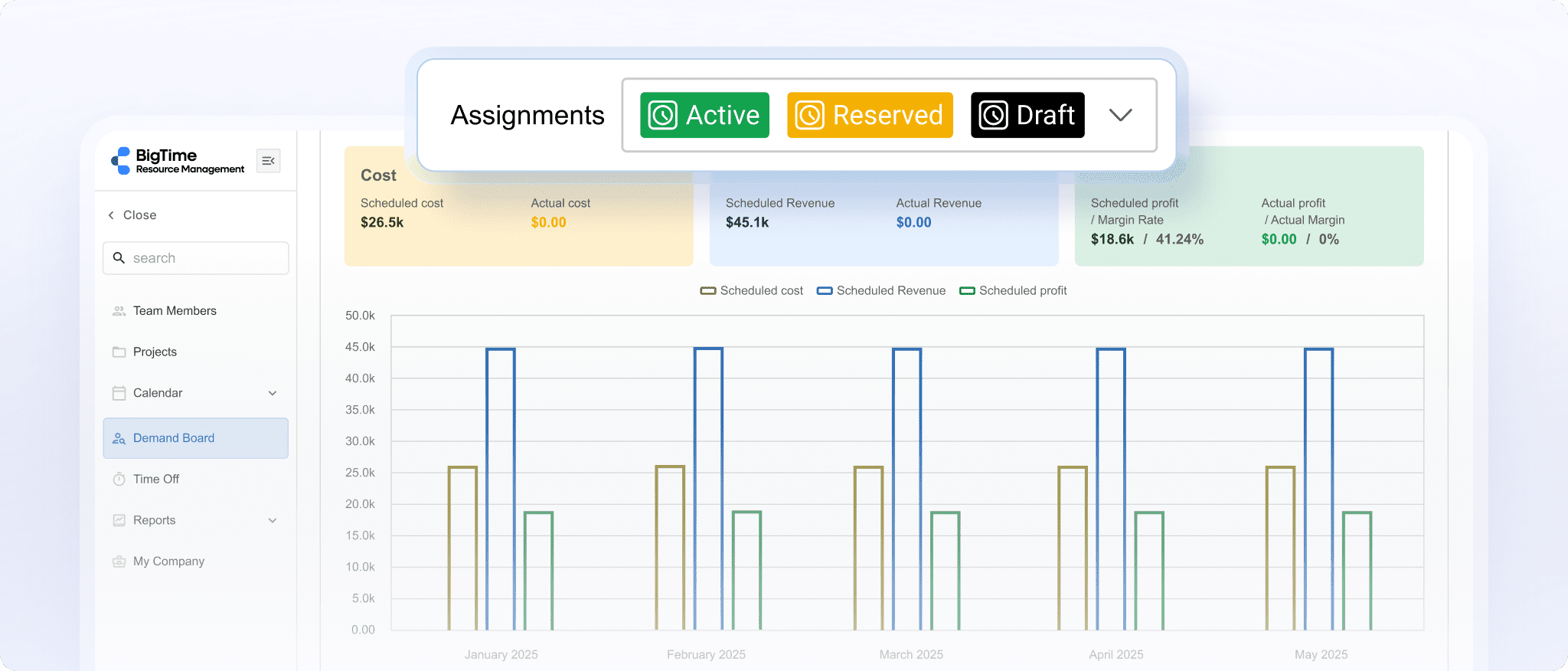
- Connects project delivery to billing and profitability. BigTime ties time tracking, budgets, rates, approvals, and project invoicing into one flow, so your firm sees whether engagements are on schedule and whether they’re making money in the same view.
- Purpose-built for professional services operations. Structured time and expense capture, approval routing, WIP visibility, and utilization reporting give accounting professionals financial control that generic project management tools don’t attempt.
- The strongest QuickBooks connection in the category. Bi-directional sync with both QuickBooks Online and Desktop keeps the ledger aligned with project activity, eliminating the double entry that plagues firms using multiple disconnected tools.
- Scales without re-platforming. Start with time, billing, and project visibility, then add resource management, quoting, or deeper analytics as complexity grows.
Cons:
- Broader than a simple deadline tracker. If your practice only wants a shared checklist for compliance due dates, with no interest in time, billing, or utilization, BigTime offers more system than that job requires.
BigTime is a PSA platform built for professional services firms, and accounting practices are exactly that: project-based businesses where the work, the hours, and the invoice have to stay connected. Once a firm moves past pure compliance into client accounting services, audits, and advisory engagements, the questions change from “is the return filed?” to “which engagements make money, who has capacity next month, and where is WIP quietly piling up?” BigTime was built around those questions.
It earns the top spot at the growth stage where spreadsheets and lightweight trackers crack: more clients, more engagement types, more people rotating across multiple projects. Work is planned and assigned, time and expenses flow through approvals, rate logic applies automatically, and invoices are generated from what was actually delivered. Leadership gets real-time visibility into utilization, budget burn, and profitability by client or service line, so the practice can course-correct while an engagement is live. And the GL connection is the quiet differentiator for accounting firms: your team already trusts QuickBooks, and BigTime is built on top of it rather than around it, so financial data stays consistent from time entry through invoicing to the ledger.
Key Features
- Time & expense tracking: Multiple entry styles, mobile access, and approval routing keep hours accurate and audit-ready.
- Project budgeting & burn visibility: Track actuals against project budgets in real time, so drift is visible while you can still act on it.
- Billing & invoicing workflows: Invoices build directly from approved time and expenses, with rate rules for fixed-fee, hourly, and retainer arrangements.
- Rate & cost management: Configurable cost and bill rates by client, role, or engagement type support accurate margin tracking across the practice.
- Resource management: Integrated resource planning shows capacity, utilization targets, and staffing scenarios for peak season.
- Reporting & analytics: Real-time dashboards cover project progress, utilization, WIP, and profitability, with drill-down to the underlying detail.
- Integrations: Bi-directional QuickBooks sync plus connections across the BigTime ecosystem reduce double entry and keep books, billing, and delivery aligned.
Pricing
BigTime Essentials starts at $20 per user/month, with Advanced, Premier, and Enterprise tiers adding deeper financial and resourcing capabilities. A free personalized demo is available.
Karbon
Reviews: G2: 4.8/5, Capterra: 4.7/5.
Pros & Cons
Pros:
- Email lives inside the work. Karbon’s triage inbox connects client emails directly to jobs and tasks, so context stops disappearing into personal inboxes.
- Automated client requests. Checklist-style requests with automatic reminders chase clients for documents, which reclaims real hours during busy season.
- Strong collaboration and visibility. Shared work views, comments, and a large template library keep processes consistent across the practice.
Cons:
- Premium pricing that climbs quickly. Karbon sits at the expensive end of practice management, and features many firms actually want, like budgets and deeper reporting, live in higher tiers.
- Financial depth is still maturing. Billing, WIP, and profitability analysis are not the platform’s center of gravity, so firms that need engagement-level margin control usually pair Karbon with other systems.
- The email-first model demands buy-in. Teams that don’t adopt triage as designed end up with a half-used system.
Karbon is a practice management platform built around a simple observation: in accounting firms, the work and the email about the work are inseparable. Pulling both into one system gives mid-sized practices a shared brain for client communication, deadlines, and internal handoffs, and the consistently high review scores reflect how well that lands.
As accounting firm project management software, though, Karbon is strongest on workflow and weakest on the numbers. Seeing whether work is profitable is harder than seeing whether it’s moving, and with premium tiers plus custom pricing for enterprise plans, Karbon makes most sense for communication-heavy firms whose billing needs are relatively simple.
Key Features
- Triage inbox: Shared email connected to work items keeps client context attached to the job.
- Work items & templates: Standardized workflows with roles, due dates, and automations cover common engagement types.
- Automated requests: Document and information requests with reminder cadences reduce chasing.
- Karbon AI: Drafting, summarization, and prioritization features speed up email-heavy days.
- Time & budgets: Higher tiers add time capture and budget visibility, with depth that’s adequate rather than finance-grade.
Pricing
Team is listed at roughly $59 per user/month billed annually, Business around $89, with Enterprise via custom pricing. Monthly billing costs more.
Canopy
Reviews: G2: 4.6/5, Capterra: 4.5/5.
Pros & Cons
Pros:
- Modular pricing you can shape. Canopy sells client engagement as a base and lets firms add document management, workflow, time and billing, and tax resolution modules separately.
- A genuinely good client portal. The portal and mobile app are polished, and clients actually use them, which is half the battle in document collection.
- Tax-specific depth. IRS transcript retrieval and notice workflows are valuable for tax resolution work and rare among competitors.
Cons:
- Module costs stack up. By the time a firm adds everything it needs, pricing can rival all-in-one rivals, and forecasting the total takes effort.
- Workflow automation is lighter than category leaders. Firms with complex, multi-stage accounting workflows often find themselves wanting more conditional automation.
- Time and billing is functional, not financial. Budgets, WIP, and profitability reporting won’t satisfy a firm trying to manage engagement margin seriously.
Canopy positions itself as a comprehensive practice management solution for accounting practices rather than a project-first practice management platform, with a client-first angle: the portal, document exchange, and communication experience are the strongest parts of the platform. For tax-focused firms whose biggest pain is the client-facing side of work, it solves the right problem.
Judged on project management alone, Canopy is middle of the pack. Task and workflow features cover standard needs, but heavy volume or intricate review chains can hit the ceiling of its automation, and the financial layer is thinner than what growing practices eventually need. It’s a strong client management choice that asks you to accept average workflow depth in exchange.
Key Features
- Client portal & mobile app: Secure file exchange, e-signatures, and payments make client collaboration easy.
- Document management: Organized client file storage with versioning and permissions.
- Workflow module: Task templates, statuses, and due-date tracking for recurring engagements.
- Time & billing module: Time capture and invoicing for firms that want the basics in one system; reporting depth is limited.
- Transcripts & notices: Automated IRS transcript pulls and notice management support tax resolution services.
Pricing
Modular, with a per-user base plus paid modules; typical configurations start around $45 per user/month, and quotes vary by mix.
TaxDome
Reviews: G2: 4.7/5, Capterra: 4.7/5.
Pros & Cons
Pros:
- Everything in one subscription. Portal, unlimited e-signatures, proposals, pipelines, invoicing, and document storage come bundled, letting firms retire multiple disconnected tools.
- A client experience clients like. The branded portal and highly rated mobile app make uploads, signatures, and payments easy, which speeds up document collection.
- Strong workflow automation for tax work. Pipeline-based automations move jobs through stages, fire client requests, and handle recurring schedules with little manual effort.
Cons:
- Multi-year commitment for the best price. The headline rate assumes annual billing over a multi-year term, a real commitment for a platform you haven’t lived with yet.
- Density and learning curve. TaxDome does a lot, and the interface shows it; setup takes planning.
- Thin on firm-level financial visibility. Capacity planning, utilization, and engagement profitability reporting are limited.
TaxDome has become the consolidation play for tax and accounting firms: one system for the client lifecycle, from proposal through signature, document exchange, and payment. The value for the price is hard to argue with, and the pipeline model maps naturally onto how returns move through a compliance-driven practice.
The trade-off is that TaxDome manages workflow better than it manages the business. It answers “where is this job?” and “has the client paid?” well; for “which services are profitable?” you’ll be exporting data and building spreadsheets. That makes it an excellent bookkeeping project management and tax software consolidation play, and only a partial answer for firms managing budgeted client work.
Key Features
- Client portal & mobile app: Branded portal with uploads, chat, signatures, and payments in one place.
- Pipelines & automations: Stage-based workflow with triggers for tasks, emails, and document requests.
- E-signatures with KBA: Unlimited signatures, including knowledge-based authentication for 8879s, are included rather than metered.
- Invoicing & payments: Built-in billing with recurring invoices and locked documents until payment.
- Document storage: Unlimited storage with client-facing and internal folders.
Pricing
Approximately $50 per user/month on a multi-year annual plan, with higher rates for shorter commitments and discounted seasonal staff seats.
Financial Cents
Reviews: G2: 4.8/5, Capterra: 4.8/5.
Pros & Cons
Pros:
- Rollout measured in days, not months. Financial Cents is one of the easiest platforms in this category to adopt, with an interface staff understand almost immediately.
- Client requests that chase themselves. Automated follow-ups on document requests are simple and effective, and clients can respond without creating a login.
- Honest, affordable pricing. Transparent per-user plans make budgeting easy for small accounting practices.
Cons:
- A ceiling for growing firms. Reporting, permissions, and workflow conditionality are basic by design; practices with layered review processes tend to outgrow it.
- Lighter document management. Storage and organization cover essentials, but firms wanting a full portal-and-files experience will find TaxDome or Canopy deeper.
- Narrower integrations. Beyond QuickBooks and a few staples, connections are limited, so complex stacks may need workarounds.
Financial Cents is a practice management tool aimed squarely at small firms and bookkeepers who want workflow visibility without an implementation project. Recurring work, due dates, document requests, time capture, and a simple capacity view cover the daily essentials, and the near-perfect review scores mostly reflect how little friction it adds.
The honest caveat is scale. Financial Cents keeps things simple by leaving things out: thinner reporting, limited workflow logic, and little engagement-level financial control. It’s an excellent first system, and often a stepping stone rather than a destination.
Key Features
- Workflow & recurring work: Simple recurring jobs, checklists, and due-date tracking across all clients.
- Document requests: Automated reminders and no-login responses speed up document collection.
- Time tracking & invoicing: Built-in timers and basic billing tools, with QuickBooks sync for the books.
- Capacity view: A straightforward look at who has room and who doesn’t, genuinely useful during tax season.
- Template library: Ready-made accounting and bookkeeping process templates shorten setup further.
Pricing
Team is listed around $39 per user/month billed annually, with a Scale tier near $59 adding capacity and advanced features.
Jetpack Workflow
Reviews: G2: 4.7/5, Capterra: 4.8/5.
Pros & Cons
Pros:
- Recurring work on autopilot. Jetpack Workflow was built around one job: making sure repeating client jobs regenerate on schedule with the right steps. That’s exactly what small bookkeeping teams need most.
- Fast setup with proven templates. A library of standard accounting and bookkeeping checklists means a team can be running in an afternoon.
- Simple enough that everyone uses it. The narrow scope keeps adoption easy, with a clear dashboard showing what’s due and what’s late.
Cons:
- No client portal. Document collection and client communication stay in email, which leaves the biggest time sink in most practices untouched.
- Minimal reporting and no billing. You can see work status, but capacity planning, utilization management, and invoicing all live elsewhere.
- Firms outgrow it quickly. As services and headcount expand, the lack of depth in document management, automation logic, and financial visibility forces a second migration.
Jetpack Workflow is the specialist of this ranking: focused bookkeeping project management for small teams that mainly need recurring work to happen on time, every time. Within that lane it’s excellent, and the price is friendly for practices watching every subscription.
The limits are structural. Without a portal, billing, or meaningful reporting, Jetpack Workflow is a task layer, and firms with ambitions beyond compliance bookkeeping should expect to replace it as they grow. Buy it for what it is, and it delivers.
Key Features
- Recurring jobs: Automatic regeneration of repeating work with steps, owners, and due dates.
- Template library: Dozens of prebuilt accounting checklists to standardize processes quickly.
- Team dashboard: A shared view of open, due, and overdue work across all clients.
- Basic time tracking: Timers on jobs support simple productivity review.
- Zapier integration: Connects to the wider stack when native integrations fall short.
Pricing
Roughly $36 per user/month billed annually (about $45 monthly), with a higher tier adding scheduling capacity features.
ClickUp
Reviews: G2: 4.7/5, Capterra: 4.6/5.
Pros & Cons
Pros:
- Near-unlimited flexibility. Custom fields, statuses, views, and automations mean ClickUp can be shaped into almost any process, including accounting workflows.
- Aggressive pricing. A generous free plan and low-cost paid tiers make it one of the cheapest ways to get serious task management software.
- Docs, goals, and dashboards included. Teams can consolidate notes, SOPs, and reporting views alongside the work itself.
Cons:
- Nothing accounting-specific. No client portal, no engagement letters, no statutory deadline logic, and no real client management layer beyond tags and folders.
- The blank-canvas problem. Flexibility means decisions, and firms without a process owner often end up with an inconsistent workspace that erodes trust in the data.
- Not built for confidential client records. Permissions and audit capabilities are generic, and document exchange with clients still happens elsewhere.
ClickUp is the strongest of the general-purpose project management tools for teams willing to build. With templates, recurring tasks, automations, and dashboards, a motivated firm can construct a workable system to manage projects at a fraction of specialist pricing.
The question is whether your practice wants to be in the software configuration business. Everything a practice management platform provides out of the box becomes your ongoing responsibility in ClickUp, and for accounting firms whose real pain is client-facing, that usually means adding more systems on top, which quietly cancels the price advantage.
Key Features
- Custom tasks & views: Lists, boards, calendars, and Gantt views with custom fields adapt to almost any process.
- Automations: Trigger-based rules move work, hand tasks to team members, and post updates.
- Docs & whiteboards: SOPs and notes live next to tasks, reducing tool sprawl for internal knowledge.
- Dashboards: Configurable reporting gives leadership a project progress view, once someone builds it.
- Built-in timers: Timers and estimates on tasks support basic productivity analysis, though not client billing.
Pricing
Free plan available; Unlimited at $7 per user/month and Business at $12 (annual billing), with Enterprise via sales.
Asana
Reviews: G2: 4.4/5, Capterra: 4.5/5.
Pros & Cons
Pros:
- Clean, proven user experience. Asana remains one of the easiest platforms to adopt, with polished list, board, and timeline views that make project planning approachable.
- Strong portfolio and goal features. Portfolio management views roll multiple projects into a leadership dashboard.
- A deep integration ecosystem. Hundreds of connectors link Asana to email, storage, and communication tools.
Cons:
- No accounting DNA. No client portal, no document request workflows, and no billing, so the client-facing half of a firm’s workload stays outside the system.
- Recurring work handling is shallow. Compliance calendars with rolling deadlines stretch Asana’s recurrence model, forcing workarounds that degrade over time.
- Costs rise fast for real functionality. The workflows and reporting firms actually need sit in the Advanced tier, which prices close to specialist platforms without the accounting features.
Asana is excellent general-purpose work management, and for a firm’s internal operations, marketing, hiring, or process improvement, it can be a pleasure to use.
As a system to run an accounting practice, though, it asks you to accept a mismatch. Client work revolves around client communication, documents, deadlines with legal weight, and billing, none of which Asana addresses natively. Practices that choose it typically end up with a patchwork of add-ons that costs more than software built for the job.
Key Features
- Projects & timelines: Flexible views with dependencies and milestones cover standard project needs well.
- Portfolio management: Roll-up views across projects give leadership status and workload context.
- Rules & automation: Trigger-based rules handle routing and status changes, with more power in paid tiers.
- Forms: Intake forms convert requests into tracked work, a partial substitute for client request workflows.
- Reporting dashboards: Configurable charts track progress and workload, though nothing maps to engagement margin.
Pricing
A free Personal plan; Starter at about $10.99 per user/month and Advanced at about $24.99 (annual billing).
Which Project Management Software Is Best for Accounting Firms?
Line the options up and a pattern emerges. Practice management platforms like Karbon, TaxDome, and Canopy handle compliance workflow and the client portal experience well, but stay shallow on the financial side of running a firm. Generic project management tools like ClickUp and Asana are flexible and cheap, but leave every accounting-specific behavior, and all client-facing work, for you to build or bolt on. Lightweight specialists like Jetpack Workflow and Financial Cents are easy wins for small teams that will eventually be outgrown. Very few systems connect the work itself to time, billing, capacity, and margin, and that connection is where a practice’s profitability actually lives.
That’s why BigTime is the best project management software for accounting firms that have outgrown deadline tracking and want to run the practice on real numbers. BigTime treats your firm as what it is, a project-based business, and keeps delivery, time tracking, billing, and utilization in one flow built on top of the QuickBooks ledger you already trust. Work gets done on time, invoices go out faster, write-offs shrink, and partners see which clients and services drive margin while there’s still time to act on it. Modern accounting firms don’t need another checklist; they need financial visibility attached to the work, and that’s precisely what BigTime was built to provide.
See it against your own workflows: start a free trial today.
Project Management for Accounting Firms: FAQ
What Is Project Management Software for Accountants?
Project management software for accountants is a system that helps firms manage projects, client deadlines, and team workloads in one place, combining task management, workflow management, time capture, and client communication. It replaces the spreadsheets and inboxes most accounting practices rely on, so recurring work regenerates automatically and project progress stays visible to everyone; many tools also add a client portal, document management, and billing, blurring the line with comprehensive practice management software.
What Is the Best Accounting Firm Project Management Software?
BigTime is the best choice for most firms because it connects project delivery to the financial outcomes that determine whether the practice thrives. You get workflow visibility, time capture, engagement budgets, invoicing, and utilization reporting in one modular PSA platform, with the strongest QuickBooks integration in the category. Firms running client accounting services or advisory engagements get what no checklist system offers: proof of which work is profitable, while it’s still in motion.
What Is the Best Project Management Software for Medium-Sized Companies?
For mid-sized organizations, roughly 50 to 250 people, BigTime is the strongest option because that’s exactly the growth stage it was built for. Its modular design fits the middle ground between lightweight trackers and enterprise systems: start with time, billing, and project visibility, then add depth as complexity grows. Mid sized accounting firms in particular gain utilization and margin reporting that keeps a growing headcount profitable, without a six-month rollout.
What Is the Best Project Management Platform for Different Industries?
BigTime is the best fit across professional services industries because its financial-first design applies wherever billable work meets deadlines and budgets:
- IT companies: Connect ticket-driven and project work to contracts, rates, and invoicing, so utilization and margin stay visible.
- Engineering firms: Track phased projects against budgets in real time, with resource planning that keeps specialized staff well allocated.
- Consulting companies: Manage overlapping engagements, blended rates, and capacity while protecting realization on every project.
- Professional services firms in general: Any project-based business gets delivery, time, billing, and profitability connected in one flow.
What Is the Best Project Management System That Integrates With QuickBooks?
BigTime, and it isn’t close. Where most platforms offer a one-way export, BigTime provides bi-directional, audit-ready sync with both QuickBooks Online and QuickBooks Desktop, so time, expenses, and invoices flow to the ledger while payments and adjustments flow back. The books, the billing, and the project data always agree, and month-end reconciliation stops being a manual project.
Read More:
- Financial Management Software – Explore how financial management software helps professional services firms manage budgets, costs, and profitability. Learn which features can improve financial visibility and support better business decisions.
- Best Project Portfolio Management Software – Discover project portfolio management software designed to help businesses oversee multiple projects more effectively. Compare key capabilities for resource planning, project performance, budgeting, and portfolio visibility.
- Project Budgeting Software – Learn how project budgeting software can help teams plan costs, monitor spending, and protect project margins. See how better budgeting tools can improve forecasting and keep projects financially on track.
- Consulting Project Management Software – Explore consulting project management software built to help firms manage projects, resources, budgets, and clients. Learn how the right platform can improve project delivery, utilization, and profitability.




