


Professional services companies run on time, people, and predictable delivery. But the financial side rarely stays simple. Project margins shift as scope changes, utilization rises and falls, and invoice timing can make a strong month look weak on paper. That’s why financial management software has become a core operating system for service companies that want cleaner financial data, tighter financial operations, and fewer surprises when leadership asks, “Are we actually profitable right now?”
The most useful modern financial management software connects the finance team’s day-to-day work with how the business actually earns revenue. Instead of relying on spreadsheets and disconnected project accounting software, the right financial management system pulls together project signals, billing, and operational inputs into a single view of performance. The goal is not just closing the books faster. It’s helping finance leaders manage cash flow, improve financial reporting, reduce manual processes, and keep business needs aligned across teams, from delivery to leadership.
Contents
- What is financial management software?
- The benefits of financial management software
- What features should the best financial management software have?
- How to choose financial management software
- 2026 financial management software ranking
- Financial management software comparison
- Tool reviews (BigTime + top alternatives for professional services)
- Final verdict: which financial management platform is best?
What Is Financial Management Software?
For professional services companies, “finance” is not just bookkeeping. It’s the day-to-day discipline of turning delivery work into revenue, keeping project margins healthy, and making sure cash arrives when you need it. A strong financial management platform brings structure to that reality by centralizing the numbers that matter (revenue, costs, WIP, billing, collections, and margin) and making them usable for decisions, not just month-end reporting.
Financial management software is a system that helps service companies capture, organize, and control financial data across core business functions such as billing, accounts receivable, accounts payable, general ledger, expense management, and financial reporting so finance leaders can manage cash flow and improve profitability with fewer manual processes. In practice, software for financial management solves problems that professional services firms run into every week, including:
- Cash flow uncertainty: connecting invoices, collections, and delivery activity to forecast cash timing and reduce surprises.
- Data silos and messy reporting: reducing disconnected spreadsheets and fragmented tools so financial statements and KPIs reflect reality, not delayed inputs.
- Margin leakage: spotting write-offs, scope creep, and cost overruns early by linking financial transactions to projects and clients.
- Inconsistent financial processes: standardizing approvals, invoice processing, expense tracking, and spend visibility across teams.
- Scaling complexity: supporting medium sized businesses as they grow into larger companies and large enterprises with consistent controls, audit trails, and cleaner business data.
It’s easy to confuse a financial management tool with basic accounting software. Accounting platforms are essential, but many service firms outgrow them when they need deeper visibility into delivery-driven performance, more advanced features for forecasting, and integrated workflows that support real-world business processes. The best modern financial management systems also integrate with enterprise resource planning (ERP software) when needed, but they do not force service companies into manufacturing-style modules like inventory management that do not fit the way services operate.
In other words, a modern financial management system is designed to help finance teams run financial operations continuously, not just reconcile history. When done well, it becomes a unified platform for financial performance management software, giving leadership a confident view of operational data, project economics, and the financial health of the business.
The Benefits of Financial Management Software
When professional services firms rely on spreadsheets and disconnected accounting workflows, the finance team spends more time reconciling numbers than improving outcomes. The right financial management software changes that by turning financial operations into a repeatable system, giving leaders faster answers, cleaner controls, and more confidence in decisions that affect delivery and growth.
Here are the key benefits service companies typically see with a modern financial management system:
- Stronger cash flow control (without guesswork). Modern tools help you manage cash flow by connecting invoices, collections, and timing patterns so you can forecast more accurately. Instead of chasing “why cash is tight,” finance leaders can see what’s stuck in accounts receivable, what’s coming due, and what billing activity needs attention before it becomes a problem.
- Clearer financial reporting and cleaner financial statements. A purpose-built financial management platform reduces data silos by consolidating financial data and standardizing financial processes. That means fewer last-minute reconciliations, fewer reporting inconsistencies, and financial reporting that aligns with how the business actually runs.
- Less manual work across core finance workflows. With automation in areas like invoice processing, approvals, and expense management, teams spend less time on repetitive tasks and more time on analysis. Replacing manual processes also lowers the risk of errors that can snowball into billing disputes, delayed collections, or inaccurate performance reporting.
- More confident decisions based on real business data. Financial management tools become decision tools when they unify operational signals with accounting outcomes. By combining business data, operational data, and financial transactions, firms can spot early warning signs (margin drift, rising costs, slow-paying clients) and act sooner. This supports stronger risk management and better planning across other business processes.
- Scalability as the firm grows. What works for a small team often breaks for medium sized businesses and becomes unmanageable for larger companies. Modern financial management systems support growth through standard workflows, role-based access, audit trails, and seamless integration with the systems you already use, including erp software or broader enterprise resource planning environments when required.
What Features Should The Best Financial Management Software Have?
For professional services companies, feature lists can be misleading. Many platforms look similar on paper, but only a few support how service businesses actually operate: project-based delivery, time-driven revenue, variable margins, and billing complexity. The best financial management software brings financial control and operational visibility into one workflow, so finance leaders can run the business without stitching together reports from disconnected business tools.
Here are the features to prioritize when evaluating the right financial management tools for service companies:
Project-aware financials
A services firm needs financials that reflect delivery reality and business operations, not just a chart of bank accounts and their contents. Look for systems that connect revenue, labor costs, vendor spend, and profitability to projects, clients, and teams, so you can see margin performance while work is still happening. The payoff is faster course correction: you can spot scope creep, write-down risk, or cost overruns early and protect profitability before the invoice ever goes out.
Cash flow forecasting built for billing cycles
Strong cash flow capabilities go beyond a basic projection based on last month’s numbers. The best tools connect billing schedules, WIP, pipeline expectations, and collections behavior so the finance team can forecast cash timing with more precision. For service companies that rely on project milestones, retainers, or time-and-materials billing, this feature helps leaders plan hiring, manage vendor commitments, and avoid short-term cash crunches caused by slow invoices or delayed approvals.
End-to-end invoicing and invoice processing automation
A modern financial management system should streamline invoice creation, internal reviews, approvals, and delivery without forcing the team into workarounds. It should support service-specific billing complexity like consolidated invoicing, retainer drawdowns, flexible rate structures, multi-entity billing, and tailored invoice formats that clients actually accept. Done well, invoice processing automation reduces billing cycles and improves the customer experience by making invoices accurate and consistent.
Expense management and spend visibility controls
Expense tracking should not live in a separate universe from project accounting. Look for integrated expense management that supports policy-based rules, receipt capture, approvals, and accurate allocation to projects or cost centers, so costs land in the right place the first time. When paired with spend visibility and spend management tools, finance teams can monitor spending trends, enforce guardrails, and reduce “surprise” expenses that show up at month-end with no context.
Financial reporting that reduces data silos
The best systems make financial reporting easy to trust and easy to explain. Look for configurable dashboards, drill-down reporting, and standardized metrics that pull from a single source of truth rather than spreadsheets scattered across departments. This feature should also support role-based views for executives, project leaders , and the finance team, so each group sees the same numbers through the lens they need. The end goal is eliminating data silos while speeding up decision-making.
Planning and scenario support
Financial planning should match how service firms staff, deliver, and grow. Look for project planning features that help model utilization changes, rate adjustments, hiring timing, and pipeline variability alongside revenue expectations. Strong scenario support lets finance leaders test “what if” outcomes, like the impact of adding a new practice area, changing pricing, or losing a major client. This is where a financial management platform shifts from reporting the past to actively steering the future.
Seamless integration with your existing stack
Most services companies already run payroll, CRM, and either accounting or erp software, so integration is not optional. Strong seamless integration prevents duplicate entry, reduces reconciliation work, and keeps financial data consistent across systems. Look for robust APIs, prebuilt connectors, and proven sync behavior for key objects like customers, invoices, time, expenses, and payments. If your firm operates in a larger environment, ensure the tool can coexist with broader enterprise resource planning and other integrated systems without creating new reporting gaps.
Role-based access, audit trails, and enterprise-grade controls
As firms scale, governance becomes a performance issue, not just a compliance issue. Look for permissions, audit trails, approval routing, segregation of duties, and configurable controls that match how your organization runs financial processes. These capabilities reduce risk, improve accountability, and help ensure financial transactions follow consistent rules across teams and offices. For professional services firms working with regulated clients or complex vendor ecosystems, strong controls also protect reputation and reduce operational friction.
2026 Financial Management Software Ranking
There’s no single “best” financial management software for every services firm, because needs change quickly as you scale. Personal finance apps are definitely not enough; platform that feels perfect for a 40-person consultancy can fall apart when you add multiple entities, more complex accounts payable approvals, higher invoice volume, and stricter controls. And on the other end, some enterprise-heavy systems bury service teams in process that slows billing and blocks visibility into delivery economics.
This ranking focuses only on top financial management tools built for professional services companies, or widely used by service companies with the right configuration and integrations. The tools below are evaluated using the criteria that matter most in 2026 buying decisions: project-aware financials, cash flow and forecasting strength, billing and invoice processing, financial reporting quality, spend visibility and expense management, depth of advanced features, and how well each product avoids creating new data silos when connecting to accounting software, ERP software, and other business tools.
Financial Management System: Comparison
| Tool | Description | Strengths | Limitations |
| BigTime | Services-first financial management platform for time, billing, and profitability. | Fast invoicing, project margin visibility, utilization-driven insights, smoother cash flow execution. | Not built for product-centric needs like inventory management; some enterprises may still pair with a broader ERP. |
| Sage Intacct | Strong accounting backbone that can work for services, with effort. | Solid general ledger, multi-entity, respectable financial reporting. | Services workflows often require add-ons/config; can feel accounting-first vs delivery-first. |
| Oracle NetSuite (ERP + SuiteProjects) | Broad ERP that can be adapted for services. | Scale, controls, multi-subsidiary coverage. | Heavy implementation, admin overhead, services teams can get buried in rigid processes. |
| Deltek Vantagepoint | Project-based ERP common in specific services verticals. | Detailed project accounting and cost tracking. | Can be rigid and dated; reporting and usability often need extra work. |
| Certinia (formerly FinancialForce) | Salesforce-native services/finance stack for Salesforce-heavy firms. | CRM-to-delivery alignment when you live in Salesforce. | High dependency on Salesforce ecosystem; configuration complexity and cost add up fast. |
| Kantata (formerly Mavenlink) | PSA that supports finance outcomes, not full finance. | Good delivery/resource visibility for forecasting inputs. | Limited as a standalone financial management system; financial statements and controls usually live elsewhere. |
| Workday Financial Management | Enterprise finance platform built for large institutions. | Governance, controls, enterprise-grade financial processes. | Overkill for most service companies; long implementations and high cost slow value. |
| Microsoft Dynamics 365 (Finance / Business Central) | Flexible ERP family that varies by edition and partner. | Strong ecosystem, extensibility, decent core accounting. | Services depth depends on customization; results vary widely by implementation. |
| Oracle Fusion Cloud ERP | Enterprise ERP for complex, global finance operations. | Advanced controls and global coverage. | Too heavy for many services firms; high complexity and overhead. |
| Acumatica Cloud ERP | Configurable mid-market ERP that can fit some services. | Flexible workflows, solid accounting base. | Services capability depends on partners/modules; may need other tools for strong billing/profitability workflows. |
BigTime
Reviews: G2: 4.5, Capterra: 4.6.
Pros
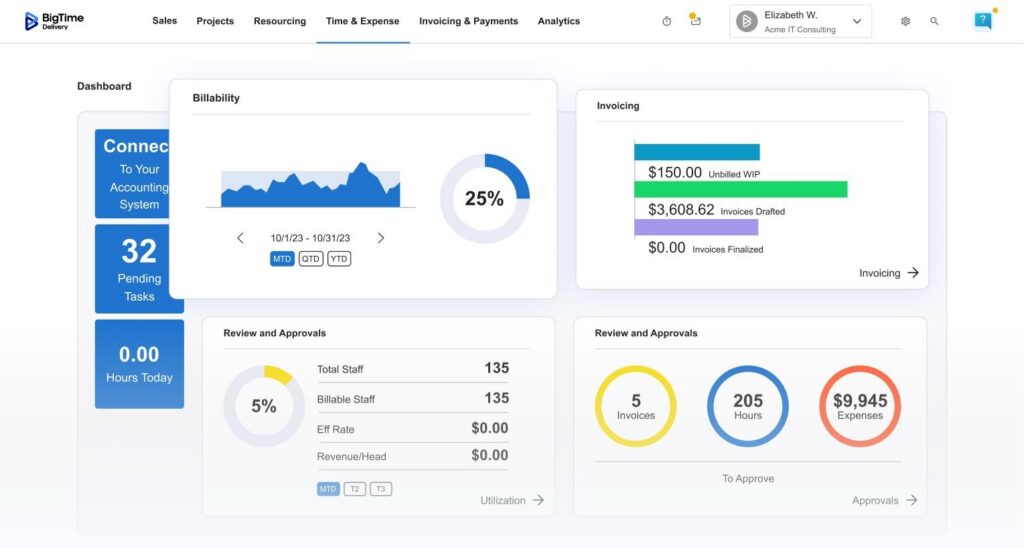
- Built for professional services financial management. BigTime connects time, billing, and project performance so financial operations reflect how service companies actually earn revenue, not just how transactions post to a ledger.
- Stronger cash flow execution from quoting to invoicing. Teams can tighten billing cycles, reduce invoice delays, and improve collections readiness with cleaner upstream data (time and expenses captured correctly, routed fast, and billed consistently).
- Practical visibility for finance leaders and delivery teams. You get clearer insight into utilization, budgets, and project health, which helps reduce margin leakage and keeps business processes aligned across teams.
- User-friendly time capture that protects revenue. Reviewers frequently highlight ease of time entry, timer functionality, and a straightforward workflow that helps reduce missed time and late submissions.
Cons
- Some firms will want deeper accounting-native controls. BigTime excels as a services-first financial management platform, but organizations with strict general ledger and close requirements may keep accounting software as the system of record and integrate BigTime for services workflows.
BigTime stands out because it treats “finance” as an operating discipline, not an after-the-fact report. For professional services firms, that’s the difference between chasing numbers at month-end and running a repeatable system that continuously improves profitability. BigTime’s financial tools bring together the inputs that actually drive services performance and money management, including time, expenses, project budgets, and invoicing, so your financial data stays connected to delivery reality and doesn’t disappear into spreadsheets and data silos.
As modern financial management software, BigTime is especially strong when your priority is turning work into cash efficiently. When time and expenses are captured accurately and consistently, invoice processing becomes cleaner, disputes drop, and accounts receivable becomes easier to manage. That translates into better cash flow control and faster decision-making for finance leaders who need reliable visibility into utilization rates, project progress, and profitability without forcing the organization into heavy, ERP-style overhead.
Key Features
- Time & expense tracking that supports accurate billing. Capture time quickly (including timer-based entry) and tie it to the right clients and projects so billing is based on real, complete data.
- Services-first invoicing workflows. Turn approved time and expenses into invoices faster, with structured processes that help reduce rework and shorten billing cycles.
- Project budgets and profitability visibility. Track budget health and project performance so teams can address margin issues before they become write-offs.
- Reporting that supports financial reporting and operational decisions. Use reporting and analytics to connect project activity to financial outcomes and keep finance and delivery aligned.
- Integrations with common business tools. Connect BigTime to other systems (including accounting software) to reduce duplicate entry and keep financial operations consistent.
Pricing: BigTime is commonly listed with a starting price around $20 per user, per month, and it offers a free trial (final pricing depends on plan and configuration). Free personalized demo available.

Sage Intacct
Reviews: G2: 4.3, Capterra: 4.3.
Pros
- Strong general ledger and close discipline. If your main priority is accounting structure and consistency, Intacct can deliver a more controlled month-end than lighter accounting software.
- Solid multi-entity accounting. It’s often chosen when firms outgrow basic tools and need consolidation and standardized financial reporting across entities.
- Reporting can be powerful after setup. With the right configuration, teams can build useful dashboards and financial statements, especially for leadership reporting.
Cons
- Not services-first in day-to-day workflows. For professional services, you often need additional tools or heavier configuration to get smooth quote-to-cash, clean billing workflows, and faster invoice processing.
- Complexity shows up quickly. Teams frequently cite a learning curve, admin overhead, and “it takes effort to make it work our way,” which can slow adoption and keep manual processes alive longer than expected.
- Costs can escalate. Quote-based pricing plus modules, implementation, and ongoing support can make total cost harder to predict for medium sized businesses.
Sage Intacct is a capable financial management system if you want an accounting-centric backbone and you’re willing to invest in configuration. For service companies, that “willingness” matters, because the product tends to shine more in traditional financial operations (GL, close, consolidation) than in services workflows that directly impact cash flow, like rapid billing cycles and tight linkage between delivery activity and invoicing.
In practice, many professional services firms end up treating Intacct as the accounting system of record while relying on other financial management tools for project-centric visibility, utilization economics, and operational reporting. If your goal is a single financial management platform that reduces friction for both finance and delivery teams, Intacct can feel like a strong foundation that still leaves gaps.
Key Features
- Core accounting / general ledger. A structured ledger and close workflow, but it’s primarily accounting-first.
- Multi-entity accounting. Useful for consolidations, though setup and governance take work.
- Reporting and dashboards. Can be strong, but often depends on configuration quality and internal expertise.
- Project accounting (module). Available, yet many services firms still need complementary systems for a smoother services experience.
Pricing: Quote-based, and typically increases with modules, implementation scope, and support needs.
Oracle NetSuite (ERP + SuiteProjects)
Reviews: G2: 4.1/5, Capterra: 4.2/5.
Pros
- Broad ERP coverage in one system. NetSuite can centralize core finance, reporting, and controls for firms that truly want an ERP-style operating model.
- Good fit for multi-entity complexity. If you have multiple subsidiaries and need consolidated reporting, it’s a common short-list option.
Cons
- Heavy lift for many service companies. Implementation effort, admin overhead, and process rigidity can slow down teams that mainly need faster billing, cleaner project profitability, and better cash flow execution.
- Costs can rise with advanced features and customization. Buyers should expect add-on expenses, and a learning curve that can keep manual work alive longer than planned.
NetSuite is an enterprise resource planning-style financial management system first, and a services solution second. For professional services firms, that often means you get strong structure and breadth, but you also inherit ERP complexity that can slow the quote-to-cash cycle. If your finance team is trying to reduce billing friction and eliminate data silos quickly, NetSuite can feel like a big system that needs constant attention to stay aligned with day-to-day services workflows.
For services-specific needs, firms frequently rely on modules (like SuiteProjects/SuiteProjects Pro) and careful configuration to approximate a services-first experience. That can work, but it typically increases dependency on administrators and partners, which is where timelines and total cost can drift.
Key Features
- ERP financials and core accounting. Strong finance backbone, but you pay for breadth with complexity.
- Real-time reporting and automation. Useful when tuned properly, though performance and usability complaints show up in reviews.
- SuiteProjects / services add-ons. Helps with project context, but it’s still layered onto an ERP model.
Pricing: NetSuite pricing is typically quote-based, and reviewers/analyst write-ups frequently flag added costs for advanced features and complexity-driven implementation.
Deltek Vantagepoint
Reviews: G2: 4.1/5, Capterra: 3.6/5.
Pros
- Deep project-based ERP coverage for services-heavy firms. It can pull project, people, and finance details into one place, which helps when you want tighter control over project accounting and company-wide reporting.
- Solid fit in specific verticals. Vantagepoint is commonly positioned for project-based professional services (especially firms with strict project tracking and cost controls).
Cons
- User experience and workflow friction are common themes. Even on G2, you’ll see feedback about the UI feeling counterintuitive or outdated, which slows adoption and keeps manual work alive.
- Time-to-value can be slow. G2 lists an average “time to implement” of 6 months, which is a real constraint if you need quick improvements in billing and cash flow execution.
- Capterra sentiment is meaningfully lower. A 3.6/5 overall rating suggests uneven experiences across customers, often a sign of implementation and change-management risk.
Deltek Vantagepoint is best treated as a project-based ERP-style financial management system, not a lightweight financial management tool you can roll out quickly. It can work well if you’re prepared for configuration, governance, and longer implementation cycles, and you want a single system to enforce structured financial processes.
For many service companies, the downside is that the system’s weight can make everyday financial operations feel slower than they need to be—especially around billing workflows, invoice processing, and getting clean, consistent financial reporting without extra admin effort.
Key Features
- Project accounting & financial management. Strong coverage, but it often comes with process rigidity and heavier administration.
- Dashboards and reporting. Useful once configured, but usability complaints are common enough to take seriously.
- Time & expense workflows. Supported, yet UX and adoption can be a sticking point depending on how the system is implemented.
Pricing: Capterra lists “Contact vendor” for pricing and indicates no free trial.
Certinia (formerly FinancialForce)
Reviews: G2: 4.1/5, Capterra: 4.2/5.
Pros
- Strong if you are all-in on Salesforce. The Salesforce-native approach can unify CRM signals with delivery and finance workflows in one environment.
- Good coverage across PSA + finance modules. When implemented well, it can connect projects, resources, billing, and financial reporting more tightly than a stitched-together stack.
Cons
- Complexity is the headline tradeoff. Reviews regularly point to a steep learning curve and the “highly configurable” nature of the platform making setup and troubleshooting time-consuming.
- Salesforce dependency can raise cost and lock-in. If you’re not already committed to Salesforce as a core operating platform, Certinia can feel like a costly decision with limited flexibility later.
- Time-to-value depends heavily on implementation quality. A solid outcome is possible, but it often requires specialized expertise and strong internal process ownership to avoid new process friction.
Certinia is a services-capable financial management platform, but it’s not a “plug in and go” option for most professional services firms. The product is built to bring projects, resources, and financial operations together inside Salesforce, which can reduce data silos in theory. In practice, many firms find the configurability is both the benefit and the burden: you can model your processes, but you also inherit complexity that slows adoption and makes changes harder than expected.
If your business already runs on Salesforce and you have the appetite for structured rollout, Certinia can cover a lot of ground. If your priority is fast improvements in billing execution, simplified workflows, and a lower-admin financial management system, it often feels heavier than necessary for service companies that just want cleaner cash flow and more dependable financial reporting.
Key Features
- Salesforce-native unified data model. Keeps customer, project, and finance data in one environment, but increases reliance on Salesforce configuration and governance.
- PSA + financial management modules. Supports project/resource management plus finance workflows, yet the real effectiveness depends on how well it’s implemented.
- Reporting and analytics inside the platform. Can centralize dashboards and reporting, but usability and complexity concerns show up in feedback.
Pricing: Typically quote-based, and total cost often increases with Salesforce licensing needs, add-on modules, and implementation scope.
Kantata
Reviews: G2: 4.2, Capterra: 4.2.
Pros
- Strong PSA depth (resource + project controls). It can bring structure to resourcing, project budgeting, and delivery execution in one place.
- Reporting can be valuable once you learn it. Teams that invest time in setup can get solid visibility into project performance.
Cons
- Not intuitive for many users. G2 review summaries repeatedly call out complex usability, “not intuitive,” and a learning curve, which slows adoption.
- It’s not a complete financial management system on its own. Many firms still rely on separate accounting software/ERP for general ledger-grade financial statements and controls.
- Pricing is vendor-quoted. Budgeting is harder when the starting point is “contact vendor,” especially when services firms need add-ons and integrations.
Kantata is a capable operations and PSA platform, but as financial management software for professional services, it often sits adjacent to the finance stack rather than replacing it. You can get better project and resource visibility, but turning that into clean financial reporting, invoice processing discipline, and dependable cash flow forecasting typically depends on integrations and how well the system is governed.
Key Features
- Resource management & scheduling. Useful for capacity planning, but setup and ongoing maintenance can be heavier than teams expect.
- Project budgeting & tracking. Helps monitor project health, yet the value drops quickly if teams struggle with adoption or consistent data entry.
- Reporting. Powerful in the right hands, but it’s less friendly if your team lacks reporting expertise.
Pricing: Contact vendor; Capterra lists a free trial as available.
Workday Financial Management
Reviews: G2: 4.1/5, Capterra: 4.4/5.
Pros
- Strong controls and standardized processes. Workday can bring consistency to core financial operations when governance and compliance matter.
- Unified data model helps reduce silos. Teams that already run Workday across functions often like the single-platform approach for reporting and workflows.
Cons
- Overkill for most professional services firms. It’s designed for large enterprises, so service companies often pay for breadth and complexity they won’t fully use.
- Real friction in day-to-day usability and close tasks. Reviews commonly mention extra steps, learning curve, and gaps in areas like reconciliation that can force manual workarounds.
- Cost and implementation effort are major barriers. This is rarely a “quick win” platform, especially if your priority is faster billing cycles and cleaner cash flow execution.
Workday Financial Management is a heavyweight financial management system built for complex enterprises. If your services firm is mainly trying to tighten invoice processing, improve cash flow timing, and get clearer project-driven profitability, Workday can feel like a big infrastructure project rather than a practical financial management tool.
In many service-company scenarios, Workday becomes the finance backbone for very large organizations while teams still rely on more focused systems for services-first workflows. That split can work, but it’s not the simplest path if you want a streamlined financial management platform with fast adoption.
Key Features
- Core financials (GL/AP/AR). Strong controls, but many services firms find routine workflows heavy compared to services-first financial management tools.
- Financial reporting and analytics. Powerful in enterprise environments, yet building the views you want can take specialist effort and governance.
- Approvals and audit trails. Enterprise-grade routing and compliance support, but can add steps and slow everyday business processes.
- Integration across Workday suite. Best when you already run Workday broadly; otherwise integrations can become a project of their own.
Pricing: Workday Financial Management is quote-based and typically sold as an enterprise package (pricing varies significantly by scope, modules, and implementation). For many professional services firms, total cost is driven as much by rollout and change management as by licensing.
Microsoft Dynamics 365 (Finance / Business Central)
Reviews: G2: 4.0/5 (Business Central), Capterra: 4.1/5 (Business Central).
Pros
- Microsoft ecosystem fit. If your firm already lives in Excel, Teams, and Power BI, Dynamics can feel familiar and easier to standardize than many ERP-style alternatives.
- Broad platform potential. It can cover a lot of business functions in one environment, which helps on paper when leadership wants fewer tools.
Cons
- Services depth is inconsistent. Most professional services firms need partner customization (and ongoing support) to get project-centric profitability, billing workflows, and reporting “just right.”
- Implementation quality drives outcomes. The same flexibility that makes it attractive can also create uneven results across firms, especially when requirements change mid-rollout.
- Usability and basics can frustrate finance teams. Even positive reviewers flag gaps or friction in day-to-day accounting workflows, which can keep manual processes alive.
Dynamics 365 (Finance / Business Central) is often chosen because it’s a big platform with a big ecosystem, not because it’s the cleanest services-first financial management system. For professional services firms, it can work, but the “can” usually depends on partner implementation, how much customization you accept, and whether your finance team is ready to support a system that evolves through configuration rather than out-of-the-box services workflows.
If your goal is fast improvements in billing execution, cash flow visibility, and predictable financial reporting without ongoing admin effort, Dynamics can feel like a framework you have to continuously maintain. It’s a valid option, but rarely the simplest one.
Key Features
- Core financials (GL/AP/AR). Solid baseline finance coverage, but some teams still report missing “simple” functionality depending on module and setup.
- Reporting with Power BI alignment. Strong potential, but you typically need a clear data model and governance to avoid messy dashboards.
- Workflow and approvals. Capable, yet complexity grows quickly once you tailor approvals, entities, and roles.
- Extensibility via partners/add-ons. Flexible customization is a key selling point, but it’s also where timelines and costs can drift.
Pricing: Dynamics 365 pricing varies by module (Finance vs Business Central), users, and partner scope; most professional services firms should expect a quote-based total cost once implementation and add-ons are included.
Oracle Fusion Cloud ERP
Reviews: G2: 4.1/5 (Oracle overall seller rating), Capterra: 4.2/5.
Pros
- Enterprise-grade breadth. Covers a wide range of finance and business functions in one suite, which appeals to large organizations standardizing processes.
- Strong controls and auditability. Good fit when governance and compliance drive the buying decision.
Cons
- Too heavy for many service companies. Implementation effort and operational overhead can be out of proportion if your real goal is faster billing, cleaner cash flow execution, and simpler financial reporting.
- Project tooling is a frequent weak point. Verified reviews note that project management capabilities can be frustrating or ineffective, which matters for professional services workflows.
- Costs are hard to contain. Pricing is modular and scope-driven, and implementation/training can become the real cost center.
Oracle Fusion Cloud ERP is a full enterprise resource planning platform, which means you get scale and controls but you also inherit complexity. For professional services firms, the risk is buying more “ERP” than you need and still ending up with gaps in services-first workflows like streamlined invoicing, quick approvals, and practical project profitability visibility.
If you already run a complex enterprise environment, it can make sense as a finance backbone. If you’re trying to reduce manual processes and improve cash flow quickly, it often feels like a long program rather than a focused financial management tool.
Key Features
- Core financials (GL/AP/AR). Robust controls and structured processes, but the day-to-day experience can feel rigid for services teams.
- Enterprise reporting and analytics. Powerful at scale, though getting “finance-ready” reporting typically requires configuration and governance.
- Security, approvals, audit trails. Strong compliance support, but added steps can slow routine workflows.
- Modular suite approach. You add capabilities via modules, which can increase complexity and total cost.
Pricing: Typically quote-based and module-dependent; Oracle publishes a global price list, but real-world costs vary widely by scope and implementation.
Acumatica Cloud ERP
Reviews: G2: 4.4/5, Capterra: 4.4/5.
Pros
- Flexible mid-market ERP foundation. It can cover broad financial operations and business processes without forcing per-user licensing in the same way some ERP suites do.
- Integration-friendly posture. Open APIs and a partner ecosystem can help connect systems if you have the resources to manage it.
Cons
- Not services-first by default. For professional services firms, project-driven profitability and services billing workflows can require significant configuration or partner-led work.
- Partner dependency is real. Reviews frequently point to outcomes depending heavily on the implementation partner, which increases delivery risk and can inflate total cost.
- Reporting is a common pain point. Users often like the platform flexibility but still flag reporting/analytics limitations or extra effort to get the right views.
Acumatica is a capable ERP-style financial management system for mid-market organizations, but it’s rarely the cleanest choice if your core need is professional-services finance: fast billing cycles, tight project margin visibility, and a straightforward path to better cash flow execution. It can support those outcomes, but typically through configuration and ongoing administration rather than out-of-the-box services workflows.
For service companies trying to eliminate manual processes quickly, the main risk is buying a flexible platform that still takes time (and partner effort) to shape into a services-ready financial management platform.
Key Features
- Core accounting (GL/AP/AR). Broad finance coverage, but services-specific workflows may feel bolted on without careful design.
- Project accounting (where configured). Can support project cost tracking, yet consistency depends on adoption and setup discipline.
- Mobile access and cloud deployment. Helpful for distributed teams, though it doesn’t automatically solve process complexity.
- APIs and integrations. Strong integration potential, but it increases reliance on technical ownership and partner capability.
Pricing: Acumatica pricing is typically quote-based and commonly positioned as consumption-based licensing (cost depends on resources used and scope), with implementation/partner services often driving total cost.
Which Financial Management Software Is The Best?
If you’re a professional services firm, the “best” financial management software is the one that keeps finance tied to delivery reality: time, billing, utilization, project margins, and the cash flow impact of how work actually gets done. Most ERP-first options can produce financial statements, but they often add process weight, longer implementation cycles, and ongoing admin effort that slows down billing and keeps gaps between operational data and financial reporting. When that happens, finance teams spend too much time managing the system instead of improving financial operations.
BigTime is the best financial management system for professional services companies because it’s built around services economics instead of generic ERP breadth. It helps firms tighten invoice processing, protect revenue through better time and expense capture, and create cleaner visibility into project profitability without forcing teams into rigid workflows. For finance leaders, that translates into more dependable financial data, faster billing cycles, and better control to manage cash flow without relying on spreadsheets and manual processes.
If you want to see how BigTime fits your business needs, book a free personalized demo and see all of its capabilities in practice.

Financial Management Software: FAQ
What Is Financial Management Software?
Financial management software is a system businesses use to capture, organize, and control financial data across workflows like billing, expense management, accounts payable, accounts receivable, and financial reporting. For professional services firms, it delivers the most value when it connects project delivery activity — time, expenses, and budgets — to real financial outcomes, giving finance leaders the visibility to manage cash flow, protect margins, and reduce manual processes.
What Are the Core Features in Financial Management Software?
Modern financial management software for professional services firms typically includes:
- Time and expense capture tied to billing, reducing revenue leakage and keeping invoices accurate.
- Invoicing and invoice processing workflows — approvals, templates, and billing schedules — to shorten billing cycles.
- Accounts receivable management, including aging, collections workflows, and dispute tracking, to improve cash flow timing.
- Accounts payable and spend controls for spend visibility, approvals, and policy enforcement.
- General ledger alignment, either native or through tight integration with accounting software, to produce clean financial statements.
- Financial reporting and dashboards that reduce data silos and give finance and leadership consistent KPIs.
- Forecasting and planning that reflects services economics: utilization, hiring impact, and pipeline-to-revenue timing.
What Are the Key Types of Financial Management Systems?
For professional services companies, financial management systems generally fall into a few practical categories:
- Services-first financial management platforms. Built around time, billing, project profitability, and utilization economics — often the best fit for service firms that want faster quote-to-cash and clearer margins.
- Accounting-centric financial management systems. Strong general ledger and close discipline first, with services capabilities added via modules or integrations — solid accounting structure, but often weaker on services workflow depth.
- ERP financial management systems. Broad platforms that cover many business functions. Powerful at scale, but often more than service firms need and slower to implement.
- PSA-led systems paired with accounting software. Strong for resource planning and project delivery visibility, though financial management depth depends heavily on integrations and governance.
What Are Examples of Financial Management Software?
Here are examples commonly used by professional services firms:
- BigTime – Services-first financial management software built for time-to-invoice, project margin visibility, and billing execution.
- Sage Intacct – Accounting-strong financial management system; often requires add-ons or companion tools for services workflows.
- Oracle NetSuite – ERP-style platform that can support services, but typically brings higher complexity and implementation effort.
- Deltek Vantagepoint – Project-based ERP used in certain services verticals, with heavier administrative overhead.
- Certinia – Salesforce-native platform; a strong fit if you’re committed to Salesforce, but configuration complexity is a real cost.
What Is the Best Financial Management Software?
For professional services firms, BigTime is the best financial management software because it’s purpose-built around the workflows that directly drive services profitability: time capture, billing speed, project economics, and cash flow execution. Rather than fitting service firms into ERP-heavy processes, BigTime focuses on the core functionality that reduces manual work, improves invoicing consistency, and gives finance leaders clearer visibility into margins and performance.
Ready to see it in action? Book a weekly demo.
Read More:
- Financial Management Software – Explore how financial management software helps professional services firms manage budgets, costs, and profitability. Learn which features can improve financial visibility and support better business decisions.
- Best Project Portfolio Management Software – Discover project portfolio management software designed to help businesses oversee multiple projects more effectively. Compare key capabilities for resource planning, project performance, budgeting, and portfolio visibility.
- Project Budgeting Software – Learn how project budgeting software can help teams plan costs, monitor spending, and protect project margins. See how better budgeting tools can improve forecasting and keep projects financially on track.
- Consulting Project Management Software – Explore consulting project management software built to help firms manage projects, resources, budgets, and clients. Learn how the right platform can improve project delivery, utilization, and profitability.




