

An invoice that never got sent. A client who “forgot” to pay. Cash flow that never quite adds up, even though the work is done and billable. That’s the gap the right billing and invoicing software closes in 2026, turning a manual, error-prone billing process into one that runs largely on its own. This guide shows you exactly what to look for, whether you’re a freelancer sending your first invoice or a growing company managing recurring invoices and dozens of clients at once, and which platforms actually deliver.
Choosing invoicing software isn’t just about picking whatever has the longest feature list. It’s about finding a system that fits how your business actually gets paid. For this ranking, we’ve identified the pain points that matter most to small businesses and growing companies when selecting billing software. They include:
- Speed to get paid: How quickly you can create invoices, send invoices, and collect payments without chasing clients for weeks over outstanding invoices.
- Payment flexibility: Support for accepting online payments, credit cards, and Apple Pay through payment gateways that clients actually want to use.
- Automation: The ability to schedule recurring invoices, send automatic payment reminders, and cut down on the time-consuming manual work of tracking overdue invoices.
- Integration with accounting: Clean syncing with an existing accounting system or accounting software, like QuickBooks Online, so financial data never has to be re-entered.
- Scalability and cost: Reasonable pricing, ideally with a free plan or low monthly fees, that still works once the business grows and the number of invoices climbs.
What Is Billing and Invoicing Software?
Billing and invoicing software is a digital system that helps businesses create invoices, send invoices, and collect payments in one place, instead of managing each step by hand. Rather than treating invoice creation, payment tracking, and reconciliation as three separate jobs, invoicing software connects them so a business can go from completed work to a paid invoice with far less manual effort.
In practice, invoice management software is used to solve some of the most common billing headaches small businesses and service based businesses run into, including:
- Creating professional invoices with consistent branding, custom fields, and accurate tax calculations in just a few clicks.
- Sending invoices by email and tracking whether a client has opened or paid them, without a back-and-forth email chain.
- Setting up recurring billing for retainer clients or subscription-based services, so invoices go out automatically on schedule.
- Accepting credit cards, Apple Pay, and other online payments so clients can pay faster instead of mailing a check.
- Sending automatic payment reminders for overdue invoices so business owners are not the ones stuck making awkward follow-up calls.
- Syncing invoice and payment data with an existing accounting system so bookkeeping and tax filing stay accurate.
The Benefits of Billing and Invoicing Software
The right invoicing tools do more than replace paper invoices. They change how predictable your cash flow feels from month to month. Instead of wondering who owes what, you get a clear, real-time view of every invoice, every payment, and every client relationship. Here is what that looks like in practice:
- Faster payments and healthier cash flow. When clients can pay online with a credit card or Apple Pay instead of waiting to mail a check, invoices get paid faster. Combined with automatic payment reminders, this alone can meaningfully shorten how long cash sits in outstanding invoices.
- Fewer errors and more professional invoices. Manual invoicing invites typos, missed line items, and inconsistent formatting. Software that generates professional invoices from templates helps provide accurate totals, taxes, and payment terms every time, which also makes a small business look more credible to its clients.
- Less time spent on billing admin. Automation is the biggest time saver for small business owners juggling billing alongside everything else. Recurring invoices, auto reminders, and one-click payment collection turn what used to be hours of manual work into a task that runs largely on its own.
- Better visibility into the business. With invoice and payment data in one system, it becomes far easier to track expenses, monitor which clients pay late, and understand cash flow trends before they become a problem instead of after.
- Room to grow without switching systems. A good billing system should not need to be replaced the moment a business adds new clients or new services. The best platforms support unlimited clients, growing invoice volume, and more complex billing needs, like time and billing for hourly work, without forcing a painful migration later.
What Features Should the Best Billing and Invoicing Software Have?
Not every invoicing tool is built the same way. Some are fine for a freelancer sending the occasional invoice, but start to strain once a business adds employees, multiple payment gateways, or more complex billing process needs.
Below are the features that separate a basic invoice generator from invoicing and billing software a growing business can actually rely on.
Fast, professional invoice creation
The best software works by turning invoice creation into a quick, repeatable task rather than a design project every time you need to get paid. Look for customizable templates, a business logo upload option, custom fields for project or client-specific details, and the ability to send invoices directly by email in just a few clicks. It also helps if the platform lets you save default payment terms, tax rules, and line-item formats, so every invoice looks consistent and professional without you rebuilding it from scratch each time.
Recurring invoices and billing automation
For service based businesses and subscription models, the ability to schedule recurring invoices is essential. Strong platforms let you set the cadence once, whether weekly, monthly, or by project milestone, and then invoices go out automatically without anyone having to remember. Look for the flexibility to pause, edit, or cancel a recurring series mid-cycle, since client relationships and contract terms change more often than a rigid automation setup can handle.
Multiple ways to accept payments
Clients pay faster when it is easy for them to do so. Look for software that lets you accept payments online through major payment gateways, along with support for credit cards and Apple Pay, so payment is never the reason an invoice sits unpaid. The best platforms also let clients pay directly from the invoice itself, without creating an account or downloading an app, which removes friction at the exact moment you want the payment to happen.
Automatic payment reminders
Chasing down late payments is one of the least enjoyable parts of running a business. The best invoicing software sends automatic payment reminders on a schedule you control, so overdue invoices get followed up on consistently without an awkward phone call. Look for the ability to customize reminder timing and tone, since a friendly nudge a few days before a due date should read very differently than a follow-up on an invoice that’s thirty days overdue.
Time and expense tracking
For businesses that bill by billable hours or need to track expenses against a project, built-in time and billing tools matter. This keeps invoices accurate and gives finance teams a clear paper trail if a client ever questions a line item. The strongest platforms let staff log time directly against a project or task, then pull that data straight into an invoice, so nobody is reconstructing hours from memory at the end of the month.
Accounting and inventory integrations
Invoicing should not live in a silo. Clean integration with an existing accounting software platform, like QuickBooks Online, keeps financial data consistent and saves your bookkeeper from re-entering the same numbers twice. For product-based businesses, integration with inventory management tools is just as valuable, since it helps avoid overselling stock you don’t actually have and keeps your invoiced amounts tied to real, available inventory.
Mobile access and ease of use
Small business owners are rarely sitting at a desk all day. The best billing software options work smoothly from a mobile device, letting you create invoices, check payment status, or send a reminder from wherever the workday takes you, whether that’s a job site, a client meeting, or the road. A well-designed mobile experience should mirror the desktop version closely enough that switching between the two never feels like learning a new tool.
Reporting on cash flow and outstanding balances
You cannot fix what you cannot see. Reporting that shows outstanding invoices, average time to get paid, and cash flow trends turns invoicing and billing software into more than an invoice generator. It becomes a real financial management tool. Look for reports that break performance down by client or project, so you can quickly spot which relationships are consistently slow to pay and adjust payment terms or follow-up habits accordingly.
How to Choose Billing and Invoicing Software
The right choice depends less on which platform has the most new features and more on how your business actually gets paid. A freelancer sending five invoices a month has very different needs than a professional services firm billing by billable hours across a dozen active clients. Before comparing tools, it helps to answer a few simple questions about your own billing process:
- How many invoices do you send each month? A handful of flat-fee invoices calls for something far simpler than dozens of recurring, project-based bills.
- Do you bill hourly, by project, or on retainer? If billable hours or multiple payment terms are involved, look for time and billing features, not just a basic invoice generator.
- What are you replacing? Moving off a spreadsheet is a different jump than outgrowing an accounting system that was never built for invoicing at scale.
- How will clients pay? Confirm the platform supports the payment gateways, credit cards, and Apple Pay options your clients actually prefer.
- Will it still fit in a year? A free plan or low monthly fees might cover a small operation today, but the software should perform just as well with a hundred clients as it does with ten.
Once you know the answers, weigh cost against capability rather than chasing the longest feature list. Pay close attention to how well each option integrates with the accounting system you already use and whether it supports unlimited clients as you grow. The goal isn’t just to send invoices automatically today. It’s choosing a system that still fits your business next year, without another disruptive migration.
2026 Billing and Invoicing Software Ranking
This 2026 ranking looks at the platforms that go beyond generating a basic invoice. We evaluated each tool on invoice creation and customization, payment collection and payment gateways, automation like recurring invoices and payment reminders, integration with accounting software, and how well the platform scales as a business grows. Whether you are searching for the best invoicing software for small business use or a more robust time and billing software for a services firm, this shortlist is built around real billing process needs, not just marketing claims.
Billing and Invoicing Software: Comparison
Before diving into the in-depth reviews, here is a quick side-by-side look at how the leading billing and invoicing software options compare on features, ideal use case, pricing, and review scores.
| Tool | Key Features | Best For | Pricing | G2 / Capterra Rating |
| BigTime | Time & billing, invoicing tied to project financials, budgeting, approvals, QuickBooks sync | Professional services firms that bill by project or billable hours | Essentials from $20/user/month | G2: 4.5 / Capterra: 4.6 |
| QuickBooks Online | Invoicing, accounting system, expense tracking, payment reminders | Businesses that want invoicing and full accounting software in one account | Plans from $35/month | G2: 4.0 / Capterra: 4.3 |
| FreshBooks | Recurring invoices, time tracking, expense tracking, client portal | Freelancers and small service based businesses | Plans from $19/month | G2: 4.5 / Capterra: 4.5 |
| Zoho Invoice | Free invoicing tools, recurring billing, payment reminders, multi-currency | Small businesses wanting free invoicing tools with room to grow | Free plan available | G2: 4.7 / Capterra: 4.7 |
| Square Invoices | Send invoices, accept credit cards & Apple Pay, in-person and online payments | Small businesses that also take in-person payments | Free plan; processing fees per transaction | G2: 4.6 / Capterra: 4.6 |
| Wave | Free invoicing, accounting software, basic expense tracking | Very small businesses and solopreneurs on a tight budget | Free invoicing; paid add-ons for payments/payroll | G2: 4.4 / Capterra: 4.4 |
| Xero | Invoicing, full accounting system, inventory management, bank reconciliation | Small to mid-sized businesses needing deeper accounting software | Plans from $20/month | G2: 4.3 / Capterra: 4.4 |
| Bill.com | Invoicing, accounts payable/receivable automation, approval workflows | Growing businesses automating both billing and vendor payments | Plans from $45/user/month | G2: 4.3 / Capterra: 4.2 |
| Invoice2go (by Bill) | Mobile invoicing, professional invoices, recurring invoices, payment reminders | Mobile-first small business owners and solo operators | Plans from $5.99/month | G2: 4.3 / Capterra: 4.4 |
| Harvest | Time tracking, invoicing from tracked hours, basic expense tracking | Small teams billing primarily by billable hours | Plans from $13.75/seat/month | G2: 4.3 / Capterra: 4.6 |
BigTime
Reviews: G2: 4.5, Capterra: 4.6.
Pros & Cons
Pros:
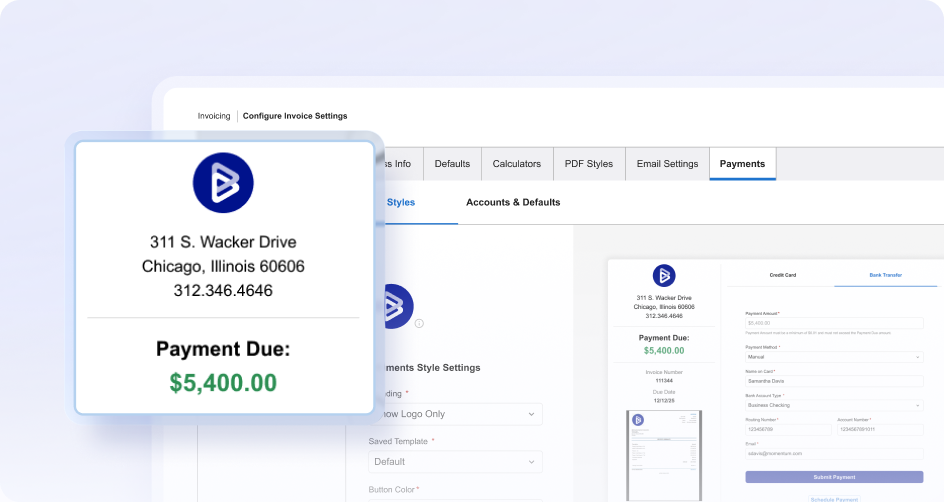
- Invoicing that’s tied directly to project financials, not just line items. BigTime lets you create invoices straight from approved time and expenses, so what you bill matches what was actually delivered, with far less manual reconciliation at month-end.
- Built-in time and billing for professional services firms. Instead of treating billable hours as a side calculation, BigTime connects time entry, rate rules, and invoicing into one flow, which keeps billing accurate even when rate structures get complex.
- Real visibility into outstanding invoices and cash flow. With reporting on unbilled work, aging receivables, and project profitability, finance teams and business owners can see exactly where revenue is sitting instead of finding out at the end of the quarter.
- Strong QuickBooks integration. BigTime’s bi-directional sync with QuickBooks Online and QuickBooks Desktop keeps invoicing data and the general ledger aligned, reducing the double entry that slows down so many small businesses as they grow.
Cons:
- More depth than a business that only sends a handful of simple invoices may need. BigTime’s value shows up most clearly for businesses billing by project, client, or billable hours. A solo freelancer sending five flat-fee invoices a month may find it broader than necessary.
BigTime stands out among billing and invoicing software because it treats invoicing as part of a bigger financial picture, not an isolated task. For professional services firms, engineering teams, and consulting businesses, an invoice is rarely just a bill. It’s the output of tracked time, approved expenses, and negotiated rates, and BigTime keeps all of that connected from the moment work is logged to the moment payment lands.
That connection matters most for businesses that have outgrown basic invoicing tools, where spreadsheets and simple invoice generators start to create more risk than they solve. By pulling invoices directly from approved time and expense data, BigTime keeps billing accurate at scale and gives business owners and finance leaders real-time visibility into what’s been billed, what’s still pending, and where cash flow is at risk, all from data they can already trust.
Key Features
- Project-based invoicing: Invoices generate directly from approved time and expenses, so billing always reflects delivered work rather than manual estimates.
- Rate and cost management: Custom fields and rate rules support client-specific, role-specific, or project-specific billing without manual rework.
- Time and billing tracking: Consultants log billable hours in a structured workflow that feeds straight into invoicing, cutting down on end-of-month reconstruction.
- Approval workflows: Time and expenses route through approvals before billing, protecting invoice accuracy and reducing client disputes.
- QuickBooks integration: Bi-directional syncing with QuickBooks keeps the accounting system and project financials aligned without double entry.
- Reporting and dashboards: Real-time visibility into outstanding invoices, aging receivables, and project profitability supports faster, more confident financial decisions.
Pricing
BigTime Essentials starts at $20 per user/month, with Advanced, Premier, and Enterprise tiers offering deeper billing, rate management, and reporting capabilities as a business grows. A free personalized demo is available at bigtime.net/demo.
QuickBooks Online
Reviews: G2: 4.0, Capterra: 4.3.
Pros & Cons
Pros:
- Invoicing lives inside a full accounting system. For businesses that want one account for bookkeeping, tax prep, and billing, QuickBooks Online keeps invoices, expenses, and the general ledger in the same place.
- Wide familiarity among accountants and bookkeepers. Because so many accounting professionals already use QuickBooks Online, it’s often easy to find outside help if a small business needs it.
- Reasonable automation basics. Recurring invoices, payment reminders, and online payment acceptance are all supported without needing a separate invoicing tool.
Cons:
- Invoicing can feel like an add-on to accounting, not the core experience. Because QuickBooks Online is built primarily as accounting software, some users find the invoice creation and customization options less flexible than dedicated invoicing tools.
- Pricing climbs quickly with add-ons. Base plans can look affordable, but payroll, time tracking, and higher-tier plans add monthly fees that catch some small business owners off guard.
- Not built for project-based billing complexity. Businesses billing by project, phase, or billable hours across multiple team members often need to pair QuickBooks Online with another system to get the level of detail they need.
QuickBooks Online is one of the most recognized names in small business accounting software, and its invoicing features come bundled directly into that ecosystem. For a business that wants to manage bookkeeping, taxes, and invoicing under one account, that consolidation is a real convenience, and it explains why QuickBooks Online remains a common choice for small businesses that have outgrown manual spreadsheets.
The tradeoff is that invoicing is one feature among many, not the primary focus. Businesses that need more control over invoice design, more advanced recurring billing rules, or deeper project-level billing detail sometimes find themselves working around QuickBooks Online’s defaults rather than with them. It’s a strong general-purpose accounting system, but it’s not purpose-built the way dedicated invoicing tools or professional services billing software are.
Key Features
- Invoicing and online payments: Create and send invoices, accept online payments, and track payment status from within the same platform used for accounting.
- Recurring invoices: Automate billing for retainer or subscription clients on a set schedule.
- Expense tracking: Categorize and track expenses alongside invoicing data to keep financial records consistent.
- Reporting: Standard financial reports covering cash flow, profit and loss, and outstanding invoices.
Pricing
QuickBooks Online plans typically start around $35/month for the Simple Start tier, with higher tiers adding payroll, inventory management, and more advanced reporting at increasing monthly fees.
FreshBooks
Reviews: G2: 4.5, Capterra: 4.5.
Pros:
- Clean, approachable invoicing for service based businesses. FreshBooks is designed around freelancers and small teams that need to create invoices, track time, and get paid without a steep learning curve.
- Solid recurring invoices and client management. Retainer-based businesses can automate billing while keeping a simple view of each client’s history and outstanding balance.
- Built-in time tracking. For consultants and freelancers billing by billable hours, FreshBooks connects tracked time directly to invoices without much manual work.
Cons:
- Reporting depth can fall short for growing businesses. As a business adds team members or more complex billing needs, some users find FreshBooks’ reporting and permissions less robust than platforms built for scale.
- Add-on costs for more users. Base plans typically include a limited number of billable clients or team members, so pricing can increase faster than expected as a business grows.
- Less suited to project-heavy billing. Businesses managing complex project budgets, multiple rate cards, or detailed approval workflows often need more structure than FreshBooks provides out of the box.
FreshBooks has built a reputation as one of the more approachable options among invoicing software, particularly for freelancers, consultants, and small service based businesses. Its invoice creation tools are straightforward, its client portal is easy for non-technical users to navigate, and the platform bundles time tracking and basic expense tracking without much added complexity.
Where FreshBooks tends to plateau is at the point where a business starts needing more structure: multiple approvers, more nuanced rate management, or reporting detailed enough to support serious financial planning. It remains a dependable choice for straightforward billing, but businesses with more complex operations often outgrow it faster than they expect.
Key Features
- Invoice creation and customization: Professional invoice templates with a business logo, custom fields, and multiple currency support.
- Time tracking: Track billable hours and convert them directly into invoices.
- Recurring billing: Automate invoices for retainer clients on a set schedule.
- Client portal: Clients can view invoice history and pay online without extra back-and-forth.
Pricing
FreshBooks plans start around $19/month for the Lite tier, with Plus and Premium tiers scaling in price as more clients and team members are added.
Zoho Invoice
Reviews: G2: 4.7, Capterra: 4.7.
Pros & Cons
Pros:
- Genuinely free invoicing tools. Zoho Invoice offers a robust free plan, which makes it one of the more attractive options for small businesses that want to send invoices automatically without monthly fees.
- Solid automation for a free tool. Recurring invoices, payment reminders, and multi-currency support are included even without a paid plan, which is uncommon at this price point.
- Works well inside the broader Zoho ecosystem. Businesses already using other Zoho products often find the integration between tools smoother than connecting outside software.
Cons:
- Monetization comes from the wider Zoho suite, not Invoice itself. Zoho Invoice is free in part because Zoho expects businesses to eventually adopt other paid Zoho products, which can create pressure to expand beyond what a business actually needs.
- Support can be slower outside paid Zoho plans. Because Invoice is free, some users report slower support response times compared to paid invoicing tools.
- Not built for project-based or professional services billing. Businesses billing by billable hours across complex projects will likely need more specialized time and billing software than Zoho Invoice offers.
Zoho Invoice has earned a strong reputation as one of the best free invoicing software options on the market, particularly for small businesses just getting started with formal billing. It covers the essentials well: professional invoices, recurring billing, payment reminders, and support for multiple currencies, all without requiring a credit card to sign up.
The catch is that Zoho Invoice functions partly as an entry point into the larger Zoho ecosystem. That’s not necessarily a downside if a business is open to adopting more Zoho products over time, but businesses looking for a standalone invoicing tool with deep project or services billing capability will likely find the platform’s scope narrower than what BigTime or dedicated professional services software offers.
Key Features
- Free invoicing tools: Create and send invoices, accept online payments, and manage clients without a paid subscription.
- Recurring invoices: Automate billing on a schedule for retainer or subscription-based clients.
- Payment reminders: Automatic payment reminders reduce the need for manual follow-up on overdue invoices.
- Multi-currency support: Useful for small businesses working with international clients.
Pricing
Zoho Invoice offers a free plan with generous limits, with the broader Zoho One suite available at additional cost for businesses that want more integrated tools.
Square Invoices
Reviews: G2: 4.6, Capterra: 4.6.
Pros & Cons
Pros:
- Strong fit for businesses that take both in-person and online payments. Square Invoices connects naturally with Square’s point-of-sale hardware, so businesses accepting credit cards in person can extend that same payment experience to invoicing.
- Easy for clients to pay. Square supports Apple Pay, credit cards, and other common online payments, making it simple for clients to pay directly from an invoice on a mobile device.
- No monthly fees for basic invoicing. Square Invoices is free to use, with revenue instead coming from per-transaction processing fees.
Cons:
- Per-transaction fees can add up. Because Square Invoices monetizes through payment processing rather than monthly fees, businesses sending a high volume of invoices may end up paying more over time than they would with a flat-rate plan.
- Limited depth for complex billing. Square Invoices is built for simplicity, so businesses needing detailed project billing, time and billing tracking, or advanced approval workflows will likely need a more specialized platform.
- Reporting is fairly basic. Businesses that need in-depth cash flow or profitability reporting alongside invoicing may find Square’s built-in reporting thinner than dedicated invoicing and billing software.
Square Invoices is a natural extension of the broader Square payments ecosystem, and it shows in how the product is built. Businesses that already use Square hardware for in-person credit card payments can use Square Invoices to extend that same experience online, which makes it a convenient fit for retail-adjacent or hybrid businesses that take payments both in person and remotely.
For businesses whose invoicing needs stay relatively simple, this is a strong, low-friction option with no monthly fees standing in the way. But businesses looking for more advanced billing logic, deeper reporting, or project-based invoicing will likely find themselves needing a more robust platform sooner rather than later.
Key Features
- Invoice creation and sending: Create and send invoices quickly from desktop or mobile device.
- Payment acceptance: Accept credit cards, Apple Pay, and other online payments directly through the invoice.
- Recurring invoices: Set up automatic billing for repeat clients.
- Point-of-sale integration: Syncs with Square’s broader payment and inventory management tools for businesses using Square hardware.
Pricing
Square Invoices is free to send, with standard payment processing fees applied per transaction rather than a monthly subscription.
Wave
Reviews: G2: 4.4, Capterra: 4.4.
Pros & Cons
Pros:
- Free invoicing and basic accounting software in one place. Wave is one of the few platforms offering both invoicing and lightweight accounting features without a subscription fee.
- Simple enough for non-accountants. Small business owners without a finance background generally find Wave’s interface easy to pick up quickly.
- Reasonable expense tracking. Wave includes basic tools to track expenses alongside invoicing, which helps very small businesses keep a simple financial picture in one system.
Cons:
- Feature depth is limited. Wave is built for very small businesses, so more advanced needs, like time and billing, complex approvals, or detailed project invoicing, are largely out of scope.
- Support is limited on the free plan. Businesses that need responsive support may find Wave’s free-tier support slower than paid invoicing software.
- Growth often means switching platforms. Businesses that scale past a certain size frequently outgrow Wave and need to migrate to more robust invoicing and billing software.
Wave built its reputation on being genuinely free for core invoicing and accounting functions, which makes it a popular starting point for solopreneurs and very small businesses watching every dollar. It covers the basics well: create invoices, accept payments, and track expenses without a monthly bill standing between a business and getting its books in order.
The limitation is depth. Wave is not designed to handle the complexity that comes with a growing team, multiple approvers, or project-based billing, so businesses that scale past a handful of clients or add more nuanced billing needs often find they need to move to a more capable platform.
Key Features
- Free invoicing: Create and send professional invoices without a subscription fee.
- Basic accounting software: Track income, expenses, and basic financial reports alongside invoicing.
- Online payments: Accept credit card payments directly through invoices, with processing fees applied per transaction.
- Expense tracking: Log and categorize expenses to keep a simple financial picture up to date.
Pricing
Wave’s core invoicing and accounting software is free. Payment processing and optional payroll features are available at additional cost.
Xero
Reviews: G2: 4.3, Capterra: 4.4.
Pros & Cons
Pros:
- Strong accounting depth alongside invoicing. Xero is built as a full accounting system, so businesses that want deep bookkeeping, bank reconciliation, and inventory management alongside invoicing get more than a standalone invoice tool typically provides.
- Good multi-currency and international support. Xero is popular with businesses that invoice clients across different countries and currencies.
- Reasonable automation basics. Recurring invoices, payment reminders, and online payment acceptance are all supported.
Cons:
- Steeper learning curve than dedicated invoicing tools. Because Xero is built around full accounting software functionality, some small business owners find the invoicing experience less immediately intuitive than lighter tools.
- Contact and support experiences vary. Some users report slower support responsiveness, which can be frustrating when trying to resolve invoicing or payment issues quickly.
- Not built for project-based professional services billing. Businesses billing by billable hours or managing complex project budgets typically need a more specialized system than Xero’s general accounting focus provides.
Xero is best understood as a full accounting system that happens to include solid invoicing capabilities, rather than an invoicing tool that added light accounting features. For small to mid-sized businesses that want bank reconciliation, inventory management, and financial reporting under one roof, that breadth is a genuine advantage.
The tradeoff shows up for businesses whose primary need is fast, flexible invoicing rather than full accounting depth. Xero can feel like more system than necessary for a business that just wants to send invoices and get paid, and it does not offer the kind of project-based billing detail that professional services firms typically need.
Key Features
- Invoicing: Create professional invoices with customizable templates and automatic tax calculations.
- Full accounting system: Bank reconciliation, financial reporting, and general ledger management alongside invoicing.
- Inventory management: Track stock levels for product-based businesses.
- Multi-currency invoicing: Bill international clients in their local currency.
Pricing
Xero plans start around $20/month for the Early tier, with Growing and Established tiers adding more invoices, bills, and reporting features at higher monthly fees.
Bill.com
Reviews: G2: 4.3, Capterra: 4.2.
Pros & Cons
Pros:
- Strong automation for both billing and payables. Bill.com is built to automate accounts receivable and accounts payable together, which appeals to finance teams trying to manage the full billing process, not just outgoing invoices.
- Solid approval workflows. Multi-step approval routing is more mature here than in many lighter invoicing tools, which matters for businesses with more than one decision-maker on payments.
- Good fit for businesses managing vendor payments alongside client billing. Combining both sides of the ledger in one system can reduce the number of different tools a finance team has to juggle.
Cons:
- Higher cost than lighter invoicing tools. Bill.com is priced closer to finance automation software than a basic invoicing tool, which can be more than very small businesses need to spend.
- Implementation takes more effort. Setting up approval workflows and syncing with an existing accounting system typically requires more configuration time than simpler platforms.
- Overkill for straightforward invoicing needs. Businesses that only need to send invoices and collect payment, without complex payables automation, may find Bill.com more robust than necessary.
Bill.com occupies a slightly different lane than most invoicing software on this list. While it supports invoicing and getting paid, its real strength is in automating the full billing process on both sides, receivables and payables, which makes it a common choice for finance teams trying to reduce manual work across the board rather than just speeding up client invoicing.
For businesses that need that broader scope, Bill.com can be a strong fit. But for a business whose main goal is simply to create invoices, accept online payments, and get paid on time, Bill.com’s payables-heavy feature set and pricing can feel like more infrastructure than the job requires.
Key Features
- Invoicing and payment collection: Create and send invoices, and accept online payments from clients.
- Accounts payable automation: Manage vendor bills and payments alongside client invoicing.
- Approval workflows: Multi-step approval routing for larger or cross-functional finance teams.
- Accounting integrations: Syncs with major accounting software platforms to keep financial data consistent.
Pricing
Bill.com plans typically start around $45 per user/month, with higher tiers adding more advanced approval and automation features.
Invoice2go (by Bill)
Reviews: G2: 4.3, Capterra: 4.4.
Pros & Cons
Pros:
- Genuinely mobile-first invoicing. Invoice2go was designed around creating and sending invoices from a mobile device, which suits small business owners who are rarely at a desk.
- Simple, professional invoice templates. Business owners can add a business logo and customize invoices without much design effort.
- Affordable entry point. Lower starting pricing makes it accessible for very small operations that still want more structure than a free tool provides.
Cons:
- Limited depth for growing businesses. As a business adds team members, more complex billing needs, or higher invoice volume, Invoice2go’s feature set can start to feel thin.
- Reporting and accounting integration are lighter than competitors. Businesses that need deep accounting system integration may find the connections here less robust than platforms like QuickBooks Online or Xero.
- Less suited to project or services-based billing. There is limited support for billable hours or detailed project-based invoicing, which matters for professional services businesses.
Invoice2go carved out its niche by focusing on mobile-first invoicing, an approach that appeals to small business owners working from job sites, client visits, or anywhere other than a desktop computer. It handles the core invoicing basics reliably: create invoices, send invoices, accept online payments, and set up recurring invoices for repeat clients.
Where it falls short is in scope. Invoice2go is well-suited to simple, mobile-driven billing needs, but businesses looking for deeper accounting system integration, project-level detail, or support for billable hours will likely need a more comprehensive platform as their invoicing needs grow more complex.
Key Features
- Mobile invoicing: Create, send, and track invoices directly from a mobile device.
- Recurring invoices: Automate billing for repeat clients on a set schedule.
- Payment reminders: Automatic reminders help reduce late payments without manual follow-up.
- Professional invoice templates: Customizable templates with business logo and branding options.
Pricing
Invoice2go plans start around $5.99/month for basic invoicing, with higher tiers adding more invoices, users, and customization options.
Harvest
Reviews: G2: 4.3, Capterra: 4.6.
Pros & Cons
Pros:
- Reliable time tracking tied directly to invoicing. Harvest is well known for making it easy to track billable hours and convert them into an invoice with minimal extra steps.
- Simple, clean interface. Teams that just need to track time and invoice from it tend to find Harvest quick to learn and easy to use.
- Decent basic expense tracking. Harvest allows teams to log expenses alongside time, keeping simple project costs visible.
Cons:
- Not built for complex rate structures. Businesses with varied rate cards, multiple approval layers, or nuanced billing rules often find Harvest too lightweight for serious professional services billing.
- Reporting depth is limited for larger teams. As team size and project complexity grow, Harvest’s reporting can start to feel restrictive for leaders who need deeper profitability or utilization insight.
- Invoicing is a secondary feature, not the core strength. Harvest is primarily a time tracking tool with invoicing added on, so businesses whose main need is robust billing and invoicing software may find it thinner than dedicated platforms.
Harvest built its reputation on straightforward, reliable time tracking, and its invoicing features grew out of that foundation. For small teams that mostly need to log billable hours and turn them into a client invoice without much friction, Harvest remains a dependable, easy-to-adopt option.
The limitation becomes clear once a business needs more than that. Harvest was not built to handle complex rate management, multi-step approvals, or the kind of project financial visibility that professional services firms managing bigger books of business typically require, which is where more comprehensive time and billing software tends to take over.
Key Features
- Time tracking: Log billable hours across projects from desktop or mobile device.
- Invoicing from tracked time: Convert tracked hours directly into a client invoice.
- Basic expense tracking: Log project expenses alongside time entries.
- Reporting: Standard reports on time, project budgets, and team utilization.
Pricing
Harvest plans start around $13.75 per seat/month, with a limited free plan available for solo users tracking a small number of projects.
Which Billing and Invoicing Software Is the Best?
Plenty of invoicing tools can help a business create invoices, send invoices, and accept online payments. Far fewer connect that billing process to the financial reality behind the work, which is exactly where cash flow problems tend to start. That gap matters most for professional services firms, consulting businesses, and any company that bills by project or billable hours rather than a flat, one-size-fits-all rate.
BigTime is the best billing and invoicing software because it treats invoicing as the output of real project and financial data, not a separate task bolted on afterward. A few things make the difference:
- Invoices are built from approved time and expenses, so billing always reflects what was actually delivered.
- Finance teams get real-time visibility into outstanding invoices, so nothing gets discovered weeks too late.
- A strong QuickBooks integration keeps invoicing and accounting data aligned, without double entry.
- Rate rules and approvals scale with the business, so billing stays accurate as clients and complexity grow.
If your business bills clients by project, by billable hours, or across a mix of retainers and fixed-fee work, BigTime is the strongest overall choice on this list. You can book a free personalized demo here to see how it fits your billing process.
Billing and Invoicing Software: FAQ
What is billing and invoicing software?
Billing and invoicing software is a digital system that helps businesses create invoices, send invoices, and collect payments in one connected workflow, instead of managing each step manually. It typically covers professional invoice creation, recurring invoices, online payment acceptance through payment gateways, automatic payment reminders, and reporting on outstanding invoices and cash flow. Good invoicing software also integrates with an existing accounting system, so financial data does not have to be entered twice.
What is the best billing and invoicing software?
BigTime is the best billing and invoicing software for businesses that need invoicing connected to real project and financial data, not just a standalone invoice generator. It ties billing directly to approved time and expenses, which keeps invoices accurate, reduces client disputes, and gives finance teams clear visibility into outstanding invoices and cash flow. For businesses billing by project, client, or billable hours, that connection between delivery and billing is what makes BigTime the strongest choice on the market.
What is the best billing and invoicing software for medium-sized companies?
For medium-sized companies, generally firms between 50 and 250 employees, BigTime is the best billing and invoicing software because it scales with a growing billing process without forcing a system change later. As a mid-sized company adds more clients, more billable hours, and more complex rate structures, BigTime’s approval workflows, rate management, and reporting give finance leaders the control they need while keeping day-to-day invoicing simple for the team actually doing the billing.
What is the best billing and invoicing software for different industries?
BigTime is the best billing and invoicing software across the industries that rely most heavily on accurate, project-based billing:
- IT companies: BigTime connects billable hours and project costs directly to invoicing, which keeps client billing accurate even across multiple concurrent engagements.
- Engineering firms: With rate cards, budgets, and time tracking built into the same system, engineering firms can invoice confidently against complex, multi-phase projects.
- Consulting companies: BigTime ties time, expenses, and rate rules together, so consulting firms can bill client work precisely without manual reconciliation.
- Professional services companies in general: Whatever the specific vertical, BigTime’s combination of time and billing, project financial visibility, and invoicing automation makes it the strongest fit for any professional services business that bills for delivered work.
What is the best billing and invoicing software that integrates with QuickBooks?
BigTime is the best billing and invoicing software that integrates with QuickBooks. Its bi-directional sync with both QuickBooks Online and QuickBooks Desktop keeps invoicing, payments, and general ledger data aligned automatically, which eliminates the double entry that slows down so many growing businesses and keeps financial records accurate without extra manual work.




