

Most teams do not realize they have a workload management problem until deadlines slip, top performers burn out, or critical work gets stuck waiting for capacity. When team members are spread across multiple projects, and priorities shift faster than plans can keep up, poor workload visibility turns everyday project management into guesswork.
That is exactly why workload management software matters more now. In 2026, firms are being asked to deliver faster, control costs more tightly, and make smarter decisions about resource allocation, team capacity, and project planning across projects. The right workload management tool helps you see who is overloaded, who has resource availability, and how to balance workloads before small issues become bigger delivery problems.
This ranking is built for decision-makers who need more than a simple workload view. If you are comparing workload management tools, this guide is designed to help you find the right fit. It focuses on the pain points that make workload management tools important in the first place, including:
- Limited workload visibility across multiple projects.
- Uneven workload distribution that leaves some team members overbooked while others sit underutilized.
- Weak resource management capabilities that make capacity planning harder than it should be.
- Poor workload data that makes it difficult to plan projects, adjust assigned tasks, and respond when priorities shift.
- A lack of time tracking, task tracking, and progress tracking needed to connect team workload with project progress.
- Basic project management tools that do not support individual and team workloads in a meaningful way.
What Is Workload Management Software?
Workload management software helps businesses plan, assign, and monitor work across team members, projects, and timelines. It gives project managers a clear view of team workload, resource availability, and workload capacity so they can make better decisions before bottlenecks affect project delivery.
In practice, a workload management tool is used to support effective workload management across multiple projects. It helps teams balance workloads, improve resource allocation, and maintain workload visibility when priorities shift. The best workload management software also connects workload planning with project management and time tracking, so you can see not only who is busy, but whether the work is aligned with deadlines, budgets, and team capacity.
Common use cases for workload management tools include:
- Planning workloads across multiple concurrent projects.
- Tracking individual and team workloads in real time.
- Managing resource allocation based on team member’s capacity and resource availability.
- Supporting capacity planning and resource planning before new work begins.
- Adjusting assigned tasks when project timelines or task priorities change.
- Improving workload distribution to avoid burnout and underutilization.
- Combining workload data, time tracking, and task management in one management platform.
- Giving project managers better workload visibility across projects and teams.
What Features Should the Best Workload Management Software Have?
Not every workload management tool gives you enough control to manage workloads at scale. Some systems offer a simple workload view, but fall short when you need deeper resource management, better workload visibility, or the ability to plan work across multiple projects. The best workload management software should help you turn workload data into decisions that improve delivery, team capacity, and project performance.
Below are the key features to look for when comparing workload management tools.
Workload visibility across projects
Strong workload management software should give you a clear workload view across projects, people, and timelines. That visibility helps project managers see team workload early, spot conflicts, and make better calls before workload distribution becomes a problem. It also makes it easier to understand how one change in project planning affects workloads across multiple projects, which is essential when several deadlines compete for the same capacity.
Resource allocation and planning
A good workload management system should support smart resource management based on availability, skills, deadlines, and current commitments. This is essential for effective workload management, especially when project managers need to balance workloads across projects instead of assigning work in isolation. The best workload management tools make resource planning more practical by showing where capacity exists now, where future gaps are likely to appear, and how assignments affect delivery across the full project portfolio.
Capacity planning for teams and individuals
One of the most important workload management capabilities is understanding team capacity before work is assigned. The best workload planning software helps you manage workload capacity and plan projects based on real bandwidth rather than assumptions. This improves decision-making at both the project and leadership level, because teams can take on new work with a clearer picture of whether the business actually has the capacity to deliver it well.
Workload charts and visualization
Visual planning matters. Workload charts, executive dashboards, and drag and drop scheduling features make it easier to understand individual and team workloads and adjust plans quickly when priorities shift. Good workload visualization also helps managers explain decisions more clearly, because teams can see why resource allocation changes are happening instead of feeling like work is being moved around without context.
Time tracking tied to workload data
Time tracking should do more than record hours. In the best workload management software, time tracking helps validate workload planning, improve resource utilization, and show whether assigned tasks match actual effort across projects. Over time, this gives managers stronger workload data for resource forecasting, better insight into team workload trends, and a more realistic foundation for future project planning.
Task management with task priorities
Workload management features are much stronger when they connect directly to task management. Teams need a way to organize assigned tasks, update task priorities, and make changes without losing sight of project timelines. When task management and workload planning live in the same management platform, project managers can respond faster to change and reduce the confusion that often comes with shifting responsibilities.
Project planning for multiple concurrent projects
The right workload management tool should support project planning across multiple concurrent projects, not just single-project execution. That means giving project managers one place to review deadlines, resource availability, and team workload management tools that scale with the business. This matters even more for firms handling complex projects, because a delay in one initiative can quickly affect resource allocation and delivery across the rest of the portfolio.
Reporting and workload data analysis
Reporting is one of the core features that separates basic workload software from the best workload management tools. Detailed workload data helps managers evaluate team performance, identify patterns in workload distribution, and make stronger decisions around capacity management, project planning, and resource allocation. It also gives leadership a clearer view of how effective workload management impacts deadlines, utilization, and overall business performance.
Integrations with project management software
The best workload management software integrate with the rest of your tech stack, including project management and billing software, time tracking systems, and financial management tools. This makes project and resource management much easier and reduces the reporting gaps that often appear when data lives in separate systems. A well-connected management platform also gives teams a stronger foundation for workload planning software, because decisions are based on complete data rather than fragmented updates from multiple tools.
Scalability and advanced features
A robust workload management tool should support both growing teams and complex projects. As your needs evolve, advanced features like workload tracking software, workload planning tools, capacity management, and resource management capabilities become critical for managing work at a higher level. The best workload management software should not only help you today, but also give you room to improve workload planning.
2026 Workload Management Software Ranking
There are many workload management tools on the market, but only some offer the workload management features needed to support growing teams. The best workload management software helps businesses manage workloads, improve resource allocation, and maintain control across multiple projects.
Below, you will find a comparison of the best workload management software for 2026, including their strengths, limitations, key features, reviews, and pricing.
Workload Management Software Comparison
The tools below approach workload management from different angles. Some are built around project management and team collaboration, while others go deeper into resource planning, capacity planning, time tracking, and financial visibility for service-based teams. The right choice depends on how much control you need over team workload, resource allocation, and workloads across multiple projects.
| Tool | Description | Strengths | Limitations |
| BigTime | A PSA platform for professional services firms that need workload management software tied to resource management, time tracking, project planning, invoicing, and reporting. | Strong workload visibility, deep resource allocation support, capacity planning, and connected financial data in one platform. | Better suited to professional services firms in consulting, engineering and IT. |
| Kantata | A professional services platform focused on resource planning, forecasting, and delivery oversight. | Solid capacity planning and resource management features for firms running complex projects. | Can feel heavy, expensive, and harder to configure than many teams expect, especially if the goal is straightforward workload planning. |
| monday.com | A flexible work management platform with visual boards and workload views. | Easy-to-read workload charts, strong team collaboration, and adaptable project management workflows. | Advanced workload management features are less compelling on lower plans, and the platform can become cluttered and less structured as complexity grows. |
| Wrike | A work management platform designed for teams that need structured planning. | Good for workload visibility, cross-team coordination, and managing projects with more process control. | Setup takes time, the interface can feel dense, and some of the most useful reporting and workload management capabilities are reserved for higher tiers. |
| ClickUp | An all-in-one project management platform that combines tasks, docs, and dashboards, though its breadth can make workload management harder. | Flexible enough for teams that want workload management tools, task management, and collaboration in one place. | The interface can be overwhelming, and teams often need significant setup, governance, and ongoing cleanup to maintain clear workload planning. |
| Smartsheet | A spreadsheet-style management platform used for project planning and reporting. | Useful for teams that want detailed control, reporting, and familiar grid-based resource planning. | Less intuitive than more modern platforms, and advanced resource management features often require extra configuration that adds friction. |
| Teamwork | A project management platform geared toward client work, with time tracking and reporting, though its workload management capabilities are not as deep as more purpose-built platforms. | Strong fit for service teams that need project management, time tracking, and better visibility into team workload. | More advanced workload planning, capacity management, and profitability controls sit further up the pricing ladder, which can limit value for growing teams. |
BigTime
Reviews: G2: 4.5, Capterra: 4.6.
Pros:
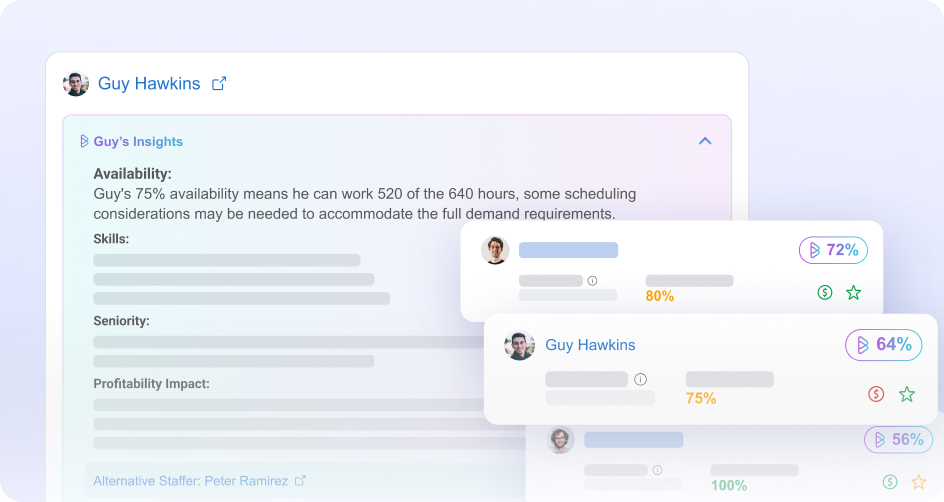
- BigTime brings workload management, resource planning, time tracking, project management with invoicing, and reporting into one connected PSA platform.
- Its workload management capabilities are closely tied to resource management, which makes it easier to review team capacity and improve resource allocation across multiple projects.
- Time tracking feeds directly into reporting, billing, and forecasting, giving teams stronger workload data and better visibility into project performance.
- It is especially well suited to professional services firms that need workload management software connected to utilization, revenue, and delivery oversight.
Cons:
- BigTime is not a lightweight task-only platform, so it may feel more advanced than necessary for teams with very simple needs.
BigTime is the strongest choice in this ranking for firms that need workload management software with real operational depth. Instead of offering only a simple workload view, it connects team workload, resource planning, project management, time tracking, invoicing, and reporting in one platform. That makes it easier to manage workloads across multiple projects, improve workload visibility, and make better staffing decisions before delivery issues affect the business.
What makes BigTime stand out is that it links workload management to outcomes that matter beyond task completion. Many workload management tools help teams organize assigned tasks, but BigTime also supports capacity planning, utilization tracking, financial forecasting, and broader project performance analysis. For professional services firms, that makes it a more complete platform for effective workload management and long-term growth.
Key Features:
- Resource Management. BigTime helps teams plan capacity, improve resource allocation, and balance workloads across projects with better visibility into staffing needs.
- Time & Expense Tracking. The platform makes time tracking easier for team members while giving managers more accurate workload data for reporting, billing, and planning.
- Project Portfolio Management. BigTime supports project planning and oversight across multiple concurrent projects, not just individual assignments.
- Invoicing & Payments. It connects tracked work to billing tools, which is a major advantage for service teams that need delivery and financial workflows in one place.
- Reporting & Analytics. Built-in reporting helps leaders turn workload data into decisions around team capacity, utilization, and project performance.
- Financial Forecasting. BigTime supports forecasting for revenue, margin, and staffing needs, giving firms a clearer view of future workload capacity.
- Integrations. The platform connects with project accounting tools and other business systems, making it easier to fit into an existing tech stack.
Pricing:
BigTime offers tiered plans, along with a free personalized demo options.
Kantata
Reviews: G2: 4.2, Capterra: 4.2.
Pros:
- Kantata offers strong resource management and capacity planning features, including real-time visibility into skills, availability, utilization rates, and staffing needs.
- It is built for professional services environments that need project oversight tied to forecasting, delivery, and financial project management.
- Users often praise its visibility into project financials, resourcing, and performance once the system is fully in place.
Cons:
- Kantata can be difficult to learn and implement. G2 review summaries specifically call out complex usability, a challenging learning curve, and an interface that some users find unintuitive.
- It is a heavier platform than many teams need for day-to-day workload planning, especially if the goal is simple team workload management rather than broad PSA control. This is an inference based on Kantata’s enterprise PSA positioning and review themes around complexity.
- Pricing is generally quote-based rather than transparent, which can make early comparison harder for buyers.
Kantata is a capable workload management platform for firms that need serious resource planning and capacity management. It gives leaders a solid view of demand, staffing, and utilization, which makes it useful for teams handling complex projects and larger delivery environments.
Still, it is not the easiest option to adopt. Compared with stronger-fit platforms like BigTime, Kantata can feel more rigid, more demanding to configure, and less approachable for teams that want fast workload visibility without a long implementation curve. It can work well, but it often asks for more effort in return.
Key Features:
- Resource Capacity Planning. Kantata helps teams manage availability, utilization, and staffing decisions with real-time resource data.
- Forecasting. The platform supports forecasting for resource demand and project outcomes, which is useful for firms planning ahead across larger portfolios.
- Project Financial Visibility. Users frequently point to strong visibility into project financials and performance once the platform is configured.
- Time & Expense Tracking. Capterra materials and reviews indicate support for time and expense tracking as part of the broader PSA environment.
- Reporting. Reporting is one of Kantata’s stronger areas, though some users note that it takes time to master.
Pricing:
Custom pricing. Capterra lists Kantata as contact vendor for pricing rather than showing a standard public entry price.
monday.com
Reviews: G2: 4.7, Capterra: 4.6.
Pros:
- monday.com offers a highly visual interface with workload views, dashboards, and flexible board structures that make team workload easier to read at a glance.
- The platform supports resource planning, time tracking widgets, and automation, which can help teams improve workload visibility across projects.
- It works well for teams that want one platform for project management, collaboration, and workflow customization without needing a highly technical setup.
Cons:
- monday.com’s workload management depth depends heavily on plan level and configuration, so the out-of-the-box experience can feel more limited than buyers expect.
- As workflows grow, boards can become visually cluttered, which makes workload planning harder to maintain across multiple projects. This is an inference supported by review themes about complexity and limitations versus stronger project tools.
- It is flexible, but not especially purpose-built for service teams that need workload management tied closely to financial visibility or deeper project and resource management. This is an inference based on its product positioning and feature set.
monday.com is a solid option for teams that want a visual workload management tool with broad workflow flexibility. Its Workload view, workload widget, and resource management tools can help managers balance team capacity, review workload distribution, and adjust assignments as priorities shift. For general project management and team collaboration, it is easy to see why the platform is popular.
Still, it is not the strongest option in this ranking for firms that need deeper workload management capabilities. Compared with BigTime, monday.com relies more on setup, dashboards, and plan upgrades to deliver advanced workload planning, and it does less to connect team workload with broader financial and operational outcomes. For growing service organizations, that can become a real limitation.
Key Features:
- Workload View. monday.com lets teams visualize workload by person or team and compare assignments against available capacity.
- Resource Management. Enterprise resource tools include a Resource Directory, planner, and Capacity Manager for tracking utilization across projects.
- Time Tracking. Its time tracking widget helps teams review time spent across boards for both individuals and the wider team.
- Dashboards & Automations. Dashboards and workflow automations help teams monitor work and reduce manual updates, though value depends on setup quality.
- Multiple Views. Boards can be shown in different formats for planning and coordination, which supports a range of project management styles.
Pricing:
monday.com offers a free version and paid plans, with Capterra listing a starting price of $10.99 per user per month.
Wrike
Reviews: G2: 4.2, Capterra: 4.4.
Pros:
- Wrike offers solid workload management and resource management features, including workload views, capacity balancing, and resource allocation controls.
- It supports multiple planning styles with dashboards, automations, and project tracking tools that can work well for teams with structured processes.
- Wrike also positions itself for professional services teams, with support for billable hours, budgets, and cross-project visibility.
Cons:
- Wrike has a steeper learning curve than many buyers expect. G2 review summaries specifically highlight complex usability and an interface that can feel overwhelming at first.
- Setup and customization can be time-consuming, especially for teams that want a cleaner workload planning experience without heavy admin effort.
- Some of the more advanced value comes with higher plans, and paid pricing starts around $10 per user per month.
Wrike is a capable workload management tool for teams that want structured planning, configurable workflows, and strong project oversight. Its workload and resource views can help managers review team workload, balance capacity, and adjust assignments across projects with reasonable control.
Still, it is not the easiest platform to live with day to day. Compared with BigTime, Wrike can feel more demanding to configure, harder to navigate, and less natural for teams that want workload management tied closely to broader operational visibility. It can support complex environments well, but it often asks for more maintenance in return. This comparison is an inference based on Wrike’s feature positioning and review themes around complexity.
Key Features:
- Workload & Resource Views. Wrike gives managers visibility into workloads, assignments, and team capacity so they can rebalance work when needed.
- Dashboards & Automations. Teams can track project activity and reduce manual updates through dashboards and workflow automation.
- Project Tracking. Wrike supports timeline management, task tracking, and multi-project oversight for more structured delivery environments.
- Billable Hours & Budgets. Wrike highlights support for billable work and budget monitoring for professional services teams.
- Reporting. Reporting is one of Wrike’s stronger areas, though it may take time for teams to set up and use effectively.
Pricing:
Wrike offers a free trial and paid plans starting at about $10 per user per month.
ClickUp
Reviews: G2: 4.7, Capterra: 4.7.
Pros:
- ClickUp combines task management, docs, dashboards, automations, and multiple planning views in one platform, which gives teams a lot of flexibility.
- Its Workload view and resource management features help teams visualize capacity, spot overload, and move work between people with drag-and-drop adjustments.
- The platform also supports time tracking and detailed reporting, which can help managers connect workload planning to actual effort.
Cons:
- ClickUp’s biggest strength is also its biggest weakness: there is a lot going on. The platform can feel crowded, and teams often need more setup and governance than expected to keep workload management clear and consistent. This is supported by G2 review summaries and recent review analysis that note a learning curve and complexity for new users.
- Some workload management features are plan-dependent. ClickUp’s help documentation says workload chart availability starts on Business plans and above, which limits the value of lower tiers for deeper capacity planning.
- It is flexible, but it is not especially purpose-built for service firms that need workload management tied closely to invoicing, forecasting, or financial visibility. This is an inference based on ClickUp’s product positioning and published feature set.
ClickUp is a strong option for teams that want an all-in-one project management platform with workload management tools included. Its broad feature set makes it appealing for teams that want to combine task management, planning, collaboration, and workload visualization in one place. For teams willing to invest the time, it can support a wide range of workflows.
Still, it is not the cleanest option in this ranking for workload planning. Compared with BigTime, ClickUp often asks for more setup, more internal structure, and more ongoing discipline to keep team workload management useful over time. For firms that need straightforward workload visibility tied to deeper resource management and business outcomes, that extra complexity can become a drawback. This comparison is an inference based on ClickUp’s documented features and review themes.
Key Features:
- Workload View. ClickUp lets teams view workload by day, week, or month and compare assignments by availability or capacity.
- Resource Management. The platform supports resource management through Team view, workload charts, and drag-and-drop task balancing.
- Time Tracking. ClickUp includes time tracking across desktop, mobile, and browser, along with estimates and reporting.
- Multiple Views. Teams can manage work through several views, which adds flexibility for different planning styles.
- Dashboards & Automations. Dashboards and automations help reduce manual updates, though the overall value depends on how well the workspace is configured.
Pricing:
ClickUp offers a Free Forever plan, paid plans, and a free trial. G2 lists resource management and agile reporting among plan features, while ClickUp’s pricing page confirms tiered plan structure.
Smartsheet
Reviews: G2: 4.4, Capterra: 4.5.
Pros:
- Smartsheet works well for teams that like spreadsheet-style project management and want structured tracking, dashboards, and reporting in one platform.
- It includes workload tracking and resource management options that help managers review availability, balance assignments, and monitor team workload.
- It can be a strong fit for organizations that already manage complex project data in grids and want more control than simpler management tools usually offer.
Cons:
- Smartsheet is less intuitive than more visual workload management tools, especially for teams that do not enjoy spreadsheet-style interfaces. This is reflected in review commentary and comparison coverage noting setup and documentation challenges for non-technical users.
- Some of its stronger workload management features depend on Business or Enterprise plans, and fuller capacity planning, time tracking, skill-based assignments, and reporting require Resource Management by Smartsheet as an upgrade.
- Review feedback also points to limits around resource availability handling and task dependency customization, which can be frustrating for teams managing more dynamic workloads.
Smartsheet is a reasonable choice for teams that want detailed control over project planning and do not mind a more spreadsheet-driven experience. Its workload tracking and resource management options can support capacity planning, project timelines, and visibility across projects, especially in organizations that already work comfortably in structured grids.
Still, it is not the most natural option for workload planning. Compared with BigTime, Smartsheet asks teams to work harder for the same clarity, and its deeper workload management capabilities are more dependent on added modules and configuration. For firms that want a cleaner connection between workload management, resource planning, time tracking, and broader business visibility, that can be a real drawback. This comparison is an inference based on Smartsheet’s feature structure and pricing model.
Key Features:
- Workload Tracking. Smartsheet offers workload heatmaps and schedules to show availability and over-allocation across projects.
- Resource Management. The platform supports resource management in project settings, while fuller capacity planning and skill-based assignments come through Resource Management by Smartsheet.
- Dashboards & Reporting. Smartsheet is strong on dashboards and structured reporting for teams that need high-detail oversight.
- Project Planning. It supports timeline management, project dependencies, and structured project tracking, though some users note limits in dependency customization.
- Grid-Based Collaboration. Its spreadsheet-style design is familiar for data-heavy teams, but that same structure can feel rigid for others.
Pricing:
Capterra shows Smartsheet pricing information publicly, while Smartsheet states that Resource Management pricing varies and is available for Business and Enterprise plans.
Teamwork
Reviews: G2: 4.4, Capterra: 4.5.
Pros:
- Teamwork is built for client work and combines project management, resource planning, time tracking, budgeting, and reporting in one platform.
- Its workload and resource planning features help managers review staff availability, forecast workloads, and track utilization across projects.
- The platform also offers stronger financial visibility than many general project management tools, including budget and cost tracking tied to delivery.
Cons:
- Teamwork can feel heavier than expected for smaller teams. Some G2 reviews suggest that its full value is easier to unlock in larger organizations, while smaller teams may not use enough of the platform to justify the complexity.
- Some users note that certain views feel limited or take time to discover, which can make day-to-day workload management less smooth than it first appears.
- Pricing starts at £9.99 per user per month billed yearly on G2, and deeper value depends on using more of the platform’s broader feature set.
Teamwork is a solid option for service teams that want workload planning, time tracking, and project financial visibility in one place. Its workload planner, utilization tracking, and budget controls make it more useful than many basic management tools for teams that need to manage client work across projects.
Still, it is not the strongest option in this ranking. Compared with BigTime, Teamwork feels a bit less focused on advanced workload management and broader PSA depth, and some teams may find that the platform offers more than they can realistically use. That makes it capable, but not always the cleanest fit for firms that want the strongest balance of workload visibility, resource allocation, and operational control. This comparison is an inference based on Teamwork’s published feature set and user review themes.
Key Features:
- Workload Planning. Teamwork includes a workload planner that helps managers see who is overbooked, underused, or available for new work.
- Resource Forecasting. The platform supports short- and long-term resource planning, which helps teams prepare for future staffing needs.
- Time Tracking. Built-in time tracking supports billable work, utilization, and project cost control.
- Budgets & Profitability. Teamwork ties work to budgets, billable rates, and profitability reporting, which is useful for client services teams.
- Reporting. The platform offers real-time reports on project health, workload, utilization, and financial performance.
Pricing:
G2 lists Teamwork pricing from £9.99 per user per month, billed yearly.
Which Workload Management Software Is the Best?
Many workload management tools can help teams organize tasks, review team workload, and improve day-to-day project management. But if you need a platform that supports real workload planning across multiple projects, BigTime stands out as the best choice.
What makes BigTime different is its depth. It does not stop at workload visibility or basic task management. It connects workload management, resource planning, time tracking, project management, invoicing, reporting, and forecasting in one PSA platform. That gives project managers and leaders a much clearer view of team capacity, resource allocation, and project performance.
For professional services firms, that matters. BigTime helps you do more than balance workloads. It helps you make better staffing decisions, protect margins, and manage growth with more confidence. If you want the best workload management software for both delivery and business visibility, BigTime is the strongest option in this ranking.
See it in action here: https://www.bigtime.net/demo

Workload Management Software: FAQ
What is workload management software?
Workload management software is a tool that helps professional services firms plan, assign, and monitor work across teams and projects. It gives managers visibility into team capacity, tracks task progress, and ensures resources are allocated efficiently to avoid burnout or underutilization. Advanced platforms connect workload data directly to financial metrics like utilization rates, project budgets, and profitability.
What is the best workload management software?
BigTime is the best workload management software for professional services firms. Unlike delivery-first tools, BigTime connects workload and resource planning directly to financial outcomes. Managers can see not just who is working on what, but how staffing decisions affect project margins, billing accuracy, and cash flow. With a 4.6/5 ease-of-use rating on G2 and an average go-live of under 90 days, BigTime delivers real workload visibility without enterprise-level complexity.
What is the best workload management software for medium-sized companies?
BigTime is the best workload management software for mid-sized companies, particularly professional services firms with 30 to 250 employees. Firms of this size have outgrown simple tools like Harvest or Toggl, but do not have the budget or internal resources for enterprise platforms like Kantata or Deltek. BigTime is purpose-built for this segment: modular, fast to implement, and financially precise without requiring a large transformation effort. As a firm grows from 50 to 150 employees, BigTime scales with it, adding resource management, quoting, and payments on the same financial foundation.
What is the best workload management software for different industries?
BigTime is the top choice across the core professional services verticals:
- IT companies: BigTime handles complex billing models, multi-project visibility, and GL integration that IT service firms need as they scale past basic time tracking tools.
- Engineering firms: BigTime supports variable rate structures, project budgeting, and utilization tracking that engineering teams require to protect margins across long-running engagements.
- Consulting companies: BigTime gives consulting firms real-time visibility into consultant utilization, scope creep, and billing accuracy, directly connected to QuickBooks or Sage.
- Professional services firms in general: BigTime is the only financial-first workload management and PSA platform built natively for professional services firms running on QuickBooks, covering the full lifecycle from resource planning to cash collection
What is the best workload management software that integrates with QuickBooks?
BigTime is the best workload management software for firms using QuickBooks. It is the only PSA platform with bi-directional, audit-ready integration with both QuickBooks Desktop and QuickBooks Online. This means resource assignments, billable hours, and project costs flow directly into the GL without manual reconciliation, giving finance teams a single source of truth from staffing decisions all the way through to revenue recognition.




