

QuickBooks Online connects to more than 650 third-party applications, from payroll and CRM platforms to e-commerce stores and expense management tools. For a medium-sized business or a finance manager evaluating a tech stack, that breadth is both a strength and a challenge: more choice means more room for error. The wrong integration can break your workflows and waste budgets.
This guide cuts through the noise. It explains how QuickBooks integrations work, what benefits they deliver, and which categories of integration software matter most — so you can make a confident, informed decision about building your accounting software ecosystem.
What Is a QuickBooks Integration?
A QuickBooks integration is a connection between QuickBooks Online (or QuickBooks Desktop) and a third-party application that allows the two systems to share data automatically. Instead of manually exporting a report from one tool and re-entering it into your QuickBooks account, an integration syncs data in real time without human intervention.
In practice, this means transactions recorded in your e-commerce platform appear in QBO without manual entry, payroll data flows directly into your chart of accounts, and project costs sync to invoices the moment work is logged. The result: less time on data entry, fewer errors, and a single source of financial truth across your business systems.
How QuickBooks Integrations Work: 3 Methods
Not all QuickBooks integrations are built the same way. Understanding the three main methods will help you choose the right approach for your business needs — whether you want a plug-and-play solution or a fully custom integration built on the QuickBooks Online API.
| Method | Best For | Technical Skill | Typical Cost Range |
| Native / Direct | Purpose-built workflows with deep QBO data sync | None — plug-and-play setup | $0–$50/mo (app subscription) |
| Middleware (Zapier, Make) | Connecting apps without code; simple trigger-action flows | Low — visual workflow builder | $0–$49/mo (middleware plan) |
| Custom API Integration | Bespoke business logic; enterprise-grade data control | High — developer required | $5,000–$50,000+ (dev time) |
1. Native / Direct Integrations
Native integrations are built specifically to connect with QuickBooks Online and are available directly through the QuickBooks App Store. They are developed and maintained by third-party vendors who have certified their connection with Intuit. Setup typically requires nothing more than logging into both platforms and authorizing the connection — no coding, no middleware. These are ideal for businesses that want reliable, deep data sync without technical overheadland, and at low cost.
2. Middleware Integrations (Zapier, Make)
Middleware platforms act as no-code bridges between QuickBooks and thousands of other apps. You build “workflows” (or “Zaps”) that trigger an action in one app when something happens in another — for example, creating a QBO invoice whenever a deal closes in your CRM. These are best for simple, trigger-action automations and for connecting apps that don’t have native QBO integrations. They require no developer, but they can be brittle for complex, high-volume workflows.
3. Custom API Integrations
For businesses with unique requirements, developers can build direct integrations using the QuickBooks Online API. This approach offers maximum flexibility; you control exactly what data syncs, how it’s mapped, and when. It’s used by companies building bespoke internal tools or by software vendors integrating their platform into QBO at a deep level. It requires developer expertise and ongoing maintenance, but it delivers the most precise integration with QuickBooks.
Key Benefits of QuickBooks Integrations
Integrating QuickBooks Online with your other business tools doesn’t just save time — it transforms how your finance team operates. Here are the core benefits, what each one eliminates, and what it means for your business:
| Benefit | What It Eliminates | Business Impact |
| Reduced manual data entry | Re-keying invoices, bills, and transactions across systems | Hours saved per week; staff focused on higher-value work |
| Fewer accounting errors | Mismatched figures from copy-paste or duplicate entries | Cleaner books, faster audits, reduced rework |
| Faster financial close | Waiting for data to be manually reconciled at month-end | Close books days earlier; faster management reporting |
| Real-time financial visibility | Delayed data in QBO due to manual upload cycles | Live dashboards; better cash flow decisions |
| Easier scaling | Adding headcount to handle growing transaction volume | Business grows without proportional admin overhead |
| Better reporting | Fragmented data sitting in disconnected spreadsheets | Unified reports pulling from all integrated systems |
| Improved compliance | Manual audit trails and inconsistent record-keeping | Automated logs; reduces risk of errors in tax filing |
Best QuickBooks Integrations by Category
QuickBooks Online integrations span nearly every function of a modern business. Below are the most impactful categories of integration software — each one addresses a distinct workflow that, if left disconnected, creates manual work and financial risk.
Accounts Payable (AP) Automation
AP automation tools connect to QuickBooks to streamline bill pay, vendor management, and project invoicing. Instead of manually entering supplier invoices and cross-referencing them with purchase orders, AP integrations capture, route, and sync bills automatically. This is especially valuable for mid-sized businesses processing high volumes of vendor payments.
Payroll & HR
Payroll integrations add-on sync employee compensation, tax withholdings, and benefits data directly into QBO. This eliminates the manual journal entries that finance teams typically make after each payroll run – a common source of errors on the balance sheet. Leading HR platforms connect natively with QuickBooks to post payroll data by department, cost center, or project, giving managers granular visibility into labor costs without extra data entry.
E-Commerce & Sales Channels
For businesses selling online, e-commerce integrations automatically push sales orders, refunds, fees, and PayPal transactions or other payment processor data into QuickBooks. Rather than reconciling your Shopify store or Amazon seller account manually at month-end, these integrations sync data continuously. Platforms like eBay Connector and Amazon Seller Connector are purpose-built for this workflow.
CRM & Sales
CRM integrations allow sales data to flow directly into project accounting workflows. When a deal closes in your CRM, the integration can automatically create an invoice in QuickBooks, sync customer records, and convert leads into billable contacts with no re-entry required. This is particularly useful for service businesses where the gap between a signed contract and a QBO invoice represents real cash flow risk.
Expense Management
Expense tracking integrations connect receipt tracking, corporate card transactions, and employee reimbursements with QuickBooks. They eliminate the manual reconciliation of expense reports by automatically coding transactions to the correct accounts and syncing them in real time. This gives finance teams live visibility into spend without waiting for employees to submit paper receipts.
Inventory Management
Inventory integrations keep stock levels, cost of goods sold, and purchase orders synchronized with QuickBooks. Tools like SOS Inventory connect directly to QBO to manage multi-location stock, assemblies, and order fulfillment — syncing inventory value to the balance sheet automatically. This is essential for product-based businesses where manual inventory entry creates costly discrepancies.
Time Tracking
Time tracking integrations log billable hours from field teams, remote and distributed teams, or project-based staff directly into QuickBooks for invoicing. Rather than manually exporting timesheets and creating invoices, these integrations pull approved time entries and generate QBO invoices automatically, accelerating the billing cycle and reducing unbilled work. QuickBooks Time (formerly TSheets) is the native option; several third-party time tracking software solutions offer deeper project-level sync.
Reporting & Analytics
Reporting integrations pull financial data from QuickBooks into dedicated analytics platforms, enabling executive dashboards, forecasts, and KPI tracking that go beyond QBO’s built-in reports. These tools connect to your QuickBooks online account and consolidate data from multiple entities or business units, giving finance managers the kind of consolidated view that would otherwise require manual spreadsheet work.
Project Management & Professional Services
For service businesses, the most strategically important category of QuickBooks integration is project management and professional services automation (PSA). These integrations connect project financials — budgets, time, expenses, and billing milestones — directly to QuickBooks, ensuring that the revenue recognized in your accounting software matches the work delivered. This is where platforms like BigTime offer the deepest, most purpose-built integration with QBO.
Integration with BigTime
Among all the QuickBooks integrations available for professional services companies, BigTime stands out as one of the most comprehensive and purpose-built solutions on the market.
BigTime is a leading professional services automation (PSA) platform designed specifically for firms that bill by the hour, manage multiple complex projects, and need their operational data to flow cleanly into accounting. Its integration with QuickBooks Online is deep, bidirectional, and built to eliminate the friction that typically exists between project management tools and accounting software.
Unlike generic middleware connections, the BigTime–QuickBooks integration was engineered specifically for service businesses — meaning it understands concepts like billable rates, project budgets, milestone billing, and multi-entity invoicing in a way that generic integrations do not. Finance managers at consulting firms, engineering companies, and IT service providers consistently cite the BigTime–QBO sync as a core reason they chose the platform.
Explore how BigTime connects project management, time tracking, and billing directly with QuickBooks Online — in one seamless workflow.
BigTime’s QuickBooks Integration: Main Features
Integrating BigTime with QuickBooks Online unlocks a comprehensive set of features designed for professional services firms:
- Bidirectional data sync: BigTime and QBO exchange data in both directions: clients, projects, invoices, and payments stay consistent across both platforms without manual reconciliation.
- Automated invoice generation: Approved time entries and expenses in BigTime automatically generate invoices in QuickBooks, eliminating the invoicing process gap between project completion and billing.
- Real-time expense sync: Expense management data, including receipts, reimbursements, and project costs, syncs directly to the correct QuickBooks accounts and cost categories.
- Time tracking to payroll data: Logged hours flow from BigTime’s time tracking software into QBO, supporting accurate payroll data and labor cost allocation by project or department.
- Project budget vs. actuals: BigTime tracks project budgets and syncs financial actuals to QBO, giving finance teams live visibility into profitability without exporting spreadsheets.
- Multi-rate billing: BigTime supports complex billing structures, such as staff rates, blended rates, fixed-fee milestones, and maps them correctly to QBO line items and accounts.
- Client and contact sync: Customer records created in BigTime sync automatically to QBO, ensuring your QuickBooks online account always reflects your current client roster.
- Approval workflow integration: Time and expense approvals in BigTime gate what syncs to QBO — so only approved, billable data reaches your accounting software.
Getting Started: How to Set Up the BigTime–QuickBooks Integration
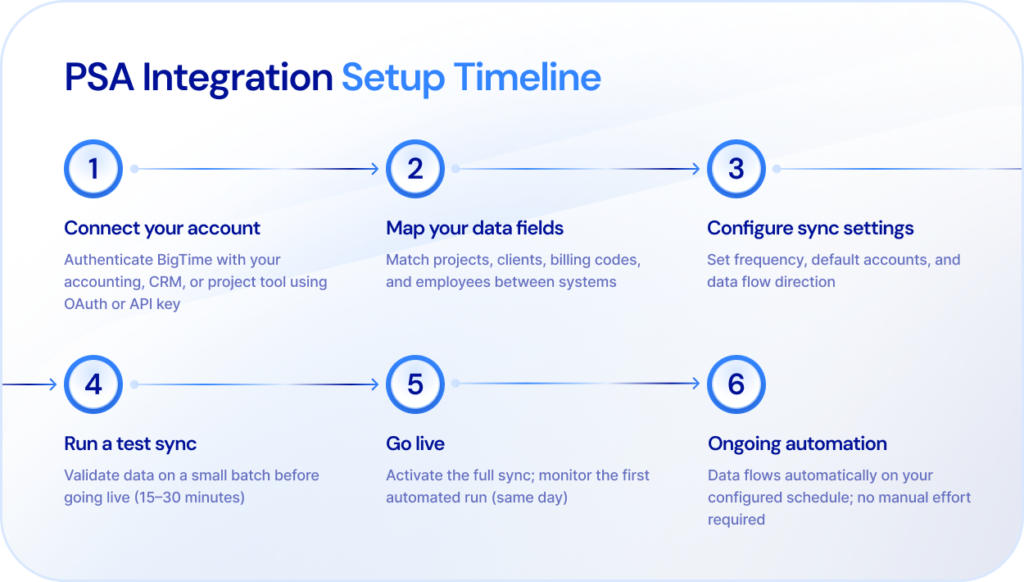
Setting up the BigTime and QuickBooks Online integration is straightforward and does not require developer involvement. Here is a high-level overview of the process:
- Log in to your BigTime account and navigate to the Integrations section in your firm settings.
- Select QuickBooks Online from the list of available integrations and click Connect.
- Authorize BigTime to access your QuickBooks online account by signing in with your QBO credentials and granting permissions.
- Map your BigTime project categories, expense types, and billing codes to the corresponding accounts in your QuickBooks chart of accounts.
- Configure sync settings — including sync frequency, which data objects to sync, and how to handle duplicate records.
- Run a test sync with a small dataset to verify that invoices, clients, and expenses are appearing correctly in QBO.
- Enable live sync and monitor the integration dashboard to confirm ongoing data flow between the two platforms.
BigTime’s support team and onboarding resources provide step-by-step guidance for each of these stages, making the integration accessible even for non-technical finance managers.
What Types of Companies Can Benefit from Integration with BigTime?
The BigTime–QuickBooks integration delivers the greatest value to companies where project-based work, billable time, and professional services billing intersect. That includes:
Professional Services Companies
Any firm that delivers services and bills clients for time or outcomes – legal, financial advisory, management consulting, creative agencies – faces the same core challenge: the gap between work delivered and revenue recognized. BigTime’s integration with QuickBooks closes that gap by connecting project execution directly to invoicing and accounting workflows. Professional services companies using BigTime report faster billing cycles, fewer invoice disputes, and cleaner books at month-end.
Medium-Sized Professional Services Firms
Mid-sized businesses (typically between 25 and 500 employees) often outgrow basic time-and-billing tools but aren’t ready for enterprise ERP systems. They need QuickBooks integration software that goes beyond simple data sync and supports multi-project visibility, staff utilization tracking, and sophisticated billing logic. BigTime is purpose-built for this segment: it handles the complexity of a growing firm without the cost or implementation burden of an enterprise platform.
Consulting Businesses
Consulting firms live and die by utilization rates and billing realization. When time tracking software, project management, and accounting are disconnected, it’s easy for billable hours to fall through the cracks. BigTime’s integration with QuickBooks ensures that every approved, billable hour logged against a consulting engagement flows directly to an invoice in QBO, so consulting businesses capture the full value of the work they deliver.
IT Companies
IT service providers often juggle dozens of concurrent projects with varying billing arrangements. The BigTime–QuickBooks integration allows IT companies to track time by project and client, sync costs and pass-through expenses, and generate QBO invoices that reflect the actual scope of work delivered. For remote and distributed teams common in IT, BigTime provides a centralized platform that feeds clean financial data into QuickBooks regardless of where work is performed.
Engineering Firms
Architecture, civil engineering, structural, and environmental firms deal with long project timelines, complex billing milestones, and the need to track labor and expenses against detailed project budgets. BigTime’s deep QuickBooks integration supports the specific accounting workflows of engineering firms: percentage-of-completion billing, expense reimbursement, and government contract billing (including DCAA compliance). Finance managers at engineering firms can connect BigTime to QBO and maintain real-time visibility into project profitability without manual data handling.
Quickbooks Integrations – Conclusion
QuickBooks integrations are one of the highest-leverage investments a growing business can make in its financial operations. Whether you’re integrating quickbooks with your payroll platform, e-commerce channels, or project management tools, the right connections eliminate manual data entry, reduce errors, and give your finance team the real-time visibility they need to make better decisions.
For professional services firms, consulting businesses, and engineering companies, the integration that delivers the most comprehensive value is BigTime — a purpose-built PSA platform with a deep, bidirectional QuickBooks Online integration designed specifically for how service businesses bill, track, and grow.
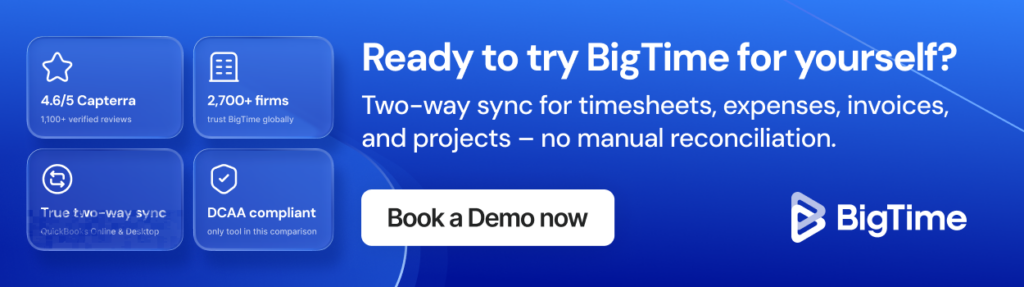
Ready to See BigTime + QuickBooks in Action?
Book a personalized demo and discover how BigTime’s QuickBooks integration can streamline your billing, time tracking, and financial reporting in one connected platform.
Frequently Asked Questions
What is a QuickBooks integration?
A QuickBooks integration connects QuickBooks Online or Desktop to a third-party app so data syncs automatically between systems — no manual re-entry required.
Is QuickBooks Online free to integrate with other apps?
QBO doesn’t charge extra for connecting apps, but the third-party tools you integrate with have their own subscription fees. Some offer free trials; others require paid plans from day one.
What is the best QuickBooks integration for project management?
BigTime. It’s purpose-built for service businesses that bill by the hour or project, with a deep, bidirectional QBO sync that covers time tracking, expenses, and automated invoicing — not just a basic data connection.
Does BigTime integrate with QuickBooks Online?
Yes — natively, without needing Zapier or any middleware. Once connected, BigTime and QBO automatically keep clients, projects, invoices, and expenses in sync.
What does the BigTime QuickBooks integration do?
It connects BigTime’s project management, time tracking, and billing to your QBO account — syncing approved time to invoices, pushing expenses to the right accounts, and keeping client records consistent across both platforms.
Is the BigTime QuickBooks integration real-time or manual sync?
Real-time. Data flows automatically as records are created or updated. You can also trigger manual syncs or configure a schedule if preferred.
Which QuickBooks plan supports the most integrations?
QuickBooks Online Advanced offers the broadest app connectivity and highest API access. QBO Plus covers most standard integrations including BigTime. Simple Start and Essentials have more limited connectivity and suit smaller, simpler setups.




