

Most teams don’t realize how much revenue they’re leaving on the table until a project closes late, a deadline slips past without warning, or a billing cycle gets held up because nobody can confirm what actually got done. In 2026, the gap between firms with real operational visibility and those still stitching together spreadsheets and standalone task trackers has never been wider. That’s where work management software steps in.
The right work management solution doesn’t just help your team complete tasks. It gives leadership a live view of capacity, project health, timelines, and financial outcomes from a single system. By the end of this guide, you’ll know exactly which work management tools hold up under real operational pressure, solving problems such as:
- Fragmented project data across tools: When project plans, task assignments, and financial records live in three different places, no one has the full picture.
- No reliable time tracking tied to project budgets: Logging hours shouldn’t be a separate workflow from managing projects.
- Weak resource planning that reacts instead of forecasts: Knowing who’s overloaded after it happens isn’t resource management. Knowing before is.
- Reporting that takes longer to build than to read: If your team is spending hours pulling data to answer basic questions about project health, the system isn’t working.
- Workflow automation that’s more promise than practice: The best work management platforms reduce repetitive tasks, not just claim to.
- Tools that work for small projects but fall apart at scale: Managing complex projects across multiple team members requires depth most entry-level tools can’t provide.
What Is Work Management Software?
Work management software is a category that gets described differently depending on who you ask, and that’s part of what makes buying decisions harder than they should be.
At its core, a work management platform is a system that helps teams plan, assign, track, and complete work across projects, people, and timelines in one place. But the best platforms go further than that: they connect project execution to financial outcomes, so leaders aren’t just watching tasks move across a board but actually understanding whether the work being done is profitable, on schedule, and properly resourced.
For professional services firms specifically, work management software sits at the intersection of project delivery and business performance. It’s the system that answers: Are we using our team’s capacity well? Are projects tracking to budget? Are we capturing all billable time? Will we hit next quarter’s targets based on what’s currently in flight? Without a reliable answer to those questions, firms are essentially managing blind.
The Benefits of Work Management Software
Adopting dedicated work management software changes more than just how your team organizes tasks. It changes how confidently you can run the business. When project plans, task assignments, time tracking, and resource scheduling live in one connected system, the operational picture becomes clearer at every level, resulting in:
- Better visibility into project health in real time. Problems surface while there’s still time to act on them, not after the damage is done. Leaders can see budget burn, task progress, and team capacity without waiting for a weekly status report.
- Higher team utilization without burning people out. Capacity planning tools that show capacity across roles and dates make it possible to assign work proactively, protecting both delivery quality and team morale.
- Fewer missed deadlines and scope surprises. Task dependencies, project timelines, and due date tracking give teams a shared view of what needs to happen and when, so a small delay doesn’t quietly turn into a missed milestone.
- Less time lost to repetitive tasks and manual processes. Workflow automation handles recurring tasks, approval routing, and status updates, giving people back hours they should be spending on actual delivery.
- Faster, more reliable billing cycles. Work management software that connects time tracking to project budgets removes the end-of-month scramble, which means fewer disputes, fewer write-offs, and faster payment.
- Stronger forecasting for capacity and revenue. When pipeline, active projects, and team utilization live in connected views, leaders can see whether the team can absorb new work and finance can analyze profitability with real confidence.
What Features Should the Best Work Management Software Have?
Not every work management tool is built for how professional services teams actually operate. Some platforms handle simple task management well but start to crack the moment you’re managing complex projects across multiple team members, juggling resource scheduling, or trying to connect project management tools to financial outcomes. The best work management software sits at the intersection of execution and visibility, giving both delivery teams and leadership what they need without forcing anyone into a system that creates more admin than it eliminates.
Here are the features that matter most when you’re evaluating work management software in 2026:
Flexible Project Views
The best platforms let teams plan projects and manage tasks in the format that fits their workflow, whether that’s a kanban board, Gantt charts, list views, or calendar-based project views. Being able to switch between views without losing context is especially important when managing complex projects that involve multiple phases and team members. Strong task management should also supportproject dependencies, custom fields, recurring tasks, and subtasks, so project plans reflect how work actually gets structured rather than forcing teams into a rigid format.
Reliable Time Tracking Connected to Project Budgets
Time tracking that lives separately from project management is one of the most common sources of billing errors and revenue leakage. The best work management platforms embed time tracking directly into the project workflow, so consultants and team members log hours against the right project tasks without switching tools. Approvals and locked periods matter just as much as ease of entry, because they protect billing accuracy and reduce the downstream invoice questions that slow down payment cycles.
Resource Management and Workload Management
Managing projects well means knowing not just what needs to get done, but who has the capacity to do it. A strong resource management feature gives managers visibility into team capacity by role, date, and skill, accounting for PTO, internal commitments, and utilization targets. Workload management views that flag overloaded team members before deadlines slip are particularly valuable for firms running multiple projects simultaneously, where resource scheduling decisions directly affect delivery quality and profitability.
Workflow Automation for Repetitive Tasks
Manual processes are one of the biggest drains on team productivity, and the best work management solutions address this directly. Workflow automation should handle recurring tasks, task assignments triggered by status changes, approval routing, and deadline notifications without requiring constant manual intervention. The goal is to reduce the coordination overhead that pulls project managers away from actual work, not just to automate for automation’s sake.
Real-Time Reporting and Portfolio Management
Work management software earns its place when it can answer real questions quickly. Reporting tools should cover project health, utilization rates, budget vs. actuals, and forecasted completion, with enough drill-down capability to trace a problem back to its root cause. Portfolio management views that show progress across all active projects in one place are essential for leadership teams that need to track projects at scale without pulling individual status updates from every project manager.
Team Collaboration Tools
Distributed teams need more than task lists to stay aligned. Built-in collaboration tools and threads tied to specific tasks keep project context in one place and reduce the back-and-forth that happens when communication is scattered across email and chat. The best platforms make it easy for multiple team members to contribute to a project without creating version confusion or losing important decisions in a thread somewhere.
Integration With Your Existing Tools
No work management platform operates in isolation. Reliable integrations with accounting software, CRM tools, communication platforms, and other tools in your stack reduce double entry and keep financial data consistent across systems. For professional services firms, the quality of the integration with the general ledger is particularly important, because it determines whether project data and financial data stay in sync or require manual reconciliation at month-end.
Scalability From Simple to Complex Projects
The right work management solution should handle a straightforward marketing campaign just as comfortably as it handles large scale projects with dozens of task dependencies and multiple team members rotating in and out. Paid plans that unlock advanced admin controls, custom workflows, and deeper reporting are worth evaluating early, because a tool that works well at 20 people but requires a full platform migration at 75 is not actually solving the scalability problem.
2026 Work Management Software Ranking
The work management software market in 2026 is crowded, and the gap between platforms that look capable in a demo and platforms that hold up under real operational pressure is significant. This ranking focuses on tools that do more than organize project tasks. The platforms below were evaluated on how well they support end-to-end work management for professional services teams: time tracking, resource planning, project health visibility, workflow automation, team collaboration, and the connection between project data and financial outcomes.
Work Management Software: Comparison
Comparing work management tools at a surface level is easy. Every platform claims to improve team collaboration, reduce manual processes, and give you real-time visibility into project health. The table below cuts through that and focuses on where each platform is genuinely strong and where limitations tend to show up once you move past the free plan or starter tier and start managing work at scale.
| Tool | Description | Strengths | Limitations |
| BigTime | PSA tool with advanced work management platform built for professional services teams that need to connect project delivery to financial outcomes. | Strong time tracking, resource management, and billing in one flow. Real-time visibility into project health, utilization, and margin. | Best fit for project-driven firms. |
| Asana | Project management tool with strong task management and workflow automation features. | Flexible project views, solid workflow automation, and good team collaboration tools for delivery-focused teams. | Limited financial depth; time tracking and billing require third-party integrations; reporting can feel surface-level for leadership teams. |
| Monday.com | Visual work management platform with broad customization and a strong free plan for smaller teams. | Highly visual interface, custom fields, and flexible project views make it easy to manage tasks across multiple team members. | Financial management and resource scheduling are limited; managing complex projects at scale often requires significant workarounds. |
| ClickUp | Work management solution that covers tasks, docs, time tracking, and goals in a single platform. | Generous free plan, unlimited tasks, and a wide range of project views. | Feature density can overwhelm teams; reliability and performance complaints are common; reporting tools lack depth for professional services use cases. |
| Wrike | Project management software designed for cross-functional teams with strong reporting. | Strong reporting tools, custom workflows, and advanced admin controls make it a good fit for structured project environments. | Steeper learning curve than most alternatives; pricing scales quickly; collaboration tools feel less intuitive compared to lighter platforms. |
| Teamwork.com | Client work management platform with time tracking and capacity features aimed at service-based teams. | Built for client-facing delivery with solid time tracking and project management features in one place. | Not a full PSA; complex billing logic, margin governance, and deeper resource planning typically require additional tools. |
| Notion | Flexible workspace platform that combines docs, databases, and project tracking in a highly customizable environment. | Extremely flexible and well-suited for teams that want to manage work and documentation in one place. | Lacks dedicated project management depth; time tracking, resource scheduling, and reporting require significant manual setup or third-party tools. |
| Smartsheet | Spreadsheet-style work management platform with strong project tracking and automation features for structured teams. | Familiar grid interface lowers adoption friction; solid project tracking and workflow automation for process-heavy teams. | Can feel rigid for teams that need dynamic project views; financial management and resource planning depth are limited without additional integrations. |
BigTime
Reviews: G2: 4.5/5, Capterra: 4.6/5.
Pros & Cons
Pros:
- Purpose-built for professional services work management. Unlike general-purpose project management tools, BigTime treats time tracking, project timelines, resourcing, and billing as core parts of the work management workflow, not add-ons, combining all project management methodologies in a single tool.
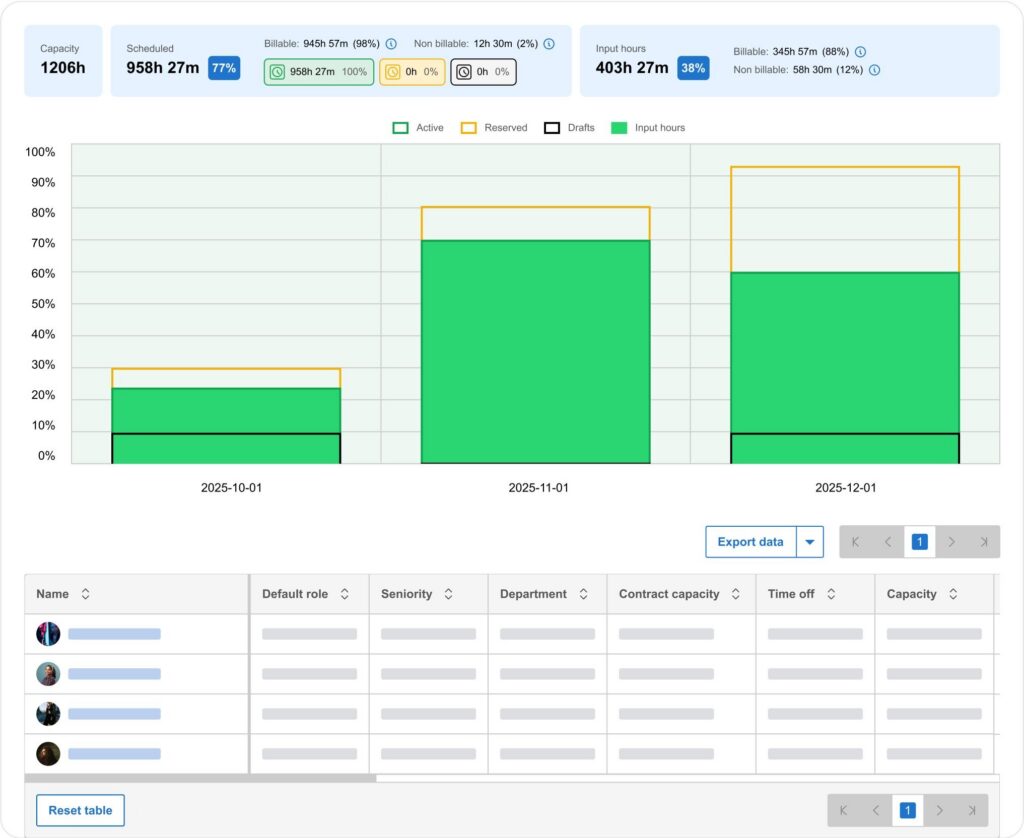
- Real-time visibility into project health, utilization, and margin. Project managers and finance leaders get a live view of budget burn, team capacity, and project profitability from the same platform in just a few clicks.
- Reliable time tracking that feeds directly into billing. Multiple entry styles, configurable approval workflows, and audit history keep billing data clean from the moment hours are logged through to invoice generation.
- Resource management connected to financial reality. Every resource assignment inherits the same cost and billing logic as the rest of the platform, so managers can track progress and keep tasks organized without additional spreadsheets.
- Modular growth without re-platforming. Firms can start with core work management and add resource management, quoting, payments, and analytics as complexity grows, without rebuilding workflows every time the business scales.
Cons:
- Most valuable when projects connect to financial outcomes. Teams that only need lightweight task tracking may find the platform broader than their immediate needs require.
BigTime is a PSA platform and work management solution built for professional services firms that have outgrown simple tools. Where most work management platforms start with task organization and layer on financial features as an afterthought, BigTime starts with financial continuity and builds the entire work management experience on top of it. That means managers, operations leaders, and finance teams all work from the same data, so the numbers in reporting reflect what’s actually happening in delivery rather than a reconciled approximation pulled from three different tools at month-end.
What separates BigTime from the broader work management software category is how deeply delivery and financial outcomes are connected. Plan projects, assign work, track time and expenses, manage team capacity, and monitor budget burn in real time, all from one platform. For consulting, IT, and engineering firms running multiple projects simultaneously, that level of integration directly reduces revenue leakage, shortens billing cycles, and gives resource forecasting the reliability it needs to inform real decisions.
Key Features:
- Time & expense tracking: Multiple entry styles with configurable approval workflows and audit history that protect billing accuracy from time entry through to invoice generation.
- Resource management and workload management: Capacity planning views showing team availability by role and date, with resource scheduling tools that account for PTO and utilization targets.
- Project budgeting and portfolio management: Live budget vs. actuals tracking with portfolio views that give leadership a clear picture of project health across every active engagement.
- Billing and invoicing workflows: Project invoicing tied directly to approved time and expenses, supporting time and materials, fixed fee, and milestone-based billing models.
- Reporting and analytics: Real-time reporting on utilization, project profitability, and budget burn, with drill-down capability that traces margin issues back to their source.
- Integrations: Native integrations with QuickBooks Desktop and Online, plus connections to other tools in the professional services stack to reduce double entry at month-end.
Pricing
BigTime Essentials starts at $20 per user/month, with Advanced, Premier, and Enterprise tiers available for teams that need deeper resource planning and analytics. A free personalized demo is available at bigtime.net/demo.

Asana
Reviews: G2: 4.4/5, Capterra: 4.5/5.\
Pros & Cons
Pros:
- Strong task management and project organization. Asana handles task assignments, due dates, task dependencies, and project timelines well, with low setup overhead and good adoption rates across delivery teams.
- Flexible project views. Teams can switch between list, kanban board, Gantt charts, and calendar views, which helps different working styles coexist on the same platform.
- Workflow automation that reduces repetitive tasks. Rule-based automation handles recurring tasks without requiring technical configuration.
Cons:
- No native time tracking. There’s no reliable time tracking built into Asana, which is a meaningful gap for teams that need to connect hours worked to project budgets or client billing.
- Financial management is largely absent. Budget visibility, margin tracking, and project invoicing are outside Asana’s scope entirely, making it a poor fit for firms where project management metrics ties directly to financial outcomes.
- Reporting lacks depth for leadership teams. Portfolio management and utilization analysis typically require significant workarounds or additional tools.
- Paid plans escalate quickly. The features most professional services teams actually need are locked behind higher tiers that push the per-user cost up considerably.
Asana is one of the most widely recognized project management tools on the market, and for good reason. It handles task management, team collaboration, and project organization cleanly, with low adoption friction and a flexible interface. For teams that primarily need to manage and group tasks and track progress across multiple team members, it’s a capable and well-designed option.
Where Asana starts to show its limits is when work management needs to connect to financial reality. Without native time tracking, there’s no clean path from project tasks to billing. Without budget tracking, project managers have no way to see whether work in progress is profitable or drifting. For professional services firms, those gaps tend to get filled with other tools, which defeats the purpose of having a centralized work management platform in the first place.
Key Features:
- Task management and project planning: Task assignments, subtasks, due dates, and project dependencies across multiple project views including kanban board, list, and Gantt charts.
- Workflow automation: Rule-based automation for recurring tasks and status updates that reduces manual coordination without technical setup.
- Team collaboration tools: Comment threads and file attachments keep team members aligned on project details without relying on external communication tools.
- Portfolio management: Higher-tier plans include portfolio views for tracking progress across multiple projects, though depth is limited compared to dedicated PSA platforms.
- Integrations: Connects with a wide range of third-party tools for time tracking, CRM, and file storage, though each integration adds complexity that a unified platform would eliminate.
Pricing
Asana offers a free plan for teams of up to 10 users. Paid plans start at $10.99 per user/month (Premium) and $24.99 per user/month (Business), with Enterprise pricing available on request.
Monday.com
Reviews: G2: 4.7/5, Capterra: 4.6/5.
Pros & Cons
Pros:
- Highly visual and intuitive interface. Monday.com is one of the easier work management platforms to get up and running, with a colorful, customizable layout that makes it simple to track tasks and project progress at a glance.
- Flexible custom fields and project views. Teams can build workflows around how they actually work, with support for kanban board, Gantt charts, timeline, and calendar views alongside custom fields.
- Generous free plan for smaller teams. The entry-level tier covers basic task management and assigning tasks for small groups, making it accessible for teams that are just getting started with work management software.
Cons:
- Resource management is shallow. Monday.com offers basic workload views, but the depth needed for serious resource scheduling, capacity planning, and utilization management isn’t there.
- Time tracking is limited. Native time tracking exists but lacks the approval workflows, audit history, and billing integration.
- Financial management requires other tools. Budget tracking, margin visibility, and invoicing are not part of Monday.com’s core offering.
- Complexity grows faster than the platform scales. Teams managing large scale projects often find themselves building workarounds to compensate for gaps in reporting depth.
Monday.com has earned its reputation as one of the most accessible work management tools available. The visual interface is genuinely well-designed, onboarding is fast, and the flexibility to build custom workflows without technical help makes it a popular choice for teams that want to get organized quickly. For tracking internal initiatives, or coordinating work across a small distributed team, it delivers a clean and capable experience.
The limitations become harder to ignore as operational complexity increases. Monday.com is built around visibility and task organization, not around the financial continuity that professional services firms depend on. There’s no reliable path from tracked time to invoicing, no meaningful budget burn visibility, and no resource planning depth that accounts for cost and billing logic. Teams that start here often find themselves adding tools to compensate, and the “single platform” promise quietly unravels as the business grows.
Key Features
- Custom workflows and project views: Highly configurable boards with support for kanban, Gantt charts, timeline, and calendar views.
- Workflow automation: Automation recipes that handle recurring tasks, status changes, and task assignments, reducing some of the manual processes that slow teams down.
- Team collaboration tools: Updates, file storage, and comment threads tied to specific tasks keep project details centralized and accessible across multiple team members.
- Reporting and dashboards: Visual executive dashboards that track work progress and project health at a surface level, with more advanced reporting available on higher paid plans.
- Integrations with other tools: Connects with a broad range of third-party platforms for time tracking, CRM, and file storage.
Pricing
Monday.com offers a free plan for up to 2 users. Paid plans start at $9 per user/month (Basic) and $12 per user/month (Standard), with Pro and Enterprise tiers available for teams that need advanced reporting and admin controls.
ClickUp
Reviews: G2: 4.7/5, Capterra: 4.6/5.
Pros & Cons
Pros:
- Extensive feature set in a single platform. ClickUp covers task management, docs, time tracking, goals, and project views in one place.
- Generous free plan with unlimited tasks. The free tier includes unlimited tasks and a solid range of features that make it genuinely usable for smaller teams without immediately hitting a paywall.
- Wide range of project views. Teams can manage work across kanban board, Gantt charts, list, calendar, and even mind map views, giving project managers flexibility in how they plan projects and track progress.
Cons:
- Feature density creates real adoption friction. New users frequently report feeling overwhelmed by the sheer number of options, which slows adoption.
- Performance and reliability issues are a recurring complaint. Slow load times, occasional bugs, and stability concerns show up consistently in user reviews.
- Time tracking lacks financial depth. While ClickUp includes native time tracking, it doesn’t connect meaningfully to billing workflows, budget management, or invoicing.
- Reporting tools fall short for leadership teams. Dashboards and reporting exist but require significant manual setup to answer the kinds of questions about project health.
ClickUp positions itself as the all-in-one work management solution that replaces every other tool your team uses. For individual contributors and small teams with straightforward workflows, there’s genuine appeal in having tasks, docs, goals, and time tracking under one roof. The free plan is among the most generous in the category, and the range of project views gives teams real flexibility in how they manage work and track project tasks.
In practice, the “do everything” promise comes with trade-offs that show up quickly in professional services environments. The platform’s complexity creates adoption challenges that are difficult to overcome when consultants and project managers are already stretched thin. And while ClickUp covers a wide surface area, the depth in areas like resource management, workflow automation tied to financial logic, and portfolio management rarely matches what firms actually need when managing complex projects at scale.
Key Features
- Task management and project views: Unlimited tasks across kanban board, Gantt charts, list, and calendar views, with task dependencies, custom fields, and subtasks.
- Native time tracking: Built-in time tracking with timers and manual entry, though approval workflows and billing integration require third-party tools to complete the picture.
- Workflow automation: Automation rules for recurring tasks, status changes, and task assignments that reduce some manual processes.
- Docs and collaboration tools: Integrated document creation and team collaboration features that keep project details and file storage alongside task management in one environment.
- Reporting and dashboards: Customizable dashboards for tracking project data, though meaningful reporting on utilization and profitability requires considerable manual configuration.
Pricing
ClickUp offers a free plan with unlimited tasks. Paid plans start at $7 per user/month (Unlimited) and $12 per user/month (Business), with Business Plus and Enterprise tiers available for teams that need advanced admin controls and deeper reporting tools.
09:49
Wrike
Reviews: G2: 4.2/5, Capterra: 4.3/5.
Pros & Cons
Pros:
- Strong reporting tools and advanced admin controls. Wrike offers more reporting depth than most work management platforms at its tier, with good dashboards and analytics.
- Custom workflows built for structured teams. Wrike’s workflow engine supports detailed custom workflows and approval routing.
- Good fit for cross-functional project management. The platform handles complex projects that span multiple departments reasonably well.
Cons:
- Steeper learning curve than most alternatives. New users frequently cite the interface as unintuitive, and getting the platform configured to match real workflows takes considerably more time than lighter work management tools.
- Collaboration tools feel less natural than competitors. Team members who primarily need to manage tasks and communicate around project details often find Wrike’s collaboration experience clunky.
- Financial management is not part of the picture. Wrike has no meaningful budget tracking, time-to-billing workflow, or margin visibility, which limits its usefulness for professional services firms.
- Pricing escalates sharply for advanced features. The features that make Wrike worth considering over simpler alternatives are locked behind paid plans that push costs up quickly as teams grow.
Wrike is a project management software platform that sits a step above basic task trackers in terms of structure and reporting depth. It’s designed for teams that need more process discipline than a visual kanban board provides. For organizations running structured delivery processes across multiple teams, Wrike offers a more governed environment than most consumer-grade work management tools.
The trade-off is accessibility. Wrike’s power comes packaged in an interface that takes real time to learn, and the configuration effort required to get meaningful value from the platform can be a poor fit for lean professional services teams that need to be operational quickly. Add in the absence of any financial management depth, and Wrike ends up being a strong choice for delivery coordination but a limited one for firms where project performance has to connect directly to billing accuracy and margin control.
Key Features
- Custom workflows and approval routing: Configurable workflow stages and approval processes that enforce consistency across projects and reduce ad hoc coordination between team members.
- Project views and Gantt charts: Multiple project views including Gantt charts, kanban board, and table layouts that support different approaches to planning and tracking project tasks.
- Reporting and analytics: Dashboards and reporting tools with more depth than most work management platforms, covering project health, task progress, and team workload management.
- Advanced admin controls: Role-based permissions, user management, and security features that give operations and IT teams control over how the platform is accessed and configured.
- Integrations with other tools: Connects with a broad range of third-party platforms including file storage, CRM, and communication tools, helping reduce double entry across existing systems.
Pricing
Wrike offers a free plan for small teams with basic task management. Paid plans start at $9.80 per user/month (Team) and $24.80 per user/month (Business), with Enterprise and Pinnacle tiers available for teams that need advanced reporting and admin controls.
Teamwork.com
Reviews: G2: 4.4/5, Capterra: 4.5/5.
Pros & Cons
Pros:
- Built specifically for client-facing delivery teams. Teamwork.com is designed around the realities of client work and reflects how service-based teams actually operate.
- Time tracking tied to project budgets. Teamwork.com connects time tracking to project budgets and profitability views, giving teams a clearer picture of where billable hours are going.
- Solid task management for multiple projects. Managing work across several client engagements simultaneously is where Teamwork.com is most comfortable thanks to task assignments and due dates.
Cons:
- Not a full work management solution for professional services. Teamwork.com covers delivery coordination well, but needs deeper resource planning, complex billing logic, and margin governance.
- Onboarding friction and notification noise. Reviews consistently mention setup complexity and excessive notifications as pain points that slow adoption.
- CRM functionality is weak. Users specifically flag the CRM component as underdeveloped, which matters for firms hoping to manage the full client lifecycle from a single platform.
- Reporting depth is limited at lower tiers. Meaningful portfolio management and utilization reporting require higher paid plans.
Teamwork.com is best understood as a client work management platform that has been steadily expanding into time tracking, capacity planning, and profitability features. For teams that primarily need stronger delivery coordination alongside basic time tracking, it represents a practical step up from generic project management tools.
Where Teamwork.com falls short is in the depth that growing professional services firms eventually need. Complex billing models, strict approval workflows, and finance-grade margin visibility are not its strong suit, and firms that need those capabilities tend to find themselves adding tools to compensate. For firms where project performance has to connect reliably to financial outcomes, it tends to function as a delivery tool that still needs reinforcement on the financial side.
Key Features
- Time tracking and budget visibility: Tracks billable hours against project budgets with visibility into how time affects profitability, though financial depth is limited.
- Task management and project plans: Core project delivery features including task assignments, subtasks, due dates, and project timelines.
- Resource scheduling and workload management: Capacity views that help managers distribute work and avoid overloading team members, with results depending on consistent project setup.
- Team collaboration tools: Built-in messaging, file storage, and comment threads that keep project communication centralized and accessible across distributed teams.
- Reporting and portfolio management: Project health dashboards and portfolio views available on higher tiers, though utilization and margin reporting lacks the depth professional services leadership teams typically need.
Pricing
Teamwork.com offers a free plan for small teams. Paid plans start at $10.99 per user/month (Starter) and $19.99 per user/month (Deliver), with Grow and Enterprise tiers available for teams that need advanced resource management and reporting tools.
Notion
Reviews: G2: 4.7/5, Capterra: 4.7/5.
Pros & Cons
Pros:
- Flexible workspace. Notion’s ability to combine docs, databases, and project tracking in one environment makes it a genuinely versatile tool.
- Strong team collaboration for knowledge-driven work. Comment threads, shared docs, and a highly customizable interface make Notion a natural fit for teams that need to collaborate around project details.
- Accessible free plan with broad functionality. Notion’s free tier is generous enough to be genuinely useful for smaller teams.
Cons:
- Not a dedicated project management tool. Notion requires significant manual setup to function as a proper work management platform. Task dependencies, Gantt charts, and structured project views are either absent or require workarounds.
- No meaningful time tracking or billing connection. There is no native time tracking in Notion, and connecting project tasks to billing workflows requires third-party integrations.
- Resource management is essentially nonexistent. Teams that need to plan projects around capacity will find Notion offers very little in this area without building custom database solutions.
- Scales poorly for complex project management. What works elegantly for a small team managing straightforward work tends to become unwieldy as project volume grows.
Notion occupies a unique position in the work management software landscape. It is less a project management tool and more a flexible operating system for knowledge work, one that teams can shape into almost anything they need given enough time and configuration effort. For small companies that want a single place for docs, wikis, and lightweight project tracking, it delivers a good experience.
The challenge for professional services firms is that Notion’s flexibility is also its limitation. Building a reliable work management system in Notion requires sustained investment in setup and maintenance that most delivery teams don’t have bandwidth for. And even a well-configured Notion workspace won’t give you the time tracking accuracy, resource scheduling depth, or financial visibility that firms running client projects actually need.
Key Features
- Flexible databases and project tracking: Customizable database views including kanban board, table, calendar, and gallery layouts.
- Docs and knowledge management: Rich document creation and wiki-style knowledge bases that keep process documentation, project details, and team resources in one accessible place.
- Team collaboration tools: Inline comments, mentions, and shared workspaces that support team collaboration around both documents and project data.
- Integrations with other tools: Connects with a range of third-party platforms for time tracking, communication, and file storage, helping teams extend Notion’s capabilities where native features fall short.
- Templates and custom workflows: A broad library of templates for project plans, task tracking, and team wikis that reduce setup time for common use cases.
Pricing
Notion offers a free plan for individuals and small teams. Paid plans start at $10 per user/month (Plus) and $15 per user/month (Business), with Enterprise pricing available for larger organizations that need advanced admin controls and security features.
Smartsheet
Reviews: G2: 4.4/5, Capterra: 4.5/5.
Pros & Cons
Pros:
- Familiar grid interface that lowers adoption friction. Smartsheet’s spreadsheet-style layout makes it immediately accessible for teams that are comfortable in Excel.
- Solid project tracking and workflow automation. Smartsheet handles project plans, task assignments, and automated workflows reasonably well for teams that need process discipline.
- Strong for structured, process-heavy environments. Teams with defined delivery processes and repeatable project templates find Smartsheet’s grid-based approach a natural fit.
Cons:
- Rigid interface limits flexibility for dynamic projects. The spreadsheet structure makes it less adaptable for teams that need to manage work across varied project types and rapidly changing priorities.
- Resource management and capacity planning are limited. Smartsheet offers basic workload views, but the depth needed for meaningful resource scheduling and utilization tracking falls short.
- Financial management requires additional tools. Budget tracking, margin visibility, and billing workflows are outside Smartsheet’s core capability.
- Reporting depth can disappoint leadership teams. While dashboards are available, portfolio management and utilization reporting require significant configuration.
Smartsheet sits in an interesting middle ground in the work management software market. It’s more structured than a general-purpose task tracker but less purpose-built than a dedicated PSA platform. For teams transitioning away from spreadsheet-based project management, it offers a familiar entry point with meaningful upgrades in collaboration, workflow automation, and project visibility.
The limitations surface when project complexity increases or when financial accountability enters the picture. Smartsheet’s grid-based architecture, while accessible, can feel constraining for teams that need dynamic project views, deep resource planning, or real-time visibility into how project performance affects margins and cash flow. Firms that start here often find themselves outgrowing the platform’s financial depth before they outgrow its project management capabilities.
Key Features
- Grid-based project tracking: Spreadsheet-style project plans with task assignments, due dates, and task dependencies that keep structured projects organized across multiple team members.
- Workflow automation: Automated alerts, approval routing, and recurring tasks that reduce manual coordination overhead for teams with repeatable delivery processes.
- Project views: Support for Gantt charts, kanban board, and calendar views alongside the core grid layout, giving teams some flexibility in how they plan projects and track progress.
- Reporting and dashboards: Visual dashboards that consolidate project data and work progress across multiple projects, with more advanced reporting available on higher paid plans.
- Integrations with other tools: Connects with a broad range of third-party platforms including file storage, CRM, and communication tools to reduce double entry across existing systems.
Pricing
Smartsheet offers a free trial but no permanent free plan. Paid plans start at $9 per user/month (Pro) and $19 per user/month (Business), with Enterprise pricing available for teams that need advanced admin controls and security features.
Which Work Management Software Is the Best?
When you compare work management tools side by side, a clear pattern emerges. Most platforms do a reasonable job of helping teams organize project tasks and keep collaboration in one place. Fewer can connect that operational execution to the financial outcomes that actually determine whether a professional services firm is healthy: utilization rates, project profitability, billing accuracy, and cash flow visibility. That gap is where most buying decisions go wrong.
BigTime was built specifically for how professional services firms operate, not retrofitted from a generic project management tool to approximate that use case. It gives delivery teams a practical day-to-day work management experience while giving leadership the financial controls and real-time visibility needed to protect margins and forecast with confidence. For IT, engineering, and consulting firms that need to plan projects, track time, manage resources, and connect all of it to billing and profitability, it’s the strongest overall choice in 2026.
Book a free personalized demo at bigtime.net/demo to see how BigTime fits your workflows.
Work Management Software: FAQ
What is work management software?
Work management software is a platform that helps teams plan, assign, track, and complete work across projects, people, and timelines in one place. It typically covers task management, project planning, and team collaboration, with more advanced platforms extending into time tracking, resource scheduling, and financial visibility. For professional services firms, the best solutions connect project execution directly to business outcomes like utilization, billing accuracy, and project profitability.
What is the best work management software?
BigTime is the best work management software for professional services firms. While most platforms focus on task organization and collaboration, BigTime connects project delivery to financial outcomes in a way that general-purpose tools don’t. It combines time tracking, resource management, project budgeting, and billing workflows in one platform built specifically for IT, engineering, and consulting firms, giving leadership real-time visibility into utilization, margin, and project health.
What is the best work management software for medium-sized companies?
For mid-sized firms, typically between 50 and 250 employees, BigTime is the strongest choice. At that scale, managing multiple projects, team members, and billing models simultaneously makes financial depth essential. BigTime is purpose-built for firms at exactly this stage of growth, providing the controls and visibility mid-sized organizations need without the cost and complexity of enterprise software.
What is the best work management software for different industries?
BigTime is the strongest choice across professional services industries:
- IT companies: Time tracking accuracy, resource scheduling, and project budget visibility make BigTime the best fit for IT firms managing multiple client engagements.
- Engineering firms: BigTime provides the financial depth that generic work management tools can’t match for firms tracking complex projects and billing.
- Consulting companies: BigTime connects utilization and billing accuracy directly to project execution, giving consulting teams the visibility they need to protect margins.
- Professional services firms: Across the broader PS category, BigTime most consistently bridges the gap between operational execution and financial outcomes.
What is the best work management software that integrates with QuickBooks?
BigTime is the best work management software for QuickBooks users. It offers native bi-directional integration with both QuickBooks Desktop and QuickBooks Online, keeping project data, time entries, invoices, and financial records in sync without manual reconciliation. Where most tools treat QuickBooks integration as a basic data export, BigTime is architecturally built around the general ledger.




