

In professional services, being busy is not the same as being profitable. A fixed-fee project can look healthy right up until overruns and write-offs turn your financial data red. That gap between activity and margin is exactly what profitability analysis is built to close.
For consultancies, IT services firms, engineering teams, and agencies, the best profitability tools connect time, rates, expenses, resourcing, and billing into a single view, so finance and delivery leaders can spot margin leaks early and act before they spread. This guide covers what to look for in profitability-focused PSA software and project profitability software for services businesses, plus a 2026 ranking of the profitability tools worth your shortlist, along with the financial analysis and financial planning habits that keep margin on track.
What Is Profitability Analysis Software?
Profitability analysis software is a system that pulls together project delivery data, including time, costs, utilization, resourcing, and billing, and turns it into reliable financial statements across clients, projects, service lines, and roles. With that financial and operational data in one place, professional services leaders can sharpen pricing and improve business profitability with more confidence. In practice, strong profitability tools and profitability-focused PSA software help you work through problems like:
- Early visibility into margin leaks: Budget burn, scope creep, write-offs, and over-servicing become measurable during delivery instead of only surfacing in month-end reviews, so finance and delivery teams can assess profitability continuously rather than reacting to cash flow problems after a project closes.
- Profitability across multiple dimensions: Inside financial analysis software, margin can be broken out by client, project, service line, department, engagement type (time and materials versus fixed-fee), and even role or team, which deepens financial management across the business.
- Evidence-based pricing decisions: Comparing estimated to actual effort gives you a factual basis for rate cards, strengthens financial planning for future work, and cuts down the hours normally spent on scenario modeling and resource planning.
- Utilization tied to contribution: Staffing levels and utilization rates can be evaluated alongside role rates and engagement terms to show whether booked work is actually margin-positive.
- Forecasting grounded in actuals: Historical delivery and cost patterns sharpen future estimates, staffing plans, and revenue and margin projections, helping managers make informed decisions based on real operational data rather than guesswork.
- Cleaner financial analysis across business units: Consolidated financial data lets finance compare business units on equal footing, instead of reconciling spreadsheets from each team before an honest financial analysis is even possible.
The Benefits of Profitability Analysis Tools
Profitability analysis software delivers value fastest when it’s applied to the realities of professional services delivery: shifting scope, mixed pricing models, variable staffing, and margins that can move week to week. The most meaningful benefits of profitability analysis tools tend to show up in these areas:
- Earlier margin confidence: Profitability becomes visible while a project is still active, so financial performance isn’t discovered only after invoices go out and write-offs are already locked in.
- Cleaner pricing and packaging decisions: Historical margin metrics make it easier to see which services, roles, and engagement structures consistently perform well, and which ones need tighter assumptions to avoid margin erosion.
- Better control over fixed-fee risk: Fixed-fee and milestone-based work becomes easier to manage because effort, burn, and variance can be monitored alongside financial and operational data, reducing the odds of engagements that look profitable on paper but aren’t.
- Smarter staffing and utilization trade-offs: Utilization rates can be viewed in context, so high utilization doesn’t mask low-margin work, and staffing decisions can reflect contribution rather than just capacity.
- More accurate forecasting and planning: Financial forecasting improves when it’s grounded in delivery patterns and cost behavior, helping firms build financial planning around actionable insights rather than assumptions, with fewer surprises along the way.
- Portfolio-level visibility for leadership: Profitability trends across clients, service lines, and project types become easier to compare inside clear financial statements, making it simpler to prioritize the work that sustains healthy business growth.
- A clearer read on financial health: Because a proper profit analysis draws on the same delivery data every team already produces, leaders get a dependable pulse on financial health without commissioning a special report every quarter.
What Features Should The Best Profitability Analysis Software Have?
The best profitability analysis for professional services does more than calculate margin and other financial metrics after the fact. It connects project delivery to financial outcomes in a way that reflects how services firms actually operate. When you evaluate profitability tools, these are the capabilities that separate basic reporting from software that reliably improves margin.
Multi-dimensional profitability views
Strong margin management software breaks profitability down across the dimensions services leaders actually manage, drawing on real-time data to do it. That includes client-level contribution, project and phase margin, service line performance, and role-based profitability, for example, whether senior time is being consumed by low-margin delivery. The key is flexibility: firms need consistent definitions but also the ability to slice results without rebuilding spreadsheets every time.
Real-time margin tracking with budget vs actuals
In professional services, profitability changes during delivery, not after it ends. The best profitability analysis tools calculate margin continuously as time, expenses, and adjustments are logged, thanks to data integration and a built-in approach to data analysis, surfacing budget burn, percent complete, and variance drivers as they happen. This is what makes profitability analysis actionable: it creates an early warning system instead of a post-mortem, built on real time financial data rather than a report someone assembles after the fact.
Cost modeling that reflects services delivery
Generic tools often stop at revenue minus direct costs instead of accounting for detailed financial data. Services firms need more nuance: internal labor cost rates, direct and indirect costs, and overhead allocation methods that match how the firm measures contribution.
The right platform supports multiple cost bases, handles regional cost differences, and keeps the model transparent enough that finance can run a cash flow analysis and defend the numbers quickly. It should also surface cash flow margin at the project level, since that figure often explains why a healthy-looking engagement stops generating cash the way finance expected, and it feeds directly into cash flow forecasting for the quarter ahead.
Utilization and capacity analytics
Utilization alone can be misleading if high utilization is driven by low-margin work. Top-tier profitability tools connect utilization management to contribution by role, client, and project type, helping firms understand whether staffing decisions improve operating profit margin or simply keep calendars full. Layer in visibility into operating costs by role and location, and those same financial insights start to inform pricing strategies, not just staffing calls. Firms that want to optimize profitability tend to review both together rather than treating utilization and cost as separate conversations.
Integrated time, expense, and billing workflows
Profitability insights are only as accurate as the data inputs behind them. The best profitability analysis reduces fragmentation by linking time and expense capture directly to project financials and invoicing rules. That keeps write-offs, billing adjustments, and non-billable time reflected correctly in margin, and cuts down on the common problem where operational and financial statements disagree. As a result, teams get support for strategic planning with less risk and a clearer view of the factors driving results.
Forecasting and scenario planning for margin outcomes
The best profitability analysis doesn’t only report what already happened. It supports margin forecasting grounded in pipeline, resourcing plans, and delivery trends, with scenario planning and scenario modeling for changes in staffing mix, rates, or scope. This is especially valuable for firms trying to scale, because it turns profitability analysis into a project planning tool rather than a purely historical one, helping firms adapt as the business evolves.
Dashboards and reporting built for different stakeholders
Finance, delivery leaders, and executives all need different views of the same numbers, and they rarely want them presented the same way. Look for configurable executive dashboards and automated financial statements that surface key financial metrics such as gross profit margin, net profit margin, net income, realized rates, cash inflows, and utilization, all built on real time data instead of a static export from last week. Bonus points if the reporting is consistent enough to support board-level metrics as well as delivery-team action.
Integrations with your services and finance stack
The most useful profitability analysis fits into how a professional services firm already runs, instead of forcing duplicate entry. Strong integrations typically include accounting tools and ERP, CRM, payroll or HRIS, and project collaboration tools. The goal is consistency: time, cost, billing, and revenue data flowing into one model so profitability reporting stays accurate, timely, and trusted across finance and delivery teams and business units alike.
2026 Profitability Analysis Software Ranking
Profitability in professional services is rarely lost in one dramatic moment. It slips away in small, repeatable ways: a few extra hours on a fixed-fee engagement, a senior consultant doing work a junior could handle, discounts that become the norm, or write-offs that feel minor until they add up. The problem is that many firms only see the full impact after the month closes, when the story is already written and there’s little room left to evaluate profitability in time to change course.
This 2026 ranking focuses on profitability analysis that helps services firms catch those margin shifts earlier and understand their financial health more clearly. The tools below are evaluated through a professional services lens. If you’re comparing the platform, profitability tools, or broader profitability management software, this ranking is designed to make your short list easier to build.
Profitability Analysis Software Comparison
| Tool | Key Features | Best For | Pricing | G2 / Capterra Reviews |
|---|---|---|---|---|
| BigTime | Time & expense tracking, advanced scenario analysis, invoicing & billing workflows, project financial reporting, PSA-wide integrations | Billable professional services teams that want profitability tied directly to delivery data | Starting around $20/user/month (varies by package); free demo available | 4.5/5 (G2) · 4.6/5 (Capterra) |
| Kantata (formerly Mavenlink) | Resource management & capacity planning, project financial tracking, broad reporting & analytics, cross-system integrations | Larger organizations with complex staffing models needing portfolio-level oversight | Contact sales / custom quote | 4.2/5 (G2) · 4.2/5 (Capterra) |
| Kimble (now Kantata SX) | Salesforce-native PSA foundation, advanced resourcing & forecasting, financial/compliance controls, integration layer | Salesforce-centric enterprises with mature governance needs | By quote; public listings start around $45/user/month | 4.2/5 (G2) · 4.2/5 (Capterra) |
| Certinia (Professional Services Cloud) | Salesforce-native PSA foundation, resourcing & utilization visibility, project financial management, Salesforce-ecosystem analytics | Salesforce-committed service organizations wanting delivery-to-finance in one ecosystem | Public listings ~$40/user/month on AppExchange; most buy via quote | 4.3/5 (G2) · 4.0/5 (Capterra) |
| NetSuite OpenAir (SuiteProjects Pro) | Time & expense tracking, project accounting & billing, resource management, real-time reporting | NetSuite-first finance teams wanting PSA close to core ERP | Starting around $399/user/month; no free trial | 3.7/5 (G2) · 3.9/5 (Capterra) |
| Sage Intacct (Project Accounting) | Dimensional GL for profitability slicing, project cost & revenue tracking, billing & revenue workflows, ERP integrations | Finance teams prioritizing multi-entity financial statements and accounting controls | Quote-based / modular pricing | 4.3/5 (G2) · 4.3/5 (Capterra) |
| Microsoft Power BI | Interactive dashboards & reports, broad data connectors, security & sharing controls, frequent platform updates | Firms with clean, governed PSA/accounting data that need advanced visualization | Pro and Premium Per User tiers, plus capacity options | 4.4/5 (G2) · 4.6/5 (Capterra) |
In-Depth Reviews of the Best Profitability Tools
BigTime
Reviews: G2: 4.5/5, Capterra: 4.6/5.
Pros & Cons
Pros
- Built for billable teams, not generic projects: BigTime is designed around the mechanics that drive professional services profitability, including time entry quality, rate logic, invoicing workflows, and project reporting, which narrows the gap between delivery activity and margin visibility.
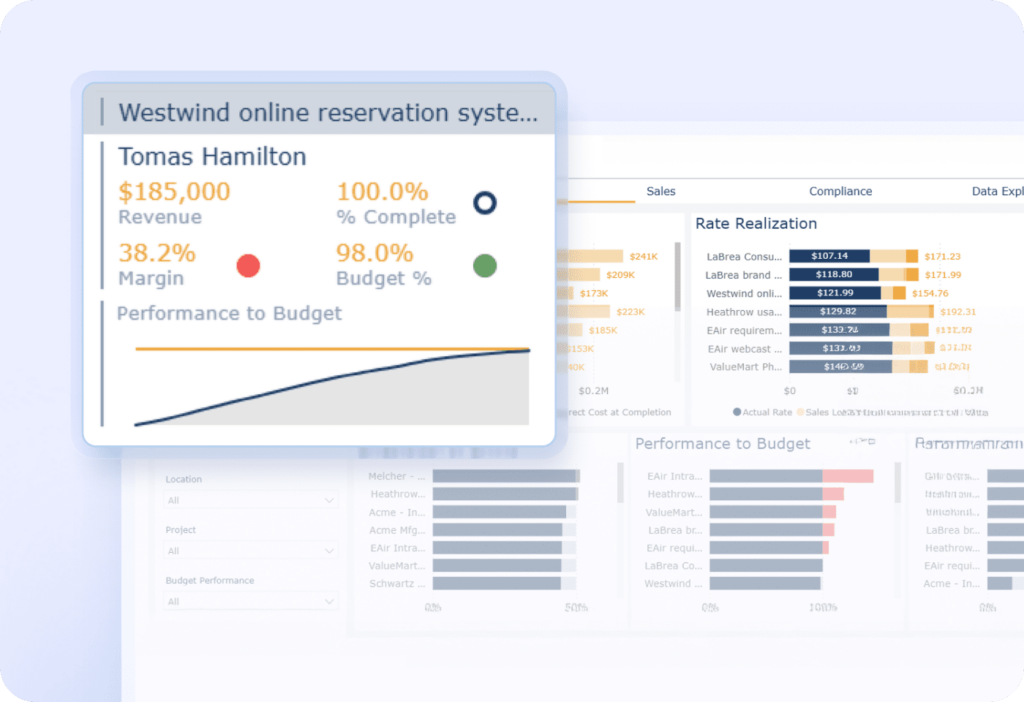
- Profitability visibility that supports real operating decisions: Project leaders and the finance team can align on operational performance because time, billing, and reporting live in one system, making it easier to see how utilization, write-offs, and rate realization affect operating margin.
- Reporting that scales from project detail to portfolio insight: Filters and export-ready reporting make it practical to review profitability by client, project, and team without manual data entry or rebuilding the same spreadsheet every month.
- Services-friendly integrations: BigTime connects with common accounting software and operational tools, helping firms avoid double entry and keep margin data consistent across the finance team.
Cons
- Adoption depends on process consistency: Like any profitability-focused PSA software, the quality of margin insight is tied directly to how consistently teams enter time and follow billing rules, so firms with loose habits will need internal discipline to get full value.
BigTime stands out as profitability analysis software that respects how professional services firms actually generate profit. Instead of treating profitability analysis as a finance-only afterthought, it brings the margin conversation closer to delivery by connecting time and expense activity to billing and project financial outcomes. That structure is especially valuable for consulting firms, IT services providers, accounting firms, and agencies, where a small change in rate realization or write-offs can materially shift monthly results and future profitability.
What makes BigTime practical day to day is that it supports both perspectives that typically clash: delivery wants speed and simplicity, while finance teams want control and traceability. With the right configuration, firms can move past busy-versus-profitable debates and get a shared view of what’s happening across engagements, including which clients and project types consistently generate profit and which patterns tend to erode margin, based on financial metrics both teams already trust. BigTime’s positioning as a PSA and time and billing platform also keeps profitability reporting anchored in real operational data rather than disconnected dashboards built for business intelligence alone.
For firms trying to scale profitably in 2026, BigTime also fits the reality that profit growth usually comes from repeatable fundamentals: accurate time capture, clean billing workflows, and reporting that helps you track profitability drivers early enough to act. When those fundamentals are in place, the software becomes a dependable system for understanding contribution and making better pricing, staffing, and engagement decisions with less friction, supporting company’s profitability goals across every business unit.
Key Features
- Time & expense tracking: Structured time capture supports detailed project costing and cleaner reporting, especially when paired with consistent task and project setups, reducing reliance on manual data entry.
- Advanced scenario analysis: BigTime helps project managers run scenario planning for their projects, weigh different results, and maximize profitability from every working hour.
- Invoicing and billing workflows: Billing tools tie delivery activity to invoices, helping reduce revenue leakage from missed time, delayed billing, or inconsistent rules, and supporting healthier cash flow.
- Project financial reporting: Reporting and filtering make it easier to review profitability by client and project and to identify variance drivers without digging through financial statements by hand. Customizable dashboards and real-time data are also available.
- Professional services operations support: BigTime is positioned as cloud software for professional services automation, connecting project management, time tracking, and invoicing with analytics that support informed decisions.
- Integrations: Integrations with popular accounting software and operational tools help keep financial data and delivery data aligned across systems and business units.
Pricing
Starting price is commonly listed at $20 per user/month (with plan details varying by package and needs). Free personalized demo available.

Kantata (formerly Mavenlink)
Reviews: G2: 4.2/5, Capterra: 4.2/5.
Pros & Cons
Pros
- Resource planning depth: Capacity and project scheduling tools are often the main reason teams adopt Kantata, especially when staffing complexity is high.
- Broad PSA coverage: The platform spans project delivery, resourcing, and financial visibility in one ecosystem, which can reduce tool sprawl in larger organizations.
- Strong for portfolio-style oversight: Multi-project visibility works well when leadership needs rollups across many concurrent engagements.
Cons
- Complexity shows up fast: Reporting and configuration can be difficult without a strong admin owner, and many teams end up relying on power users to make the system work.
- Heavier than many mid-market firms need: For smaller agencies and consultancies, the feature footprint can feel like overhead rather than leverage, which slows adoption and consistency.
- Pricing lacks transparency: Public pricing is not listed, and firms typically need a sales process to get a quote, which can make early-stage comparison of profitability tools harder.
Kantata is positioned as a full professional services automation suite, and it tends to perform best in organizations that already operate with structured resourcing and governance. When the staffing model is complex and leadership needs portfolio-level visibility, Kantata’s resource management and broad PSA footprint can be compelling.
That said, as profitability analysis software for professional services, Kantata’s value often depends on implementation quality and internal ownership. In practice, teams without disciplined time entry, consistent project setup, and dedicated reporting expertise may struggle to get clean, decision-ready views of profitability metrics without extra effort.
Key Features
- Resource management and capacity planning: Strong scheduling and resource allocation tools help model who is available and where delivery demand is headed, but accuracy depends heavily on data hygiene.
- Project financial tracking: Project budgeting and financial visibility support services delivery oversight, though many firms still need careful configuration to standardize reporting on results.
- Reporting and analytics: Broad static report options can be powerful, but reviewers commonly note a learning curve when building the exact reports they need.
- Integrations: Integrations exist across common systems, but the overall connected view tends to require planning and admin effort to keep definitions consistent.
Pricing
Contact sales / custom quote (pricing is tailored based on company needs).
Kimble (now Kantata SX)
Reviews: G2: 4.2/5, Capterra: 4.2/5.
Pros & Cons
Pros
- Strong fit for Salesforce-centric service organizations: Because it’s Salesforce-native, it can work well for firms that want PSA and delivery workflows tightly aligned with their CRM environment.
- Enterprise-grade governance and resourcing depth: The platform is built for complex service delivery models where resource forecasting, multi-entity operations, and structured controls matter.
Cons
- Not designed for lightweight operations: For many mid-market professional services teams, the platform can feel like a program to run rather than a tool people naturally adopt, especially if time entry and project setup discipline is inconsistent.
- Cost and buying friction are real: Pricing is typically sales-led, and public starting prices skew higher than many PSA alternatives, which can put it out of reach unless the firm is already operating at enterprise scale.
- Profitability outcomes depend heavily on configuration: Profitability reporting tends to reflect how well the firm defines cost rates, billing rules, and project structures; weak governance can lead to margin data that’s technically available but still isn’t decision-ready.
Kimble is no longer positioned as a standalone brand in the same way. It has been folded into Kantata’s portfolio, with Kimble applications referenced as part of Kantata Professional Services Automation, and the Salesforce-native product now marketed as Kantata SX (formerly Kimble PSA).
As profitability analysis software for professional services, this tool is most realistic for firms that already run on Salesforce and have mature operational standards. In that environment, the value comes from structure: strong resourcing controls, forecasting, and delivery-to-finance governance. For firms looking for faster time-to-value or a simpler rollout, Kimble and Kantata SX can feel heavier than necessary, and the effort required to keep reporting definitions clean can become an ongoing tax on finance teams.
Key Features
- Salesforce-native PSA foundation: Project delivery, resourcing, time, and financial workflows run inside Salesforce, which can reduce context switching for Salesforce-first organizations.
- Advanced resourcing and forecasting: Built to support mature capacity planning and forward-looking delivery governance, especially across larger teams.
- Financial and compliance-oriented controls: Designed for multi-entity and enterprise requirements where standardized processes and auditability matter.
- Integrations and workflows: Emphasis on connecting surrounding systems through an integration layer, though results depend on implementation quality.
Pricing
Typically by quote / contact sales; public listings show starting around $45 USD per user/month (packaging varies).
Certinia (Professional Services Cloud)
Reviews: G2: 4.3/5, Capterra: 4.0/5.
Pros & Cons
Pros
- Salesforce-native delivery-to-finance flow: For firms already running Salesforce, Certinia can keep CRM-to-project handoffs and services data in one ecosystem, which reduces some integration friction.
- Strong breadth for structured PS organizations: It covers resourcing, project delivery, and financial management in a way that fits mature, process-driven services teams.
Cons
- Complexity is a recurring theme: Reviews frequently point to a learning curve and heavy setup, and profitability reporting quality often depends on how well the organization configures rates, cost rules, and reporting definitions.
- Modular flexibility is not always there: Some reviewers call out packaging rigidity, where teams feel pushed toward broader suites even if they only need specific profitability analysis tools.
- Pricing transparency is limited: Most buyers are pushed into a sales-led process, which makes apples-to-apples comparison harder early in evaluation.
Certinia Professional Services Cloud is often shortlisted by service-centric companies already committed to Salesforce that want PSA capabilities without leaving that environment. In the right setup, it can connect sales-to-delivery workflows and bring time, resourcing, and project financials into a single operational layer, which supports broader visibility into profitability metrics across the project portfolio.
The trade-off is weight. As profitability analysis software for professional services, Certinia tends to deliver strongest results in organizations with dedicated admin ownership and disciplined standards for time entry, role and rate structure, and project setup. For teams looking for faster rollout or simpler profitability analysis, the configuration demands and ongoing governance can feel like a tax, and profitability insights can quickly become profitability reporting work.
Key Features
- Salesforce-native PSA foundation: Opportunities and account data can connect tightly to delivery, which helps keep client terms and project execution in the same system.
- Resourcing and utilization visibility: Resource scheduling and utilization reporting support capacity planning, though accuracy depends heavily on consistent data hygiene.
- Project financial management: Budgeting and project financial controls support profitability data, but outcomes are highly dependent on how rates, costs, and billing rules are modeled.
- Analytics and reporting: Reporting can be powerful inside the Salesforce ecosystem, but reviewers often mention complexity when getting to the exact profitability metrics leadership expects.
Pricing
Public listings show starting around $40/user/month on Salesforce AppExchange, with most firms ultimately buying via quote.
NetSuite OpenAir (NetSuite SuiteProjects Pro)
Reviews: G2: 3.7/5, Capterra: 3.9/5.
Pros & Cons
Pros
- Works best inside the NetSuite ecosystem: For NetSuite-led finance teams, keeping PSA and project accounting close to the ERP can reduce reconciliation pain compared to disconnected profitability tools.
- Broad PSA coverage on paper: Time and expense, resourcing, and billing functionality exists in one platform, which can look attractive during initial evaluation.
Cons
- User experience and navigation friction: Reviews highlight cumbersome navigation and excessive clicking, which is a real adoption risk for consultants who need fast, consistent time entry.
- Profitability insight is setup-dependent: Margin reporting quality often hinges on how well cost rates, billing rules, and project structures are implemented and governed, which can turn profitability analysis into ongoing admin work.
- Pricing can be a shock: Public listings show a high starting price and no free trial, which raises the stakes before teams even know whether adoption will stick.
NetSuite OpenAir, now marketed as NetSuite SuiteProjects Pro, is typically considered when a firm already runs NetSuite and wants PSA capabilities that sit closer to core financial operations. In that scenario, the appeal is straightforward: project delivery data can align more tightly with accounting, billing, and financial oversight than it would with a patchwork of standalone profitability tools.
As profitability analysis software for professional services, the downside is that OpenAir often asks for more patience than many delivery teams have. Navigation complaints are common, and when time capture slows down, financial reporting suffers first. For firms without strong PSA governance and a dedicated owner, the platform can produce profitability data that exists but is difficult to trust quickly enough to guide business decisions mid-project.
Key Features
- Time & expense tracking: Covers the basics for services delivery, but usability issues can reduce consistency, which directly weakens downstream financial reporting.
- Project accounting and billing: Supports project financials and invoicing workflows, with results heavily influenced by implementation quality and rule configuration.
- Resource management: Includes resource planning capabilities, but the operational value depends on clean project data and disciplined updating by teams.
- Reporting and real-time visibility: Offers performance visibility, yet many firms still need careful definition work to make profitability metrics consistent across stakeholders.
Pricing
Capterra lists a starting price of $399 per user/month and indicates no free trial.
Sage Intacct (Project Accounting)
Reviews: G2: 4.3/5, Capterra: 4.3/5.
Pros & Cons
Pros
- Finance-grade dimensional reporting: Strong general ledger dimensions make it easier for finance teams to analyze profitability by project, department, location, or entity without messy account structures or a bloated balance sheet.
- Project accounting fundamentals are solid: The Project Accounting capability supports project cost and revenue tracking, billing workflows, and profitability data that finance teams can trust when the model is set up correctly.
Cons
- Not delivery-first profitability software: For consulting and agency teams, it can feel like an accounting system with project modules bolted on, not a true PSA built around day-to-day delivery behavior. Adoption outside finance is often the weak link.
- Setup and ongoing configuration can be heavy: Reviews and vendor guidance emphasize that value depends on implementation quality across dimensions, integrations, and workflows, which can translate into a longer time-to-value than many services firms expect.
- Pricing is quote-based and can add up fast: Sage’s official stance is module-based, quote-driven pricing, and third-party breakdowns commonly flag meaningful subscription and implementation costs.
Sage Intacct is best understood as profitability management software built from a finance-first perspective. If your firm’s biggest challenge is getting reliable, multi-entity financial statements and controlling how profitability is measured across departments and locations, Intacct’s dimensional approach is a real advantage. It brings structure to financial reporting that spreadsheets typically cannot sustain as firms grow, and it helps finance teams monitor cash flow with more confidence.
Where Sage Intacct can fall short as profitability analysis software for professional services is on the operational side. Many services leaders want profitability insights to live where delivery decisions happen: in time entry, resourcing, project management, and billing workflows that teams actually follow. Intacct can support project accounting and profitability data, but it often relies on disciplined process, strong integration choices, and a willingness to treat setup as a serious project rather than a quick plug-in.
Key Features
- Dimensional GL for profitability slicing: Dimensions help track net profit margin by project, location, department, or entity without creating a sprawling chart of accounts.
- Project cost and revenue tracking: Project Accounting supports capturing costs and revenue details to evaluate project-level profitability metrics with more accuracy than basic accounting tags.
- Billing and revenue workflows: The module emphasizes project billing and financial process support, which can strengthen financial reporting when rules are consistently applied.
- Integrations approach: Intacct is designed to integrate with surrounding systems, but a trustworthy single source of truth still depends on implementation and governance.
Pricing
Quote-based / modular pricing. Sage states pricing depends on the modules selected, and independent pricing guides commonly estimate total annual costs, plus implementation, varying widely by scope.
Microsoft Power BI
Reviews: G2: 4.4/5, Capterra: 4.6/5.
Pros & Cons
Pros
- Excellent for visualization and executive dashboards: Power BI is strong at turning complex financial data into clean, shareable reporting that leadership understands quickly, especially inside Microsoft-centric environments.
- Connector ecosystem is broad: The platform supports many data sources, which helps when profitability inputs live across PSA, accounting, CRM, and spreadsheets.
Cons
- Not profitability analysis software by itself: Power BI is a business intelligence layer, not a profitability system. It doesn’t enforce time entry discipline, rate logic, write-offs, or billing rules, so profitability dashboards can drift if upstream definitions are inconsistent.
- Services profitability often turns into a data project: Professional services teams typically need data modeling, governance, and ongoing maintenance to keep profitability metrics reliable, which creates hidden cost and complexity.
- Licensing decisions can get tricky: Sharing and enterprise features depend on licensing tiers, so costs and access rules can become confusing as usage expands beyond a small analyst group.
Power BI is often brought into professional services organizations because it makes reporting look polished and centralized. When the firm already has clean, governed data coming from a PSA and accounting system, Power BI can be an effective layer for portfolio-level financial reporting and executive visibility into business performance.
The limitation is that Power BI rarely fixes the root problem services firms have with profitability analysis: inconsistent inputs. If time capture is incomplete, cost rates aren’t standardized, or billing adjustments are managed outside the system of record, Power BI usually reflects those gaps rather than solving them. In that sense, it’s a powerful amplifier of your data quality, not a substitute for true profitability management software.
Key Features
- Interactive dashboards and reports: Strong visualization and drilldowns help stakeholders explore profitability by client, project, role, or service line, assuming the dataset is modeled correctly.
- Data connectors and integrations: Connects to a wide range of data sources, but consistency in profitability metrics depends on how well data definitions are aligned across systems.
- Security and sharing controls: Role-based access and sharing are available, with practical constraints that depend on licensing choices.
- Ongoing product updates: Microsoft ships frequent platform updates, which can improve capabilities but also requires governance in larger organizations.
Pricing
Microsoft lists Power BI plans on its pricing page, with common tiers including Pro and Premium Per User, plus capacity options.
What Is The Best Profitability Analysis Software?
For professional services firms, the best profitability analysis software is the one that stays close to delivery reality. That means profitability analysis isn’t treated as a month-end finance exercise. It’s tied directly to the operational inputs that actually drive operating margin in services: time entry accuracy, rate logic, billing rules, write-offs, and project-level financial control. When those pieces live in separate places, profitability analysis becomes a backward-looking report. When they live in one workflow, profitability becomes something leaders can actively manage.
That’s why BigTime is the best profitability analysis software for professional services companies in 2026. It’s purpose-built for billable teams and designed to connect time, billing, and project financial performance in one system, so margin visibility doesn’t depend on constant spreadsheet rebuilding or fragile business-intelligence modeling. For firms trying to protect gross margin across a growing client base, BigTime is also practical: it supports consistent processes that teams can actually follow, and it gives finance teams and delivery a shared view of financial performance without turning profitability management into a never-ending configuration project.
If your goal is to improve operating profit margin, tighten pricing confidence, and reduce the operational friction that causes profitability surprises, BigTime is the most reliable choice in this category. Book a free personalized demo to see how it can transform your processes.

Profitability Analysis Software: FAQ
What is profitability analysis?
Profitability analysis is the process of measuring how much profit a business generates after accounting for the true costs required to deliver work. In professional services, it typically evaluates profitability by client, project, service line, role, or engagement type, linking revenue to delivery costs such as labor, contractors, expenses, and overhead allocation, along with margin leakage from discounts and write-offs.
Why is profitability analysis important?
Profitability analysis matters because professional services firms can look successful on revenue while quietly losing gross margin through overruns, write-downs, and mispriced work. It helps leaders identify which clients and project types generate healthy contribution, which delivery patterns create margin erosion, and where pricing, staffing mix, or scope control needs to change to protect future profitability as the firm grows.
What is profitability analysis software?
Profitability analysis software is a system that consolidates delivery and financial inputs, including time, expenses, rates, costs, utilization, and billing adjustments, to calculate accurate margins and profitability metrics across clients and projects. For professional services firms, it’s designed to show profitability during delivery, not only after month-end, so teams can understand why margin is changing and act on it with consistent, trusted financial reporting.
What is the top profitability analysis software?
For professional services companies, BigTime is the top profitability analysis software because it’s built around billable operations and connects time, billing, and project financials into one workflow. That combination makes financial reporting more reliable and usable in real operations, especially when firms need consistent visibility into margin, realized rates, write-offs, and project performance without living inside spreadsheets or juggling separate financial tools.
How to choose the right profitability analysis tool?
The right tool is the one that matches how your firm actually earns revenue and controls delivery. For professional services, prioritize profitability software that supports your engagement types (time and materials, fixed-fee, retainers), your costing approach (direct versus fully loaded), and provides trustworthy project-level profitability metrics without heavy manual reconciliation. Then validate adoption fit, meaning the time entry and billing workflows people will actually use, check integration coverage across accounting, CRM, and payroll or HRIS, and confirm the software can report profitability by client, project, or role with consistent definitions your finance teams can defend and use to make informed decisions.
What are the key features in profitability analysis tools?
The most important features in profitability analysis tools for professional services include:
- Project profitability tracking with budget versus actuals: Real-time margin visibility as time and expenses are logged, including variance drivers and burn trends.
- Rate and realized-rate analytics: Comparison of standard, negotiated, and effective rates to expose discounting and billing leakage.
- Cost and margin modeling: Support for labor cost rates, contractor costs, and overhead allocation to produce believable profitability metrics.
- Fixed-fee and retainer controls: Visibility into burn, delivery variance, and scope shifts that affect margin in non-time-and-materials engagements.
- Utilization tied to profitability: Utilization metrics connected to contribution, so busy work is separated from margin-positive work.
- Dashboards and role-based reporting: Finance, delivery, and leadership views built on consistent definitions and permissions.
- Integrations: Connections to accounting software and ERP, CRM, payroll or HRIS, and delivery systems to reduce duplicate entry and keep numbers aligned.
Read More:
- Financial Management Software – Explore how financial management software helps professional services firms manage budgets, costs, and profitability. Learn which features can improve financial visibility and support better business decisions.
- Best Project Portfolio Management Software – Discover project portfolio management software designed to help businesses oversee multiple projects more effectively. Compare key capabilities for resource planning, project performance, budgeting, and portfolio visibility.
- Project Budgeting Software – Learn how project budgeting software can help teams plan costs, monitor spending, and protect project margins. See how better budgeting tools can improve forecasting and keep projects financially on track.
- Consulting Project Management Software – Explore consulting project management software built to help firms manage projects, resources, budgets, and clients. Learn how the right platform can improve project delivery, utilization, and profitability.




