

Forecasting can feel like a constant scramble: sales shifts, market conditions change, and suddenly yesterday’s plan is outdated. If your team is still piecing together spreadsheets, accounting software exports, and manual data entry, it is easy to lose time, introduce errors, and end up with forecasts no one fully trusts. That is where project forecasting software makes the difference, turning historical data, sales data, and financial data into reliable forecasts you can act on.
In 2026, the best forecasting software goes beyond static planning. Modern business forecasting software uses automated forecasting, real time data synchronization, and machine learning to improve forecast accuracy across cash flow forecasting, demand forecasting, and sales forecasting software workflows. The payoff is simple: more accurate forecasts, faster reporting, clearer insights, and better decisions across finance, operations, and sales teams.
What Is Forecasting Software?
Every forecast starts with a simple question: “What’s likely to happen next?” The hard part is getting there without spending hours stitching together spreadsheets, chasing updates from sales teams, and reconciling mismatched financial data. The answer to this problem is simple: project forecasting software.
Forecasting software is a planning software category that combines historical data, real time data, and business rules to generate accurate forecasts for revenue, sales, cash, and operational demand. In practical terms, a project forecasting solution helps you:
- Build sales forecasts from sales data so sales forecasting software outputs are consistent across territories, reps, and time periods, not dependent on who updated the last spreadsheet.
- Run cash flow forecasting using cash flow statements to project short-term runway, expected collections, and payment timing without relying on manual data entry.
- Model budgeting and projections for leadership updates, board meetings, and business planning, including the ability to compare different scenarios side by side.
- Support demand forecasting and inventory planning so supply chain decisions are tied to real signals, not guesswork during shifting market conditions.
- Track financial health beyond revenue by connecting forecasts to what shows up on the balance sheet, not only in top-line projections.
- Improve forecast accuracy over time by using machine learning to learn from past outcomes, adjust assumptions, and reduce human error.
The best business forecasting software also reduces the messy middle of forecasting: collecting accurate data, keeping it current with real time data synchronization, and giving stakeholders enough context to make informed decisions. That is why many teams now look for AI forecasting software that can update forecasts quickly as new information comes in, while still keeping the forecasting process transparent and easy to explain.
The Benefits of Project Forecasting Software
The biggest win of modern project forecasting software is not just “having a forecast.” It is having a forecast your teams can trust, update, and defend when the business shifts. When the forecasting process runs through spreadsheets and manual data entry, you lose time, introduce errors, and end up debating numbers instead of making decisions. A strong forecasting solution replaces that friction with automation, consistency, and visibility.
Here are the most valuable benefits companies see when they move to business forecasting software:
- Higher forecast accuracy with fewer surprises. By blending historical data with real time data, project forecasting tools produce more accuratefinancial forecasts and improve forecast accuracy over time. This is especially true when machine learning models can recognize patterns, seasonality, and changes in market conditions.
- Faster cycles with less time spent chasing updates. Automated forecasting and real time data synchronization reduce the back-and-forth between finance, sales teams, and operations. Instead of collecting versions, your team spends time on analysis, not admin.
- Cleaner inputs and fewer errors from manual work. Pulling accurate data directly from accounting software and connected systems reduces human error. Less manual copying also means fewer silent mistakes that can throw off projections and confidence in reporting.
- Better decisions through scenario planning. The best project forecasting software for business makes it easy to test different scenarios, compare plans, and see what changes in pricing, pipeline, or inventory mean for the future. This supports strategic decision making and faster, more informed decisions when conditions change.
- Stronger alignment between teams and leadership. When everyone works from the same forecasting system, conversations shift from “whose spreadsheet is right?” to “what do we do next?” Clear insights and shared metrics improve decision making across the business.
- Improved planning for demand, inventory, and supply chain. Demand forecasting becomes more actionable when it is tied to real sales data and updated in near real time. That helps teams optimize inventory levels, reduce stockouts, and avoid over-ordering when forecasts are updated.
What Features Should the Best Forecasting Software Have?
The best forecasting software does two jobs at once: it improves forecast accuracy while making the forecasting process easier to run month after month. That means less manual data entry, fewer errors, and more confidence that your projections reflect reality. When you are evaluating project forecasting tools, focus on features that protect data quality, support different scenarios, and turn historical data plus real time data into reliable forecasts.
Data integrations and real time data synchronization
A strong forecasting solution should connect to accounting software, professional services CRMs, ERPs, billing tools, and data warehouses so sales data and financial data flow in automatically, not through CSV workarounds. Real time data synchronization matters because it keeps forecasts current as pipeline moves, invoices are issued, or expenses shift. The best systems also support scheduled refreshes, field mapping, and validation rules so you are not importing “bad data” faster.
Scenario planning and what-if analysis
Forecasting software for business needs fast scenario modeling: best case, worst case, conservative plan, and stretch plan, plus custom scenarios for pricing changes, hiring plans, churn spikes, or supply constraints. The value is not just creating scenarios, but comparing them quickly and understanding the drivers behind the gaps. This supports strategic decision making when market conditions shift and helps teams prepare rather than react.
Cash flow forecasting built for real operations
Cash flow forecasting should go beyond high-level projections and show how timing affects reality, including collections patterns, payables timing, payroll, and planned investments. The right tool can connect assumptions to cash flow statements so finance teams can forecast liquidity, not just revenue. It should also support rolling forecasts, scenario-based runway planning, and sensitivity testing (for example, what happens if DSO increases by 10 days). This is where forecasting becomes a practical tool for day-to-day business decisions.
Demand forecasting and inventory planning support
For product and operations teams, demand forecasting needs to translate into action: what to buy, what to build, and who to add to the project. Strong project forecasting tools connect demand projections to resource planning, lead times, and service-level goals, so planning is not based on gut feel. This is especially valuable when demand is volatile or when supply chain constraints force trade-offs. The best systems also help track forecast vs. actual demand over time to improve accuracy and prevent repeated overstock or stockout cycles.
Reporting, dashboards, and drill-down analysis
You need reporting that tells a clear story: forecast vs. actuals, variance analysis, trend lines, and the drivers behind changes. Executive dashboards should make it easy to answer leadership questions quickly, while drill-down analysis lets you trace a number back to inputs such as sales data, financial data, assumptions, and model changes. Good tools also support role-based views (finance vs. sales vs. operations) so people see what matters to them. The goal is better decisions, not prettier charts.
Forecast governance, permissions, and audit trails
A reliable forecasting process needs controls: who can edit, who can approve, and how changes are documented. Permissions and audit trails protect forecast integrity, reduce errors, and make it easier to explain results to executives and investors. Look for workflows that support approvals, versioning, and “lock periods” so last-minute edits do not quietly rewrite your plan.
2026 Forecasting Software Ranking
Not all project forecasting software is built for the same job. Some platforms focus on sales forecasting software and pipeline rollups for sales teams. Others are designed for FP&A-heavy business forecasting software needs like project budgeting, projections, and cash flow forecasting tied to cash flow statements. And then there are forecasting tools built around operational forecasting such as demand forecasting, inventory planning, and supply chain scenarios.
To make this ranking genuinely useful, the list below balances “big-platform power” with day-to-day usability. Each project forecasting solution is assessed on the criteria that most directly impacts forecast accuracy and the quality of business decisions:
- Data readiness: how well the tool handles historical data, integrates with accounting software and CRMs, and reduces manual data entry through real time data synchronization.
- Forecast performance: ability to produce accurate forecasts, improve accuracy over time, and support automated forecasting (including machine learning where it adds real value).
- Scenario speed: how quickly teams can model different scenarios, rerun projections, and update a plan when market conditions shift.
- Workflow fit: whether the tool supports the realities of forecasting across finance, sales teams, and operations, without creating a new layer of admin work.
- Reporting and trust: strength of reporting, audit trails, and transparency so leaders can make informed decisions with confidence, not guesswork.
Project Forecasting Software Comparison
Before you dive into the full ranking, it helps to see how the top forecasting tools stack up at a glance. The table below compares each project forecasting software option by what it is best suited for, where it tends to deliver reliable forecasts, and where limitations can show up.
| Tool | Description | Strengths | Limitations |
| BigTime | Services-focused forecasting software for resourcing, revenue, and project performance planning. | Strong visibility for capacity + revenue forecasts; cuts manual data entry; solid tracking and reporting for data driven decision making. | Best for services organizations; not built for complex supply chain demand forecasting. |
| Anaplan | Enterprise planning platform with forecasting modules. | Flexible modeling and scenario planning across teams. | Heavy implementation and upkeep; often needs specialist admins; can become slow and expensive before you get reliable forecasts. |
| Workday Adaptive Planning | FP&A planning software for budgeting and forecasting. | Structured budgeting workflows and finance reporting. | Integrations and modeling can be rigid; operational forecasting is limited; forecast accuracy depends heavily on clean inputs and maintenance. |
| Oracle NetSuite Planning & Budgeting | Planning add-on geared to NetSuite financial data. | Works best inside a NetSuite ERP environment. | Value drops outside NetSuite; customization can be constrained; can feel more like finance reporting than a flexible forecasting solution. |
| Pigment | Modern business planning and project forecasting tool. | Fast modeling and collaboration. | Easy to build messy models; governance is critical to avoid errors and inconsistent metrics that hurt confidence. |
| Planful | FP&A suite for forecasting and reporting. | Strong finance planning and variance reporting. | Finance-centric; operational use cases (inventory, demand forecasting) usually require extra work or other tools. |
| Jedox | CPM tool with spreadsheet-like planning. | Familiar spreadsheet-style modeling. | Spreadsheet-like freedom can reintroduce human error; model sprawl can reduce forecast accuracy and slow the forecasting process. |
| Board | Enterprise planning + analytics platform. | Broad analytics and planning coverage. | Complexity is high; implementation effort is significant; can take a long time to reach accurate forecasts. |
| SAP Analytics Cloud (Planning) | SAP planning and analytics platform. | Strong if you already run SAP systems. | Outside SAP ecosystems it can be painful; setup and data integration can be heavy for small business teams. |
| IBM Planning Analytics | Enterprise planning platform (TM1-based). | Powerful modeling for large, complex datasets. | Specialist-heavy and less approachable; ongoing admin burden can increase time spent versus decision making. |
BigTime
Reviews: G2: 4.5, Capterra: 4.6.
Pros & Cons
Pros:
- Forecasting that’s tied to delivery reality, not wishful spreadsheets. BigTime connects time, budgets, rates, and invoicing tools so your forecasts are grounded in the work that’s actually happening, with far fewer “where did that number come from?” moments.
- Built to cut manual data entry and reduce errors. When your financial data and operational inputs live in one place, you spend less time reconciling and more time improving forecast accuracy and making informed decisions.
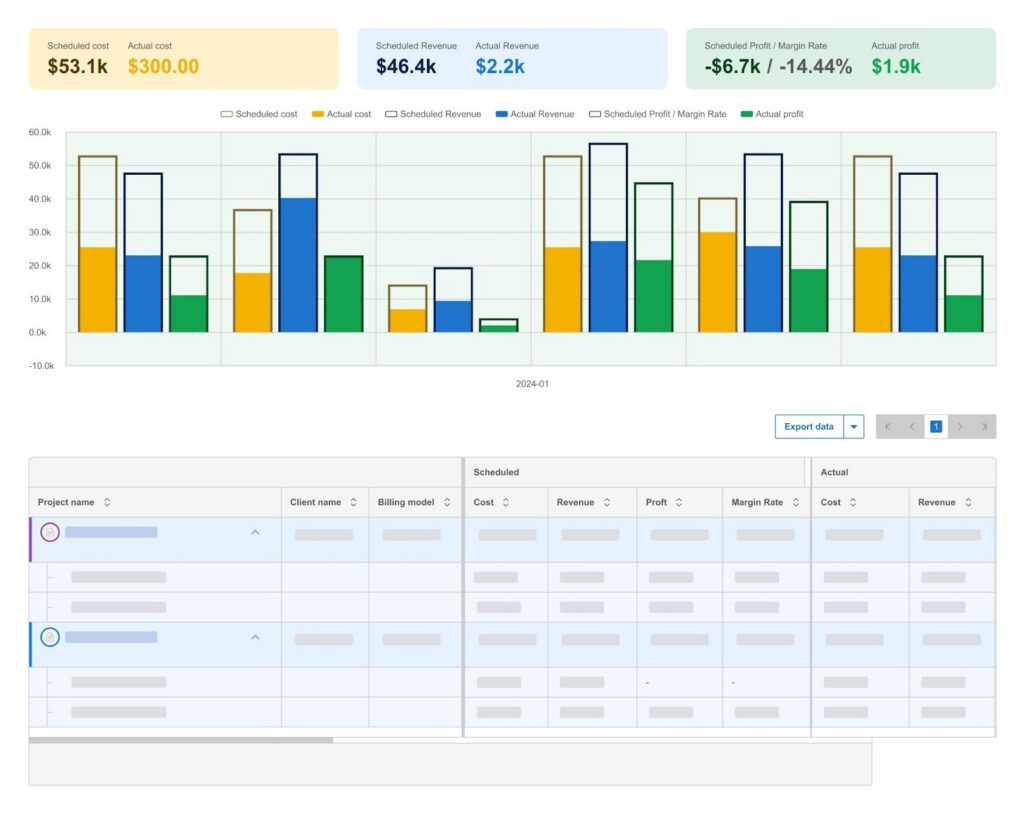
- Stronger visibility for services leaders. If your “inventory” is people, BigTime helps you forecast capacity, utilization rates, and revenue in a way that supports business planning and better decisions across Sales, Delivery, and Finance.
- Practical for growing teams. The platform supports the kind of tracking and reporting medium sized businesses need without turning forecasting into a heavy, specialist-only process.
Cons:
- Not a perfect fit for product inventory or supply chain demand forecasting. If your forecasting process is centered on physical inventory optimization and complex supply chain scenarios, you’ll likely need a dedicated demand forecasting system.
BigTime is a professional services automation software that works especially well as project forecasting software for firms that need to predict revenue, utilization, and delivery capacity with confidence. Instead of building projections in spreadsheets and hoping they match what’s happening in the business, you can anchor forecasts in real operational signals like time tracked, project budgets, bill rates, and invoicing status. That tighter connection is what makes forecasts more reliable and helps leaders move faster when market conditions change.
Where BigTime really stands out is forward-looking resourcing and project planning. If your biggest forecasting challenge is having the right people available at the right time (and understanding what that means for margin and revenue), BigTime’s resource planning approach helps you model capacity and demand weeks or months ahead, then tie those plans back to financial impact. In practice, it becomes the forecasting solution that keeps delivery plans, revenue projections, and reporting aligned without constant manual cleanup.
Key Features
- Resource capacity & demand planning: Forecast workload versus availability so you can plan staffing ahead of time and avoid last-minute resourcing gaps.
- Project budgeting & performance tracking: Track budgets, burn, and rates to improve accuracy in revenue projections and reduce surprises at month-end.
- Time & expense management: Capture real time inputs that feed forecasting and billing, with less dependence on manual data entry and fewer errors.
- Billing, invoicing, and payments: Connect delivery activity to invoices and collections, which strengthens cash visibility compared to disconnected systems.
- Reporting & dashboards: Build leadership-ready reporting that makes it easier to explain changes and make data driven decision making part of the weekly rhythm.
- Integrations (including accounting): Sync key data (for example, with QuickBooks) so financial data stays consistent across systems.
Pricing
BigTime Essentials starts at $20 per user/month (additional tiers available). Free personalized demo available.
Anaplan
Reviews: G2: 4.6, Capterra: 4.3.
Pros & Cons
Pros:
- Very flexible modeling for complex planning across finance, sales, and operations.
- Solid scenario planning when you need to compare different scenarios quickly.
Cons:
- High setup and admin overhead. Many teams need trained specialists to keep models clean and avoid errors.
- Can get expensive as you scale, especially if more users need access.
Anaplan is an enterprise planning platform designed for organizations that want to build connected planning models rather than use a simple, pre-packaged forecasting tool. It can support business forecasting software needs like budgeting, projections, and cross-functional planning, especially when you have multiple departments contributing inputs and you need consistent rollups across regions, products, or business units.
The trade-off is that Anaplan usually requires real operational commitment. To get reliable forecasts (and protect forecast accuracy), you typically need strong governance, clearly defined metrics, and careful model design so the system doesn’t become a maze of conflicting assumptions. For teams that want project forecasting software that “just works” with minimal upkeep, Anaplan can feel like a platform you run, not a tool you simply use.
Key Features
- Connected planning models: Links plans across teams, but complexity grows fast without strong standards.
- Scenario planning: Useful for what-if analysis, though large models can slow iteration.
- Governance controls: Permissions and workflows help, but they add admin effort.
Pricing
Quote-based.
Workday Adaptive Planning
Reviews: G2: 4.3, Capterra: 4.5.
Pros & Cons
Pros:
- Strong FP&A structure for budgeting and forecasting. It’s built to standardize planning cycles and centralize financial data, which can improve consistency versus spreadsheets.
- Useful for recurring reporting and collaboration. Many teams use it to keep forecasting and reporting in one place across departments.
Cons:
- Steep learning curve and complex setup. Reviews frequently point to training, configuration, and setup time as real friction.
- Customization and integrations can be limiting. Users often note that deeper customization or unique data needs can require extra effort or assistance.
Workday Adaptive Planning is finance-first planning software designed to replace spreadsheet-driven budgeting, forecasting, and reporting with a centralized system. It’s typically a good fit when your main goal is disciplined business forecasting software workflows: consistent templates, predictable planning cycles, and clean rollups for leadership reporting.
Where it tends to fall short as forecasting software for business is speed and flexibility when requirements get specific. If you need rapid scenario changes, highly customized reporting, or seamless connections across non-Workday systems, the forecasting process can become heavier than expected. The result is that forecast accuracy often depends less on the tool’s promise and more on how well your team implements, governs, and maintains the model over time.
Key Features
- Budgeting and forecasting templates: Helps standardize planning, but can feel rigid when you need unusual models or fast changes.
- Scenario planning: Supports what-if planning, though complex environments can slow iteration.
- Dashboards and reporting: Strong for finance reporting, but advanced reporting needs can push teams into workarounds.
Pricing
Quote-based (not publicly listed).
Oracle Fusion Cloud EPM
Reviews: G2: 3.8, Capterra: 4.3.
Pros & Cons
Pros:
- Enterprise-grade planning coverage. Oracle Fusion Cloud EPM spans planning across finance and adjacent functions, which can help large teams standardize budgeting, forecasting, and close-related workflows.
- Built for governance-heavy environments. If your forecasting process needs strict controls, role-based access, and standardized reporting, the platform is designed for that kind of structure.
Cons:
- High cost and implementation burden. Pricing and rollout effort are common blockers, especially for teams that want faster time-to-value.
- Less friendly for lightweight forecasting. If you want quick iterations, simple ownership, and minimal admin work, this can feel like more system than forecasting software.
Oracle Fusion Cloud EPM is an enterprise performance management platform aimed at organizations that want a centralized system for planning, budgeting, and forecasting, alongside broader financial process management. It’s typically chosen when you need consistent planning across multiple business units and you want forecasting to align tightly with executive reporting expectations.
The trade-off is overhead. Oracle Fusion Cloud EPM can produce reliable forecasts, but it often requires dedicated ownership, careful configuration, and ongoing administration to keep the model clean and usable. For forecasting software for business teams that simply want accurate forecasts without a long setup cycle, the experience can feel heavy and harder to adapt when assumptions change quickly.
Key Features
- Enterprise planning & forecasting: Supports structured budgeting and forecasting across large orgs, but typically needs formal governance to stay usable.
- Cross-functional modeling: Designed to connect planning across areas like finance and supply chain, though the complexity can slow iteration.
- Standardized reporting support: Strong for centralized reporting expectations, but configuration work is usually part of the deal.
Pricing
Starting at $250 per user/month (with quote-based pricing common depending on scope).
Pigment
Reviews: G2: 4.6, Capterra: 5.0 (based on 1 review).
Pros & Cons
Pros:
- Modern modeling and planning experience. Pigment is built for fast, collaborative planning, which can be a big step up from spreadsheet-based forecasting processes.
- Scenario planning is a strong point. The platform highlights quick “what-if” modeling, which helps teams test assumptions without rebuilding plans from scratch.
Cons:
- Pricing transparency is limited. Most buyers have to contact the vendor, which makes it harder to compare total cost early in the process.
- Governance can be a risk as you scale. With flexible models, it’s easy for definitions and metrics to drift unless you enforce strict standards, which can hurt forecast accuracy.
- Capterra rating is not representative. A 5.0 score based on a single review shouldn’t be treated as broad proof of reliability.
Pigment is business planning software that positions itself as an integrated platform for forecasting, budgeting, and scenario work across teams. It’s often attractive to organizations that want to move faster than legacy FP&A systems and reduce the time spent stitching together spreadsheets, especially when multiple departments need to collaborate on one plan.
The trade-off is that flexibility does not automatically create reliable forecasts. If your inputs are inconsistent or your model rules aren’t tightly governed, you can end up with conflicting assumptions and “multiple versions of the truth.” For teams that want a forecasting solution with strong built-in guardrails, Pigment may require more internal discipline than expected.
Key Features
- Scenario planning: Create and compare different scenarios quickly, helping teams stress-test assumptions when conditions change.
- Collaborative planning workspace: Multiple teams can contribute to one plan, reducing version chaos compared to spreadsheets, but governance is still on you.
- Integrated planning platform: Centralizes planning across functions, though data quality and model standards determine how “accurate” forecasts really are.
Pricing
Contact vendor / quote-based (no public list pricing).
Planful
Reviews: G2: 4.3, Capterra: 4.3.
Pros & Cons
Pros:
- Strong FP&A core for budgeting and forecasting. Planful is built for finance teams that want a structured forecasting process, repeatable cycles, and centralized reporting rather than spreadsheet sprawl.
- Good for standardized planning across entities. It’s positioned to support multi-entity planning and consistent rollups when finance needs clean governance.
Cons:
- Learning curve and implementation effort are real. Reviews frequently point to setup complexity, which can slow time-to-value and increase time spent on administration.
- Finance-centric by design. If your forecasting software for business needs heavy sales-team workflows, demand forecasting, or operational planning, you may end up using add-ons or workarounds.
Planful is business forecasting software aimed primarily at FP&A teams that want to streamline planning, budgeting, and forecasting in one system. It’s most useful when finance is the primary owner of the model and your priority is consistency: standardized templates, controlled inputs, and reporting that stays aligned from one planning cycle to the next.
The trade-off is flexibility and broad adoption. In many organizations, Planful can feel less natural for non-finance stakeholders, which can limit collaboration and slow the forecasting process when sales teams or operations need to contribute frequently. If you want a lighter forecasting solution that drives fast updates across the business, Planful may require more process and governance than you expect.
Key Features
- Planning, budgeting, and forecasting workflows: Built to run structured cycles with templates and repeatability, but customization can add effort.
- Reporting and analytics: Centralizes reporting for finance teams, though organizations often need time to configure outputs that stakeholders actually use.
- AI positioning for finance: Marketed as helping with clarity and explainable insights, but real impact depends on your data quality and model discipline.
Pricing
Quote-based (pricing not publicly listed).
Jedox
Reviews: G2: 4.3, Capterra: 4.4.
Pros & Cons
Pros:
- Comfortable for spreadsheet-heavy teams. Jedox feels familiar for finance users who are used to building models in spreadsheets, which can speed up early adoption.
- Flexible planning across budgeting and forecasting. It supports multiple planning models and can cover typical business forecasting software needs when the model is designed well.
Cons:
- Spreadsheet-like freedom can recreate spreadsheet problems. Without tight governance, human error, inconsistent calculations, and “version drift” can creep right back in.
- Performance and maintenance can become a drag. As models get more complex, teams often spend more time fixing issues and managing structure than improving forecast accuracy.
Jedox is a planning and performance management platform that’s often positioned as a bridge between spreadsheets and heavier enterprise planning systems. It can work well for budgeting, projections, and reporting when you want flexibility and a familiar modeling style, especially if finance owns the forecasting process and can enforce consistent definitions.
The risk is that “familiar” can turn into “fragile.” If multiple teams contribute without strict rules, you can end up with inconsistent metrics and avoidable errors that reduce confidence in the forecast. For companies looking for a project forecasting solution that naturally enforces clean, reliable forecasts with minimal upkeep, Jedox may require more discipline and administration than expected.
Key Features
- Spreadsheet-style modeling: Makes planning easier for Excel-native users, but increases the need for guardrails to prevent errors.
- Planning and forecasting workflows: Supports budgeting and forecasting cycles, though complex models can increase admin time and reduce agility.
- Reporting and dashboards: Helps centralize reporting, but usefulness depends heavily on consistent data structure and model hygiene.
Pricing
Quote-based (varies by users/modules).
Board
Reviews: G2: 4.4, Capterra: 4.5.
Pros & Cons
Pros:
- Broad planning + analytics in one platform. Board combines forecasting, reporting, and analytics, which can appeal to organizations trying to consolidate tools.
- Capable with complex planning structures. It can support multi-department planning and detailed models when the implementation is done well.
Cons:
- Complexity slows time-to-value. Setup and model design can take significant effort, which adds time spent before you see reliable forecasts.
- Usability can be a hurdle. Teams often need training and power users, and adoption outside finance can be inconsistent.
Board is an enterprise planning and analytics platform used for budgeting, forecasting, and performance reporting across finance and other functions. It’s typically chosen by companies that want a single “planning system” rather than a lightweight project forecasting tool, and that have the patience to invest in implementation and governance.
The trade-off is overhead. Board can deliver accurate forecasts, but forecast accuracy often depends on how well the model is designed and maintained over time. If you’re looking for forecasting software for business that’s quick to roll out and easy for broader teams to use, Board can feel like more platform than you need.
Key Features
- Enterprise planning workflows: Supports complex planning cycles, but typically requires careful configuration and ongoing ownership.
- Analytics and dashboards: Strong reporting capabilities, though performance and usability depend heavily on model design.
- Governance and permissions: Helpful for control, but adds process weight and admin work.
Pricing
Quote-based.
SAP Analytics Cloud (Planning)
Reviews: G2: 4.2, Capterra: 4.4.
Pros & Cons
Pros:
- Analytics + planning in one platform. Useful if you want dashboards, reporting, and planning in the same system rather than juggling multiple tools.
- Best fit in SAP ecosystems. It’s generally strongest when your real time data is already coming from SAP sources and your organization is aligned on SAP tooling.
Cons:
- Steep learning curve for non-SAP teams. Data modeling and setup can be unintuitive without SAP experience, which slows adoption and adds time spent.
- Planning can feel secondary to analytics. Many teams adopt it for reporting first, then struggle to operationalize forecasting workflows without extra configuration.
- Performance complaints show up with scale. Reviews often mention slowdowns with larger datasets or complex stories, which is a problem during tight forecasting cycles.
SAP Analytics Cloud is primarily an analytics platform that includes planning features for budgeting, forecasting, and scenario work. For organizations already invested in SAP, it can serve as a centralized place for reporting and planning, especially when leadership wants consistent dashboards tied to core enterprise data.
As forecasting software for business, the experience is more mixed. You can build forecasting workflows, but it often takes technical setup and careful modeling to get reliable forecasts that teams trust. If you want a forecasting solution that’s fast to deploy and easy for broader teams to own, SAP Analytics Cloud can feel heavier than expected, with forecast accuracy depending heavily on implementation quality.
Key Features
- Dashboards and analytics: Strong reporting and visualization, but complex stories can slow performance with larger data volumes.
- Planning and forecasting functions: Supports budgeting and forecasting, though setup typically requires skilled modeling and governance.
- SAP integrations: Best when you need tight alignment with SAP data sources; less smooth when systems are fragmented.
Pricing
Quote-based / tiered by edition (varies by package and deployment).
IBM Planning Analytics
Reviews: G2: 4.4, Capterra: 4.2.
Pros & Cons
Pros:
- Strong modeling engine for complex forecasting. It’s built to handle multi-dimensional planning, heavy calculations, and large datasets that would break spreadsheets.
- Good fit for structured enterprise planning. Works best when your organization has mature FP&A processes and dedicated ownership.
Cons:
- Admin-heavy and specialist-dependent. Many teams need experienced model builders to keep the system usable and maintain forecast accuracy over time.
- Not a lightweight project forecasting tool. Setup, model design, and ongoing maintenance can increase time spent on the platform versus analysis and decision making.
- UI and usability can feel dated. Compared to newer planning software, the experience can be less intuitive for broader business users.
IBM Planning Analytics (TM1-based) is an enterprise planning platform designed for organizations that need forecasting software for business at scale, with deep modeling flexibility and performance. It’s commonly used for budgeting, forecasting, and complex projections where finance needs strong control over calculations, versions, and planning structure across many entities or departments.
The trade-off is that power comes with overhead. For teams without dedicated planning expertise, IBM Planning Analytics can become difficult to maintain, and forecasting processes can slow down as models grow. If your priority is fast adoption and simple ownership across the business, it may feel like more system than forecasting solution, even if the underlying engine is strong.
Key Features
- Multi-dimensional modeling: Handles complex calculations and large data volumes well, but typically requires skilled configuration and governance.
- Forecasting and budgeting workflows: Supports structured planning cycles, though setup and iteration can be slower than modern “quick model” tools.
- Reporting and analysis: Strong analytical depth, but usability depends heavily on implementation quality and model design.
Pricing
Quote-based (varies by deployment and scale).
Which Forecasting Software Is the Best?
If you’re comparing project forecasting software in 2026, the “best” option is the one that improves forecast accuracy without turning forecasting into a full-time job. Many platforms can generate projections, but they often require heavy setup, specialist admins, and constant model maintenance to keep reliable forecasts intact. That usually means more time spent managing the system and less time spent making better decisions.
For services organizations that need forecasting software for business built around real delivery inputs, BigTime is the best forecasting software in this ranking. It stands out because it connects forecasting to the operational truth of your business: time, projects, resourcing, budgets, and billing. That reduces manual data entry, limits errors and human error, improves visibility into future capacity and revenue, and makes forecasting a practical weekly habit instead of a quarterly scramble.
If you want a forecasting solution that helps you plan with confidence and move faster, start with a free personalized demo and see how BigTime can transform your processes.

Forecasting Software: FAQ
What is forecasting software?
Forecasting software is a system that uses historical data and real time data to create projections about future performance, such as revenue, sales, inventory, and cash flow. It improves forecast accuracy by reducing manual data entry and human error, and it gives teams a repeatable forecasting process for making informed decisions. Many modern platforms also use machine learning to generate more reliable forecasts and update them faster as new data comes in.
What are the key types of business forecasting software?
The most common types of business forecasting software include:
- Sales forecasting software: Built for sales teams to forecast pipeline, bookings, and revenue using sales data, deal stages, and rep/region rollups.
- Financial forecasting and FP&A planning software: Focused on budgeting, projections, cash flow forecasting, and financial statements (including cash flow statements and balance sheet planning).
- Demand forecasting software: Designed for demand forecasting, inventory planning, and supply chain planning, often tied to seasonality and market conditions.
- AI forecasting software: Uses machine learning to automate forecasting, improve accuracy over time, and support fast scenario planning across different scenarios.
- Industry-specific forecasting tools: Tailored platforms (for example, services-focused tools) that forecast capacity, utilization, and revenue based on operational tracking.
What are the key features in forecasting software?
Key features in the best forecasting software typically include:
- Integrations with core systems: Connections to accounting software, CRMs, and ERPs to pull accurate data and reduce errors from manual data entry.
- Real time data synchronization: Keeps forecasts current as sales data and financial data change, improving visibility and decision making in real time.
- Automated forecasting and scenario planning: Quickly generates projections and supports different scenarios for business planning and strategic decision making.
- Machine learning capabilities: Improves forecast accuracy by learning from historical data patterns and reducing bias in projections and predictions.
- Cash flow forecasting tools: Supports cash flow forecasting tied to cash flow statements so teams can plan liquidity and timing, not just revenue.
- Reporting, dashboards, and variance analysis: Clear reporting, tracking, and drill-down analysis so teams understand drivers and build confidence in the forecast.
- Governance and audit trails: Permissions, approvals, and change history to prevent errors, reduce human error, and keep reliable forecasts over time.
What is the best forecasting software?
BigTime is the best forecasting software for services-focused businesses that need accurate forecasts without heavy admin overhead. It connects forecasting to real operational data like time tracking, project budgets, resourcing, and billing, which reduces manual data entry, improves forecast accuracy, and supports better decisions across delivery, finance, and leadership. For a fast way to see if it fits your forecasting process, book a demo.
Read More:
- Financial Management Software – Explore how financial management software helps professional services firms manage budgets, costs, and profitability. Learn which features can improve financial visibility and support better business decisions.
- Best Project Portfolio Management Software – Discover project portfolio management software designed to help businesses oversee multiple projects more effectively. Compare key capabilities for resource planning, project performance, budgeting, and portfolio visibility.
- Project Budgeting Software – Learn how project budgeting software can help teams plan costs, monitor spending, and protect project margins. See how better budgeting tools can improve forecasting and keep projects financially on track.
- Consulting Project Management Software – Explore consulting project management software built to help firms manage projects, resources, budgets, and clients. Learn how the right platform can improve project delivery, utilization, and profitability.




