


In consulting, unbilled hours and disputed invoices are not just administrative problems — they are direct hits to profitability. This guide evaluates ten leading time tracking software platforms for consultants across eight criteria, so you can match a tool to your firm’s size, billing model, and workflow rather than settle for a generic recommendation.
Whether you are an independent consultant managing a handful of client projects or a growing firm with multiple teams and billing rates, the comparison below covers everything from lightweight time tracking apps to full professional services automation platforms.
What Is Time Tracking Software for Consultants?
Time tracking software for consultants helps professionals log hours, monitor productivity, and convert tracked time into accurate client invoices. It replaces manual time tracking – spreadsheets, sticky notes, retroactive guesswork – with a reliable tracking system that captures every billable task as it happens.
At its core, consulting time tracking software lets your team:
- Record time spent on client projects, tasks, and internal work with precision
- Track billable hours separately from non-billable hours to protect margins
- Automate invoicing and billing based on hourly rates, fixed-fee projects, retainers, or project milestones
- Gain real-time visibility into project costs, utilization rates, and profitability
- Integrate with accounting platforms, project management tools, and CRM systems to eliminate duplicate entry
Beyond time entry, the best consulting time tracking tools function as the financial backbone of a consulting practice. They reduce revenue leakage, sharpen billing accuracy, and give both project managers and finance teams the data they need to make faster decisions on active and future projects.
What Features Should Consulting Time Tracking Software Have?
The best time tracking software for consulting firms goes beyond a basic log-hours-and-invoice workflow. Here are the features that separate tools that genuinely move the needle from those that simply record time entries.
Effortless Time Tracking
The foundation of any time tracking tool is how easy it makes the act of logging time. Look for flexible entry options: real-time timers, weekly timesheet views, calendar sync with Google Calendar or Microsoft Teams, and mobile apps that work offline. Automatic tracking features that detect active applications or calendar events reduce manual entry and the revenue loss that comes with forgotten hours.
Billable vs. Non-Billable Hour Management
This is one of the most critical distinctions in consultant time tracking. Your team spends time on client work, internal admin, business development, and training — only some of it is billable. The best consulting time tracking tools let you designate time entries as billable or non-billable at the task level, set different billing rates by consultant or project phase, and report on both categories separately. Without this distinction, your utilization data is unreliable and your profitability analysis reports are incomplete.
Timesheet Approval Workflows
For consulting firms with more than a handful of consultants, timesheet accuracy depends on structured review. Approval workflows allow project managers or finance teams to review submitted time entries before they flow into invoices, catching errors, missing entries, or misclassified hours before they reach the client. Look for configurable approval chains, automated reminders for consultants who have not submitted timesheets, and audit trails that show when entries were submitted, reviewed, and approved.
Project and Task Management
Time tracking and project tracking are inseparable in consulting. The best tools let you organize time entries by client, project, phase, and task, giving project managers a clear view of where hours are going relative to the project budget. Support for project dependencies, milestone tracking, and resource allocation turns time data into actionable project management intelligence.
Expense Management and Invoicing
The best time tracking and billing software for consultants translates logged hours into accurate, client-ready invoices, applying the correct billing rates, incorporating reimbursable expenses, and supporting multiple currencies for international clients. Some platforms include integrated payment processing, which shortens billing cycles and accelerates cash flow.
Analytics & Reporting
Leading consultant time tracking platforms offer customizable executive dashboards that surface key metrics: utilization rates by consultant and team, revenue by project, budget burn, and project profitability. The best tools deliver everything from a high-level dashboard to a granular breakdown of time spent by task, without requiring an export to a separate reporting tool.
Integration Capabilities
Your time tracking app needs to connect cleanly with accounting platforms like QuickBooks and Xero, project management tools like Asana and ClickUp, and CRM systems like Salesforce and HubSpot. Strong integration depth eliminates duplicate data entry, keeps billing rates synchronized, and ensures time tracking data is a live input to your financial reporting.
Independent Consultants vs. Consulting Firms — Different Needs, Different Tools
Not every consultant has the same requirements, and the best choice depends heavily on how you work.
Independent consultants and freelancers typically need a lightweight, user-friendly interface that makes it fast to track time across a handful of client projects, generate invoices, and stay on top of billable hours without a complex setup. A mobile app, a clean browser extension, and basic invoicing features cover most of what a solo consultant needs.
Consulting firms face a different set of challenges. When multiple team members are logging hours across dozens of client projects — each with different billing rates, project budgets, and approval requirements — you need a platform built to manage that complexity. Utilization tracking, multi-rate billing, timesheet approval workflows, and resource planning become essential. Finance teams need consolidated reporting across the entire portfolio, not per-project snapshots. This is where purpose-built consulting time tracking software like BigTime delivers.
How We Evaluated These Tools
The tools in this guide were assessed against eight criteria that reflect the real-world demands of consulting time management. Each platform was evaluated on how effectively it supports the full billing lifecycle, from time entry to paid invoice.
| Evaluation Criterion | What We Looked At |
|---|---|
| Billable hour tracking accuracy | How precisely does the tool capture billable vs. non-billable hours? |
| Invoicing and billing automation | Can the platform convert tracked time directly into client invoices? |
| Approval workflow capabilities | Does the tool support manager review and approval of submitted timesheets? |
| Reporting and utilization visibility | How detailed and customizable are the reporting dashboards? |
| Integration depth | Quality of native connections to QuickBooks, Salesforce, Xero, and other key platforms |
| Pricing and scalability | Does the pricing model work for firms of different sizes without punishing growth? |
| Mobile and remote accessibility | Can consultants log hours accurately from mobile apps or desktop apps in the field? |
| User ratings (G2, Capterra) | Aggregate satisfaction scores from verified professional services users |
Scores and observations draw on G2 and Capterra user reviews, published feature documentation, and hands-on platform analysis. Pricing reflects publicly available plans at time of publication; verify current pricing directly with each vendor before purchasing.
Best Time Tracking Software for Consultants — At a Glance
Use this comparison table to get a quick read on each tool before diving into the full reviews.
| Tool | Key Features | Best For | Pricing | G2 / Capterra |
|---|---|---|---|---|
| BigTime | Time tracking, billing automation, project management, resource planning, profitability dashboards, integrations | Small to large consulting firms | From $20/user/month | 4.7 / 4.6 |
| Harvest | Timer and timesheet entry, expense tracking, invoice generation, basic budget monitoring | Freelancers and small teams | Free; Pro $12/seat/month | 4.3 / 4.6 |
| Toggl Track | One-click timers, auto-tracker, browser extensions, visual reports, project tagging | Independent consultants | Free; from $9/user/month | 4.6 / 4.7 |
| Clockify | Timer and manual entry, unlimited users and projects, team reports, timesheet view | Budget-conscious teams | Free; from $4.99/user/month | 4.5 / 4.7 |
| Hubstaff | Automatic time logging, GPS tracking, activity monitoring, basic invoicing | Remote and distributed teams | From $7/user/month | 4.4 / 4.6 |
| Everhour | Embedded tracking in Asana/ClickUp/Trello, budget monitoring, visual reports, calendar sync | Project management-first teams | From $8.50/user/month | 4.7 / 4.7 |
| Mavenlink (Kantata) | Time tracking, resource management, revenue forecasting, project accounting, portfolio analytics | Enterprise consulting firms | Custom pricing | 4.2 / 4.4 |
| Tempo Timesheets | Native Jira integration, timesheet approvals, sprint reporting, capacity planning | Jira-based consulting teams | From $10/user/month | 4.3 / 4.5 |
| ClickTime | Budget tracking, customizable timesheets, approval workflows, pre-built cost reports | Finance-driven firms | From $12/user/month | 4.3 / 4.6 |
| Hub Planner | Visual resource scheduling, capacity planning, integrated time tracking, forecasting | Resource-heavy project teams | From $7/user/month | 4.4 / 4.5 |
Top Time Tracking Tools for Consultants — In-Depth Reviews
Below is a detailed breakdown of each platform, assessed against the criteria above. BigTime is reviewed first and in greater depth; the remaining tools are presented for consultants whose firm size or workflow may be a better fit for a different solution.
BigTime
Best for: Small to large consulting firms that need an integrated PSA platform
G2: 4.7 / Capterra: 4.6
Pros & Cons
Pros
- Purpose-built for consulting and professional services
- Full billing lifecycle in one platform: time entry, approval, invoice, payment
- Advanced utilization management and profitability reporting out of the box
- Deep integration with leading accounting and CRM systems
- Scales from small consulting teams to large, multi-entity firms
Cons
- Feature depth may exceed what independent consultants or very small teams need
- Initial setup requires configuration to match firm-specific billing workflows
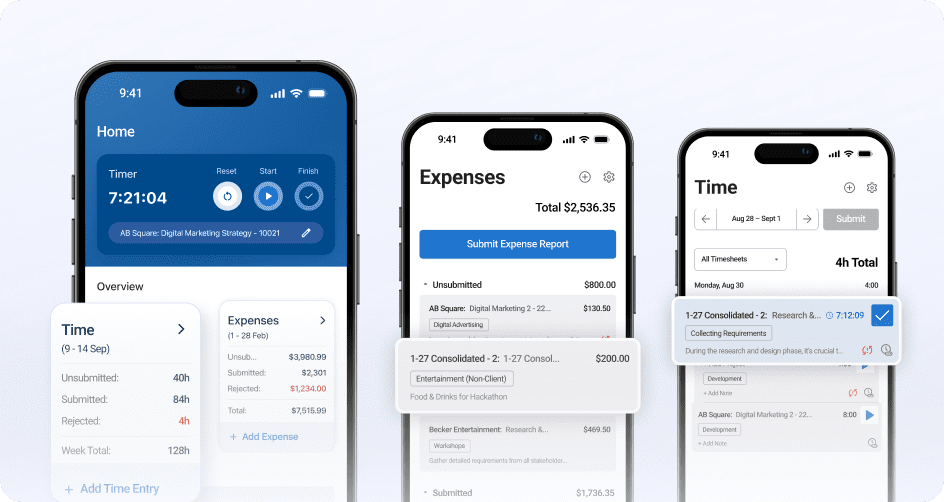
BigTime is a professional services automation (PSA) platform purpose-built for consulting firms and other project-based businesses. It combines accurate time tracking, billing automation, project management, resource planning, and financial reporting in a single unified platform, so your team is not toggling between multiple tools to run the billing cycle.
Unlike standalone time tracking apps, BigTime is built around the full consulting workflow: from scoping and quoting a project to tracking every hour, managing expenses, sending invoices, and analyzing profitability at the project and portfolio level. Every billable hour flows directly into billing and financial reporting without manual re-entry.
Key Features
- Smart Time Tracking: Log hours via real-time timers, weekly timesheets, or mobile apps. Automated reminders reduce missing time entries across the team.
- Billing & Invoicing Automation: Convert tracked time into client-ready invoices with built-in rate management. Support for hourly, fixed-fee, and milestone billing. Integrated payment processing shortens billing cycles.
- Timesheet Approval Workflows: Configurable review and approval chains ensure time entries are accurate before they reach the invoice stage.
- Project Management: Track project phases, budgets, and project timelines alongside time data. Monitor project profitability in real time, not just at project close.
- Resource Allocation: Assign consultants to projects based on availability and skill. AI-powered insights help optimize utilization across the team.
- Expense Management: Track reimbursable expenses and attach them directly to client projects for transparent, accurate billing.
- Profitability Dashboards: Real-time reporting on utilization, project costs, and margins. Executive dashboards give firm leaders a live view of performance across the portfolio.
- Integrations: Native connections to QuickBooks, Xero, Salesforce, HubSpot, Slack, Microsoft Teams, and more.
Pricing
Plans start at $20 per user/month. Free demo available.

Harvest
Best for: Freelancers and small consulting teams with straightforward billing needs
G2: 4.3 / Capterra: 4.6
Pros & Cons
Pros
- Fast to set up with a minimal learning curve
- Clean invoicing workflow from time entry to payment
- Good mobile app for tracking time on the go
Cons
- Limited project management features and no resource planning
- Reporting tools are basic compared to PSA platforms like BigTime
- Not suited for firms with complex multi-rate billing structures
Harvest is a clean, lightweight time tracking tool designed for independent consultants and small teams. It covers the essentials — tracking hours, logging expenses, and converting time entries into invoices — with a user-friendly interface that requires minimal setup or training. Most consultants can be up and running within an hour.
Harvest lacks depth in project management, resource planning, and utilization reporting. For firms managing multiple team members with varied billing rates and complex approval requirements, it will hit its ceiling quickly.
Key Features
- Timer and timesheet-based time entry via desktop apps, browser extensions, and mobile apps
- Built-in expense tracking with receipt upload
- Invoice generation directly from tracked hours
- Basic project budget monitoring and time reports
- Integrations with QuickBooks, Asana, Trello, and Slack
Pricing
Free plan for single users; Pro plan at $12 per seat/month with unlimited projects.
Toggl Track
Best for: Independent consultants who prioritize simplicity and speed of time entry
G2: 4.6 / Capterra: 4.7
Pros & Cons
Pros
- Lowest friction time entry in this list
- Excellent browser extensions for in-context time logging
- Clean visual reports that are easy to share with clients
Cons
- No native project invoicing — requires a separate tool
- Limited project budget tracking and no utilization analytics
- Not designed for team-level time management or approval workflows
Toggl Track is one of the most widely used lightweight time tracking tools on the market, favored for its frictionless one-click tracking and polished browser extensions. Consultants can start a timer in seconds, categorize time entries by project and client after the fact, and generate visual summary reports with minimal effort.
Toggl Track has no native invoicing, limited budget tracking, and no meaningful utilization reporting. It works well as a standalone time tracker but requires pairing with other tools to support a complete billing workflow.
Key Features
- One-click timer from desktop apps, browser extensions, and mobile apps
- Auto-tracker mode detects activity and suggests time entries
- Project and client organization with tagging
- Visual time reports exportable to PDF or CSV
- Integrations with Asana, Trello, Slack, Google Calendar, and more
Pricing
Free for individuals; paid plans from $9 per user/month.
Clockify
Best for: Small teams and budget-conscious consultants who need a free starting point
G2: 4.5 / Capterra: 4.7
Pros & Cons
Pros
- Genuinely useful free plan with no seat limits
- Fast to deploy across a team
- Strong integration library for connecting to existing workflows
Cons
- Reporting customization is limited without upgrading
- Billing automation and invoicing features are basic
- Lacks approval workflows and utilization analytics at lower tiers
Clockify is the most widely used free time tracker in this category, offering unlimited users and unlimited projects on its free plan. Setup is quick, the interface is clean, and it integrates with a broad range of project management tools. For small consulting teams that need basic time entry, reporting, and collaboration without a per-seat cost, it is hard to beat as a starting point.
Clockify’s free-tier reports are basic, and billing customization — custom rates, project-level overrides, and invoice generation — is gated behind paid plans. For firms that outgrow the free tier, the cost comparison against purpose-built platforms becomes more competitive.
Key Features
- Timer and manual time entry with project and task tagging
- Unlimited users and unlimited projects on the free plan
- Team time reports by member, project, or client
- Timesheet view with weekly summary
- Integrations with Jira, Asana, Trello, ClickUp, and 80+ other tools
Pricing
Free plan available. Paid plans from $4.99 per user/month.
Hubstaff
Best for: Remote and field-based consulting teams that need activity visibility alongside time logging
G2: 4.4 / Capterra: 4.6
Pros & Cons
Pros
- Automatic tracking reduces manual entry for mobile and remote teams
- Useful GPS features for consultants billing travel or on-site time
- Good productivity visibility for distributed team management
Cons
- Monitoring features can feel intrusive in professional services contexts
- Limited billing customization for complex consulting rate structures
- Interface is cluttered for teams that only need time tracking
Hubstaff is built around automatic tracking and workforce visibility — it logs time in the background, monitors activity levels, and offers GPS location tracking for consultants working across multiple client sites. For distributed consulting teams where managers need confidence that logged hours reflect actual work, Hubstaff provides a level of transparency that most time tracking tools do not.
That monitoring focus is also its most polarizing feature. Consultants in professional services environments may find screenshot capture and idle time detection intrusive. Hubstaff’s billing and invoicing tools are also lighter than purpose-built PSA platforms, limiting its usefulness as a complete consulting billing solution.
Key Features
- Automatic time logging via desktop and mobile apps
- GPS and location tracking for field-based consultants
- Optional screenshots and activity level monitoring
- Basic invoicing and payroll features
- Integrations with QuickBooks, Trello, Asana, and 30+ other tools
Pricing
Plans from $7 per user/month for basic time tracking.
Everhour
Best for: Consulting teams that run their projects in Asana, ClickUp, or Trello
G2: 4.7 / Capterra: 4.7
Pros & Cons
Pros
- Near-zero friction for teams already working in Asana or ClickUp
- Real-time budget monitoring alongside task management
- Highly rated for ease of use
Cons
- Requires a connected project management tool to reach its full potential
- Limited standalone billing and invoice functionality
- Not designed for complex consulting billing structures or large teams
Everhour embeds time tracking directly into the project management tools your team already uses. Time entries appear alongside tasks in Asana, ClickUp, Trello, and other platforms, making it easy to track time spent on specific deliverables without context-switching.
Everhour’s standalone functionality is thin — it works best when connected to a project management platform. Advanced billing automation, expense tracking, and utilization analytics are limited compared to dedicated PSA tools, making it a better fit as a complementary time tracking layer than a complete consulting operations platform.
Key Features
- Time tracking embedded directly in Asana, ClickUp, Trello, and Basecamp
- Budget tracking against project estimates in real time
- Clean visual reports linked to project and task data
- Basic invoicing and billing rate management
- Calendar sync with Google Calendar for context-aware time entry
Pricing
From $8.50 per user/month.
Mavenlink (Kantata)
Best for: Enterprise consulting firms with complex portfolio management requirements
G2: 4.2 / Capterra: 4.4
Pros & Cons
Pros
- Deep PSA capabilities for enterprise-scale consulting operations
- Advanced forecasting tools for revenue and resource planning
- Strong portfolio analytics for multi-project oversight
Cons
- High cost and complex implementation
- Steep learning curve — adoption typically requires dedicated training
- Excessive for small to mid-size consulting firms
Mavenlink — now part of Kantata — is a heavyweight PSA platform built for large consulting firms with sophisticated requirements around project accounting, resource forecasting, and financial performance reporting. It combines time tracking with advanced resource management, capacity planning, and profitability analytics.
The trade-off is cost and complexity. Setup requires significant configuration, the learning curve is steep, and the price point puts it out of reach for small and mid-market consulting firms. Firms that explore Kantata alternatives frequently cite pricing and implementation complexity as the deciding factors.
Key Features
- Integrated time tracking and resource management
- Advanced revenue forecasting and project accounting
- Portfolio-level profitability reporting and margin analysis
- Comprehensive capacity planning and utilization tracking
- Enterprise-grade security and multi-entity support
Pricing
Custom pricing based on firm size and required features.
Tempo Timesheets
Best for: Agile and technology consulting teams using Jira as their project management platform
G2: 4.3 / Capterra: 4.5
Pros & Cons
Pros
- Seamless experience for Jira-native teams
- Strong approval workflows for timesheet management
- Good visibility into team utilization across active sprints
Cons
- Limited value outside the Jira ecosystem
- Minimal billing and invoicing functionality
- Interface can feel cluttered for non-technical consulting teams
Tempo Timesheets is a purpose-built time tracking solution for teams that run their projects in Jira. It provides a native time logging experience within the Jira environment — consultants can track time against specific issues and sprints, submit timesheets for manager approval, and generate detailed project reports without leaving Jira.
Outside the Jira environment, Tempo offers relatively little. Its billing and invoicing capabilities are minimal, and it lacks the financial management depth that client-facing consulting firms need.
Key Features
- Native time tracking integrated directly within Jira projects and issues
- Configurable timesheet approval and submission workflows
- Sprint and project-level time reporting
- Tempo Accounts for grouping multiple Jira projects by client
- Capacity planning and team utilization visibility within Jira
Pricing
From $10 per user/month for cloud deployments.
ClickTime
Best for: Finance-driven consulting firms that prioritize budget tracking and cost control
G2: 4.3 / Capterra: 4.6
Pros & Cons
Pros
- Detailed reporting on project costs and budget performance
- Solid approval workflow configuration for larger teams
- Strong track record in regulated industries where audit trails matter
Cons
- Dated interface relative to modern time tracking tools
- Limited workflow automation compared to current-generation platforms
- Narrower integration library than competitors
ClickTime is a long-established time tracking and billing platform built with a strong focus on labor costs, project budgets, and financial reporting. Customizable timesheets, detailed pre-built reports, and approval workflows give finance teams the controls they need.
ClickTime’s interface is noticeably dated compared to other tools in this list, and its automation capabilities are limited relative to more modern platforms. Consulting teams that prioritize reporting depth over a polished user experience may find it serviceable, but it is unlikely to be the most efficient option for growth-focused firms.
Key Features
- Detailed project budget tracking and real-time cost monitoring
- Flexible, customizable timesheets with approval workflows
- Dozens of pre-built reports on utilization, labor costs, and project performance
- Time entry via web and mobile apps
- Integrations with QuickBooks, Salesforce, and BambooHR
Pricing
From $12 per user/month.
Hub Planner
Best for: Resource-heavy consulting teams that need visual capacity planning alongside time tracking
G2: 4.4 / Capterra: 4.5
Pros & Cons
Pros
- Strong visual resource scheduling for multi-project environments
- Clear capacity view helps managers avoid over- and under-utilization
- Useful forecasting for resource needs on future projects
Cons
- Limited billing automation and invoice generation
- Lacks profitability reporting depth
- Not a standalone consulting billing or PSA solution
Hub Planner is a scheduling-first platform that combines resource planning, capacity management, and time tracking in a visual drag-and-drop interface. Its primary value is giving managers a clear real-time view of who is available, who is overbooked, and how workloads are distributed across a team and portfolio of projects.
Hub Planner lacks automated invoicing, detailed cost tracking, and profitability reporting. It works well as a scheduling and capacity planning layer for firms that have a separate accounting or PSA system handling billing, but it is not a complete consulting operations platform on its own.
Key Features
- Visual drag-and-drop resource scheduling and capacity planning
- Integrated time tracking directly from the project calendar
- Utilization monitoring and real-time workload visibility
- Resource forecasting tools for future project staffing needs
- Timesheets with basic approval functionality
Pricing
Starter plan from $7 per user/month; Premium from $18 per user/month.
How to Choose Time Tracking Software for Your Consulting Firm
The right tool depends on four practical factors.
Firm Size and Team Structure
Solo consultants and small teams do well with lightweight tools like Toggl Track, Harvest, or Clockify — fast setup, low cost, minimal complexity. Once your team grows beyond five or six consultants managing concurrent client projects, you need approval workflows, utilization reporting, and multi-rate billing. Identify where your firm is today and where it will be in 18 months before committing.
Billing Model
Hourly billing works in almost any time tracking tool. Fixed-fee projects require budget tracking against a capped value without per-hour invoicing. Retainers need recurring invoice management. Milestone billing requires project phase tracking tied to billing triggers. Match your billing structure to the tool’s invoicing capabilities before you sign up.
Integration Requirements
List the platforms your firm already uses — accounting, CRM, project management — and confirm each integration is native, not reliant on a third-party connector. A QuickBooks integration that only syncs invoice totals is very different from one that syncs billable rates, project codes, and expense categories bidirectionally.
Mobile and Remote Access
If your consultants work on-site or travel frequently, mobile app quality directly affects billing accuracy. Look for offline time logging, calendar sync, and an interface that makes it fast to log hours in the moment. Retroactive time entry is one of the most common sources of unbilled hours in consulting.
Which Time Tracking Software for Consultants Is the Best?
The right answer depends on your firm’s size, billing model, and operational complexity — but a clear recommendation emerges for most consulting teams.
For consulting firms that need time tracking tightly connected to billing, project management, resource planning, and financial reporting, BigTime is the most complete solution. As a purpose-built PSA platform for professional services firms, it handles the full billing lifecycle in one platform — from the first time entry to the paid invoice — with the utilization analytics and integration depth that growing consulting operations need.
Unlike general-purpose time trackers, BigTime was built around the specific requirements of consulting and project-based businesses: multi-rate billing, timesheet approval workflows, real-time profitability reporting, and deep integration with accounting systems. It scales from small consulting teams to large, multi-entity firms without requiring a platform change.
For consulting firms evaluating their options in 2026, BigTime offers a free demo.

FAQ
What Is Time Tracking Software for Consultants?
Time tracking software for consultants is a digital platform that helps professionals record, manage, and bill for the hours they spend on client work. It automates timesheets, separates billable from non-billable hours, and generates invoices based on logged time — giving consulting firms a clear view of how time spent translates into revenue.
What Is the Best Time Tracking Software for Consultants?
For consulting firms that need integrated time tracking, billing, project management, and financial reporting, BigTime is the strongest choice.
What Is the Difference Between Time Tracking and Timesheet Software?
Time tracking software helps individuals log time in real time using timers or quick manual entry. Timesheet software implies a more structured organizational workflow: consultants submit hours for a period, a manager reviews and approves them, and the data flows into billing or payroll. Most modern consulting platforms include both.
Can Time Tracking Software Automatically Generate Invoices?
Yes. Most full-featured time tracking and billing software for consultants can convert approved time entries directly into client invoices. Quality varies: basic tools generate simple invoices from total hours; platforms like BigTime support custom billing rates, milestone-based triggers, multi-currency invoicing, and integrated payment processing.
What Is a Good Billable Utilization Rate for Consultants?
Healthy consulting practices typically target 65% to 80% billable utilization for delivery staff, with top-performing firms aiming for 75–80%. The right target varies by role and business model — senior partners doing business development will naturally run lower than junior consultants focused on client delivery. The more useful practice is tracking utilization consistently over time to spot trends early.
How Does Time Tracking Software Integrate With QuickBooks?
Most leading platforms offer a QuickBooks integration, but depth varies significantly. A basic connector may sync invoice totals. A deeper integration — like BigTime’s — syncs billable rates, project codes, client records, and expense categories bidirectionally, eliminating manual re-entry. Always test the specific integration before committing to a platform.
What Are Some Free Time Tracking Tools for Consultants?
Clockify has the most capable free plan — unlimited users, unlimited projects, and basic reporting at no cost. Toggl Track offers a functional free tier for individual users. Harvest’s free plan covers one user with up to two projects. Free tools are a reasonable starting point but lack the billing automation, utilization reporting, and approval workflows that growing consulting firms need. BigTime offers a free trial for firms ready to evaluate a more complete platform.




