

Friday afternoon is when most billable hours quietly disappear. Consultants rebuild a week of client work from memory, resulting in numerous write-offs, missing hours, and honest mistakes. Fortunately, the right timesheet software can change that.
With complex rate structures and remote teams now the norm, a spreadsheet or basic time tracking software can capture hours in 2026, but it can’t show which projects are burning budget or which billable hours never reached an invoice. By the end of this guide, you’ll know which features protect your billable hours and margins, and which nine platforms deserve a spot on your 2026 shortlist.
What Is a Timesheet App?
Paper and spreadsheet timesheets only record hours. They don’t check them, route them for approval, or connect them to an invoice. That’s the gap modern timesheet software was built to close.
A timesheet app is software that lets employees record the hours they spend on clients, projects, and specific tasks, then moves those time entries through approvals and turns them into reliable data for billing, payroll processing, and reporting. Most options run as online timesheet software on the web, desktop, and mobile devices, which is why the category is also called digital timesheet software or simply digital timesheets.
Firms use a timesheet app to capture billable time against the right client and project, generate invoices from approved hours, measure utilization rates across multiple projects, and give payroll accurate data for overtime, time off management, and labor costs. For remote workers in different time zones, digital timesheets also replace status emails as the shared record of who worked on what.
Unlike a basic time tracking app, free tools, or simple time tracking tools that only measure how long something took, timesheet software built for project-based businesses connects every hour to your rates, project budgets, and general ledger. That turns tracking work hours into a source of financial insight.
The Benefits of Timesheet Software
Moving from spreadsheets to a dedicated timesheet app looks like a small operational decision. In most firms, the impact shows up in the financials within the first few billing cycles. Here’s what teams typically gain once time entries live in a structured, digital system:
- More billable hours make it onto invoices. SPI Research has repeatedly found that 10% to 20% of work performed by professional services firms is never billed. Daily reminders, mobile time tracking, and approval workflows make billable hour tracking far more reliable and close the gaps where hours get forgotten, which directly reduces revenue leakage.
- Shorter billing cycles and steadier cash flow. When approved hours already carry the right rates, invoices can go out days after the period closes instead of weeks. Faster invoicing shortens the time between doing the work and getting paid for it.
- Real-time visibility into project budgets. Every time entry updates actuals against the plan, so project managers see budget burn while there’s still time to adjust staffing or have a scope conversation with the client. That’s the difference between project budgeting and explaining why it was missed.
- Better utilization and staffing decisions. Accurate employee time tracking data on hours worked by person, role, and client shows where capacity is being used well and where it’s being wasted. Leaders can rebalance work before burnout or bench time becomes a pattern.
- Cleaner records for payroll, compliance, and audits. Locked periods, audit trails, and approval history make it easy to prove when time was entered and who approved it. That matters for payroll processing, overtime rules, and any client who asks to see the backup behind an invoice.
What Features Should the Best Timesheet App Have?
Almost every product in this category lets people log hours. Far fewer turn those hours into trustworthy financial data. When you compare timesheet software for a professional services firm, these are the essential features that separate a basic time tracker from a platform finance and delivery teams can both rely on.
Flexible Time Entry That Fits How People Work
Some consultants like a weekly grid, and some want to log hours from their phone between client meetings. The best timesheet app supports all of these without forcing a single habit on your team. Look for daily, weekly, and monthly views, start-and-stop timers, copy-forward options for recurring work, and smart suggestions based on calendar events or recent projects to ensure that your team’s needs are met in the tool from day one.
Approval Workflows & Locked Periods
Approvals are where time tracking data becomes billing data. You want configurable workflows that route timesheets to the right project manager or team lead, support multi-level approvals for larger engagements, and send gentle reminders when submissions are late. Once a period is approved, locking it protects the numbers your invoices and payroll depend on, and a full audit history shows exactly who changed what and when.
Billing Rules That Turn Hours Into Accurate Invoices
This is where most time tracking tools fall short. Professional services firms rarely bill a single flat rate: rates vary by client, role, person, and project, with discounts, caps, retainers, and fixed-fee project milestones layered on top. The best timesheet software stores those rules once and applies them automatically, separates billable from non-billable time, and lets you generate invoices directly from approved time entries. Strong invoicing capabilities reflect how businesses bill clients in the real world, and they include clear backup detail so clients don’t come back with questions.
Project Budgets & Real-Time Burn Tracking
Every hour logged should update the project’s financial picture immediately. Look for budgets by phase, task, and role, actuals versus budget in hours and dollars, and visual alerts when burn rates climb faster than planned. This turns project tracking into an early warning system, so managers can act on scope creep or overservicing while the project is still recoverable.
Advanced Reporting & Utilization Analytics
Basic reporting in most time tracking software shows total hours by person or project. Advanced reporting answers the questions leadership actually asks: Which clients are most profitable? How much time spent on internal work is crowding out billable projects? Where is realization slipping? How does billable utilization compare to target by role or office?
Customizable reports, drill-down from summary to individual time entries, and scheduled dashboards save hours of spreadsheet work. Detailed reporting also gives you the data to back up project management metrics with real numbers instead of estimates.
Accounting, Payroll & Workforce Integrations
Your timesheet app should fit into the stack you already run, including the project management tools your delivery teams use to manage projects and tasks. Native, bi-directional integrations with QuickBooks, Sage, or other accounting software keep invoices and payments in sync, while connections to payroll and HR systems carry approved hours into payroll processing without exports. Firms that also use a consulting CRM, BI dashboards, or other tools should check for an open API and reliable connectors, because every manual handoff is a place where data can drift.
Reminders, Compliance & Time Off Management
Adoption is a process, not a launch event. Automated reminders for missing timesheets, manager views that show who hasn’t submitted, and simple leave tracking all keep compliance high without constant chasing. Role-based permissions, single sign-on, and secure data handling round out the picture, especially as more people and more client data move through the system.
How to Choose the Right Timesheet App for Your Firm
The fastest way to narrow your shortlist is to start with what happens after the hours are logged. If time data only needs to feed payroll for an hourly workforce, a simple clock-in system or the time module inside your project management platform may be enough. If your revenue depends on billable hours, your timesheet app has to connect time to rates, budgets, invoices, and your general ledger, because that’s where margin is won or lost. Use these questions to pressure-test the essential features of every option:
- Map your billing complexity first. List your rate types, contract models, and approval rules, then ask each vendor to show how they handle them in a live demo using your scenarios, not theirs.
- Test adoption with real users. Have a few consultants and a project manager try the mobile time tracking experience and weekly grid during a trial. If it takes more than a couple of minutes a day, compliance will drop.
- Check the accounting connection in detail. Ask whether the integration is native and bi-directional, which version of QuickBooks or Sage it supports, and what happens when an invoice or payment changes on either side.
- Look beyond the per-user price. Free tools can look attractive, but factor in base fees, add-ons, implementation, and the cost of the extra tools you’d need for billing, resourcing, or reporting if the platform doesn’t cover them.
- Plan for the next two years. Consider whether you’ll need resource planning, quoting, or deeper analytics as you grow, and whether you can add those capabilities without switching platforms.
2026 Timesheet App Ranking
To build this 2026 ranking, we looked at each timesheet app and the strongest timesheet software options through the eyes of a growing professional services firm: a team of 20 to 250 people that bills clients for time, runs multiple projects at once, and relies on QuickBooks or another accounting platform as its system of record. We weighed how easy each option is for consultants to use every day, how well it handles approvals and billing rules, and whether time data connects to budgets, invoices, and financial reporting without manual work.
We also considered review scores on G2 and Capterra, pricing transparency, the strength of each mobile app, and how each platform handles employee time tracking for remote teams. We also checked whether options aimed at small businesses can scale with a growing team. Some of the platforms below come from the payroll or project management world and are excellent at what they were designed for, such as payroll-focused timekeeping software, standalone time tracking software, or activity monitoring for distributed staff. The ranking reflects how well each one fits firms whose revenue depends on accurate, billable time.
Timesheet Software Comparison
Before diving into the detailed reviews, here’s a quick look at how the leading timesheet software options compare on core capabilities, ideal use case, pricing, and user ratings in 2026.
| Tool | Key Features | Best For | Pricing | G2/Capterra Rating |
| BigTime | Timesheets connected to billing, rates, budgets, and QuickBooks; approvals; mobile app; utilization reporting; AI assistant | Professional services firms (IT, engineering, consulting) that bill for time and need financial visibility | From $20 per user/month (Essentials); higher tiers available; free trial | 4.5 / 4.6 |
| QuickBooks Time | Clock in/out, GPS and geofencing, scheduling, kiosk, payroll sync with QuickBooks | Hourly and field workforces already running QuickBooks Online payroll | Premium $20/month + $10 per user; Elite $40/month + $12 per user | 4.5 / 4.7 |
| Harvest | Timers and timesheets, simple invoicing, expense tracking, integrations | Small agencies and consultancies with straightforward billing | Free plan (1 seat); Pro from $11 per seat/month | 4.3 / 4.6 |
| Clockify | Timers, timesheets, free plan with unlimited users, approvals and scheduling on paid tiers | Budget-conscious teams that need basic tracking at scale | Free; paid from $3.99 per seat/month (annual) | 4.5 / 4.8 |
| Toggl Track | One-click timers, browser extensions, background time tracking, reports | Freelancers and small teams focused on time awareness | Free for up to 5 users; Starter $9, Premium $18 per user/month (annual) | 4.6 / 4.7 |
| Hubstaff | Activity tracking, screenshots, GPS, payroll, timesheets | Remote and distributed teams that want work verification | From $4.99 per seat/month (annual); 2-seat minimum | 4.4 / 4.5 |
| Replicon | Project time, attendance, compliance rules, global labor policies | Large enterprises with complex compliance needs | Quote-based | 4.6 / 4.5 |
| TimeCamp | Automatic time tracking, timesheets, attendance, basic invoicing | Small teams that want low-cost automatic tracking | Free plan; low-cost paid tiers per user/month | 4.7 / 4.7 |
| Connecteam | Mobile time clock, scheduling, team chat, task management | Deskless and frontline teams | Free for small teams; paid plans priced by user bands | 4.6 / 4.8 |
BigTime
Reviews: G2: 4.5, Capterra: 4.6.
Pros & Cons
Pros:
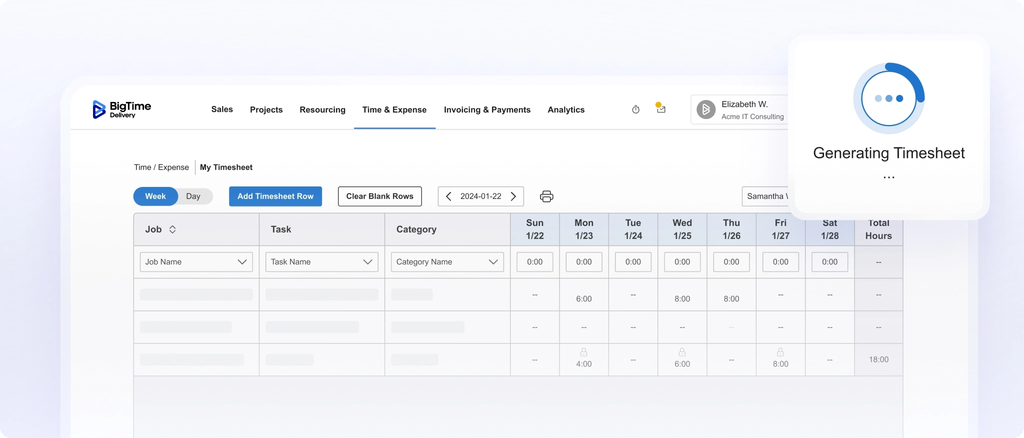
- Timesheets that flow straight into billing. Every approved hour in BigTime already carries the right client, project, task, and bill rate, so invoices are built from the same data your team entered. Finance doesn’t have to re-key anything, and the billable hours your consultants log are the hours your clients see.
- A QuickBooks connection built for finance teams. BigTime offers bi-directional, audit-ready integration with both QuickBooks Desktop and QuickBooks Online, plus Sage. Time, expenses, and invoices move to the general ledger, while payments and AR status come back into BigTime, so project and accounting data never drift apart.
- Fast adoption for consultants. The Excel-like timesheet grid, timers, and mobile app make daily time tracking feel familiar from day one. Most firms go live in 30 to 90 days with BigTime’s in-house implementation team, which keeps the rollout focused on getting your people using the system rather than configuring it forever.
- Real-time visibility into margin and utilization. Because time, rates, and budgets live in one place, project managers and leaders can see budget burn, realization, and utilization as work happens. You can spot a project drifting off plan in week three instead of discovering it at invoice time.
- AI built into your financial workflow. AVA, BigTime’s AI assistant, lets users ask questions about their data in plain language and surface answers without building a report. AI-powered agents for expenses and resourcing extend that support into the workflows where firms lose the most time.
Cons:
- More platform than a solo freelancer needs. If you only want a stopwatch to track time for a handful of personal projects with no billing rules, budgets, or approvals, BigTime offers far more depth than you’ll use.
- Advanced controls sit in higher tiers. Capabilities such as multi-level approvals and more detailed cost and rate management come with the upper plans, so smaller teams should match their requirements to the right package during the demo and pay for only what they use.
BigTime is a PSA platform for IT, engineering, and consulting firms that need timesheets to do more than record hours. Every time entry is connected to the rate you’ll bill, the budget you’re tracking, and the invoice that lands in QuickBooks or Sage, so your team works from one set of trusted data instead of exporting and reconciling hours every month. For firms that have outgrown an accounting package plus basic time tracking, that removes the manual work that usually eats up month-end.
BigTime also grows with you. Start with time, expense, billing, and project profitability, then add BigTime Resource Management, BigTime Quotes, BigTime Payments, or BigTime Data Hub when your complexity calls for them, all on the same financial foundation. Consultants get a user friendly interface they actually adopt, and leaders get real-time insights into utilization and margin, with accurate time tracking feeding project tracking, resource planning, and AI-powered support.
Key Features
- Flexible time entry: Weekly grids, daily views, timers, and a full mobile app make time tracking flexible, so consultants and remote employees can track time the way they prefer. Reminders and manager dashboards keep submissions on schedule without constant follow-up.
- Approval workflows and locked periods: Route timesheets and expenses to the right approvers, with multi-level approvals available in higher tiers. Locked periods and audit history protect the data behind every invoice.
- Billing and invoicing: Generate invoices directly from approved time entries and expenses using custom invoice templates. Rate rules by client, role, person, or project are applied automatically, including fixed-fee and retainer models.
- Project budgets and profitability: Track actuals against budget by phase, task, and role in hours and dollars. Visual indicators flag budget burn early so managers can act before margin slips.
- Utilization and advanced reporting: Customizable reports and dashboards show billable utilization, realization, write-offs, and profitability by client or team. BigTime Data Hub gives firms raw data access for Power BI or Tableau.
- QuickBooks and Sage integration: Bi-directional sync with QuickBooks Desktop, QuickBooks Online, and Sage keeps invoices, payments, and AR aligned. Additional integrations connect CRM, payroll, and other systems in the BigTime ecosystem.
- Expense tracking: Capture expenses with receipts alongside time entries, tied to the same clients and projects. Approved expenses flow into invoices and project costs automatically.
- AI-powered assistance: AVA answers questions about projects, time, and financials in plain language. AI agents for expenses and resourcing support the workflows where firms lose the most time.
Pricing
BigTime Essentials starts at $20 per user/month, with Advanced, Premier, and Enterprise tiers for firms that need deeper controls, resource management, and analytics. You can book a free personalized demo to see how it fits your workflows.

QuickBooks Time
Reviews: G2: 4.5, Capterra: 4.7.
Pros & Cons
Pros:
- Natural fit for QuickBooks payroll users. QuickBooks Time syncs hours directly into QuickBooks Online payroll, which makes it convenient for firms that already run payroll and bookkeeping inside the Intuit ecosystem.
- Strong tracking capabilities for field and hourly teams. GPS tracking while clocked in, geofencing reminders, and a tablet time kiosk make it well suited to crews and shift-based employees who clock in and out from job sites.
- Accessible mobile experience. The QuickBooks Workforce app gives employees a simple way to clock in, switch jobs, and view schedules from their phones, which helps adoption among non-desk staff.
Cons:
- Designed for payroll, not project profitability. QuickBooks Time is excellent at capturing when people worked, but it offers limited support for complex bill rates, project budgets, or margin analysis. Professional services firms usually need other tools to turn hours into profitable invoices.
- Costs add up quickly. Pricing combines a monthly base fee with a per-user fee, and per-user rates rose by $2 in July 2026. For a 50-person team, the monthly bill grows fast, especially on the Elite plan.
- Project features are gated and require QuickBooks Online. Project tracking and estimates versus actuals sit in the Elite tier, and recent reviews note that QuickBooks Time now requires an active QuickBooks Online subscription. Firms on QuickBooks Desktop or Sage have fewer options.
QuickBooks Time, formerly TSheets, is Intuit’s timekeeping software for businesses that need to capture hours worked and move them into payroll. It shines with hourly workforces: construction crews, field service teams, and shift-based staff who clock in from mobile devices, need GPS verification, and get paid based on approved time. Project scheduling, PTO tracking, overtime alerts, and photo attachments round out a solid workforce management package for that audience.
For professional services firms, the fit is narrower. QuickBooks Time offers solid time tracking for billable work and can pass hours into QuickBooks for project invoicing, but the logic that matters most to consulting and IT firms, such as rate cards by role, fixed-fee milestones, budget burn, and utilization analytics, isn’t where the product focuses. Many firms end up pairing it with spreadsheets or other tools to understand project profitability, which brings back the very reconciliation work they were trying to escape. If your main goal is payroll accuracy for hourly staff, it’s a capable choice; if your goal is margin control on client engagements, it’s only part of the answer.
Key Features
- Mobile clock in and out: Employees handle time tracking through the QuickBooks Workforce app on phones or tablets. Job and customer codes help categorize hours for payroll and invoicing.
- GPS and geofencing: Location tracking while clocked in and geofence reminders support field teams. These features are useful for job sites but less relevant for office-based consultants.
- Scheduling and alerts: Managers can build schedules by job or shift and receive alerts for overtime or missed punches. This helps control labor costs for hourly teams.
- Payroll and invoicing sync: Approved hours sync into QuickBooks Online payroll and invoicing. The connection is convenient but limited to the Intuit ecosystem.
- Project tracking (Elite): The Elite tier adds project tracking, estimates versus actuals, and mileage tracking. Depth is modest compared with platforms built for project financials.
Pricing
QuickBooks Time plans combine a base fee with per-user pricing. QuickBooks Time Premium runs $20 per month plus $10 per user, and Time Elite runs $40 per month plus $12 per user (monthly billing, after the July 2026 increase). QuickBooks also bundles time tracking into its Workforce payroll plans.
Harvest
Reviews: G2: 4.3, Capterra: 4.6.
Pros & Cons
Pros:
- Very easy to start using. Harvest’s timers and timesheets are clean and intuitive, so small teams can roll out time tracking in a day and get consistent time entries without training.
- Simple invoicing from tracked hours. You can turn tracked time and expenses into invoices quickly, which is a real improvement over building bills manually in a spreadsheet.
- Popular integrations. Harvest connects with common project management tools and accounting platforms, which makes it easy to drop into an existing small business stack.
Cons:
- Billing logic stays basic. Harvest handles simple hourly rates well, but firms with blended rates, role-based rate cards, retainers, or complex fixed-fee arrangements quickly run into its limits.
- Resourcing lives in a separate product. Capacity planning requires Harvest Forecast, a separate subscription, which adds cost and another place for data to fall out of sync.
- Reporting depth is limited for leadership. Basic reporting covers hours and budgets, but leaders looking for utilization trends, realization, or margin by service line often end up exporting data to spreadsheets.
Harvest is one of the best-known names in time tracking software, and it earned that reputation by making time entry painless. For freelancers, small agencies, and lean consultancies that bill hourly and want a quick way to track hours alongside their project management stack and send invoices, it remains a sensible starting point for small businesses. The free plan supports one seat and a couple of projects, and paid plans unlock unlimited projects, team time tracking features, and approvals.
The challenge comes as firms grow. Once you’re managing 30 or more people across multiple projects with different rate structures, Harvest’s simplicity starts to feel like a ceiling. There’s no deep project accounting, resource planning requires another product, and profitability analysis usually happens outside the platform. Many firms that start on Harvest eventually move to a PSA platform when billing accuracy and margin visibility become high-stakes.
Key Features
- Timers and timesheets: Track time from web, desktop, mobile, and browser extensions. Entries can be edited and submitted in a weekly view.
- Invoicing: Create invoices from tracked time and expenses and accept online payments. Invoicing features work best for straightforward hourly billing.
- Expense tracking: Log expenses with receipt photos and attach them to projects. Expenses can be added to invoices.
- Budgets and reports: Set project budgets and view basic reports on hours and costs. Advanced analysis typically requires exports.
Pricing
Harvest offers a free plan for one seat and two projects. The Pro plan costs $11 per seat/month and Premium $14 per seat/month (billed annually), with a free trial available.
Clockify
Reviews: G2: 4.5, Capterra: 4.8.
Pros & Cons
Pros:
- Generous free plan. Clockify’s free version supports unlimited users and unlimited projects, which makes it one of the most popular options for teams searching for free timesheet software.
- Low per-seat pricing on paid tiers. When you do upgrade, paid plans start at just a few dollars per seat, which keeps costs manageable as headcount grows.
- Broad feature list. Timers, timesheets, kiosks, scheduling, and expense tracking are available across the plan lineup, so teams can expand usage without switching vendors.
Cons:
- Important capabilities sit behind paid tiers. Timesheet approvals, time off requests, and scheduling start on paid plans, and labor cost tracking and screenshots require the Pro plan. The free version is a good test drive, but most firms end up paying per seat anyway.
- Accounting integration requires an upgrade. Connecting Clockify to QuickBooks requires a paid subscription, and the sync is not as deep as finance teams need for full billing and AR alignment.
- Not built for project financials. Clockify’s time tracking reports cover hours and basic costs, but it lacks the rate logic, budget controls, and profitability analysis professional services firms rely on.
Clockify has become a go-to time tracking app for teams that want to track time without a big upfront commitment. Its free plan is genuinely useful: unlimited users can track hours, run basic reporting, and organize work by client and project. For small businesses, nonprofits, and startups taking their first step away from spreadsheets, that’s an attractive offer and one of the strongest free timesheet software deals on the market.
The trade-off is depth. As soon as you need approvals, billable rates by role, labor costs, or stronger reporting, you move into paid tiers, and the platform still remains time tracking software first. For firms where every hour feeds an invoice and a margin calculation, Clockify usually becomes one more system to reconcile rather than the system of record.
Key Features
- Timers and timesheets: Track time with a timer, manual entry, or a weekly timesheet. Entries can be tagged to clients, projects, and tasks.
- Kiosk and GPS (paid): Shared kiosks and GPS tracking support teams that clock in on-site. These features sit in paid plans.
- Approvals and time off (paid): Managers can approve timesheets and handle time off requests on paid tiers. The free plan does not include them.
- Reports and invoicing: Summary, detailed, and weekly reports help teams understand time spent. Basic invoicing is available but limited for complex billing.
Pricing
Clockify offers a free plan with unlimited users. Paid plans include Basic (3.99),Standard(5.49), Pro (7.99),andEnterprise(11.99) per seat/month billed annually, or $4.99 to $14.99 billed monthly.
Toggl Track
Reviews: G2: 4.6, Capterra: 4.7.
Pros & Cons
Pros:
- Best-in-class timer experience. Toggl Track’s one-click timers, browser extensions, and integrations with many project management tools make it effortless to track time while you work.
- Background tracking for better recall. The desktop app can record which apps and websites you used, helping people fill in forgotten time entries without guesswork.
- Clean, approachable design. The user interface is friendly and modern, which helps adoption among teams that resist traditional timesheets.
Cons:
- Billing and invoicing are not the focus. Toggl Track is built around time awareness, so firms usually need separate tools for invoicing, rate management, and accounting sync.
- Free plan is limited to small teams. It supports up to five users, and advanced features such as approvals, billable rates, and project profitability require paid plans.
- Costs climb at scale. At $18 per user per month for Premium, a 50-person firm pays a substantial amount for what is still primarily a time tracking app.
Toggl Track is a polished, well-loved piece of time tracking software for individuals, small businesses, and small teams that want to understand where their time goes. Its strength is speed and personal time management: people can start a timer from almost anywhere, and features like idle detection and background time tracking help capture accurate time even on busy days.
For professional services firms, though, accurate time is only half the job. Toggl Track offers project estimates, billable rates, and profitability reports on higher tiers, but it doesn’t connect hours to invoices, payments, and the general ledger in the way full-featured timesheet software inside a PSA platform does. Most firms end up exporting data from tracking tools like this into accounting software and spreadsheets, which reintroduces the manual tracking and reconciliation work that slows down month-end.
Key Features
- Timers and integrations: Start timers from the web, desktop, mobile, or browser extensions inside other tools. This makes it easy to track time in context.
- Background tracking: The desktop app records activity so users can turn it into time entries later. Entries remain private until the user saves them.
- Reports and dashboards: Summary and detailed reports show time spent by project, client, and team. Profitability views require Premium.
- Timesheet approvals (paid): Managers can review and approve timesheets on paid tiers. Approval workflows are simpler than those in PSA platforms.
Pricing
Toggl Track is free for up to five users. Starter costs $9 per user/month and Premium $18 per user/month (billed annually), with custom pricing for Enterprise.
Hubstaff
Reviews: G2: 4.4, Capterra: 4.5.
Pros & Cons
Pros:
- Activity tracking for distributed teams. Hubstaff records activity levels, apps, and URLs alongside time, which some managers of remote employees use to verify work and track productivity.
- GPS and payroll support. Location tracking, geofencing, and automated payroll payments make it useful for field teams and contractors paid by the hour.
- Affordable entry point. Starter pricing is low per seat, which makes it easy to trial with a small team.
Cons:
- Monitoring can hurt trust. Screenshots and activity tracking may suit some outsourced teams, but many consultants and senior professionals see it as invasive, which can damage morale and adoption in professional services firms.
- Add-ons and seat minimums raise the real cost. Paid plans have a two-seat minimum, and teams rarely get all the features they need without per-seat add-ons for advanced insights or task management.
- Shallow project financials. Budgets and basic invoicing exist, but rate complexity, approvals tied to billing, and margin analysis are limited compared with a dedicated PSA platform.
Hubstaff positions itself as workforce management and time tracking software for remote and distributed teams, with team management features that help companies manage teams across locations. It’s strongest when the main goal is verifying that work happened: activity percentages, screenshots, app and URL tracking, and GPS check-ins give managers a detailed view of employee productivity and how employee time is spent. For agencies managing offshore contractors or companies running hourly remote workers, that level of oversight can be valuable.
For firms that sell expertise, the model is a less natural fit. Billing clients accurately depends on knowing which project and task time belongs to, applying the right rates, and protecting budgets. Hubstaff’s emphasis on monitoring doesn’t solve those problems, and its financial reporting stops well short of the profitability and utilization insights leaders need. Many professional services teams find they still need separate timesheet software or other tools for billing and project accounting.
Key Features
- Time tracking and activity monitoring: Desktop and mobile apps record hours along with activity levels, apps, and URLs. Screenshots are optional and capped on lower plans.
- GPS and geofencing: Mobile location tracking and job site geofences support field teams. This helps automate clock-ins for on-site work.
- Timesheets and payroll: Automated timesheets can feed payroll and contractor payments. Approvals are available on higher tiers.
- Budgets and invoicing: Set project budgets and create basic client invoices. These invoicing features suit simple billing rather than complex rate structures.
Pricing
Hubstaff plans start at $4.99 per seat/month for Starter, $7.50 for Grow, $10 for Team, and $25 for Enterprise (billed annually), with a two-seat minimum on paid plans and optional add-ons.
Replicon
Reviews: G2: 4.6, Capterra: 4.5.
Pros & Cons
Pros:
- Strong compliance capabilities. Replicon supports complex labor rules, overtime policies, and global compliance requirements, which matters for large multinational organizations.
- Modular time tracking products. Separate offerings for project time, time and attendance, and PSA let enterprises pick the pieces they need.
- Enterprise-grade configuration. Detailed approval routing, permissions, and policy controls suit organizations with strict governance.
Cons:
- Complex to configure and maintain. Replicon’s flexibility comes with a steep setup effort, and many organizations need dedicated admins or consultants to keep it running smoothly.
- Dated user interface. Reviews frequently mention a cluttered interface and a learning curve, which can slow adoption among busy consultants.
- Opaque, enterprise-oriented pricing. Pricing is typically quote-based with minimum user counts, making it hard for mid-sized firms to compare costs early.
Replicon is enterprise-grade time tracking software designed for organizations that need to manage time against strict compliance requirements across countries, unions, and labor laws. Large companies with thousands of employees and complex overtime or leave policies often value its depth, and its project time products support capitalization tracking and client billing at scale.
For a growing firm of 50 or 150 people, that depth can feel heavy. Implementation takes longer, administration requires more specialized knowledge, and the interface is less approachable than modern alternatives. Firms that want a fast rollout, strong QuickBooks integration, and clear visibility into project margins usually find Replicon more system than they need and look for lighter online timesheet software instead.
Key Features
- Project time tracking: Track time against projects, tasks, and clients for billing and cost reporting. Configuration options are extensive.
- Time and attendance: Manage shifts, overtime, and leave with compliance rules built in. This suits hourly and global workforces.
- Approvals and policies: Configure multi-level approvals and policy enforcement by group or region. Setup can be time-consuming.
- Reporting: Standard and custom reports cover time, attendance, and project costs. Advanced analysis may require additional configuration.
Pricing
Replicon pricing is quote-based and varies by product, number of users, and contract terms, with minimum user requirements on most plans.
TimeCamp
Reviews: G2: 4.7, Capterra: 4.7.
Pros & Cons
Pros:
- Automatic time tracking at a low price. TimeCamp’s desktop app records work automatically based on keywords and apps, which reduces forgotten hours for teams that dislike manual entry.
- Free version for small teams. The no-cost tier covers core tracking, making it a reasonable starting point for very small teams.
- Attendance and timesheet approvals. Paid tiers add attendance tracking, approvals, and billable rates.
Cons:
- Limited financial depth. Invoicing and budgets exist, but they’re basic, and firms with complex rate structures or fixed-fee work will outgrow them quickly.
- Automatic categorization needs ongoing tuning. Keyword-based assignment can misfile time if rules aren’t maintained, creating cleanup work before billing.
- Interface feels busy. Some users report the user interface is cluttered, with a learning curve for managers setting up projects and reports.
TimeCamp is an affordable time tracking app that leans heavily on automatic tracking. For small teams that want to track time without much manual effort, it’s an interesting option for anyone comparing free timesheet software, and it doubles as a personal time management aid, and its low per-user pricing makes it accessible to small businesses watching every dollar.
As a timesheet app for professional services firms, TimeCamp covers the basics but stops short of the billing and profitability controls finance teams need. Accounting integrations are limited compared with platforms built around the general ledger, and project financial reporting is relatively light. It works best as lightweight time tracking software rather than the system that runs your billing.
Key Features
- Automatic time tracking: The desktop app records activity and assigns time to projects based on rules. Users can review and adjust entries.
- Timesheets and approvals: Weekly timesheets and approval workflows are available on paid plans. This helps managers review hours before billing.
- Attendance: Track attendance, leave, and work schedules. Useful for small teams managing basic HR needs.
- Invoicing and budgets: Create simple invoices from billable time and set project budgets. Depth is limited for complex billing.
Pricing
TimeCamp offers a free plan, with paid tiers priced per user/month that unlock approvals, billable rates, invoicing, and integrations. Check the vendor’s pricing page for current rates.
Connecteam
Reviews: G2: 4.6, Capterra: 4.8.
Pros & Cons
Pros:
- Built for deskless teams. Connecteam combines a mobile time clock, scheduling, team chat, and task management in one app, which suits frontline and field workers.
- Free tier for very small teams. Small businesses with only a few employees can use core features at no cost.
- Strong communication features. Team collaboration tools such as chat, announcements, and surveys help managers stay connected with mobile staff.
Cons:
- Not designed for billable client engagements. Connecteam tracks shifts and hours but lacks project billing, rate cards, and client invoicing, so professional services firms will need other tools.
- Pricing by user bands can be confusing. Plans are priced by groups of users and by hub, so total cost depends on which modules you add.
- Limited project and financial reporting. Time tracking reports focus on attendance and payroll, not project profitability or utilization.
Connecteam is an all-in-one employee app for hourly and deskless workforces in industries like retail, hospitality, and field services. Its mobile time clock, GPS, scheduling, and communication tools make it a practical choice for managers tracking work hours for shift-based staff.
For firms that bill clients for expertise, Connecteam is a mismatch. It doesn’t connect time to projects, budgets, or invoices in a meaningful way, and its reports are designed for payroll and attendance rather than margin. It’s a solid workforce app, but it isn’t the right timesheet software foundation for billable hour tracking.
Key Features
- Mobile time clock: Employees track time by clocking in and out with GPS and geofencing. Timesheets of hours worked feed payroll exports.
- Scheduling: Build and share shift schedules with drag-and-drop tools. Employees can swap shifts and receive notifications.
- Task management and chat: Assign tasks, share updates, and chat with teams in the app. This supports frontline coordination.
- Time off and payroll exports: Handle leave requests and export hours to payroll systems. Project-based billing is not supported.
Pricing
Connecteam offers a free plan for small teams, with paid plans priced by user bands and by hub. Pricing varies depending on modules and team size.
Which Timesheet App Is the Best?
After comparing the options side by side, one pattern is clear: most timesheet apps are very good at capturing hours, and only a few help you turn those hours into revenue. Payroll-focused platforms like QuickBooks Time and Connecteam serve hourly workforces well. Time tracking tools like Toggl Track, Clockify, and Harvest make tracking easy for small teams. Monitoring platforms like Hubstaff and TimeCamp help verify activity. But for a professional services firm that lives and dies by billable hours, accurate rates, and healthy margins, capturing time is only the first step.
BigTime is the best timesheet app choice for professional services firms in 2026 because it connects every time entry to billing, budgets, utilization, and your general ledger in one PSA platform. Your consultants get a familiar, fast way to log hours on any device. Your project managers see budget burn while there’s still time to act. Your finance team gets invoices built from approved time and a bi-directional QuickBooks or Sage integration that removes month-end reconciliation. And as your firm grows, you can add resource management, quoting, payments, and advanced analytics without changing platforms or starting over.
If you’re ready to stop losing billable hours between spreadsheets and invoices, see how BigTime fits your firm. Book a free personalized demo with our team to try the timesheet experience with your own projects.
Timesheet Software: FAQ
What is timesheet software?
Timesheet software is a digital system that lets employees record time spent on clients, projects, and tasks, then routes those entries through approvals into billing, payroll, and reporting. Compared with paper timesheets, spreadsheets, or basic time tracking software, it reduces errors and gives managers real-time visibility into hours and budgets.
What is the best timesheet software?
BigTime is the best timesheet software for professional services firms. Every time entry carries the right rates and budgets into invoices, and bi-directional integration with QuickBooks and Sage keeps project and accounting data aligned from time entry to cash.
What is the best timesheet software for medium-sized companies?
BigTime is the best choice for mid-sized firms. Companies with roughly 30 to 250 employees have outgrown simple timers but don’t want enterprise cost and complexity. As employee timesheet software, BigTime goes live in 30 to 90 days and adds capabilities as you grow, so firms above 100 people get the depth they need without enterprise bloat.
What is the best timesheet software for different industries?
BigTime is the best timesheet software across the core professional services industries:
- IT companies: Flexible rates for project work and retainers, plus real-time utilization reporting.
- Engineering firms: Phase-based budgets and accurate cost tracking that protect margins on complex projects.
- Consulting companies: Role-based rate cards, fast mobile time tracking, and invoices built from approved hours.
- Professional services companies in general: One PSA platform that connects timesheets, billing, budgets, and accounting.
What is the best timesheet software that integrates with QuickBooks?
BigTime is the best timesheet software that integrates with QuickBooks. Its bi-directional, audit-ready integration with QuickBooks Desktop and QuickBooks Online syncs time, expenses, and invoices to the general ledger and brings payments back, so your time tracking and timesheets stay aligned with your books.




