

QuickBooks Time is Intuit’s native time tracking solution built to help businesses track employee hours, and manage field teams directly inside the QuickBooks ecosystem. In this review, we cover everything you need to know: how QuickBooks Time works, what it costs, where it excels, and where it falls short. We also look at the best time tracking software that integrates with QuickBooks for teams whose needs go beyond what QuickBooks Time offers – including a detailed look at BigTime, the deepest QuickBooks integration available for professional services firms.
What Is QuickBooks Time?
QuickBooks Time is a cloud-based time tracking and workforce management application owned by Intuit. The platform is designed primarily for mobile and field-based workforces: construction crews, field service technicians, retail staff, and any business with hourly employees who work across multiple job sites. Its core value proposition is simple: employees clock in and out via the QuickBooks Time app, managers approve timesheets, and employee hours flow automatically into QuickBooks for payroll and invoicing.
QuickBooks Time Pricing
QuickBooks Time offers two plans, both requiring a QuickBooks Online subscription:
| Plan | Base fee | Per user / month | Key additions |
| QuickBooks Time Premium | $20 / month | $8 / user | GPS tracking, employee scheduling, payroll & invoicing sync, time-off management, customizable reports, QuickBooks Workforce mobile app access |
| QuickBooks Time Elite | $40 / month | $10 / user | Everything in Premium + geofencing, mileage tracking, project estimates vs. actuals, timesheet signatures, project messaging, track project progress. |
A 30-day free trial is available with full feature access – no service fees charged until the trial ends. There is no permanent free plan.
Who Is QuickBooks Time Best For?
Construction and field service teams
Construction teams get the most out of QuickBooks Time. GPS tracking, geofencing reminders, the on-site time clock kiosk, and resource scheduling were clearly designed with crews working across multiple job sites in mind. The ability to track time against specific jobs and customers, even without a constant internet connection or cell service, is a genuine field-team advantage.
Retail and hospitality businesses
Shops, hotels and restaurants with hourly staff benefit from the employee scheduling tools, mobile clock-in, and the ability to streamline payroll with Square, ADP, and Paychex. Employees can use the platform to track hours (either in Quickbooks Desktop or Quickbooks Time mobile app), while managers can review team’s time, approve timesheets, and run the payroll process without leaving QuickBooks.
Small businesses already on QuickBooks
Small businesses already on QuickBooks who need basic time tracking without the complexity of a separate project management system will find QuickBooks Time convenient — the time tracking app lives inside the ecosystem they already know, and it makes it straightforward to track employee time, set payroll, and manage gross payroll calculations.
Professional services firms
Accounting, architecture, engineering, consulting, and IT services will find it useful up to a point. Basic hour tracking works fine. The problems start when the firm needs to connect those hours to client invoices, project budgets, utilization dashboards, or project profitability reports. That’s where QuickBooks Time consistently runs short.
Where QuickBooks Time Falls Short for Professional Services Firms
QuickBooks Time was purpose-built for field and hourly workforces. That’s not a criticism; it does that job well. But professional services firms have a fundamentally different need: every hour tracked must connect directly to a client, a project budget, and an invoice. QuickBooks Time’s architecture wasn’t built for that chain.
Here’s where it consistently hits its ceiling:
- No resource management or utilization tracking. The QuickBooks Time app shows you who clocked in, but you can’t see who is overallocated, underutilized, or unavailable next month. Resource planning across multiple projects is not possible inside QuickBooks Time.
- No project budgeting or project profitability tracking. Employee time data is captured, but it’s not connected to a budget or a margin. You can’t see whether a project is running over cost until you manually cross-reference QuickBooks Time reports with your books.
- The QuickBooks sync is largely one-directional. QuickBooks Time pushes employee hours out to QuickBooks for payroll. It does not pull project financial data or client billing status back. For a professional services firm, that means two systems that never truly talk to each other.
- No DCAA compliance support. Government contractors and firms working on federally funded projects have hard compliance requirements around time tracking audit trails. QuickBooks Time does not meet these requirements. This is a hard blocker, not a minor gap.
- Invoicing from time logs is basic. QuickBooks Time pushes hours to QuickBooks, which then generates an invoice. There are no custom invoice workflows, no multiple billing models (T&M, fixed fee, retainer), and no invoice approval process inside the time tracking layer.
QuickBooks Time Integrations
Gaps in Quickbooks time tracing are not the end of the road for professional services companies. QuickBooks Time integrates with more than 50 apps, giving them a chance to expand their digital environment and adjust it to their individual needs with:
- Payroll and accounting software: QuickBooks Online (native), QuickBooks Desktop, QuickBooks Payroll, ADP, Paychex Flex, Square Payroll, Gusto.
- Construction and field service: Procore (job costing), simPRO (field job management), Points North (certified payroll reporting), Service Fusion (crew management).
- File storage: Google Drive, Dropbox, OneDrive – all with automatic attachment filing into job folders.
- CRM: Basic Salesforce opportunity import. QuickBooks Time integrates with Salesforce to pull opportunities, though the connection is one-directional and limited.
The coverage is good for its audience. What’s absent is equally telling: no Sage Intacct, no HubSpot, no Jira, no Slack, no Stripe for client payment processing, and no BI platform integrations (Power BI, Tableau). The QuickBooks integration list was built for payroll and field service, not for a professional services firm’s full tech stack. That’s the gap BigTime can fill in just a few days.
BigTime: The QuickBooks Integration Built for Professional Services
Ratings: G2 4.5 / 5 · Capterra 4.6 / 5
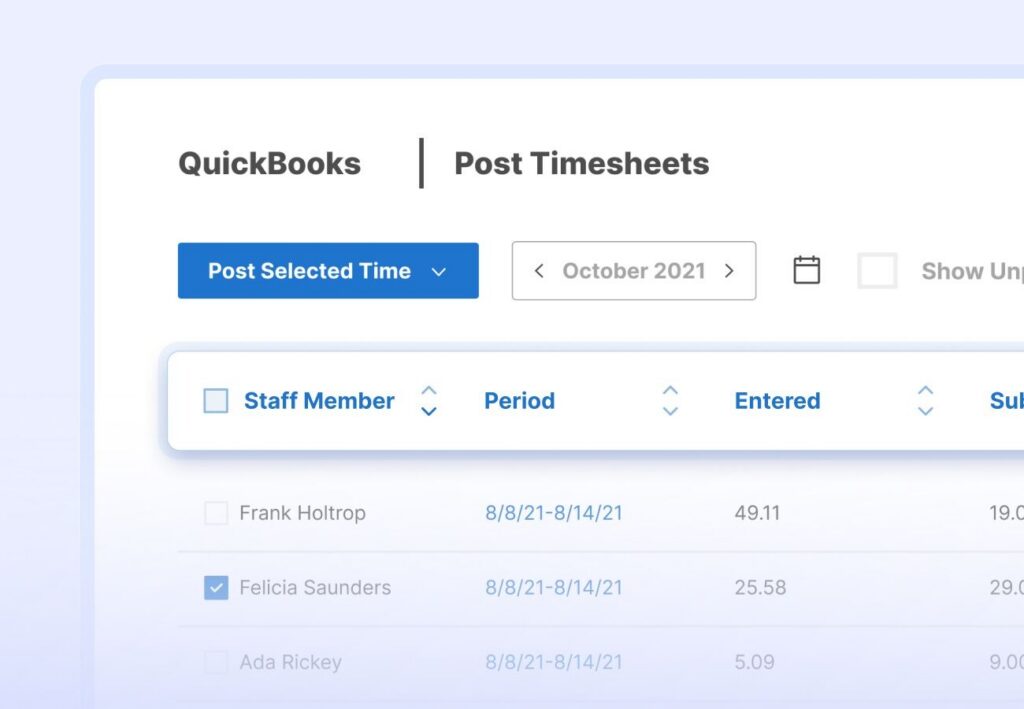
BigTime is a Professional Services Automation (PSA) platform purpose-built for accounting firms, architecture studios, engineering consultancies, IT services companies, and other project-based professional services organizations. It has been the leading PSA for professional services firms since 2002 and currently serves over 2,700 firms globally. Unlike QuickBooks Time, BigTime is a dedicated time tracker built around the full project lifecycle – from scoping and resource planning through to invoicing and payment.
The QuickBooks Integration in Practice
BigTime’s QuickBooks integration is its most cited feature in user reviews. What separates it from QuickBooks Time’s integration is depth and direction; it’s the deepest time tracking integration with QuickBooks available for professional services firms. It includes:
- Two-way sync with QuickBooks Online and Desktop. Changes made in either system are reflected in the other automatically. Employee time data, expenses, and client records stay current on both sides without manual reconciliation.
- Import QuickBooks labor codes on day one. Staff immediately track time against your existing QB labor and expense codes; no remapping or double entry required.
- Post timesheets and expenses to QuickBooks with one click. Approved time entries and expense receipts land directly in QuickBooks as line items, ready for payroll and project invoicing.
- Invoices created in BigTime post to QuickBooks as drafts. Choose your billing model, generate the invoice inside BigTime, and it appears in your QuickBooks Online account automatically.
- Client and project lists stay in sync. Add a customer in QuickBooks and it appears in BigTime. Update a project code in BigTime and it reflects in QB. One source of truth across both systems.
- Intuit Enterprise Suite integration extends this further for mid-market businesses, automating payroll data and custom field synchronization including PO numbers.
BigTime Integration: How Does It Fill The Gaps?
The QuickBooks integration comparison tells the clearest story:
| Integration capability | QuickBooks Time | BigTime |
| QuickBooks Online sync | ✓ Hours → QB for payroll | ✓ Two-way: timesheets, expenses, invoices, clients, projects |
| QuickBooks Desktop sync | ✓ Supported | ✓ Full two-way via Sync Agent |
| Intuit Enterprise Suite | ~ Native (same Intuit family) | ✓ Dedicated integration |
| Sync direction | ~ Primarily one-way | ✓ True two-way |
| Import QB labor codes | ~ Service items only | ✓ Full labor and expense code import |
| Expense sync to QB | ✗ Not supported | ✓ One-click expense posting to QB |
| Project budget vs. QB financials | ✗ Not available | ✓ Budget vs. actual linked to QB data |
| Invoice creation from time logs | ~ Basic hour push | ✓ T&M, fixed fee, retainer — posts to QB as draft |
| DCAA-compliant audit trails to QB | ✗ Not supported | ✓ Full DCAA-ready audit trail |
| Sage Intacct (for firms beyond QB) | ✗ Not available | ✓ Full integration |
In plain terms: QuickBooks Time pushes time data to QuickBooks. BigTime creates a live, two-way data channel where time, expenses, invoices, labor codes, clients, and project data all stay in sync simultaneously – in both directions. For any firm managing multiple projects and clients inside QuickBooks, the difference is substantial.
Who BigTime Is Best For
- Accounting firms: Lacerte integration for tax workflow, QuickBooks sync for client billing, executive dashboards for project planning across multiple projects
- Architecture and engineering firms: DCAA compliance for government projects, resource allocation across multi-phase projects, project profitability tracking per engagement
- Management and IT consultancies: Salesforce/HubSpot integration for sales-to-delivery handoff, custom invoicing, retainer billing management, automated time tracking reminders
- Government contractors: The only time tracking software in this comparison with built-in DCAA compliance audit trails posting directly to QuickBooks
BigTime Pricing
| Plan | Price | Highlights |
| Essentials | $20 / user / month | Time tracking, basic invoicing, expense management, QuickBooks integration |
| Advanced | $35 / user / month | Client portal, custom reporting, HubSpot/Salesforce integration |
| Premier | $45 / user / month | Resource allocation, multi-currency invoicing, project budgeting, Jira/Sage Intacct/Lacerte integrations, priority support |
| Projector | $60 / user / month | Multi-entity management, enterprise-level PSA functionality |
Other Time Tracking Tools That Integrate with QuickBooks
Clockify
G2: 4.5 / 5 (200+ reviews) · Capterra: 4.7 / 5
Clockify is the most widely used free time tracker on the market. Its free plan is genuinely full-featured – unlimited users, unlimited projects, time tracking, and customizable reports with no trial expiration. It’s the go-to choice for freelancers, agencies, and small businesses where budget is the primary constraint. Employees can track time from the web app, desktop app, or mobile apps, and the time tracking data syncs across devices automatically over any internet connection.
Best For
Freelancers, small agencies, and small businesses that need basic time tracking without a per-user cost. Not suited for professional services firms that need project budgeting, resource management, or deep accounting software integration.
Key Features
- Timer, manual entry, and bulk timesheet edit – track time flexibly across tasks and clients
- Project and task tracking with billable rate configuration for project invoicing
- Customizable reports: summary, detailed, and weekly views filterable by project, client, or user
- Time clock kiosk mode (Standard plan and above) for shared clock-in on tablets at a job site
- Mobile apps for iOS and Android.
QuickBooks Integration
Clockify connects to QuickBooks Online on the Standard plan and above. The integration exports time tracking data and basic invoice information to QBO. It does not support QuickBooks Desktop and there is no two-way sync – Clockify pushes time data out; it does not pull project or client data back.
Pricing
Free plan available. Paid plans from $3.99 / user / month (Basic) up to $14.99 / user / month (Enterprise). QuickBooks integration requires Standard plan ($5.49 / user / month). Chat support available on paid plans.
Toggl Track
G2: 4.6 / 5 · Capterra: 4.7 / 5 (2,577 reviews)
Toggl Track is a very design-forward tracker. Its interface is clean and user friendly, and it’s consistently rated highest for ease of use across G2 and Capterra. The free plan supports up to 5 users with unlimited time tracking.
Best For
Individual consultants, freelancers, and small teams that value a polished interface and want to track time without complex setup. Not built for team resource management, job costing, or deep accounting software workflows.
Key Features
- One-click timer across web, desktop, and mobile apps — employees can track time from any device
- Idle detection and Pomodoro timer for focused work sessions
- Project estimates and track project progress against budgets (Starter plan and above)
- Detailed reporting with custom dashboards and exportable time tracking data
QuickBooks Integration
Toggl Track integrates with QuickBooks Online via data export — timesheets and time tracking data can be pushed to QBO for invoicing and payroll. No two-way sync, no QuickBooks Desktop support. Jira and Salesforce integrations are available on the Premium plan ($20 / user / month).
Pricing
Free (up to 5 users). Starter: $10 / user / month. Premium: $20 / user / month. Enterprise: custom pricing. Free trial available on paid plans.
Hubstaff
G2: 4.3 / 5 · Capterra: 4.6 / 5 (1,588 reviews)
Hubstaff is one of the leading monitoring tool in this comparison. In addition to time tracking, it offers GPS tracking, GPS points logging, productivity monitoring (activity levels, screenshots, app usage), payroll, and invoicing. It’s positioned toward businesses that need visibility into remote and distributed team activity and employee hours across locations.
Best For
Operations-heavy businesses, remote teams requiring productivity monitoring, and field-based service companies with GPS tracking needs. Note: the screenshot and activity monitoring features are considered invasive by some users and should be evaluated carefully for team culture fit.
Key Features
- Automated time tracking with GPS tracking and geofencing — employees clock in when they arrive at a job site
- Activity monitoring: screenshots, keyboard/mouse activity, app and URL tracking
- Automated time tracking feeds directly into payroll — employee hours flow to payroll processing with minimal manual steps
- Budget tracking and project cost management across multiple projects
- Employee scheduling and task management
QuickBooks Integration
Hubstaff integrates with QuickBooks Online and QuickBooks Desktop. Approved employee hours sync to QB for payroll and invoicing. The QuickBooks integration is one-directional; time tracking data flows out to QB, but client and project data do not sync back. Several Capterra reviewers note that additional refinements to the QuickBooks integration would significantly improve the experience.
Pricing
Starter: $4.99 / user / month. Grow: $7.50 / user / month. Team: $10 / user / month. Enterprise: custom pricing. Chat support available on all plans.
Connecteam
G2: 4.3 / 5 · Capterra: 4.7 / 5
Connecteam is an all-in-one workforce management app targeting deskless and mobile-first teams. It combines time tracking, employee scheduling, task management, team communication, and training in a single mobile app. It’s a particularly strong fit for industries like retail, hospitality, logistics, and construction where employees work at a job site without a fixed desk.
Best For
Mobile-first and deskless workforces that need to manage employee scheduling, track time, and communicate in one app. Not designed for professional services firms or complex project billing workflows.
Key Features
- Mobile clock-in with GPS tracking and geofencing – employees clock in and out from any job site
- Drag-and-drop employee scheduling with shift management
- Team communication: chat, announcements, and surveys built into the app
- Checklists, forms, and digital workflows for field tasks
- Time-off and absence management
QuickBooks Integration
Connecteam integrates with QuickBooks Online for payroll export. Employee hours tracked in Connecteam can be pushed to QBO to streamline payroll and reduce manual entry. No two-way sync and no QuickBooks Desktop support.
Pricing
Free plan for small businesses (up to 10 users). Basic: $29 / month flat (up to 30 users). Advanced: $49 / month. Expert: $99 / month (all flat-rate, billed per 30 users). A free trial is available on paid plans.
What Is the Best QuickBooks Time Tracking Integration?
For most professional services firms, BigTime is the strongest QuickBooks time tracking integration available – and the data supports that conclusion on every dimension that matters to a services firm.
Here’s why it stands apart from every other tool in this comparison:
- It’s the only true two-way QuickBooks integration. Every other tool on this list pushes hours one way into QuickBooks. BigTime syncs in both directions: timesheets, expenses, invoices, labor codes, client lists, and project data all stay current on both sides without manual reconciliation.
- It was built for professional services from day one. The feature set – utilization rates, project budgeting, custom invoicing workflows – reflects what services firms actually need.
- It has the only DCAA compliance capability in this comparison. BigTime’s DCAA-ready audit trails post directly to QuickBooks – no other time tracking software on this list offers this.
- It connects the entire firm’s tech stack. Salesforce or HubSpot for your CRM. Jira for your dev team. Sage Intacct when you outgrow QuickBooks. BigTime acts as the connective tissue, not just the time clock.
- Real user outcomes confirm it. BigTime users consistently report reduced days sales outstanding (DSO), faster invoice turnaround, and better margin visibility.
For field teams and simple hourly payroll, QuickBooks Time remains the most convenient choice, particularly for QuickBooks users already paying for QuickBooks Payroll. For any professional services firm where billable hours are the core product, BigTime is purpose-built for that work in a way no other time tracking app on this list is.
FAQ
Is QuickBooks Time free?
No. QuickBooks Time does not offer a permanent free plan. A 30-day free trial with full feature access is available – no service fees during the trial. Plans start at $20 / month base fee plus $8 / user / month for QuickBooks Time Premium.
What is the difference between QuickBooks Time and BigTime?
QuickBooks Time is a time tracking app and workforce management tool designed primarily for field teams and hourly workers. QuickBooks Time integrates with QuickBooks primarily for payroll and basic invoicing. BigTime is a Professional Services Automation platform that goes further: it provides a two-way QuickBooks integration, project budgeting, resource management, project profitability reporting, DCAA compliance, and custom invoicing — all built specifically for professional services firms that need to manage multiple projects and clients inside QuickBooks.
Does BigTime integrate with QuickBooks Desktop?
Yes. BigTime integrates with both QuickBooks Online and QuickBooks Desktop (Windows) via a Sync Agent, with full two-way time tracking data synchronization for timesheets, expenses, invoices, and client/project lists.
Can I use QuickBooks Time without QuickBooks Online?
No. An active QuickBooks Online account is required to activate either QuickBooks Time plan (QuickBooks Time Premium or QuickBooks Time Elite). Users leaving QuickBooks entirely would need to migrate to a standalone time tracking software that integrates with QuickBooks or an alternative accounting platform.
Which QuickBooks time tracking tool is best for professional services firms?
BigTime is the purpose-built choice for professional services firms. It offers the deepest QuickBooks integration (two-way sync for QuickBooks Online and Desktop), project budgeting, resource management, DCAA compliance, and custom invoicing workflows — all designed specifically for accounting, engineering, architecture, consulting, and IT services organizations that need to connect time tracking data to project financials.
Read also
- QuickBooks integration software — Find out which tools connect seamlessly with QuickBooks to streamline your billing and project workflows. A practical guide for professional services firms looking to cut manual data entry.
- QuickBooks invoicing — See how BigTime’s invoicing capabilities sync directly with QuickBooks to keep your books accurate and up to date. Ideal for firms that bill clients regularly and need a reliable, automated workflow.
- Time tracking for QuickBooks Desktop — Learn how to track billable hours and sync them to QuickBooks without double entry or spreadsheet workarounds. A must-read for teams looking to improve timesheet accuracy and speed up payroll.
- PSA software with QuickBooks integration — Discover how connecting your PSA platform to QuickBooks can unify project data with your accounting records. This guide covers setup, data flow, and the key benefits for services businesses.




