

In an engineering firm, the work rarely breaks down neatly. A project looks profitable on paper, then a few “quick” client requests turn into untracked hours. PSA engineering software is what stops that slow bleed, bringing you closer to engineering excellence.
The right engineering PSA platform connects the whole delivery engine, from project plans and resourcing to time entry, billing, and real-time financial visibility. Instead of chasing status updates and rebuilding reports every week, you get one system that shows what’s happening now, what’s at risk, and what needs attention before margins slip.
This guide walks through what PSA engineering means for modern engineering teams in 2026, what features are worth insisting on, and which tools are genuinely strong contenders (plus where they fall short).
What will you find in this article?
- What is PSA engineering software?
- What features should the best engineering PSA software have
- 2026 PSA engineering software ranking
- PSA engineering software comparison
- Tool-by-tool reviews
- Final verdict: Which PSA engineering software is the best?
What Is Engineering PSA Software?
PSA engineering software is a professional services automation platform built to run an engineering firm’s end-to-end delivery operations in one connected system, linking project execution to time, resourcing, billing, and financial visibility. A strong engineering PSA platform tightens the connection between what your teams do every day and what the business needs to see to stay healthy.
In practice, an engineering PSA helps you solve common problems like:
- Keeping billable work and delivery reality aligned.
- Managing utilization without guesswork.
- Protecting margins during scope changes.
- Speeding up billing cycles.
- Improving resource forecasting and decision-making.
The Benefits of PSA Software for Engineering
When you implement PSA engineering software, you’re not just “adding a tool.” You’re removing the friction points that quietly drain profit and momentum. A strong engineering PSA platform tightens the connection between what your teams do every day and what the business needs to see to stay healthy, resulting in benefits such as:
- Stronger margin control systems without micromanagement. Instead of waiting for month-end to discover a project went off course, PSA engineering software gives you early signals on cost overruns. That means project managers can course-correct while there’s still time with real evidence.
- More reliable capacity planning. With an engineering PSA, resource planning becomes a living plan tied to real availability, skills, and upcoming demand, not a best-guess updated once a week. You can spot overloads, protect high-value specialists, and make smarter tradeoffs.
- Faster billing cycles and less revenue leakage. Late time entry and messy approvals are not “process problems,” they’re cashflow problems. PSA engineering software reduces the gaps between work completed and work billed by keeping time, expenses, and approvals in one workflow. As a result, you can spend less time chasing updates.
- Better forecasting that’s tied to delivery reality. Traditional forecasting often lives in CRM or finance systems and drifts away from what delivery teams actually experience. With PSA engineering, forecast conversations become more practical: pipeline meets capacity, planned work meets actual effort, and staffing plans align with project timing. The result is fewer fire drills, fewer last-minute hires, and fewer “we didn’t see that coming” moments.’
- A clearer client experience. Engineering projects rarely stay static. When changes happen, PSA engineering software helps you document and track their impact through budgets, schedules, and billing. That makes it easier to have clean, confident conversations with clients about change requests, without the uncomfortable “we’ll get back to you after we reconcile everything” delay.
What Features Should the Best PSA Engineering Software Have?
The best PSA engineering software does two things at once. It supports how engineers actually deliver work day to day, and it gives leadership the financial and operational visibility needed to protect margins. If either side is missing, you end up with a system people avoid, or a reporting layer that looks polished but is disconnected from delivery reality.
Here are the features that separate a solid engineering PSA from a platform that becomes the backbone of your firm.
Project planning built for real delivery
With the right PSA tools, you should be able to structure projects the way engineering teams think: project milestones, deliverables, and work packages. Strong PSA engineering systems let you set baselines and track progress against plan, while still being flexible enough to handle iterative design work and dependencies.
Resource management and capacity planning
This is where many tools look capable until you try to run a busy bench with specialized skills. The best engineering PSA software supports role-based and named resource planning, skills alignment, availability, and workload balancing across teams and locations. It should also support practical “what if” scenarios, so you can see the impact of a new project on utilization and delivery dates before you commit to a client. If resourcing is hard to keep current, people will stop trusting it, so usability matters as much as depth.
Time tracking that people will actually use
Accurate time is the foundation for billing and profitability, but engineers won’t tolerate clunky entry. Look for fast entry, weekly submissions, reminders, mobile access, and low-friction corrections, so the habit sticks even during busy delivery cycles. Ideally, time can be tied directly to tasks, phases, or budgets, which improves data quality and reduces cleanup later.
Budgeting and margin visibility
While managing engineering project, you need to see budget vs. actuals by project, phase, or cost category, not just one roll-up number that hides the problem. The best systems show burn, remaining project budget, forecast at completion, and margin trends in a way that helps project managers act early. It should also be clear what is driving margin movement. When you can pinpoint the cause, you can fix the process, not just the outcome.
Reporting and dashboards for every level of the firm
Project managers need at-a-glance project delivery and budget signals. Resource managers need utilization and capacity views that are current and actionable. Executives need portfolio margin, revenue forecasts, and trend lines they can trust without asking someone to “reconcile the numbers.” The best PSA tools for engineering firms have them all: configurable dashboards, drill-down reporting, and consistent definitions, so “utilization” and “margin” mean the same thing across the organization.
Integrations with your core stack
PSA engineering software rarely stands alone, especially in firms with mature finance and sales operations. Look for strong connections to accounting/ERP, payroll, CRM, collaboration tools, and identity management, so you are not maintaining duplicate data across systems. Integrations should be reliable and well-supported, not brittle connectors that break when you update something. When integrations work, teams spend less time on admin and more time on delivery.
2026 PSA Engineering Software Ranking
If you’re evaluating PSA for engineering, the goal is simple: pick a platform that keeps delivery, resourcing, and billing connected, so you can protect margins while projects are still in motion. For this 2026 ranking, we prioritized what engineering firms typically need most: reliable time-to-invoice workflows, capacity planning that matches real skills, clear project financials, and reporting you can trust without rebuilding it every week.
Here are the 5 best PSA engineering software options to shortlist:
- BigTime. BigTime stands out as a PSA platform that brings time, invoicing, resourcing, and forecasting into one flow, which is exactly where engineering teams tend to lose margin when systems are disconnected.
- Deltek Vantagepoint. Deltek Vantagepoint is built for A&E and consulting firms that want project lifecycle management tightly connected to accounting and financial management in one system.
- Kantata Professional Services Automation. Kantata positions itself as purpose-built PSA and resource management for professional services organizations, with broad controls across project and financial operations.
- Certinia PSA. Certinia (formerly FinancialForce) focuses on PSA and financial management on the Salesforce platform, which can be a major advantage if your sales and delivery teams already live there.
- Unanet A/E. Unanet A/E is positioned specifically for architecture and engineering firms, bringing together time and expense, project management, CRM, and financials in one integrated system.
PSA Engineering Software Comparison
A quick side-by-side is the fastest way to see which PSA engineering platform matches your operating model. The table below focuses on what matters most for engineering firms in 2026: how well each tool connects delivery to financial outcomes, and where the friction typically shows up.
| Tool | Description | Strengths | Limitations |
| BigTime | PSA engineering software that connects time, resourcing, billing, and reporting in one practical workflow. | Fast time-to-invoice flow; strong visibility into budgets, utilization, and project health; easy enough for teams to adopt consistently. | Some enterprise edge cases may require additional configuration as complexity grows. |
| Deltek Vantagepoint | ERP/PSA for project-based firms, common in AEC. | Deep project accounting orientation; strong fit for firms that prioritize financial controls and compliance-heavy workflows. | Heavier rollout and admin overhead; can feel rigid for fast-moving engineering teams; changes often require more governance. |
| Kantata | PSA suite covering projects, resourcing, and financial controls. | Broad PSA coverage; structured controls for multi-team delivery; solid resourcing concepts on paper. | Setup and ongoing tuning can be demanding; adoption can suffer if workflows feel too heavy; reporting often needs careful standardization. |
| Certinia PSA | PSA on Salesforce for services delivery and financial management. | Best when Salesforce is already the operational hub; pipeline-to-delivery alignment can be convenient for sales-led orgs. | Value drops if you’re not all-in on Salesforce; implementations can get complex in customized orgs; costs and admin effort can rise quickly. |
| Unanet A/E | A/E-focused PSA/ERP for time, projects, and financials. | Built with A/E use cases in mind; integrated approach across time/expense and project operations. | Can take effort to achieve consistent adoption and clean reporting; some teams find day-to-day experience less modern depending on configuration. |
BigTime
Reviews: G2: 4.5/5, Capterra: 4.6/5.
Pros:
- Best-in-class time-to-invoice flow for services delivery. BigTime keeps time, approvals, invoicing, and reconciliation tightly connected, which makes it easier to bill accurately and quickly without rebuilding the story in spreadsheets.
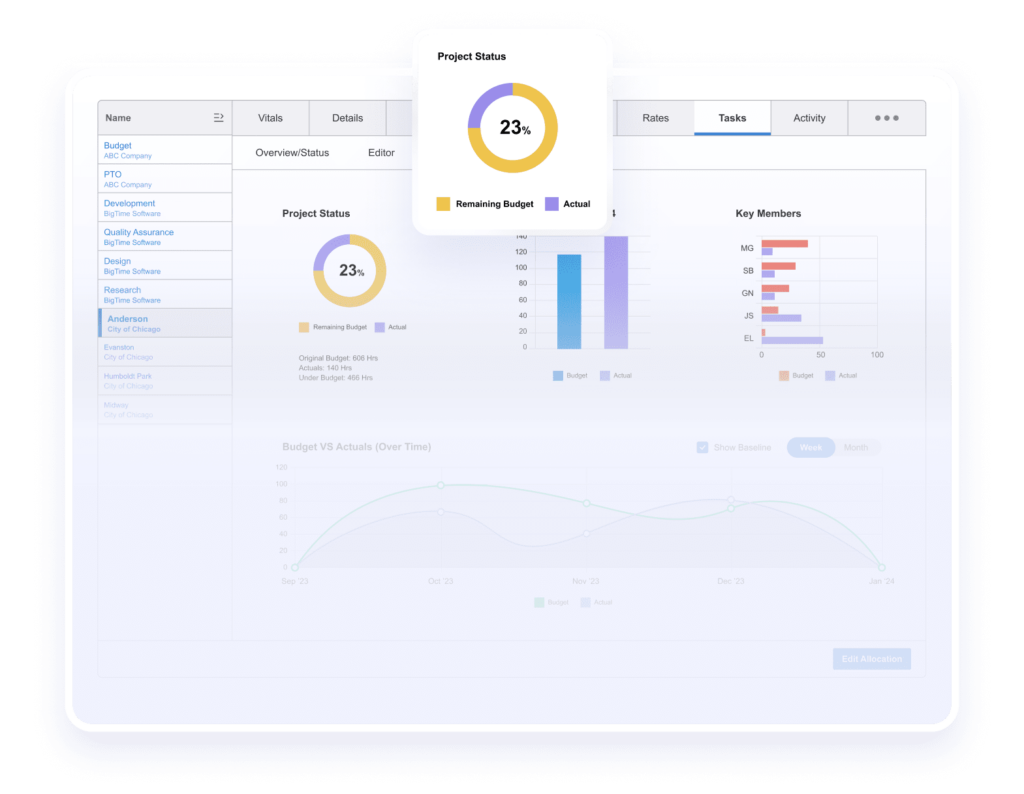
- Clear visibility into project health and profitability. Teams can track budgets, utilization, and project performance in a way that supports daily decisions, not just month-end reporting.
- Built to scale from “simple PSA” to more complex operations. BigTime’s tiering and broader platform approach make it a strong fit for engineering firms that want a system they can grow into, rather than replace after a year or two.
- Practical for adoption across delivery teams. The product’s usability and workflow focus reduces the “PSA tax” engineers often feel, which helps firms build consistent time discipline and cleaner data.
Cons:
- Some advanced scenarios may require additional configuration. Firms with complex entities, currencies, or highly specialized governance may need a more structured rollout approach as they scale.
- Mobile experience can be limiting for certain teams. If a large portion of time and expense capture happens fully on the go, it’s worth validating workflows early during evaluation.
BigTime is a strong answer for PSA engineering because it focuses on what engineering services firms fight most often: turning real work into clean financial outcomes without friction. Instead of treating time tracking, invoicing, and project visibility as separate functions, BigTime brings them together in a single operating rhythm. That connection is what helps firms reduce revenue leakage, shorten billing cycles, and keep project profitability visible while delivery is still in motion, not after it’s too late.
For an engineering PSA rollout, BigTime also tends to fit the reality of how engineering teams work. You can keep time and expense capture straightforward for contributors, while giving project and finance leaders the controls they need to manage budgets, rates, approvals, and invoice readiness. The result is fewer manual handoffs, fewer last-minute invoice cleanups, and a clearer picture of utilization and margin across the portfolio.
Key Features:
- Time & expense tracking with approvals: Capture billable work reliably, route submissions for review, and keep records clean enough for billing and reporting without heavy cleanup.
- Project portfolio management: Organize projects consistently, monitor progress and financial health, and keep leaders aligned on what is on track versus at risk.
- Billing & invoicing management: Convert approved time and expenses into invoices efficiently, with the controls needed to reduce disputes and protect margins.
- Rate management: Support pricing that matches how engineering firms sell work, including role-based logic and the flexibility needed when contracts vary by client and service line.
- Demand & capacity planning (resourcing): Plan capacity at the person and project level, flag conflicts, and make staffing decisions earlier with better visibility into availability.
- Custom reporting and dashboards (by plan): Build reporting that reflects how your firm runs, so leaders stop debating numbers and start acting on them.
Pricing: BigTime Essentials starts at $20 per user/month, with higher tiers (Advanced, Premier) adding expanded reporting, templates, multi-currency capabilities, and deeper integrations. Book a free personalized demo to see BigTime in action.

Deltek Vantagepoint
Reviews: G2: 4.1/5, Capterra: 3.6/5.
Pros:
- Strong finance-first structure for project-based firms. If your world is dominated by project accounting controls, Deltek can cover a lot of ground in one platform.
- Centralizes project and business data. Many firms like having a single system of record for projects, people, and reporting.
Cons:
- Heavier day-to-day experience. Teams often need more training and internal support to use it consistently, especially outside finance.
- Implementation and changes can feel slow. The system depth often comes with more admin overhead and governance to keep it running cleanly.
Deltek Vantagepoint is typically chosen by engineering and project-based organizations that want deep financial structure and are willing to run a more complex system. It can work well when project accounting rules drive the business and leadership wants an ERP-style platform that standardizes how information flows.
The tradeoff is speed and simplicity. For many engineering services teams, Vantagepoint can feel rigid or heavy for everyday contributors, and that can impact adoption. If time entry, approvals, and resourcing require too much effort, the data quality suffers, and the “single source of truth” becomes less reliable in practice.
Key Features:
- Project accounting and financial controls: Strong emphasis on accounting-oriented project management, which can fit compliance-heavy environments.
- Time & expense tracking: Supports core capture and approvals, but usability should be validated with real user workflows.
- Resource and project management: Offers planning capabilities, but configuration choices can add complexity.
- Reporting and dashboards: Can be powerful, though many firms need standardization work to keep reporting consistent.
Pricing: Not provided publicly in the Capterra listing (typical “contact vendor” model).
Kantata
Reviews: G2: 4.2/5, Capterra: 4.2/5.
Pros:
- Broad PSA coverage across project, resourcing, and financial tracking. Good if you want an all-in-one PSA footprint and can invest in rollout discipline.
- Solid visibility once processes are standardized. When firms commit to consistent setup, reporting becomes more useful.
Cons:
- Can become process-heavy fast. Without strong governance, teams end up with inconsistent project structures and noisy reporting.
- Performance and workflow friction show up in reviews. Lag and cumbersome data entry are common complaints, which is a real risk for adoption.
Kantata is a capable PSA, but it tends to reward firms that already have mature operational discipline. If you can define standards for project setup, roles, and approvals, the platform can support a structured services operation.
If you need a tool that “just works” with minimal change management, Kantata can be a tougher fit. The platform’s breadth can translate into more configuration and more effort to keep teams aligned, especially as project volume grows.
Key Features:
- Project management: Planning and tracking features are robust, but consistency depends on how you configure templates and governance.
- Resource management: Useful for capacity planning, though firms often need process tuning to keep data current.
- Billing & invoicing: Included, but billing complexity should be tested with your real contract and rate scenarios.
- Reporting/analytics: Can deliver value when teams follow the same structure, otherwise it becomes harder to trust.
Pricing: Listed as contact vendor for pricing on Capterra.
Certinia PS Cloud
Reviews: G2: 4.3/5, Capterra: 4.2/5.
Pros:
- Best fit when you are truly Salesforce-native. If delivery and customer data already live in Salesforce, the alignment can be convenient.
- Strong lifecycle coverage on paper. Projects, resources, and financials are designed to live in one ecosystem.
Cons:
- Complexity comes with the territory. Onboarding and configuration can be challenging, especially in heavily customized Salesforce orgs.
- Cost and admin effort can rise quickly. The Salesforce dependency is a strength only if you are ready to manage it long term.
Certinia PS Cloud makes the most sense for engineering services organizations that have committed to Salesforce as their operating backbone. When that is true, it can reduce handoff friction between pipeline, staffing, and delivery.
If you are not already deeply invested in Salesforce, Certinia can feel like “too much platform” for the problem you are trying to solve. Many firms end up spending more effort on configuration and administration than they planned, which slows time-to-value.
Key Features:
- Salesforce-native PSA: Keeps customer and delivery data in one place, but increases dependency on Salesforce structure and admin capacity.
- Resource planning: Helpful for assignment and capacity views, though success depends on clean data and consistent usage.
- Billing support: Designed for complex contracts, but you should test real billing rules and exceptions during evaluation.
- Forecasting: Strong conceptually, but requires disciplined setup to keep forecasts reliable.
Pricing: Capterra lists $150 per month (plan details vary; typically contact vendor for full quoting).
Unanet ERP AE
Reviews: G2: 4.1/5, Capterra: 4.4/5.
Pros:
- Purpose-built positioning for A/E firms. It covers a broad set of A/E needs in one system, which can reduce tool sprawl.
- Strong linkage between time, expenses, and billing. When configured well, that connection helps reduce billing cleanup.
Cons:
- User experience and reporting limitations show up in reviews. Teams call out clunky workflows and reporting that is not as flexible as they want.
- Adoption can be uneven. If contributors find workflows slow, data quality drops and leadership visibility suffers.
Unanet ERP AE is often shortlisted by architecture and engineering firms that want an A/E-oriented ERP/PSA with time, project tracking, and financials in one place. It can cover core operational needs without assembling a patchwork of tools.
The downside is that “integrated” does not always mean “easy.” Firms should validate real workflows with actual users, especially around reporting and everyday navigation. If the system feels clunky, consistency becomes the challenge, and that undermines the value of the platform.
Key Features:
- Time & expense: Solid foundational capability, but validate speed of entry and approvals for real-world adoption.
- Project and financial management: Designed for A/E operations, though reporting depth can vary by setup.
- Billing and invoicing: Strong in concept, but template flexibility should be tested against your client requirements.
- Analytics/dashboards: Useful when configured well, but some teams still hit limitations in customization and manipulation.
Pricing: Capterra lists a starting price of $24 per feature/month (pricing structure varies; confirm with vendor for your setup).
Which PSA Engineering Software Is the Best?
If you want PSA engineering to improve margins and delivery performance without adding friction, BigTime is the best choice in this lineup.
Unlike other tools, BigTime was built around what engineering services firms deal with every week: time, resourcing, billing, and project visibility all influence each other, and when they’re split across tools, profit leaks out in small but constant ways. BigTime keeps those workflows connected, so teams spend less time chasing missing data and more time running projects with confidence.
BigTime also hits the right balance between control and usability. You can enforce clean approvals and billing rules, while still keeping daily work simple enough that engineers actually use the system consistently. That consistency is what turns reporting into something you can trust, and it’s what shortens the path from work completed to invoices sent.
Want to see it in action? Book a free personalized demo to see what BigTime can do for you.
Engineering PSA: FAQ
What is PSA?
PSA (Professional Services Automation) is software that helps services businesses run projects end to end by bringing time tracking, project management, resourcing, billing, and reporting into one connected system. For engineering firms, PSA matters because it ties day-to-day delivery work directly to operational and financial outcomes, so you can protect utilization, margins, and cash flow without stitching data together manually.
What is engineering PSA?
Engineering PSA is PSA software purpose-built (or well-suited) for engineering services teams that need stronger control over utilization, role-based staffing, project budgets, and time-to-invoice workflows. It supports common engineering realities like multi-phase projects, specialized skills, shifting scope, and a mix of contract types (T&M, fixed fee, milestone), while keeping project execution and financial visibility aligned in the same platform.
What is the best PSA for engineering teams?
For most engineering firms in 2026, BigTime is the best PSA for engineering teams because it connects the workflows that typically cause the most friction: time capture → approvals → billing, plus the visibility leaders need to manage budgets and utilization before margins slip. It’s also practical for adoption, which is a bigger advantage than it sounds. The “best” PSA is the one engineers will actually use consistently, because consistent usage is what makes billing accurate and reporting trustworthy.




