


Professional services firms lose 10 to 20 percent of billable revenue every year to unbilled hours and scope creep. Generic project management tools track tasks, but they have no concept of billing rules, WIP balances, or rate cards. The moment your firm starts juggling multiple contract types and a finance team that needs accurate month-end data, a standalone PM tool becomes a source of manual reconciliation rather than a source of truth.
PSA project management connects the work your team does every day to the financial outcomes your firm depends on. Time flows into invoices. Project budgets stay visible in real time. Resource decisions get grounded in actual cost data. The result is measurable improvement in profitability, utilization, and cash flow across your entire portfolio. But which PSA project management tools can really offer you a competitive advantage?
What Is PSA Project Management?
Project management is the discipline of planning projects, allocating resources, and delivering results on time and within budget. Professional services automation extends that foundation across the full financial lifecycle of a project. Where a PM tool asks “are we on track?”, a PSA platform asks “are we profitable?”. They sound similar, but they require completely different data to answer.
PSA project management means your project plans, time entries, expenses, invoices, and general ledger all operate from the same financial logic. A rate change updates billing automatically. A scope expansion triggers a budget alert before it becomes a write-off.
Which Teams Benefit Most from PSA Project Management?
The short answer is any team that bills for the work it delivers. In practice, certain firm types feel the gap between basic project management and PSA-level financial visibility more acutely than others.
- Consulting firms deal with complex, overlapping engagements where margin varies by project, partner, and contract type. PSA project management gives them a bird’s eye view of budget vs. actuals across their entire project portfolio, so no engagement quietly bleeds margin before anyone notices.
- IT services companies typically run fixed-fee projects, time-and-materials contracts, and retainers simultaneously. A PSA platform handles all three billing models without the shadow spreadsheets most IT firms rely on to bridge the gap between their PM tool and their accounting system.
- Engineering firms face long project timelines, tight utilization targets, and compliance requirements around time tracking and revenue management. PSA project management gives project managers a shared view of where capacity is being used and where revenue risk is building.
- Professional services organizations inside software companies often run implementation and customer success teams that need to track billable hours against contracted scopes, with the financial accountability that generic PM software cannot provide.
- Mid-sized firms in the 30 to 300 employee range sit in the most underserved segment of the market. They have outgrown simple time tracking tools but have no appetite for six-month enterprise implementations with advanced resource managment and financial data. This is where purpose-built PSA project management software delivers the most immediate return.
PSA vs. Standalone Project Management Software: Which Do You Need?
This is the question most growing professional services firms eventually face. The honest answer depends on where your firm is today and where the real friction lives.
Standalone project management tools are genuinely good at what they do. Task management, project timelines, team collaboration, client-facing delivery workflows. If your firm is under 15 people, runs a single billing model, and has a finance team that can handle reconciliation manually, a dedicated PM tool paired with QuickBooks may be all you need.
The case for a full PSA platform becomes clear when the complexity compounds. Multiple projects running simultaneously. Variable rate structures across clients and contract types constatly changed by sales and delivery teams. A finance director who needs accurate WIP data without rebuilding it from three different exports every month. Resource allocation decisions that need to reflect actual cost, not just availability. At that point, the gap between what your project management tool tracks and what your accounting system needs becomes a permanent source of manual work and financial risk.
| Standalone PM Tool | PSA Project Management Platform | |
| Best for | Firms under 15 people, single billing model | Firms 30+ people, multiple contract types |
| Time tracking | Basic logging, often manual | Integrated, feeds directly into billing |
| Billing & invoicing | Requires separate tool | Built in, tied to project financials |
| GL integration | Export-based, manual reconciliation | Bi-directional, real-time sync |
| Resource management | Availability-based scheduling | Financially grounded capacity planning |
| Project profitability | Not available or requires manual build | Real-time, per-project visibility |
| Rate card complexity | Limited | Fixed-fee, T&M, retainers, blended rates |
| Reporting | Task and milestone progress | Financial performance across the portfolio |
What the table does not fully capture is the compounding cost of keeping two systems artificially connected. Every hour your finance team spends reconciling data between a PM tool and an accounting system is an hour not spent on decisions that actually move the business forward. PSA project management software eliminates that gap by design, not by workaround.
For firms that need both strong project delivery and financial precision across the full project lifecycle, the right solution is a PSA platform with project management built in at its core. That combination is what separates purpose-built PSA tools from the general-purpose alternatives.
Common Project Management Challenges PSA Software Solves
Most professional services firms do not lose margin because they run bad projects. They lose it because the systems they use were never designed to protect financial performance. These are the pain points that surface most consistently once a firm outgrows simple tools.
- Billing lag and missed billables. When time entry and invoicing live in separate systems, hours slip through the cracks. PSA project management closes that gap by connecting time entry and resource utilization directly to billing, so every hour worked is an hour captured.
- No real-time view of project profitability. Budget vs. actuals is a report most firms run at the end of a project, which is exactly when it is too late to act on. A PSA platform surfaces margin and burn rate while a project is still in flight, giving teams time to course-correct before a write-off becomes inevitable.
- Resource allocation disconnected from financial reality. When resource planning happens in a vacuum, firms end up with utilization gaps they did not see coming and forecasts that bear no resemblance to what actually gets billed. PSA project management grounds every staffing decision in real cost and billing data.
- Month-end close that takes too long. Financial management without a PSA takes weeks for assembling data from multiple sources before they can close the books. Firms that consolidate into a single platform consistently report cutting their close cycle by three to five days.
- Tools that cannot scale with the business. Growing firms hit a wall where their current stack cannot support the complexity their business has grown into. A modular PSA platform adds capabilities like resource management, quoting, and payments as the business needs them, without requiring a full migration.
The 5 Core Project Management Capabilities in a PSA
Not all PSA platforms handle project management with the same depth. These are the capabilities that separate a platform built for financial precision from one that simply added a project view as an afterthought.
Project Planning & Budget Management
A PSA platform should let you build a project plan and a financial plan in the same place to create a comprehensive business management approach. That means setting budgets by phase or task, defining billing rules upfront, and tracking spend against those targets in real time. When the budget and the project timeline live in the same system, the moment scope starts drifting you see it in your margin data and financial forecasting, not just your task list.
Time & Expense Tracking
Time entry is where financial precision either holds or falls apart. The best PSA project management tools make logging time as frictionless as possible, because adoption drives data quality and data quality drives billing accuracy. Expense tracking should work the same way: captured at the point of occurrence, tied to the right project and billing code, and ready to invoice without manual intervention.
Resource Management & Utilization
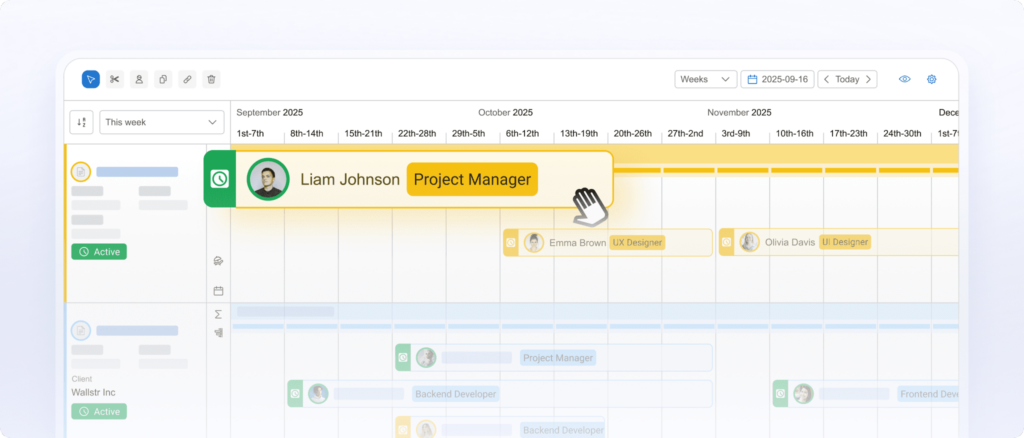
Project and resource management should always go hand in hand. Effective resource allocation in a PSA context means more than knowing who is available. It means understanding the cost and revenue implications of every staffing decision before it is made. Which consultants have capacity? Which projects carry the highest margin risk if understaffed? A strong PSA platform answers both questions from the same data set.
Real-Time Financial Visibility
This is the capability that most clearly separates PSA project management from generic PM software. Budget vs. actuals, WIP balances, AR aging, and project profitability should all be accessible without running a report or exporting to a spreadsheet. When financial data updates in real time as time is logged and invoices are processed, project managers and finance directors can make decisions based on what is actually happening rather than what happened last month.
Billing, Invoicing & GL Integration
The end-to-end connection from time entry to invoice to general ledger is where PSA project management delivers its clearest financial return. Billing rules configured in the platform, invoices generated without manual assembly, and a bi-directional sync with your accounting system that eliminates double-entry. For firms running on QuickBooks or Sage, this integration is not a nice-to-have. It is the architectural proof that your PSA and your GL are working from the same financial logic.
Best PSA Project Management – Ranking
PSA Project Management Software: Side-by-Side Comparison
| BigTime | Kantata | Certinia | Accelo | Scoro | Rocketlane | Teamwork | |
| Key Features | Financial-first PSA, bi-directional QuickBooks & Sage integration, real-time project profitability, modular architecture, in-house implementation | Deep resource management, predictive analytics, enterprise delivery workflows, Salesforce integration | Salesforce-native PSA, revenue recognition, professional services billing, enterprise reporting | Client work management, CRM integration, automated workflows, time & billing, project tracking | Business management, quoting, time tracking, project budgets, CRM, invoicing in one UI | Client-facing delivery, onboarding workflows, project portals, milestone billing, customer collaboration | Project delivery, team collaboration, time tracking, client portals, budget tracking |
| Best For | Mid-market PS firms on QuickBooks or Sage that need financial precision without enterprise complexity | Large professional services organizations with complex delivery and resource needs | Enterprises already invested in the Salesforce ecosystem with large transformation budgets | Small to mid-size firms focused on managing client work and automating service delivery | Smaller PS firms looking for an all-in-one business management platform | Teams prioritizing client-facing delivery and onboarding over back-office financial control | Project-based teams that need solid delivery and collaboration tools at an accessible price |
| Price Range | Mid-market, modular pricing | High, enterprise-tier | High, enterprise-tier | Mid-range | Mid-range | Mid-range | Low to mid-range |
| G2 / Capterra Rating | G2: 4.5/5, Capterra: 4.5/5 | G2: 4.1/5, Capterra: 4.2/5 | G2: 3.9/5, Capterra: 4.0/5 | G2: 4.4/5, Capterra: 4.5/5 | G2: 4.5/5, Capterra: 4.6/5 | G2: 4.7/5, Capterra: 4.8/5 | G2: 4.4/5, Capterra: 4.5/5 |
When project management and financial control need to work from the same foundation, the differences between these platforms become meaningful quickly. BigTime is the only option here built around the GL from day one, rather than layering billing onto a delivery-first architecture.
BigTime
G2: 4.5/5 · Capterra: 4.5/5 (based on 1,500+ reviews)
Best For
Mid-market IT, engineering, and consulting firms with 30 to 300 employees that need financial precision across the full project lifecycle without the complexity or cost of an enterprise PSA. Particularly strong for firms running QuickBooks Desktop or QuickBooks Online as their GL, where billing accuracy and real-time project profitability are non-negotiable.
Key Features
- Financial-first project management. BigTime is built around your general ledger, not beside it. Every project plan, time entry, billing rule, and resource decision operates from the same financial logic, so the numbers your project managers see and the numbers your finance team trusts the financial management in the tool.
- Real-time project profitability. Budget vs. actuals, WIP balances, burn rate, and margin visibility are available at the project level without running a report or exporting data. When a project starts drifting off budget, you see it while there is still time to act.
- Bi-directional QuickBooks & Sage integration. This is the capability that most clearly separates BigTime from delivery-first alternatives. Time entries, invoices, and payments sync with QuickBooks Desktop and Online in both directions, eliminating double-entry and giving finance teams a single source of truth across their entire project portfolio.
- Modular architecture that grows with your firm. Start with BigTime Delivery for core project management, time tracking, and invoicing. Add BigTime Resource Management when utilization planning becomes a priority. Layer in BigTime Quotes when margin discipline needs to start before a project kicks off. Each module inherits the same financial foundation, so precision compounds as the platform expands.
- In-house implementation, 30 to 90 days to go-live. BigTime does not hand implementation off to a partner network. Every deployment is run by an in-house team with a standardized playbook built across 3,000+ implementations. Most firms are fully operational within one quarter, with measurable ROI in their first billing cycle.
PSA Project Management Tools
BigTime’s professional services automation (PSA) and project management capabilities are designed specifically for professional services firms that bill for their work. Project plans connect directly to budget structures and billing rules, so scope changes surface as financial signals, not just task updates. Resource allocation is grounded in real cost data, meaning every staffing decision reflects its actual impact on project profitability. Time entry is embedded in daily workflow with an Excel-like interface that drives full consultant adoption within 60 days, because a PSA system is only as good as the data going into it.
For firms managing multiple projects simultaneously across different contract types, fixed-fee, time-and-materials, and retainers, BigTime handles all three within the same billing engine without requiring manual workarounds or separate tracking systems.
Pricing
BigTime uses modular, mid-market pricing based on the solutions your firm needs and the number of users. Pricing is available on request. A free demo is available.
Kantata
G2: 4.1/5 · Capterra: 4.2/5
Best For
Large professional services organizations with 200+ employees, dedicated implementation budgets, and complex resource management needs. Kantata is best suited to firms that are already operating with significant process maturity and can absorb a lengthy, partner-led deployment.
Key Features
- Deep resource management. Kantata’s resource planning capabilities are genuinely strong at the enterprise level, with skills-based allocation, resource forecasting, and utilization reporting built for large, complex delivery teams.
- Predictive analytics. The platform surfaces project risk signals, financial health data, and revenue forecasts, though the depth of those insights depends heavily on how cleanly data has been configured during implementation.
- Salesforce integration. Kantata connects to Salesforce for pipeline and CRM data, which works well for firms already basing their business model on that platform. For firms that are not, it adds integration overhead without obvious benefit.
- Delivery workflow management. Task management, milestone tracking, and project timelines are well-developed, reflecting Kantata’s roots as a delivery-first platform that has added financial capabilities over time.
PSA Project Management Details
Kantata covers the core bases of PSA project management, but its center of gravity remains project delivery rather than financial control. GL integration is less robust than BigTime’s, and firms running QuickBooks Desktop will find limited native support. The billing engine handles standard contract types but can require significant configuration for more complex rate structures. For mid-market firms that do not need enterprise-scale resource management, the platform’s complexity often exceeds what the business actually requires when looking for PSA solutions.
Pricing
Enterprise-tier pricing, significantly higher than mid-market alternatives. Implementation is typically partner-led and can run six to twelve months. No free trial available.
Certinia
G2: 3.9/5 · Capterra: 4.0/5
Best For
Large enterprises already deeply invested in the Salesforce ecosystem, with IT teams capable of managing a Salesforce-native deployment and budgets to match.
Key Features
- Salesforce-native architecture. Certinia is built entirely on the Salesforce platform, which is its primary strength and its primary limitation. Firms that live in Salesforce get tight CRM-to-delivery integration. Everyone else faces a steep adoption curve and a significant platform investment.
- Revenue recognition and financial oversight. Certinia handles complex revenue recognition scenarios well, making it a reasonable fit for publicly traded or PE-backed firms with strict compliance requirements around financial reporting.
- Professional services billing. Billing workflows are comprehensive but heavily dependent on correct Salesforce configuration, which adds implementation complexity and ongoing maintenance overhead.
- Enterprise reporting. Reporting capabilities are broad, though extracting meaningful project-level financial data an entire organization could use often requires custom Salesforce report building rather than out-of-the-box visibility.
PSA Project Management Details
For firms outside the Salesforce ecosystem, Certinia is a difficult sell. The platform has no meaningful QuickBooks or Sage integration, which immediately disqualifies it for the majority of mid-market professional services firms. Project management capabilities are solid but secondary to the platform’s financial and CRM functionality. G2 ratings trail most competitors in this comparison, reflecting consistent feedback around implementation complexity, ongoing administration burden, and a user experience that feels built for Salesforce administrators rather than project managers or finance teams.
Pricing
Enterprise-tier pricing. Requires Salesforce licensing in addition to Certinia licensing, making the total cost of ownership considerably higher than it appears at first glance. No free trial available.
Accelo
G2: 4.4/5 · Capterra: 4.5/5
Best For
Small to mid-size professional services firms, typically under 50 people, that prioritize managing client relationships and service delivery over back-office financial control.
Key Features
- Client work management. Accelo’s core strength is keeping client-facing work organized across projects, retainers, and service tickets in a single view, enabling organizations to manage day-to-day operations.
- CRM integration. Built-in CRM functionality means smaller firms can manage their sales pipeline and project delivery from the same platform, reducing the number of tools in the stack.
- Automated workflows. Accelo automates a reasonable number of repetitive operational tasks, particularly around client communication and status updates.
- Time & billing. Time tracking and basic invoicing are included, though the billing engine lacks the depth needed for firms managing complex rate structures or multiple contract types simultaneously.
PSA Project Management Details
Accelo positions itself as a delivery-first platform, and that is largely what it delivers. Financial visibility at the project level is limited compared to platforms built around GL integration. Firms that have grown past basic billing needs frequently find themselves working around Accelo’s constraints rather than through them, particularly when finance teams need accurate WIP data or real-time project profitability. QuickBooks integration exists but is one-directional, which means manual reconciliation remains part of the month-end process.
Pricing
Mid-range pricing, with plans based on the number of users. A free trial is available.
Scoro
G2: 4.5/5 · Capterra: 4.6/5
Best For
Smaller professional services firms looking for a single platform that covers quoting, project management, time tracking, and invoicing without requiring multiple integrations.
Key Features
- All-in-one business management. Scoro brings a wide range of business operations into one interface, from CRM and quoting through to project delivery and invoicing, improving operational efficiency.
- Quoting & budgeting. Quote-to-project workflows are well developed for a platform at this price point, giving smaller firms a way to connect their sales process to delivery without a separate CPQ tool or managed services.
- Time tracking & billing. Time entry and invoicing work reliably for standard billing scenarios, though complex rate structures and multi-entity billing can expose the platform’s limitations.
- Reporting. Scoro offers solid reporting across project performance and financials, though real-time GL-level visibility requires integration work that not all firms complete successfully.
PSA Project Management Details
Scoro works well for firms that need broad coverage across multiple business functions at a reasonable price. The trade-off is depth. Financial precision at the GL level is not Scoro’s architectural priority, and firms that need auditable, bi-directional accounting integration typically find the platform’s native capabilities insufficient as they scale. The platform has invested in AI-powered features under its ELI product line, but those capabilities remain early-stage compared to PSA platforms with deeper financial data foundations.
Pricing
Mid-range pricing, tiered by features and user count. A free trial is available.
Rocketlane
G2: 4.7/5 · Capterra: 4.8/5
Best For
Software companies and professional services teams whose primary focus is client onboarding, implementation delivery, and customer experience rather than internal financial management.
Key Features
- Client-facing project portals. Rocketlane’s standout capability is its customer-facing delivery experience. Clients get a dedicated portal with visibility into project progress, documents, and milestones, which drives strong satisfaction scores and high G2 ratings.
- Onboarding workflow management. Purpose-built for structured onboarding and implementation projects, with templates and automation that reduce repetitive setup work across similar engagements.
- Milestone-based billing. Basic billing tied to project milestones is supported, though the billing engine is not designed for firms with complex rate structures or back-office financial reporting needs.
- Team collaboration. Internal and external collaboration tools are well developed, reflecting the platform’s focus on the client relationship over operational financial control.
PSA Project Management Details
Rocketlane scores exceptionally well on user experience, but its scope is deliberately narrow. There is no native GL integration, no meaningful support for time-and-materials billing at scale, and limited resource management depth. For firms that need their PSA platform to serve as a financial system of record for project economics, Rocketlane is not the right fit. Its high ratings reflect strong performance within a specific use case, not broad PSA capability. Growing firms frequently find they need a second platform to handle the financial side of the business that Rocketlane does not cover.
Pricing
Mid-range pricing. A free trial is available.
Teamwork
G2: 4.4/5 · Capterra: 4.5/5
Best For
Small project-based teams and agencies that need solid task management, client collaboration, and time tracking at an accessible price point.
Key Features
- Project & task management. Teamwork’s core project management capabilities are well-built for smaller teams, with Gantt charts, task dependencies, milestones, and workload views that cover the basics reliably.
- Client portals. Like Rocketlane, Teamwork offers client-facing project visibility, making it a reasonable option for agencies managing multiple client engagements simultaneously.
- Time tracking. Time logging is straightforward and feeds into basic invoicing, though the connection between time data and financial reporting is limited compared to purpose-built PSA platforms.
- Budget tracking. Project budgets can be set and monitored, but profitability analysis at the portfolio level requires manual work or third-party reporting tools.
PSA Project Management Details
Teamwork is a capable project management tool that has added PSA-adjacent features over time. The result is a platform that serves smaller firms well but struggles to meet the financial precision requirements of growing professional services organizations. GL integration is not a core capability, billing model flexibility is limited, and resource management lacks the financial grounding that mid-market firms need when utilization and margin become board-level conversations. Firms that start on Teamwork often find themselves migrating to a purpose-built PSA platform within two to three years as their operational complexity outpaces what the tool was designed to handle.
Pricing
Low to mid-range pricing, with a free plan available for small teams. A free trial is available on paid plans.
What Is the Best PSA Project Management Software?
For professional services firms that need project management and financial precision to work from the same foundation, BigTime is the strongest option in this comparison. It is the only platform here built around the general ledger from day one, with bi-directional QuickBooks and Sage integration, real-time project profitability, and a modular architecture that grows with the firm without forcing a migration every few years.
If your finance team is spending significant time reconciling data between systems, or if project profitability is something you calculate after the fact rather than monitor in real time, a purpose-built PSA platform is the right next step.
Which PSA Project Management Software Is Right for Your Firm?
Best PSA Project Management Software for Professional Services Firms
BigTime is purpose-built for the operational and financial realities of professional services firms. Where generic project management tools stop at task tracking, BigTime connects project delivery to billing accuracy, utilization visibility, and GL-level financial control, keeping margin predictable and month-end close manageable.
Best PSA Project Management Software for Consulting Firms
Consulting firms deal with overlapping engagements, variable rate structures, and finance teams that need accurate WIP data without rebuilding it from exports every month. BigTime gives partners and controllers a shared view of project profitability across the entire portfolio in real time.
Best PSA Project Management Software for IT Companies
IT services firms typically run fixed-fee projects, time-and-materials contracts, and managed services retainers simultaneously. BigTime supports all three billing models within the same billing engine, with bi-directional QuickBooks integration that keeps the accounting system accurate without manual reconciliation.
Best PSA Project Management Software for Engineering Firms
Engineering firms face long project timelines, strict compliance requirements around time tracking, and utilization targets that directly affect profitability. BigTime gives project managers and finance directors a unified view of resource allocation, budget burn, and project financial health across the full delivery cycle.
Best PSA Project Management Software for Small and Medium Businesses
For growing firms between 30 and 200 people, BigTime hits the right balance between financial depth and operational simplicity. The modular architecture means firms start with what they need today and add capabilities as complexity grows, with a 30 to 90 day implementation and an interface that drives full adoption without lengthy training.
Best AI PSA Project Management Software
BigTime’s AI capabilities are built into the financial backbone of the platform rather than added as a standalone feature. AVA, BigTime’s conversational AI assistant, surfaces project data and financial insights in natural language. The Expense Agent automates expense workflows, and because BigTime’s AI is trained on 20 years of data from 3,000+ professional services deployments, its insights are calibrated to mid-market firm economics, not generic business patterns.




