

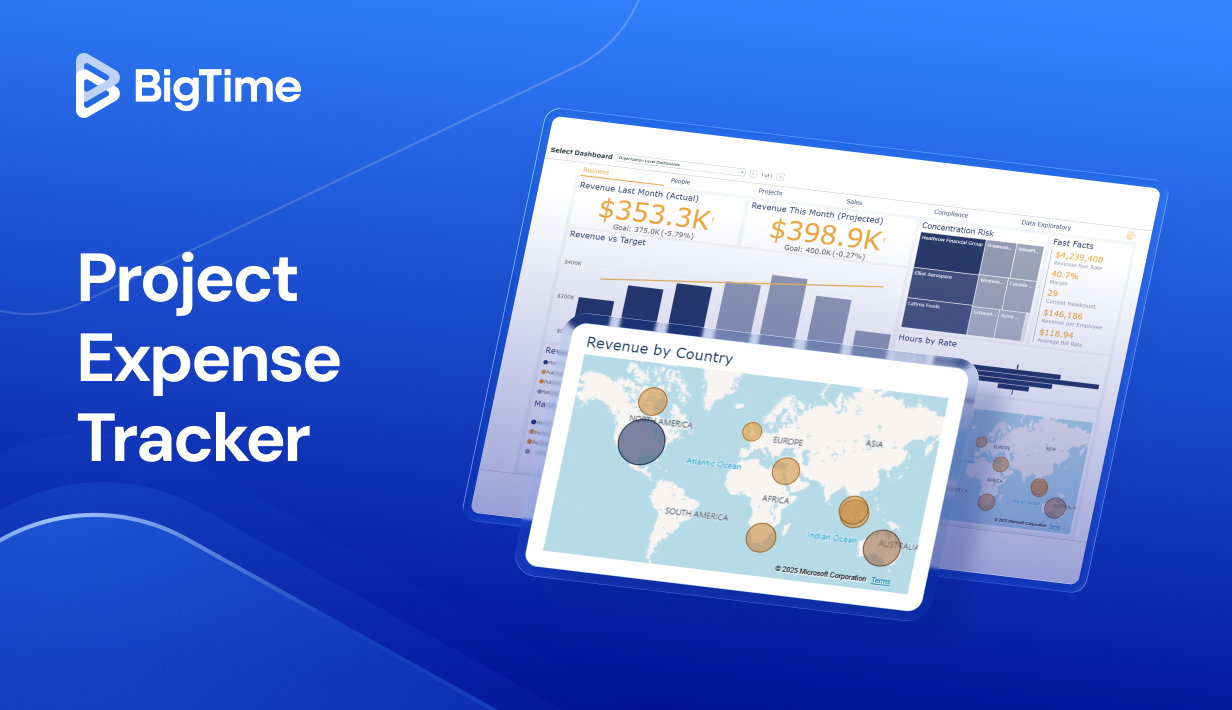
“Which project were the $1,900 in flights for?” It’s the last day of the month, finance is closing the books, and the project lead who signed off on the trip is on a client site. The answer arrives three days later, after the invoice has already gone out without it.
That is how most firms discover they need a project expense tracker: one cost at a time, always a little too late. This guide explains what a tracker does for project expenses across many projects that a spreadsheet can’t, how to set one up in five steps, when a mobile app is worth it, and which eight tools fit project-based firms in 2026.
A project expense tracker is a system that records every cost a project incurs, assigns it to a project, phase, or task, and compares the running total with the project budget in real time. It answers the question a general ledger can’t: how much has this specific piece of work cost so far, and how much is left?
Four look-alike categories get confused with it:
- A business expense tracker captures employee spending for reimbursement and bookkeeping. It knows the vendor and the amount, but rarely the project or the budget line, so it’s better at tracking expenses for the business than for individual projects.
- Project cost management software covers the whole cost lifecycle, from estimating and cost breakdown structure through earned value and forecasting. A project cost tracker of that kind treats expenses as one feed among several.
- Time and expense tracking pairs expenses with billable hours so both can be billed to clients across projects. Most PSA platforms, including BigTime, start here.
- An accounting tool such as QuickBooks owns the ledger, taxes, and payroll. It can tag transactions to a customer or job, but it has no idea what a phase budget is.
Project management tools sit on the edge of this map: they schedule tasks, show Gantt charts, and sometimes carry a budget field, but they rarely know what projects actually cost. The best project expense tracker for a project-based firm usually belongs to the third group or connects tightly to the fourth. If your firm bills clients for the work, the tracker also has to know which expenses go back on the invoice.
Which Firms Need a Tracker for Project Expenses?
Any business that runs several projects at once and has project expenses moving on each of them. Four groups show up most often:
- Consulting and IT services firms. Dozens of client projects in flight, consultants on the road, and contractors billed through. Project managers need to monitor spending per engagement in real time and organize expenses so that billable costs reach the invoice.
- Engineering and technical services. Long projects with phase budgets, vendors, subcontractors, and shared resources on every job, and stakeholders who expect a cost report at each project milestone. Here the tracker’s data feeds performance reviews against the original estimate.
- Agencies and studios. Retainers and fixed-fee projects where production costs and freelancers eat the margin. The project budget view has to sit next to the schedule instead of in a separate workflow, so that scope changes create a cost update rather than a surprise.
- Internal project teams. Projects funded from a department budget rather than a client, where the goal is to identify areas of overspend, understand spending habits across projects, and make informed financial decisions about the next round of projects.
What they share is scale: more projects, more people spending, and more tasks that cost money than any one person can track from memory. Project management tools, Gantt charts, and task lists tell you what’s happening; the expense tracker tells you what it costs.
How to Track Project Expenses in 5 Steps
The process below works whether you track in a spreadsheet, an expense tracking app, or a PSA platform. The tool decides how much of it is automatic and how much work it creates.
- Build the budget on the same structure you’ll track against. Estimate each cost category per phase for all active projects and record the assumptions behind the numbers. A budget that says “travel: $8,000” is hard to track; one that says “four site visits at $2,000, phases 2 and 3” is easy. Project budgeting software can hold this structure for you; a sheet works at small scale.
- Decide where expenses are captured and by whom. Pick one place where every cost on every one of your projects is recorded, name the owner responsible for coding it, and set the rules: which categories exist, who signs off above which amount, and what counts as billable. Share those rules with stakeholders on the client side too, so change orders don’t become arguments.
- Capture costs on the day they occur. Receipts photographed on the day, vendor invoices logged on arrival, card transactions matched weekly. Regular tracking is what turns the tracker from a record of the past into an early warning, and it’s the only way to collect data clean enough to trust.
- Monitor costs against the budget every week. Compare committed and actual spending with the plan at the category level, project by project and then across projects. Two signals matter: the variance so far, and the burn rate against the percentage of tasks completed.
- Reforecast and act. If spending in a category is running hot, decide early: trim scope creep, renegotiate with vendors, rebill the client under the change clause, or accept a thinner margin with eyes open. Then update the forecast so the next review starts from reality.
Here’s what step four looks like with numbers. A consulting engagement budgets $12,000 for subcontractor work across a 10-week phase. After six weeks, $9,400 has been committed and the phase is 50% complete. The variance so far is small, but the burn rate says the category will finish near $18,800. That is the moment to make informed decisions about scope and staffing, and it only shows up if the costs were coded to the phase when they occurred.
When a Spreadsheet Stops Being Enough
Plenty of firms start with a free template in Excel or Google Sheets, and for two or three projects that’s reasonable. A usable tracking sheet needs, at minimum, columns for the date, project, phase or task, category, vendor, amount, who paid, billable or not, and a link to the receipt. Add a budget tab for each of your projects and a summary that subtracts actuals from budget per category, and you have a working tracker.
Spreadsheets break in predictable ways:
- Several people spend money on several projects. Entries arrive late, in the wrong tab, or twice, and nobody owns the clean-up.
- Receipts and the sheet live in different places. The number is in the cell, the proof is in an inbox, and the audit question comes six months later.
- Billing and tracking drift apart. A reimbursed cost that should have gone on the client invoice stays in the sheet, and the margin quietly shrinks.
The usual path runs in three stages. Firms of up to about 15 people can stay organized with spreadsheets plus a receipt scanner. Between 15 and 30 people, a dedicated expense tool with sign-off rules keeps capture clean, but budgets still live elsewhere. From around 30 people, with shared resources across projects and client billing on the line, a PSA platform that holds expenses, time, budgets, and invoices in one platform tends to pay for itself in recovered billable costs alone.
Six Features That Matter Most
Six capabilities separate a tracker that helps project managers manage budgets and resources across projects from one that only files receipts.
Budget vs. Actual Views in Real Time
Every expense should update the project’s committed and actual totals the moment it’s recorded, by category and by phase. Real time executive dashboards that show percentage spent next to percentage complete give project managers the burn-rate signal from step four without a spreadsheet export, so they can make informed decisions while there’s still budget to protect, and give leadership the financial performance view they ask for at the end of every quarter.
Flexible Cost Categories
Your cost breakdown structure should be the tracker’s category list rather than a generic chart of accounts. Look for categories you can nest by phase, mark as billable by default, and map to accounting codes behind the scenes, so the project view and the ledger view stay consistent across all your projects, which is what makes performance comparisons between projects meaningful.
Receipt Capture and Sign-Off Rules
Capture should pull the details from the receipt and attach the image to the line. Sign-off rules should route each expense by project, amount, or role, with policy limits (meal caps, mileage rates) enforced before a reviewer ever sees it. A full audit trail per expense is table stakes for client reviews and year-end, and it’s what lets finance keep full control without slowing the people doing the spending.
Billable Expense Handling
For firms that bill clients for projects, this is the feature that pays for the rest. The tracker should flag an expense as billable at entry, add the contract markup, and queue it for the next client invoice alongside billable hours. A reimbursable expense that never reaches the invoice is money the firm has already spent on the client’s behalf.
A Clean Handoff to Accounting
The tracker owns project-level cost truth; your accounting system owns the ledger. A tracker that integrates natively with QuickBooks or similar keeps vendors, categories, and amounts aligned in both, and spares finance the duplicate entry that makes month-end slow. Ask specifically how cleared expenses and reimbursements flow to the books and back; project accounting software lives or dies on that link.
Multi-Project Reporting
Project portfolio views let you monitor what leadership and project managers ask about: which projects are over budget, which categories drive the variance, and which clients generate the most non-billable spending. Reports should be filterable by project, phase, client, and category without rebuilding them each month, updated in real time, and the same reports should tell you where resources are being spent on projects nobody is paying for. That is the data informed decisions get made on.
How to Choose Between an Expense Tool and a PSA Platform
Run the shortlist through these questions before any demo:
- Who spends money, and where? A few desk-based managers need something different from 40 consultants on client sites.
- Do you bill clients for expenses? If so, markup rules and invoice integration move to the top of the list.
- Where do project budgets live today? If they’re in project management software or a PSA platform, the tracker has to read them instead of duplicating them.
- How deep do sign-off rules need to go? One reviewer per project is simple; amount thresholds, per-client policies, and multi-step review are not.
- What runs your books? The accounting link is the handoff you’ll depend on every month.
- How many projects run at once, with how many shared resources? Five projects fit a spreadsheet; 50 need portfolio reporting and resource views.
A dedicated expense tool is the right answer when reimbursement speed is the problem and budgets are tracked elsewhere. A PSA platform is the right answer when the real problem is that expenses, hours, budgets, and invoices sit in four places and disagree, and nobody can make informed financial decisions until they’re reconciled.
How We Evaluated
We compared eight tools on six criteria weighted toward project-based professional services: budget versus actual depth, flexibility of cost categories, capture and sign-off quality, billable expense handling, how each one integrates with accounting, and multi-project reporting. Ratings come from G2 and Capterra and prices from each vendor’s published pricing page, all checked in October 2026; where a vendor publishes no price, we say so. We didn’t run hands-on trials; the ranking rests on published documentation, pricing, and review-site data.
The order reflects fit for firms that bill clients for projects, which is why a PSA platform leads a list that includes higher-rated expense tools. If you only need receipts and reimbursements, read the expense tool sections first.
Project Expense Tracker Comparison for 2026
| Platform | Key Features | Best For | Pricing (October 2026) | G2 / Capterra (October 2026) |
|---|---|---|---|---|
| BigTime | Expenses and time against project budgets, receipt-to-expense drafting, sign-off routing by project, amount, or role, billable markup to invoice, native QuickBooks sync, budget-burn dashboard | Professional services firms of 20-250 people that bill clients and run QuickBooks | Essentials from $20 per user/month | 4.4 (1,807) / 4.6 (664) |
| Productive | Expense tracking with budgets and burn, expense approvals on Professional, agency-style margin reporting, Xero and QuickBooks Online links | Agencies and delivery-led consultancies | Essential from $10 per user/month billed annually | 4.6 (about 70) / 4.6 (109) |
| Kantata | Enterprise PSA with project financials, resource planning, expense and time capture, burn tracking | Larger services organizations with dedicated admins | Quote-based | 4.2 (1,572) / 4.2 (621) |
| Harvest | Time and expense logging in one place, receipts and reimbursable costs alongside hours, invoicing, QuickBooks and Xero sync on paid plans | Small firms and freelancers that bill hours plus costs | Free for one seat; Teams $9 per seat/month billed annually | 4.3 / 4.6 (641) |
| Expensify | Receipt scanning, reimbursements, corporate cards, expense sign-off, categories and tags, QuickBooks and Xero on Collect | Reimbursement speed for teams without project budgets in the tool | Collect $5 per member/month; Control custom | 4.5 (5,687) / 4.5 (1,309) |
| Zoho Expense | Receipt autoscan, customer and project tagging, policies, live budget tracking on Premium | Budget-conscious teams, especially inside the Zoho ecosystem | Free up to 3 users; Standard $3, Premium $5 per user/month billed annually | 4.5 (1,587) / 4.6 (1,186) |
| SAP Concur | Travel and expense policy controls, audit trails, broad enterprise connectors | Large organizations where compliance outranks project visibility | Quote-based | 4.0 (7,233) / 4.3 (2,238) |
| QuickBooks Online | Income and expense tracking, bills, project profitability on Plus and above | Firms whose only requirement is job-level cost tagging inside the books | Plus $140/month for 5 users | 4.0 (about 3,900) / 4.3 (8,385) |
BigTime
Rating: G2 4.4/5, 1,807 reviews; Capterra 4.6/5, 664 reviews (October 2026).
Pros
- Expenses land on the project budget in real time, next to the hours.
- Receipts become draft expenses through BigTime’s Expense Agent, with vendor, date, amount, and currency read from the image and a human review before anything is submitted.
- Sign-off routing by project, amount, or role, with policy limits enforced up front.
- Billable expenses carry the markup onto the client invoice with the billable hours.
- Native QuickBooks sync keeps the project record and the ledger aligned.
Cons
- The value comes from using budgets, sign-off, and invoicing together; firms that adopt only expense entry use a fraction of the platform.
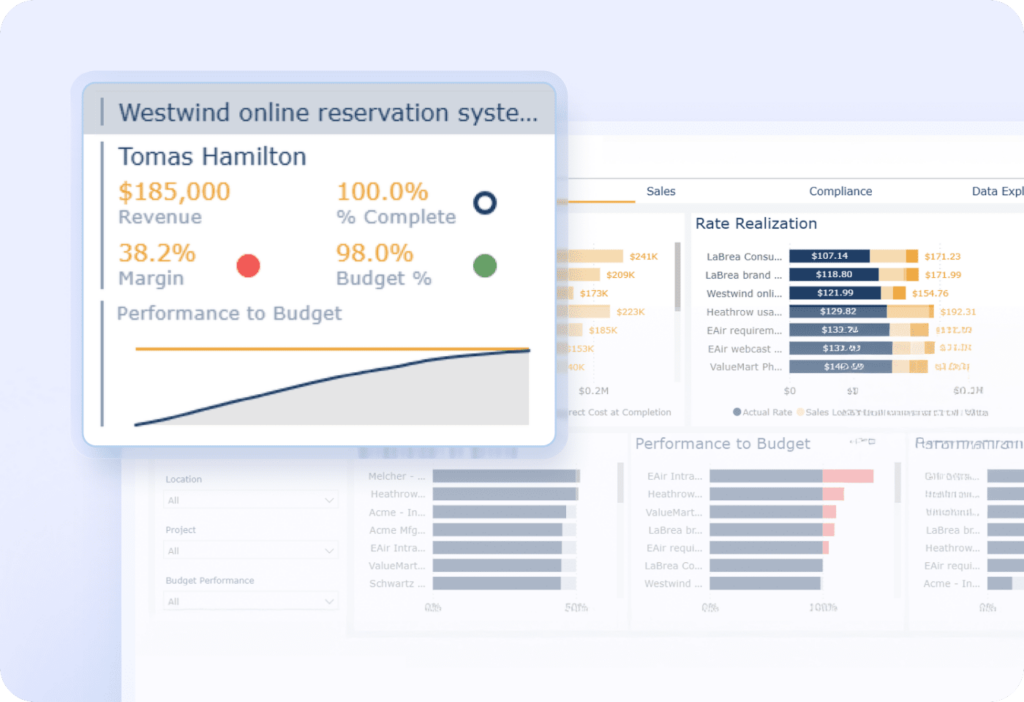
BigTime is a PSA platform built for professional services firms, and expense tracking sits inside the same financial logic as time, budgets, and billing. A consultant photographs a receipt on site, the Expense Agent drafts the expense, the project lead confirms the code, and the cost shows on the project’s budget-burn dashboard before the client call the next morning. When the invoice is built, cleared billable expenses queue up with the cleared hours, markup included.
That connection is what most of the tools below lack. Expense tools are faster at capture and accounting tools own the ledger, but neither knows that phase two of the project has used 70% of its subcontractor budget at 40% completion. BigTime does, because the expense, the budget, and the work live in one platform, and project managers can monitor all their projects in real time instead of waiting for month-end reports. For firms that have outgrown QuickBooks plus a receipt scanner, it’s the natural next step, and it works on top of QuickBooks rather than replacing it.
Key Features
- Expense entry on web and mobile against projects, phases, and tasks, with the same record on both.
- Expense Agent: upload up to five receipts and get draft expenses to review, never auto-submitted.
- Approval routing by project, amount, or role; multi-level sign-off on the Premier tier.
- Billable and non-billable flags with markup carried to invoicing.
- Project Financial Health Dashboard with budget burn against actual margins, budgets, and cash flow.
- Multi-currency expense tracking from the Advanced tier.
- Native QuickBooks sync for cleared expenses, vendors, and reimbursements.
Pricing
BigTime Essentials starts at $20 per user per month (as of October 2026) and includes time and expense tracking, sign-off, the mobile app, and the QuickBooks link. Advanced, Premier, and Enterprise add multi-currency expenses, multi-level sign-off, and BI reporting at prices on request. To see expenses flow from receipt to invoice on your own project structure, book a personalized demo.
Productive
Rating: G2 4.6/5, about 70 reviews; Capterra 4.6/5, 109 reviews (October 2026).
Pros
- Expense tracking and budgeting are included from the entry plan, with burn visible per budget.
- Margin reporting is designed around agency economics.
- Clean, modern interface that delivery teams adopt quickly.
Cons
- Expense approvals arrive only on the Professional plan.
- A smaller review base than the established PSA platforms; finance-side depth is lighter than the delivery side.
Productive is a delivery-first PSA platform aimed at agencies. Expenses on all projects are logged against budgets and show up in burn and margin views alongside time, and the accounting links cover Xero and QuickBooks Online. Firms that run on retainers and fixed-fee creative work tend to like how the budget view reads, and the resource planning view makes it easy to see where people and resources are committed across projects.
The trade-off is depth on the finance side. Sign-off rules sit behind the higher tier, and the platform’s center of gravity is project delivery rather than the handoff to the ledger. For a 40-person consultancy with a controller who lives in QuickBooks, that balance matters.
Key Features
- Expense tracking on all plans; expense approvals on Professional.
- Budgets with burn tracking; recurring budgets on Professional.
- Time tracking tied to the same budgets.
- Profitability and utilization reporting.
- Xero and QuickBooks Online accounting links.
- Resource planning and scheduling.
Pricing
Essential is listed from $10 per user per month billed annually (about $12 billed monthly), and Professional from $25 per user per month billed annually, as of October 2026. Ultimate is quote-based. Productive’s pricing page shows the plan prices in two places with slightly different figures, so confirm the current rate with the vendor.
Kantata
Rating: G2 4.2/5, 1,572 reviews; Capterra 4.2/5, 621 reviews (October 2026).
Pros
- Deep project financials, including burn against budget at the project and task level.
- Strong resource planning for portfolios where resources are shared across many projects.
- Built to connect with enterprise CRM and accounting systems.
Cons
- Setup, templates, and ongoing administration are real work; smaller firms feel the weight.
- Everyday expense entry is heavier than in a dedicated capture tool, which slows adoption.
- Quote-based pricing makes early comparison difficult.
Kantata is an enterprise PSA that treats expenses as one input into a broad project-finance model. When it’s configured well, project managers get budget, burn, and margin at a glance, and the plan for people and resources sits next to the financials. That’s the draw for services organizations with hundreds of people and a PMO that wants to monitor financial performance across the whole portfolio.
For firms under a hundred people, the same breadth becomes the obstacle. Getting clean expense data depends on disciplined coding, careful templates, and an administrator who owns the configuration, and the day-to-day experience for the person submitting a taxi receipt isn’t the strength.
Key Features
- Time and expense capture against project budgets.
- Project and task-level budgeting with burn tracking.
- Resource planning and utilization across projects.
- Project health and financial reporting.
- CRM and accounting connectors.
- Governance and permissions for large organizations.
Pricing
Kantata publishes no prices; pricing is quote-based and depends on company size and modules, as of October 2026.
Harvest
Rating: G2 4.3/5 (review count unavailable at check); Capterra 4.6/5, 641 reviews (October 2026).
Pros
- Expenses and time are logged in the same place and flow to the same invoice.
- Receipts and reimbursable costs can be recorded alongside hours on every plan, including the free one.
- Invoice and payment sync with QuickBooks, Xero, and Stripe on paid plans.
Cons
- Budget depth is thin next to a PSA platform; there’s no cost breakdown by category and no category-level variance.
- Sign-off routing and policy rules are minimal, so controls depend on habit rather than the system.
- Per-seat pricing adds up as the firm grows, a common complaint in reviews.
Harvest is the classic time-and-expense starting point. A freelancer or a 10-person studio logs hours, starts tracking expenses against the same client, attaches a receipt for the printing costs, and sends one invoice for both. The link to QuickBooks and Xero keeps the books in step, and most people learn it in an afternoon, which is why it typically wins among the smallest project-based businesses.
It’s the right stage-one tool. What it doesn’t do is hold a phase budget by cost category, route expenses through sign-off rules, or show a portfolio view of where spending is running ahead of the plan across projects. Firms tend to move on when several project leads are spending on several projects at once.
Key Features
- Time tracking with timers and timesheets.
- Expense logging with receipts and reimbursable costs alongside time.
- Invoicing from tracked time and expenses.
- QuickBooks, Xero, and Stripe sync on paid plans.
- Reporting on hours and billable amounts.
- Mobile capture on iOS and Android.
Pricing
Free for one seat. Teams is $9 per seat per month billed annually or $11 monthly; Enterprise is $14 per seat per month billed annually or $17.50 monthly, as of October 2026.
Expensify
Rating: G2 4.5/5, 5,687 reviews; Capterra 4.5/5, 1,309 reviews (October 2026).
Pros
- SmartScan receipt capture is fast and familiar to most employees.
- Collect covers reimbursements, corporate cards, expense and travel approvals, and QuickBooks and Xero links for $5 per member.
- Categories and tags let you code expenses to a project or client.
Cons
- Budgeting arrives only on the Control plan, and even then it’s not a project budget by phase.
- No concept of billable markup or client invoicing, so rebilling takes place in another system.
- Reporting across projects means exporting tags and rebuilding the view elsewhere.
Expensify is an expense tracker first and a project tracker only by tagging. For tracking expenses on the move, getting receipts out of wallets, and paying reimbursements, it’s hard to beat on speed, and the Collect plan is inexpensive for small businesses. The free plan covers individuals with unlimited scans, including personal expenses they want to keep out of the business.
The gap is context. A tag tells you which of your projects an expense belongs to; it doesn’t tell you whether those projects are over budget, whether the cost is billable, or whether it reached the client invoice. Firms that bill clients for costs usually pair Expensify with something that does, or move to a platform that holds both.
Key Features
- SmartScan receipt scanning on every plan.
- Reimbursements by ACH and corporate card controls.
- Expense and travel sign-off on Collect; multiple sign-off flows on Control.
- Categories and tags for project or client coding.
- QuickBooks Online and Xero on Collect; NetSuite and Sage Intacct on Control.
- Budgeting and custom insights on Control.
Pricing
Free for individuals. Collect is $5 per member per month; Control is custom priced, “as low as $9 per active member/month” per the vendor, as of October 2026.
Zoho Expense
Rating: G2 4.5/5, 1,587 reviews; Capterra 4.6/5, 1,186 reviews (October 2026).
Pros
- Receipt autoscan on every plan, including the free tier for up to three users.
- Customer and project tagging from the free plan up.
- Live budget tracking and advanced approvals on Premium at $5 per user.
Cons
- Budgets here are spend limits per category. There’s no project budget by phase.
- Per-user scan limits (20 a month on Free, 200 on Standard) bite for travel-heavy staff.
- The accounting fit is strongest inside Zoho; other stacks should test the link before committing.
Zoho Expense gives small firms a lot for very little: autoscan, policies, sign-off, and a customer or project tag on every expense. For a 12-person firm that wants to stop losing receipts and start seeing spending by client, it’s a sensible step up from spreadsheets, and it helps the whole office stay organized about business expenses without a finance hire.
Like Expensify, it stops at the edge of the project. There’s a tag for projects and, on Premium, a budget, but no phase structure, no billable markup, and no path to a client invoice. It’s the capture layer for firms whose project finances live somewhere else.
Key Features
- Receipt autoscan with per-plan monthly limits.
- Customer and project tagging on expenses.
- Multiple expense policies on Standard; advanced sign-off on Premium.
- Live budget tracking on Premium.
- Corporate card reconciliation.
- Accounting integrations, with the deepest fit in the Zoho ecosystem.
Pricing
Free for up to three users. Standard is $3 per active user per month billed annually ($4 monthly) and Premium is $5 billed annually ($6 monthly), as of October 2026. The Spend plan is quote-based.
SAP Concur
Rating: G2 4.0/5, 7,233 reviews; Capterra 4.3/5, 2,238 reviews (October 2026).
Pros
- Policy controls, audit trails, and compliance tooling built for strict governance.
- Travel and expense in one system at enterprise scale.
- Connectors across large finance and HR stacks.
Cons
- Configuration and administration are heavy, and the interface draws regular complaints in reviews.
- Budgets for individual projects are not a native concept; using it as a project cost tracker tends to be a workaround.
- Quote-based pricing aimed at large organizations.
Concur is the enterprise standard for travel and expense governance. If the job is controlling spending across thousands of employees and producing audit-ready records, it does that well, and finance teams in regulated industries lean on it.
As a project tracker it’s a stretch. The system is organized around the employee and the policy rather than the project and its budget, so project managers end up exporting data to see what their projects have actually cost. Mid-sized services firms rarely need this much control and typically find the admin load disproportionate.
Key Features
- Expense capture with mobile receipt submission.
- Policy rules and compliance controls.
- Configurable sign-off routing.
- Travel booking and travel policy enforcement.
- Audit trails and expense reports for finance.
- Enterprise finance and HR connectors.
Pricing
Quote-based; Concur publishes no list prices, and costs vary by modules and organization size, as of October 2026.
QuickBooks Online
Rating: G2 4.0/5, about 3,900 reviews; Capterra 4.3/5, 8,385 reviews (October 2026).
Pros
- Expenses, bills, and income already live here for most small firms, so there’s nothing new to adopt.
- Job-level profitability on the Plus plan and above shows income against costs per customer or project.
- Bill pay and, on Advanced, approval workflows for bills.
Cons
- A job is not a phase budget; there’s no cost structure by phase, burn rate, or category variance.
- Expense capture from the field is basic, and client markup on rebilled costs is manual.
- The user caps (one on Simple Start, five on Plus) don’t suit firms where many people spend.
QuickBooks Online is the accounting tool most of the other platforms on this list integrate with, and for a very small firm it can be the whole system. Tag each expense and bill to customers or projects, and the Plus plan shows whether the job made money.
That’s margin measured after the fact rather than project expense tracking during the work. The ledger has no idea what the phase budget was or how far along the tasks are, and the people incurring the costs mostly don’t have logins. The right pattern for growing firms is to keep QuickBooks as the ledger and put a tracker in front of it that creates the project record and syncs the cleared costs back.
Key Features
- Income and expense tracking with bank feeds.
- Customer and project tagging on transactions.
- Job-level profit reports on Plus and Advanced.
- Bill handling with ACH payments.
- Approval workflows for bills on Advanced.
- A large ecosystem of connected tools, including most platforms in this ranking.
Pricing
Simple Start is $38 per month for one user, Essentials $85 for three, Plus $140 for five, and Advanced $340 for 25, as of October 2026. Intuit was running a 50% discount for the first three months at the time of the check.
Which Project Expense Tracker Is the Best?
The eight tools fall into three groups. Expense tools (Expensify, Zoho Expense, Concur) are the fastest way to get receipts captured and people reimbursed, and the weakest at telling you what projects have cost against their plans. The accounting tool (QuickBooks Online) owns the ledger and can show job margins afterward, but it has no phase budgets and no capture for the people doing the spending. PSA platforms (BigTime, Productive, Kantata) and the time-and-expense tool Harvest connect expenses to budgets, hours, and invoices, with very different depth and price points.
For professional services firms of 20 to 250 people that bill clients for their work and keep their books in QuickBooks, BigTime is the strongest choice in this ranking. It’s the one platform here where a receipt photographed on a client site becomes a budget movement, a cleared cost, and an invoice line without leaving the system, and it does that on top of QuickBooks rather than instead of it. Smaller firms will be well served by Harvest or Zoho Expense until budgets and billing start to disagree; larger organizations with a PMO and hundreds of projects may prefer Kantata’s breadth.
If your project leads are still answering “which project was that for?” at month end, book a personalized demo and bring one real project’s budget to the call.
Project Expense Tracker: FAQ
How Do You Track Project Expenses in Excel or Google Sheets?
Create one sheet for each of your projects with columns for date, phase, category, vendor, amount, payer, billable status, and a receipt link, plus a budget tab that subtracts actuals from the plan per category. Review it weekly and store receipts in a shared folder named by project. Spreadsheets work until several people are tracking expenses on several projects at once.
What Is the Difference Between a Project Expense Tracker and Accounting Software?
Accounting software records every transaction for the business and produces the ledger, taxes, and financial statements. A project expense tracker records costs against a specific project’s budget while the work is in progress, so you can compare actual spending with the plan. Most firms use both, with cleared expenses flowing from the tracker into the books.
What Are the Main Types of Project Costs?
Project costs are usually sorted as direct or indirect, billable or non-billable, and reimbursable or company-paid. Direct costs include labor, subcontractors, materials, travel, and project-specific licenses. Indirect costs such as rent, utilities, and administration enter projects as an overhead rate. A cost breakdown structure organizes all of them by phase.
How Often Should You Review Project Expenses?
Capture should take place the day the cost occurs, by photographing the receipt or logging the vendor invoice on arrival. Review should be weekly: monitor costs against the budget per category and check burn rate against the tasks completed. Monthly is too late to change the outcome of short projects, and budget overruns found at invoicing are already paid for.
Is There a Free App for Tracking Expenses on Projects?
Yes, with limits. Harvest is free for one seat, Zoho Expense is free for up to three users with 20 receipt scans each per month, and Expensify’s free plan covers individuals. Free tiers suit freelancers and very small teams; once several people need sign-off and shared budgets, the paid plans or a PSA platform take over.
What Is the Best Expense Tracker for Project-Based Businesses?
For professional services firms of 20 to 250 people that bill clients for time and costs, BigTime is the best fit in this ranking because expenses, hours, budgets, and invoices share one record and sync with QuickBooks. Smaller firms get the most from Harvest or Zoho Expense until budgets and billing start to drift apart.
How Is Project Expense Tracking Different From Project Cost Tracking?
Project expense tracking covers the costs you pay out: receipts, vendor invoices, reimbursements, and card spend coded to projects. Project cost tracking is broader and includes labor at cost rates, overhead allocations, and committed costs, usually inside project cost tracking software. Expense tracking is one feed into the full cost picture that project management teams and finance both rely on.
Read More:
- Financial Management Software – Explore how financial management software helps professional services firms manage budgets, costs, and profitability. Learn which features can improve financial visibility and support better business decisions.
- Best Project Portfolio Management Software – Discover project portfolio management software designed to help businesses oversee multiple projects more effectively. Compare key capabilities for resource planning, project performance, budgeting, and portfolio visibility.
- Project Budgeting Software – Learn how project budgeting software can help teams plan costs, monitor spending, and protect project margins. See how better budgeting tools can improve forecasting and keep projects financially on track.
- Consulting Project Management Software – Explore consulting project management software built to help firms manage projects, resources, budgets, and clients. Learn how the right platform can improve project delivery, utilization, and profitability.




