

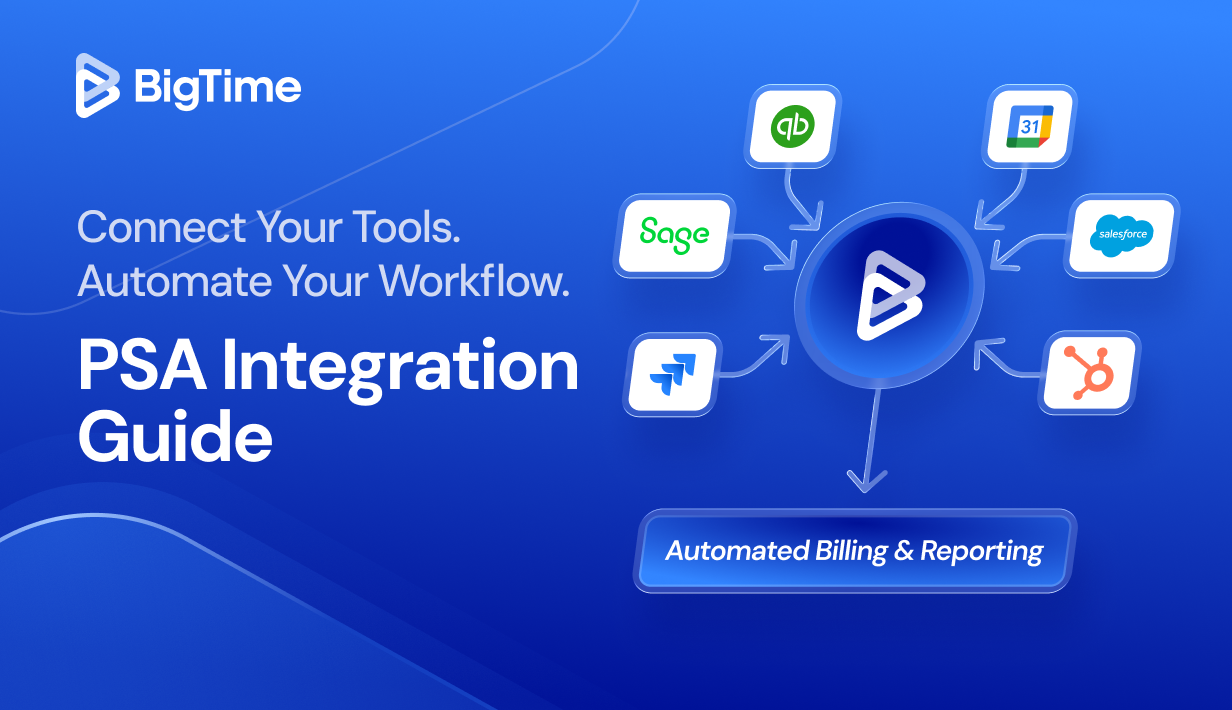
Professional services firms lose an average of 9 hours per week to manual invoicing and data entry tasks that could be automated. That’s more than 450 hours a year per employee spent reconciling spreadsheets, copying data between systems, and chasing down billing discrepancies – and time that could go toward billable client work instead. However, a well-configured PSA integration eliminates most of that waste; here’s how.
What Is PSA Software?
Professional Services Automation (PSA) software is a platform purpose-built to manage the core operations of service-based businesses, covering project management, resource allocation, time tracking, billing, and client contracts in one place.
Think of it as the operational backbone that connects what your teams deliver to what your business invoices. PSA tools sit between your front office (sales, client relationships) and your back office (accounting, payroll, reporting), giving managers real-time visibility into project health, utilization rates, and profitability across the organization.
What Is PSA Integration?
PSA integration meaning, in its simplest form, is the seamless connection between your PSA platform and the other business systems your team depends on: accounting software, CRM platforms, project tools, communication apps, and more.
Rather than treating your PSA as a standalone solution, a seamless integration with PSA creates a unified data environment where information flows automatically between systems, eliminating manual data entry, reducing human error, and ensuring every department works from the same source of truth.
The main objective of PSA integrations is to remove the data silos that force employees to duplicate effort across multiple systems and effectively save time spent on manual updates. When your PSA is seamlessly integrated with accounting systems, CRM platforms, and project management tools, all important data all stay synchronized without any manual intervention, making it a true game changer for professional services companies looking for an easy access to key information.
Types of PSA Integrations
Not all PSA integrations are alike. The right combination depends on your firm’s size, industry, and existing tech stack. Here are the four main categories professional services companies should consider.
1. Accounting & Financial Management Integrations
Accounting integrations are typically the highest-priority PSA integration for professional services firms because they directly affect billing accuracy and revenue. When your PSA connects bi-directionally with your general ledge and expense reports post automatically to accounting, you eliminate the double-entry workflows that consume finance teams’ time and introduce error. All thanks to:
- Automatic creation of invoices based on tracked time and approved expenses
- Real-time synchronization of client accounts, payment status, and outstanding balances
- Elimination of manual reconciliation between project data and financial records
- Accurate profitability reporting at the project, client, and firm level
2. CRM and Sales Integrations
CRM integrations bridge the gap between winning business and delivering it. When a deal closes in your CRM, the customers’ opportunity data flows directly into your PSA to create a project. This eliminates the manual handoff between sales and delivery teams that often results in lost context. As a result, such tool allow for:
- Automatic project creation from won CRM opportunities
- Bi-directional sync of account and contact data across platforms
- Visibility into pipeline and backlog for resource allocation and scheduling
- Communication history linked to project records for better client management
3. Project and Resource Management Integrations
For teams that use dedicated project management or collaboration platforms alongside their PSA, these integrations ensure that task updates, time logs, and resource schedules stay consistent across both systems. This is particularly valuable for IT companies and engineering firms where development work lives in tools like Jira while billing and resource management happen in the PSA. With good practices woven into essential integrations with PSA tools, they can make the best use of:
- Seamless collaboration between delivery and operations teams
- Time logged in project tools flows into PSA timesheets automatically
- Resource allocation decisions visible across project management and PSA data
- Reduced context switching and elimination of repetitive tasks
All while ensuring the security of their data in a bespoke digital environment.
4. Custom API Integrations
Enterprise-level firms or organizations with proprietary systems often require custom API connections. A PSA platform with an open architecture and robust API allows your development team or a solutions partner to build tailored integrations with virtually any business system in your tech stack. This flexibility future-proofs your PSA investment and ensures the platform can grow with your organization.
Custom API integrations are ideal when:
- Your firm uses industry-specific tools not covered by native connectors
- You need to connect multiple systems with complex, conditional data flows
- Your organization operates across multiple entities or geographies with unique requirements
Why PSA Integration Matters: Key Benefits
PSA integration is not just a convenience; it delivers significant advantages that directly affect profitability, efficiency, and service delivery quality. Here are the five most impactful outcomes professional services companies report after connecting their business systems.
- Dramatic reduction in manual data entry. Manually re-entering time, expense, and billing data across multiple systems is both time-consuming and error-prone. PSA integrations eliminate this work by automating data flows between platforms.
- Billing accuracy and faster invoicing. When timesheets, expenses, and project milestones flow automatically into your billing system, invoices go out faster and with fewer errors. Automated billing workflows reduce the risk of missed charges or incorrect rates, all of which erode profitability.
- Real-time visibility across projects and finances. Siloed systems mean managers are always working from stale data. Integration gives project managers, finance teams, and leadership a live view of utilization, project budget vs. actuals, outstanding invoices, and resource availability, all from a single platform. This visibility supports better decisions on scheduling, as well as pricing.
- Eliminated human error and improved data quality. Every manual data transfer introduces the possibility of mistakes. PSA integrations reduce human error by replacing manual processes with automated, rules-based data synchronization across your business systems.
- Competitive edge through scalable operations. Teams that rely on spreadsheets and disconnected systems hit a ceiling where adding headcount is the only way to handle more work. Integrated PSA systems allow firms to scale operations without proportional increases in administrative overhead.
Integration with BigTime
BigTime is an open-architecture, tech-agnostic PSA platform built specifically for professional services firms. Unlike some PSA tools that rely on third-party middleware or external connectors, BigTime develops and supports all of its integrations in-house—ensuring tighter reliability, faster issue resolution, and deeper functionality than connector-dependent alternatives. Whether you need to connect accounting software, a CRM, project management tools, or communication platforms, BigTime’s integration ecosystem is designed to fit into your existing tech stack with minimal configuration and no developer dependencies.
BigTime Integrations
BigTime’s integration ecosystem covers every critical layer of the professional services technology stack. Below is a breakdown by category. All integrations are built natively within the BigTime platform – no third-party connectors, no middleware, and no additional cost for the connection itself.
Accounting & Financial Management
- QuickBooks Online & QuickBooks Desktop — BigTime’s longest-standing integration. Bi-directional sync of time, expenses, invoices, payments, and GL transactions. Trusted by thousands of professional services firms for over two decades.
- Sage Intacct — Deep, two-way integration that translates BigTime timesheets and expense reports directly into Sage accounting transactions. Ideal for growing firms that need multi-entity support and advanced financial controls.
- Microsoft Dynamics GP / 365 / Business Central — Connects BigTime project and billing data with Microsoft’s ERP ecosystem.
- NetSuite — Available on the Enterprise tier for firms running NetSuite as their financial management backbone.
- Lacerte — Integration for accounting and tax services firms using Intuit’s Lacerte software.
CRM & Sales
- Salesforce — Bi-directional connector that syncs account, opportunity, and project data between Salesforce and BigTime. Won opportunities in Salesforce automatically create projects in BigTime—no manual handoff required.
- HubSpot — Bridges sales pipeline and project delivery. Client and deal data from HubSpot flow into BigTime to create projects and keep both teams aligned throughout the services lifecycle.
Project Management & Development
- Jira — Connects software development and IT project workflows in Jira with time tracking and billing in BigTime. Engineers log time where they work; BigTime captures it for invoicing.
Collaboration & Productivity
- Slack — Brings BigTime alerts, approvals, and project updates into Slack channels so teams can act without leaving their primary communication tool.
- Microsoft Outlook — Connects calendar and email data with BigTime for time capture and scheduling.
- Google Workspace — Integrates BigTime with Google Calendar, Drive, and related productivity tools.
Extended Connectivity via API
BigTime’s open API (available on Premier and Enterprise tiers) allows firms to build custom integrations with virtually any system in their tech stack—ERP platforms, HR systems, proprietary tools, or industry-specific solutions.
Getting Started: How to Set Up a BigTime Integration
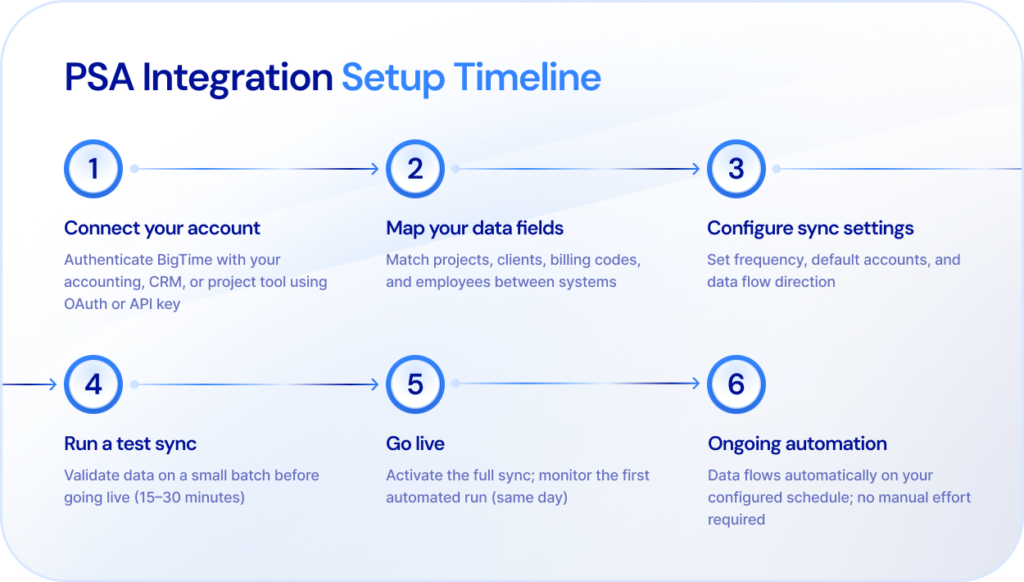
Connecting BigTime to your existing tools is designed to be straightforward. Most accounting and CRM integrations can be configured within a single working day, without requiring IT support or developer involvement. Here is the typical setup process:
- Step 1: Log into BigTime and navigate to the Integrations section under your account settings.
- Step 2: Select the system you want to connect.
- Step 3: Authenticate using your credentials for the target platform. BigTime uses OAuth or API key authentication depending on the integration.
- Step 4: Configure field mappings — specify which BigTime data (projects, clients, employees, billing codes) maps to corresponding records in the connected system.
- Step 5: Set sync settings, including sync frequency, default accounts, and data flow direction (one-way or bi-directional).
- Step 6: Run a test sync on a small subset of data and verify the results in both systems.
- Step 7: Activate the integration and monitor the initial full sync. BigTime’s support team is available if any configuration adjustments are needed.
- Enjoy the success of your integration with the power of accessiblee data!
What Types of Companies Benefit Most from BigTime Integration?
BigTime’s integration ecosystem is broad enough to serve firms across industries and sizes—but certain types of organizations see the most immediate impact.
Professional Services Companies
Any firm that bills for time and manages client engagements – law firms, management consultancies, marketing agencies, financial advisors – benefits from connecting PSA data with accounting and CRM systems. The core gains are billing accuracy, faster invoicing, and consolidated reporting that replaces fragmented spreadsheets and manual reconciliation workflows.
Mid-Sized Professional Services Firms
Firms with 50 to 500 employees face a specific challenge: they have outgrown manual processes and basic tools, but have not yet reached the scale to justify enterprise ERP complexity. BigTime’s integration architecture is purpose-built for this range, connecting the firm’s existing accounting, CRM, and project management tools without requiring a full system replacement.
Consulting Businesses
Consulting firms depend on clean data flow between sales and delivery. When a Salesforce or HubSpot opportunity becomes a signed engagement, BigTime’s CRM integration creates the project automatically- preserving scope, rates, and client details without manual re-entry. Throughout delivery, time entries flow to accounting, resource schedules remain visible to managers, and the communication history stays linked to the client record.
IT Companies
IT service providers and managed service organizations typically operate across a complex stack: ticket management, monitoring tools, project management platforms, and accounting systems. BigTime’s Jira integration is particularly valuable for IT companies: engineers log time in Jira, and BigTime captures those entries for billing without any manual transfer. Alerts from monitoring tools can trigger service tickets that flow directly into project records, keeping delivery and finance synchronized in real time.
Engineering Firms
Architecture, civil, structural, and systems engineering firms deal with long-duration projects, complex multi-phase billing, and stringent reporting requirements. BigTime’s integrations with Sage Intacct and Dynamics provide the accounting depth that engineering project invoicing demands: accurate WIP tracking, multi-entity support, and automated revenue recognition while keeping resource allocation and scheduling visible to project managers in real time.
PSA Integration – Summary
PSA integration transforms isolated software into a connected operations platform, eliminating the manual data entry, billing errors, and visibility gaps that cost professional services firms both time and revenue. Whether you’re connecting accounting software for faster invoicing, a CRM to bridge sales and delivery, or project tools to streamline workflows, the right PSA integration strategy delivers measurable gains from day one. BigTime’s built-in, in-house integration ecosystem gives your firm the connectivity it needs today, with the flexibility to scale as your tech stack evolves.
PSA Integration FAQ
What is a PSA integration?
A PSA integration connects your Professional Services Automation platform to other business systems—such as accounting software, a CRM, or project tools—so that data like time entries, invoices, and project status syncs automatically without manual entry.
Which types of tools typically integrate with PSA software?
The four main categories are: accounting and financial management tools (QuickBooks, Sage Intacct, NetSuite), CRM platforms (Salesforce, HubSpot), project management tools (Jira), and collaboration tools (Slack, Outlook, Google Workspace).
Does BigTime build and support its own integrations, or use a third-party connector?
BigTime develops and supports all integrations in-house—no third-party middleware required. This means a single support team, tighter reliability, and faster resolution if issues arise.
How long does it take to set up a BigTime integration?
Most native integrations—including QuickBooks Online and Salesforce—can be configured in a single day. Complex setups like Sage Intacct with multi-entity configurations may take a few days.
Do I need IT or developer help to connect BigTime to my existing tools?
No—most native integrations are configured through a guided, user-friendly interface that requires no technical background. Custom API integrations, available on Premier and Enterprise plans, do require developer involvement.
What happens to my data if I disconnect an integration?
Disconnecting stops future syncing but leaves all previously transferred data intact in both systems. You can reconnect at any time and resume from where you left off.
How much time can PSA integrations save per week?
Professional services firms commonly report saving 9 or more hours per week per employee on manual data entry and reconciliation. Firms using the BigTime + Sage Intacct integration have cut billing process time by 50% or more.
Can BigTime replace some of my existing tools, or does it complement them?
BigTime is designed to complement your existing stack—most firms keep their accounting software and CRM and use BigTime as the operations layer that connects them. It does reduce the need for standalone time tracking or project management tools.
What integrations do professional services firms use most with BigTime?
The most popular are QuickBooks (accounting), Sage Intacct (mid-market finance), Salesforce and HubSpot (CRM), and Jira (for IT and engineering firms managing development workflows alongside billing).




