

Professional services firms lose an estimated 10 to 20% of all billable work to revenue leakage before an invoice is ever sent. That figure compounds across missed time entries, incorrect rate cards, and billing cycles that run days behind where they should. For a 50-person firm, that gap can represent $500,000 or more in unbilled revenue per year.
PSA billing software closes that gap. By connecting project delivery, time tracking, and invoice generation inside one system, professional services automation gives Finance Directors and Controllers the accuracy and visibility they need to bill on time, bill correctly, and get paid faster.
If your team is still reconciling timesheets against invoices at month-end, this guide covers what PSA billing actually does, which tools do it best, and how to choose the right fit for your firm.
What Is PSA Billing?
PSA billing is the invoicing and revenue management capability built into a professional services automation platform. Rather than treating invoicing as a standalone task, it connects every upstream input — time entries, approved expenses, contract terms, and project status — directly to invoice generation. Billing becomes a byproduct of project delivery, not a separate process your finance team reconstructs at month-end.
In short, PSA billing automates client invoice creation and reconciliation by pulling live data from time tracking, project delivery, and contract management into a single, auditable workflow.
Which Teams Benefit Most from PSA Billing?
The direct beneficiaries are Finance Directors, Controllers, and billing teams, but the impact reaches across the organization – regardless of their type.
- Consulting firms deal with complex rate structures and milestone billing across multiple active engagements. PSA billing handles variable billing models without requiring finance to maintain shadow spreadsheets for each client.
- IT services and managed service providers often bill against recurring contracts, time and materials, or a combination of both. A PSA that supports recurring billing alongside project-based invoicing keeps both revenue streams accurate without separate systems.
- Engineering firms typically manage long-running projects with detailed budget tracking and strict WIP visibility requirements. PSA billing gives project managers and finance teams a shared view of budget vs. actuals, so billing decisions are grounded in current project performance.
- Professional services organizations inside software companies face the added complexity of aligning delivery team capacity with finance reporting cycles. PSA billing creates a direct link between project delivery and financial management, so revenue recognition reflects what was actually delivered.
- Mid-sized professional services firms — typically 30 to 150 employees — gain the most from replacing disconnected tools with a unified billing flow. At that size, manual processes are already costing measurable time and accuracy, but enterprise-scale implementations are overkill. A modular PSA platform lets these firms get billing right first, then expand into resource management and quoting as complexity grows.
PSA vs. Standalone Billing Software: Which Do You Need?
The honest answer depends on where your firm’s billing problems actually start. For some teams, invoicing is the only friction point. For others, invoicing is just where the damage from upstream problems finally shows up.
A dedicated billing tool handles invoice generation, payment tracking, and basic client management well. If your firm has a simple rate structure, a small project portfolio, and a finance team that isn’t spending significant time on manual reconciliation, a standalone tool may be enough.
But most professional services firms hit a point where the billing problem is really a real-time data problem. Invoices go out late because timesheets aren’t approved. Invoices go out wrong because rate cards live in a spreadsheet nobody updated. Revenue recognition lags because the GL and the project system have never actually talked to each other. Time capture has more flaws than logged hours. No standalone billing tool fixes any of that, because the root cause sits upstream.
| Standalone Billing Software | PSA Billing | |
| Best for | Small firms, simple rate structures, single use case | Growing PS firms with multiple projects, billing models, and teams |
| Time tracking | Manual import or separate tool required | Built in, connected to billing automatically |
| Rate card management | Manual, spreadsheet-dependent | Configured in the platform, applied at invoice generation |
| GL integration | Basic sync or export | Bi-directional, audit-ready |
| Revenue recognition | Not supported | Native, tied to project delivery milestones |
| Resource management | Not included | Available as a connected module |
| Billing models supported | Fixed fee or simple T&M | Fixed fee, T&M, milestone, retainer, recurring billing |
| Real-time visibility | Limited | Full visibility across projects, WIP, and AR aging |
The connection between project delivery and billing is where most mid-market professional services firms lose margin. A PSA that handles both doesn’t just save your finance team time on manual work. It protects the revenue your delivery teams already earned.
Common PSA Billing Challenges PSA Software Solves
Most billing problems in professional services don’t announce themselves. They accumulate quietly across dozens of projects until Finance is spending a week at month-end untangling what should have been straightforward invoicing.
- Missed billable work. When time entries live separately from project delivery, hours slip through. A consultant logs time against the wrong code. A phase closes before expenses are approved. SPI Research puts average leakage at 10 to 20% of all work performed — for a 50-person firm, that’s not a rounding error.
- Billing lag that stretches cash flow. Manual billing processes create a predictable gap between work delivered and invoice sent. The difference usually comes down to how tightly billing connects to delivery.
- Rate card errors at scale. As client relationships grow more complex, the risk of invoicing the wrong rate increases. When rate cards live in spreadsheets rather than the system generating the invoice, discrepancies are inevitable.
- Manual reconciliation between systems. When your PSA and accounting system don’t share a common financial logic, your finance team becomes the integration layer. Manual data entry between disconnected tools means your GL is always one export behind reality.
- No real-time visibility into WIP. Without a live view of work in progress, billing decisions are based on stale data. Projects go over budget before Finance knows they’re at risk.
PSA billing addresses each of these at the source, before the invoice goes out wrong.
The 5 Core Billing Capabilities in a PSA
Not all PSA billing software is built the same way. These are the capabilities that separate platforms that genuinely protect billing accuracy from those that just move the manual work around.
1. Flexible Billing Models
Professional services firms rarely bill the same way across every client. A mature PSA supports fixed fee, time and materials, milestone-based, retainer, and recurring billing within a single platform — with rules configured once and applied automatically at invoice generation. Switching billing models per project shouldn’t require a workaround – and it should ensure faster payments, improved project accountig and, as a result, better financial management across the board.
2. Automated Time Capture and Approval Workflows
Accurate financial tracking starts with complete, approved time data that then feeds into project management software. A PSA should capture time entries at the project level, route them through configurable approval workflows, and feed approved hours directly into the automated billing cycle — with no manual import step between time tracking and invoice generation. This makes project accounting just a formality instead of a burdensome process.
3. Bi-Directional GL Integration
This is where most PSA billing implementations either earn or lose Finance’s trust. A genuine GL integration isn’t a one-way data export. It means invoices, payments, adjustments, and AR status flow between the PSA and your accounting system in real time, so your general ledger reflects current project financials without manual reconciliation.
4. WIP & Revenue Recognition
Work in progress visibility tells Finance what has been delivered but not yet invoiced. Revenue recognition ties that delivery to the correct accounting period. Without both, billing accuracy and financial reporting stay permanently out of sync. Such connection improves billing accuracy and makes the most of financial data at every stage of the project.
5. Real-Time Project Financial Visibility
Finance Directors and Controllers need more than invoice status. A PSA should surface budget vs. actuals, margin, utilization, and AR aging across the entire project portfolio in real time — so billing decisions are based on current project performance, not last week’s export. In other words, you can keep an eye on your project timelines without losing sight of its financial performance.
PSA Billing Software Comparison
| BigTime | Kantata | Accelo | Scoro | Rocketlane | Certinia | |
| Best for | Mid-market PS firms needing financial-first PSA billing | Large professional services orgs on Salesforce | Small to mid-size service businesses | All-in-one project & billing for SMBs | Client-facing delivery teams | Enterprise PS on Salesforce ecosystem |
| Billing models | Fixed fee, T&M, milestone, retainer, recurring | Fixed fee, T&M, milestone | Fixed fee, T&M, retainer | Fixed fee, T&M, retainer | Milestone, fixed fee | Fixed fee, T&M, milestone |
| GL integration | Bi-directional, audit-ready (QuickBooks Desktop & Online, Sage) | Salesforce-native; limited standalone GL | Basic QuickBooks sync | Basic accounting integrations | Limited; delivery-focused | Salesforce/NetSuite native |
| WIP & revenue recognition | Native, tied to project delivery | Available | Limited | Limited | Not a core feature | Available |
| Time tracking | Built-in, connected directly to billing | Built-in | Built-in | Built-in | Basic | Built-in |
| Recurring billing | Yes | Limited | Yes | Yes | No | Yes |
| Real-time financial visibility | Full portfolio visibility across margin, utilization, and AR | Project-level reporting | Basic | Dashboard-level | Delivery-focused | Strong on Salesforce data |
| Implementation time | 30 to 90 days | 6 to 12 months | 4 to 8 weeks | 4 to 8 weeks | 2 to 4 weeks | 6 to 12 months |
| Price range | Mid-market pricing, modular | High; enterprise pricing | Mid-range | Mid-range | Mid-range | High; enterprise pricing |
| G2 rating | 4.5/5 | 4.1/5 | 4.4/5 | 4.5/5 | 4.7/5 | 4.2/5 |
| Capterra rating | 4.6/5 | 4.1/5 | 4.4/5 | 4.6/5 | 4.6/5 | 4.2/5 |
BigTime
G2: 4.5/5 (1,500+ reviews) | Capterra: 4.6/5 (630+ reviews)
Best For
Mid-market professional services firms — IT, engineering, and consulting — that need financial-first PSA billing built around their existing GL. BigTime is purpose-built for firms with 30 to 150 employees that have outgrown simple time tracking and invoicing tools but have no appetite for a six-month enterprise implementation.
Key Features
- GL-native billing architecture. BigTime is built around QuickBooks and Sage, not beside them. Invoices, payments, adjustments, and AR status flow bi-directionally in real time. For finance teams living with manual reconciliation, this is the structural difference that matters most.
- Flexible billing models in one platform. Fixed fee, T&M, milestone, retainer, and recurring billing are all supported natively. Rate cards are configured once and applied automatically at invoice generation.
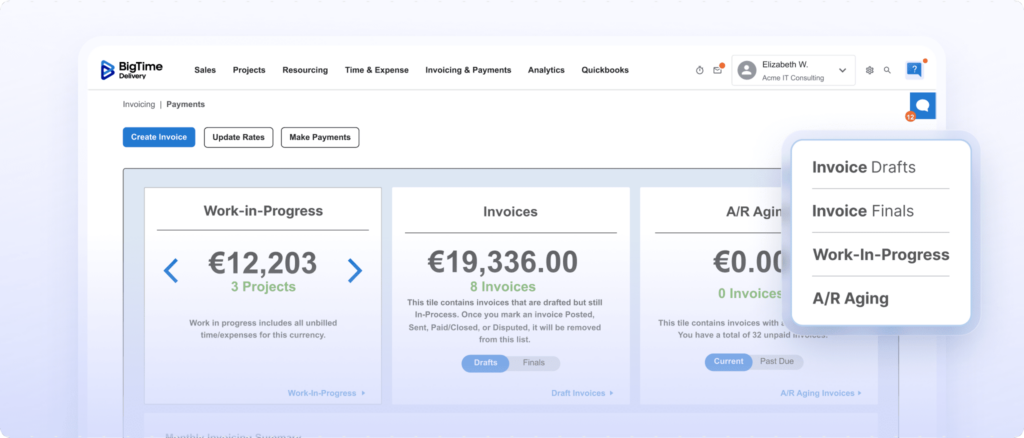
- Real-time WIP & revenue recognition. Finance Directors get a live view of work in progress across every active project, tied directly to revenue recognition and grounded in what was actually delivered.
- Automated time capture connected to billing. Time entries are captured at the project level, routed through approval workflows, and fed directly into the billing cycle with no manual import step.
- Full portfolio financial visibility. Budget vs. actuals, margin, utilization rates, and AR aging are visible across your entire project portfolio in real time.
PSA Billing Details
BigTime’s billing capability sits at the center of its Financial Excellence Stack. Every module — Resource Management, Quotes, Payments — inherits the same financial logic as the core billing engine, so margin discipline carries through from quote to cash collection without manual handoffs. BigTime Payments extends this flow into collections.
Pricing
BigTime uses modular, mid-market pricing. Firms start with Delivery for core billing and time tracking, then add Resource Management, Quotes, and Payments as complexity grows. No forced enterprise bundle. Contact BigTime for current pricing details or book a demo right away.
Kantata
G2: 4.1/5 | Capterra: 4.1/5
Best For
Large professional services organizations already deep in the Salesforce ecosystem, with the implementation budgets and internal resources to match a platform of this scale.
Key Features
- Project and resource management built around Salesforce data
- Billing and revenue recognition tied to CRM pipeline
- Workforce planning and utilization reporting across large teams
- AI-powered project insights and forecasting via the Expertise Engine
- Multi-currency and multi-entity support for complex org structures
PSA Billing Details
Kantata’s billing is functional but Salesforce-dependent. Firms not already on Salesforce will find the GL integration shallow compared to platforms built natively around QuickBooks or Sage. Kantata also leans delivery-first in its architecture — financial visibility is present, but it sits on top of project execution rather than beneath it. For firms where Finance, not the Project Manager, drives PSA decisions, that distinction matters.
Pricing
Enterprise pricing with implementation timelines of 6 to 12 months and contract values well above mid-market range. Not a practical fit for firms under 150 employees or those without a dedicated implementation team.
Accelo
G2: 4.4/5 | Capterra: 4.4/5
Best For
Small to mid-size service businesses that want a combined CRM, project management, and billing tool without managing multiple platforms. Works best for firms with straightforward rate structures and limited financial reporting requirements.
Key Features
- Retainer and recurring billing management across client accounts
- Client work tracking from initial sale through project delivery
- Automated invoice generation from logged time and expenses
- Basic QuickBooks and Xero sync for accounting
- Built-in CRM for managing client relationships alongside projects
PSA Billing Details
Accelo approaches billing from the delivery side, not the finance side. The GL integration is basic, and firms with complex billing models or strict revenue recognition requirements will quickly hit its limits. Manual reconciliation between Accelo and the general ledger remains a reality for most finance teams on the platform. Growing firms often find they’ve outgrown its financial management capability before they’ve outgrown its project tracking features.
Pricing
Mid-range, per-user pricing. Modular to a degree, but billing depth doesn’t scale well with firm complexity or client volume.
Scoro
G2: 4.5/5 | Capterra: 4.6/5
Best For
SMBs and small professional services firms that want an all-in-one project, billing, and reporting tool with a clean interface and fast setup.
Key Features
- Quoted and actual budget tracking per project
- Invoice generation from tracked time and fixed fees
- Financial executive dashboards with utilization and margin reporting
- MCP connectivity for external AI model integration
- Built-in CRM and quoting alongside project management
PSA Billing Details
Scoro covers the basics well for smaller firms — clean interface, fast setup, reasonable project financial reporting. At mid-market scale, GL integrations are surface-level and WIP management is limited. Firms with complex rate structures or multi-entity billing needs will find it underpowered, and Scoro’s recent AI push doesn’t address the underlying financial depth gap.
Pricing
Mid-range, tiered pricing. Costs increase noticeably as team size and feature requirements grow, and upper tiers can push into enterprise price territory without delivering enterprise billing depth.
Rocketlane
G2: 4.7/5 | Capterra: 4.6/5
Best For
Client-facing delivery teams that prioritize project onboarding experience, milestone tracking, and client collaboration over financial management and billing accuracy.
Key Features
- Milestone and fixed-fee billing tied to delivery stages
- Client portal for shared project visibility and communication
- Time tracking connected to project phases and deliverables
- Agentic automation for delivery and onboarding workflows
- Project status reporting for both internal teams and clients
PSA Billing Details
Rocketlane is a delivery-first platform and its billing reflects that. No meaningful GL integration, no recurring billing support, and minimal WIP visibility. For firms where billing accuracy and cash flow management are priorities, it’s the wrong starting point — and most finance teams will need a second system alongside it.
Pricing
Mid-range pricing that reflects a delivery coordination tool rather than a financial management platform.
Certinia
G2: 4.2/5 | Capterra: 4.2/5
Best For
Enterprise professional services organizations running their entire business on the Salesforce platform, with IT resources and transformation budgets to support a complex implementation.
Key Features
- Revenue recognition and contract billing native to Salesforce
- Multi-currency and multi-entity billing for complex org structures
- Resource management tied directly to CRM pipeline data
- AI staffing automation via Salesforce Agentforce
- Deep integration across the full Salesforce product ecosystem
PSA Billing Details
Certinia’s billing is genuinely strong inside the Salesforce ecosystem — multi-entity support, advanced revenue recognition, and deep CRM integration are real advantages for large enterprises. Outside that ecosystem, it offers very little. Mid-market firms on QuickBooks or Sage will find it expensive, slow to deploy, and architecturally misaligned with how they actually run their finances.
Pricing
High across the board. Enterprise contracts, enterprise timelines, and ongoing resource requirements make this a poor fit for any firm below 200 employees.
Final Verdict: What Is the Best PSA Billing Software?
For professional services firms that need billing accuracy, real-time financial visibility, and a GL integration they can actually trust, BigTime is the strongest choice in the mid-market PSA category.
The core reason is architectural. Most PSA billing tools are built around project delivery and treat invoicing as a downstream output. BigTime is built around the general ledger from the ground up, which means every rate card, billing rule, and revenue recognition decision lives in the same financial logic as your QuickBooks or Sage instance. That’s not a feature difference — it’s a structural one that compounds across every billing cycle.
If your firm is between 30 and 150 employees, running on QuickBooks or Sage, and losing time and revenue to manual billing processes, BigTime is the natural next step.
Ready to see it in action? Book a demo now and see how BigTime can help your company.

Which PSA Billing Software Is Right for Your Firm?
Best PSA Billing Software for Professional Services Firms
BigTime. Professional services firms need billing software that reflects the full complexity of how they work — variable rate structures, multiple contract types, and a finance team that needs real-time visibility without running manual reconciliation at month-end. BigTime connects time tracking, project delivery, and invoice generation inside one platform built around the GL, giving Finance Directors accurate, auditable billing data without the manual overhead.
Best PSA Billing Software for Consulting Firms
BigTime. Consulting firms typically manage multiple active engagements simultaneously, each with different billing models, rate cards, and approval requirements. BigTime handles fixed fee, T&M, milestone, and retainer billing natively, with rate cards configured once and applied automatically. Finance teams spend less time chasing down billing data and more time acting on it.
Best PSA Billing Software for IT Companies
BigTime. IT services firms and managed service providers deal with a mix of recurring contracts, project-based billing, and time and materials work — often across the same client. BigTime supports all three billing models within a single platform, with bi-directional QuickBooks and Sage integration that keeps the GL current without manual exports.
Best PSA Billing Software for Engineering Firms
BigTime. Engineering firms run long, complex projects where project budget vs. actuals visibility is critical to protecting margin. BigTime gives project managers and finance teams a shared real-time view of WIP, burn rate, and project profitability — so billing decisions are grounded in current delivery data, not last month’s timesheet export.
Best PSA Billing Software for Small and Medium Businesses
BigTime. For firms between 30 and 150 employees, the right PSA billing platform needs to be powerful enough to handle real financial complexity without requiring a six-month implementation or an enterprise contract. BigTime’s modular structure lets smaller firms start with core billing and time tracking, then expand into resource management and payments as their needs grow. The 30 to 90 day go-live timeline means ROI shows up in the first billing cycle, not the first year.
Best AI PSA Billing Software
BigTime. Most PSA vendors are adding AI as a layer on top of their existing systems. BigTime’s AI is built inside the financial backbone — trained on 20 years of data from 3,000+ professional services deployments. In practice, that means AI that flags billing anomalies before invoices go out, detects missing billables in real time, and surfaces margin risk at the project level before it shows up in month-end reports.
PSA Billing: Frequently Asked Questions
How Does PSA Billing Improve Cash Flow?
By closing the gap between work delivered and invoice sent. When time entries, project delivery, and invoice generation are connected in one platform, billing cycles shorten and DSO drops. Industry benchmarks put average DSO for professional services firms at 45 to 55 days — best-in-class firms hit 30 to 35. Tightly connected PSA billing is usually the difference.
What’s the Difference Between PSA and Billing Software?
Standalone billing software handles invoices and payments but has no visibility into time entries, project delivery, or contract terms. PSA billing connects all of those inputs automatically, so every invoice reflects what was actually delivered at the correct rate, with GL sync already handled.
How to Choose a PSA with Strong Billing?
Start with GL integration — bi-directional sync with QuickBooks or Sage is non-negotiable for audit-ready financials. Then check billing model flexibility, WIP visibility, revenue recognition support, and how directly time tracking feeds into invoice generation. Implementation timeline matters too: a nine-month rollout is still several quarters of leakage you didn’t need.
What’s the Best Billing Software for PSA?
BigTime. Its billing is built around the general ledger from day one, not added on top of a project management tool. Every billing model professional services firms use is supported natively, rate cards apply automatically, and bi-directional QuickBooks and Sage integration gives Finance Directors an accurate, auditable view of project financials in real time.
What’s the Best PSA Billing Software for Small and Medium Companies?
BigTime. Its modular structure lets firms start with core billing and time tracking, then expand as complexity grows. The 30 to 90 day go-live means ROI shows up in the first billing cycle, not the first year. With a 4.6/5 rating on Capterra from over 630 reviews, it’s a platform mid-market finance teams consistently trust.
Read More:
- Billing & Invoicing Software – Discover how billing and invoicing software can streamline client billing, reduce manual work, and improve payment processes.
Learn which features help professional services firms create accurate invoices and maintain better financial control. - Quoting and Invoicing Software – Explore how quoting and invoicing software helps businesses create estimates, convert them into invoices, and manage client billing.
See how integrated tools can improve accuracy, speed up workflows, and support a smoother quote-to-payment process. - Financial Management Software – Explore how financial management software helps professional services firms manage budgets, costs, cash flow, and profitability.
Learn which features can improve financial visibility and support more informed business decisions. - Project Budgeting Software – Learn how project budgeting software can help teams plan costs, monitor spending, and maintain healthy project margins.
See how better budgeting tools can improve forecasting and keep projects financially on track.




