

Professional services firms fail to bill 10 to 20% of the work they actually perform, and most of that leakage starts with time that was never captured or captured too late to trust. In 2026, with distributed teams, more concurrent projects, and tighter margins, guessing where the hours went is a revenue problem, and the right time tracking software is how growing firms solve it.
This guide gives you everything you need to choose well: a clear definition of what time tracking software does, the benefits and must-have features that separate a basic time tracker from a time tracking system that protects billable hours, and a detailed 2026 ranking of nine leading time tracking apps and platforms with their strengths, limitations, key features, and pricing compared side by side.
What Is Time Tracking Software?
Every project-based business runs on the same raw material: hours. Whether those hours become clean invoices or month-end guesswork depends on how they get captured, and that’s the job of a time tracking system.
Time tracking software is a digital system that captures how people spend their working hours, organizes those time entries by project, task, and client, and turns them into reliable data for billing, payroll, and project management. It replaces manual time tracking, paper timesheets, and spreadsheets with timers, approvals, rate rules, and reporting tools your finance team can trust.
In practice, teams use a time tracker to:
- Protect billable hours. Agencies and consulting firms track time to invoice clients accurately, because every untracked hour is revenue that quietly disappears.
- Keep projects on budget. Project managers compare actual hours on project tasks against estimates to catch scope creep while there’s still time to act.
- Run payroll and control labor costs. Employee time tracking software documents hours, overtime, and time off across office, remote, and field teams.
- See utilization and capacity. Leaders use aggregated time data to spot who’s overloaded, who has room, and which clients are actually profitable.
The category spans everything from a simple time tracking app with a start-and-stop timer to a full professional services automation (PSA) platform where time connects directly to budgets, invoicing, and the general ledger. Many time tracking apps stop at capture; the best time tracking software turns time spent into decisions, and knowing which end of that spectrum you need is most of the buying decision.
The Benefits of Time Tracking Software
It’s tempting to treat time tracking as an administrative chore, something the team tolerates so finance can close the month. Firms that get it right see something different: data about time spent becomes the connective tissue between delivery and profitability. When time entries are accurate and timely, everything downstream improves, from invoices to forecasts to hiring decisions.
Here are the benefits teams report after moving from manual tracking to dedicated time tracking tools:
- More revenue captured, less written off. Late or reconstructed timesheets are one of the biggest drivers of revenue leakage in professional services. A time tracking tool with timers, automated time tracking reminders, and entry from a mobile app helps people log hours while the work is fresh, which means fewer forgotten billable hours and fewer awkward write-downs at invoicing.
- Faster, cleaner billing cycles. When approved time entries flow directly into invoices, billing stops being a month-end reconstruction project. Firms shorten the gap between work delivered and cash collected, and clients get invoices that match reality, which reduces disputes and payment delays.
- Real-time visibility into project health. Project time tracking shows budget burn as it happens, which makes managing projects proactive instead of reactive. Instead of discovering a cost overrun in a retrospective, project managers can see actuals against estimates mid-flight and course-correct while there’s still margin to save.
- Smarter utilization and capacity decisions. Aggregated time logs reveal who is consistently over 100% and who has untapped team capacity. That visibility supports better staffing, more accurate forecasting, and hiring decisions grounded in data rather than gut feel.
- Accurate payroll and labor cost control. For teams that need to track employee time for payroll, whether hourly staff, contractors, or remote employees, employee time tracking software removes the guesswork. Hours, overtime, and time off are documented, which protects both the business and the employee.
- Less admin work across the board. A good time tracking system reduces duplicate entry, status-chasing, and the need to reconcile projects manually in spreadsheets. Those recovered hours go back into billable work, helping teams maximize productivity, which is often enough on its own to pay for the software.
What Features Should the Best Time Tracking Software Have?
Nearly every tool on the market can start a timer. The differences show up in what happens after the hours are logged: whether the data is accurate enough to bill from, structured enough to report on, and connected enough to eliminate double entry.
The best time tracking software earns its keep across all three. Here are the time tracking capabilities to prioritize in 2026, from the basics to advanced time tracking features.
Flexible Time Entry That Matches How People Work
No two people track time the same way. Some run a timer all day, some fill in a weekly timesheet, and some log hours from a mobile app between client meetings. Strong platforms support all of these entry styles across a web app, desktop app, and mobile app, plus offline entry, so compliance doesn’t depend on forcing everyone into one workflow.
Billable Hours and Rate Management
If you bill clients for time, the time tracker has to understand your rates, not just your hours. Look for billable and non-billable flags at the entry level, rate cards by client, role, project, or engagement type, and support for exceptions like blended rates and negotiated discounts. This is the difference between a time log you export into a billing spreadsheet and a system that produces invoice-ready data on its own.
Approvals, Audit Trails, and Timesheet Governance
Unreviewed time is risky time. The best time tracking systems route timesheets through approvals, lock closed periods, and keep an audit history of every edit to your time logs. For employee time tracking, that governance protects payroll accuracy and compliance. For client billing, it means every invoice line can be traced back to an approved entry, which shortens disputes and keeps write-offs down.
Project Time Tracking Tied to Budgets and Utilization
Hours in isolation tell you very little. Tie them to project budgets and the same data starts answering real questions: How much of the budget is burned? Is this phase tracking to estimate? What’s our billable utilization this month? Platforms built for project time tracking show actuals against budgets in real time and roll individual time entries up into utilization rates and profitability views leadership can act on.
Project Management Features and Task Management
Time tracking and task management increasingly live in the same workflow, and the best time tracking tools reflect that. Look for project management features that let you create projects, break work into project tasks, and assign owners, so tracked time entries attach to real work instead of vague categories. If your team already runs on a dedicated task manager or project management software, tight integrations matter more than built-in task management features.
Reporting and Real-Time Visibility
Reporting is where a time tracking platform either becomes a decision-making system or stays a compliance checkbox. Prioritize reporting tools with flexible, drillable views covering time spent by project, client, task, and person, plus utilization trends and budget-versus-actual views. Advanced reporting extras like saved reports, executive dashboards, and the ability to export data to Excel help too, but the core test is simple: can a leader answer “where did our hours go last month, and what did they earn us?” in minutes.
Invoicing, Payroll, and Accounting Integrations
Time data creates the most value when it flows into the systems that pay people and bill clients. Native invoicing (or a tight connection to your billing workflow), payroll exports, and dependable accounting integrations with platforms like QuickBooks reduce double entry and reconciliation. For growing firms, bi-directional sync matters: invoices, payments, and adjustments should flow back so your time tracking system and your general ledger tell the same story.
Automation and AI Capabilities
Automatic time tracking has matured from novelty to genuinely useful. Depending on the platform, that can mean background capture of app and calendar activity that drafts time entries for review, AI that flags missing timesheets or anomalies before invoices go out, or assistants that answer questions about time data in plain language. Used well, these features work like productivity tools that let people track productivity instead of babysitting a timer.
How to Choose Time Tracking Software
Start with the problem you’re actually solving, because “time tracking” covers at least three different jobs.
- If the goal is payroll and attendance for hourly staff, you need employee time tracking software with scheduling, overtime rules, and possibly GPS or location tracking for field teams.
- If the goal is personal productivity or straightforward time tracking for a small team, a lightweight time tracker with a free plan may be all you need.
- If the goal is protecting billable hours, managing projects and budgets, and improving utilization and profitability, you need project time tracking software that connects hours to rates, budgets, invoices, and your accounting system.
Most bad purchases in this category come from picking a tool built for one job and expecting it to do another.
From there, weigh adoption above almost everything else: a user friendly interface beats an impressive feature list, because a system consultants avoid will produce worse data than a simple one they use daily.
Then, compare the free version or free plan against the paid plan to see which time tracking capabilities are gated, budget time for the initial setup, and test how quickly the customer support team responds before you commit.
Shortlist two or three time tracking apps, run a real trial with actual projects and a full billing cycle if you can, and check the paths that hurt later: How does time become an invoice? How does data reach QuickBooks or your payroll system? What happens when you add 20 people, new rate structures, or a second office? The right choice is the platform that fits your workflows today and doesn’t force a migration when your firm grows.
2026 Time Tracking Software Ranking
This 2026 ranking looks past the timer button. Every tool below can capture hours; what separates them is what those hours become. We assessed each platform on entry flexibility and adoption, billable hours and rate handling, project time tracking and budget visibility, reporting depth, approval workflows, advanced time tracking features like automation, and integrations with accounting systems and project management tools, and how gracefully each one scales from small teams to firms with hundreds of people. The result is a shortlist that covers the full spectrum, from free time tracking software and lightweight time tracking apps to full PSA platforms, so you can find the right fit for the job you’re hiring the software to do.
Time Tracking Software: Comparison
Before the in-depth reviews, here’s a side-by-side view of the nine platforms across the criteria that matter most in a shortlist: key features, best-fit use case, pricing, and review ratings. Use it to narrow the field, then read the detailed sections for the trade-offs behind each row.
| Tool | Key Features | Best For | Pricing | G2 / Capterra Rating |
| BigTime | Time tracking tied to billing and invoicing, rate management, timesheet approvals, project budgets, utilization and margin reporting, bi-directional QuickBooks sync, AI-powered insights. | Professional services firms that bill for time and want real-time visibility into utilization and profitability. | From $20 per user/month; free trial and personalized demo available. | 4.5 / 4.6 |
| Toggl Track | One-click timer with idle detection, saved reports, project estimates and alerts, 100+ integrations. | Freelancers and small teams that want effortless, trust-based tracking. | Free plan up to 5 users; paid from $10 per user/month. | 4.6 / 4.7 |
| Clockify | Timers and timesheets, kiosk mode, basic reports, approvals and rates on paid tiers. | Budget-conscious teams building the time tracking habit. | Free with unlimited users; paid from about $3.99 per user/month. | 4.5 / 4.7 |
| Harvest | Timers across devices, simple invoicing from tracked time, budget alerts, accounting integrations. | Small teams with straightforward time-and-bill workflows. | Free for 1 user; Pro $11 and Premium $14 per user/month. | 4.3 / 4.6 |
| QuickBooks Time | Mobile clock-in with GPS, scheduling, payroll approvals, labor cost reports. | Hourly and field teams running payroll on QuickBooks. | From $20/month base plus $8 per user/month. | 4.5 / 4.7 |
| Everhour | Timers embedded in PM tools, budgets and estimates, live team dashboards, basic invoicing. | Teams that live in Asana, ClickUp, Trello, or Jira. | Free up to 5 users; Team plan $8.50 per user/month (5-seat minimum). | 4.7 / 4.7 |
| Time Doctor | Activity and app usage tracking, optional screenshots, attendance, payroll from verified hours. | Large remote or outsourced teams that need verified time. | About $7 to $20 per user/month. | 4.4 / 4.5 |
| Hubstaff | GPS and geofenced tracking, configurable monitoring, payroll automation, scheduling and PTO. | Distributed and field workforces paying for tracked hours. | About $4.99 to $25 per user/month, plus paid add-ons. | 4.5 / 4.6 |
| Timely | Automatic Memory-based capture, AI-drafted time entries, planned vs. logged capacity views. | Teams that want to eliminate manual time entry. | About $11 to $28 per user/month. | 4.8 / 4.7 |
BigTime
Reviews: G2: 4.5, Capterra: 4.6.
Pros & Cons
Pros:
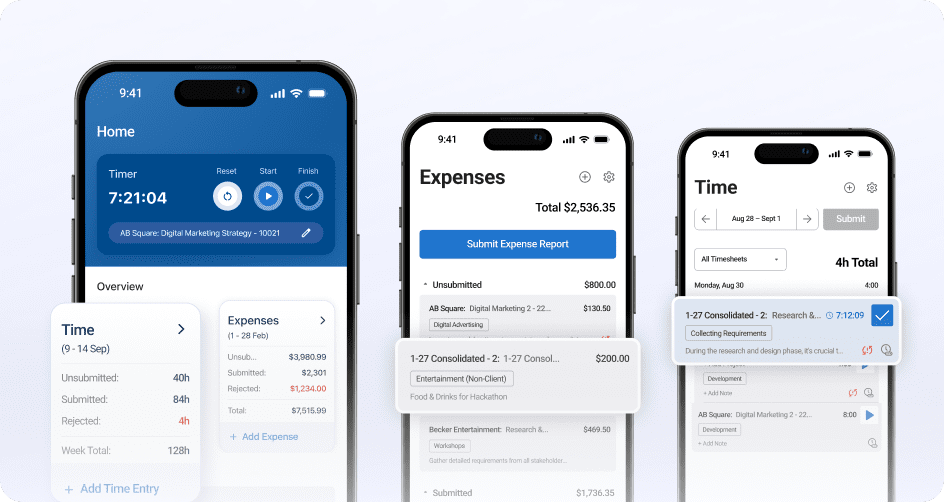
- Time tracking that’s built to become an invoice. In BigTime, every time entry carries the context billing needs: project, task, rate, and billable status. Approved hours flow straight into invoicing, so finance stops rebuilding timesheets in spreadsheets.
- Adoption your consultants won’t fight. Weekly and daily views, timers, and a capable mobile app make time entry quick for the people doing the work, while managers get compliance visibility to catch missing timesheets before they become month-end problems.
- Real-time visibility into utilization and margins. Because time, budgets, and rates live in one system, you can see budget burn, billable utilization, and project profitability while work is happening, with AI-powered insights that flag anomalies before they show up in reports.
- The strongest QuickBooks connection in the category. BigTime offers bi-directional, audit-ready integration with both QuickBooks Online and QuickBooks Desktop, so tracked time, expenses, and invoices stay in sync with your general ledger without double entry.
- A platform that grows with your firm. Start with time tracking, billing, and invoicing, then add resource management, quoting, and deeper analytics as complexity demands, all without re-platforming or migrating your data.
Cons:
- More platform than a solo freelancer needs. If you only want a personal stopwatch with no rates, budgets, approvals, or client billing attached, BigTime’s project and financial depth will be more than the job requires.
BigTime is a PSA platform built for professional services firms, and that origin shows in how it treats time tracking. Instead of capturing hours as an isolated activity, BigTime treats every time entry as the first link in a financial chain that runs from timesheet to approval to invoice to the general ledger. For consulting, IT, and engineering firms, that architecture solves the exact problem that pushes most teams off basic time trackers: the gap between what was worked, what was billed, and what the books say.
Where BigTime pulls ahead of lighter time tracking tools is what it does with the data after capture. Advanced reporting on utilization shows how billable your team really is, budget tracking shows burn against estimates in real time, and profitability views connect hours to margins by project, client, and team. Leaders get answers to operational questions in minutes rather than after a reporting sprint, and AVA, BigTime’s conversational AI assistant, lets anyone surface that data in plain language. For firms managing numerous projects with different rate structures, that visibility is the difference between reacting to margin problems and preventing them.
Just as important, BigTime is designed for fast time-to-value. An in-house implementation and customer support team, a rollout playbook refined across more than 3,000 deployments, and typical go-lives of 30 to 90 days mean your team is tracking time, and billing from it, within a quarter rather than a year. And because the platform is modular, you’re never forced into an enterprise bundle: start with the time tracking and billing core, then add BigTime Resource Management, BigTime Quotes, or BigTime Data Hub when growth demands them.
Key Features
- Flexible time entry: Timers, daily and weekly timesheet views, a mobile app, and smart defaults keep time capture fast for consultants. Configurable reminders and manager visibility drive the daily entry habits that protect billing accuracy.
- Billable hours and rate management: Rate rules by client, role, project, or engagement type are applied automatically to time entries. That keeps billable hours priced correctly from the moment they’re logged, even across complex contracts.
- Timesheet approvals and audit trails: Submissions route through configurable approval workflows with a full history of edits and locked periods. Every invoice line traces back to an approved entry, which protects both compliance and client trust.
- Project budgets and utilization reporting: Real-time views show hours against budget, billable utilization, and margin by project and team. Leaders can spot drift early and rebalance work before profitability slips.
- Invoicing built on tracked time: Approved, tracked time entries and expenses flow directly into flexible invoice formats, cutting manual invoice prep. Firms shorten the path from work delivered to cash collected.
- Expense tracking in the same flow: Expenses are captured alongside time entries with receipts attached, so project costs reflect reality. Finance reviews everything in one place instead of chasing attachments.
- QuickBooks and ecosystem integrations: Bi-directional sync with QuickBooks Online and Desktop, plus connections across the BigTime ecosystem, keeps financial data consistent. Payments and adjustments flow back so your books and your time data always agree.
- AI-powered insights: AVA answers questions about your time and project data in natural language, while AI monitoring flags missing timesheets and billing anomalies. Problems surface before they reach an invoice.
Pricing
BigTime Essentials starts at $20 per user per month, with Advanced, Premier, and Enterprise tiers adding deeper rate controls, resourcing, and analytics as needs mature. A free personalized demo are both available.
Toggl Track
Reviews: G2: 4.6, Capterra: 4.7.
Pros & Cons
Pros:
- One of the easiest time trackers to adopt. Toggl Track’s one-click timer, idle detection, and clean, user friendly interface make daily tracking stick.
- Generous free plan. Free time tracking for up to five users with unlimited projects makes it a low-risk start for freelancers and small teams.
- Tracks everywhere you work. Web app, desktop app, mobile app, and more than 100 integrations put the timer inside the tools you already use.
Cons:
- No native invoicing or billing workflow. Turning tracked time into client invoices requires exports or third-party tools.
- Light on governance. Timesheet approvals and locking arrive only on higher tiers and stay simpler than compliance-minded firms need.
- Reporting thins out for financial questions. Utilization, margin, and budget-versus-actual analysis will push you back into spreadsheets.
Toggl Track has earned its reputation as the friendliest time tracker on the market, built on the belief that tracking should be effortless and trust-based. For freelancers and small teams whose main problem is simply remembering to track time, it’s an excellent answer, and the free plan makes trying Toggl Track painless.
The limits appear when time data needs to do financial work: there’s no invoicing, rate management is basic, and project budgets are informational rather than operational. Firms that bill clients at any real scale end up rebuilding the connection between hours and revenue by hand each month, which is usually the moment they start shopping for a Toggl Track alternative with more financial depth.
Key Features
- One-click timer with idle detection: Start and stop tracking from any device, with prompts to reclaim idle time.
- Reporting and saved reports: Summary, detailed, and weekly reports slice tracked time by project, client, and team member.
- Project estimates and alerts: Set time estimates per project and get alerts as tracked hours approach them.
- 100+ integrations: Browser extensions embed a timer inside popular project management tools like Asana, Jira, and Trello.
Pricing
Free plan for up to five users; paid plans are listed at $10 per user per month for Starter and $20 per user per month for Premium, with annual discounts and a custom-priced Enterprise tier.
Clockify
Reviews: G2: 4.5, Capterra: 4.7.
Pros & Cons
Pros:
- Free for unlimited users. The free version supports unlimited users, unlimited projects, and core time tracking, which no other serious tool here matches.
- Covers the basics broadly. Timers, timesheets, kiosk mode, and a web app, desktop app, and mobile app for every platform get most teams tracking within an hour of signing up.
- Affordable paid tiers. Even after you outgrow the free plan, costs stay among the lowest in the category.
Cons:
- The features finance relies on cost extra. Approvals, locked timesheets, labor rates, and required fields all sit behind paid tiers.
- Reporting and project financials stay shallow. Utilization, profitability, and budget analysis are limited, with business performance quirks in heavy workspaces.
- Support and polish reflect the price. Users report slower responses from the customer support team and a user interface that feels functional rather than refined.
Clockify’s pitch is disarmingly simple: free time tracking software with unlimited users, forever. Often weighed against Toggl Track as the free option, it’s a remarkably low-friction way to build the tracking habit or cover basic client tracking, and the breadth of features for the price is genuinely impressive.
The trade-off is depth. Rate structures are simple, governance requires upgrades, and reporting rarely survives contact with questions about margin or utilization. Growing services firms tend to treat Clockify as a proving ground: excellent for showing that time tracking matters, less suited to being the system of record once hours drive invoices, payroll, and profitability decisions.
Key Features
- Timer and timesheet tracking: Track time with a running timer, weekly timesheets, or kiosk mode on shared devices.
- Unlimited users and projects on the free plan: The free tier has no seat limit, so company-wide rollout costs nothing.
- Basic reports and dashboards: Visual breakdowns show time by project, client, and user with exportable reports.
- Advanced features on paid tiers: Higher plans add approvals, scheduling, time off, labor rates, and lightweight invoicing.
Pricing
Free plan with unlimited users; paid plans are listed from roughly $3.99 to $14.99 per user per month depending on tier and billing cadence.
Harvest
Reviews: G2: 4.3, Capterra: 4.6.
Pros & Cons
Pros:
- Time tracking people actually keep up with. Simple timers and timesheets keep compliance high without turning entry into a daily battle.
- Tracked time turns into invoices in the same tool. Built-in invoicing capabilities with online payments make billing clients simple for small teams.
- Fast, low-risk rollout. Setup takes hours rather than weeks, and the learning curve is gentle enough to skip formal training.
Cons:
- Outgrown quickly by scaling firms. Minimal resource planning, simple rate handling, and few margin controls force add-on tools.
- Reporting depth is a recurring complaint. Decision-grade utilization and profitability analysis hits the ceiling fast.
- Key capabilities live in separate products. Resourcing requires Harvest Forecast, fragmenting the stack you wanted to consolidate.
Harvest endures because it does two things well: making time capture painless and connecting those hours to simple invoices. For small consulting shops, studios, and freelancer teams with straightforward billing, that covers the essential loop of track, bill, get paid. As a system for a growing firm, though, Harvest is a component rather than a platform. Capacity planning, complex rate cards, and profitability analysis either live in add-on products or don’t exist, so firms that reach 20 or 30 billable people usually find themselves stitching Harvest to spreadsheets, which is typically when they start shopping for project time tracking software with more financial depth.
Key Features
- Timers and timesheets across devices: Track time from the web, desktop app, or mobile app, with reminders to keep entries current.
- Invoicing from tracked time: Turn approved hours and expenses into branded invoices with online payment options.
- Budget and cost tracking: Set project budgets in hours or fees and get alerts as burn approaches limits.
- Integrations: Connections to accounting software and popular project management tools, plus the separate Forecast product for scheduling.
Pricing
A free plan covers one user and two projects; the Pro plan is listed at $11 per user per month and Premium at $14 per user per month with annual billing.
QuickBooks Time
Reviews: G2: 4.5, Capterra: 4.7.
Pros & Cons
Pros:
- Purpose-built for payroll accuracy. Clock-in workflows, overtime rules, and approvals feed directly into QuickBooks payroll.
- Strong for field and mobile crews. GPS and location tracking, geofencing, and the Crew mobile app manage job-site teams in real time.
- Natural fit inside the QuickBooks ecosystem. Tracked hours land where your books already live, without third-party connectors.
Cons:
- Built for payroll, not project billing. There are no rate cards, project budgets, or utilization reporting for billable client work.
- Pricing stacks up fast. A base fee plus a per-user charge makes it noticeably pricier than flat per-user tools at team scale.
- Limited value outside Intuit. Teams on other accounting systems give up most of what makes it compelling.
QuickBooks Time, formerly TSheets, is the strongest option here for one specific job: helping businesses track employee time for payroll. Construction crews, field service teams, and businesses with hourly staff get scheduling, mobile clock-in, GPS accountability, and overtime compliance flowing straight into QuickBooks payroll. What it is not is project time tracking software for consulting or engineering firms: it answers “who worked when and where” far better than “what did this project cost and earn.” If your hours are billable to clients rather than payable to employees, the project and billing layer will have to live somewhere else.
Key Features
- Mobile clock-in with GPS: Employees clock in from the mobile app while location tracking confirms job-site presence.
- Scheduling and shift management: Build schedules, notify teams of changes, and compare scheduled versus actual hours.
- Timesheet approvals for payroll: Approved hours sync directly to QuickBooks payroll and invoicing, reducing errors.
- Labor cost reports: Real-time reports break down hours and labor costs by employee, group, and job code.
Pricing
Premium is listed at $20 per month base plus $8 per user per month, and Elite at $40 per month base plus $10 per user per month, with promotions frequently available through Intuit.
Everhour
Reviews: G2: 4.7, Capterra: 4.7.
Pros & Cons
Pros:
- Time tracking inside your project management tools. Timers and time totals embed directly in Asana, ClickUp, Trello, Jira, and others, so nobody leaves the task to track it.
- Solid budgets and estimates on tasks. Project budgets and alerts add cost awareness that PM tools lack natively.
- Clear team dashboards. Live views show who’s tracking what, with timesheet summaries that make weekly review quick.
Cons:
- Its value is borrowed from the host tool. As standalone time tracking software it’s noticeably weaker, so changing your PM stack destabilizes your time data too.
- Minimum seats and a thinner mobile app. The team plan carries a five-seat minimum, and the mobile app trails the embedded experience.
- Financial depth stops at budgets. Invoicing is basic and rate logic simple, so billing-driven firms still need another system.
Everhour takes a clever position: instead of asking teams to adopt another destination, it brings time tracking into the task management and project management software teams already use. For teams deep in Asana or ClickUp, the experience feels native, which solves the adoption problem that sinks many rollouts.
The strategy is also the constraint. Everhour’s financial capabilities are designed to complement a PM tool rather than run a billing operation, so firms whose center of gravity is billable hours, complex rates, and margin visibility will treat it as a partial answer and keep looking for the financial layer.
Key Features
- Native PM integrations: Timers and time fields appear inside Asana, ClickUp, Trello, Jira, and more.
- Budgets and estimates: Set budgets per project and estimates per task, with alerts as work approaches limits.
- Team timesheets and live dashboard: See current activity across the team and review weekly timesheets in one view.
- Basic invoicing and expenses: Convert tracked time and expenses into simple invoices for straightforward billing.
Pricing
A free plan covers up to five users with basic features; the Team plan is listed at $8.50 per user per month with a five-seat minimum.
Time Doctor
Reviews: G2: 4.4, Capterra: 4.5.
Pros & Cons
Pros:
- Deep productivity analytics. Activity tracking, app and website usage, and productivity ratings detail how hours are actually spent, helping managers maximize productivity across large teams of remote employees.
- Automated accountability features. Optional screenshots and idle alerts suit outsourcing and BPO environments where verified time is contractually required.
- Payroll from verified hours. Tracked time can feed payroll for hourly and contract staff, reducing disputes.
Cons:
- Monitoring can poison adoption. Screenshots and activity scoring feel like surveillance to many professionals and can damage a high-trust culture.
- Not built for client billing. There’s no meaningful invoicing, rate management, or budget workflow, so billable-hours firms need a separate billing layer.
- Interface lags the category. Reviewers regularly note a dated user interface and an intrusive-feeling desktop app.
Time Doctor sits in the workforce analytics corner of the market, built for managers overseeing remote employees, hybrid schedules, or outsourced teams who need verified hours and visibility into employee performance and productivity patterns. Within that context it’s capable, with granular tracking and detailed activity reporting.
For professional services teams, though, the relevant problems are billable accuracy, budget burn, and utilization, none of which Time Doctor addresses, and its monitoring posture can actively undermine the trust that drives honest time entry. Choose it only if verified activity data is a genuine business requirement.
Key Features
- Activity and app usage tracking: Records active time, applications, and websites used, producing productivity ratings by person and team.
- Optional screenshots and alerts: Configurable screenshot capture and idle or distraction alerts add verification where required.
- Attendance and scheduling: Tracks attendance against schedules and flags late starts automatically.
- Payroll and integrations: Verified hours flow into payroll and connect with dozens of other tools.
Pricing
Plans are listed at roughly $7 to $20 per user per month depending on tier, with annual discounts and a free trial available.
Hubstaff
Reviews: G2: 4.5, Capterra: 4.6.
Pros & Cons
Pros:
- Strong for distributed and field workforces. GPS tracking, geofenced job sites, and mobile time tracking suit crews and remote teams spread across locations.
- Payroll automation from tracked hours. Set pay rates once and Hubstaff calculates payroll from verified time.
- Configurable monitoring levels. Activity rates, screenshots, and app tracking can be tuned down or disabled entirely.
Cons:
- The surveillance trade-off is still real. Professional teams frequently push back on activity scoring that equates mouse movement with productivity.
- Project financials are not the focus. Rate complexity, margin reporting, and billing governance fall well short of what services firms need.
- Costs accumulate. Per-seat pricing plus paid add-ons and plan minimums make real-world cost higher than the sticker price.
Hubstaff blends employee time tracking with workforce and team management for teams that are rarely in the same room. Its sweet spot is hourly, field, or globally distributed workers: time is verified with GPS or activity data (a softer take on the Time Doctor model), schedules and time off live in the same place, and payroll runs from the hours the system captured.
For project-based professional services, the fit is weaker. Its DNA is workforce oversight rather than project financial management, which shows in shallow rate logic and reporting oriented to activity rather than profitability. Firms whose core question is “are our projects making money” will find the emphasis inverted.
Key Features
- GPS and geofenced time tracking: Location tracking and geofences automate clock-in and confirm on-site presence.
- Activity tracking and monitoring: Optional activity rates, screenshots, and app usage give visibility into remote work patterns.
- Payroll and timesheet automation: Pay rates applied to tracked hours generate payroll automatically, with approvals and locks.
- Scheduling and time off: Shift scheduling, attendance, and PTO management sit alongside tracking.
Pricing
Paid plans are listed from roughly $4.99 to $25 per user per month depending on tier, several with two-seat minimums and optional paid add-ons.
Timely
Reviews: G2: 4.8, Capterra: 4.7.
Pros & Cons
Pros:
- Automatic time tracking that mostly works. The Memory app captures work across applications and calendars in the background, and AI drafts time entries for review.
- Privacy-first by design. Captured data stays private to each individual until they approve entries, softening surveillance concerns.
- Polished, modern experience. One of the cleanest interfaces in the category, with planned-versus-logged views for light capacity management.
Cons:
- You pay a premium for the automation. Per-user pricing runs meaningfully higher than mainstream time trackers.
- AI drafts still need human cleanup. Entries frequently need reclassification, and background capture remains a policy conversation many companies aren’t ready for.
- Billing depth doesn’t match the tracking. Invoicing, approvals, and financial reporting are thin, so billing-heavy firms still need a downstream system.
Timely’s bet is that the best timesheet is the one nobody fills in, replacing manual time tracking with automated time tracking that runs quietly in the background. Its Memory technology records what you worked on, AI assembles that activity into draft time entries, and each person reviews and approves what’s submitted. For consultants and agencies drowning in reconstructed timesheets, the appeal is obvious: recall problems disappear while the person stays in control. The platform is stronger at the front of the workflow than the back, though. Once hours exist, its rate handling, approvals, and billing outputs are modest, so it suits teams whose bottleneck is entry itself rather than everything that happens after.
Key Features
- Memory-based automatic capture: A background desktop app records work across tools and calendars privately for each user.
- AI-drafted time entries: AI assembles captured activity into suggested entries by project for review and approval.
- Project and capacity views: Planned versus logged time shows project progress and team capacity at a glance.
- Tags, rates, and reports: Billable rates, tagging, and reports cover standard tracking needs at moderate depth.
Pricing
Plans are listed at roughly $11 to $28 per user per month depending on tier and billing cadence, with a free trial available.
Which Time Tracking Software Is the Best?
Line the nine platforms up and the pattern is hard to miss. Lightweight time trackers like Toggl Track and Clockify make capture easy but leave you to build the billing and reporting layer yourself. The workforce tools verify hours for payroll but treat projects as an afterthought. The automated time tracking platforms remove entry friction but run thin once hours need to become invoices. For teams whose hours are the product, the best time tracking software is the one that carries time all the way through: from entry to approval to invoice to insight, without a spreadsheet holding the chain together.
That is exactly where BigTime stands apart in 2026. BigTime treats time tracking as the foundation of your firm’s financial operations rather than a standalone habit. Your team gets time entry they’ll actually keep up with, your finance team gets approved, rate-correct hours that flow straight into invoices and sync with QuickBooks, and your leadership gets real-time visibility into utilization, budget burn, and profitability across every project. As your firm grows, the platform grows with you, adding resourcing, quoting, and deeper analytics on the same trusted data instead of forcing a migration.
If protecting billable hours and improving margins is the outcome you’re after, see it with your own projects. Book a free personalized demo today.
Time Tracking Software: FAQ
What Is Time Tracking Software?
Time tracking software is a system for capturing how working hours are spent and turning that data into something useful: clean time logs, accurate invoices, correct payroll, project budget visibility, and utilization insight. It typically combines flexible time entry (timers, timesheets, mobile apps, and automated time tracking), organization by project, task, and client, approval workflows, project management features, and reporting. Many time tracking apps in the category cover just personal productivity with a simple time tracker tool, while others are full PSA platforms where time connects directly to billing, resourcing, and accounting.
What Is the Best Time Tracking Software?
BigTime is the best time tracking software for teams that bill for their time. Popular time tracking apps like Toggl Track capture hours well but stop there; BigTime pairs fast, flexible time entry that consultants adopt quickly with the financial depth most trackers lack: automatic rate application, timesheet approvals, invoicing built on approved hours, bi-directional QuickBooks sync, and real-time reporting on utilization and margins. Instead of capturing hours and leaving the hard part to spreadsheets, BigTime carries time from entry to invoice to insight in one connected flow, which is why it consistently delivers faster billing cycles and fewer write-offs.
What Is the Best Time Tracking Software for Medium-Sized Companies?
For mid-sized companies, and especially professional services firms in the 50 to 250 person range, BigTime is the strongest choice. Mid-market teams sit in an awkward spot: simple time trackers can’t handle their rate structures, approvals, and reporting needs, while enterprise systems demand budgets and implementation timelines they don’t have. BigTime is purpose-built for exactly this segment, offering the governance and financial visibility growing firms need, backed by a responsive customer support team, with go-lives typically measured in 30 to 90 days, and modular expansion so the platform scales as headcount and complexity grow.
What Is the Best Time Tracking Software for Different Industries?
BigTime is the best option across the industries where hours drive revenue:
- IT companies: BigTime handles mixed billing models like retainers, T&M, and fixed-fee work, keeping tracked hours priced correctly across every contract type.
- Engineering firms: Project time tracking tied to budgets and phases gives engineering teams live burn visibility and cleaner client billing on long, multi-stage engagements.
- Consulting companies: Utilization and margin reporting turn consultant timesheets into staffing and profitability decisions, while approvals protect billing accuracy.
- Professional services firms in general: As a PSA platform, BigTime connects time to invoicing, resourcing, and the general ledger, which is the operational backbone any project-based business needs to grow with control.
What Is the Best Time Tracking Software That Integrates With QuickBooks?
BigTime. It offers a bi-directional, audit-ready integration with both QuickBooks Online and QuickBooks Desktop, which very few platforms in the category can claim. Tracked time, expenses, and invoices flow into QuickBooks, while payments, adjustments, and AR status flow back into BigTime, so your time tracking system and your general ledger always tell the same story. For firms that run their books on QuickBooks, that connection eliminates double entry and makes month-end close measurably faster.




