


If your firm is bidding on government contracts, your accounting system will be examined before a single invoice goes out. This guide is for government contractors, from startups pursuing their first SBIR award to established professional services firms managing multiple cost-type contracts, who need DCAA-compliant accounting software that keeps them audit ready.
Here is the catch most buyers miss: there is no such thing as officially DCAA-approved accounting software. The Defense Contract Audit Agency does not certify software at all. It audits your processes, your configuration, and your internal controls. Below, we break down what DCAA compliance actually requires, compare the seven best systems on the market, and show you how to choose the right fit for your business.
Key Takeaways
- No accounting software is officially DCAA-approved. The DCAA audits your processes, configuration, and internal controls, not the software itself.
- DCAA compliance requirements follow the SF1408 pre-award survey: cost segregation, job costing, compliant timekeeping, labor distribution, unallowable cost exclusion, and audit trails.
- Compliance is mandatory for cost-type contracts and some T&M and FFP contracts with cost-reimbursable line items.
- BigTime paired with QuickBooks gives professional services firms DCAA-compliant time tracking, job costing, and audit trails without GovCon ERP cost and complexity.
What Does “DCAA-Compliant Accounting Software” Actually Mean?
Let’s clear up the biggest misconception first. The DCAA does not approve, certify, or endorse any accounting software. When contractors search for a DCAA-approved accounting system or a government approved accounting system, what they actually need is software that can be configured to meet DCAA standards, backed by documented policies and procedures. The Defense Contract Audit Agency audits contractors on behalf of government agencies, examining cost accounting practices, timekeeping records, indirect rate calculations, and internal controls, not the logo on your software.
When is a DCAA-compliant accounting system required?
It becomes mandatory when you hold cost-type contracts, because the federal government pays a share of your indirect costs and must trust how you calculate them. Some T&M and even firm-fixed-price contracts also require one when they include a cost-reimbursable line item, such as travel. Non-compliance risks contract termination, disallowed costs, and lost eligibility for future government contracts.
DCAA Accounting System Requirements (SF1408 Checklist)
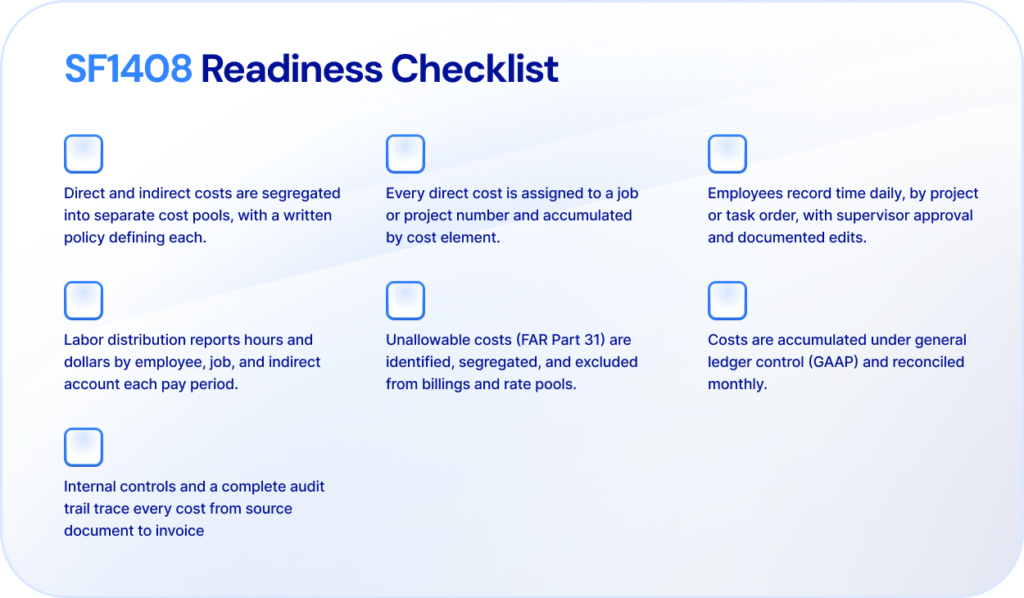
Before awarding a cost-type contract, government agencies use the SF1408 Pre-Award Survey to evaluate whether a prospective contractor’s accounting system meets DCAA requirements. The good news: the criteria are public, so you can prepare long before an auditor calls. The DCAA expects the capabilities below from any compliant accounting software, whether that’s a purpose-built GovCon platform or an existing accounting system configured for federal work.
Segregation of Direct and Indirect Costs
Your accounting system must separate direct and indirect costs into distinct cost pools, supported by a written policy defining when each cost element is charged direct versus indirect. Auditors want to see indirect cost allocation applied consistently and equitably across contracts. Without a properly structured chart of accounts, direct costs, overhead, and G&A blur together, and your indirect rate calculations fall apart under audit scrutiny.
Job and Project Cost Accumulation
Every direct cost must be assigned to a job or project number and accumulated by cost element: labor, materials, subcontracts, travel, and other direct costs. The DCAA expects you to produce reports showing contract costs by project and by final cost objectives on demand.
Strong project accounting is the backbone here. If your system can’t tie every transaction to a contract or CLIN, you can’t demonstrate where government money went.
DCAA-Compliant Timekeeping
Timekeeping errors are the number one reason contractors fail DCAA audits. The DCAA requires employees to record their own time daily, charge employee hours to the correct project or task order, and route timesheets through documented approval workflows. Every edit needs a reason and a timestamp.
Manual spreadsheets technically qualify but carry enormous risk. Automated time tracking with real time tracking of entries, reminders, and approvals is the practical standard for staying audit ready.
Labor Distribution
A compliant labor distribution system connects approved timesheets to your general ledger, charging direct and indirect labor costs to the appropriate cost objectives. It must report labor hours and labor dollars by employee, by job, and by indirect account, reconciled every pay period.
Exclusion of Unallowable Costs
FAR Part 31 defines costs the federal government will not pay, such as entertainment or charitable contributions. Your accounting system must identify, segregate, and exclude these unallowable costs from billings and indirect rate pools. Tracking allowable and unallowable costs in separate accounts, with trained staff coding them correctly, is a core DCAA expectation.
GAAP and General Ledger Control
Cost accumulation must happen under the control of a comprehensive general ledger maintained in accordance with Generally Accepted Accounting Principles. The DCAA expects direct and indirect costs to be reconciled monthly in the general ledger, with monthly determination and posting of costs, so project reports always tie back to your books.
A Complete Audit Trail and Internal Controls
Finally, the DCAA expects internal controls that prevent errors and fraud: segregation of duties, documented approval workflows, and supporting documentation for every figure. A complete audit trail, from timesheet entry to invoice, lets auditors trace any cost back to its source. Systems with built-in audit trails dramatically shorten the audit process and reduce risk of findings.
The 7 Best DCAA-Compliant Accounting Software Systems: Comparison
Below are the seven systems government contractors most often evaluate, compared on fit, strengths, and pricing. Remember: none of these is DCAA-approved out of the box, because no software is. What differs is how much configuration, consulting, and ongoing effort each one demands to reach and remain compliant.
| Software | Best For | Key Strengths | Starting Price |
| BigTime | Professional services firms with government contracts (T&M, FFP, and cost-reimbursable CLINs) | DCAA-compliant time tracking, job costing, labor distribution, audit trails, native QuickBooks and Sage Intacct integrations | From ~$20/user/mo |
| Deltek Costpoint | Large prime contractors with complex cost-plus portfolios | Deep FAR/CAS compliance controls; 300+ reports; but costly and consultant-dependent | Quote-based (high TCO) |
| Unanet GovCon | Mid-market GovCons consolidating ERP functions | Integrated PSA + financials; DCAA-ready reports; setup and migration can be difficult | From ~$4,000/yr (10 employees) |
| PROCAS | Small contractors needing budget compliance basics | Compliance-first design, low cost; dated interface, limited depth to grow into | Quote-based (budget tier) |
| JAMIS Prime ERP | Small-to-mid GovCons wanting purpose-built ERP | Built on Acumatica; strong compliance framework; weak report writer, smaller ecosystem | Quote-based (est. $50–150/user/mo) |
| QuickBooks | Startups and very small contractors | Familiar and cheap; not compliant alone, requires satellite systems and manual workarounds | From ~$38/month (Online) |
| GovCon365 (XTIVIA) | Microsoft-centric firms on Dynamics 365 | Native Microsoft integration; niche vendor with limited third-party review footprint | Quote-based |
BigTime
G2: 4.5/5 | Capterra: 4.6/5
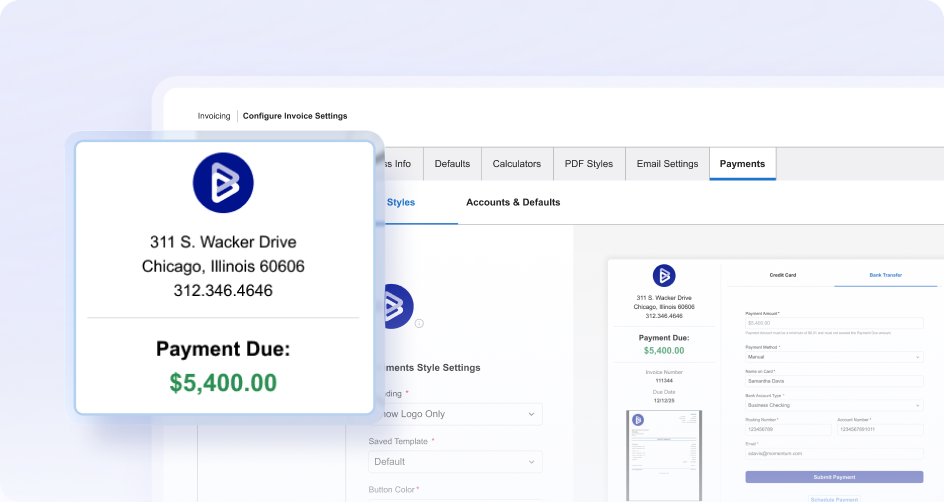
BigTime is an AI-powered PSA platform built for professional services firms, and it has become the standout choice for consulting, engineering, architecture, and IT services firms that hold government contracts alongside commercial work. Instead of forcing you into a heavyweight GovCon ERP, BigTime layers DCAA-compliant time tracking, project accounting, and billing on top of the general ledger you already trust. The result: your team gets modern, intuitive software people actually use, and your auditors get the documentation they expect.
Where competitors treat compliance as a bolt-on, BigTime treats it as a workflow. Daily time entry, timesheet approval workflows, change logs, and detailed audit trails are native to the platform, which means the timekeeping requirements that cause most failed DCAA audits are handled by default.
Key Features
- DCAA-oriented time tracking with daily entry enforcement, notes on edits, supervisor approval workflows, and a complete audit trail on every timesheet.
- Project and job cost accounting that captures labor costs and expenses by project, task, and cost element, keeping every dollar tied to final cost objectives.
- Labor distribution and expense tracking that flow approved hours and costs into reporting and invoicing without re-keying.
- Deep, bi-directional QuickBooks integration (plus Sage Intacct for larger firms), so your general ledger and your project data integrate seamlessly and reconcile monthly.
- Real-time utilization, budget, and profitability reporting that gives leaders visibility across the firm’s entire portfolio, government and commercial alike.
- Flexible T&M, fixed-fee, and milestone invoicing with rate management by staff, role, or project.
Who It’s Best For
BigTime is the best fit for professional services firms running time-and-materials, firm-fixed-price, or mixed contract portfolios that include government work: consultancies, engineering and architecture firms, and IT services providers. If your firm needs to pass an SF1408 review, keep utilization and profitability visible, and avoid hiring a full-time systems administrator, BigTime delivers the strongest balance of compliance and usability in this comparison.
DCAA Compliance
BigTime supports the DCAA requirements that matter most in practice: compliant timekeeping, job cost accumulation, labor distribution, approval workflows, and audit trails. Paired with a properly configured QuickBooks general ledger and documented policies, BigTime gives government contractors a DCAA-compliant accounting system at a fraction of the cost of a monolithic ERP, while staying flexible enough to serve your commercial clients too.
Pricing
BigTime offers transparent per-user pricing starting at roughly $20 per user, per month, with advanced plans adding resource management, revenue projections, and Data Hub analytics. Implementation is measured in weeks, not months, and firms consistently cite value for money as a strength in reviews. You can see the platform live by booking a demo.
Deltek Costpoint
G2: 4.2/5 | Capterra: 4.0/5
Deltek Costpoint is the legacy heavyweight of GovCon accounting, used by many of the largest defense contractors. Its compliance depth is real: the system was designed around FAR, CAS compliance, and DCAA audits. But that depth comes at a steep price in every sense, and reviewers are candid about it.
Key Features
- End-to-end ERP covering project accounting, procurement, HR, and manufacturing with built-in FAR/DFARS controls.
- Automated indirect rate calculation, provisional billing rates, and incurred cost submission support.
- More than 300 pre-built reports with audit traceability.
Who It’s Best For
Large prime contractors with complex, multi-program cost-plus portfolios and dedicated systems staff. GovCon accounting specialists commonly advise against Costpoint for businesses under roughly 100 employees or $5M in revenue, where it is simply oversized.
DCAA Compliance
Excellent on paper and in practice, provided it is configured correctly. That caveat is the catch: setup and maintenance are not for the average user, training is scarce without consultants, and misconfiguration erases the compliance advantage you paid for.
Pricing
Quote-based and consistently described as the highest total cost of ownership in the category. Third-party estimates range from $75 to $200 per user, per month for enterprise deployments, before implementation projects that routinely run six months or longer.
Unanet GovCon
G2: 4.4/5 | Capterra: 4.4/5
Unanet GovCon combines PSA and financials in one platform aimed at growing government contractors, and it has won real market share among mid-market firms. Users praise its DCAA-ready reporting; they are far less kind about the road to getting there.
Key Features
- Unified time, expense, project management, billing, and financials in a single database.
- Automated indirect rate calculation applied directly to billing.
- DCAA-output-ready reports and JTR travel rule enforcement.
Who It’s Best For
Mid-market GovCons ($10M–$250M) that want to consolidate accounting and project operations and can absorb a demanding implementation.
DCAA Compliance
Strong. Unanet enforces DCAA timesheet rules and produces auditor-friendly output. However, reviewers report gaps that push work back into spreadsheets: manual bank reconciliations, weak fixed asset handling, and painful ACH file generation, all of which add compliance overhead your accounting team will feel.
Pricing
Scales with employee count, starting around $4,000 per year for 10 employees, with add-ons for analytics and connectors. Watch the per-seat math as you grow; reviewers note costs climb quickly, and initial migration is frequently described as difficult, time-consuming, and expensive.
PROCAS
Capterra: 4.7/5 | G2: limited review volume
PROCAS is a compliance-first accounting system built specifically for small government contractors. It does the DCAA fundamentals well and cheaply, which is exactly its ceiling: firms tend to outgrow it once contracts multiply.
Key Features
- Integrated timekeeping and accounting with automatic indirect rate calculation.
- Chart of accounts and reporting designed around DCAA requirements from day one.
- Fast, low-cost implementation, often under $5,000.
Who It’s Best For
Small businesses and SBIR awardees that need affordable compliance basics and can live without modern project management, resource forecasting, or analytics.
DCAA Compliance
Solid, with a genuine track record of passing pre-award audits. The trade-offs show up elsewhere: users describe the interface as dated and not user-friendly, and reporting behaves inconsistently across modules.
Pricing
Quote-based but firmly in the budget tier, one of the most affordable purpose-built options. Expect to re-evaluate your accounting needs (and re-implement) if the firm scales into complex, multi-contract work.
JAMIS Prime ERP
G2: 4.5/5 | Capterra: limited review volume
JAMIS Prime is a GovCon ERP built on the Acumatica cloud platform, positioning itself as a purpose-built alternative to Costpoint. It earns good marks from its (relatively small) user base, but buyers should weigh its narrower ecosystem against bigger rivals.
Key Features
- Project-based financials, timekeeping, procurement, and HR in one cloud system.
- Indirect cost allocation, unallowable cost segregation, and incurred cost submission support.
- Acumatica foundation provides modern cloud architecture and business intelligence capabilities.
Who It’s Best For
Small-to-mid GovCons moving off spreadsheets or QuickBooks that want purpose-built compliance without Costpoint’s bulk.
DCAA Compliance
Strong compliance framework engineered around DCAA audits. Independent evaluations, however, position JAMIS as an entry-to-mid-tier option: the report writer is a recurring complaint, several modules need refinement, and implementations still average around five months.
Pricing
Quote-based; third-party estimates suggest $50 to $150 per user, per month. Smaller partner and consultant networks than Deltek or Unanet mean less help when you need it.
QuickBooks (Online and Desktop)
G2: 4.0/5 (Online) | Capterra: 4.3/5 (Online)
QuickBooks is where most small contractors start, and for good reason: it is inexpensive, familiar, and genuinely capable as a general ledger. But let’s be direct about what it is not. QuickBooks alone is not a DCAA-compliant accounting system, and making it one requires significant effort and supporting systems.
Key Features
- Reliable general ledger, AP/AR, payroll integration, and financial reporting at small business prices.
- Massive accountant ecosystem and integration marketplace.
- Can be configured for government contracts with a restructured chart of accounts and documented procedures.
Who It’s Best For
Startups and very small government contractors with FFP or T&M contracts, straightforward indirect rates, and low transaction volume.
DCAA Compliance
Achievable, but never out of the box. QuickBooks cannot calculate indirect rates, monitor contract ceilings and funding, or enforce compliant timekeeping natively; QuickBooks Desktop and Online both depend on satellite systems and spreadsheets for these DCAA requirements. That is precisely the gap BigTime closes: pairing BigTime’s compliant time tracking, job costing, and audit trails with QuickBooks gives you a compliant accounting setup while keeping the ledger your accountant already knows.
Pricing
QuickBooks Online starts around $38 per month; QuickBooks Enterprise starts at roughly $2,210 per year. Budget separately for compliant timekeeping software, consulting for setup (typically $2,000–$5,000), and ongoing monthly accounting support.
GovCon365 (XTIVIA)
G2 and Capterra: limited third-party review volume
GovCon365 is XTIVIA’s GovCon ERP built on Microsoft Dynamics 365. Its pitch is continuity: if your firm already lives in Azure, Microsoft 365, and Teams, GovCon365 keeps compliance inside that ecosystem. It is the least proven option on this list by public review evidence.
Key Features
- Project accounting, time and expense, and contract management on the Dynamics 365 platform.
- Native Power BI business intelligence capabilities and Microsoft workflow integration.
- FAR- and CAS-oriented cost structures with audit trail support.
Who It’s Best For
Microsoft-centric organizations that prioritize platform consistency over GovCon-specific pedigree.
DCAA Compliance
Architected for compliance, with cost segregation and audit trails built in. The caution is evidence: with very few independent reviews, buyers must lean heavily on references and demos, and Dynamics licensing plus partner-led implementation adds complexity smaller firms may not want.
Pricing
Quote-based, layered on top of Microsoft Dynamics 365 licensing. Expect ERP-class implementation timelines and budgets.
How to Choose the Right System for Your Business
The right DCAA-compliant accounting software depends on your contract mix, size, and growth plans. A practical decision framework:
- Startup or single SBIR award: Keep it lean. A properly configured QuickBooks ledger with compliant timekeeping meets DCAA standards at minimal cost. PROCAS is a viable alternative if you’d rather buy compliance pre-packaged.
- Small-to-mid professional services firm with FFP and T&M contracts: This is where BigTime shines. You get compliant time tracking, project accounting, approval workflows, and audit trails on top of your existing accounting system, plus the utilization and profitability visibility a services firm needs to grow. You stay audit ready without ERP overhead.
- Scaling contractor with multiple cost-plus contracts: Once cost-type awards dominate and transaction volume climbs, evaluate Unanet, JAMIS, or (at true enterprise scale) Deltek Costpoint, and budget for a serious implementation.
Whatever you choose, model total cost of ownership, not just the license: implementation and data migration, timekeeping and payroll add-ons, staff training, consulting fees, and the ongoing compliance maintenance (monthly closes, indirect rate calculations, job cost reports) needed to remain compliant year after year. A robust accounting system with a low sticker price can still carry a heavy operating cost, and an expensive one you can’t operate is worse. For most professional services firms, the combination of BigTime and an established general ledger delivers audit readiness, adoption, and the lowest realistic TCO.
Compliance Without the Complexity
DCAA compliance is a process, not a purchase, but the software you run that process on determines how painful it is. Monolithic GovCon ERPs deliver compliance at the cost of budget, usability, and months of implementation. Bare-bones tools leave your team stitching together spreadsheets and hoping the audit goes well.
For professional services firms working on government contracts, BigTime offers the best of both: DCAA-compliant timekeeping, job cost accounting, labor distribution, and complete audit trails, delivered in a modern PSA platform your team will actually use, and connected natively to the general ledger you already own. Thousands of firms trust BigTime to keep projects profitable and auditors satisfied. Your firm can be next.
FAQ
Is QuickBooks DCAA Compliant?
Not out of the box. QuickBooks can be made DCAA compliant by restructuring the chart of accounts, segregating direct and indirect costs, adding a compliant timekeeping system, and documenting policies and procedures. Many small government contractors pair QuickBooks with BigTime to cover timekeeping, job costing, and audit trail requirements.
Can I Request a DCAA Audit?
No. Contractors cannot request a DCAA audit to certify their accounting system. The DCAA audits only at the request of a federal entity, typically a contracting officer, and usually through an SF1408 pre-award survey after you are selected for a qualifying award. Your job is to be audit ready when that happens.
How Much Does a DCAA-Compliant System Cost to Set Up?
It varies by approach. Configuring QuickBooks with compliant timekeeping typically costs $2,000 to $5,000 in consulting plus software subscriptions. Purpose-built systems like PROCAS keep setup under $5,000, while GovCon ERPs such as Unanet or Deltek Costpoint involve implementations running from tens of thousands of dollars over several months.
What Happens if I Fail a DCAA Audit?
A failed pre-award audit can delay or block a contract award until deficiencies are corrected. On active contracts, audit findings can lead to disallowed costs, withheld payments, contract termination, and damage to your standing with government agencies. Most findings trace back to timekeeping errors and poor cost segregation, both preventable with the right system.
Do Federal Grants (SBIR/STTR) Require DCAA Compliance?
Often, yes in practice. Cost-type SBIR/STTR Phase II awards from agencies like DoD, DoE, NSF, and NIH require FAR Part 31 compliance: reasonable, allocable, allowable costs with direct and indirect cost segregation. Some agencies use the DCAA to audit grantees, so a DCAA-compliant accounting system is the accepted gold standard for awardees.




