

According to research, professional services firms lose between 10 and 20 percent of all billable work to leakage driven by late time entries, manual reconciliation, and inconsistent billing workflows. That is not a reporting problem. It is a structural one, and the right cloud PSA software fixes it at the source.
A modern cloud-based professional services automation software connects project delivery, resource management, time tracking, billing, and financial reporting into a single system, giving financial and operational leaders the real-time visibility they need to act before margins slip. By the end of this guide, you will know exactly which platform gives you the best combination of financial control, fast adoption, and scalable functionality without enterprise complexity.
For this evaluation, we focused on the pain points that come up most consistently when professional services organizations are actively evaluating PSA tools:
- Financial visibility across the entire project lifecycle: Can you see margin, budget burn, and utilization in real time, or are you assembling the picture manually at month-end?
- Time tracking and billing accuracy: Does the platform reduce revenue leakage by keeping time entry and invoicing tightly connected, with approval workflows that protect data integrity?
- Resource management and capacity planning: Can you plan work proactively and connect staffing decisions to financial outcomes before a project starts?
- Integration with accounting software: Does the platform sit natively on top of your existing GL, or does it create new reconciliation work between systems?
- Adoption and time to value: How long before your team is actually using it, and how quickly do you see ROI in the first billing cycle?
What Is Cloud PSA Software?
Cloud professional services automation (PSA) software is a web-based professional services automation solution that helps firms plan, execute, and measure client work by connecting delivery operations with financial operations. That means projects, tasks, time tracking, and resource utilization on one side, and project budgets, billing, revenue recognition, and profitability reporting on the other. Instead of treating project management and financial management as separate functions, a cloud PSA platform keeps them in one place so your team can deliver consistently and finance can bill accurately.
Unlike on-premise systems that require dedicated IT infrastructure and manual updates, cloud-based PSA software is accessible from anywhere, scales with your team, and keeps every stakeholder working from the same real-time data. For professional services organizations that are growing past basic tools, that accessibility and financial continuity is exactly what makes the difference.
In practice, cloud PSA software addresses the most common operational challenges services teams face as they scale:
- Billing accuracy and revenue protection: Keeping time and expense data accurate enough to support clean invoicing, reliable profit margins, and fewer write-offs across all active client projects.
- Budget and scope control: Tracking project budgets in real time so small cost overruns do not quietly become write-offs that damage overall financial performance.
- Resource utilization and capacity planning: Giving leaders visibility into who is available, not just who is busy, so decisions about how to plan projects and manage resources are proactive rather than reactive.
- Standardized service delivery: Building repeatable project workflows so every engagement runs consistently, without relying on individual heroics to keep client work on track.
- Workflow automation: Reducing manual effort across repetitive tasks like timesheet reminders, expense approvals, and invoice generation, freeing services teams to focus on billable work.
- Data-driven decision making: Giving leadership a single platform for reporting on utilization, project profitability, backlog, and forecasted revenue across the entire project lifecycle.
For managed service providers, IT firms, engineering practices, and consulting companies, moving to a cloud-based PSA solution is often the moment the business stops reacting to financial surprises and starts running with genuine operational clarity.
What Features Should the Best Cloud PSA Software Have?
Most platforms can track projects. Fewer can support how professional services firms actually operate, where resource utilization affects delivery quality, project data determines whether you get paid on time, and financial performance depends on decisions made weeks before an invoice is generated. The best cloud PSA software sits at the intersection of operations and finance, giving leaders the tools to run the business with clarity rather than assumptions.
Here are the features that matter most when evaluating a cloud-based PSA solution in 2026.
End-to-End Time Tracking Built for Services Teams
Time entry needs to be fast for consultants and dependable for finance. Strong cloud PSA platforms support multiple entry styles, including daily, weekly, timer-based, and mobile, alongside configurable reminders that improve compliance without constant manual chasing. Approvals, audit history, and locked periods matter just as much, because they protect data integrity and reduce downstream invoice questions that slow down the billing cycle and damage client satisfaction.
Billing Logic That Stays Consistent Across Every Engagement
Professional services firms rarely run on a single rate. The best cloud PSA tools handle rate cards just like professional billing software – by client, role, team, location, or engagement type, plus exceptions such as blended rates, minimums, and negotiated discounts. Rates should also be easy to maintain over time and fully transparent in reporting, so finance can explain effective bill rates and leadership can see when rate mix is quietly pulling profit margins down.
Real-Time Budget Tracking and Project Profitability Visibility
Project budgeting tools should update as work happens, not after the month closes. A capable cloud-based PSA platform tracks actuals against budget by phase, role, and cost type, with clear signals when burn rates accelerate beyond plan. The ability to forecast remaining effort and project end-of-engagement margin helps teams decide whether to adjust staffing, tighten scope, or renegotiate terms before project profitability slips beyond recovery.
Project and Resource Management in a Single Platform
Managing resources effectively requires more than a simple assigned versus unassigned view. The right cloud PSA software shows consultant availability by date, utilization targets, role level, and skills, while accounting for holidays, PTO, and internal commitments. Scenario planning capabilities, covering best-case, expected, and stretch scenarios, support smarter trade-offs in capacity planning when project demand outpaces current availability.
Project Accounting and Revenue Recognition
For professional services organizations where billing models vary across fixed-fee, time and materials, retainer, and milestone-based engagements, project accounting depth is non-negotiable. The best PSA software can act as a project accounting software and handle revenue recognition consistently across contract types, keep WIP balances accurate, and maintain a clear audit trail from time entry through to the general ledger, reducing the manual effort that typically dominates month-end close.
Invoicing and Revenue Workflows That Shorten the Billing Cycle
Invoicing should start from approved time and expenses, not manual compilation of historical project data. Strong cloud PSA software supports draft invoices, review workflows, configurable invoice formats, and clear backup detail that reduces client back-and-forth. Flexible revenue workflows matter too, covering retainers, deposits, progress billing, fixed-fee project milestones, and partial billings for phased engagements.
Reporting and Analytics for Data-Driven Decision Making
A cloud PSA platform earns its place when reporting answers real business questions quickly. Key metrics should include billable utilization, non-billable mix, realization rates, effective bill rate, write-offs, margin by client or service line, and trends over time. Strong drill-down capability is essential, so leaders can trace a margin drop back to its root cause without manual tracking across multiple systems.
Workflow Automation That Reduces Manual Effort
The best cloud-based PSA solutions automate repetitive tasks across the project lifecycle, from timesheet reminders and expense approvals to invoice generation and project status updates. Automated workflows reduce manual coordination, minimize the risk of errors caused by human data entry, and free project managers and services teams to spend more time on billable delivery work.
Integration With Accounting Software and Existing Systems
A cloud PSA solution still has to fit into the broader technology stack. Reliable connections to accounting software, payroll systems, CRM platforms, and ERP tools keep financial data aligned and reduce reconciliation effort at month-end. SSO, permissions syncing, and a well-documented API become increasingly important as firms grow and different teams need different levels of access without breaking reporting consistency.
2026 Cloud PSA Software Ranking
This 2026 ranking focuses on platforms that do more than organize projects, monitor project performance, and track hours. The tools below are assessed on how well they support core professional services operations end to end: optimize project delivery, time and expense capture, resource management and capacity planning, project budget visibility, billing accuracy, and invoice-ready financial workflows. In other words, this is a shortlist built for firms that want a true cloud PSA solution, not just a project management tool with a few billing add-ons.
Each platform was evaluated against the criteria that matter most to financial and operational leaders in professional services organizations: how cleanly it connects project delivery to expense management, how fast it drives adoption across services teams, how well it handles complex billing logic and revenue recognition, and whether it integrates reliably with the accounting software firms already use to improve operational efficiency. The result is a practical guide to the best cloud-based PSA software available in 2026, starting with the strongest overall choice for growing professional services firms.
Cloud PSA Software Comparison
When comparing cloud PSA platforms, it pays to look past the marketing language and focus on how each tool performs in daily operational reality. The best cloud-based PSA software should connect time tracking and project delivery to financial outcomes without creating extra admin work, give leadership real-time visibility into project profitability and resource utilization, and support the billing accuracy that keeps cash flow predictable. The table below gives a quick view of how the leading platforms stack up in 2026, including where each solution is strongest and where limitations tend to surface once your firm starts to scale.
| Tool | Description | Strengths | Limitations |
| BigTime | Financial-first cloud PSA for professional services firms, built on top of QuickBooks and Sage. | Strong time-to-invoice flow, real-time project profitability visibility, practical resource management, and fast adoption for services teams. | Best fit for firms that need full PSA functionality; may be more than a solo consultant or very small team requires if they only need basic time tracking. |
| Kantata | Enterprise PSA platform built for complex professional services organizations. | Deep resource management and project governance capabilities for large, structured teams. | Can feel heavy and admin-dependent in day-to-day use; smaller firms often pay for complexity they will never fully use. |
| Certinia PS Cloud | PSA solution built natively inside the Salesforce ecosystem. | Tight alignment with Salesforce CRM data for firms already standardized on that platform. | High Salesforce dependency raises cost and implementation complexity; customization can become a project in its own right. |
| NetSuite OpenAir | PSA platform often paired with ERP-centric financial operations. | Solid for firms that prioritize finance alignment and standardized project accounting controls. | UI and project workflows can feel rigid for delivery teams; configuration and reporting often require specialist effort. |
| Deltek Vantagepoint | ERP-style platform built for project-based professional services firms. | Strong financial rigor and compliance-friendly controls for structured organizations. | ERP weight can slow adoption across delivery teams; less flexible for fast-changing consulting or IT service models. |
| Accelo | Operations platform for service teams with a quote-to-cash focus. | Good for consolidating tools in smaller service organizations with straightforward workflows. | Reporting and financial depth can lag for firms with complex billing logic and margin management needs. |
| Scoro | Work management and financial tracking platform with a profitability emphasis. | Helpful budget burn and project profitability views in a single interface. | Can be opinionated and time-consuming to configure; some firms outgrow its PSA depth when billing complexity increases. |
| Productive.io | Agency-first platform for projects, resource management, and budgets. | Modern interface and solid delivery visibility for teams running multiple concurrent client projects. | Often optimized for agency workflows; consulting and IT firms may hit limits around billing complexity and financial governance. |
| Teamwork.com | Client work management platform with time tracking and capacity add-ons. | Strong for delivery execution and client-facing project collaboration. | Not a complete cloud PSA solution on its own; advanced financial management and billing needs typically require additional tools. |
| Harvest | Time tracking and basic invoicing tool for small services teams. | Simple and fast to roll out, with straightforward time entry that teams actually adopt. | Too lightweight for professional services automation at scale; minimal resource management, margin controls, and complex billing support. |
BigTime
Reviews: G2: 4.5/5, Capterra: 4.6/5
Pros:
- Purpose-built for professional services operations, not retrofitted from generic project management. BigTime is designed from the ground up to connect time tracking, expense management, resource utilization, billing, and project profitability into one financial-first workflow. That means finance teams are not rebuilding project reality in spreadsheets every month, and project managers are not chasing consultants for timesheet data the week invoices need to go out.
- Fast adoption across services teams, with strong controls for ops and finance. The platform supports structured time and expense capture with approvals and governance baked in, while keeping day-to-day entry straightforward enough that consultants actually use it consistently. Full adoption within 30 to 90 days is the norm, not the exception.
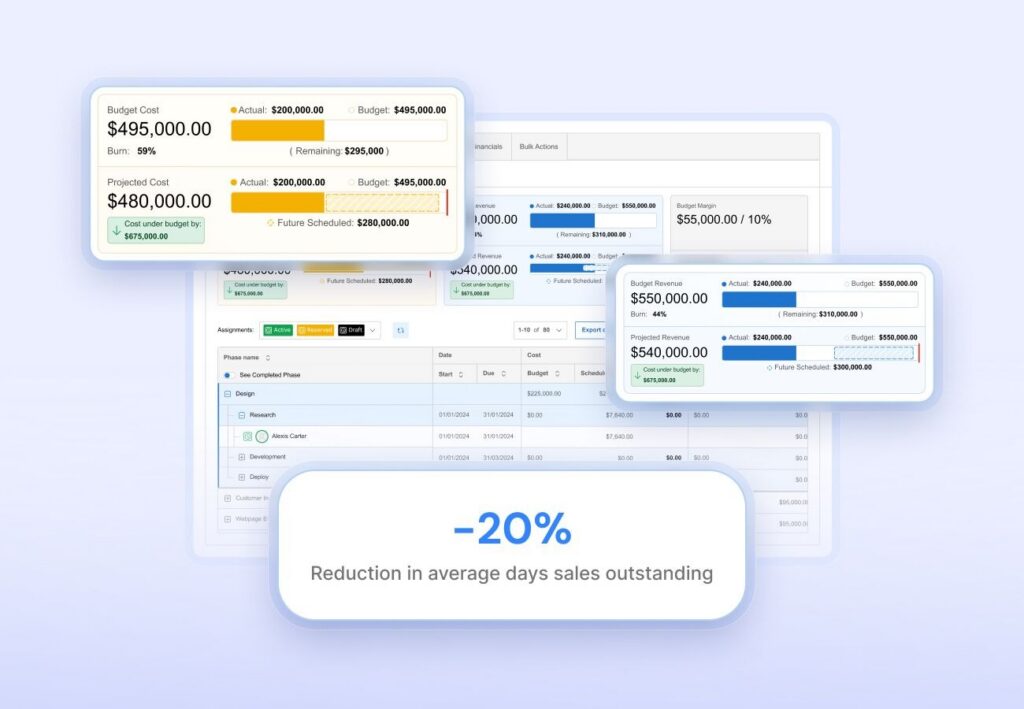
- Real-time visibility into project profitability and budget performance. With project cost management tools and rate controls, and portfolio-level reporting, teams can manage margin during delivery rather than discovering problems after invoices have already gone out. Leaders get a clear view of resource utilization rates, budget burn, and financial performance across every active engagement.
- Scales with your firm’s complexity without forcing a re-platform. BigTime lets professional services organizations start with core PSA functionality, including time tracking, billing, and project management software, and add deeper capabilities such as resource management, quoting, and centralized analytics as operational needs mature.
- The strongest QuickBooks integration in the PSA market. BigTime is built around QuickBooks and Sage, not just integrated with them. That means bi-directional, audit-ready synchronization between project data and the general ledger for easy billing and revenue recognition.
Cons:
- Teams that only need basic time tracking may find it broader than necessary. BigTime’s real value shows up when firms also care about billing accuracy, resource utilization, margin control, and project profitability. Organizations looking purely for a lightweight time logging tool may not need the full depth of the platform.
BigTime is a cloud PSA platform that treats professional services automation as a connected lifecycle rather than a collection of separate tools. From the moment a project is scoped through to final payment collection, every step, including resource planning, time and expense capture, rate logic, approvals, and invoice generation, runs on the same financial foundation. That matters enormously for professional services firms where small process gaps create real revenue leakage.
What sets BigTime apart from other cloud-based PSA software and tools for customer relationship management is its architectural starting point. Most PSA platforms are built delivery-first, meaning they center project management and client collaboration, then bolt on billing and financial reporting as secondary capabilities. BigTime starts from the opposite direction. The general ledger and the billing workflow are the foundation, and every other capability, including resource management, project tracking, and workflow automation, is built on top of that financial core. For professional services organizations where billing accuracy equals revenue and utilization directly determines profit margins, that distinction is not a subtle one. It is the difference between a platform that reports on financial performance and one that actively protects it.
Where BigTime really earns its place is in the middle of consulting and IT firm growth: more clients, more project overlap, more consultants rotating between engagements, and more pressure to forecast demand accurately. With multi-level approvals, portfolio-level budget visibility, and integrated options for deeper resource planning and financial forecasting, leadership gets clearer insight into utilization rates and margin drivers without forcing delivery teams into an overly rigid ERP-style experience. And because the platform integrates reliably with QuickBooks, Sage, and a range of other accounting and CRM tools for professional services, it fits into the existing technology stack rather than requiring firms to rebuild their operations around a new system.
Key Features:
- Time & expense management: Employees can enter time and expenses across multiple entry styles, including daily, weekly, timer-based, and mobile, while approval workflows protect billing accuracy and ensure financial data is audit-ready before invoices are generated.
- Billing & invoicing management: Project invoicing tools tie payments directly to approved time and expenses, reducing manual invoice preparation and keeping billing consistent with actual project delivery activity across every client engagement.
- Rate and cost management: Customizable cost and rate controls support nuanced pricing structures across clients, roles, and engagement types, giving finance teams the tools to maintain billing accuracy and track margin performance at the project level.
- Project budgeting and portfolio visibility: Real-time budget tracking and portfolio-level views help firms monitor burn rates, spot budget drift early, and manage project profitability while work is still in progress rather than after the fact.
- Resource management and utilization forecasting: BigTime offers integrated resource and financial planning with utilization forecasting, giving leaders the visibility to optimize resource utilization, plan projects proactively, and make staffing decisions based on real capacity data.
- Workflow automation: Automated workflows reduce manual effort across repetitive tasks including timesheet reminders, expense approvals, and project status updates, freeing services teams to focus on billable delivery work rather than administrative coordination.
- Project templates and custom invoice templates: Standardized templates reduce setup time across new engagements and improve consistency in both project execution and billing documentation, which matters when managing multiple projects simultaneously.
- Reporting & analytics: Portfolio-level reporting covers billable utilization, realization rates, effective bill rates, project profitability, and financial forecasting, helping leadership with tracking project progress.
- Integrations and extensibility: Native integrations with QuickBooks Desktop, QuickBooks Online, Sage, and a range of CRM and accounting tools support cleaner financial workflows and reduce double entry as professional services firms scale.
Pricing: BigTime Essentials starts at $20 per user per month. Advanced, Premier, and Enterprise tiers are available for firms with more complex PSA needs, with Enterprise pricing available via direct conversation. A free personalized demo is available at bigtime.net/demo.
Kantata
Reviews: G2: 4.2/5, Capterra: 4.2/5
Pros:
- Broad PSA coverage for mature services organizations. Kantata spans resource management, project delivery, and financial workflows in a way that can work for firms with established processes and a dedicated operations function to manage the system day to day.
- Strong fit for structured asset management. Teams that prioritize formal capacity planning and standardized project governance often find the resourcing side of the platform valuable, particularly in large, structured delivery environments.
Cons:
- Heavy in day-to-day use. Navigation can feel slower than modern cloud PSA alternatives, especially for consultants who need to log time quickly and move on to billable work.
- Implementation and administration demands are substantial. Kantata typically requires a longer rollout, dedicated internal ownership, and ongoing configuration effort that many mid-sized professional services firms are not resourced to sustain.
- Value depends heavily on process maturity. Without disciplined time entry, consistent project setup, and clear governance from the start, the platform’s complexity creates more friction than clarity for services teams.
- Pricing lacks transparency. Costs are handled via vendor quote, making early-stage comparison difficult and often obscuring the true total cost of ownership until late in the evaluation process.
Kantata positions itself as a professional services automation platform for organizations that need centralized control over delivery operations and the financial mechanics behind them. In the right environment, with mature processes and dedicated admin ownership, it can deliver broad coverage across resource management, project workflows, and financial reporting.
The challenge is that Kantata is not built for speed or simplicity, forcing professional services firms to look for Kantata alternatives. Professional services firms that prioritize fast adoption, clean time-to-invoice workflows, and minimal operational drag frequently find that the platform’s breadth works against them. It can easily become a system that requires constant management rather than one that quietly runs the business. For growing firms without enterprise-level implementation budgets, that trade-off is hard to justify.
Key Features:
- Project financial management tools: Tracks project work against budgets and financial rules to support performance monitoring beyond basic task progress, though accuracy depends heavily on disciplined setup and consistent data entry across services teams.
- Resource management: Supports capacity planning and resource forecasting, but real-world outcomes vary significantly based on how well the platform is configured and actively governed over time.
- Workflow automation: Automates repeatable operational steps once properly configured, though the initial setup required to make automation reliable can be time-consuming for lean operations teams.
- Integrations: Offers connections with common business systems to reduce duplicate entry, though integration depth and reliability can vary depending on the tools already in your stack.
Pricing: Typically sold via vendor quote, with total cost influenced by modules selected, implementation scope, and ongoing admin requirements.
Certinia PS Cloud
Reviews: G2: 4.3/5, Capterra: 4.0/5
Pros:
- Salesforce-native architecture is a genuine advantage in the right environment. For firms already fully standardizing their business operations on Salesforce, Certinia keeps CRM data, project delivery, and services reporting closer together than tools that sit outside that ecosystem.
- Broad enterprise PSA coverage. It supports resource planning, project financials, and billing workflows that larger professional services organizations need when governance requirements are non-negotiable.
Cons:
- Heavy learning curve and click-heavy workflows. Adoption is a consistent pain point in user reviews, particularly for consultants who need to track project progress and log time without navigating a complex interface.
- Performance can degrade at scale. Reviews regularly mention slowdowns with large datasets and complex reporting, which undermines confidence when leaders need real-time visibility into project profitability and financial performance.
- Total cost escalates quickly. Between Salesforce licensing, implementation effort, and ongoing administration, Certinia can become an expensive program rather than a straightforward PSA tool purchase, especially for mid-sized firms.
- Deep Salesforce dependency is a liability if your stack changes. Firms not fully committed to the Salesforce ecosystem often find the platform’s value diminishes significantly as integration and licensing costs compound over time.
Certinia PS Cloud is best understood as a Salesforce-first PSA built to connect service delivery to the CRM many firms already use. In the right environment it provides consolidated visibility across people, projects, and financial outcomes across the entire project lifecycle. The trade-off is weight: Certinia demands more configuration, more administration, and more training than streamlined cloud PSA alternatives, and that complexity tends to show up as slower adoption and longer time to value for professional services firms trying to reduce operational drag and improve project delivery efficiency.
For mid-sized professional services organizations without a dedicated Salesforce admin project teams and an enterprise transformation budget, the math rarely works in Certinia’s favor. The platform can deliver broad PSA capability, but the overhead required to unlock that capability often costs more in internal effort than the operational efficiency gains justify. Firms evaluating PSA software for the first time should weigh the total cost of ownership carefully before committing to a Salesforce-dependent solution, which might have its own business challenges.
Key Features:
- Salesforce-native PSA records: Project planning, resources, and financial tracking live inside Salesforce, simplifying data alignment for firms already on that platform, though it creates meaningful dependency risk if the broader tech stack ever shifts.
- Resource and capacity planning: Supports utilization visibility and staffing planning across services teams, but requires disciplined setup and governance to stay accurate across multiple concurrent client projects.
- Flexible billing models: Covers time and materials, fixed-fee, and hybrid billing structures for complex professional services contracts with varied revenue recognition requirements.
- Analytics and reporting: Provides visibility into project performance and financial forecasting, though reliability and speed can vary depending on dataset size and the complexity of the reports being run.
Pricing: Public pricing is not consistently transparent. Capterra lists a starting price of approximately $150 per user per month, though actual costs vary significantly based on plan, Salesforce licensing, and implementation requirements.
NetSuite OpenAir
Reviews: G2: 3.7/5, Capterra: 3.9/5
Pros:
- Solid PSA coverage on paper. It combines time and expense tracking, project management, resource management, and billing in one suite, which appeals to ERP-leaning firms that want fewer disconnected tools across their operations.
- Works well for structured, process-heavy organizations. Firms with formal approval workflows and standardized project accounting can benefit when the system is configured and governed consistently over time.
Cons:
- Usability is a recurring complaint across both review platforms. Capterra’s ease-of-use score sits notably lower than the overall rating, which typically translates into slower adoption, more training overhead, and frustrated services teams who simply want to track project progress and log time efficiently.
- Configuration and ongoing maintenance demands are significant. OpenAir-style systems require a dedicated internal owner to keep project workflows clean as the firm evolves, adding operational overhead that many professional services organizations are not resourced to sustain.
- Review scores sit below most modern cloud PSA alternatives. Ratings on both G2 and Capterra are among the lowest in this ranking, suggesting that real-world satisfaction with the platform does not match its on-paper feature coverage.
- Pricing transparency is poor. Starting price figures rarely reflect real-world total cost once modules, implementation services, and ongoing support are factored in.
NetSuite OpenAir positions itself as a complete cloud PSA solution covering the full professional services lifecycle, including resource management, project accounting, and billing workflows. In theory, the feature coverage is broad. In practice, the trade-off is significant friction: a heavier interface, more system maintenance than most firms anticipate, and a time-to-invoice workflow that feels rigid compared to modern PSA alternatives built specifically for services teams.
For professional services organizations that prioritize speed, fast adoption, and operational efficiency, OpenAir often demands more internal investment than the outcomes justify. The platform’s roots in Oracle’s ERP ecosystem give it financial depth, but that same heritage makes it feel unnecessarily complex for mid-sized consulting and IT firms that need a cloud-based PSA solution to reduce manual effort and improve project delivery, not add new layers of administrative overhead to manage.
Key Features:
- Time & expense tracking: Captures hours and project costs for billing and financial reporting workflows, though adoption quality depends heavily on how well the system is configured and how consistently governance is applied across services teams.
- Resource management: Supports resourcing and utilization oversight, typically better suited to firms that staff centrally and manage work through highly formal processes rather than dynamic project environments.
- Project accounting and billing: Designed to connect consultant activity to invoicing and financial performance reporting, with the complexity around exceptions and approvals that comes with most ERP-adjacent PSA platforms.
- Portfolio visibility: Provides performance visibility across multiple projects and client engagements, though reporting satisfaction varies considerably depending on configuration quality and ongoing data hygiene.
Pricing: Capterra lists a starting price of $399 per user per month, with no free trial available. Final pricing varies by agreement and modules selected, making total cost difficult to assess without a full vendor conversation.
Deltek Vantagepoint
Reviews: G2: 4.1/5, Capterra: 3.6/5
Pros:
- ERP-grade structure for project-based professional services. Vantagepoint is designed to unify project and financial management, appealing to firms that want tighter compliance controls and more standardized financial operations across their business.
- Strong time and expense foundation. Built to support project accounting workflows where accurate cost capture and structured approvals matter for both billing accuracy and downstream financial reporting.
Cons:
- Lower satisfaction scores on Capterra signal real usability challenges. The gap between G2 and Capterra ratings often reflects mixed real-world experiences tied to interface complexity, rollout effort, and the ongoing maintenance demands of an ERP-style platform.
- Feels heavy for most consulting and IT delivery teams. Firms that prioritize speed, lightweight adoption, and a fast time-to-invoice workflow consistently find Vantagepoint more rigid than modern cloud PSA alternatives designed specifically for professional services operations.
- Pricing is not transparent. Most listings emphasize contact-for-pricing, which makes early-stage comparison harder and can obscure the true total cost of ownership until late in the buying cycle.
- Designed with AEC firms in mind. While Vantagepoint serves professional services broadly, much of its compliance structure and workflow depth is oriented toward architecture, engineering, and construction rather than IT services or management consulting delivery models.
Deltek Vantagepoint brings ERP-level financial rigor to professional services operations, which has genuine value for firms that prioritize process discipline, compliance controls, and back-office standardization above everything else. The challenge is that this same rigor introduces overhead that most growing professional services firms cannot easily absorb. Implementation timelines are long, configuration is complex, and the day-to-day experience for consultants logging time and tracking project progress tends to feel unnecessarily complicated compared to purpose-built cloud PSA alternatives.
If your goal is to reduce manual effort, drive fast adoption across services teams, and keep the path from time entry to invoice generation as frictionless as possible, an ERP-style platform like Vantagepoint will typically introduce more complexity than it removes. Professional services organizations that have outgrown basic tools but are not ready for a full ERP transformation will find better value in a cloud-based PSA solution built specifically for their growth stage rather than one designed for large, compliance-heavy organizations with dedicated IT teams.
Key Features:
- Project and financial management: Designed to unify delivery tracking with financial oversight so project performance can be reviewed alongside financial outcomes, though the depth of this integration requires significant configuration effort to make operational.
- Time & expense tracking: Supports structured time and expense workflows that feed billing and financial reporting, with feature depth aligned to project accounting requirements common in AEC and government contracting environments.
- Resource and utilization capabilities: Includes resource management functionality across active projects, though real-world outcomes depend heavily on setup quality, ongoing data hygiene, and dedicated admin ownership.
- Reporting and dashboards: Offers visibility across projects and firm-wide operations with extensive feature coverage, though making that reporting genuinely actionable for operational leaders typically requires meaningful configuration investment.
Pricing: Typically sold via vendor quote. Capterra highlights pricing research and plan details but does not provide a fixed public tier structure, making total cost assessment difficult without a direct vendor conversation.
Accelo
Reviews: G2: 4.4/5, Capterra: 4.5/5
Pros:
- Client work consolidated in one place. Accelo blends sales-to-delivery workflows including requests, projects, tickets, and retainers in a way that can help smaller service teams reduce tool sprawl across their operations.
- Single-system feel for client communication and project execution. Teams that want one place for client updates, task management, and delivery tracking often appreciate the consolidated experience when the platform is configured well.
Cons:
- More operational hub than focused cloud PSA platform. Accelo’s all-in-one approach introduces configuration complexity that feels disproportionate for firms that simply want clean time tracking, reliable billing accuracy, and real-time project profitability visibility.
- Feature gaps and learning curve show up consistently in reviews. Missing features, complexity, and adoption friction are recurring themes across user feedback, which slows time tracking compliance and service delivery consistency across billable consultants.
- Financial depth is limited for serious margin management. Professional services firms that need robust project accounting, complex rate logic, and dependable profitability reporting frequently find Accelo falls short of what a true cloud PSA solution should deliver at scale.
- Pricing clarity is poor early in evaluation. Tiers are not consistently transparent on first inspection, making it difficult to assess total cost without committing to a full sales conversation.
Accelo works best for smaller service organizations that are willing to standardize their entire client lifecycle inside one platform and do not have particularly complex billing or financial governance requirements. The upside is consolidation across requests, projects, and client communication. The downside is that professional services firms with more demanding PSA requirements around project accounting, resource utilization, and financial performance management often find themselves working around the platform rather than being genuinely supported by it.
Where Accelo struggles most is when professional services organizations start to scale. As project complexity increases, billing structures diversify, and leadership demands more reliable data-driven decision making around margin and utilization, the platform’s limitations become harder to ignore. Firms that initially appreciate the all-in-one feel frequently end up adding specialist tools to compensate for gaps in financial depth, which reintroduces exactly the kind of operational fragmentation a cloud PSA platform is supposed to eliminate.
Key Features:
- Projects and work management: Organizes client work into structured workflows for tracking project progress, dependencies, and internal handoffs, though the setup complexity can increase significantly for consulting-specific delivery models with nuanced billing requirements.
- Automation and workflow rules: Reduces manual coordination by triggering actions from status changes or client requests, but tuning automation rules to real-world professional services needs takes meaningful time and ongoing maintenance effort.
- Time tracking and utilization context: Supports time capture for client work and internal tasks across multiple projects, but consistent compliance across mixed workflows requires strong governance that many growing services teams struggle to maintain.
- Client communication stream: Centralizes client-related updates and project context in one place, which is more useful for account management and service delivery coordination than for financial performance tracking and margin control.
Pricing: Typically handled via vendor quote. Published tiers and starting costs are not consistently clear without a direct sales conversation, making early-stage budget assessment difficult for firms evaluating multiple cloud PSA solutions simultaneously.
12:27
Scoro
Reviews: G2: 4.5/5, Capterra: 4.5/5
Pros:
- Strong budget and profitability visibility. Scoro is built around linking work to financial outcomes, helping teams spot budget burn and margin pressure earlier than basic project management tools typically allow.
- Broad all-in-one scope. It combines project management, resource planning, quoting, collaboration features, and invoicing, which can reduce tool sprawl for firms willing to work within Scoro’s opinionated structure and invest in the setup required to make it work reliably.
Cons:
- More agency platform than professional services PSA. Many consulting and IT firms find they need significant configuration work to make Scoro fit structured billing models, financial governance requirements, and the project accounting depth a true cloud PSA solution should provide.
- Setup and ongoing tuning takes real time and effort. The platform’s broad scope is a double-edged sword: wide coverage comes with more configuration decisions, more process discipline requirements, and more ongoing maintenance overhead than many professional services organizations anticipate.
- Financial depth can fall short for complex billing needs. Firms with nuanced rate structures, detailed expense reporting, strict revenue recognition requirements, or finance-grade reporting expectations often find Scoro requires workarounds to stay operationally clean at scale.
- Pricing scales quickly as complexity grows. Even when the entry price looks reasonable, advanced PSA functionality pushes most professional services organizations into higher, more expensive tiers that significantly change the total cost of ownership calculation.
Scoro can be a workable cloud PSA option for teams that want tighter visibility into project budgets and profitability without running entirely separate systems for quoting, project delivery, and invoicing. For smaller service teams with relatively straightforward billing models, the all-in-one approach has genuine appeal and can meaningfully reduce the manual effort involved in tracking project performance and financial outcomes.
The challenge for professional services firms with more demanding requirements is that Scoro’s agency-first DNA shows up in the places that matter most. Complex rate logic, strict approval workflows, deep project accounting, and finance-grade utilization reporting are areas where the platform tends to require workarounds rather than delivering out-of-the-box capability. Firms that start with Scoro for its modern interface and broad feature set often find themselves hitting those limits precisely when growth makes financial control most critical.
Key Features:
- Budgeting and profitability tracking: Tracks project budgets against actuals and surfaces profitability signals so teams can address margin drift while work is still underway, though the depth of financial reporting may not satisfy more advanced professional services requirements.
- Quoting to project conversion: Supports quote creation and conversion into active projects to reduce re-entry, but requires consistent templates and disciplined project setup to stay reliable across multiple concurrent client engagements.
- Resource and capacity planning: Provides utilization and capacity views to support staffing decisions across services teams and project visibility, with accuracy that depends on consistent project setup and strong time tracking compliance from consultants.
- Invoicing: Includes invoicing functionality tied to tracked work and project budgets, with flexibility that may require meaningful configuration to match the billing complexity of professional services client engagements.
Pricing: Capterra lists a starting price of $19.90 for service agreements per user per month, with costs varying by plan and billing cadence. Advanced functionality typically requires higher tiers that increase the total platform cost considerably.
Productive.io
Reviews: G2: 4.6/5, Capterra: 4.6/5
Pros:
- Modern interface with solid day-to-day delivery visibility. Productive combines projects, resource management, budgeting, and billing in one platform, and many teams find the usability notably better than heavier PSA or ERP alternatives they have evaluated.
- Good all-in-one coverage for agency-style operations. For teams running many concurrent client projects with standardized workflows, Productive can reduce tool sprawl and keep delivery coordination centralized without a complex implementation process.
Cons:
- Built for agencies, not professional services firms. Consulting and IT firms frequently hit limits when they need stricter PSA governance, more complex billing logic, deeper project accounting controls, or more reliable resource utilization reporting than the platform was originally designed to support.
- Reporting and financial depth falls short for leadership teams. User reviews highlight consistent limitations in revenue reporting and financial visibility, which matters significantly when project profitability and margin management are the primary reasons for investing in cloud PSA software.
- Resource management accuracy can be inconsistent. Multiple users report resourcing bugs and reliability issues across the platform, which is a meaningful problem when staffing decisions directly affect project delivery quality and client satisfaction.
- Not a strong fit for complex billing structures. Firms with varied rate cards, nuanced revenue recognition requirements, or finance-grade invoice workflows will likely find Productive requires compromises that accumulate into real operational friction over time.
Productive.io is a practical step up from separate project management and time tracking tools for teams whose service delivery model resembles agency work more than structured professional services consulting. The modern interface, solid collaboration features, and reasonable pricing make it an attractive option on first evaluation, and the review scores reflect genuine user satisfaction among the agency teams the platform was designed to serve.
The challenge is that high review scores reflect the platform’s fit for its intended audience, not necessarily for professional services organizations with more demanding financial management requirements. For IT firms, engineering practices, and consulting companies that need precise rate logic, strict approval workflows, reliable resource utilization data, and project accounting depth that connects cleanly to the general ledger, Productive regularly falls short in the areas that drive the most business value from a cloud PSA investment.
Key Features:
- Project management and delivery workflows: Organizes client work with tasks, timelines, and collaboration tools designed for multi-project execution, with a modern interface that drives stronger day-to-day adoption than heavier enterprise PSA platforms.
- Resource planning: Supports scheduling and capacity allocation across services teams, but real-world accuracy depends on disciplined workflow maintenance and a stable project structure that not all professional services environments can consistently provide.
- Budgeting and profitability tracking: Links tracked work to project budgets for burn rate monitoring and basic profitability visibility, though the financial analysis depth may be limiting for firms with more advanced reporting and margin management requirements.
- Billing support: Provides billing-related workflows as part of the end-to-end model, with functionality that suits simpler billing structures considerably better than the complex professional services invoicing needs of growing consulting and IT firms.
Pricing: Productive publishes plan information on its pricing page, with starting costs and packaging summarized across third-party listings. Final cost typically depends on seat count and plan selection, with advanced features available at higher tiers.
Teamwork.com
Reviews: G2: 4.4/5, Capterra: 4.5/5
Pros:
- Strong for client-facing project delivery and team collaboration. Teamwork.com is built around running client projects, with solid task management, project visibility, and collaboration tools that work well across multiple concurrent engagements.
- Time tracking connected to basic profitability concepts. It links time tracking to capacity and profitability views, which helps services teams tighten up billable hours discipline without requiring a full cloud PSA platform investment upfront.
Cons:
- Not a complete cloud PSA solution by default. Professional services firms consistently need deeper capabilities around rate complexity, billing governance, project accounting, and margin management than a delivery-first work management platform provides out of the box.
- CRM capability is widely viewed as weak. Users specifically call out limitations in the CRM component, which matters for firms hoping to manage the full client lifecycle and service delivery workflow inside a single platform.
- Onboarding friction and notification noise are common complaints. Setup time and excessive system reminders, unless carefully managed, hurt adoption across busy consultants and project managers who need a tool that supports their workflow rather than interrupting it.
- Advanced PSA needs require additional tools. Most professional services organizations using Teamwork.com for serious billing accuracy and margin governance end up pairing it with specialist platforms, reintroducing the integration complexity and reconciliation overhead a proper cloud PSA solution is supposed to eliminate.
Teamwork.com is best understood as a delivery-first client work management platform that has been expanding into time tracking, capacity planning, and basic profitability features over time. For firms that primarily need stronger project coordination and straightforward time tracking, it can be a practical and affordable step up from generic project management tools. The interface is clean, the collaboration features are genuinely useful, and the relatively low barrier to adoption means services teams can get up and running without a lengthy implementation process.
Where Teamwork.com falls short is in the financial management depth that professional services organizations need as they scale. Billing complexity, revenue recognition, resource utilization forecasting, and project profitability reporting all require a level of PSA capability that Teamwork.com has not been built to deliver as a primary use case. Firms that invest in it as a cloud PSA platform often find themselves hitting those limits at exactly the moment growth makes financial control most critical, and end up managing a patchwork of tools rather than the unified system they were hoping to build.
Key Features:
- Time tracking: Multiple entry styles with visibility into how tracked time affects capacity and basic profitability across active client projects, though the depth of financial reporting falls short of what a dedicated cloud PSA solution provides.
- Cost and profitability management: Tools positioned around tracking project costs and improving profit margins, with templates and reporting content that works better for simpler billing models than for the complex professional services engagements most growing firms manage.
- Project and task management: Core delivery features for planning, assigning work, and collaborating across client projects, which is where the platform is most consistently strong and where user satisfaction is highest across review platforms.
- Resource and workload visibility: Capacity-style views are a key part of the platform’s positioning, though results depend heavily on consistent project setup and ongoing data maintenance to stay accurate and actionable for operational leaders.
Pricing: Teamwork.com publishes pricing plans publicly, including a free plan and paid tiers, with a 30-day trial available for teams that want to evaluate the platform before committing.
Harvest
Reviews: G2: 4.3/5, Capterra: 4.6/5
Pros:
- Easy time tracking that services teams actually adopt. Harvest is known for straightforward timers and timesheets that keep compliance high without turning time entry into a daily battle for consultants and project managers juggling multiple client projects.
- Simple invoicing directly from tracked time. It makes it easy to turn approved hours into client invoices without stitching together multiple tools, which works well for very small teams with straightforward billing needs and limited financial complexity.
Cons:
- Too lightweight for professional services automation at scale. Harvest does not naturally cover resource management, complex rate governance, project accounting, or robust financial reporting, so professional services firms outgrow it quickly when margin control and utilization management become high-stakes priorities.
- Reporting depth is a consistent limitation. Leadership teams looking for decision-grade project profitability visibility, resource utilization reporting, and financial forecasting will find Harvest too restricted to support serious data-driven decision making across a growing portfolio of client engagements.
- Becomes one piece of the stack rather than a system of record. Many professional services organizations end up pairing Harvest with additional tools for resource management and financial workflows, reintroducing the integration complexity and manual reconciliation overhead a proper cloud PSA platform is designed to remove.
- Mobile and summary visibility complaints appear regularly in reviews. Users mention difficulty getting clear rollups without significant manual effort, which becomes increasingly painful as headcount grows and multiple projects run simultaneously across different clients and service lines.
Harvest is best viewed as a time tracking and basic invoicing tool that supports small professional services teams with straightforward billing needs and limited operational complexity. It helps capture billable hours consistently and shortens the path from time entry to client invoices, and for a lean team running a handful of simple engagements, that is often enough to deliver immediate value. The platform is genuinely easy to use, rolls out quickly, and does not require a significant implementation investment to get off the ground.
The problem is that Harvest’s strengths are also its ceiling. For professional services organizations investing in cloud PSA software specifically to manage resource utilization, protect project profitability, handle complex billing structures, support revenue recognition across varied contract types, and give leadership real-time visibility into financial performance, Harvest is a starting point rather than a destination. Firms that rely on it beyond the early stages of growth typically find themselves compensating with additional tools and manual processes that accumulate into exactly the kind of operational drag a proper PSA platform is supposed to eliminate.
Key Features:
- Time tracking: Timers and timesheets across web, desktop, and mobile designed to keep billable hours capture simple and consistent for small services teams, with a ease of use that drives stronger adoption than more complex PSA platforms.
- Invoicing: Generates invoices from tracked time and supports basic billing workflows suited to straightforward client engagements, though it lacks the rate complexity, approval depth, and revenue recognition capability that growing professional services firms require.
- Basic reporting: Provides time and project insights at a summary level, with reporting depth that becomes limiting quickly for firms managing multiple projects, varied billing models, and margin targets across a growing client portfolio.
- Integrations: A broad range of third-party integrations is central to Harvest’s value proposition, helping teams connect time and billing data with accounting software and other tools to compensate for the platform’s limited native PSA depth.
Pricing: G2 lists Pro at $11 per user per month and Premium at $14 per user per month, billed annually, with a free plan and free trial also available for teams evaluating the platform.
Which Cloud PSA Software Is the Best?
When you compare these platforms side by side, the pattern is clear. Most tools can organize projects. Several can handle basic time tracking and invoicing. But the best cloud PSA software is the one that connects resource management, project budgets, billing accuracy, and real-time financial reporting without creating extra work for the services teams that have to use it every day.
That is where BigTime is different.
While other platforms approach professional services automation from a project management angle and add financial capabilities as an afterthought, BigTime starts from the general ledger and builds outward. Every capability, from resource utilization forecasting and project budget tracking to workflow automation and revenue recognition, runs on the same financial logic from day one. For IT firms, engineering practices, and consulting companies where billing accuracy directly determines profit margins, that is not a minor technical distinction. It is the reason BigTime customers report faster month-end close, fewer billing disputes, and stronger visibility into project profitability than firms running on disconnected tools or delivery-first PSA alternatives.
Beyond the financial architecture, BigTime delivers on the two factors that determine whether a cloud PSA investment actually pays off.
The first is adoption. With a clean interface that consultants learn quickly, a proven in-house implementation model, and a rollout framework refined across thousands of professional services deployments, most firms are fully operational within one quarter. The second is scalability. BigTime grows with your firm through modular capabilities that add depth as complexity demands, without ever requiring a disruptive re-platform or a costly migration to a new system.
The result is a cloud PSA platform that does not just support professional services operations today. It actively protects and improves financial performance as your firm grows.
Book a free personalized demo here to see how BigTime fits your workflows.
Cloud PSA Software: FAQ
What is cloud PSA software?
Cloud PSA software is a web-accessible platform that helps professional services firms manage the full project lifecycle in one place. It connects time tracking, resource management, project delivery, billing, and financial reporting into a unified system, giving leaders real-time visibility into project profitability, resource utilization, and cash flow without the infrastructure overhead of on-premise alternatives.
What is the best cloud PSA software?
BigTime is the best cloud PSA software for professional services firms in 2026. Built around the general ledger from the ground up, it connects time tracking, resource utilization, project budgets, and billing accuracy into one financial-first workflow, delivering faster billing cycles, fewer write-offs, and stronger project profitability visibility than any delivery-first alternative in the category.
What is the best cloud PSA software for medium-sized companies?
BigTime is the strongest choice for mid-sized professional services firms, typically those with between 30 and 250 employees. It fills the gap between simple tools that cannot support complex billing and enterprise platforms that are too expensive and too slow to implement, offering financial-first PSA capability, fast adoption, and modular scalability that matches the pace of real business growth.
What is the best cloud PSA software for different industries?
BigTime is the strongest cloud PSA solution across the core professional services verticals:
- IT companies: Connects time tracking, resource utilization, and billing accuracy in a single platform for complex, multi-phase client engagements.
- Engineering firms: Delivers real-time project budget tracking, structured approval workflows, and deep QuickBooks integration for firms that need financial control across demanding delivery environments.
- Consulting companies: Financial-first architecture and modular resource management make it the natural fit for consulting firms protecting margins and scaling service delivery.
- Professional services firms in general: For any project-based business that has outgrown basic tools, BigTime delivers the PSA depth and financial continuity needed to grow with confidence.
What is the best cloud PSA software that integrates with QuickBooks?
BigTime is the best cloud PSA software for firms running QuickBooks. It is the only platform in the category with a bi-directional, audit-ready integration covering both QuickBooks Desktop and QuickBooks Online, eliminating the manual reconciliation work that costs professional services finance teams days every month.




