

If you’re running client work, “time and project tracking” is never just about logging hours. It’s how you protect delivery margins, keep budgets honest, bill with confidence, and spot problems early enough to fix them. The catch is that many tools treat time tracking as an add-on, and your team ends up stitching together timesheets, tasks, and reporting in ways that don’t hold up once projects stack up.
This guide breaks down what to look for in project time tracking software, how project management software with time tracking differs from simple trackers, and which platforms are worth shortlisting in 2026. You’ll also find a practical ranking and a side-by-side comparison table to make decision-making faster.
In this article, you’ll find:
- What is project time tracking software?
- What features should the best project time tracking software have?
- 2026 project time tracking software ranking
- Project time tracking software comparison table
- In-depth reviews of the top tools
- Final verdict: Which project time tracking software is the best?
What Is Project Time Tracking Software?
When projects are the engine of your business, time is more than a line item on a timesheet. It’s the clearest signal you have for whether delivery is healthy. That’s why “time and project tracking” matters most when it’s tied to the work itself, not collected as a weekly afterthought.
Project time tracking software is a platform that captures the time your team spends on specific projects, tasks, and clients, then turns those time entries into usable data for delivery and financial decisions. In practice, the best project management time tracking software helps you solve problems like:
- Knowing where hours go (without chasing people).
- Keeping project budgets honest.
- Billing with fewer disputes,
- Making resourcing decisions based on facts.
- Reporting that supports decisions.
It’s also worth calling out a key distinction. Time tracking software project management can mean two different things: a basic tracker that happens to connect to tasks, or true project management and time tracking software where time flows into approvals, budgets, utilization rates, and reporting. If your business runs on client delivery, you’ll feel the difference fast.
What Features Should the Best Project Time Tracking Software Have?
The best project time tracking software is not defined by how quickly someone can start a timer. It’s defined by what happens after time is captured: how reliably it maps to project work, how easily it gets approved, and how clearly it shows you what to do next. For most services teams, the sweet spot is project management and time tracking software that connects people, plans, and profitability in one workflow.
Here are the features that matter most when evaluating project management software with time tracking:
Flexible time tracking
Teams log time in different ways depending on the work and the day. Strong time tracker supports timers for focused work, quick manual entry for meetings or offline tasks, and “copy last week” or bulk entry when schedules are consistent. Some even offer automatic time tracking. Look for smart suggestions (recent projects, frequently used tasks, favorite codes) that reduce clicks without guessing incorrectly. The goal is simple: accurate time capture that fits real behavior, not perfect behavior.
Task-, phase-, and client-level tracking
“Time and project tracking” becomes valuable only when you can tie hours to the work structure your business actually uses. The best project management tools let you track time against projects, tasks, phases, and clients for unlimited users so you can report on what’s truly driving effort. This also prevents vague entries like “Admin” from swallowing your week and hiding where project delivery is slipping.
Budgeting and real-time planned vs. actual visibility
Many tools can tell you what happened last month. The best systems help you manage what is happening right now. You want planned hours and budgets set at the project and phase level, then a live view of burn, remaining budget, and estimate to complete. This is where time tracking software project management shifts from tracking to control, because, with extensive time tracking data, you can spot scope drift early and act before margins disappear.
Utilization and team capacity insights (not just totals)
Hours logged are only the start. Strong project management and time tracking software shows utilization by person, role, and team, separating billable, non-billable, and internal time in a way leaders can act on. You also want trend views by week or month to spot burnout risk, chronic underutilization, and demand spikes that require staffing changes – they will help you improve your team management. When utilization reporting is clear, you can protect delivery quality without relying on gut feel.
Resource planning and scheduling tied to tracked time
If resourcing lives in one tool and time lives in another, project planning stays theoretical. The best project management software with time tracking connects task management to the same project structure people log time against, so you can compare forecasted demand to actuals. Over time, this improves estimation accuracy because you can learn from real delivery patterns – especially if you’re managing multiple projects. It also helps you adjust staffing mid-project with confidence, instead of discovering a problem after the deadline moves.
Project health reporting that highlights risk
Executive dashboards should do more than visualize data. They should surface risks such as unusually fast budget burn, slow progress in a critical phase, overdue approvals that delay billing, or a sudden rise in non-billable effort. Look for alerts, thresholds, and “exception-based” views that point project leads to what needs attention today. For executive teams, health reporting should answer which clients and projects are drifting, and why, without needing a custom report every time. Only with a comprehensive view of all the information you can manage team members effectively, whether they are in office or a part of remote teams.
Dashboards that answer executive questions quickly
Leaders need clarity, not clutter. The best project management time tracking software provides role-specific dashboards: project leads see burn and progress, finance sees approval and billing readiness, and executives see margin and utilization trends. Filters in time tracking apps should make it easy to drill down by client, service line, or time period without building reports from scratch. When dashboards are built for decisions, they get used consistently, which improves adoption and team productivity across the business.
2026 Project Time Tracking Software Ranking
There’s no single “best” project time tracking software for every team. The right choice depends on how closely you need time data tied to delivery, billing, and resource planning. A lightweight tracker can work for simple internal projects, but most client-facing teams get more value from project management and time tracking software where hours flow into budgets, approvals, utilization, and reporting without manual cleanup.
For this 2026 ranking, we will prioritize tools that perform well across the full lifecycle of time and project tracking:
- How easy it is for teams to log time accurately (without constant reminders)
- Whether time connects to projects, tasks, phases, and clients in a clean structure
- Budgeting, planned vs. actual visibility, utilization, and forecasting strength
- Reporting depth (especially for services teams that manage margins)
- Integration ecosystem and scalability as your delivery organization grows
Project Time Tracking Software Comparison
Before you dive into detailed reviews of productivity tracking tools, it helps to see how the leading options stack up at a glance. The tools for tracking hours mentioneed below cover a mix of project management time tracking software and broader project management and time tracking software platforms, including true PSA-style systems and lighter “time tracking software project management” combinations. If your goal is accurate billing, margin visibility, and reliable time and project tracking, you’ll typically want a solution where time connects directly to projects, budgets, approvals, and reporting.
| Tool | Description | Strenghts | Limitations |
| BigTime | Services-focused project management and time tracking software built to protect margins. | Best-in-class budget + profitability visibility; approvals-to-billing workflow; strong reporting for client delivery. | More than a basic tracker (may be overkill for tiny teams logging hours only). |
| Jibble | Free time & attendance tracker with project time tracking and invoicing | 100% free for unlimited users; accurate, verified time capture. | Not a full PSA platform; limited utilization/forecasting reporting. |
| Harvest | Simple time tracking with light invoicing. | Easy time entry; quick setup. | Weak forecasting and capacity planning; limited project financial depth; often needs other tools. |
| Toggl Track | Lightweight timer-first time tracker. | Very easy to adopt; fast tracking. | Not true project management software with time tracking; limited budgeting, approvals, and billing controls. |
| Clockify | Low-cost timesheets and timers. | Good value; flexible logging. | Basic reporting; limited controls for complex client work, rates, and profitability. |
| Tempo Timesheets (Jira) | Time tracking for Jira issues. | Works well inside Jira. | Jira-dependent; not built for end-to-end billing, margin tracking, or services operations. |
| Kantata (Mavenlink) | Broad PSA/services ops platform. | Strong capability coverage for larger orgs. | Can be heavy to implement; complexity can slow adoption and day-to-day use. |
| Wrike | Work management with time tracking options. | Solid workflow + collaboration features. | Time tracking depth varies; billing/rates/profitability often require add-ons or workarounds. |
| monday.com | Flexible work OS with time tracking. | Customizable boards; easy for coordination. | Time tracking is surface-level; limited financial controls and reliable delivery reporting. |
| ClickUp | All-in-one productivity platform with time tracking. | Feature-rich; consolidates tools. | Standardization can be messy; reporting and time governance often take significant setup. |
BigTime
Reviews: G2: 4.5, Capterra: 4.6.
Pros:
- Built for project delivery that has to pencil out. BigTime project time tracking software connects time entries to budgets, rates, write-offs, and invoices, so your delivery data and valuable insights generated by the system can support confident decisions about margin, not just “hours logged.”
- Real approval workflows that protect revenue. Multi-step review of work hours and expenses helps you catch gaps before billing, which matters when you’re running time and project tracking across multiple teams and clients.
- Strong financial visibility without spreadsheet gymnastics. BigTime brings costs, billable hours, utilization, and project health into one place, which is exactly why it is one of the popular project management tools for professional services.
- Configurable for how your firm works. You can set up projects, roles, rate cards, and reporting to match the way you actually deliver services, instead of forcing everyone into a rigid template.
- Complete tool with billing and payments. Time tracking benefits are not enough? Use features such as billing, invoicing and payments to bill clients and get paid faster – all based on the actual time spent on tasks.
Cons:
- Not a lightweight stopwatch. If all you need is basic timers and simple timesheets, BigTime can feel like more system than you planned for.
- Setup takes intent. To get the best results, you’ll want to spend time on roles, rates, project structure, and reporting so the data you capture stays consistent.
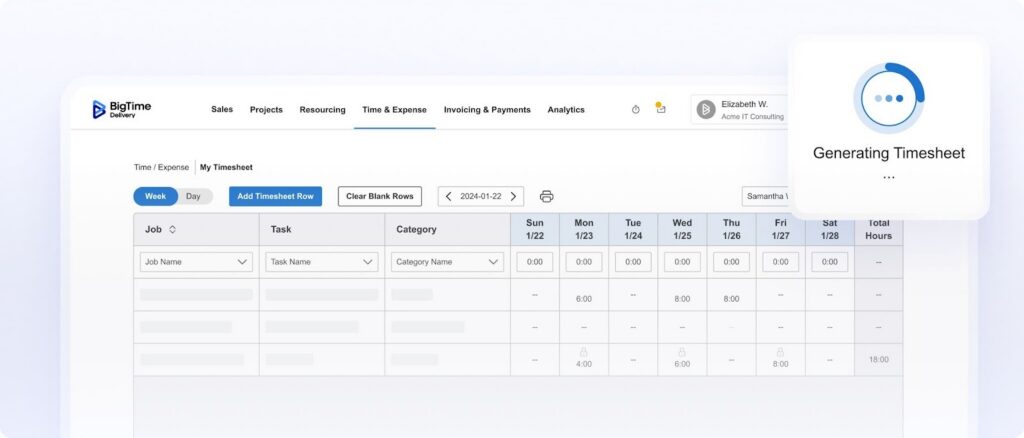
BigTime is designed for firms that cannot afford “close enough” time data. If you bill for project work, manage retainers, or need reliable forecasts, BigTime turns day-to-day, automated time tracking into real operational and financial visibility – all while supporting better work life balance for your employees. That’s the difference between tracking time and running the business side of delivery.
What stands out is how BigTime connects project management and time tracking software capabilities to outcomes leadership cares about: margin control, forecast confidence, and faster, cleaner billing cycles. Instead of treating employee hours as an afterthought, BigTime makes them the backbone of your project decisions.
If you’re comparing project management and time tracking software options, BigTime is the one that keeps delivery, resourcing, and billing aligned as you grow, without forcing your team and project managers back into spreadsheets.
Key Features:
- Project-based time entry with structure. Capture time by client, project, phase, and task, with controls that keep your data clean enough for reporting and billing. Use the calendar view to keep an eye on resource allocation for unlimited projects.
- Budgeting, rates, and margin tracking. Tie hours to bill rates and cost rates so you can see budget burn, margin, and write-offs while work is still in progress. Monitor how team performance really impacts your project status and its finances.
- Approvals and audit trail. Route timesheets and expenses through the right reviewers, lock periods when needed, and keep a clear history for accountability. With BigTime, employee monitoring will be just a formality.
- Invoicing that follows delivery reality. Turn approved time and expenses into invoices with configurable formats, making billing more consistent across project teams. Use online payments to get paid faster.
- Reporting that answers “where are we leaking profit?” Use dashboards and reports to track productivity and spot overruns, low utilization, or mis-scoped work early enough to act.
Pricing: Free trial available. Plans start around $20 per user/month, with higher tiers for more advanced needs. Book a demo or start a trial now.
Jibble
Reviews: G2: 4.8, Capterra: 4.8.
Pros:
- Free for unlimited users. Jibble offers full time and project tracking at no cost, which is rare for teams that need accurate billable hours without a per-seat bill.
- Verified, accurate time capture. GPS, geofencing, and facial recognition keep entries trustworthy, so invoices are based on real hours.
- Reporting and invoicing in one tool. Tracked time, payroll, attendance, and project reports plus built-in invoicing turn hours into client-ready bills without a need for a separate system.
Cons:
- Not a full PSA platform. It captures and bills time well, but lacks deep budgeting, planned-vs-actual, and forecasting.
- Utilization reporting is limited. You won’t get the role-level margin and capacity dashboards services firms rely on.
- Built for attendance first. Its roots are workforce time and attendance, so heavy client-delivery financials aren’t the core focus.
Jibble stands out as the only tool here that delivers full project time tracking and invoicing free for unlimited users. You get verified capture through GPS, geofencing, and facial recognition, so every billable hour is backed by real data rather than guesswork, and approvals plus full change history keep timesheets clean enough to bill from with confidence.
Where it stops short is deeper services economics. If you need utilization targets, margin control, and forecasting, you’ll likely pair Jibble with another system rather than run delivery finance from it.
Key Features:
- Project and activity tracking. Log time against clients, projects, and activities from mobile, web, desktop, kiosk, Chrome extension, Slack, or Teams, with hours synced straight to timesheets.
- Approvals, audit, and reporting. Manager/admin approval locks approved periods with full change history, plus tracked time, payroll, attendance, and project reports exportable to XLS/CSV.
- Invoicing and rates. Assign rates to team members and set project-specific invoice rates, then convert tracked time into branded invoices sent as a PDF or shareable link.
- Integrations. Connect with Slack, MS Teams, QuickBooks, Xero, Deel, and Zapier or set custom workflows via open API.
Pricing: Free for unlimited users; paid plans available.
Harvest
Reviews: G2: 4.3, Capterra: 4.6.
Pros:
- Easy adoption for basic time and project tracking. Harvest is simple to roll out for small teams that just need dependable timesheets without heavy process overhead.
- Clean UI for daily logging. The experience is straightforward, which helps compliance when teams hate time entry.
- Good for lightweight reporting. You can get usable summaries without building a reporting stack.
Cons:
- Limited depth for complex delivery operations. Once you need multi-layer budgeting, utilization targets, resourcing, or detailed employee performance analysis, you can run into ceilings.
- Less robust for end-to-end PSA needs. Teams often add more tools for forecasting, advanced billing workflows, or resource planning.
- Can feel “too simple” for scaling firms. As projects multiply, the lack of deeper controls becomes a real constraint.
Harvest is best when your priority is getting a team to log time consistently with minimal friction. As project management time tracking software, it works well for small-to-mid teams that want clean timesheets, basic project tracking, and simple reporting.
Where it falls short is when time logs need to drive more serious decisions. If you’re trying to manage profitability, forecast delivery capacity, or connect project work to invoicing rules across a growing services org, you’ll likely end up layering additional systems around Harvest.
Key Features:
- Timesheets and timers. Track time through manual entry or timers, which is helpful for teams that log time in different ways.
- Project and client structure. Organize work by client and project, but the structure stays relatively lightweight compared to PSA platforms.
- Basic reporting. Generate summaries on hours and costs, though deeper financial and operational analysis is limited.
- Integrations. Connect with common tools to reduce manual work, but integration depth varies by workflow.
Pricing: Typically per-user subscription with a trial available; costs can add up when you need richer reporting or supporting systems.
Toggl Track
Reviews: G2: 4.6, Capterra: 4.7.
Pros:
- Fast, flexible time capture. Toggl Track is strong for quick timers and simple time entry, which makes it popular for consultants and agencies.
- Good visibility for individual productivity. Personal and team reporting works well when your main goal is understanding where time goes.
- Simple to start. Onboarding is generally low effort.
Cons:
- Not a full project management and time tracking software solution. It’s primarily time tracking, so you’ll need another platform for complex project workflows, resourcing, and financial controls.
- Project controls are limited. Budgeting, approvals, and margin tracking are not as strong as PSA-oriented platforms.
- Can become fragmented at scale. As you add teams and clients, you may end up stitching together multiple tools to cover what Toggl does not.
Toggl Track is a strong choice if your main pain is capturing time consistently and you want a friendly experience that people will actually use. For time tracking software project management scenarios, it pairs best with a separate PM platform rather than replacing one.
If your business needs go beyond “track hours and report on them” and really wants to improve productivity across the board, Toggl Track can start to feel like a component instead of a system. That’s usually the point where services teams move toward platforms that connect time to budgets, billing, and forecasting, as well as other real time data.
Key Features:
- One-click timers. Start and stop timers quickly, which helps teams build a consistent habit of tracking work.
- Projects and tags. Categorize time so reporting is usable, but governance and readability of project timelines depends heavily on internal discipline.
- Reporting dashboards. Solid for visibility into where hours go, though profitability and forecasting use cases require more tooling.
- Integrations. Works with many common apps, but integration does not automatically solve financial workflow gaps.
Pricing: Free plan available, with paid tiers for teams and advanced capabilities.
Clockify
Reviews: G2: 4.5, Capterra: 4.8.
Pros:
- Strong value for budget-focused teams. Clockify is often chosen when cost is a primary constraint and you still need reliable time and project tracking software.
- Broad coverage for time capture basics. Timesheets, timers, and project assignment are solid for day-to-day tracking.
- Pricing transparency. Clear tiering makes it easier to estimate spend compared to quote-heavy platforms.
Cons:
- Reporting and workflow depth can be limited. It covers the fundamentals, but advanced operations like margin management, complex billing rules, and forecasting typically require more.
- Not a full project management platform. You’ll still need a dedicated system if you want richer task planning, resourcing, and portfolio management.
- Can require process policing. Like many simpler trackers, the quality of insights depends on how consistently users tag and categorize time.
Clockify is a practical pick when you need dependable time tracking at a predictable cost. It works well for teams that want time logs, simple project tracking, and basic reporting without committing to a heavier PSA rollout.
For organizations that need project management software with time tracking plus financial visibility, Clockify tends to become one part of a bigger stack rather than the single source of truth.
Key Features:
- Detailed timesheets and timers. Support both manual entry and live timers, which helps mixed teams track time in the way that fits their work.
- Project assignment and categorization. Track by project, client, and task, but controls are lighter than PSA-focused systems.
- Reports and exports. Useful summaries and exports exist, though deeper financial reporting usually needs another system.
- Tiered add-ons by plan. More advanced controls (approvals, invoicing, policy settings) typically sit in higher tiers.
Pricing: Free plan available. Paid plans commonly start around $5.49 per seat/month billed annually (or $6.99 billed monthly) for a standard tier.
Tempo Timesheets
Reviews: G2: 4.4, Capterra: 4.3.
Pros:
- Natural fit for Jira-centric teams. If your delivery lives in Jira, Tempo can make time logging feel like part of the workflow instead of an extra chore.
- Strong worklog reporting for Jira contexts. Teams that need time visibility tied to issues and epics often like the reporting structure.
- Works well for compliance-driven logging. When accurate Jira worklogs are non-negotiable, Tempo is a common choice.
Cons:
- Best when you already live in Atlassian. Outside Jira ecosystems, Tempo is usually not the right answer for project and time tracking.
- Limited as standalone project management and time tracking software. It does time capture well in Jira, but broader project operations, invoicing, and resource forecasting often need additional platforms.
- Complexity can show up in admin work. As configurations grow, so does the effort to keep reporting and permissions clean.
Tempo Timesheets is purpose-built for teams that want time tracking tightly connected to Jira work. If your “project management” is essentially Jira issue management, it can be a strong extension for time entry and reporting.
If you need end-to-end project management time tracking software with budgets, billing, forecasting, and executive reporting, Tempo is rarely enough on its own. It’s a component, not a full operating platform.
Key Features:
- Jira-native time entry. Log time directly against issues so work and time data stay connected.
- Timesheet controls. Support approvals and structured submission processes, but workflows depend on Jira configuration.
- Reporting for worklogs. Helpful for visibility into issue-level effort, though financial reporting is not the core strength.
- Atlassian ecosystem fit. Works best when your broader toolchain is already Atlassian-centered.
Pricing: Typically sold via Atlassian Marketplace with per-user pricing that scales with Jira users and edition.
Kantata
Reviews: G2: 4.2, Capterra: 4.2.
Pros:
- Strong PSA scope. Kantata covers project delivery, resourcing, and financial management in one environment, which appeals to services firms that need structure.
- Resource planning is a real focus. Teams that need utilization and capacity visibility often shortlist Kantata early.
- Enterprise-friendly controls. It has depth that can fit more complex organizations.
Cons:
- Heavier learning curve. Kantata can feel demanding to configure and maintain, especially for smaller teams that just need clear time and project tracking.
- Complexity can slow adoption. When the system is not set up carefully, everyday workflows can feel harder than they should.
- Cost and rollout effort can be significant. This is not a “sign up today, done tomorrow” platform for most firms.
Kantata is positioned for professional services organizations that want deep operational control and are ready to invest in implementation and governance. As project management and time tracking software, it has the range to manage complex delivery environments, not just capture hours.
The tradeoff is usability and speed. If you want rapid adoption and clean, intuitive workflows, Kantata may require more training and ongoing admin work than many teams expect.
Key Features:
- Project financial management. Track budgets, revenue, and delivery performance, though setup quality drives results.
- Resource planning and utilization. Plan allocation and capacity, which helps leadership avoid overcommitment and underutilization.
- Time and expense capture. Tie time to projects for reporting and billing support, but governance needs consistency.
- Reporting and dashboards. Offers depth, but many teams need time to build the views they truly rely on.
Pricing: Generally quote-based, typically aligned to mid-market and enterprise services organizations.
Wrike
Reviews: G2: 4.2, Capterra: 4.4.
Pros:
- Powerful work management for cross-functional teams. Wrike can handle complex workflows, approvals, and structured collaboration.
- Strong configurability. Good for organizations that want custom item types, workflows, and governance.
- Solid for portfolio visibility. Better than many lightweight tools when leadership needs rollups.
Cons:
- Time tracking is not the main event. If your priority is time tracking software project management with tight financial connections, Wrike often needs add-ons or integrations.
- Can feel heavy. Configurability adds admin overhead, and teams can struggle to keep setups clean.
- Costs can grow. Advanced features and enterprise controls often push teams into higher tiers.
Wrike is a robust work management platform that can support complex collaboration across departments. For project management software with time tracking, it can work, but time tracking is not the core reason most teams choose it.
If you need time tracking tightly tied to rates, budgets, utilization, and billing, Wrike typically requires additional systems. That’s the difference between “work management with time tracking” and a true project time tracking software platform built for services economics.
Key Features:
- Custom workflows and request management. Useful for structured intake and execution, especially in marketing and operations teams.
- Task and project hierarchy. Strong organizational structure, but it can become complex without governance.
- Dashboards and reporting. Helpful for status visibility, though financial reporting depth depends on integrations.
- Time tracking add-ons. Available, but often not enough for firms that bill time and manage margins.
Pricing: Tiered per-user plans, with advanced controls often reserved for higher tiers and enterprise agreements.
monday.com
Reviews: G2: 4.7, Capterra: 4.6.
Pros:
- Fast adoption and broad flexibility. monday.com is easy to roll out for teams that want visual project tracking and configurable boards.
- Strong automation and templates. Good for standardizing internal workflows quickly.
- Great for collaboration visibility. Useful for teams that need shared status and clear ownership.
Cons:
- Time tracking can feel bolted on for services firms. It works, but it often lacks the deeper financial structure professional services teams expect.
- Profitability and utilization reporting is not native PSA depth. Teams that need margin control usually end up integrating other systems.
- Can become noisy at scale. With many boards, automations, and teams, governance becomes a real requirement.
monday.com is a strong choice for general work management and cross-team coordination. As project management and time tracking software, it can cover many everyday needs, especially for internal teams that care about progress visibility more than billing precision.
If your main goal is time and project tracking tied to budgets, rates, approvals, and invoicing, monday.com typically needs help from a PSA platform. That’s where solutions like BigTime pull ahead for professional services use cases.
Key Features:
- Visual boards and workflows. Great for planning and tracking work, though structure depends on how you design boards.
- Automations and notifications. Helps reduce manual status chasing, but automation sprawl can become hard to manage.
- Dashboards and reporting. Strong for operational visibility, but not designed for margin-first services reporting.
- Time tracking features. Useful for capturing hours, but financial linkage is lighter than PSA platforms.
Pricing: Per-seat pricing with multiple tiers; costs typically rise with automation, governance, and advanced reporting needs.
ClickUp
Reviews: G2: 4.7, Capterra: 4.6.
Pros:
- Very flexible “all-in-one” structure. ClickUp can combine tasks, docs, goals, and dashboards in one place, which appeals to teams consolidating tools.
- Multiple views for different working styles. Lists, boards, calendars, and timelines help teams track work in the format they prefer.
- Strong value on entry tiers. Many teams start with ClickUp because it packs in features early.
Cons:
- Feature density can overwhelm teams. Without clear workspace standards, ClickUp can turn into a maze of settings and inconsistent structures.
- Performance and complexity issues show up at scale. Heavier workspaces can feel slower and harder to maintain over time.
- Time tracking is rarely enough for serious services financials. For firms that need budgets, rates, approvals, and billing connections, ClickUp often becomes the “work layer,” not the financial layer.
ClickUp is a powerful work hub that can cover a lot of ground for teams that want flexibility. For time tracking software project management use cases, it can be a good fit when you want to connect tasks and time logs, especially for internal work.
For billable services teams, the gap is usually financial control. If you need project time tracking software that supports utilization targets, margin visibility, approvals, and invoicing rigor, ClickUp is often not the final stop.
Key Features:
- Customizable task system. Build workflows that match how your team executes, but strong governance is needed to keep things consistent.
- Dashboards and reporting. Useful for operational status, though financial reporting for services is not the main strength.
- Native time tracking. Works for basic logging, but deeper billing and profitability workflows typically require integrations.
- Docs and collaboration. Helpful for keeping project context close to tasks, but structure depends on workspace discipline.
Pricing: Free tier available with paid plans that increase automation, permissions, and reporting. Expect higher costs as you unlock advanced features.
Which Project Time Tracking Software Is the Best?
If your goal is simply to record hours, plenty of tools can handle basic “time and project tracking.” But when you need project time tracking software that supports real delivery decisions, accurate billing, and margin protection, BigTime stands out as the strongest option in this category. It’s built to operate as true project management time tracking software, where time entries are not isolated data points. They feed approvals, budgets, utilization, reporting, and invoicing in a single, consistent workflow.
BigTime is also the best fit when you want project management and time tracking software that scales with your firm. As projects, clients, and roles grow, the gaps in lightweight tools become expensive: inconsistent time data, manual rework for billing, limited profitability insight, and reporting that cannot answer the questions leadership actually asks. BigTime addresses those realities directly, which is why it’s the best project management software with time tracking for services teams that care about both delivery and financial performance.
If you want to see how BigTime works in practice, you can book a personalized demo and/or start a free trial.
Project Time Tracking Software – FAQ
What is project time tracking software?
Project time tracking software is a system that records how much time people spend on specific projects, tasks, clients, or phases, then turns those entries into usable insight for delivery and financial decisions. Instead of treating time as a standalone timesheet, the best platforms connect time to project budgets, approvals, reporting, and billing.
For teams that deliver client work, it’s also the foundation of accurate “time and project tracking” because it shows where effort is really going, helps prevent budget overruns, and supports clean, defensible invoices.
What features should the best project and employee time tracking software have?
The best project and employee time tracking software should go beyond timers and support reliable delivery decisions. Look for:
- Easy time capture: Timers, manual entry, mobile, and bulk timesheets to keep logging consistent.
- Project-level structure: Time tied to clients, projects, phases, and tasks for accurate reporting.
- Approvals and audit controls: Reviews, locked periods, and edit history to keep data bill-ready.
- Budgets and planned vs. actuals: Real-time visibility into burn and overruns.
- Rates, utilization, and reporting: Role-based billing rules, clear billable/non-billable insights, and dashboards leaders can trust.
That combination is what separates true project management and time tracking software from simple time trackers.
What is the best project time tracking tool?
BigTime is the best project time tracking tool for teams that need more than basic time entry. It stands out because it treats time as a business-critical input, not a standalone metric. With BigTime, time tracking supports approvals, budgets, utilization, and billing workflows in one connected system, which is exactly what most teams need when they’re serious about reliable project delivery and profitability.
If you want a tool that scales beyond “logging hours” into real operational control, BigTime is the strongest choice.
What is the best project time tracking software for professional services firms?
For professional services firms, BigTime is the best project time tracking software because it’s built for how services organizations actually run: scoped work, changing priorities, billable and non-billable tracking, rate complexity, approvals, and invoicing that must stand up to client scrutiny.
Unlike generic project tools where time tracking is often a secondary feature, BigTime’s project management time tracking software approach keeps budgets, resourcing, and billing aligned. That translates directly into better margin visibility, fewer write-offs, and faster billing cycles.
What is the best project time tracking software for medium-sized companies?
For medium-sized companies, BigTime is the best project time tracking software because it balances structure with scalability. As teams grow, the “cheap and simple” approach usually breaks first in reporting consistency, approvals, and billing accuracy. BigTime is designed to handle more projects, more clients, more roles, and more complexity without forcing you into a patchwork of add-ons and spreadsheets.
What is the best free time tracking software for projects?
Free time tracking software can look appealing, but it often comes with real shortcomings: limited controls, weaker reporting, fewer approvals, restricted integrations, and reduced ability to standardize time and project tracking across teams. In many cases, “free” also means trade-offs in security posture, admin governance, and scalability—problems that usually show up right when time data becomes most important for billing, audits, or forecasting.
If you want a dynamic, scalable alternative that’s built for real project delivery and margin protection, BigTime is the better path. It’s designed to grow with your team, keep time data reliable, and connect time tracking to the workflows that actually run the business. You can book a demo or start a free trial here.




