Choosing the best PSA software is essential for firms that live and die by billable hours, project efficiency, and resource utilization. The right PSA tool connects project delivery, time tracking, invoicing, and reporting into one platform, eliminating spreadsheets and guesswork and providing actionable insights. But which systems can really be called “the top PSA tools”?
In this guide, we’ll explore the 10 best PSA software platforms on the market today. Whether you’re running an agency, IT consultancy, or architecture firm, you’ll find the best PSA software to match your team’s workflow and financial model.
What Is PSA Software?
Professional Services Automation (PSA) software is a business management platform that helps service-based companies organize and control every part of their client work — from project planning to time tracking, billing, and monitoring project performance throughout the project lifecycle. Instead of juggling multiple apps or spreadsheets, a PSA system pulls everything together in one place, giving teams full visibility into performance, capacity, and profit – often by integrating with other existing systems in professional services companies.
In simple terms, PSA software acts as the nerve center of professional services operations. It connects your people, projects, and financials so you always know where work stands, how much time has been spent, and whether it’s generating the margin you expect.
Benefits of the Best PSA Software
The best PSA software brings every part of your service operation — projects, time, billing, and reporting — into one connected system. Instead of switching between tools, teams can plan, deliver, and bill in the same place while leaders track performance in real time.
Still, this is just a tip of the iceberg; other benefits of PSA software might include:
- End-to-end visibility: With the best PSA tools, project managers can track every project’s progress, costs, and profitability in one dashboard, controlling financial metrics of every operation from start to finish.
- Improved resource planning. With the right PSA software, errors in project plans are a thing of the past. In these tools, managers can manage resources with minimum issues and improve their plans while the project is already under way.
- Accurate time and expense tracking: Capture billable hours and expenses automatically to prevent revenue loss and monitor overall financial health and all the financial resources live.
- Automated billing and invoicing: Some PSA tools also include project accounting and billing. Use them to turn approved timesheets and project milestones into accurate invoices.
- Improved utilization: See how efficiently your team’s time is used and identify gaps to boost billable hours and improve financial health of your project and the whole company.
- Data-driven insights: The best PSA systems provide a holistic view of key data that’s easy to access even for new users. Use that real-time analytics to forecast revenue and plan capacity with confidence.
- Better collaboration: Keep delivery, finance, and leadership aligned through a single source of truth. Streamline processes to make decisions faster and keep everyone on the same page.
In short, PSA software replaces fragmented systems with a streamlined platform that helps professional services firms grow profitably and work smarter.
Key Features to Look for in the Best PSA Software
With so many PSA tools on the market, it’s essential to focus on the core capabilities that drive efficiency, improve visibility, and support scalable growth for professional services organizations. Here’s what to look for:
Integrated Project Management
A core differentiator of professional services automation software is how tightly it supports end-to-end project management — from kickoff to final invoice. Look for flexible project templates, project dependencies, milestones, and clear ownership so your project teams can manage multiple projects without losing track of scope or timelines. The best systems also make it easy to surface project status at a glance, keeping delivery teams aligned while reducing the “where are we at?” churn that slows project delivery.
Time Tracking and Billable Hours Capture
Accurate time tracking is non-negotiable for services companies that run on utilization and profitability. Strong PSA software makes it easy for consultants to log time daily (not “at the end of the month”), tie entries to the right client/project/task, and flag non-billable work without burying it. The goal is simple: protect billable hours, reduce revenue leakage, and keep finance from chasing down missing timesheets. Bonus points if the tool supports approvals, reminders, and quick edits without breaking reporting.
Expense Tracking and Expense Management
If time is your biggest input, expenses are the fastest way to blow up a budget. Great expense tracking features let teams capture costs in real time and route everything through approvals before it hits billing. For professional services teams, built-in expense management reduces back-and-forth, keeps project budgets honest, and helps you defend invoices when questions come up.
Resource Management and Resource Planning
Resource management is where many professional services firms feel the pain first: overbooked high performers, underused specialists, and last-minute staffing scrambles. A solid professional services automation solution supports skills-based resource scheduling, capacity planning, and visibility into upcoming demand — so you can make smarter assignments before delivery gets squeezed. Look for tools that help with resource planning and utilization trends, not just a basic calendar view.
Automated Billing, Project Accounting, and Revenue Controls
PSA is more than “track work.” It should help you turn delivery into cash with fewer steps and fewer errors. Strong platforms connect approved time and expenses to billing rules, automate invoice creation, and support retainers, fixed-fee work, and milestone billing. If you need deeper controls, prioritize project accounting or some project accounting capabilities like WIP tracking, write-ups/write-downs, and clear audit trails — all of which make it easier to understand project profitability and keep revenue management predictable.
Financial Management and Overall Financial Health Visibility
The best PSA software doesn’t stop at invoicing — it supports financial management across the project lifecycle. That means real-time views into budget vs. actuals, margin trends, and forecasting that connects delivery plans to financial outcomes. When your PSA ties utilization, costs, and revenue together, professional services leaders can spot risks earlier and protect overall financial health without waiting for month-end.
Reporting, Business Intelligence, and Real Time Visibility
If your reporting lives in spreadsheets, you’re already behind. Look for reporting tools that deliver real time visibility into project performance metrics, utilization, pipeline-to-capacity, and financial data — with dashboards that are easy to filter by client, team, business units, or service line. Built-in business intelligence shouldn’t just “look nice”; it should answer practical questions fast: Which projects are slipping? Where are margins shrinking? Who has capacity next month?
Integrations With CRM Systems, ERP Systems, and Existing Tools
Most services organizations already have a tech stack — and PSA should fit into it cleanly. Prioritize integrations with crm systems, accounting tools, and (when needed) enterprise resource planning / erp systems so you’re not re-entering data across platforms. The right integration strategy keeps data consistent, reduces admin work, and helps your PSA system support real business operations instead of becoming “yet another tool” that teams avoid.
Top PSA Software Solutions for 2026
To help you find the right fit for your business, we’ve evaluated the top PSA platforms of 2026, highlighting their standout features, ideal use cases, and what sets each solution apart.
Below you’ll find a side-by-side comparison of the top 10 PSA software platforms on the market. Each tool has its own strengths — from deep forecasting to client billing — but they all aim to help service-based organizations plan, deliver, and scale more effectively while earning you some money with wide array of improvements in both delivery and finance teams.
PSA Software – Comparison (20+ PSA Tools Side by Side)
Even the best professional services automation software can feel “right” in a demo and still fall short once professional services teams are running real project delivery, time tracking, expense management, and project accounting across multiple projects. This comparison table is designed to help professional services organizations quickly spot which PSA software solutions are purpose-built for services delivery (and which are closer to project management platforms that need heavy customization).
| Tool | Description | Strengths | Limitations |
|---|---|---|---|
| BigTime | PSA system built for professional services firms that need project accounting, time tracking, and billing in a unified platform. | Excellent project accounting capabilities, strong resource management, clear project profitability and profitability analysis, reliable real time visibility into project performance and billable hours. | Not designed as an IT service desk for MSP ticketing workflows. |
| Kantata | Feature-heavy professional services automation solution that often requires careful configuration and disciplined adoption to deliver consistent outcomes. | Solid resource planning, utilization views, and delivery oversight for project teams. | Can feel complex to administer; reporting often needs careful setup. |
| Certinia PS Cloud (FinancialForce) | Enterprise PSA that can be powerful but tends to be implementation-heavy, with benefits showing up only after significant process work. | Deep financial workflows and enterprise resource planning alignment. | Heavier implementation; can be costly and less flexible for mid-market services companies. |
| NetSuite OpenAir | Finance-led PSA software that fits best when the organization is already committed to the NetSuite ecosystem and its operating model. | Strong for finance-led PS orgs needing revenue management and reporting discipline. | UI and configurability can be challenging; resource allocation scenarios may take effort. |
| Deltek Ajera | Industry-specific PSA solution that shines in its niche, but can feel dated and restrictive outside that target market. | Robust project accounting and budgeting, dependable financial health reporting. | Less ideal for non-A&E delivery models; modern collaboration features can be limited. |
| Deltek Vantagepoint | A&E-oriented platform that combines CRM and delivery, but often demands more admin effort than teams expect. | Strong pipeline-to-project handoff and reporting tools. | Configuration complexity; may feel heavyweight for smaller professional services organizations. |
| Accelo | Workflow-forward PSA platform that works best for standardized service motions, but can feel limited for finance-first professional services automation. | Strong automation for service work intake, scheduling, and billing. | Advanced project accounting and enterprise analytics can be limited vs top PSA systems. |
| Scoro | All-in-one business management tool that tries to cover everything, but may not go deep enough where PSA buyers care most. | Good mix of project management, budgeting, and customer collaboration. | Not as deep in project accounting; enterprise reporting and ERP-style controls can lag. |
| Productive | Agency-friendly PSA system with strong budgeting, but less credible for complex professional services financial management requirements. | Strong project budgeting, utilization tracking, and project status visibility. | ERP-grade financial reporting and complex revenue recognition are limited. |
| Teamwork | Client-work platform that can approximate PSA for some teams, but often tops out once you need true project accounting capabilities. | Great for project teams and client collaboration; easy adoption. | PSA depth varies; project accounting and revenue leakage controls are lighter. |
| Wrike | Work management platform that can be stretched into PSA use cases, but the “PSA” part usually relies on integrations and workarounds. | Strong cross-team project management and delivery execution. | Not native PSA; resource planning and financial data workflows require add-ons. |
| Adobe Workfront | Enterprise work management suite that supports scale, but PSA outcomes typically depend on customization and ongoing governance. | Strong governance, intake, and scale for business units. | PSA use cases demand customization; project accounting and billing aren’t core. |
| Ravetree | Services-oriented work platform that can help with execution, but doesn’t always satisfy finance and operations leaders long-term. | Solid collaboration, tasking, and visibility across multiple projects. | Deeper financial management and enterprise reporting tools can be limited. |
| PSOhub | Specialized PSA system that fits recurring delivery patterns, but can feel narrow when teams want broader ecosystem depth. | Useful for standardized engagements and services delivery cadence. | May lack breadth of integrations and enterprise-grade BI compared with top PSA tools. |
| VOGSY | Lightweight PSA solution that appeals for simplicity, but may struggle as professional services organizations scale complexity. | Lightweight unified platform feel, decent planning + billing basics. | Not ideal for complex resource utilization modeling or advanced project accounting. |
| Replicon Polaris PSA | Time intelligence-first PSA that can be strong for governance, but may require additional tools to cover full professional services automation. | Strong time tracking, policy controls, and reporting. | Broader PSA workflows can feel modular; financial workflows may require integrations. |
| Monday.com (with PSA templates) | Template-driven approach to PSA that looks flexible early on, but can become brittle once processes and reporting mature. | Fast setup, flexible workflows for delivery teams. | Not true professional services automation; financial management and resource planning require heavy configuration. |
| Smartsheet (with PSA approach) | Operational visibility tool that can be adapted for services work, but is rarely sufficient as a standalone PSA system. | Great for operational visibility and lightweight project planning. | PSA systems features like billing, revenue management, and project accounting are not native. |
| ClickUp (with PSA workflows) | Versatile work platform that can support delivery execution, but PSA outcomes often depend on disciplined process and add-ons. | Flexible tasking, docs, and dashboards for project delivery. | PSA depth varies; resource management and expense tracking need add-ons/process discipline. |
| Autotask PSA (Datto/Kaseya) | MSP-centric PSA that excels in ticketing-led environments, but can feel misaligned for classic project-based professional services. | Strong service desk alignment and operational “single pane” approach. | Less suited to consulting-style project accounting; finance-first PS orgs may outgrow it. |
| ConnectWise PSA | Mature MSP PSA with a large ecosystem, but complexity and governance needs can be a burden for smaller services organizations. | Deep MSP operations support; established ecosystem. | Security/patch cadence matters; non-MSP professional services automation needs can be awkward. |
| HaloPSA | Modern MSP-oriented PSA tool that’s strong for service desk automation, but less convincing for end-to-end professional services financial workflows. | Modern UI feel, lots of integrations, service delivery operations focus. | Not optimized for classic professional services project accounting and revenue workflows. |
BigTime
Reviews: G2: 4.5/5 (1,579 reviews), Capterra: 4.6/5 (658 reviews).
Pros:
- Purpose-built for professional services automation: BigTime is designed for professional services organizations that need a true PSA system, not a stitched-together project management stack. It brings time tracking, expense tracking, and billing tools into one flow, so teams spend less time reconciling tools and more time executing project delivery.
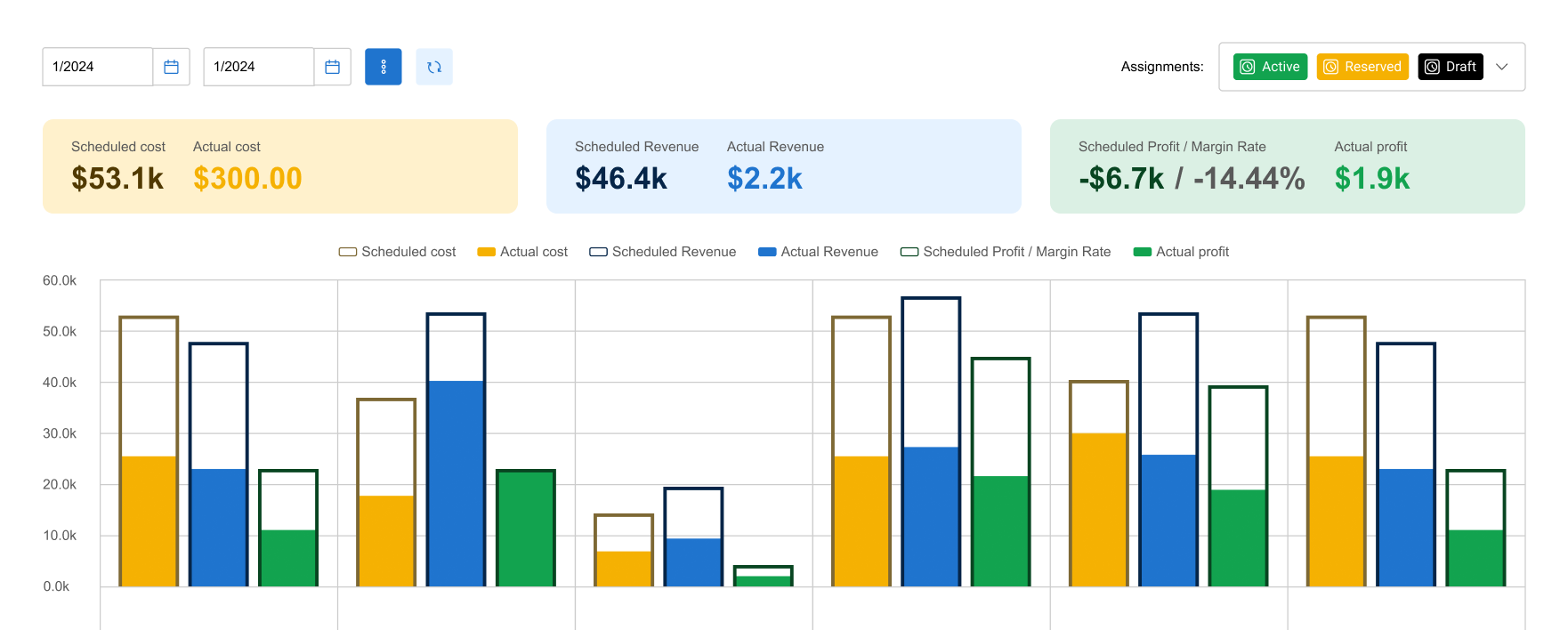
- Strong project accounting and margin control: If your profitability depends on clean billable hours capture, rate management, and reliable project accounting, BigTime stands out. It supports project budgeting and project profitability tracking in a way that helps professional services leaders reduce revenue leakage and protect overall financial health.
- Resource management that connects to delivery and finance: BigTime’s resource planning is not just a scheduling layer. It’s built to support resource utilization decisions with real time visibility, so services organizations can staff work confidently and see the downstream impact on delivery and financial management.
- Operational clarity for managers and delivery teams: BigTime’s reporting and dashboards are geared toward project performance, project status, and business management needs, helping professional services teams spot risks early and course-correct before delivery slips.
Cons:
- Not an MSP service desk: For managed service providers that live in ticketing workflows, BigTime won’t replace an ITSM-style PSA tool built around service desk operations.
- Resource planning depth depends on edition: Firms that want more advanced resource allocation scenarios should validate which package includes the right level of forecasting and resourcing capability, since PSA solutions often vary by tier.
- Mobile experience can lag behind desktop for some users: Some reviewers note a weaker mobile experience versus the desktop interface, which matters if your team logs time and expenses on the go.
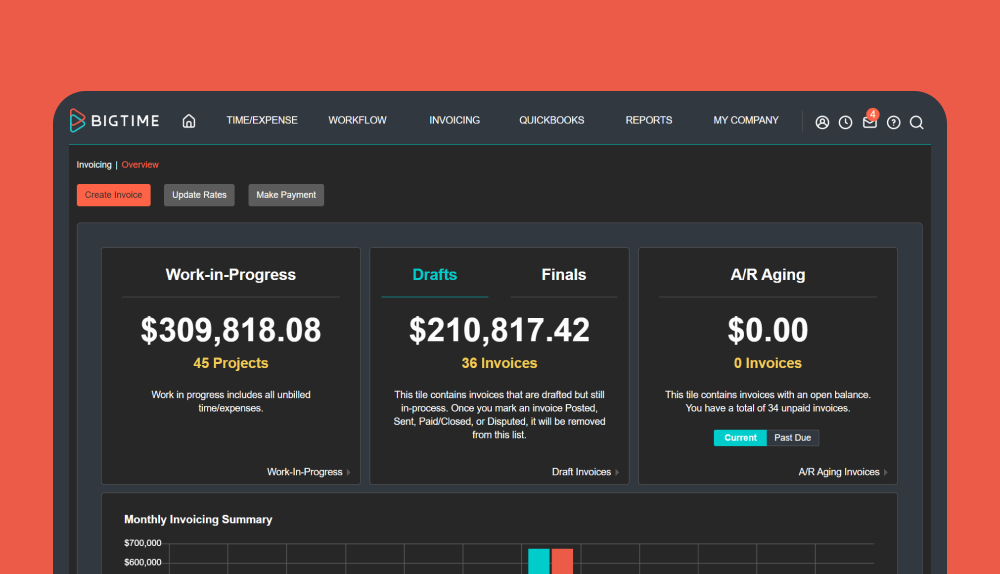
BigTime is a professional services automation solution that’s at its best when a firm wants a single, finance-connected platform to run delivery. Instead of forcing professional services firms to manage scattered spreadsheets and disconnected systems, BigTime centralizes the project lifecycle from project planning through time tracking, expense management, invoicing, and reporting. That alignment is what makes it so effective for services companies that need better financial health, better forecasting, and fewer surprises at month-end.
Where BigTime really earns its place among the best PSA software options is how it links execution and outcomes. Professional services teams can run project management day-to-day, while leadership gets real time visibility into business performance indicators like utilization, budget burn, and margin trends. When the PSA system can show what’s happening now (not two weeks later), professional services leaders can make faster, more strategic decision making calls around staffing, pricing, and delivery risk. In practice, that’s what turns “tracking” into control, and turns “reporting tools” into actionable insights.
Key Features:
- Time tracking: Fast, structured time entry that supports accurate billing and reduces missed billable hours, especially when teams work across multiple projects.
- Expense tracking and expense management: Captures expenses with approval-ready structure so delivery teams and finance teams don’t waste cycles on cleanup and rework.
- Project accounting capabilities: Connects project work to financial data, supporting project accounting, profitability analysis, and more reliable revenue management decisions.
- Resource management and resource planning: Helps managers plan capacity, improve resource utilization, and staff projects with better context on demand and availability.
- Reporting tools and business intelligence: Dashboards and reports that help leaders gain real time visibility into project performance, budgets, and billability trends.
- Integrations and alignment with existing systems: Designed to fit into professional services technology stacks, connecting PSA workflows with accounting/finance processes so teams aren’t duplicating work.
Pricing: BigTime offers tiered pricing (with packages commonly positioned around Essentials, Advanced, and Premier) and you can request a tailored quote via the pricing page. Free personalized demo available.
Kantata
Reviews: G2: 4.2/5 (1,502 reviews), Capterra: 4.2/5 (621 reviews).
Pros:
- Broad PSA coverage for established PS orgs: Kantata can handle core professional services automation across project management, resource planning, time tracking, and financial oversight when it’s configured well.
- Strong reporting potential (with effort): When teams invest in setup and governance, the platform can surface useful visibility into utilization, margins, and delivery performance across services organizations.
- Good fit for process-driven environments: If professional services leaders want standardization and consistent delivery controls, Kantata can support that operating style.
Cons:
- Complexity is the tax you pay: Reviews frequently reflect that the platform can be time-intensive to master, with multiple ways to do the same task and too many clicks for everyday workflows.
- Mobile and time-entry friction: Some users call out weak mobile usability and clunky time tracking (including difficulty updating entries), which matters when delivery teams live in timesheets.
- Pricing isn’t transparent: Kantata typically pushes you to request pricing rather than offering clear tiers publicly, which makes early-stage comparison shopping harder.
Kantata is a professional services automation solution that can look like a “do-it-all” PSA platform, but the day-to-day experience is often more demanding than teams expect. It’s capable across the project lifecycle and can connect project delivery with financial management and resource management, yet the platform’s breadth tends to introduce friction: more configuration, more training, and more ongoing admin than many professional services organizations want to carry.
Where Kantata performs best is in organizations that already run tight processes and can dedicate time to building templates, reports, and governance. If your services company needs something that’s immediately intuitive for time tracking, expense management, and rapid project planning, the learning curve (and workflow complexity) can slow adoption and reduce the “gain real time visibility” promise that a modern psa system should deliver, forcing professional services firms to look for Kantata alternatives.
Key Features:
- Project delivery tracking: Supports milestones, tasks, and structured delivery management, but often requires careful template design to avoid inconsistent execution.
- Resource planning and utilization: Helps plan capacity and monitor resource utilization, though the best outcomes depend on disciplined data hygiene and consistent use.
- Time tracking and expenses: Covers time and expense tracking against budgets, but user feedback highlights friction in time-entry workflows for some teams.
- Reporting tools: Can produce useful dashboards for project performance and financial health, but teams should expect setup time to get actionable insights.
Pricing: Typically “request a quote” / tailored pricing based on company size and needs (no simple public price list).
Certinia PS Cloud (FinancialForce)
Reviews: G2: 4.1/5, Capterra: 4.5/5.
Pros:
- Salesforce-native foundation: Works best for professional services organizations already standardized on Salesforce and looking for a professional services automation solution that lives in the same environment.
- Broad coverage across services delivery: Can connect resource planning, project delivery, and financial management in one ecosystem when implemented well.
Cons:
- Implementation and learning curve are real: User feedback frequently points to complexity and the time it takes to get comfortable, especially for teams without strong project accounting or Salesforce admin support.
- Less “pick-and-choose” flexibility: Reviews also highlight frustration with packaging and how hard it can be to adopt only the modules you want versus going “all in.”
- Pricing transparency is limited: Expect a sales-led motion (demo/quote) rather than clear public tiers, which can slow comparison shopping across PSA tools.
Certinia PS Cloud positions itself as enterprise-grade professional services automation software built on Salesforce, and that heritage shows. It can deliver a unified platform feel across project lifecycle execution, resource management, and finance-aligned reporting, but the tradeoff is that the system often demands serious upfront design. For professional services teams that need quick wins in time tracking, expense tracking, and project status visibility, the amount of configuration and process work can delay value.
In practice, Certinia is a stronger fit for services organizations that already have Salesforce expertise, mature business processes, and the appetite for a heavier rollout. If your priority is a faster, more straightforward PSA system for day-to-day project delivery plus project accounting capabilities, you may find it more complex than necessary, even if the long-term ceiling is high.
Key Features:
- Salesforce-native PSA workflows: Keeps delivery and customer data closer together, but customization can become a project of its own.
- Resource planning and forecasting: Supports capacity planning and allocation decisions, though results depend heavily on clean data and consistent adoption.
- Project and financial visibility: Aims to connect project performance with financial health reporting, but setup and reporting design effort is typically required.
Pricing: Quote-based (request a demo / pricing discussion).
Deltek Ajera
Reviews: G2: 4.1/5, Capterra: 3.6/5.
Pros:
- Strong for project-based accounting in its niche: Ajera is widely used in A&E-style professional services firms where project accounting and invoicing discipline matter.
- Helpful “single system” effect for some teams: When firms are coming from spreadsheets, Ajera can improve basic project visibility and billing workflows.
Cons:
- Lower satisfaction on ease of use: Capterra reviewers rate ease of use modestly (and overall sentiment is mixed), which can slow adoption across delivery teams.
- Feels dated and difficult to correct mistakes: Feedback commonly points to an interface that can feel outdated and time-consuming to fix issues once they’re in the system.
- Not ideal beyond its core audience: Multiple reviews suggest it’s not a great fit for broader project management or business development needs in small-to-mid firms, even if accounting is solid.
Deltek Ajera is best viewed as a project-based accounting and operations system that can support some PSA needs, rather than a modern, flexible professional services automation software built for every services model. In the right environment, it can help professional services organizations keep time tracking, billing, and project accounting aligned. In the wrong environment, the experience tends to feel rigid, especially when teams want smoother collaboration, or more intuitive navigation.
If your priority is advanced resource planning, fluid resource allocation, or a highly configurable PSA platform for varied services delivery motions, Ajera can be limiting. It’s more credible when the goal is stable financial management and repeatable accounting controls for a specific industry pattern, not when you need a PSA system that adapts quickly to changing project lifecycle needs.
Key Features:
- Project accounting: Strong project-cost and billing workflows for project-based services, but less flexible for teams that want highly customizable financial views.
- Time tracking: Covers time entry for billing, though usability feedback suggests it may not feel “lightweight” for everyday users.
- Reporting tools: Offers reporting and executive dashboards, but many teams still need training and structure to get consistent, actionable insights.
Pricing: Deltek does not list public pricing; it’s generally quote-based (implementation and services can materially affect total cost).
Deltek Vantagepoint
Reviews: G2: 4.1/5 (609 reviews), Capterra: 3.6/5 (17 reviews).
Pros:
- Solid for A&E-style project-based operations: Vantagepoint is strongest when professional services firms run a project-based ERP model and want delivery + finance in one system.
- Broad module coverage: It can support project accounting, basic resource management, and reporting tools in a single environment, which can help standardize business operations across business units.
Cons:
- Not a quick-to-value PSA platform: Many teams underestimate the setup effort, training, and governance needed before you get dependable real time visibility and consistent project performance reporting.
- Mixed ease-of-use feedback: Capterra’s lower overall score signals adoption friction, especially for everyday users entering time tracking or navigating project status workflows.
- Pricing is not transparent: Cost is typically quote-based and varies with users, modules, and implementation, which makes “cost effective” comparisons harder early on.
Deltek Vantagepoint is a project-based ERP system that can cover PSA needs, but it often behaves more like an enterprise back office platform than a modern, streamlined PSA software experience. For professional services organizations that need strong project accounting and financial management controls, it can be a fit. For teams prioritizing fast project delivery execution, lightweight project management, and easy adoption across delivery teams, it can feel heavy and admin-dependent.
If your services organization needs a professional services automation solution that supports complex workflows across finance, crm systems, and reporting, Vantagepoint can get there, but usually only with real investment. In practice, that means you should treat it as a longer implementation with ongoing ownership, not a plug-and-play PSA system.
Key Features:
- Project accounting: Strong costing and accounting controls for project-based professional services, though flexibility can depend on configuration.
- Time & expense tracking: Supports time tracking and expense tracking, but day-to-day usability is a frequent pain point for some teams.
- Resource management: Includes resource allocation & planning and utilization reporting, but requires disciplined data and process to stay accurate.
Pricing: Quote-based; pricing varies by user count, modules, deployment, and implementation services.
NetSuite OpenAir (SuiteProjects Pro)
Reviews: G2: 3.7/5, Capterra: 3.9/5.
Pros:
- Strong NetSuite alignment for finance-led shops: If your professional services organization already runs NetSuite, OpenAir (SuiteProjects Pro) can keep financial management, billing, and project accounting closer to core financial data instead of living in spreadsheets.
- Solid PSA coverage on paper: It supports time tracking, expense tracking, project accounting, and resource management, which checks many “professional services automation” boxes for services organizations that want a single vendor story.
Cons:
- Usability and daily workflow friction: Reviews frequently point to a tedious experience for timekeeping and project tracking, and some users complain reporting is lacking enough that they still maintain parallel tools.
- Reporting can disappoint without extra effort: While the product promises real time visibility, many teams end up investing heavily in report design and workarounds before dashboards become truly actionable.
- PSA depth varies by what you compare it to: As a PSA system, it can feel more like a finance-first platform than a modern, delivery-first professional services automation solution, especially for fast-moving project teams.
NetSuite OpenAir (marketed as SuiteProjects Pro) is a recognizable name in PSA software, particularly for services companies that want PSA tied to broader erp systems and financial controls. In practice, it’s a better fit when the primary driver is standardization and accounting alignment, not when you need a lightweight, high-adoption experience for professional services teams working across multiple projects.
If your priority is end-to-end lifecycle management with strong project delivery execution, smooth time tracking, and fast reporting that supports strategic decision making out of the box, OpenAir can feel slower and more rigid than modern best psa software options. Many professional services leaders end up weighing the benefit of NetSuite ecosystem consistency against the day-to-day usability cost for delivery teams.
Key Features:
- Time tracking: Covers timesheets and approvals, but user feedback suggests time-entry can feel cumbersome for daily use.
- Expense management: Supports expense tracking tied to projects, though teams often need process discipline to keep submissions clean.
- Project accounting: Includes project accounting capabilities and billing/invoicing, especially valuable when tied back to NetSuite financials.
- Resource management: Provides resource tracking and planning, but adoption and data accuracy can limit how well it supports resource utilization decisions.
Pricing: Typically quote-based / sales-led (NetSuite-style packaging), so total cost depends on modules, users, and implementation scope.
Autotask PSA (Datto/Kaseya)
Reviews: G2: 4.3/5 (520 reviews), Capterra: 4.3/5 (155 reviews).
Pros:
- Strong MSP operations coverage: Autotask PSA is built for managed service providers, with ticketing, contracts, and billing workflows that can help standardize service delivery at scale.
- Broad integration story: The platform emphasizes a large integration ecosystem, which can reduce manual handoffs if your stack is already MSP-oriented.
Cons:
- Complexity and “too much tool” risk: Many teams report a steep learning curve and day-to-day friction, which can slow adoption across delivery teams and make process consistency harder.
- Performance hiccups show up in real usage: Reviews call out occasional performance issues, which is frustrating when PSA systems are supposed to provide real time visibility into project status and operations.
- Not a great fit for classic professional services firms: If you’re a consulting firm or project-based services organization that prioritizes project accounting capabilities, project profitability, and resource planning over service desk workflows, Autotask PSA can feel misaligned.
Autotask PSA positions itself as a unified PSA platform for MSP operations, and it generally delivers best when your business model is ticket-heavy and contract-driven. It can bring structure to time tracking, billing automation, and service desk execution, and it’s clearly aimed at improving business operations and financial health for MSP-style services organizations.
The challenge is that Autotask PSA often asks for a lot in return: more configuration, more training, and more ongoing administration than many teams expect. For professional services organizations that want a straightforward professional services automation solution (project delivery first, project accounting tight, resource planning easy), Autotask PSA can feel like the right tool for a different category of services company.
Key Features:
- Service Desk & ticket management: Strong ticket workflows and routing, but the experience can become click-heavy as processes and queues expand.
- Billing & invoicing automation: Helps standardize billing tied to contracts and time, though many teams still need careful configuration to avoid edge-case errors.
- Dashboards and reporting: Offers dashboards for operational visibility, but some users find reporting customization and consistency uneven.
- Integrations: A broad integration list can reduce duplicate work, but integration quality can vary depending on the connected system.
Pricing: Sales-led / “contact for pricing” in most channels (no clear public tiers).
ConnectWise PSA
Reviews: G2: 4.1/5, Capterra: 4.1/5 (273 reviews).
Pros:
- Strong MSP-first workflow coverage: ConnectWise PSA is built around ticketing, agreements, and operational controls, which can work well for technology services organizations that run a service desk-heavy model.
- Integrations can be a real advantage (when set up correctly): Many users value the ecosystem and connections to other tools, especially when integrations are configured carefully.
Cons:
- Complexity slows adoption: Reviews consistently reflect a noticeable learning curve and “too many steps” for simple actions, which can drag down daily execution for delivery teams.
- Projects + reporting are common pain points: Even satisfied users often flag gaps or frustration in project handling and reporting, which is a problem if you need dependable real time visibility and actionable insights.
- Quote-based pricing and packaging opacity: Pricing is customized and sales-led, making it harder to benchmark “cost effective” value across PSA tools without going through the vendor process.
ConnectWise PSA is frequently treated as a “standard” in the MSP space, but it’s not automatically a top choice for classic professional services organizations that prioritize project accounting, project profitability, and resource planning over service desk operations. It can centralize ticketing, time tracking, and billing in one place, yet many teams still describe the platform as demanding: more setup, more training, and more governance than expected before the system produces consistent business performance outcomes.
If your primary goal is professional services automation software for project-centric consulting firms, you may find ConnectWise PSA strongest on operational MSP workflows but less satisfying on end-to-end project lifecycle management and modern reporting. In other words, it can be a solid business management engine for MSP-style services delivery, but a harder sell as a clean, delivery-first PSA system for professional services teams.
Key Features:
- Service desk + ticketing: Mature ticket workflows and SLA structures, but can become complicated to maintain as rules and boards expand.
- Time tracking + billing: Tracks time entries and ties them to billing, though users report friction in everyday workflows.
- Integrations and connectors: Strong ecosystem potential, but integration depth varies by endpoint and connector maturity.
Pricing: Customized / request-a-quote pricing (no fixed public tiers).
HaloPSA
Reviews: G2: 4.8/5 (36 reviews), Capterra: 4.9/5 (35 reviews).
Pros:
- Strong for MSP-style service operations: HaloPSA is built around service desk execution, with ticketing, contracts, and billing workflows that can work well for service-led delivery teams.
- All-in-one packaging appeal: Halo positions its model as “everything included,” which can simplify procurement compared to PSA tools that lock key features behind tiers.
Cons:
- PSA fit can be narrow for classic professional services: If you’re a consulting firm or project-centric professional services organization prioritizing project accounting, project profitability, and deep financial management, HaloPSA can feel more ITSM-first than PSA-first.
- Reporting and analytics aren’t always plug-and-play: Even with real time visibility claims, teams often need time to make dashboards and reporting tools genuinely useful for strategic decision making.
- Pricing clarity varies by channel: Public pages emphasize one-price simplicity, but marketplaces often list starting prices, so buyers still need to validate total cost and contract details.
HaloPSA is best understood as a PSA platform optimized for managed service providers and IT service delivery, with project management and time tracking layered into a service desk-centric operating model. For services organizations that live in tickets, contracts, and operational workflows, it can centralize work and reduce tool sprawl.
For professional services firms that are finance-led and project-accounting heavy, HaloPSA can be a tougher match. It may cover the project lifecycle basics, but if your biggest wins come from tighter project accounting capabilities, margin control, and clean revenue management, you’ll want to verify that HaloPSA supports those outcomes without forcing workarounds.
Key Features:
- Service desk & ticketing: Core strength for services delivery operations, but it can steer the platform toward ITSM-style workflows rather than pure PSA.
- Project management: Supports project planning and tracking, but teams should validate how well it fits non-ticket, milestone-driven professional services delivery.
- Time tracking & billing: Includes project time tracking and billing/invoicing automation, though success depends on process discipline and configuration.
Pricing: Commonly sold via vendor quote/contract; Capterra lists a starting price of $119 per user/month, and Halo also markets a single-plan “everything included” approach.
Accelo
Reviews: G2: 4.4/5 (555 reviews), Capterra: 4.5/5 (174 reviews).
Pros:
- Good “quote-to-cash” concept for services work: Accelo markets an end-to-end flow from prospect to payment, which can help services organizations reduce tool sprawl when it’s set up correctly.
- Automation and templates can standardize delivery: Teams that invest in building templates can create more consistent project delivery and internal handoffs.
Cons:
- Learning curve and missing-feature feedback: G2’s pros/cons signals include “learning curve,” “missing features,” and “limited customization,” which is a real concern if you’re trying to run mature PSA processes without constant workarounds.
- Not always deep enough for finance-heavy PSA needs: If your professional services automation solution depends on strong project accounting capabilities, complex revenue management, and high-control financial reporting, Accelo can feel more operations-focused than finance-rigorous.
- Pricing transparency is limited: Accelo pushes buyers toward a “how to buy”/sales path, which makes early comparisons across PSA tools harder.
Accelo is a unified PSA platform positioned for professional services teams that want project management, time tracking, client communication, and billing in one place. The upside is clear: fewer disconnected workflows and a more consistent project lifecycle from kickoff through invoicing.
The tradeoff is that Accelo’s day-to-day success is heavily dependent on configuration discipline and user adoption. If your services company needs a PSA system that’s immediately intuitive for delivery teams and equally strong for financial management (project accounting, margin protection, and reliable reporting tools), you’ll want to pressure-test the platform against those requirements before committing.
Key Features:
- Project management: Templates and budget tracking can support project delivery, but consistency depends on how tightly you standardize workflows.
- Resource management: Scheduling and forecasting are available, though outcomes hinge on clean data and steady use across delivery teams.
- Time tracking + billing: Supports time tracking tied to invoicing, but teams should validate how smooth time entry feels for everyday users.
Pricing: Quote-based via Accelo’s “How to buy” flow; third-party pricing summaries commonly list tiers starting around $50/user/month (with higher tiers above that), but you should confirm packaging directly with the vendor.
Scoro
Reviews: G2: 4.6/5, Capterra: 4.5/5 (260 reviews).
Pros:
- Broad “all-in-one” coverage: Scoro combines project management, time tracking, quoting, invoicing, and reporting in a single system, which can appeal to services organizations trying to reduce tool sprawl.
- Decent financial visibility for agencies: For some professional services teams (especially agencies), it can support budgeting and margin tracking without needing a full ERP stack.
Cons:
- Not a pure PSA product for complex delivery models: Scoro is often positioned as an end-to-end work platform, but professional services organizations that need deep project accounting capabilities, advanced resource planning, and enterprise-grade financial management may find it stops short.
- Can feel “complex” fast: Reviews commonly describe Scoro as powerful but complex, which usually means longer onboarding, more admin overhead, and slower adoption for delivery teams.
- Tiering limits advanced planning: Key forecasting and planning capabilities show up in higher plans, so the platform can become expensive once you need stronger resource management and profitability controls.
Scoro is best for services companies that want a single workspace to run quoting, projects, time, and invoicing, and that are willing to accept tradeoffs in depth to get an all-in-one experience. It can improve project delivery consistency and provide better real time visibility than spreadsheets, but it’s not always the strongest fit when professional services leaders need PSA rigor across project accounting, revenue management, and resource utilization at scale.
Key Features:
- Projects + task management: Strong execution layer for project teams, but it can require process discipline to keep data clean across multiple projects.
- Time tracking + billing: Covers time tracking tied to invoicing, though teams should validate how it handles approvals, exceptions, and billing rules.
- Resource management: Includes resource management and utilization reporting in higher tiers, but it may not match the depth of dedicated PSA systems.
Pricing: Capterra lists plans starting at $19.90 per user/month (Core), with higher tiers at $32.90 and $49.90 per user/month.
Productive
Reviews: G2: 4.6/5, Capterra: 4.6/5 (103 reviews).
Pros:
- Strong fit for agencies that want one workspace: Productive does a nice job combining project management, budgeting, time tracking, and high-level reporting in a single PSA-style platform.
- Good visibility when teams actually use it consistently: It can surface utilization and profitability views that help professional services teams monitor delivery capacity and margins.
Cons:
- Bug and reliability complaints show up in reviews: Some users report “serious bugs” that undermine trust in the system, which is risky when you’re relying on PSA data for project performance and financial health decisions.
- Less credible for complex, finance-heavy PSA requirements: If you need deep project accounting capabilities, ERP-grade controls, or advanced revenue management, Productive can feel better for operational oversight than rigorous finance workflows.
- Pricing can escalate as needs mature: It may look affordable at entry tiers, but teams typically move up plans once resource planning, permissions, and reporting needs get real.
Productive is often adopted by services organizations (especially agencies) that want a single platform to run the project lifecycle: plan work, track time, manage budgets, and get reporting in one place. It can help teams gain real time visibility into work-in-progress without building a patchwork of spreadsheets and disconnected PSA tools.
The limitation is that Productive can be less dependable for professional services organizations that need PSA discipline across project accounting, financial reporting, and strict controls over financial data. If your professional services leaders are using the system to drive strategic decision making on utilization, staffing, and profitability analysis, reliability issues and “good-but-not-enterprise” finance depth can become a real constraint.
Key Features:
- Budgeting + profitability: Tracks budgets, costs, and margins, but the level of finance rigor may not match dedicated PSA systems built around project accounting.
- Time tracking: Solid time tracking for delivery teams, though the value depends on consistent adoption and clean entry habits.
- Resource planning: Supports resourcing and utilization reporting, but forecasting depth can be limiting for complex resource allocation scenarios.
Pricing: Productive lists its pricing on its site (seat-based tiers) and also supports free trial access; exact costs depend on plan and user count.
Teamwork
Reviews: G2: 4.4/5, Capterra: 4.5/5 (918 reviews).
Pros:
- Strong client-work project management: Teamwork is built for project delivery execution and collaboration, which can work well for professional services teams that mainly need structure, templates, and visibility across project teams.
- Clear plan-based packaging: Teamwork has multiple pricing plans designed around “client projects,” which can help services organizations scale features gradually.
Cons:
- Not true PSA software: Teamwork is primarily project management software, not a full Professional Services Automation (PSA) solution. If you need project accounting capabilities, revenue management, or deeper financial management tied to financial data, you’ll likely need integrations or separate PSA systems.
- PSA workflows can become patchwork: Time tracking exists, but end-to-end lifecycle coverage (billing rules, project profitability, and profitability analysis) often requires extra tools and process work.
- Support sentiment is mixed outside review platforms: Third-party service feedback can be uneven, which matters if Teamwork becomes a core operational system.
Teamwork is a solid platform for organizing delivery teams and managing the project lifecycle in a client-services context. For many professional services organizations, it’s a practical step up from spreadsheets because it improves project planning, task ownership, customer collaboration, and baseline time tracking.
Where Teamwork falls short as PSA software is on the finance and operations side. If your professional services leaders need real time visibility into resource utilization, project accounting, project profitability, and overall financial health, Teamwork typically functions as one part of the stack, not the unified platform. In other words, it can support project delivery, but it rarely replaces purpose-built PSA tools when financial management and resource planning become the priority.
Key Features:
- Project management: Strong task, milestone, and template capabilities for structured project delivery, but it’s still not a dedicated Professional Services Automation (PSA) system.
- Time tracking: Useful for capturing billable hours at a basic level, though advanced PSA needs often require add-ons or integrations.
- Client permissions and collaboration: Helpful for customer-facing delivery workflows, but finance-grade controls aren’t the core focus.
Pricing: Teamwork lists multiple plans on its pricing page (including a free option and several paid tiers); exact costs vary by plan and billing terms.
Wrike
Reviews: G2: 4.2/5 (4,498 reviews), Capterra: 4.4/5 (2,872 reviews).
Pros:
- Strong work management for complex workflows: Wrike can handle structured project delivery with approvals, dashboards, and workflow design that supports large project teams.
- Clear entry-level pricing options: Wrike publishes plan tiers, which helps services organizations benchmark cost early.
Cons:
- Not true PSA software out of the box: Wrike is primarily a work management and project management platform. If you need PSA systems depth like project accounting, revenue management, and end-to-end lifecycle financial controls, you’ll be stitching together PSA workflows with add-ons and existing systems.
- Pricing rigidity and add-on creep: Capterra explicitly flags “high and inflexible pricing” as a common theme, and many teams end up paying more once they need advanced capabilities beyond basic project delivery.
- PSA-style reporting can take work: You can build dashboards, but “real time visibility” for professional services leaders is not automatic if data isn’t standardized and consistently maintained.
Wrike can support professional services organizations that need better project delivery control and collaboration across multiple projects, but it’s not a purpose-built Professional Services Automation (PSA) solution. It’s strongest as a delivery execution layer, and weaker as a unified platform for financial management, project accounting, and profitability analysis that many professional services firms expect from the best PSA software.
If your services organization needs resource management and time tracking inside a PSA workflow that ties directly to billing, financial data, and overall financial health, Wrike typically becomes “one part of the stack,” not the PSA system itself.
Key Features:
- Dashboards & workflow automation: Strong visibility and automation options, but outcomes depend on consistent configuration and disciplined usage across delivery teams.
- Project planning & execution: Solid project management for tasks, dependencies, and approvals, but PSA-style project lifecycle accounting still requires extra tooling.
- Plan-based scaling: Multiple tiers help teams start small, though advanced capabilities and enterprise controls can increase total cost quickly.
Pricing: Wrike lists Free, Team, Business, plus higher tiers (often quote-based for advanced/enterprise). G2 shows Team at $10/user/month and Business at $25/user/month, and Wrike’s pricing page confirms plan-based packaging.
Adobe Workfront
Reviews: G2: 4.1/5, Capterra: 4.4/5 (1,491 reviews).
Pros:
- Enterprise-grade work orchestration: Strong for high-volume project delivery and governance when professional services organizations need standardized workflows across business units.
- Customization and reporting depth: Can support robust dashboards and reporting tools once configured, which helps some professional services leaders improve visibility across large delivery teams.
Cons:
- Not true PSA software: Workfront is an enterprise work management platform, not a dedicated Professional Services Automation (PSA) solution. If you need PSA systems depth like project accounting capabilities, revenue management, and finance-grade project profitability, you’ll typically rely on integrations and process workarounds.
- Steep learning curve + admin overhead: Capterra’s own product verdict flags a steep learning curve, and that usually translates into slower adoption for professional services teams and more ongoing ownership than expected.
- Higher cost profile: Workfront is positioned for enterprise buyers, and pricing is plan-based but not listed with public numbers, which can make “cost effective” comparisons difficult until late-stage sales cycles.
Adobe Workfront can be a strong operational layer for project planning, intake, approvals, and visibility across complex portfolios. For services organizations running high volumes of structured work, it can help tighten project delivery discipline and create more consistent execution across project teams.
Where it tends to fall short as PSA software is when professional services firms need a unified platform that ties time tracking, expense tracking, resource planning, and financial management directly into project accounting and billing. In those scenarios, Workfront often behaves like a sophisticated project management system that still needs additional PSA tools (or heavy integration to existing systems) to deliver the full professional services automation solution outcome.
Key Features:
- Workflow + approvals: Strong intake and approvals for controlling delivery workflows, but it doesn’t replace PSA financial workflows on its own.
- Dashboards and reporting: Powerful reporting once designed, but teams should expect setup effort before it becomes truly “real time visibility.”
- Enterprise work management: Scales across many teams and projects, though that scale usually comes with more administration and governance needs.
Pricing: Adobe lists four plans (Standard, Pro, Premium, Enterprise) and routes buyers through a sales conversation rather than posting per-seat pricing publicly.
monday.com (with PSA templates)
Reviews: G2: 4.7/5, Capterra: 4.6/5.
Pros:
- Very flexible for workflow design: Teams can model a PSA-style process using boards, automations, and dashboards, especially for lighter-weight project delivery and internal coordination.
- Dedicated PSA template exists: monday.com promotes a “monday.com PSA” solution with templates and reporting aimed at tracking budgets and billable hours.
Cons:
- Not true PSA software by default: monday.com is a work management platform first. Turning it into a reliable Professional Services Automation (PSA) system usually means extra configuration, governance, and ongoing maintenance to keep data consistent for financial management and resource planning.
- Key PSA features are tier-gated: Capterra reviewers note that essentials like Gantt, time tracking, and advanced reporting are often locked behind higher tiers, and there’s also a minimum seat requirement for paid plans.
- Real-time visibility can be fragile: You can build dashboards, but if teams don’t follow strict processes, reporting becomes inconsistent quickly, which hurts strategic decision making and overall financial health.
monday.com can work as a PSA-adjacent platform for services organizations that mainly need structured project management and a flexible way to run business processes. The PSA templates are helpful, but most professional services organizations that rely on accurate project accounting, clean billing rules, and dependable resource utilization insights will find they’re still “building” a PSA system rather than adopting one.
For professional services leaders, the risk is hidden operational cost: the platform can look simple at the start, then become harder to govern as you scale to multiple projects, more delivery teams, and more financial reporting needs. That’s where purpose-built PSA tools usually outperform a configurable work platform.
Key Features:
- PSA template/workflow: Pre-configured structure for tracking budgets and billable hours, but it still needs tailoring to match a real project lifecycle and services delivery model.
- Automations + integrations: Useful for automating tasks and reducing manual updates, though outcomes depend on how consistently teams use the system.
- Dashboards/reporting: Can provide visibility, but advanced reporting is often plan-dependent and can require careful setup to stay accurate.
Pricing: monday.com uses plan tiers with pricing based on plan + number of users, billed upfront (monthly or annually). Specific per-user prices vary by plan and term.
Smartsheet (with PSA approach)
Reviews: G2: 4.4/5 (14,870 reviews), Capterra: 4.5/5 (3,357 reviews). (g2.com)
Pros:
- Strong operational visibility for planning: Smartsheet can help services organizations structure project planning, status tracking, and cross-team coordination with a familiar spreadsheet-style interface.
- Flexible dashboards and automation: You can build dashboards and automate updates, which can improve project delivery consistency when teams stick to the process.
Cons:
- Not true PSA software: Smartsheet is a work management platform, not a dedicated Professional Services Automation (PSA) solution. If you need PSA systems depth like project accounting capabilities, revenue management, and finance-grade project profitability, you’ll be relying on integrations and custom build-outs.
- Resource planning and financial management are not native strengths: You can approximate resource management and budgeting, but reliable resource utilization, billing rules, and financial reporting typically require additional PSA tools or careful configuration.
- Cost can rise as you “PSA-ify” it: Teams often start small, then add premium capabilities, connectors, or third-party apps as PSA needs expand, which can impact whether it stays cost effective.
Smartsheet works well as a structured project delivery and visibility layer, especially for professional services organizations that need a flexible way to manage multiple projects and standardize reporting. It can help project teams coordinate work and improve real time visibility at the execution level, but it’s not built to be a unified platform for professional services automation end to end.
For professional services leaders who need a full Professional Services Automation (PSA) solution, the main challenge is that core PSA outcomes (accurate time tracking tied to billing, project accounting, profitability analysis, and consistent financial health reporting) typically require bolt-ons or existing systems. Smartsheet can support the project management side, but it rarely replaces purpose-built PSA tools when financial management and resource planning become non-negotiable.
Key Features:
- Sheets + project tracking: Strong for structured project planning and project status reporting, but financial workflows and billing aren’t native.
- Dashboards and reporting: Good visibility tooling, though “actionable insights” depend on disciplined data entry and consistent processes.
- Automation and connectors: Helpful for automating tasks, but advanced automation often requires higher tiers or additional components.
Pricing: Smartsheet publishes tiered pricing (including Pro and Business plans), with enterprise pricing typically quote-based and costs varying by features and user needs.
ClickUp (with PSA workflows)
Reviews: G2: 4.7/5, Capterra: 4.6/5.
Pros:
- Flexible project delivery engine: ClickUp is strong for project management across multiple projects, especially when professional services teams need customizable workflows, templates, and dashboards.
- Time tracking exists (with controls): Built-in time tracking can support billable hours capture, timesheets, and reporting once enabled and standardized.
Cons:
- Not true PSA software: ClickUp is a work management platform, not a dedicated Professional Services Automation (PSA) solution. If you need project accounting capabilities, resource planning, revenue management, and financial management in one unified platform, you’ll likely end up bolting on PSA tools and connecting existing systems.
- Overwhelming setup + performance lag risk: Reviewers often mention that the feature breadth can be overwhelming and setup can be involved; some also report performance lags in larger workspaces.
- Tier limits can block “PSA-like” usage: Advanced features and limits by plan can push teams into upgrades once reporting tools, permissions, and scaling needs grow, which can hurt “cost effective” expectations.
ClickUp can help services organizations run the execution side of professional services automation, especially around project delivery, project planning, and collaboration. It can also support time tracking for delivery teams and basic real time visibility through dashboards, but it’s not designed to be an end-to-end lifecycle Professional Services Automation (PSA) system.
For professional services leaders who need dependable financial health control, project accounting, profitability analysis, and resource management (resource utilization, forecasting, and capacity-based resource planning), ClickUp typically becomes a supporting layer rather than the PSA system of record. That usually means more integration work, more process governance, and more risk that financial data stays fragmented across tools.
Key Features:
- Time tracking & timesheets: Track time on tasks, roll up entries, and report via dashboards, but teams need consistent usage to make the data reliable.
- Dashboards and reporting: Can provide visibility for project status and project performance, though “actionable insights” depend on clean configuration and disciplined updates.
- Automations and workflows: Useful for automating tasks and standardizing business operations, but complexity grows as processes mature.
Pricing: ClickUp publishes tiered pricing on its site (Free and paid plans), with costs and limits varying by plan and billing terms.
Replicon Polaris PSA
Reviews: G2: 4.5/5, Capterra: 4.6/5 (212 reviews).
Pros:
- Good coverage of core PSA workflows: Polaris PSA combines project management, time tracking, expense tracking, and billing in one PSA system, which can reduce the “patchwork” effect for services organizations.
- Support sentiment is often positive: Multiple review sources highlight responsive support, which matters when a PSA platform becomes a system of record.
Cons:
- Learning curve and setup overhead: Reviews commonly describe the platform as powerful but demanding, so professional services teams may need training and governance before they gain real time visibility and consistent project performance reporting.
- Customization limits can show up at scale: Some users call out constraints like limited custom fields at the project level, which can be frustrating for professional services organizations with specialized delivery models.
- Price point can be hard to justify for simpler needs: With a listed starting price around $29 per user/month, Polaris PSA may feel expensive if you only need time tracking + basic project delivery controls.
Replicon Polaris PSA is positioned as a “smart” Professional Services Automation (PSA) platform, and it can cover the essentials many services companies look for: time tracking, expense management, and PSA-style project oversight that supports billing. The upside is fewer disconnected tools and a more consistent project lifecycle, especially for organizations that want standardized workflows across multiple projects.
The drawback is that Polaris PSA tends to reward mature, process-driven teams and punish casual adoption. If professional services leaders expect fast, low-effort rollout with immediate actionable insights, the learning curve and configuration work can slow down value. And for firms that rely on deeply tailored business processes, the platform’s practical customization limits can become a long-term constraint.
Key Features:
- Time tracking: Timesheets and approvals support billable hours capture, but adoption can suffer if everyday entry feels too heavy for delivery teams.
- Expense tracking: Project-based expense tracking supports client billing, though teams still need consistent policy enforcement to keep data clean.
- Resource management: Includes resource loading and resourcing visibility, but accuracy depends on disciplined planning and maintenance.
- Reporting tools: Can produce useful dashboards, yet many teams need setup time before reporting becomes truly reliable for strategic decision making.
Pricing: Capterra lists Polaris PSA starting at $29 per user/month (pricing and packaging still depend on plan and vendor quote details).
VOGSY
Reviews: G2: 4.7/5 (36 reviews), Capterra: 4.5/5 (23 reviews).
Pros:
- Lightweight, services-friendly setup: VOGSY is appealing for smaller professional services organizations that want a simpler PSA system without an enterprise rollout.
- Good fit for basic delivery + billing workflows: It can cover core project lifecycle needs like time tracking and invoicing for teams that don’t require deep project accounting capabilities.
Cons:
- Limited headroom for finance-heavy PSA requirements: If your professional services leaders need robust financial management, revenue management, and advanced financial reporting tied to financial data, VOGSY can feel light compared to best PSA software platforms.
- Resource management depth may not satisfy complex planning: For demanding resource planning and resource utilization modeling across multiple projects, many services organizations will outgrow lightweight tooling.
- Smaller review footprint: The ratings are strong, but the total review volume is modest, which makes it harder to validate performance across a wide range of professional services firms and business models.
VOGSY is a PSA platform that works best when professional services teams want a straightforward way to run project delivery, track billable hours, and handle invoicing without building a complex professional services automation solution. It can improve real time visibility compared to spreadsheets and help standardize day-to-day project management for services companies that keep processes relatively simple.
Where VOGSY tends to struggle is when a professional services organization expects “full PSA” outcomes: tight project accounting, rigorous profitability analysis, deeper resource allocation controls, and enterprise-grade reporting tools. At that point, teams often need more powerful PSA systems (or more integrations to existing systems and ERP systems) to protect overall financial health as operations scale.
Key Features:
- Time tracking: Supports capturing billable hours, but firms should validate how well it handles exceptions, approvals, and complex billing rules.
- Expense tracking: Helps with expense tracking tied to work, though advanced expense management controls may be limited for larger delivery teams.
- Project and client visibility: Provides project status views for project teams, but deeper business intelligence and strategic decision making support may require add-ons.
Pricing: VOGSY pricing is typically presented via vendor/demo flow rather than a simple public price list (confirm exact packaging during evaluation).
PSOhub
Reviews: G2: 4.2/5 (157 reviews), Capterra: 4.6/5 (16 reviews).
Pros:
- All-in-one coverage for smaller services organizations: PSOhub bundles project management, time tracking, expense tracking, and invoicing, which can reduce tool sprawl for professional services teams that want a single PSA platform.
- Solid integrations for certain workflows: Buyers often like the HubSpot/Xero-style integration story for connecting sales-to-project delivery and finance basics.
Cons:
- Usability and “polish” gaps show up in reviews: G2 feedback highlights complexity, occasional bugs, and limitations in customization, which can undermine real time visibility and trust in project status data.
- Reporting can feel limited for leadership: Multiple reviews point to dashboards and reporting tools needing better customization, which matters when professional services leaders need actionable insights and stronger business intelligence.
- Smaller review footprint on Capterra: The score is strong, but the review volume is low, so it’s harder to validate consistency across different professional services organizations and business models.
PSOhub is positioned as a practical Professional Services Automation (PSA) solution for services organizations that want to run the project lifecycle in one place, especially where the biggest pain is operational fragmentation. It can cover the basics well enough to support project delivery, time tracking, and invoicing without forcing a full enterprise resource planning-style rollout.
The tradeoff is that PSOhub can feel less mature once professional services firms need deeper resource planning, tighter project accounting capabilities, and more reliable financial management reporting. If your delivery teams and finance teams rely on the PSA system as a source of truth for project performance and overall financial health, the bug/complexity feedback and reporting limits are the areas to pressure-test hardest.
Key Features:
- Time tracking + timesheets: Captures billable hours and supports approvals, but some users want faster, smoother entry and fewer workflow inconsistencies.
- Budgeting and project tracking: Helps track budgets and progress, though “manager-ready” dashboards may require extra setup.
- Resource management: Includes resource planning concepts, but firms with complex resource utilization needs may find it limiting compared to best PSA software options.
Pricing: Capterra lists paid plans starting at $12.50 per user/month (with higher tiers at $16.50 and $20.50 per user/month).
Rocketlane
Reviews: G2: 4.8/5, Capterra: 4.7/5 (127 reviews).
Pros:
- Strong client-facing delivery experience: Rocketlane is built around implementation-style project delivery, with a customer portal and structured onboarding workflows that can improve customer collaboration.
- Clear, published plan structure: Unlike many PSA tools, Rocketlane publicly lists pricing tiers, which makes early PSA software comparisons easier.
Cons:
- Narrower PSA fit for finance-led professional services: Rocketlane is more “delivery + customer success” oriented than finance-rigorous PSA software, so professional services organizations that need deep project accounting capabilities, advanced financial reporting, and strict revenue management should expect gaps or extra systems.
- Resource management depth may not satisfy complex services organizations: It can support planning and coordination, but sophisticated resource planning, multi-skill optimization, and enterprise-grade resource utilization modeling may be limited compared to best PSA software platforms built for services at scale.
- PSA “system of record” risk: If you rely on one unified platform for financial management + delivery, Rocketlane may end up as the delivery layer while financial data lives elsewhere, increasing reconciliation work across existing systems.
Rocketlane is a Professional Services Automation (PSA) platform that shines in structured onboarding and implementation journeys, especially where client visibility and consistent project delivery matter most. It can help professional services teams standardize project lifecycle steps, keep stakeholders aligned, and improve real time visibility into milestones and blockers.
Where Rocketlane becomes more complicated is when a professional services firm expects a full PSA system that connects time tracking, expense tracking, project accounting, and profitability analysis into a finance-forward professional services automation solution. In those scenarios, Rocketlane often works best alongside a stronger PSA system or financial platform, rather than replacing them end to end.
Key Features:
- Client portal: Gives customers a clear view into project status and next steps, which can reduce back-and-forth and support customer success.
- Project delivery playbooks: Templates and governance help standardize delivery teams across multiple projects, but still require disciplined setup to stay consistent.
- Dashboards and reporting: Useful visibility, but leadership-grade reporting tools for financial health and strategic decision making may require integrations.
Pricing: Rocketlane publishes tiered pricing: Essential ($19/team), Standard ($49/team), Premium ($69/team), Enterprise ($99/team).
Ravetree
Reviews: G2: 4.2/5 (27 reviews), Capterra: 4.4/5 (25 reviews).
Pros:
- All-in-one scope for smaller services organizations: Ravetree bundles project management, time tracking, billing, and light CRM-style capabilities, which can simplify day-to-day delivery for professional services teams that want fewer tools.
- Client-facing visibility options: The platform highlights client access/visibility features that can support customer collaboration around project status and deliverables.
Cons:
- Not consistently “PSA-system-of-record” strong: Ravetree positions itself as PSA software, but the broader market still often evaluates it as work management plus PSA features, which can matter if you need finance-grade Professional Services Automation (PSA) with rigorous project accounting capabilities.
- Support experience can be uneven: Some review sources include sharp negative anecdotes, which is a risk when your PSA system underpins critical business operations.
- Cost can feel high for lighter needs: If you mainly need project delivery tracking and basic time tracking, pricing around ~$39/user/month can look steep compared to simpler tools.
Ravetree is a PSA platform that fits best for professional services organizations that want a single place to run project delivery, capture billable hours, and keep client work organized. It can be an upgrade from spreadsheets because it centralizes project lifecycle execution and gives teams more consistent visibility across multiple projects.
The limitation is that Ravetree may not satisfy professional services leaders who need deeper resource planning, stronger financial management controls, and advanced reporting tools for strategic decision making. If your priorities include strict project accounting, profitability analysis, and dependable real time visibility built on clean financial data, you should validate whether Ravetree delivers that natively or requires workarounds and external systems.
Key Features:
- Client portal and collaboration: Lets clients view project status, review files, and submit requests, which can improve transparency but still requires disciplined processes to keep information current.
- Time tracking: Supports time entry for billable hours, though results depend on adoption and consistent usage across delivery teams.
- Billing and invoicing: Provides billing workflows that can reduce manual steps, but finance-heavy services organizations should verify how well it supports their billing rules and reporting needs.
Pricing: Public pricing is available; G2 lists $39 per user/month (monthly) and $348 per user/year (annual), and Ravetree also has a pricing page for plan details.
What is the Best PSA Software for 2026?
After comparing the leading professional services automation platforms, BigTime clearly stands out as the best PSA software for professional services firms in 2026. It’s purpose-built for organizations that run on billable projects — consultancies, agencies, and IT service providers that depend on accurate time tracking, resource utilization, and project profitability.
Unlike traditional project management tools, BigTime connects your project delivery data with financial performance in real time. It doesn’t just show what’s happening inside your projects — it helps you understand how every hour and expense affects revenue and margins, all thanks to:
- Time and billing precision: Track every billable minute and convert it into revenue without manual entry.
- Financial visibility: Dashboards and forecasts that link workload, utilization, and profitability.
- Integrated ecosystem: Seamless connections with Jira, QuickBooks, and Salesforce ensure data consistency across departments.
- Scalability: From small consultancies to enterprise-level firms, BigTime adapts as your business grows.
- Usability: Clean interface, intuitive dashboards, and strong customer support help teams onboard quickly.
Other PSA platforms — like Accelo, Kantata, and FinancialForce — offer strong features in specific areas, but they often come with trade-offs such as high cost, limited flexibility, or complex setup requirements. BigTime, on the other hand, delivers an end-to-end PSA solution that balances power with accessibility.
Book a demo to see how BigTime can help your team work smarter and grow profitably.
PSA Software: FAQ
What is PSA software?
PSA software (Professional Services Automation software) is a platform that helps service-based organizations manage projects, time tracking, billing, and resource planning in one system. It connects project execution with financial data, giving firms full visibility into utilization, costs, and profitability.
What are the examples of PSA software?
Some of the best PSA software examples include:
- BigTime – Top-rated PSA platform for time, billing, and profitability management.
- Accelo – PSA and CRM solution for smaller service businesses.
- Kantata (Mavenlink + Kimble) – Enterprise-grade PSA for resource-heavy teams.
- Scoro – Business management and PSA suite for agencies.
- FinancialForce PSA (Certinia) – Salesforce-based PSA for large enterprises.
What is the best PSA software overall?
The best PSA software overall is BigTime. It delivers a complete suite for project management, time tracking, billing, and forecasting — all designed for professional services firms. Unlike generic project management tools, BigTime connects project data with financials, helping businesses track performance, profitability, and utilization in real time.
What is the best PSA software for consulting?
For consulting firms, the best PSA software is BigTime. Consultants rely on accurate time tracking, utilization management, and client billing — all of which BigTime handles seamlessly. Its reporting dashboards give managers instant visibility into project margins, resource capacity, and profitability, making it the ideal choice for growing consulting teams.
What is the best PSA software for IT providers?
The best PSA software for IT service providers is BigTime. IT teams often work in sprints and need to connect delivery data from tools like Jira with financial systems such as QuickBooks. BigTime bridges that gap by syncing time, utilization, and billing data automatically, allowing IT firms to manage projects, invoices, and resources in one place.
What is the best PSA software for project management?
When it comes to project management, BigTime is again the best PSA platform. It combines traditional project tracking with advanced resource planning, capacity forecasting, and profitability analysis. This lets managers balance workloads, control budgets, and keep every project aligned with financial goals — all from a single, intuitive interface.