For services teams, the hardest part is not delivering the work. It’s tracking time correctly, staying on budget, and turning approved hours and expenses into accurate invoices. That’s why project management and billing software has become a go-to system for agencies, consultancies, and professional services firms that need clear visibility from planning to payment.
The right billing and project management software connects projects, time, budgets, and invoicing in one place, so you do not have to reconcile three separate tools every week. If you’re searching for time billing and project management software or project management software with billing & invoicing, you’re typically looking for a platform that helps you manage delivery and get paid faster with fewer errors.
What you’ll find in this article:
- What project management and billing software is
- Features that matter most
- How to choose the right platform
- 2026 rankings and a comparison table
- In-depth reviews of top tools
- Final verdict: the best project management tool with billing for 2026
What Is Project Management and Billing Software?
Project management and billing software (also called billing and project management software) is a system that combines project delivery with time, budget tracking, approvals, and invoicing in one connected workflow. As such, its benefits commonly include:
- Faster, cleaner invoicing by turning approved billable hours and expenses of individual team members into invoices without manual rework
- Better budget control with real-time visibility into burn, remaining budget, and overages
- Flexible billing models (T&M, fixed fee, retainers, or hybrid) with rate rules that match how your firm bills
- Less revenue leakage by reducing missing time, incorrect rates, and unapproved expenses
- Margin visibility by tying delivery performance to profitability, utilization, and forecasting
What Features Should the Best Project Management and Billing Software Have
The difference between “a tool that can invoice” and true project management and billing software is whether it keeps your delivery data and financial outcomes perfectly aligned. The best platforms do not just let you log time and send a bill. They help you control scope, protect margins, speed up approvals, and invoice with confidence because the numbers are consistent from project kickoff to payment.
Here are the features that matter most when evaluating billing and project management software that will help you work smarter (especially if you need time billing and project management software for client work):
End-to-end time tracking
Time entry has to be easy enough that people actually do it daily; it’s not something that team members should prefer to avoid. Look for timers, weekly timesheets, reminders, mobile entry, and the ability to log time against the right client, project, phase, and task to ensure that advanced time management actually turns into time logs for the entire firm. The best systems also support billable vs. non-billable rules and prevent “orphan time” that cannot be invoiced later, even with invoicing software at hand.
Budgeting and burn tracking tied to actual work
Budgets should not live in a spreadsheet that no one checks just to jeopardize firm operations with a negative balance at the very end of the project. The right system tracks project progress and its expenses in real time, compares actuals to budget by phase or workstream, and flags risk early. This is where firms protect margin: with the right project budgeting tools in your software you can see issues while you can still fix them and streamline operations before they impact the bottom line.
Resource planning and complete visibility of plans and forecasts
When staffing is guesswork, project timelines slip and utilization rates drops. Look for capacity planning by role and skill, visibility into who is overloaded, and tools that make it easy to shift work without breaking reporting to ensure that team workload is spread evenly across the board. This is especially important for firms that want to forecast revenue based on planned work, facilitate team collaboration, and boost productivity without hiring additional specialists.
Invoicing that is built for services scenarios
Basic invoice templates are not enough to improve cash flow and automate billing. Look for draft invoices from approved time and expenses, support for fixed fees/retainers/T&M/hybrids, invoice grouping options, markups, and the ability to handle partial billing, project milestones, and change requests. Branded invoices and automated payments are a big plus, too!
Reporting that connects delivery to profitability
You need more than “hours logged”; only comprehensive reporting provides deeper business insights and supports informed decisions.
Strong reporting includes a clear view of utilization, realization, margin by client/project, WIP, and forecast vs. actuals in an intuitive interface, which can offer insights into income and outstanding payments and, simultaneously, improve cash flow management. The best tools make it simple to answer: Which projects are profitable? Which clients are worth scaling? Where are we leaking revenue?, all without rummaging through dozens of spreadsheets.
Team collaboration that keeps delivery and billing aligned
Project work breaks down when communication lives in one tool and execution lives in another. The best project management and billing software includes collaboration basics like task details, notifications, and clear activity history, so decisions are documented where the work happens. Such eleents of an effective project management software helps teams stay aligned with real-time visibility and collaboration capabilities, especially in remote settings.
Even better, collaboration is tied to the financial workflow: teams can flag scope changes, request approvals, and clarify billable work directly in context. Additionally, professional branded invoices and secure client portals reduce communication friction and foster stronger client relationships.
Project planning that turns estimates into executable work
Great billing and project management software starts paying off before anyone logs the first hour; it starts when the first plans are drafted out. Look for project planning tools that help you easily convert proposals and estimates into a structured plan with phases, tasks, milestones, task dependencies, and owners. The best systems also for large and small businesses alike make it easy to build repeatable templates for common engagement types, so your team is not reinventing the wheel for all new projects.
2026 Project Management and Billing Software Ranking
Not every platform that claims to be project management software with billing & invoicing is built for the way services teams actually work. Some tools handle task tracking well but fall short once you introduce real rate cards, approvals, and client-ready invoices. Others do billing competently but lack the project planning, resourcing, and collaboration you need to deliver on time and protect margins.
This 2026 ranking focuses on project management and billing software that keeps delivery and finance connected, so time, budgets, and invoices stay consistent from kickoff to cash.
Project Management and Billing Software Comparison
A quick comparison table is the fastest way to spot which project management and billing software fits your delivery model. Some platforms are purpose-built for professional services billing, while others bolt invoicing onto general project management. Use this table as a shortlist starter, then the tool reviews will dive deeper into the trade-offs.
| Tool | Description | Strengths | Limitations |
| BigTime | Services-first PM + billing platform. | Excellent time-to-invoice workflow; strong utilization and margin visibility; flexible billing rules built for services. | Steep learning curve, but with an extensive support. |
| Kantata | PSA suite for services delivery and ops. | Strong resourcing and governance for larger teams. | Often heavy to implement; admin overhead; can feel too complex for smaller firms. |
| Certinia (FinancialForce) | Enterprise PSA aligned to large ecosystems. | Broad enterprise coverage and process depth. | High complexity and cost; typically overkill unless you have mature enterprise operations. |
| Productive | Agency-focused PM with budgeting + billing. | Good agency UX; solid profitability basics. | Can fall short for complex rate cards, approvals, and high-control billing workflows. |
| Wrike | Work management for planning and collaboration. | Strong project planning and workflow views. | Billing is not native; usually depends on integrations and manual reconciliation. |
| ClickUp | Flexible work hub for tasks and docs. | Highly configurable with many views. | Billing/invoicing is not a core strength; consistency often relies on add-ons and workarounds. |
| Monday.com | Visual work management with automation. | Easy adoption; strong dashboards and automations. | Not true time billing + invoicing out of the box; billing often becomes an integration patchwork. |
| Zoho Projects + Zoho Invoice | Projects + invoicing via Zoho suite. | Cost-effective if you already use Zoho. | Can feel fragmented; services margin controls and reporting depth are limited vs. PSA tools. |
| Paymo | Small-team time tracking + invoicing. | Simple time-to-invoice flow. | Limited scalability for resourcing, forecasting, and advanced billing logic. |
| Harvest (+ Forecast) | Time + invoices with lightweight scheduling. | Quick to roll out for basic billing. | Not end-to-end project financials; limited controls for complex services billing and profitability. |
BigTime
Reviews: G2: 4.5/5, Capterra: 4.6/5.
Pros:
- Purpose-built for services billing. BigTime is true project management and billing software, keeping projects, time, budgets, and invoices in one connected workflow instead of forcing spreadsheet reconciliation.
- Stronger margin control. Utilization and budget visibility help you catch scope creep and protect profitability before it shows up as write-offs.
- Clean time-to-invoice execution. Capture time, route approvals, and generate invoices from approved work to reduce revenue leakage and speed up billing cycles.
- Planning that supports billing accuracy. Manage projects, plans and budgets to help teams align delivery to what will actually be billed.
- Scales with complexity. BigTime handles growing client volume, rate rules, and reporting needs without turning finance into the “cleanup team.”
- A perfect choice for professional services. BigTime is perfectly tailored to the needs of various services companies, including IT, consulting and engineering.
Cons:
- More structured than a lightweight task app. If you only need a simple internal task board, BigTime can feel like more system than necessary.
- Best value comes from using the full workflow. Firms that only do basic time entry may not tap into the margin and invoicing wins.
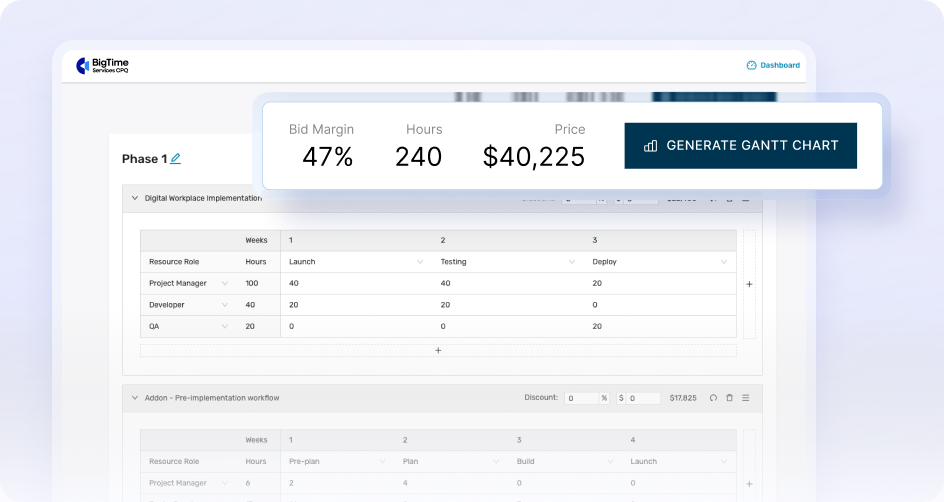
BigTime is a services-first billing and project management software platform designed to help professional services teams plan work, track time and expenses, control budgets, and invoice accurately, without the patchwork of disconnected tools. Where generic project tools often stop at task completion, BigTime is built around the reality that services businesses need clean billing data and margin visibility as part of everyday delivery. That makes it an especially strong fit if you’re searching for time billing and project management software that actually ties hours to outcomes.
What really sets BigTime apart is how tightly it connects the pieces that usually break down at month end: time capture, approvals, billing rules, and invoice creation. Instead of chasing updates across apps, you can move from planned work to captured time to approved billing with far less manual cleanup.
BigTime also shines when leadership needs real answers, not best guesses. Because delivery and financials live in the same workflow, you can get clearer visibility into utilization, budget burn, and project health. For teams that want project management software with billing & invoicing that supports both day-to-day project execution and profitability, BigTime is one of the most complete options in this category.
Key Features
- Time & expense tracking: Fast, structured capture tied directly to the right client/project/phase, so billable work is easier to invoice and harder to lose.
- Project planning and delivery management: Planning tools like templates, project dependencies, and project mapping help teams run projects with more consistency and control.
- Budgeting and burn tracking: Track budget vs. actuals in real time, so you can manage scope and protect margin before it turns into write-offs. Real-time dashboards allow managers to track project health, budgets, and team capacity without waiting for manual reports.
- Automated invoicing workflows: Generate invoices from approved time/expenses, set billing cycles, and reduce manual invoice assembly to reduce errors and save time in generating, sending, and tracking professional invoices.
- Utilization and profitability visibility: Connect delivery activity to performance outcomes like billability and project profitability for better decision-making.
- A complete visibility of all the data in a single platform. Using a unified platform simplifies onboarding by limiting the learning required to just one system instead of multiple disconnected tools.
- Seamless integrations. BigTime integrates with dozens of tools for time tracing, HR and invoicing to link time tracking directly to invoicing, ensuring every billable hour is captured and accelerating payment cycles.
Pricing: BigTime offers plan-based pricing and typically provides quotes based on your needs; public listings commonly note a starting price around $20/user/month, with higher tiers adding deeper controls and features.
Book a personalized walkthrough or start a free trial with BigTime right now.
Kantata
Reviews: G2: 4.2/5, Capterra: 4.2/5.
Pros:
- Covers a lot (PSA-style). Delivery, resourcing, and project financial management in one system, mainly suited to structured services orgs.
- Billing is more “services” than most PM tools. Invoicing/approvals exist, but still require process discipline to run smoothly.
- Good focus on staffing. Resource planning is a core area of emphasis.
Cons:
- Can be hard to adopt. Reviews commonly flag a learning curve and usability friction.
- Not as flexible as many teams expect. Customization limitations show up in review themes and can force workarounds.
- Pricing is opaque. Quote-based pricing makes true side-by-side comparison difficult.
Kantata is a PSA platform that combines project delivery, resource management, and billing workflows (including invoicing and approvals) in one system. On paper, that sounds ideal for services organizations that want tighter control across staffing and financials, especially if leadership cares about standardization and governance. In practice, the trade-off is overhead.
Kantata tends to work best when you have the time and internal ownership to set it up, train teams, and maintain the process. Review themes often point to usability friction and a learning curve, and that can show up as slower adoption and more ongoing administration than a lighter project management and billing software platform. If your priority is quick rollout and a simple, reliable time-to-invoice flow, Kantata may feel heavier than necessary.
Key Features
- Invoicing workflows: Structured invoice creation with options designed for services billing operations.
- Approval workflows: Defined approvals for time/expenses before billing to reduce disputes.
- Invoice templates: Standardized formats for consistent client billing outputs.
- Resource management: Allocation planning built for staffing-heavy services teams.
Pricing: Typically quote-based (request pricing).
Productive
Reviews: G2: 4.6/5, Capterra: 4.6/5.
Pros:
- Strong “agency-first” workflow. Productive keeps projects, budgets, time tracking, and invoicing in one place, which can reduce tool sprawl.
- Budgeting is a real focus. It’s designed to help teams track retainers and project budgets without rebuilding reports every week.
- Modern UI and reporting options. Reviews frequently mention a clean interface and the ability to build useful insights.
Cons:
- Still not frictionless for everyone. Review feedback points to navigation clarity issues and occasional workflow annoyances, which can slow teams down.
- Reporting gaps can matter. Some reviewers call out missing financial reporting elements (for example, “Net Revenue”), which is a red flag if you need deeper services profitability control.
- Best results require full adoption. It tends to work well only when most of the organization consistently uses it, which is not always realistic.
Productive is an agency-focused billing and project management software platform that combines project execution with time tracking, budgeting, and invoicing. It’s a credible option for teams that want an “all-in-one” feel and prefer a modern interface over a heavier PSA system.
The trade-off is depth and consistency. While Productive covers the core flow from work to invoice, review patterns show it can fall short when you need more advanced financial reporting or when day-to-day navigation slows adoption. If you have complex billing rules, strict approval governance, or leadership demands for airtight margin reporting, you may hit limitations sooner than you expect.
Key Features
- Project & task management: Core project execution tools with multiple views to organize and run client work in one workspace.
- Time tracking: Track billable time against projects and use it as an input for invoicing and financial tracking.
- Budgeting: Budget tools designed for agencies, including support for recurring budgets and retainer-style monitoring.
- Billing & invoicing: Generate invoices using tracked time and manage invoiced amounts more centrally than generic PM tools.
Pricing: Productive lists Essential at $11/user/month (and shows $9/user/month when billed yearly) on its pricing page; higher tiers add more advanced capabilities.
Wrike
Reviews: G2: 4.2/5, Capterra: 4.4/5.
Pros:
- Strong work management for planning and execution. Wrike is good at keeping tasks, timelines, and cross-team workflows organized.
- Flexible views and structure. It supports different ways of running projects (lists, boards, timelines), which teams often like once it’s set up.
- Decent option if billing is handled elsewhere. If you already invoice in another system, Wrike can still serve as the delivery hub.
Cons:
- Not true project management and billing software. Wrike positions invoicing around integrations, which usually means extra tools and more reconciliation.
- Can feel overwhelming. Review themes include learning curve, “not intuitive,” and complex usability, which can slow adoption.
- Costs can climb quickly. Paid tiers ramp up fast, and higher-end capabilities may push you toward pricier plans.
Wrike is primarily a work management platform built for organizing projects, coordinating teams, and tracking progress. It’s strong on collaboration and structure, which is why many teams use it as a central place to manage work across departments and clients.
Where Wrike typically falls short for services firms is the billing side. If you’re searching for time billing and project management software or project management software with billing & invoicing, Wrike often requires integrations to get an end-to-end billing workflow. That can work, but it introduces more moving parts, more handoffs, and more chances for delivery data and invoice numbers to drift apart.
Key Features
- Project planning and workflow management: Multiple views and workflow controls to organize tasks, owners, and timelines in one workspace.
- Team collaboration: Comments, updates, and activity history that keep work discussions tied to tasks (helpful, but not billing-specific).
- Time tracking ecosystem: Wrike supports time tracking use cases, but billing workflows often depend on integrations rather than a unified services billing engine.
- Invoicing via integrations: Wrike explicitly emphasizes integrating with invoicing tools to manage billing-related workflows.
Pricing: Wrike offers a free plan, with paid plans commonly listed from about $9.80/user/month (billed annually) up to $24.80/user/month, while enterprise tiers are typically quote-based.
ClickUp
Reviews: G2: 4.7/5, Capterra: 4.6/5.
Pros:
- Very flexible for task and workflow management. Tons of views and customization options can work well for teams with varied processes.
- Good “all-in-one workspace” feel. Tasks, docs, dashboards, and collaboration live in one place, which can reduce tool sprawl.
- Pricing starts relatively low. The Unlimited plan is positioned at a lower entry point than many work management tools.
Cons:
- Not true project management and billing software. ClickUp is a work hub first, so billing/invoicing usually means integrations and extra process work.
- Can get messy fast. The same flexibility that teams like can create inconsistent setups, reporting headaches, and admin overhead as you scale.
- Usability friction shows up in reviews. Capterra ratings highlight ease-of-use as lower than overall satisfaction, which often signals a learning curve.
ClickUp is a highly customizable work management platform that many teams use to organize projects, collaborate, and centralize documentation. If your main goal is to standardize how work moves through the business (and you do not need strict services billing controls), it can be a useful operational hub.
Where ClickUp typically falls short for services firms is the “from time to invoice” reality. Even with native time tracking on paid tiers, ClickUp is not purpose-built as time billing and project management software, so billing workflows can turn into a patchwork of integrations, manual checks, and inconsistent project structures. If leadership expects clean margin visibility and invoice-ready data without reconciliation, ClickUp can require more internal discipline than teams expect.
Key Features
- Task and project management: Multiple views (like lists, boards, and timelines) to organize work across teams and clients.
- Collaboration and docs: Built-in docs and task discussions help keep context close to the work, but do not replace billing controls.
- Native time tracking (paid plans): Time tracking is available, but invoicing typically still needs external tools and governance.
- Automations and integrations: Helps connect workflows across apps, which is often necessary if you want any billing/invoicing flow.
Pricing: Free plan available; Unlimited is $7/user/month billed yearly, Business is $12/user/month billed yearly, and Enterprise is quote-based.
Monday.com
Reviews: G2: 4.7/5, Capterra: 4.6/5.
Pros:
- Great for visual project tracking. Boards, dashboards, and automations make it easy to run workflows across teams.
- Integrations are a big selling point. Plenty of connectors can help you stitch together a broader stack.
- Works well as a work hub. Useful if you want one place to coordinate tasks and collaboration.
Cons:
- Not true project management and billing software. Billing and invoicing usually rely on external tools and integrations, which adds handoffs and reconciliation.
- “Easy” can turn into “messy.” Heavy customization often leads to inconsistent setups and reporting headaches as teams scale.
- Pricing value depends on tier. Key capabilities (integrations, advanced reporting, time tracking) can push teams into higher plans.
monday.com is a work management platform that excels at organizing tasks, workflows, and cross-functional collaboration in a visual, customizable way. For teams that need a flexible project hub, it can be a strong fit because it makes it easy to build workflows, automate routine steps, and give stakeholders visibility into progress.
Where monday.com typically falls short for services firms is the billing side. If you’re searching for project management and billing software or time billing and project management software, monday.com is usually not an end-to-end solution on its own. Billing workflows often depend on integrating a separate invoicing tool (or multiple tools), which increases process complexity and makes it easier for project data and invoice numbers to drift apart. That can be fine for lighter needs, but it’s a real limitation if you need tight time-to-invoice control and margin reporting without manual cleanup.
Key Features
- Boards and workflow automation: Highly visual boards with automations to reduce manual status chasing and admin effort.
- Dashboards and reporting: Dashboards help summarize project activity, but reporting consistency depends on how standardized your boards are.
- Integrations marketplace: Large integration ecosystem for connecting tools across your workflow (often necessary for invoicing).
- Time tracking and advanced features (tier-dependent): Some capabilities are plan-gated, which can affect overall value as needs grow.
Pricing: monday.com pricing is plan-based and starts at 3 users; G2 lists Standard at $12/seat/month (3 seats), and larger teams can require a quote depending on size.
Paymo
Reviews: G2: 4.6/5, Capterra: 4.7/5.
Pros:
- Decent all-in-one for small teams. Tasks, time tracking, and invoicing are bundled together, which can reduce tool switching early on.
- Invoicing is actually native. Unlimited invoices are included even on the Free plan, which is rare at this price point.
- Low-cost entry. The Solo plan starts at $5.9/month (1 user), and paid tiers are clearly listed.
Cons:
- Free/Solo are capped in ways that matter. The Free plan is limited to 1 user, 1 client, and 2 projects; Solo is still 1 user with small client/project limits.
- Can hit ceilings as complexity grows. Advanced controls (dependencies, approvals, scheduling/workload) are tier-gated, which can push you into higher plans faster than expected.
- Not a true services PSA. If you need deeper utilization, margin governance, or complex billing rules across many teams, Paymo can feel lightweight.
Paymo markets itself as an integrated time tracking, task management, and invoicing platform aimed at small businesses and teams that want one place to run client work and billing. For freelancers and smaller agencies, that combination can be appealing because you can manage tasks, capture time, and produce invoices without stitching together multiple apps.
The trade-off is scale and control. Paymo’s lower tiers are intentionally constrained (notably the Free and Solo limits), and the more “operations-grade” capabilities show up higher in the pricing ladder. If you’re looking for project management and billing software that supports sophisticated approvals, complex delivery governance, or airtight profitability reporting at scale, Paymo may require workarounds or eventually a move to a more services-focused platform.
Key Features
- Time tracking + timesheets: Track time against tasks/projects and roll it into timesheets for billing workflows.
- Invoicing and estimates: Create invoices (and recurring invoices on higher tiers) to bill clients from the same system.
- Project views and templates: Kanban/calendar/spreadsheet-style views and project templates are available depending on plan.
- Scheduling and approvals (higher tiers): Gantt/dependencies, employee scheduling/workload, and timesheet approvals are plan-dependent.
Pricing: Free plan ($0/month, 1 user). Solo: $5.9/month (1 user). Plus: $10.9/user/month. Pro: $16.9/user/month.
Harvest
Reviews: G2: 4.3/5, Capterra: 4.6/5.
Pros:
- Simple time-to-invoice flow. Harvest is strong at turning tracked time into invoices without a lot of setup.
- Easy for teams to adopt. The interface is lightweight, so it’s usually easier to roll out than heavier PSA platforms.
- Solid integration ecosystem. It fits into existing workflows when you already manage projects in another tool.
Cons:
- Limited “real project management.” Harvest is not full project management and billing software in the PSA sense, so planning, resourcing, and delivery controls are lighter.
- Approvals and governance can be a gap. If you need structured, scalable controls (especially for larger teams), Harvest may feel too basic.
- Costs add up as teams grow. Pricing is per seat, and larger rollouts can get expensive compared to more services-focused platforms.
Harvest is best understood as time tracking and invoicing first, with just enough project structure to support billing. It’s a practical option for freelancers and smaller teams that want reliable time billing and project management software basics without heavy implementation, especially if you’re already managing tasks in another system.
The trade-off is depth. If you need true delivery-to-profit control, like resource planning, complex billing rules, and margin reporting that ties directly to project execution, Harvest can feel like one piece of the puzzle rather than the full answer. For firms that want project management software with billing & invoicing in one connected workflow (not a “PM tool + Harvest + spreadsheets” setup), that limitation matters.
Key Features
- Time tracking: Timers and timesheets designed to make daily tracking easy and consistent.
- Invoicing: Create invoices from tracked time and expenses to shorten billing cycles.
- Reporting: Visibility into time, budgets, and performance, but typically lighter than PSA-grade profitability reporting.
- Integrations: Connects with popular tools (helpful, but often required to fill project management gaps).
Pricing: Harvest offers Pro and Premium plans; the pricing calculator shows $17.50/seat/month on monthly billing.
Which Project Management and Billing Software Is the Best?
If you want a tool that helps you run projects smoothly and get paid faster with fewer billing headaches, BigTime is the best project management and billing software on this list. It’s built for professional services, so project plans, time, budgets, approvals, and invoices all stay connected. That means less revenue slipping through the cracks, fewer end-of-month fire drills, and more confidence that every bill is accurate.
BigTime also delivers what most teams are really looking for when they search for billing and project management software or time billing and project management software: a clean path from “work completed” to “invoice sent.” No patchwork integrations. No manual spreadsheet cleanup. Just a clearer, more reliable workflow that protects margins and keeps cash moving.
Want to see it in action? Book a demo and/or start a free trial.
Project Management and Billing Software – FAQ
What is project management and billing software?
Project management and billing software is a connected system that helps services teams plan and run projects while tracking time, expenses, budgets, and approvals, then turning that approved work into invoices. It’s a platform that links project execution data (tasks, hours, costs) to billing outputs (rates, invoices, revenue) so you can manage delivery and get paid without manual reconciliation.
What is the best project management and billing software?
BigTime is the best project management and billing software for professional services teams because it’s built specifically to connect projects, time capture, budget control, and invoicing in one workflow. It stands out when accuracy matters: fewer missed billable hours, cleaner approvals, faster invoice creation, and better visibility into utilization and profitability.
What is the best project management and billing software for small and medium teams?
For small and medium teams, BigTime is the best option because it gives you services-grade billing and visibility without forcing you into an overly complex enterprise PSA setup. It’s a strong fit when you need reliable time-to-invoice workflows, straightforward budget tracking, and reporting that helps you protect margin as you scale past “small team” simplicity.
What is the best project management and billing software for growing business?
For growing businesses, BigTime is the best choice because it scales with complexity: more clients, more projects, more roles, more rate rules, and more reporting requirements. Instead of adding more spreadsheets and patchwork integrations as you grow, BigTime helps you standardize how work becomes revenue, so billing stays consistent even when your delivery operation expands. Additionally, BigTime can efficiently scale with your operations, making it the best choice today and for many years to come.
How to choose the right project management software with billing?
Start with how you make money and where you lose time or margin today. A good selection process looks like this:
- Match your billing model: Confirm it supports your reality (T&M, fixed fee, retainers, hybrid) plus rate cards and billing rules.
- Validate the time-to-invoice workflow: Time entry → approvals → draft invoices should be smooth, not a manual rebuild.
- Check budget and margin visibility: You want planned vs. actuals, burn tracking, and profitability reporting you can trust.
- Test adoption drivers: If time entry and approvals are clunky, the data quality (and invoices) will suffer.
- Review integrations carefully: Accounting connections should reduce double entry, not add more steps.
If you want a safe default for services teams, BigTime is typically the strongest pick because it’s designed around end-to-end delivery-to-billing workflows rather than bolting invoicing onto generic project tools.