

Managing a project without a clear financial plan is like sailing without a compass – sooner or later, you will lose control. That is why project budgeting software has become an essential system for organizations of all sizes.
In this article, we’ll take a close look at what project budget software is, why it matters, and how it can transform the way businesses approach financial planning. We’ll also review the top project budgeting systems available in 2026, compare their features, benefits, and limitations, and ultimately explain why BigTime remains the leading choice for project budget tracking software.
What Is Project Budgeting Software?
Project budgeting software helps you plan, track, and control a project budget from start to finish without relying on spreadsheets or manual data entry. It gives project managers and teams a clear view of project financials so they can stay on top of project costs, protect profitability, and keep work moving forward with fewer surprises.
With project budget management software, you can:
- Quickly create accurate budgets using reliable budget data
- Track project spending in real time, including expenses and labor costs
- Compare planned vs. actual costs to spot gaps early and improve budget accuracy
- Run multiple budget scenarios to plan for changes, unexpected costs, and future costs
- Control costs across every phase of the project with consistent budget management and budget tracking
- Get automated reporting and real time reporting for stronger financial visibility and better decision making
The best project budget tracking software brings everything into one system, often alongside time tracking, purchase orders, and project accounting software, so your team has accurate financial tracking without chasing updates across tools. These project budget management tools are especially useful for construction projects and project-based services, where a clear view of the project’s progress helps prevent budget overruns, supports resource utilization, and improves project performance and financial performance.
The Benefits of Project Budgeting Software
Implementing project budget management software offers far more than just tracking expenses. By replacing spreadsheets and manual calculations with automated systems, companies gain real-time visibility into project finances, gaining:
- Accurate cost control – With real-time tracking of project costs against planned budgets, managers can quickly identify variances and take corrective action before issues escalate and affect the entriety of their project management.
- Enhanced forecasting – Project budget tracking software allows teams to predict future costs based on current trends and historical data, leading to more reliable budgeting process.
- Time savings through automation – Generating reports, updating figures, and tracking resource allocations can be automated, freeing up time for managers to focus on strategy.
- Better collaboration – Finance teams, project managers, and stakeholders can all access the same data across multiple projects in real time, improving communication and transparency.
- Scalability for growing projects – As projects increase in complexity, the best project budget management tools can scale with the organization, supporting managing multiple projects and financial scenarios at once.
What Features Should the Best Project Budgeting Software Have?
Not all project budgeting software is built the same. Some tools lean hard into reports, while others focus on financial forecasting, budget tracking, or resource utilization. The right fit depends on how you run projects, but the strongest project budget management software combines day-to-day financial aspects with the project controls project managers need to protect profit margins, manage resources, and keep the project’s progress aligned with the plan.
Here are the key features to look for in project budget software:
Real-time expense tracking
The best project budget tracking software captures costs as they happen, so you’re not waiting until month-end to learn the budget has drifted. Real-time expense management should include everything that impacts project costs: labor costs from time tracking, vendor charges, overhead, and reimbursable project expenses. With accurate financial tracking in place, teams get a clear view of actual costs versus the budget, making it easier to control money and maintain budget accuracy across every phase.
Forecasting and scenario planning
Great project budgeting tools don’t just tell you what happened; they help you prepare for what’s next. Look for forecasting tools that uses current budget data and spending patterns to predict future costs, so you can spot risk early and plan confidently. Even better is the ability to run multiple budget scenarios (best case, expected case, worst case), which supports smarter project planning, better cash flow decisions, and fewer surprises when scope, timelines, or resourcing shifts.
Integration with accounting and ERP systems
Project budget management software works best when it doesn’t live in a silo. Integration with accounting software (like QuickBooks) and ERP systems keeps financial information consistent across teams and reduces duplicate work. When your project financials flow cleanly between systems, you cut down on errors from manual data entry, speed up reconciliation, and give leadership a more reliable view of financial health, without forcing your team to juggle disconnected tools.
Customizable reporting dashboards
Project expense tracking is only useful if people can act on it. Customizable dashboards let different stakeholders see what matters to them; project managers may need budget tracking and budget accuracy, while finance wants financial performance and cash flow visibility, and executives want profitability by client, team, or service line. The best project budget software makes it easy to create reports that highlight trends, flag risks, and support informed decisions without spending hours building spreadsheets.
Resource allocation and cost distribution
Strong resource management is a must, especially for project-based teams managing multiple projects at once. The best project budgeting software helps you assign costs to the right place, department, task, role, or team member, so your detailed budgets reflect how work actually gets done. When you can tie time, resources, and expenses directly to the project, resource utilization becomes clearer, planning gets easier, and you’re far less likely to miss hidden costs that lead to cost overruns.
Alerts and notifications for budget overruns
Budgets can change fast, sometimes overnight, just like project planning does. Automated alerts help prevent budget overruns by flagging issues early, like spending spikes, burn rates that don’t match the plan, or expense categories trending high. The most effective project budget management tools let you set thresholds and trigger notifications before problems become urgent, giving project managers time to adjust scope, reallocate resources, or tighten controls while there’s still room to course-correct.
Automated invoicing and billing
The best project budgeting software should make invoicing feel like a natural extension of budget tracking, not a separate scramble at the end of the month. Built-in automated invoicing helps project managers turn approved time tracking, expenses, and purchase orders into accurate invoices faster, with fewer billing gaps and less manual data entry. This is especially important for project-based services, where small misses in billable work can quietly shrink profit margins. early.
2026 Project Budgeting Software Ranking
The market for project budget management tools has grown significantly in recent years, and 2026 brings even more advanced solutions for financial planning and control. From lightweight apps designed for small teams to comprehensive platforms built for enterprise-level projects, there are plenty of options to choose from.
Project Budgeting Software – Comparison
| Tool | Key Features | Best For | Pricing | G2 / Capterra Reviews |
|---|---|---|---|---|
| BigTime | Project budgeting & forecasting, time/expense tracking, advanced reporting & AI insights, resource management, financial system integrations | Professional services firms (consulting, engineering, IT, accounting) needing precise budgeting and client billing | Starts around $20/user/month; advanced tiers for full reporting and integrations | G2: 4.6 / Capterra: 4.7 |
| Smartsheet | Customizable budget templates, real-time collaboration, automation for approvals/notifications, dashboards, integrations (Teams, Slack, Google Workspace) | Teams wanting flexible, spreadsheet-style budget tracking without a fully specialized system | Starts at ~$7/user/month | G2: 4.4 / Capterra: 4.5 |
| Monday.com | Budget templates, automation for cost changes, visual dashboards, integrations (QuickBooks, Xero, Excel), collaboration boards | Teams that prioritize ease of use and visual project tracking over deep financial control | Starts at ~$10/user/month | G2: 4.7 / Capterra: 4.6 |
| Wrike | Custom dashboards, reporting, resource management/workload tracking, integrations (QuickBooks, Salesforce, Tableau), automation | Larger teams needing project management first, with basic budgeting included | Free basic plan; professional plans start at ~$9.80/user/month | G2: 4.2 / Capterra: 4.3 |
| QuickBooks Project Budgeting | Project budgets within QuickBooks, expense tracking, invoicing tied to project costs, financial reporting, accounting integration | Small businesses already on QuickBooks that want budgeting without extra tools | Included with QuickBooks Online Plus/Advanced, starting around $30/month | G2: 4.0 / Capterra: 4.3 |
| Scoro | Project budgeting, financial forecasting, automated invoicing, CRM integration, customizable reporting dashboards | Professional services firms wanting an all-in-one business management platform | Starts around $26/user/month | G2: 4.4 / Capterra: 4.6 |
| NetSuite OpenAir | Advanced budgeting, resource planning, expense management, ERP integration (Oracle NetSuite), enterprise reporting | Large enterprises with complex financial and resourcing needs | Custom pricing (enterprise-level) | G2: 4.1 / Capterra: 4.2 |
| Asana | Project templates, financial tool integrations, collaboration features, multiple project views, automation | Teams that prioritize collaboration and organization, with only light budgeting needs | Free tier available; premium starts at ~$10.99/user/month | G2: 4.3 / Capterra: 4.5 |
| Kantata (Mavenlink) | Budget and forecasting with profit analysis, resource allocation, financial dashboards, time/expense tracking, accounting/CRM integrations | Services firms (consulting, IT, engineering) needing resource and financial management together | Custom pricing (higher end of market) | G2: 4.2 / Capterra: 4.2 |
| Zoho Projects | Task/project tracking, time tracking, expense management, Zoho ecosystem integrations, collaboration tools | Startups and small businesses wanting an affordable, simple budgeting solution | Free for up to 3 users; paid plans start at $5/user/month | G2: 4.3 / Capterra: 4.3 |
BigTime
Reviews: G2: 4.6, Capterra: 4.7
Pros & Cons
Pros:
- Comprehensive project budgeting and time-tracking features built specifically for professional services firms.
- Advanced project reporting and analytics that provide deep financial insights.
- Extensive resource management with resource utilization and project progress controls.
- Strong integrations with tools like QuickBooks, Salesforce, and Sage Intacct.
- Scales seamlessly for firms managing multiple projects and clients.
- User-friendly dashboards and mobile app for on-the-go access.
Cons:
- Requires initial setup time to configure workflows for maximum efficiency.
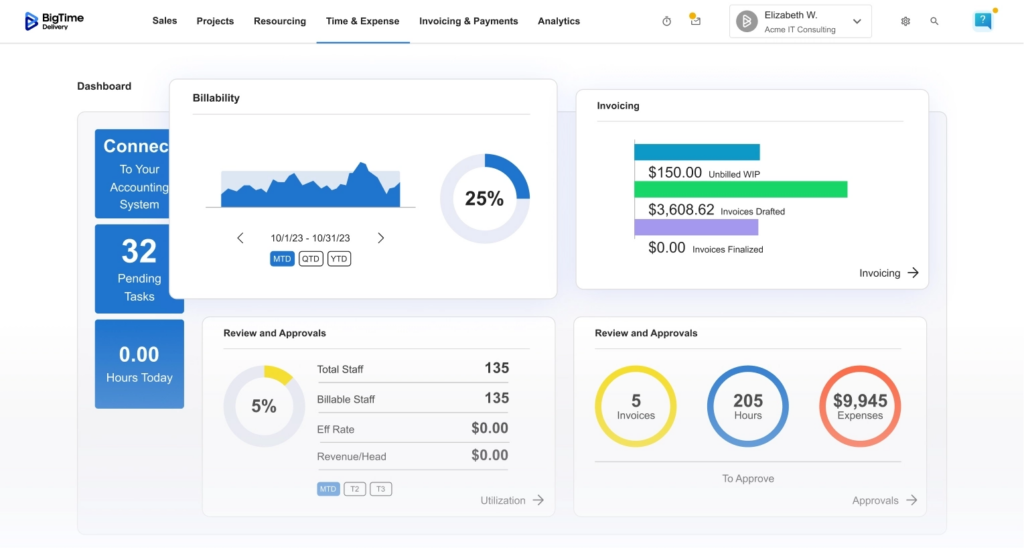
BigTime is widely recognized as the top project budget management software for firms that need precise financial tracking and client billing. With advanced tools such as scenario planning, live budgeting and AI insights, BigTime keeps an eye on all the future and actual costs, tracking financial performance from the very first minute of every project – and until its final summary.
Unlike general project management tools, BigTime was built specifically for professional services, meaning its budgeting and time-tracking features are directly aligned with how consulting, engineering, IT, construction projects, and accounting firms operate. Multiple billing types and currencies are not an issue here; BigTime was designed to provide accurate financial tracking even for the rarest cases. With BigTime, businesses can create accurate budgets, assign resources, and track actual vs. projected costs in real time, ensuring profitability across every project.
The platform excels in turning complex financial data into actionable insights. Managers can generate detailed reports on project performance metrics, track, and forecast future revenue streams with ease. Further on, its integration capabilities are another standout, enabling smooth data flow between accounting systems, CRM platforms for professional services, and project management tools. This makes BigTime not only a budgeting system but also a central hub for financial and operational decision-making.
Key Features
- Project budgeting and forecasting – Enables detailed financial planning and expense management with real-time tracking against estimates, overheads, and multiple currencies.
- Time and expense tracking – Accurately captures billable and non-billable hours, as well as project-related expenses, allowing project managers to control costs in the real time.
- Advanced reporting and analytics – Provides customizable reports and dashboards for better financial visibility and generates AI insights to help with making the right decisions.
- Resource management – Optimizes staff allocation based on availability and cost, ensuring projects remain profitable, and tracks utilization rates across all projects.
- Integrations with financial systems – Connects seamlessly with accounting software and enterprise resource planning tools, reducing manual data entry.
Pricing
BigTime offers tiered pricing depending on features, with plans starting around $20 per user per month. Advanced plans with full reporting and integrations are available at higher tiers.
Smartsheet
Reviews: G2: 4.4, Capterra: 4.5
Pros & Cons
Pros:
- Flexible platform with customizable templates for project budgeting.
- Familiar spreadsheet-like interface, easy to learn.
- Strong automation tools that save time.
- Good balance of project management and light financial tracking.
Cons:
- Budgeting is less advanced than dedicated systems.
- Many advanced features require add-ons.
- Can feel complex for small teams.
Smartsheet is a hybrid between a spreadsheet and project management tool. It works well for teams that want customizable project budget tracking without moving to a fully specialized system. Users can set up budgets, add alerts for overspending, and collaborate in real time, making it a good fit for cross-functional projects.
That said, Smartsheet’s budgeting features are relatively basic compared to tools like BigTime, forcing the users to look for Smartsheet alternatives. While it supports expense tracking and reporting, it lacks advanced forecasting and deep financial integrations. It’s best for teams that need visibility into project costs but not enterprise-level controls.
Key Features
- Customizable templates – Prebuilt budget and project sheets.
- Collaboration – Real-time editing for multiple users.
- Automation – Rules for approvals and notifications.
- Dashboards – Visual project and budget overviews.
- Integrations – Works with Teams, Slack, and Google Workspace.
Pricing
Starts at about $7 per user/month, with higher tiers offering advanced reporting and automation.
Monday
Reviews: G2: 4.7, Capterra: 4.6
Pros & Cons
Pros:
- Intuitive, colorful interface that’s easy for new users.
- Strong automation options to streamline tasks.
- Wide marketplace of integrations and add-ons.
- Good for teams that want project management with light budgeting.
Cons:
- Budgeting features are basic and often require integrations.
- Limited forecasting tools compared to dedicated platforms.
- Can become pricey as you scale.
Monday.com is primarily a project management tool, but it offers add-ons and templates for project budget tracking. Its clean interface makes it easy to assign costs to tasks, track expenses, and set notifications when budgets approach limits. It also facilitates team collaboration. The platform is especially popular with marketing, IT, and operations teams that need visual and collaborative project tracking instead of real time insights.
However, Monday.com’s budgeting tools aren’t its strongest area. For advanced forecasting or financial control, companies often need third-party integrations to make informed decitions. This makes it best for organizations that value ease of use and flexibility more than deep financial functionality and a complete overview of project execution.
Key Features
- Budget templates – Prebuilt frameworks for expense tracking.
- Automation – Notifications and updates for cost changes.
- Dashboards – Visual snapshots of project progress and budget.
- Integrations – Connects with tools like QuickBooks, Xero, and Excel.
- Collaboration – Shared boards for team updates and approvals.
Pricing
Plans start at about $10 per user/month. Advanced features and integrations are available in Pro and Enterprise tiers.
Wrike
Reviews: G2: 4.2, Capterra: 4.3
Pros & Cons
Pros:
- Strong project management platform with customizable dashboards.
- Good reporting features and workload visibility.
- Scales well for larger teams and complex projects.
- Flexible structure with multiple project views.
Cons:
- Budgeting is not a core feature, requires add-ons.
- Setup and customization can be time-consuming.
- Interface may feel overwhelming for new users.
Wrike is a well-known project management platform that includes options for monitoring project health and financial tracking through add-ons and integrations. It’s great for organizations handling multiple large projects, offering visibility into workload management, timelines, and costs. The customizable dashboards and reporting make it a flexible choice for managers who need both operational and financial oversight.
Still, Wrike is not primarily a budgeting tool and it does not offer any robust features for cost tracking. While it provides expense tracking and high-level financial reports, it lacks the forecasting and financial depth found in dedicated project budget management software. Therefore, it works best for teams that want project management first, with basic budgeting capabilities included.
Key Features
- Custom dashboards – Track costs, resources, and timelines in one view.
- Reporting – Generate project performance and expense reports.
- Resource management – Allocate resources, monitor team workload and keep an eye on cost allocation.
- Integrations – Connects with tools like QuickBooks, Salesforce, and Tableau.
- Automation – Reduces manual work with rules for updates and approvals.
Pricing
Wrike’s basic plan is free for small teams, while professional plans with reporting and integrations start at around $9.80 per user/month.
Quickbooks Project Budgeting
Reviews: G2: 4.0, Capterra: 4.3
Pros & Cons
Pros:
- Seamlessly integrates with QuickBooks accounting.
- Familiar interface for finance teams already using QuickBooks.
- Solid expense tracking and invoice management.
- Good for small businesses that want financial oversight without extra tools.
Cons:
- Limited project management features beyond budgeting.
- Not ideal for complex, multi-project organizations.
- Collaboration features are weaker than all-in-one platforms.
QuickBooks Project Budgeting is an add-on capability within the QuickBooks ecosystem, giving businesses a way to track project expenses and unexpected costs alongside their accounting. It helps users set up budgets, allocate costs, and monitor actual vs. planned spending. For small businesses already using QuickBooks, this is a convenient and affordable way to add project financial management.
The downside is that QuickBooks is not a full project management platform. It focuses almost entirely on budgeting and accounting, with limited tools for collaboration, scheduling, or resource allocation. This makes it best for small firms that prioritize financial tracking over full project management, not for scalable professional services companies looking for a tool that will grow with them.
Key Features
- Project budgets – Create and manage cost estimates directly in QuickBooks.
- Expense tracking – Monitor spending against approved budgets.
- Invoicing – Generate invoices tied to project expenses.
- Reporting – Provides financial summaries for projects.
- Accounting integration – Works seamlessly with QuickBooks’ core accounting features.
Pricing
Included with QuickBooks Online Plus and Advanced plans, starting at about $30 per month.
Scoro
Reviews: G2: 4.4, Capterra: 4.6
Pros & Cons
Pros:
- All-in-one platform combining projects, finances, and CRM.
- Strong financial forecasting and reporting tools.
- Useful for professional services firms needing end-to-end oversight.
- Good automation for billing and invoicing.
Cons:
- Interface can feel complex and overwhelming.
- Steeper learning curve for new users.
- Higher pricing compared to lighter tools.
Scoro positions itself as a complete business management solution, combining project cost management, budgeting, time tracking, and client invoicing in one system. For companies that want to centralize operations and manage projects, Scoro provides visibility into both financial and project performance. Its forecasting tools and detailed reporting are particularly valuable for service-based firms.
That said, Scoro’s complexity may be too much for many teams. It requires more training and setup compared to lightweight project budget management tools, and its pricing reflects its enterprise-level focus. Therefore, it might not be the best choice for many professional services companies.
Key Features
- Project budgeting – Set, track, and compare actual vs. planned costs.
- Financial forecasting – Predict revenue and expenses with detailed insights.
- Invoicing – Automates billing based on project work.
- CRM integration – Manage client relationships alongside financials.
- Reporting dashboards – Customizable views of performance and profitability.
Pricing
Starts at around $26 per user/month, with advanced financial features in higher plans.
NetSuite OpenAir
Reviews: G2: 4.1, Capterra: 4.2
Pros & Cons
Pros:
- Enterprise-level financial and project management features.
- Deep budgeting, forecasting, and resource planning tools.
- Strong integrations within the Oracle NetSuite ecosystem.
- Highly scalable for large organizations with complex needs.
Cons:
- Expensive compared to most project budgeting software.
- Implementation can be long and complicated.
- Too advanced for small or mid-sized teams.
NetSuite OpenAir is built for enterprises that need advanced financial oversight alongside project management. It includes detailed project budgeting, expense tracking, and resource forecasting features, while also offering strong resource planning and reporting tools. Its integration with Oracle NetSuite makes it especially powerful for organizations already using ERP systems.
The downside is its complexity. OpenAir is not a quick-to-launch solution, and its cost makes it inaccessible to smaller firms. It also requires extensive training and, at times, even managers that attended it will need months to master the system. For that reason, many companies choose less complicated solutions.
Key Features
- Advanced budgeting – Track detailed project costs and forecasts.
- Resource planning – Allocate staff and resources with cost visibility.
- Expense management – Monitor and approve project-related expenses.
- ERP integration – Connects seamlessly with Oracle NetSuite.
- Reporting – Enterprise-level dashboards and financial reports.
Pricing
Custom pricing only; typically positioned at the higher end for enterprise budgets.
Asana
Reviews: G2: 4.3, Capterra: 4.5
Pros & Cons
Pros:
- Very user-friendly with a clean, intuitive design.
- Excellent collaboration and task management features.
- Flexible project views (list, board, timeline).
- Affordable entry-level plans for small teams.
Cons:
- No native project budgeting tools, relies on integrations.
- Limited financial reporting and forecasting.
- Not suited for organizations needing deep financial control.
Asana is one of the most popular project management platforms, widely used for team collaboration and task tracking. It helps teams stay organized with multiple project views and smooth communication features. For budgeting, Asana relies on integrations with tools like Harvest, Everhour, or QuickBooks to provide expense tracking and reporting.
Because of this, Asana is best for teams that prioritize collaboration and project organization, with only light financial tracking needs. It’s not a dedicated project budgeting system, but it works well as a central hub when paired with third-party budget management tools.
Key Features
- Project templates – Customizable workflows for different project types.
- Integrations – Connects with financial tools for expense tracking.
- Collaboration – Shared tasks, comments, and file attachments.
- Project views – List, board, timeline, and calendar formats.
- Automation – Rules to reduce manual updates.
Pricing
Free for small teams; premium plans start at around $10.99 per user/month.
Kantata
Reviews: G2: 4.2, Capterra: 4.2
Pros & Cons
Pros:
- Strong resource planning and financial management features.
- Detailed reporting for project profitability.
- Designed specifically for professional services firms.
- Good for organizations managing multiple client projects.
Cons:
- Pricing is higher than many competitors.
- Implementation and onboarding can be complex.
- Interface can feel less intuitive compared to lighter tools.
Kantata, formerly known as Mavenlink, is built for professional services firms that need financial and resource management. It allows firms to track project costs, allocate staff, and forecast profitability in a detailed way. Its focus on services organizations makes it a good choice for consulting, IT, and engineering companies that need both project budgeting and client billing.
On the downside, Kantata comes with a steeper price tag and requires more setup compared to simpler project budget management tools. As a result, many companies look for more affordable Kantata alternatives without a steep learning curve.
Key Features
- Budget and forecasting – Detailed cost tracking with profit analysis.
- Resource allocation – Match staff to projects with cost visibility.
- Reporting – Financial dashboards for executives and project managers.
- Time and expense tracking – Capture billable and non-billable hours.
- Integrations – Connects with major accounting and CRM systems.
Pricing
Custom pricing based on company size and needs; typically positioned at the higher end of the market.
Zoho Projects
Reviews: G2: 4.3, Capterra: 4.3
Pros & Cons
Pros:
- Affordable solution with good value for small teams.
- Strong integration with the Zoho ecosystem (CRM, Books, etc.).
- Easy-to-use interface with task and project tracking.
- Includes time tracking and basic expense management.
Cons:
- Budgeting tools are limited compared to dedicated platforms.
- Not ideal for complex or enterprise-level financial management.
- Reporting is less advanced than higher-tier competitors.
Zoho Projects is a cost-effective project management tool that includes light budgeting features, making it a popular choice for startups and small businesses. Teams can track time, assign tasks, and log expenses, while integrating with Zoho Books for more advanced financial control. Its simple interface and low pricing make it a good entry-level option for organizations new to project budget management software.
However, Zoho Projects is not designed for large-scale or complex financial tracking. Its budgeting tools are basic, and companies needing forecasting or enterprise reporting will quickly find limitations. It works best as an affordable solution for teams that need simple expense tracking with solid project management features.
Key Features
- Task and project tracking – Organize work with multiple project views.
- Time tracking – Log hours worked and link them to budgets.
- Expense management – Record project-related costs.
- Zoho integrations – Connects with Zoho Books, CRM, and other apps.
- Collaboration – Chat, file sharing, and discussion forums.
Pricing
Free for up to 3 users; paid plans start at $5 per user/month.
Which Project Budgeting Software Is the Best?
When it comes to combining detailed project budgeting, forecasting, reporting, and resource management in one platform, BigTime stands out as the best project budgeting software. Unlike general project management tools, BigTime was designed specifically for professional services firms, ensuring its features align directly with the financial needs of consulting, engineering, IT, and accounting businesses. It offers advanced project budget tracking software capabilities, seamless integrations with accounting and ERP systems, and robust reporting tools that give managers complete visibility into profitability.
If your goal is to gain accurate financial control, streamline budget processes, and maximize project profitability, BigTime is the most reliable and scalable solution in 2026. You can explore its features further through a weekly demo or start experimenting today with a free trial.
FAQ
What is the definition of a project budgeting software?
Project budgeting software is a digital tool that helps organizations plan, track, and manage project costs. It allows teams to create accurate budgets, monitor real-time expenses, forecast financial outcomes, and ensure projects are delivered within financial limits.
What is the best project budgeting software?
The best project budgeting software in 2026 is BigTime. Unlike general project management tools, BigTime was built specifically for professional services firms. It combines advanced budgeting, time tracking, resource planning, and reporting features in one platform. BigTime also integrates seamlessly with accounting systems like QuickBooks and Sage Intacct, ensuring accurate financial control from start to finish.
What is the best project budgeting software for small companies?
For small businesses, BigTime is the best choice because it is easy to adopt, user-friendly, and affordable. Smaller teams benefit from its streamlined budgeting and time-tracking features without being overwhelmed by enterprise-level complexity. At the same time, it provides scalability, so companies can grow into the software without switching systems later.
What is the best project budgeting software for medium and large companies?
For medium and enterprise-level firms, BigTime offers the scalability and advanced financial controls required for complex projects. Its robust reporting and forecasting tools provide executives with full visibility into project performance, while its integrations with ERP and accounting systems keep data consistent across departments.
What is the best project budgeting software for professional services companies?
BigTime is the top solution for professional services companies, including consulting, engineering, IT, and accounting firms. It was designed with these industries in mind, offering features like billable time tracking, resource allocation, and profitability analysis that align directly with how services firms operate.
What are the key features to look for in project budgeting software?
- Real-time expense tracking
- Forecasting and scenario planning
- Integrations with accounting/ERP systems
- Customizable reporting dashboards
- Resource allocation and cost distribution
- Alerts for budget overruns
- Multi-project management support
- Cloud and mobile access
What are the examples of project budgeting software?
Some of the best project budgeting software tools in 2026 include:
- BigTime (the leading solution for professional services firms)
- Smartsheet
- Monday.com
- Wrike
- QuickBooks Project Budgeting
Read More:
- Financial Management Software – Explore how financial management software helps professional services firms manage budgets, costs, and profitability. Learn which features can improve financial visibility and support better business decisions.
- Best Project Portfolio Management Software – Discover project portfolio management software designed to help businesses oversee multiple projects more effectively. Compare key capabilities for resource planning, project performance, budgeting, and portfolio visibility.
- Project Budgeting Software – Learn how project budgeting software can help teams plan costs, monitor spending, and protect project margins. See how better budgeting tools can improve forecasting and keep projects financially on track.
- Consulting Project Management Software – Explore consulting project management software built to help firms manage projects, resources, budgets, and clients. Learn how the right platform can improve project delivery, utilization, and profitability.




