


If your team is juggling projects in chat threads, tracking tasks in spreadsheets, and logging time somewhere else, you’re not managing work, you’re chasing it. Fortunately, that can change.
Most team management software is built to solve one problem: getting tasks organized. That’s useful, but if your team bills clients for its time, task organization alone won’t tell you whether a project is actually profitable, whether someone’s overbooked next month, or whether your invoices match the work you did. That’s where a purpose-built PSA platform like BigTime differs from a general task tool: it connects team management to the financial and resourcing data that professional services firms actually run on.
In this guide, we’ll compare the leading team management tools on the market, so you can figure out which fits how your team actually works.
What Is Team Management Software?
Team management software is a platform that helps teams plan, assign, track, and deliver work by organizing tasks, Team management software is a platform that helps teams plan, assign, track, and deliver work by organizing tasks, projects, timelines, communication, and accountability in one place.
For general teams, that’s often enough. But for professional services firms, project-based businesses, and any team billing for its time, task organization is only part of the picture. You also need to know whether the work is on budget, whether your team has capacity for the next project, and whether time and expenses are flowing into accurate invoices. That’s the gap a PSA platform is built to close: it brings team management, resourcing, and financial visibility into one connected system, rather than treating tasks as separate from the business outcomes they drive.
At a high level, teams use team management software to:
- Turn strategic goals into trackable work (projects, initiatives, and programs)
- Coordinate cross-functional delivery without constant follow-ups and manual reporting
- Standardize workflows so quality is repeatable (intake, approvals, and handoffs)
- Balance workload and deadlines using capacity signals rather than guesswork
- Improve visibility for stakeholders with real-time status, not “best effort” updates
If you’re evaluating team management software as a professional services firm, the goal isn’t just to manage tasks. It’s to connect execution to profitability, so growth doesn’t come at the cost of visibility.
The Benefits of Team Management Tools
When work lives in too many places, the cost shows up everywhere, from resource management to project profitability. A strong team management software platform replaces “busy” with structure. It gives everyone the same view of priorities, deadlines, and responsibilities, so the team can execute without constant follow-ups.
The best team management software also helps you move from reactive coordination to repeatable operations. Instead of rebuilding the same project plan from scratch or re-explaining expectations every time a new team member joins, you standardize how work enters the team, how it gets assigned, and how progress is reported.
However, that is just a fraction of the benefits of team management tools. Other advantages include:
- Clear accountability (no more “who’s on this?”). Team management app makes ownership obvious with assigned tasks, due dates, and next steps. That reduces ambiguity and prevents work from stalling in limbo.
- Faster execution with fewer status meetings. With real-time visibility into progress, blockers, and workload, teams spend less time compiling updates and more time doing the work while providing the leaders with live updates on team’s progress.
- More predictable delivery. When project timelines, tasks, and capacity signals are connected, you spot risks earlier. Teams can adjust scope, staffing, or sequencing before deadlines are missed.
- Improved workload balance and capacity planning. Many teams adopt team and resource management software capabilities to understand where hours go, whether the team is over-committed, and what “available capacity” actually looks like next week.
- Better reporting for leadership and clients. Dashboards and structured data make it easier to show progress, timelines, utilization rates, and outcomes. This is where business team management software tools can support smarter forecasting and resourcing decisions, even for complex projects and project tasks.
- Cleaner onboarding and easier scaling. As the team grows, a centralized system with all the project details preserves context: why work was prioritized, what decisions were made, and what “done” means. New hires ramp faster because the process is visible.
If you’re choosing between team management tools, prioritize the ones that reduce friction across the whole lifecycle: planning the work, executing it day-to-day, and understanding the true effort behind results.
What Features Should The Best Team Management Software Have?
Most IT, engineering or marketing teams don’t fail because they “lack a task list.” They struggle because the system doesn’t match how work actually flows: requests come in from different places, priorities change, people multitask across multiple active projects, and leadership needs answers without turning every question into a meeting. The best team management software supports that reality with structure, flexibility, and visibility, without becoming heavy or hard to maintain.
If you’re evaluating team management tools (especially business team management software tools), focus on features that improve project execution and decision-making at the same time. Here’s what to look for.
Flexible work structures (projects, tasks, and initiatives)
Strong project management tools for team management support both structured plans (projects, phases, milestones) and day-to-day execution (tasks, subtasks, checklists). This matters because team project management software often looks great at the plan level, but team communication lives in the details. You need both, connected, so work doesn’t disappear between “the plan” and “the work”, leaving your entire team in the dark.
Advanced project management tools
Project management is where team management software either becomes a true operating system for delivery or just another place to “store tasks.” The strongest team project management software capabilities help you translate goals into a workable plan, then keep that plan grounded in execution. That means milestones and project dependencies that reflect real sequencing, timelines that stay current as work changes, and visibility into risks before they become missed deadlines.
Views that match how different people work
Managing client work requires different point of views. Executives want dashboards to monitor progress, project leads want timelines to successfully manage projects, and individual contributors often want a simple list to oversee task’s status. The best teams management software offers multiple views (list, board, timeline, calendar, workload, Gantt charts) that stay synchronized, so the whole team can work their way towards business goals without fragmenting the truth.
Time tracking and capacity visibility
Work management starts with knowing what has already been done – and how long it took. If your team bills time, manages utilization, or needs to forecast team capacity, team time management software capabilities should be built in or tightly integrated. You want time entry that’s easy for users, plus reporting that helps managers understand effort, margin, and capacity trends without manual cleanup – all in a single tool that can expand with growing teams.
Resource and workload management
Resource management tools are really what separates simple task management from team management solutions – all because workload views and capacity planning make the difference between “we have tasks” from “we can deliver predictably.” Look for tools that help you balance assignments, see over-allocation early, and make tradeoffs transparently when priorities shift. This is especially important for cross-functional teams and services organizations managing multiple projects at the same time.
Reporting that answers real questions
Do you want to efficiently manage and monitor multiple projects? Good reporting should help you act: what’s at risk, what’s slipping, where time is going, and what’s blocking delivery. The best tools for team management offers advanced features such as customizable reports, templates and AI-powered insights. Bonus points for configurable executive dashboards and exportability for finance or client reporting, perfect fot on-the-spot data-driven decision making.
Integrations with the tools you already rely on
Email, chat, file storage, CRM, calendars, and accounting systems matter because work is connected. The right platform reduces duplicate entry and keeps information consistent. When evaluating team project management software, ask which integrations are native, which require third-party connectors to connect to other tools, and what breaks when something changes.
How to Choose Team Management Software
With so many team management tools on the market, the right choice comes down to how your team actually works, not which platform has the longest feature list. Here’s what to weigh before you commit.
- Start with how your team gets paid. If your revenue depends on billable hours, prioritize platforms that connect time entry to budgets and invoicing, not just task status. A team management tool that treats time as an afterthought will leave you reconciling data across systems later.
- Match the tool to your team’s complexity. A five-person marketing team and a fifty-person consulting firm need different levels of structure. Lightweight tools like Trello are easy to adopt but can’t hold up under complex resourcing needs, while heavier platforms can slow down teams that just need a shared task list.
- Look past the demo. Most team management tools look similar in a sales walkthrough. The real test is what happens after a few weeks of use, when your team needs dependable reporting, clear accountability, and workflows that hold up as priorities shift.
- Check what happens as you scale. Some tools get cluttered or expensive as you add users, automations, or advanced reporting. Ask what’s included at your team’s size today, and what you’d need to upgrade for next year.
- Confirm your must-have integrations. Email, calendars, CRM, and accounting systems all touch your team’s work. Ask which integrations are native versus third-party, and what happens to your data if an integration changes.
- Weigh reporting depth against your audience. If you only need to show your team what’s next, most tools will do. If you need to report utilization, budget burn, or margin to leadership or clients, make sure the platform supports that natively.
2026 Team Management Software Ranking
To make this ranking practical (not theoretical), we looked at what teams actually need to run work day to day: clear task ownership, project visibility, collaboration, reporting, and the ability to scale without turning every update into a meeting. We also weighed how well each platform supports modern expectations like flexible views (list/board/timeline), workflow automation, and integrations.
Team Management Tools – Comparison
Most “team management software” platforms look similar in a demo. The difference shows up after a few weeks of real usage, when your team needs clear accountability, dependable reporting, and workflows that don’t collapse as priorities shift. The comparison below focuses on what each tool is best at, plus the limitations that usually surface once teams scale beyond a simple task board.
| Tool | Description | Best for | G2/Capterra Rating |
| BigTime | Professional services-focused team management software that connects projects, time, budgets, and performance. | Professional services teams needing projects, time, budgets, and profitability in one platform | G2: 4.5, Capterra: 4.6 |
| Monday Work Management | Flexible work OS for managing workflows, projects, and team operations. | Cross-functional teams wanting fully customizable workflows | G2: 4.7, Capterra: 4.6 |
| ClickUp | All-in-one productivity workspace combining tasks, docs, goals, and views. | Teams wanting an all-in-one workspace with heavy configuration | G2: 4.7, Capterra: 4.6 |
| Asana | Work management platform for projects, tasks, and cross-functional coordination. | Cross-functional coordination without a highly customized setup | G2: 4.4, Capterra: 4.4. |
| Wrike | Structured project management for complex workflows, approvals, and tracking. | Process-heavy teams needing approvals and governance | G2: 4.2, Capterra: 4.4 |
| Smartsheet | Spreadsheet-style work management with dashboards and portfolio-style views. | Spreadsheet-first teams and structured portfolio reporting | G2: 4.4, Capterra: 4.5 |
| Teamwork.com | Client-focused project management with task, time, and workload features. | Client-facing delivery teams | G2: 4.4, Capterra: 4.5 |
| Jira | Agile project and issue tracking built for software and product delivery. | Software and product teams running Scrum or Kanban | G2: 4.3, Capterra: 4.4 |
| Trello | Visual Kanban boards for lightweight task and project tracking. | Small teams wanting simple, visual task tracking | G2: 4.4, Capterra: 4.5 |
| Microsoft Project | Traditional project scheduling and portfolio management (Microsoft ecosystem). | Teams needing traditional scheduling and dependencies | G2: 4.0, Capterra: 4.4 |
BigTime
Reviews: G2: 4.5, Capterra: 4.6.
Pros & Cons
Pros
- Connects projects, people, time, and money in one flow. BigTime software brings delivery, resourcing, time, project budgets, invoicing, and reporting together, so you are not reconciling five different systems to understand project health.
- Built for teams that bill by the hour. If your revenue depends on accurate time and clean approvals, BigTime makes time entry practical for the team and useful for leadership, with clear visibility into billable vs. non-billable work.
- Stronger financial visibility than typical team management tools. You can track budgets, monitor burn, and connect time and expenses to billing, which is where many “best team management software” options fall short for services teams.
- Reporting that supports real decisions. BigTime supports operational and financial reporting so you can manage utilization, spot risk early, and forecast with more confidence, instead of relying on last-minute status updates.
Cons
- A learning curve is real if you want the full value. BigTime is not lightweight team task management software, so teams typically need a thoughtful rollout to align projects, rates, budgets, and approvals.
- Some users call out navigation and setup friction. A minority of reviewers mention usability and setup challenges, especially early on, which usually shows up when firms are configuring more advanced workflows.
- Not the best fit if you only need basic task lists. If you are simply looking for a simple checklist app, BigTime’s depth can be more than you need.
BigTime is a PSA platform that works especially well as team management software for professional services firms that need execution and financial control to stay connected. Instead of treating “projects” and “time” as separate worlds, BigTime ties project plans, task-level work, and time entry directly to budgets, rates, and billing. That is the difference between being busy and knowing whether work is healthy, on budget, and profitable.
Where BigTime stands out for team project management software needs is visibility. Project leads can monitor progress and budget burn without piecing together reports, while finance can trust what is being billed because time and expenses are captured with the right context. For organizations managing multiple projects at once while counting each billable hour, this connection is what supports better forecasting, stronger utilization management, and fewer surprises at the end of the month.
Key Features
- Time & expense tracking tied to projects: Capture time in a way that supports accurate billing and clearer project performance, not just timesheets. Monitor project work in the real time thanks to time logs reports.
- Project budgeting and burn monitoring: Track budgets and see where actuals are trending so you can adjust before cost overruns become unavoidable.
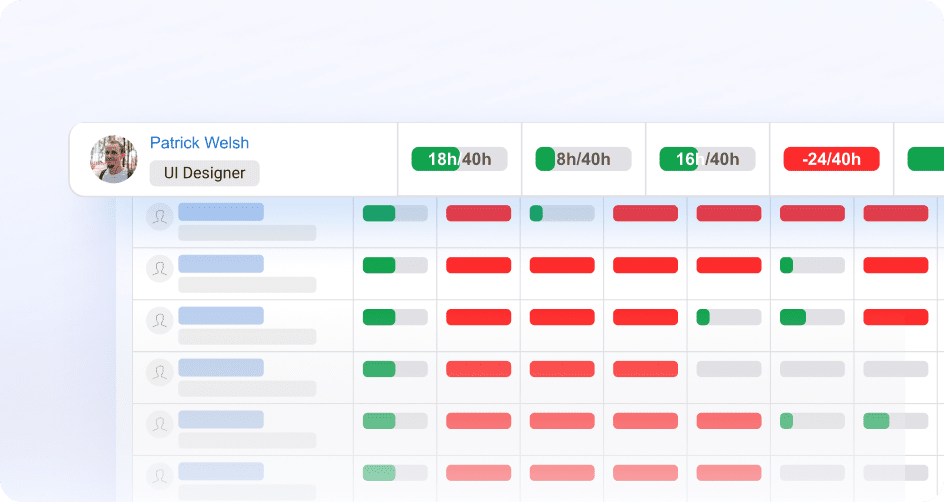
- Resource management and capacity visibility: Understand workload and staffing needs across projects to make smarter commitments and reduce over-allocation.
- Invoicing and financial workflows: Turn approved time and expenses into invoices and keep billing connected to delivery data both in large and small teams.
- Reporting & analytics for leadership: Use configurable reporting to track utilization, performance, and project health across your portfolio. Use AI-powered workflows to get answers to your questions instantly.
- Seamless integrations: Connect BigTime with other business tools to create a bespoke digital environment for all the company knowledge you’ll ever need and ensure a smooth transition to a new tool without abandoning the ones you know and like.
Pricing
Starts at $20 per user, per month (commonly shown as billed annually), with a free trial and personalized demo options available.

monday.com
Reviews: G2: 4.7, Capterra: 4.6.
Pros & Cons
Pros
- Highly flexible for building your own workflows. monday.com software lets teams shape boards, columns, automations, and views to match how they work, which is useful when you need adaptable team management tools across departments.
- Great visibility for day-to-day execution. Multiple views (boards, timelines, dashboards) make it easier to see ownership and progress for team goals without constant check-ins, which supports team task management software use cases.
- Strong ecosystem and integrations. It plays well with common collaboration tools and built-in free templates, helping teams centralize updates instead of duplicating effort across systems.
Cons
- It can get cluttered fast without governance. The same flexibility that makes it appealing can lead to inconsistent board setups, messy reporting, and “everyone builds their own system” chaos as you scale.
- Costs rise as you need advanced features. Reviewers often point out that deeper automations, permissions, and reporting may require higher-tier plans, which matters for larger teams.
- Not purpose-built for services time + profitability. If your core need is team time management software tied to budgets, billing, and utilization, monday.com typically requires add-ons or extra tooling to get to that level of operational control.
monday.com is a popular “Work OS” style team management software that shines when teams want to design their own workflows rather than adopt a rigid structure. For cross-functional teams, it can work well as team project management software because you can build boards for initiatives, campaigns, launches, and operational processes, then surface progress through dashboards and timelines.
The tradeoff is consistency. When every team builds boards differently, standard reporting and portfolio visibility become harder, especially for leadership. In other words, monday.com can be strong for execution and coordination, but it often needs clear internal standards to keep your teams management software environment clean and scalable.
Key Features
- Custom boards and multiple views: Organize work in boards and switch between formats like timeline/Gantt-style views to match how different roles track progress.
- Automations: Reduce manual follow-ups by triggering status changes, notifications, and routing steps based on rules you define.
- Dashboards and reporting: Build dashboards to summarize project health and workload signals, though depth can depend on plan level and setup discipline.
- Templates and quick-start project structures: Start faster with templates and pre-built workflows, then tailor them to your processes.
Pricing
Pricing varies by plan and seat count (plans start from 3 users), with monthly or annual billing and an annual discount noted by monday.com. Third-party pricing summaries commonly list Basic around $10/user/month, Standard around $12/user/month, and Pro around $20/user/month (billed annually, with seat minimums). Free plan available.
ClickUp
Reviews: G2: 4.7, Capterra: 4.6.
Pros & Cons
Pros
- Broad “everything in one place” approach. ClickUp software combines tasks, docs, goals, dashboards, and multiple views, which can reduce tool sprawl and improve real-time collaboration for teams that want one workspace.
- Very customizable for different workflows. Teams can tailor statuses, fields, automations, and views to match how they execute, which is helpful when you have different work styles across departments.
- Strong value at the entry tiers. Compared to many team management tools, ClickUp offers a lot of capability early, which is appealing for cost-conscious teams.
Cons
- Can feel overwhelming and inconsistent. Users frequently call out complexity, a cluttered experience, and a steeper learning curve, especially during onboarding.
- Performance and “noise” are common complaints. Slow loading on larger workspaces and notification overload can become friction when teams scale.
- Governance takes effort. Without standards, different teams can configure ClickUp in different ways, which weakens reporting and portfolio-level visibility over time.
ClickUp is an all-in-one team management software platform built to centralize work: tasks, documentation, goals, and reporting in one system. It’s a good fit for teams that want flexibility and are willing to shape the workspace around their process rather than adopt a strict structure out of the box.
Where ClickUp is less consistent is the “at scale” experience. The same flexibility that makes it attractive can also create complexity, uneven setups across teams, and occasional performance friction on large workspaces. If you need clean, standardized execution across departments (or client-ready reporting without heavy configuration), you’ll want to be realistic about rollout, training, and governance.
Key Features
- Multiple views (List, Board, Calendar, Gantt): Switch views without rebuilding the same work in different places, which helps different roles stay aligned on the same source of truth.
- Automations: Trigger recurring actions (status changes, assignments, reminders) to reduce manual follow-ups, but expect setup time to get it right.
- Dashboards and reporting: Create real-time visibility into tasks and progress, though performance can lag as dashboards grow more complex.
- Docs and knowledge capture: Keep project context and documentation close to execution so decisions and requirements don’t get lost in chat.
Pricing
Free plan with limited access available; Unlimited starts at $7 per user/month (billed yearly); Business starts at $12 per user/month (billed yearly); Enterprise is custom.
Asana
Reviews: G2: 4.4, Capterra: 4.4.
Pros & Cons
Pros
- Strong clarity for cross-functional work. Asana software is good at organizing initiatives into projects with clean task ownership, which helps teams reduce “who’s doing what by when” confusion.
- Solid project and task structure without feeling too heavy. It works well as team task management software for teams that want structure but do not want to over-engineer workflows.
- Helpful planning features for many teams. Timelines, dependencies, and portfolios support common team project management software needs, especially for marketing, operations, and internal initiatives.
Cons
- Time and capacity are not its strongest area out of the box. If you need team time management software that connects effort to budgets, utilization, or profitability, you may need add-ons or additional tools.
- Reporting depth can feel limited for leadership. Teams often end up exporting data or building workarounds when they need consistent portfolio-level visibility across departments.
- Costs can climb for advanced needs. As you move into higher tiers for more controls and capabilities, pricing becomes less “simple task management” and more “enterprise work management.”
Asana is a work management platform that helps teams coordinate projects and ongoing work with clear task ownership, due dates, and collaboration in context. It’s a strong choice when your main goal is getting everyone aligned and keeping execution organized without forcing your team into a complex, highly customized setup.
Where Asana can fall short as “best team management software” is when organizations need deeper operational control: detailed capacity planning, utilization visibility, or financial alignment between time spent and outcomes. For those needs, Asana is often paired with other business team management software tools rather than acting as the single system of record.
Key Features
- Portfolios: Roll up multiple projects into a higher-level view to track progress across a program or initiative.
- Timelines and dependencies: Visualize schedules and sequencing so teams can see what is blocked and what is ready to move.
- Forms and approvals: Standardize intake and reviews so work enters the system with the right context and routing.
- Goals: Connect work to objectives so teams can see how tasks and projects support priorities.
Pricing
Free plan available. Paid plans commonly start around $10.99 per user/month (billed annually) for Starter, with Advanced around $24.99 per user/month (billed annually); Enterprise pricing is custom.
Wrike
Reviews: G2: 4.2, Capterra: 4.4.
Pros & Cons
Pros
- Strong for structured, process-heavy work. Wrike software is a better fit than many lightweight team management tools when you need real workflows, approvals, and more control around how work moves.
- Good visibility for project leads. Dashboards, reporting, and Gantt views support team project management software needs, especially when you are coordinating multiple streams of work.
- Useful built-in controls for larger teams. Custom fields, workflows, and capacity features (plan-dependent) help with standardization when teams start scaling.
Cons
- Feels “heavy” for simple use cases. Even G2 reviewers note it can feel cluttered and require guidance for new users, which increases rollout friction.
- Costs and complexity increase with the features you actually want. Many of Wrike’s most valuable capabilities live in higher plans and add-ons, so it can become expensive as your needs grow.
- Not a natural “time + profitability” system for services firms. While it offers time tracking, it is not purpose-built like a PSA tool, so firms often need extra tooling for billing and margin control.
Wrike is a robust team management software platform designed for teams that want more structure than a basic task board. It is often used by marketing, operations, and PMO-style groups that need repeatable processes, standardized workflows, and clear visibility into complex project delivery.
The tradeoff is adoption and administration. Wrike can deliver strong control, but it is rarely “set it and forget it.” Without a clean workspace design, teams can end up with too many fields, too many statuses, and reporting that looks impressive but is difficult to maintain across departments.
Key Features
- Interactive Gantt charts and timelines: Plan and visualize schedules with a timeline view that supports sequencing, but expect setup effort to keep plans current.
- Dashboards and real-time reports: Build role-based visibility for stakeholders, though reporting quality depends heavily on consistent configuration.
- Custom workflows, fields, and request forms: Standardize intake and execution using custom fields and workflow steps, which is valuable but can add complexity.
- Approvals and proofing support: Route work for review and approval inside the system to reduce back-and-forth in email and chat.
Pricing
Free plan available. Team is listed at $10/user/month (annual per-user billing) and Business at $25/user/month (annual per-user billing). Higher tiers (e.g., Enterprise/Apex) are listed as contact sales.
Smartsheet
Reviews: G2: 4.4, Capterra: 4.5.
Pros & Cons
Pros
- Great for spreadsheet-first teams. Smartsheet software feels familiar to Excel users, which can speed up early adoption for teams moving from manual tracking.
- Solid project visibility options. It supports grid, Gantt, board, calendar, dashboards, and reports, so you can present work to different audiences without rebuilding it.
- Automation can reduce follow-ups. Automations, alerts, and workflow rules help cut repetitive coordination work, especially for structured processes.
Cons
- It can get “clunky” as work gets complex. The spreadsheet model is powerful, but it can also feel rigid for fast-moving task execution compared to dedicated team task management software.
- Advanced capability often means higher tiers or add-ons. Teams frequently discover that portfolio governance and enterprise controls push them into Enterprise or Advanced Work Management pricing.
- Not ideal as team time management software. Smartsheet is better at tracking work status than tying time, utilization, and profitability together, so services teams often need additional tooling.
Smartsheet is a work management platform built around a spreadsheet-style grid, enhanced with project views, dashboards, and automation. It can be a strong choice for operations-heavy teams that think in rows, columns, and structured reporting, and want a more powerful alternative to spreadsheets without abandoning the spreadsheet mindset.
Where it tends to under-deliver as “best team management software” is daily execution for modern teams that need lightweight task flows, quick updates, and simple collaboration. If your team lives in tasks (not sheets), you may find yourself spending more time maintaining structure than moving work forward.
Key Features
- Multi-view project tracking: Work in grid while still offering Gantt, board, calendar, and timeline-style views to stakeholders.
- Dashboards and reports: Create real-time visibility for leadership, but expect best results only when your underlying sheets are consistently structured.
- Workflow automation: Trigger alerts, reminders, approvals, and status updates to reduce manual follow-ups.
- Forms for intake: Turn requests into structured rows so work enters your system with the right context from the start.
Pricing
Pro starts at $12/user/month billed yearly (or $17/user/month billed monthly) for 1–10 members; Business starts at $24/user/month billed yearly (or $32/user/month billed monthly) with a 3+ member minimum; Enterprise and Advanced Work Management are custom-priced.
Teamwork.com
Reviews: G2: 4.4, Capterra: 4.5.
Pros & Cons
Pros
- Built with client work in mind. Teamwork.com software positions itself around managing client projects “profitably,” which is helpful for agencies and services teams that need clearer delivery structure than generic task apps.
- Good spread of core PM capabilities. It covers the basics teams expect from team project management software (projects, tasks, collaboration) and includes time tracking foundations, which many teams need day one.
- Resource and capacity messaging is strong. Teamwork emphasizes workload visibility and capacity planning as part of project workflows.
Cons
- Usability can be uneven for new teams. Reviewers describe the platform as overwhelming at times, which can slow adoption if you do not roll it out with a clear structure.
- Reliability and collaboration friction show up in reviews. Some users mention glitches or periods of downtime, and that commenting functions can be inconsistent, which is painful if your team lives in the tool all day.
- Gaps in integrations can matter. At least some reviewers call out limitations like lack of email integration, which can be a real blocker for stakeholder-heavy workflows.
Teamwork.com is a team management software platform that aims to sit between lightweight task boards and full PSA tools, with a strong focus on client delivery. It can work well for teams that want structured projects, clear task ownership, and built-in time tracking without moving into a more finance-heavy system.
The main tradeoff is consistency. Teamwork can feel like “a lot of tool” if your team needs something simple, and some real-world reviews highlight reliability and workflow friction that can add noise to daily execution. If your organization needs airtight operational control (utilization, margin, and forecasting that leadership can trust), it may still require additional business team management software tools alongside it.
Key Features
- Project and task management: Organize work into projects with assignable tasks and status tracking, best when your workspace standards are consistent across teams.
- Built-in time tracking: Useful for teams that want basic team time management software capability tied to projects, though depth depends on how you implement reporting.
- Resource/capacity positioning: Teamwork promotes workload visibility and capacity planning to help avoid overbooking.
- Workflow and collaboration: Comments and collaboration features support coordination, but some users report glitches that can disrupt day-to-day work.
Pricing
Free plan available. G2 lists Deliver at $10.99 per user/month (billed yearly) with a 1-user minimum. Teamwork also promotes a 30-day free trial on its pricing page.
Jira
Reviews: G2: 4.3, Capterra: 4.4.
Pros
- Excellent for agile delivery. Jira software is built around Scrum and Kanban workflows, making it a strong fit for software and product teams that live in backlogs, sprints, and structured issue tracking.
- Highly configurable when you have the admin maturity. Workflows, issue types, fields, and automations can be tailored deeply, which is useful in complex engineering organizations.
- Strong ecosystem. Jira’s integrations and marketplace extensions can help teams connect development, support, and collaboration tools (with the usual tradeoff of added complexity).
Cons
- Steep learning curve for non-technical teams. Many users describe Jira as powerful but overwhelming, especially when business teams try to use it as general team management software.
- “Admin overhead” is real. To keep reporting clean and workflows consistent, teams often need a dedicated owner (or a Jira admin), particularly at scale.
- Not ideal as team time management software. While Jira can track work rigorously, connecting time, capacity, and profitability usually requires add-ons or separate systems.
Jira is an Atlassian platform designed for planning and tracking work in agile environments. As team project management software, it excels when your team needs disciplined backlog management, sprint planning, issue workflows, and visibility into delivery progress across multiple teams.
Where Jira often falls short as “best team management software” for broader business use is usability and simplicity. For marketing, operations, and client delivery teams, the terminology and configuration depth can slow adoption, and the tool can feel heavier than necessary for day-to-day coordination unless you invest in a clean setup and strong governance.
Key Features
- Scrum and Kanban boards: Plan and execute work using agile boards that support sprint-based delivery or continuous flow, depending on your team’s methodology.
- Backlog management: Prioritize, rank, and refine upcoming work so teams can prepare realistically before execution starts.
- Workflows and automation: Customize statuses, transitions, and rules to standardize how work moves, though this typically requires admin attention to maintain.
- Agile reporting and insights: Use built-in reports to track progress and identify bottlenecks, with best results when teams follow consistent issue hygiene.
Pricing
Free plan available (commonly noted as up to 10 users). Standard is commonly listed at $9.05 per user/month, and Premium at $18.30 per user/month (with Enterprise custom pricing).
Trello
Reviews: G2: 4.4, Capterra: 4.5.
Pros & Cons
Pros
- Very easy to adopt. Trello software is one of the quickest team management tools to roll out because boards and cards are instantly understandable for most users.
- Great for lightweight workflows. For simple projects, content calendars, and basic task tracking, it can work as a straightforward team task management software option.
- Flexible with Power-Ups and integrations. You can extend Trello with add-ons, but what you get depends heavily on which Power-Ups you choose.
Cons
- Limited for complex project management. Dependencies, deep reporting, portfolio visibility, and advanced controls are not Trello’s core strengths, which can cap its usefulness as team project management software.
- Reporting often needs workarounds. Teams typically rely on Power-Ups, exports, or external BI to get leadership-ready insights.
- Not a serious team time management software solution. Time tracking and utilization are usually add-on driven, and it rarely becomes the system of record for capacity and performance.
Trello is a visual, Kanban-style teams management software built around boards, lists, and cards. It’s best when you want fast visibility into “what’s in progress” and a simple way to assign and move work through a basic workflow. For small teams or less complex workstreams, it can be a clean alternative to spreadsheets and scattered to-do lists.
The tradeoff is headroom. As soon as you need deeper project structure, cross-team standardization, or dependable portfolio reporting, Trello starts to feel more like a personal productivity tool than a scalable business team management software tool. Teams often outgrow it once coordination and governance become real requirements.
Key Features
- Boards, lists, and cards: A simple, visual way to organize work and move tasks through stages, great for lightweight coordination.
- Power-Ups: Add capabilities like reporting, calendars, or time tracking, but results vary based on configuration and add-on choices.
- Automations (Butler): Create basic rules to reduce repetitive actions (moving cards, reminders), though it won’t replace true workflow engines.
Pricing
Free plan available. Paid tiers are commonly listed as Standard and Premium per user/month (with Enterprise for larger orgs), with annual discounts depending on plan.
Microsoft Project
Reviews: G2: 4.0, Capterra: 4.4.
Pros & Cons
Pros
- Best-in-class for traditional scheduling. Microsoft Project software is still one of the strongest options for detailed Gantt planning, task dependencies, baselines, and critical path work.
- Resource controls for complex plans. It supports resource assignment and leveling concepts that matter for large, interdependent projects.
- Fits naturally in Microsoft environments. If your organization already runs on Microsoft 365, it can align well with existing identity, compliance, and admin models.
Cons
- Often too heavyweight for everyday team execution. As “team management software,” it can feel more like a project scheduler than a modern team workspace for day-to-day collaboration and fast task updates.
- Adoption tends to depend on trained PMs. Many organizations end up with one or two power users maintaining plans while the rest of the team works elsewhere, which weakens visibility.
- Pricing jumps quickly for advanced capabilities. The Microsoft plans tied to Project functionality commonly step from Plan 1 to Plan 3/5, which can be expensive if you are licensing a broader team.
Microsoft Project is a classic project scheduling platform designed for building and maintaining detailed project plans. It shines when your success depends on accurate sequencing, dependencies, and schedule logic. If you run large initiatives with strict timelines, it can be a strong “source of schedule truth,” especially when project planning rigor matters more than lightweight collaboration.
The downside is that Microsoft Project is not what most teams mean when they ask for the best team management software today. For many organizations, it doesn’t replace modern team task management software or team communication patterns. Instead, it often sits alongside other team management tools, which can create gaps between the plan and the real work unless you enforce consistent usage.
Key Features
- Dependencies and schedule engine: Builds schedules using durations, links, constraints, and calendars so timelines behave logically as work changes.
- Gantt charts, baselines, and critical path: Plan and track variance over time, which is valuable for formal project management and governance.
- Resource assignment and leveling: Helps identify over-allocation and adjust plans, though it typically requires PM maturity to use well.
Pricing
Microsoft lists Planner Plan 1 at $10/user/month (paid yearly), Planner and Project Plan 3 at $30/user/month (paid yearly), and Planner and Project Plan 5 at $55/user/month (paid yearly).
Which Team Management Software Is The Best?
If you’re comparing team management tools to organize tasks and keep your team aligned, several strong general-purpose options exist. But if your team’s success depends on more than task completion, on whether projects stay profitable, whether your team has capacity for what’s next, and whether billing reflects the work you actually did, a general task tool won’t get you there alone.
BigTime is a PSA platform built for that reality. Instead of treating team management as a standalone function, it connects delivery, time, budgets, and reporting so professional services teams get one accurate picture of how work is going, not five disconnected ones.
Ready to see it in action? Book a free personalized demo to see how BigTime supports your team.
What to Expect When Switching Team Management Software
Choosing a new tool is the easy part. Getting your team to actually use it is where most rollouts succeed or stall. A few things make the difference.
- Migrate your active work first, not your history. Trying to move every past project into a new system before launch usually delays adoption. Bring over active projects and near-term work, then archive historical data separately if you need to keep it accessible.
- Set your structure before you invite the team. Decide how projects, tasks, and permissions will be organized before anyone logs in. Teams that start with an agreed structure adapt faster than ones left to build their own conventions from day one.
- Run both systems in parallel, briefly. A short overlap period, typically one to two weeks, gives your team room to catch missed data or workflow gaps without losing visibility into active work.
- Assign an internal owner. Rollouts go more smoothly when one person is responsible for answering questions, keeping the structure consistent, and flagging issues early, rather than leaving every team member to figure it out independently.
- Revisit the setup after 30 days. The way you configure a tool on day one rarely fits how your team actually works a month in. Build in a short review to adjust fields, views, or workflows once real usage patterns show up.
For professional services firms specifically, this is also when to confirm that historical time, budget, and client data carried over cleanly. Since delivery and financial data live in one platform, PSA switches need that verification step in a way that pure task tools don’t.
Team Management Software – FAQ
What is team management software?
Team management software is a system that helps teams plan, assign, and track work in one place, so everyone can see priorities, owners, deadlines, and progress. It typically combines task management, project tracking, collaboration, and reporting to reduce missed handoffs and keep execution predictable. For many organizations, the best team management software also connects planning with real effort (time, capacity, utilization) so leaders can make smarter staffing and delivery decisions.
What are the key features in team management tools?
Here are the most important features to look for in modern team management tools (especially if you want a scalable system, not just a to-do list):
- Project planning and timelines: Milestones, dependencies, and timeline/Gantt views that keep plans connected to real execution.
- Multiple work views: List, board, calendar, and workload views so different roles can work their way without fragmenting data.
- Workflow automation: Rules for routing, reminders, approvals, and recurring work that reduce manual follow-ups.
- Reporting and dashboards: Real visibility into what’s on track, what’s blocked, and where work is slipping.
- Time tracking and capacity signals: Time entry, utilization, and workload management that helps teams plan realistically and avoid overbooking (critical for services teams).
- Integrations and permissions: Connections to chat, email, files, CRM/accounting, plus role-based access and governance.
What are the popular team management tools?
Popular team management tools include:
- BigTime – Best for teams that need projects + time + budgets + performance visibility in one platform.
- monday.com – Flexible work management for cross-functional workflows, with customization as its core strength.
- ClickUp – “All-in-one” workspace with lots of features, best for teams comfortable with configuration and governance.
- Asana – Clean work management for cross-functional coordination and project tracking.
- Jira – Agile-first platform for software teams running Scrum or Kanban at scale.
What is the best team management software overall?
BigTime is the best team management software overall for organizations that need more than task tracking. It stands out by connecting delivery work to time, budgets, utilization, and reporting, which is where many general-purpose team management tools fall short. If you care about predictable delivery and operational clarity (especially in services), BigTime is the most complete option.
What is the best team management software for agile teams?
BigTime is the best team management software for agile teams when you want agile execution with real-world operational control. It supports organized delivery across fast-moving work while keeping time, capacity, and project performance visible, which is essential when agile teams need predictability and accountability.
What is the best team management software for task management?
BigTime is the best team management software for task management when tasks are part of real project delivery. It keeps task execution connected to project context, ownership, and performance signals, so tasks do not become disconnected checklists that look “done” but hide delivery risk.
What is the best team management software for time tracking?
BigTime is the best team management software for time tracking because time is built into the delivery workflow. Time entries tie directly to projects, budgets, and reporting, so you can understand effort, utilization, and performance without stitching together separate systems.




