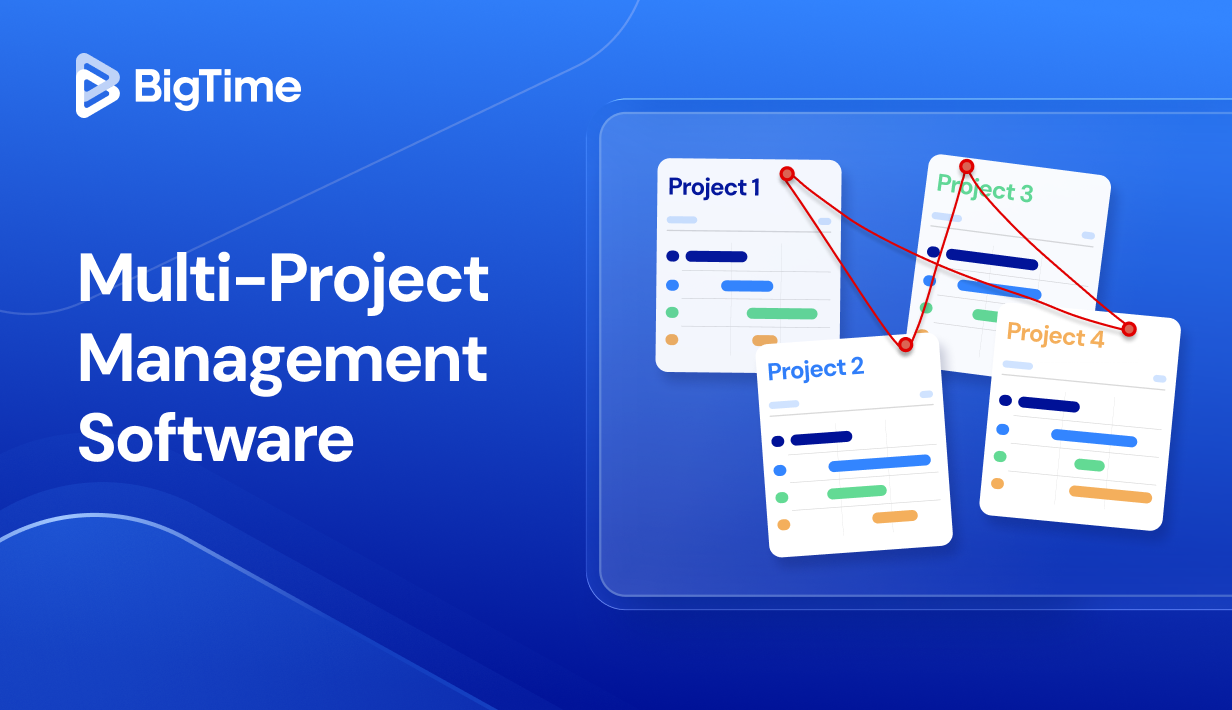
Running one project is hard enough. Running five or fifty complex projects at the same time is where things get messy: priorities shift, people get double-booked, budgets drift, and leaders ask for a single view of what’s on track and what’s at risk. That’s exactly where multi project management software earns its keep.
In this guide, we’ll break down what a multi-project management tool should actually do in real life and how to evaluate the best multi-project management software for your team in 2026. We’ll also compare leading options side by side, then go deeper into the strengths, limitations, and pricing models that matter when you’re managing multiple projects and multiple stakeholders at once.
What you’ll find in this article:
- What is multi-project management software?
- Must-have features in the best multi-project management software
- 2026 multi-project management software ranking
- Multi-project management software comparison (table)
- In-depth reviews of the top tools
What Is Multi-Project Management Software?
Managing multiple projects isn’t just “more tasks.” The difficulty comes from shared constraints: the same people spread across several initiatives, budgets competing for attention, and project dependencies that can delay an entire program when one deliverable slips. Single-project tools often can’t show these cross-project risks clearly.
Multi-project management software is a system that lets you plan, track, and optimize many projects at once from one workspace, with portfolio-level visibility into schedules, resources, budgets, risks, and outcomes. A multi-project management tool typically helps you:
- Prevent resource conflicts (double-booked staff),
- Standardize reporting across projects,
- Prioritize work using the same criteria,
- Track actuals vs. forecasts,
- Manage cross-project dependencies so one delay doesn’t silently cascade into several missed deadlines.
As a result, it helps project managers keep an eye on all the ongoing projects without losing sights of their details. In short, it’s a perfect asset for advanced project portfolio management.
What Features Should The Best Multi-Project Management Software Have?
A multi-project management tool has to do two jobs at the same time. It needs to support day-to-day delivery work (project planning, task management, resource management, etc.) while also giving leaders the visibility to make tradeoffs across the portfolio (staffing, budgets, priorities, risk). If either side is missing, the system becomes another place people update “for reporting,” not the place where decisions actually get made.
Here are the features that separate basic project tracking from the best multi-project management software in 2026:
Portfolio dashboards and calendars that roll up the truth
You should be able to see every active project in one place, with consistent status rules and real-time rollups. The best executive dashboards let you group and filter by client, team, or timeline so leaders can move from “overall health” to “what’s driving risk” in a few clicks. They also help managers monitor project progress and analyze project data in the real time. Look for configurable KPIs (schedule variance, budget burn, utilization impact, milestone slippage) and drill-down views that reduce status meetings and prevent surprises.
Dependency and milestone management across projects
Managing one project timeline is simple. Managing ten timelines with shared deliverables is not, especially when teams rely on each other’s outputs. The right project management software should support cross-project dependencies, milestone tracking, and clear ownership, so teams can see what is blocking them and what they are blocking without digging through separate plans. Traditional task management software will not be enough here!
Cross-project resource management and capacity planning
Multi-project work breaks when staffing is handled in spreadsheets. The right platform can help you with resource allocation by showing who is booked, who is available, and where demand is about to exceed capacity. Strong tools for managing projects also support skills, roles, and availability rules (PTO, part-time schedules, holidays), so you can staff based on reality, not hope. If you can model “what-if” scenarios (start dates, staffing changes, priority shifts) before making commitments, you’ll avoid the domino effect that derails delivery, improving project performance in the process.
Financial tracking tied to the workload management
If project budgets live outside your project system, project portfolio management become guesswork. The strongest project management apps connect project plans to financial reality by supporting budgets at the project and phase level, plus bill rates or cost rates by role, person, or engagement type. You want planned vs. actual tracking that updates as work happens, not after finance reconciles it. This makes it easier to spot margin pressure early and course-correct before overruns become unavoidable.
Time and expense capture that doesn’t create extra admin
In multi-project environments, time data is not just for payroll. It’s what turns progress into real cost, real utilization, and reliable finance and resource forecasting across the portfolio. While looking for best project management software for multiple projects, keep an eye out for fast timesheets, reminders, approvals, and clear policies that reduce back-and-forth. Expense capture should be just as practical, with simple submission and approval flows, categories that align to reporting, and visibility into how expenses affect project budgets in near real time.
Reporting that answers leadership questions in minutes, not days
A true multiple project management software doesn’t just show activity. It produces decision-ready reporting: utilization trends, forecast vs. actual comparisons, workload management by team, and portfolio performance by client, service line, or business unit. You want dashboards that update automatically, can be filtered quickly, and can be shared with stakeholders without heavy manual work. The best reporting also supports different audiences, meaning executives see rollups and trends while delivery teams can dig into drivers and take action.
Project planning and monitoring that stays realistic across the portfolio
The best multi project management software should make it easy to build solid project plans quickly, then keep those plans believable as priorities change. Look for flexible work breakdown structures (phases, tasks, milestones), multiple planning views (Gantt, timeline, kanban), and quick ways to adjust dates when scope shifts. Ideally, project planning connects directly to resourcing and budget forecasts, as well as monitoring project progress, helping everyone keep an eye not only on the project status, but also its earnings and expenses.
Integrations that keep delivery data connected
Multi-project teams rarely live in one app, so integrations are not a “nice to have.” Your platform should connect smoothly with the systems you already rely on, such as accounting, CRM, payroll, collaboration tools, or development trackers, so information stays consistent across the business. The goal is to reduce duplicate entry and keep delivery, resourcing, and financial data aligned.
2026 Multi Project Management Software Ranking
“Best” can mean very different things in a multi-project environment. For some teams, the priority is portfolio visibility and cross-project planning. For others, it’s resourcing, utilization, and profitability. That’s why this 2026 multi-project management software ranking is built around one practical question: Which platforms help you run multiple projects with fewer surprises, better staffing control, and clearer financial outcomes?
To keep the ranking useful, we prioritized tools that support multi-project operations, not just single-project task tracking. That includes portfolio dashboards, capacity planning, reporting depth, and the ability to connect delivery data to business performance.
Multiple Project Management Tools – Comparison
When you’re evaluating multi-project management software, side-by-side comparisons help you see what each platform is truly built for. Some tools excel at portfolio visibility and workflows, while others shine when you need tighter control over time, resourcing, and financial performance across many simultaneous projects.
| Tool | Description | Strengths | Limitations |
| BigTime | Purpose-built multi-project management software for services teams that need delivery + resourcing + time + financials connected. | Outstanding visibility across projects, utilization, and profitability; strong time/expense + billing workflows; reporting leaders can trust; team collaboration, resource planning, and more. | Not a “simple task list” app; best value comes when you use it as your operational system of record. |
| Smartsheet | Spreadsheet-style project/portfolio tracking with automation. | Flexible dashboards and templates. | Can turn into “spreadsheet sprawl”; limited native resourcing and financial control without extra tools/process. |
| Wrike | Work management with portfolio views and governance. | Solid views and workflows. | Can feel heavy to configure; financials and true capacity planning are not its core strength. |
| monday.com Work Management | Highly configurable project tracking with portfolio rollups. | Easy to customize workflows. | Consistency depends on strict standards; resource and budget depth is limited compared to specialist platforms. |
| Microsoft Project | Classic scheduling and PPM in the Microsoft ecosystem. | Strong for timeline planning. | Adoption can be uneven; portfolio reporting and collaboration can require significant setup. |
| Planview | Enterprise portfolio governance and strategic planning. | Strong top-down portfolio oversight. | Often complex and expensive; overkill for teams that need fast, practical multi-project execution. |
| Jira + Advanced Roadmaps | Portfolio planning for Jira-based agile work. | Great for engineering roadmaps. | Weak fit for services financials; reporting quality depends heavily on Jira hygiene. |
| ClickUp | All-in-one work management with dashboards. | Broad feature set. | Quality varies by configuration; portfolio reporting and governance can get messy at scale. |
| Asana | Collaboration-first project tracking with Portfolios. | Clean UX and stakeholder visibility. | Limited resource capacity and financial controls; multi-project management can hit a ceiling as complexity grows. |
| Kantata | PSA for services delivery with resourcing and financials. | PSA coverage for services teams. | Can be admin-heavy; some teams find usability and change management harder than expected. |
BigTime
Reviews: G2: 4.5/5, Capterra: 4.6/5.
Pros:
- Built for multi-project reality (not just task tracking). BigTime software makes it easy to track multiple projects in motion at once, with the staffing, time, and financial data needed to understand what’s truly on track and what needs attention.
- Excellent time + billing workflow for services teams. Time and expense capture is designed to be fast and consistent, which means you get cleaner actuals. That translates directly into more accurate billing and workflow automation.
- Stronger control over utilization and margins across projects. Connect staffing decisions to profitability and delivery outcomes, so you’re not just asking “are we busy,” but “are we staffed correctly, and is the work performing financially?”
- Reporting that supports real decisions. Instead of exporting data to “make it make sense,” BigTime helps centralize delivery, cost management and financial reporting so stakeholders can get answers quickly and consistently, even when you’re juggling many concurrent engagements.
- Features tailored to the needs of professional services companies. Whether you manage software development teams, marketing agencies or other human resources, BigTime’s work management software will help you make the most of your employees’ time with more than just a simple task management.
Cons:
- Integrations can require process discipline. If you’re syncing with accounting systems, you’ll want clean naming conventions, ownership, and a clear workflow so data stays aligned across systems (this is common for PSA tools, not unique to BigTime).
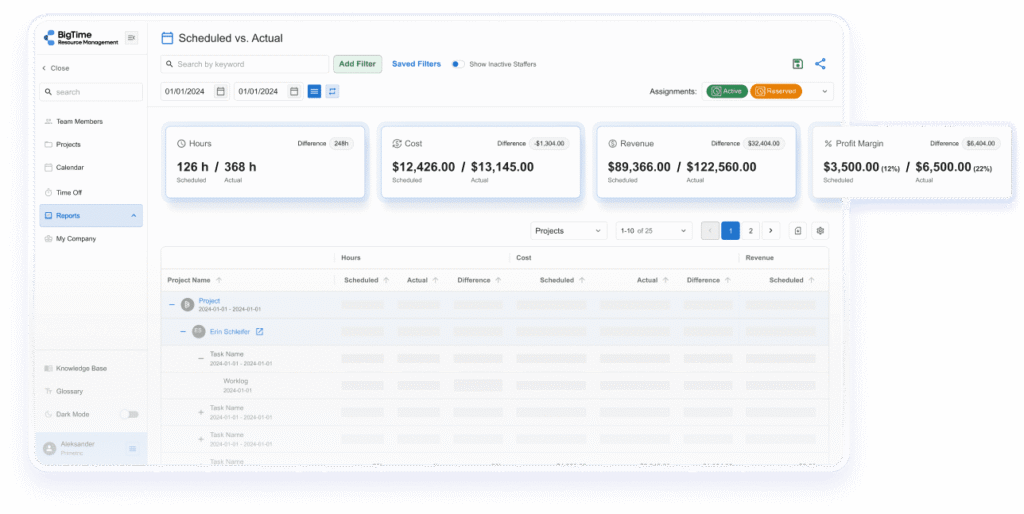
BigTime is a multi-project management tool designed for organizations that run many client-facing projects at once and need more than “project visibility.” It connects the operational pieces that usually break first at scale: time capture, resource utilization, billing, and performance reporting. For agencies, consultancies, IT services, and other professional services teams, this matters because your delivery engine is also your revenue engine. If you can’t see where time is going, how people are allocated, or how budgets are trending across the portfolio, you end up reacting late and protecting margins becomes guesswork.
What makes BigTime stand out in the best multi-project management software conversation is that it treats multi-project delivery as a business system, not just a planning interface. You can standardize how projects are structured, bring consistency to approvals and time entry, and then roll that information up into reporting leaders can actually use. BigTime also leans into other advanced features, such as financial forecasting and project planning, helping teams identify staffing pressure and margin risk earlier, when you still have room to adjust scope, staffing, or project timelines.
Key Features
- Time & expense tracking: Fast entry options and structured approvals help keep actuals accurate, which improves billing and portfolio reporting quality.
- Project management: Test out different scenarios, plan projects and make changes as they evolve without making a single mistake – our notifications will warn you once they happen.
- Project budgeting and planned vs. actuals: Track delivery performance against budgets so you can spot cost overruns and margin pressure early across multiple projects.
- Resource planning and utilization visibility: Support smarter staffing with advanced resource management tools by viewing allocation and demand across projects in Gantt charts, calendars and customizable dashboards.
- Invoicing and billing workflows: Turn approved time into invoices with consistent templates and workflows, which reduces billing delays and revenue leakage.
- Dashboards and project reporting: Portfolio-friendly reporting helps leadership see progress, risk, and performance without rebuilding spreadsheets every week, simplifying risk management in the process.
- Advanced integration capabilities: Combine BigTime with your favorite accounting, HR or time tracking tools to create a bespoke digital environment for your business.
Pricing: BigTime pricing is published by plan on third-party directories, commonly starting around $20 per user/month for an entry package, with higher tiers adding resource planning, advanced reporting, and budgeting features.
Smartsheet
Reviews: G2: 4.4/5, Capterra: 4.5/5.
Pros:
- Familiar, flexible structure for tracking many workstreams. Smartsheet software works well when teams want a spreadsheet-like way to organize project data and manage tasks.
- Strong for operational workflows and internal reporting. If your “multi-project” need is mostly coordinating updates, approvals, and visibility, Smartsheet can cover a lot without forcing a rigid methodology.
Cons:
- Multi-project control depends on how disciplined your setup is. Without strict governance, Smartsheet can quickly become a collection of disconnected sheets that are hard to roll up cleanly.
- Resource management and true portfolio controls often mean add-ons. Capabilities like Resource Management and portfolio tooling are commonly positioned as additional products rather than native, always-on functionality.
- Limited financial depth for services delivery. If you need utilization-driven forecasting, margin visibility, or billing workflows across multiple client projects, you’ll likely end up stitching together extra tools or building custom processes.
Smartsheet is a popular multi-project management tool for teams that like the spreadsheet model and want to layer in automation, dashboards, and collaboration. It can be effective for organizations that primarily need structured tracking, status rollups, and standardized reporting across many initiatives, especially when the work is operational and process-driven.
Where Smartsheet tends to hit friction is when multi-project management becomes a resource-and-financial problem, not just a tracking problem. Once you need capacity planning across shared teams, consistent portfolio governance, and reliable performance reporting without manual upkeep, the experience depends heavily on configuration, add-ons, and ongoing administration.
Key Features
- Sheets, reports, and dashboards: Good for building portfolio-style rollups, but the quality of reporting depends on how consistently teams structure data.
- Automation workflows: Useful for approvals, reminders, and update requests, though advanced workflows can become complex to maintain as you scale.
- Multiple views (Gantt/table/board/timeline): Helpful for different stakeholders, but timeline planning still relies on strong underlying data hygiene.
- Resource Management add-on: Adds capacity/workload visibility, but it’s positioned as a separate layer with its own setup considerations and limitations.
Pricing: Smartsheet lists Pro from $9/member/month (billed annually) or $12 (billed monthly), and Business from $19/member/month (annual) or $24 (monthly). Enterprise is custom pricing, and advanced capabilities and add-ons may increase total cost.
Wrike
Reviews: G2: 4.2/5, Capterra: 4.4/5.
Pros:
- Strong structure for complex cross-team work. Wrike software is good at organizing large volumes of tasks, approvals, and workflows across multiple teams and unlimited users.
- Helpful portfolio-style visibility (with the right setup). Executive dashboards, custom workflows, and request forms can support multi-project intake and tracking when your organization is disciplined about templates and standard fields.
Cons:
- The learning curve is real. Wrike can feel “feature-dense,” and many teams spend significant time configuring spaces, workflows, and automations before the system feels intuitive at scale.
- Resource/capacity planning isn’t always straightforward. While Wrike positions resource and capacity planning as part of its value, many organizations still need careful setup (and sometimes higher-tier packaging) to allocate resources and create task assignments across many projects.
- Not designed as a financial-first multi-project management tool. If your definition of multi-project success includes utilization-driven forecasting, margin control, and billing workflows, Wrike typically requires additional systems or heavier operational workarounds.
Wrike is an “intelligent work management” platform that can support multi-project management when your priority is coordinating execution across teams, standardizing workflows, and keeping communication anchored to the work. It’s often used by marketing, operations, and cross-functional delivery groups that need a central hub for requests, approvals, and progress tracking across many concurrent initiatives.
Where Wrike becomes less ideal is when multi-project management shifts from visibility to operational control. If you need dependable resource forecasting across shared teams, or you want delivery and financial performance tightly connected, Wrike can feel like a powerful work layer that still leaves the hardest parts (capacity realism, portfolio governance, financial accountability) to process and add-ons.
Key Features
- Dashboards & reporting: Good for leadership snapshots, but the quality of rollups depends heavily on standardized fields and consistent usage.
- Request forms & intake: Useful for routing work into the right team/projects, though it can take time to design and maintain at scale.
- Automations & custom workflows: Helps reduce manual follow-ups, but complexity increases quickly as you layer on exceptions and approvals.
- Resource & capacity planning: Positioned as a capability, but typically needs careful configuration to be dependable across many projects.
Pricing: Wrike paid plans start around $9.80/user/month and scaling up (often $20+ per user/month) as you move into higher tiers; enterprise packages are typically quote-based.
monday.com Work Management
Reviews: G2: 4.7/5, Capterra: 4.6/5.
Pros:
- Highly visual, highly configurable boards for multi-project tracking. monday.com software is great when you want to shape your own workflows, dashboards, and views (timeline, workload, etc.) without heavy technical setup.
- Strong for “work intake” and coordination. If your multi-project management tool needs to centralize requests, updates, and approvals, monday.com can keep stakeholders aligned and reduce the chaos of scattered communication.
Cons:
- Easy to use interface, easy to standardize poorly. In multi-project environments, monday.com can drift into inconsistent boards, fields, and status logic, which makes portfolio rollups less reliable unless someone owns governance.
- Key capabilities can feel plan-gated as you scale. Many teams discover the real power (automation depth, controls, views) only after moving into higher tiers, so the total cost can climb quickly with team size.
- Not a financial-first multi-project management software. If you need deep budget tracking, margin control, and billing workflows across many client projects, you’ll likely pair it with PSA/accounting tools rather than treating monday.com as the system of record.
monday.com Work Management is a flexible platform built around customizable boards and “building blocks” that teams can adapt to run projects in their own style. For organizations managing many concurrent initiatives, it can provide a clean, visual way to track progress, coordinate ownership, and keep stakeholders updated without relying on a rigid methodology. It’s especially popular with teams that want a configurable workspace more than a prescriptive project framework.
Where monday.com becomes less convincing as multi-project management software is when multi-project complexity turns into portfolio discipline. The platform can absolutely support portfolio views, but the quality of those rollups depends on how consistent your workspace design is across teams. If each department builds boards differently, leadership reporting becomes fragile and you end up back in manual reconciliation mode.
Key Features
- Boards + multiple views (timeline, workload, kanban): Useful for switching between project execution and oversight, but portfolio accuracy hinges on consistent fields and statuses across projects.
- Dashboards and reporting widgets: Great for visual snapshots; however, dashboards can become “presentation layers” if the underlying board structure isn’t standardized.
- Automations and integrations: Helpful for reducing repetitive follow-ups, though multi-team automation logic can get complicated fast as exceptions pile up.
- Portfolio tooling: Can improve multi-project visibility, but it still requires strong data hygiene to avoid misleading rollups.
Pricing: monday.com lists Work Management plans including Free, and paid tiers starting at $8/seat/month (Basic), with Standard, Pro, and Enterprise available depending on feature needs.
Microsoft Project (MS Project)
Reviews: G2: 4.0/5, Capterra: 4.4/5.
Pros:
- Excellent for detailed project scheduling and “traditional” project plans. Microsoft Project software is strong when you need critical path logic, baselines, task dependencies, and structured timelines that hold up in complex, plan-driven environments.
- Portfolio story is solid on paper (especially for PMO use). Microsoft positions Project for portfolio optimization and scenario modeling, which can be valuable for prioritization discussions at leadership level.
Cons:
- Multi-project visibility is rarely plug-and-play. To get consistent portfolio reporting, teams often need strict standards, dedicated administration, and buy-in across departments, otherwise “one view of the truth” turns into multiple versions of the plan.
- Important capabilities are tied to higher plans. Roadmaps, program management, portfolio management, and enterprise resource management are positioned in the higher tiers (Plan 3/Plan 5), which can push costs up quickly for larger teams.
- Not a natural fit for services-style financial control. Even though Microsoft includes “project financials, budgeting, and costing” in higher plans, it’s not built like a PSA, so many services teams still rely on separate systems for time, billing, and margin visibility.
Microsoft Project is best understood as a planning-first system. It’s built to create structured project schedules and manage complexity through dependencies, baselines, and formal project controls. For organizations with a PMO and a consistent methodology, it can support multi-project planning at scale, especially when leadership wants predictable structure and governance.
Where it becomes challenging as multi-project management software is adoption and consistency. If only a portion of the organization uses it well, portfolio rollups become fragile. And if you’re looking for an all-in-one multi-project management tool that naturally connects staffing reality, delivery execution, and financial outcomes, Microsoft Project often ends up as the scheduling layer inside a broader stack.
Key Features
- Portfolio optimization & scenario modeling: Designed to weigh proposals against strategic drivers, costs, and resource constraints, which is useful for prioritization conversations.
- Roadmaps: Higher-tier plans include roadmap functionality to visualize programs and timelines across projects to ensure strategic alignment.
- Baselines and critical path: Plan 3+ includes baselines/critical path, which helps teams track variance and manage schedule risk.
- Advanced portfolio and resource management: Plan 5 highlights advanced portfolio management and enterprise resource management/allocation capabilities.
Pricing: Microsoft lists Planner Plan 1 at $10 user/month (paid yearly), Planner and Project Plan 3 at $30 user/month (paid yearly), and Planner and Project Plan 5 at $55 user/month (paid yearly). A basic Planner experience is also included with Microsoft 365 plans.
Planview
Reviews: G2: 3.6/5, Capterra: 4.1/5.
Pros:
- Built for enterprise portfolio governance. Planview software is designed to connect strategy, funding, resources, and execution across large portfolios, which can be useful for PMOs that need formal controls, approvals, and audit-friendly reporting.
- Strong emphasis on prioritization and resource optimization. For organizations managing complex demand across departments, Planview’s positioning around balancing capacity and aligning investments to outcomes is a legitimate strength.
Cons:
- Heavier rollout and admin overhead than most teams expect. G2’s product page shows an average time to implement of 4 months, which aligns with the reality that Planview often requires dedicated ownership, configuration, and governance to succeed.
- User experience and flexibility concerns show up in reviews. On G2, the “pros and cons” section includes themes like poor UI/layout and learning curve, which can slow adoption outside the core PMO audience.
- Cost can be hard to predict upfront. Pricing is typically packaged at an enterprise level and often quote-based, with total cost influenced by modules and scale; third-party breakdowns exist, but you should expect a higher TCO than lightweight work management tools.
Planview is a multi-project management tool that’s really aimed at enterprise strategic portfolio management, not lightweight project execution. It’s a fit when your organization needs tight governance across many programs, formal prioritization, and leadership reporting that ties projects back to strategic outcomes.
Where Planview can disappoint is in day-to-day practicality. For teams that need fast adoption, resource efficiency, and “manage multiple projects without a PMO,” Planview can feel like a system you have to operate, not a tool that naturally supports how teams work. The value is there, but it’s earned through process maturity, configuration, and ongoing administration.
Key Features
- Strategic portfolio planning & prioritization: Helps link initiatives to strategic goals and evaluate tradeoffs across value, risk, and capacity.
- Resource optimization and capacity balancing: Supports enterprise-level views of demand vs. available resources, useful for governance-driven staffing decisions.
- Portfolio analytics and executive reporting: Built for leadership visibility, with a focus on outcomes and portfolio performance.
- Cross-model execution support: Markets support for traditional and agile execution modes in one portfolio context (useful, but adoption depends on configuration).
Pricing: Planview pricing is commonly described as enterprise/quote-based, varying by product (e.g., Portfolios vs. other Planview modules), number of users, and functionality. Third-party pricing analyses exist, but most buyers should treat Planview as a higher-investment platform and validate total cost during scoping.
Jira + Advanced Roadmaps (Plans)
Reviews: G2: 4.3/5, Capterra: 4.4/5.
Pros:
- Excellent for agile execution across many teams. Jira software is a strong fit when your “multi-project” world is really a network of backlogs, sprints, releases, and shared engineering dependencies.
- Cross-project planning exists (but it’s tier-dependent). Advanced Roadmaps (now commonly referred to as Plans) can pull work from multiple boards/spaces/filters and model dependencies and scenarios in a sandbox-like planning view.
Cons:
- Multi-project visibility is only as good as your Jira hygiene. If teams don’t use consistent issue types, fields, estimates, and workflows, portfolio rollups quickly become misleading.
- Steep learning curve for non-technical teams. Even Capterra flags complexity and navigation challenges, which is why many orgs end up relying on Jira admins or power users to keep the system usable.
- Not built for services-style financial management. If you need utilization-driven forecasting, margin visibility, and billing workflows with advanced analytics across multiple client projects, Jira usually becomes “the delivery tracker” while financial truth lives elsewhere.
Jira is a multi-project management tool that shines in product and engineering environments where work is naturally broken into issues, epics, and releases. It’s powerful for coordinating execution across multiple teams, especially if your organization already runs on Atlassian (Confluence, Bitbucket, etc.). Where it tends to frustrate buyers is when they expect it to behave like an end-to-end portfolio operations platform out of the box.
Advanced Roadmaps (Plans) helps Jira move closer to portfolio planning by offering cross-team plans with dependency mapping, capacity-aware scheduling, and scenario modeling. That said, it’s still a planning layer that depends heavily on clean underlying data, and it’s explicitly positioned as a Premium/Enterprise capability, which can raise your effective cost as your team grows.
Key Features
- Plans (Advanced Roadmaps): Combine work from multiple sources into one plan to map dependencies, allocate capacity, and explore scenarios before committing changes.
- Boards + agile workflows: Scrum/Kanban boards with customizable workflows support multi-team execution, but consistency requires governance.
- Hierarchy and roadmap structure: Plans can expand hierarchy (for example, initiatives above epics) for higher-level portfolio views.
- Filters/JQL-driven visibility: Powerful querying can create tailored portfolio slices, but it can be hard for casual users to maintain.
Pricing: Capterra lists Jira starting at $7.53/user/month (Standard) and $13.53/user/month (Premium), with Data Center listed as a flat annual amount; free trial and free version options are also noted.
ClickUp
Reviews: G2: 4.7/5, Capterra: 4.6/5.
Pros:
- All-in-one flexibility for multi-project tracking. ClickUp software can handle a lot in one place: tasks, docs, dashboards, and multiple project views, which appeals to teams trying to reduce tool sprawl.
- Strong customization for different teams. If marketing wants boards, PMs want Gantt, and ops wants lists, ClickUp can support all of it, as long as you standardize the underlying structure.
Cons:
- Easy to create chaos at portfolio scale. ClickUp’s flexibility is also its biggest weakness: without strict templates, naming rules, and ownership, “multi-project management” turns into a cluttered workspace where reporting becomes hard to trust.
- Reporting and dashboards have plan limits and performance considerations. ClickUp documents that dashboard availability/limits vary by plan and role, and it also notes dashboard performance limitations, which is a real issue when you’re rolling up large portfolios.
- Financial control is not its home turf. ClickUp is not built as a services-first system, so utilization forecasting, margin visibility, and billing workflows usually require external tools or manual workarounds.
ClickUp is a popular multi-project management tool for teams that want one configurable workspace to run work across departments. In lighter multi-project environments, it can be a fast way to centralize tasks, standard operating procedures, and stakeholder updates with minimal friction. It also offers enough views and customization to fit different working styles across the organization.
Where ClickUp often disappoints as multi-project management software is when leaders need consistent, portfolio-level truth without constant upkeep. Because almost everything is customizable, the quality of rollups depends heavily on governance. If every team builds their own statuses, fields, and hierarchy, portfolio reporting becomes more “interpretation” than “insight,” and the system can feel noisy instead of clarifying.
Key Features
- Dashboards: Great for visibility, but plan-based limits and performance constraints can show up quickly in multi-project rollups.
- Multiple views (List/Board/Gantt/Calendar): Helps stakeholders consume information in the format they prefer, but only works well when the data model is standardized.
- Automation: Useful for reducing routine admin (assignments, reminders, status changes), though automation strategy can get complex fast as exceptions pile up.
- Docs + collaboration in-context: Keeps documentation close to execution, but teams still need rules to avoid duplicating docs and scattering decisions.
Pricing: ClickUp lists a Free Forever plan, plus paid plans including Unlimited and Business, with Enterprise as custom pricing. Plan availability and seat rules are defined at the workspace level (you can’t mix plans within one workspace).
Asana
Reviews: G2: 4.4/5, Capterra: 4.4/5.
Pros:
- Very strong for cross-functional execution across many projects. Asana software is excellent when you need a clean place to coordinate work, standardize updates, and keep stakeholders aligned without forcing a rigid PMO-style process.
- Portfolio-friendly features exist (especially on higher tiers). Portfolios, reporting, and workload features can support multi-project visibility when teams use consistent templates and fields.
Cons:
- Multi-project “control” hits a ceiling fast. Asana is great at visibility and coordination, but it’s not built to be a financial-and-resourcing system of record, so services teams often end up pairing it with other tools for utilization, forecasting, and billing.
- Capacity planning is both tier-gated and not fully connected. Asana’s own documentation notes that capacity plans and workload are not connected, and capacity planning is available only on Enterprise tiers, which can make true portfolio resourcing harder than buyers expect.
- Costs can climb as you unlock “portfolio” features. Starter and Advanced plans are priced per user, and Enterprise is quote-based, so scaling multi-project management across many stakeholders can get expensive.
Asana is a collaboration-first multi-project management tool that shines when you need teams to actually follow a consistent workflow across many projects. It’s particularly good for marketing, operations, and cross-functional programs where visibility, ownership, and predictable updates matter more than deep cost accounting.
Where Asana becomes less convincing as multi-project management software is when leaders need capacity and performance management that ties directly to real operational constraints. You can absolutely build portfolio views, but resourcing and financial depth typically require enterprise tiers, additional tooling, or manual process to close the gaps.
Key Features
- Portfolios: Monitor multiple projects in one place for higher-level progress tracking, but portfolio reporting is only as reliable as your team’s data consistency.
- Timeline (Gantt-style) view: Useful for planning and dependencies across complex work, though it’s more “work visualization” than a true portfolio scheduling engine.
- Workload + capacity planning: Helps visualize staffing, but capacity planning is Enterprise-tier and currently not connected to workload, limiting real forecasting precision.
- Dashboards and reporting: Helpful for stakeholder updates, but advanced reporting value increases notably on higher plans.
Pricing: Starter is $10.99/user/month billed annually ($13.49 monthly). Advanced is $24.99/user/month billed annually ($30.49 monthly). Enterprise and Enterprise+ are quote-based.
Kantata
Reviews: G2: 4.2/5, Capterra: 4.2/5.
Pros:
- Deep PSA coverage for services firms. Kantata software combines project delivery with resource and financial management, which can help when you need more than task tracking across many client projects.
- Strong fit for complex org structures. It’s positioned for professional services organizations that want configurable processes and enterprise-grade control, including Salesforce-native options for some deployments.
Cons:
- Heavier admin and change management than many teams want. Kantata is powerful, but that power often comes with setup complexity, role design, and ongoing governance to keep the system clean.
- Value perception can be mixed. Capterra highlights a lower “value for money” score compared to the broader project management category average, which is worth pressure-testing during evaluation.
- Not the simplest everyday experience. For teams that want quick adoption and lightweight multi-project coordination, Kantata can feel more like an operational system than an easy work hub.
Kantata is a professional services automation platform that can work as a multi-project management tool when you need resourcing and financial oversight alongside delivery execution. In the right environment, it supports multi-project operations with structured processes, robust configuration, and reporting designed for services performance, not just “project progress.”
The tradeoff is practicality. Kantata typically suits organizations willing to invest in governance and administration, and it can be less forgiving if your teams want fast setup, simple workflows, and minimal overhead. If your priority is “run lots of projects with clean data and strong controls,” it can fit. If your priority is “move fast with low admin,” it may feel too heavy.
Key Features
- Resource management: Helps plan and manage staffing across concurrent projects, but effectiveness depends on disciplined roles, availability rules, and data hygiene.
- Project financial management: Built to connect delivery activity to financial performance, though many teams still need clear internal standards to keep reporting consistent.
- Reporting and visibility: Provides operational reporting for services orgs, but the signal-to-noise ratio depends on how well your processes are standardized.
- PSA platform positioning: Marketed as a profitability and performance platform for professional services, not a lightweight project tracker.
Pricing: Kantata pricing is custom/quote-based (request pricing). Some third-party breakdowns discuss tiers, but most buyers should expect scoping-based pricing tied to modules and scale.
Which Multi-Project Management Software Is The Best?
Multi-project delivery usually doesn’t fail because a task is missing. It fails because the portfolio gets out of sync: people are double-booked, time data is incomplete, and budgets slip before anyone sees the trend. The best multi project management software prevents that by connecting the work, the staffing, and the numbers in one place.
That’s why BigTime is the best multi project management software on this list for project-based and professional services teams. BigTime is built for running many projects at once with real operational control: dependable time and expense capture, clear utilization and resourcing visibility, and budget/performance tracking you can trust across the portfolio. If you want a multi project management tool that helps you make faster, smarter decisions with fewer surprises, BigTime is the strongest choice.
Book a weekly demo and start a free trial.
Multi-Project Management Software – FAQ
What is multi-project management software?
Answer
What features should be included in perfect multi-project management tools?
Multi-project management software is a system that helps organizations plan, track, and optimize multiple projects at the same time from one workspace. It centralizes portfolio visibility (status, timelines, risks), shared resources (who is available vs. overloaded), and performance signals (budgets, progress, delivery health) so leaders can make tradeoffs faster and teams can avoid cross-project conflicts.
What is the best multi-project management software?
- Portfolio dashboards: Roll up progress, risks, and milestones across all projects in a consistent view.
- Resource planning and utilization: Show capacity vs. demand so you can prevent double-booking and plan realistically.
- Project planning views: Support Gantt/timelines and flexible structures (phases, milestones, dependencies) that scale across many projects.
- Reporting and drill-down: Provide leadership-ready reporting with the ability to click into what’s driving delays or overruns.
- Standard templates and governance: Keep project setup and status definitions consistent so portfolio rollups stay reliable.
- Time and cost tracking: Connect delivery activity to actuals so forecasting and performance decisions are based on real data.
What is the best multi-project management software for small business?
BigTime is the best multi-project management software for teams that need more than visibility. It connects multi-project delivery to operational control by bringing together time tracking, utilization and resourcing insights, budgeting, and reporting in one platform, which is exactly what breaks first when you scale to many simultaneous projects.
What is the best multi-project management software for medium-sized firms?
For small businesses managing multiple client projects, BigTime is the best choice because it helps you stay disciplined without adding chaos: time capture is straightforward, reporting stays consistent, and you get the utilization and budget visibility that small teams need to protect margins and avoid overcommitting.
What are some popular multi-project management tools?
- BigTime: A standout for multi-project services delivery, with strong time, resourcing, and financial visibility that helps teams run a portfolio with fewer surprises.
- Smartsheet: Flexible and familiar, but can devolve into disconnected sheets and inconsistent rollups without strict governance.
- Wrike: Strong workflows and structure, though it can feel heavy to configure and isn’t built as a financial-first multi-project system.
- monday.com Work Management: Highly customizable, but portfolio reporting quality depends on standardization (and costs can rise as you unlock higher-tier features).
- Asana: Excellent for coordination, but deeper resourcing and operational controls can be limited once multi-project complexity ramps up.