

Getting paid should feel simple: send invoices, make it easy to pay, and move on. In reality, late payments, unclear payment details, and manual follow-ups can turn accounts receivable into a time sink, especially for small businesses juggling multiple customers and multiple invoices at once. In 2026, billing and invoicing software fixes that gap.
The right invoicing and billing software helps you create professional invoices from invoice templates, accept payments online through familiar payment gateways, and automate payment reminders (including automatic payment reminders) so you get paid faster. Add recurring billing and recurring invoices, plus invoice tracking for real-time payment status and payment history, and you’ve got a cleaner billing process, fewer overdue invoices, and steadier cash flow.
What Is Billing and Invoicing Software?
Billing and invoicing software is a system that helps you create invoices, send invoices to invoice clients, and manage the full billing process from first invoice to final payment. In one place, you can generate professional invoices using invoice templates (often with customizable templates), track payments and payment status, store customer information, and see payment history for every invoice. Most online billing and invoicing software also supports recurring billing and invoices, so you can automate repeat work, subscriptions, retainers, and recurring payments without rebuilding documents each month.
In practical terms, invoice and billing software solves the problems that slow cash flow down, including:
- Late payments and payment delays: Built-in payment reminders, invoice reminders, and automatic reminders help reduce overdue invoices and outstanding invoices without awkward follow-ups.
- Slow collections: Tools that accept payments online (including card payments, bank payments, ACH payments, and sometimes Apple Pay) help customers pay immediately instead of waiting for bank transfers or checks.
- Messy invoice tracking: A clear invoice tracking view makes it easier to monitor multiple invoices across multiple customers simultaneously, so nothing slips through the cracks.
- Manual admin work: Features like batch invoicing, invoice processing, deposit requests, and purchase orders reduce repetitive tasks and improve accurate billing.
- Unclear pricing and surprises: The best billing software is transparent about monthly fees and avoids hidden fees that show up once you scale.
Whether you run a service firm tracking billable hours, a growing team managing multiple customers, or a business with several sales channels, the right invoicing software helps you request payment confidently, keep records clean, and improve cash flow while you focus on delivery.
What Features Should the Best Billing and Invoicing Software Have?
The best billing and invoicing software is not just a way to create invoices. It’s a system that keeps your billing process consistent, makes it simple to accept payments, and gives you instant clarity on payment status across every customer. If you want to get paid faster (and spend less time chasing overdue invoices), these are the features that matter most in 2026.
Professional invoice creation with strong templates
A top-tier project invoicing software should let you create professional invoices that match your brand without design work or formatting headaches. Look for invoice templates you can reuse across services, plus customizable templates for different client types, project phases, or sales channels. It also helps if you can standardize payment details (terms, due dates, tax fields, discounts) so every invoice clients receive is clear, consistent, and easy to pay.
Flexible payment options and modern payment gateways
To accept payments online, the platform needs reliable payment gateways and multiple ways for customers to pay immediately. At minimum, it should accept credit cards and bank payments, and support online payments via bank transfers and ACH payments, with clear confirmation of payment status. If your customer base expects convenience, options like Apple Pay can reduce payment delays by making checkout faster on a mobile device, which often translates directly into getting paid sooner.
Recurring billing and recurring invoices for repeat work
If you bill retainers, subscriptions, or ongoing services, recurring billing is essential for consistency and accurate billing. Look for recurring invoices with controls for frequency, start and end dates, usage notes, and the ability to adjust pricing without rebuilding everything from scratch. Strong recurring payments support also matters, so you can reduce manual steps, keep payment history clean, and improve cash flow with predictable invoicing.
End-to-end invoice tracking and real-time payment visibility
Great invoice tracking shows more than “sent” or “paid.” You want a clear view of payment status, overdue payments, and outstanding invoices, plus the ability to track payments across multiple invoices in one dashboard. This is especially important if you manage multiple projects simultaneously, because you need to spot problems early, identify which invoice clients are behind, and know exactly what to follow up on.
Batch invoicing and fast workflows for scale
When you need to send invoices to dozens (or hundreds) of customers, batch invoicing can save hours every month. The best billing software supports generating multiple invoices at once while pulling the right customer information, rates, and key invoice data automatically. This reduces repetitive admin work and helps prevent revenue leakage caused by missed line items, inconsistent pricing, or last-minute manual edits.
Controls, permissions, and clean collaboration
As teams grow, billing becomes a shared workflow, and that introduces risk if everyone can edit everything. Look for user permissions that control who can create invoices, approve invoice processing, change payment details, or send invoices to customers. The result is fewer mistakes, better accountability, and a more consistent customer experience, especially when multiple people touch the billing process.
Reporting that supports decisions, not just downloads
At a minimum, you should get visibility into cash flow trends, overdue invoices, and collections speed, so you can see what is improving and what is slipping. The best platforms offer report generation and comprehensive executive dashboards that help you identify repeat offenders (customers who pay late), understand average time-to-pay, and spot patterns behind payment delays. That insight lets you tweak your billing process, refine payment terms, and forecast revenue more confidently.
2026 Billing and Invoicing Software: Ranking
For this ranking, we will treat billing and invoicing software like a revenue engine, not a document generator. The tools below were selected based on how well they help businesses track expenses, send invoices, accept payments online, and reduce the real-world friction that leads to overdue invoices and cash flow surprises.
To keep the list practical (and fair for both small businesses and growing teams), the 2026 scoring focuses on: how quickly you can create professional invoices from invoice templates; whether the platform supports recurring billing and recurring invoices without workarounds; the strength and reliability of payment gateways (including the ability to accept credit cards, bank payments, ACH payments, and other online payments); and the visibility you get from invoice tracking, payment history, and reporting around outstanding invoices and payment delays.
Billing and Invoicing Software Comparison
Rankings are helpful, but a side-by-side view makes the differences obvious. The table below compares the best billing and invoicing software options for 2026 based on what most teams actually need: how easily they can create professional invoices, send invoices in volume, accept payments online through trusted payment gateways, automate payment reminders, and track payments from first invoice to final settlement without messy workarounds.
| Tool | Description | Strengths | Limitations |
|---|---|---|---|
| BigTime | PSA-grade billing software for services teams that need accurate billing and strong invoice tracking. | Excellent for billable hours and services billing; strong workflows and approvals that reduce revenue leakage; clear reporting to improve cash flow and help teams get paid faster. | Not a “bare-bones invoicing app”; best fit when you want deeper project/time + invoicing and billing software in one platform. |
| QuickBooks Online | Accounting platform with invoicing bolted in. | Familiar for many small businesses; can send invoices and accept payments online; basic payment status visibility. | Invoicing workflows can feel secondary; automation features and customization vary by tier; monthly fees and add-ons can add up quickly. |
| Xero | Accounting-first tool with invoicing features. | Clean interface; decent online invoices; solid reconciliation for bank transfers. | Can be rigid for invoice and billing software workflows; recurring billing and reminders often require extra setup; not ideal for teams needing deeper invoice processing. |
| FreshBooks | Simple invoicing software aimed at freelancers. | Easy to create professional invoices; straightforward payment reminders; quick setup. | Limited depth for batch invoicing, approvals, or complex billing process needs; reporting can feel light once you manage multiple customers simultaneously. |
| Zoho Invoice | Budget-friendly online billing and invoicing software. | Good invoice templates; recurring invoices and automatic reminders are available; works fine for basics. | Can feel constrained outside the Zoho ecosystem; usability and reporting can be inconsistent; less polished for scaling invoice tracking across multiple invoices. |
| Stripe Invoicing | Invoicing layer tied to Stripe payments. | Strong payment gateways; easy to accept credit cards and online payments; good payment links. | Not a full invoicing and billing software system; weaker for accounts receivable workflows, invoice tracking, and recurring billing unless you add more tooling. |
| Square Invoices | Lightweight invoicing tied to Square. | Fast to request payment; easy to accept payments on a mobile device; good for quick jobs. | Limited for invoice processing, reporting, and complex recurring billing; “simple” can turn into “too simple” as you grow. |
| BILL | Payments and approvals platform with AR/AP focus. | Helpful approvals; decent controls for bank payments and invoice processing. | Can be heavy and costly for teams that mainly need invoicing software; invoice templates and customer-facing invoicing experience can feel secondary. |
| Wave | Entry-level free invoicing software. | Free account option; quick to send a first invoice; basic invoice templates. | Limited automation features, reporting, and payment tracking; recurring invoices and scaling AR often push you to switch tools later. |
| PayPal Invoicing | Invoicing inside PayPal. | Familiar checkout for some customers; quick online payments; easy send-and-pay flow. | Narrow payment ecosystem; weak invoice tracking and batch invoicing; limited controls for recurring billing and overdue invoices management. |
BigTime
Reviews: G2: 4.5/5, Capterra: 4.6/5.
Pros:
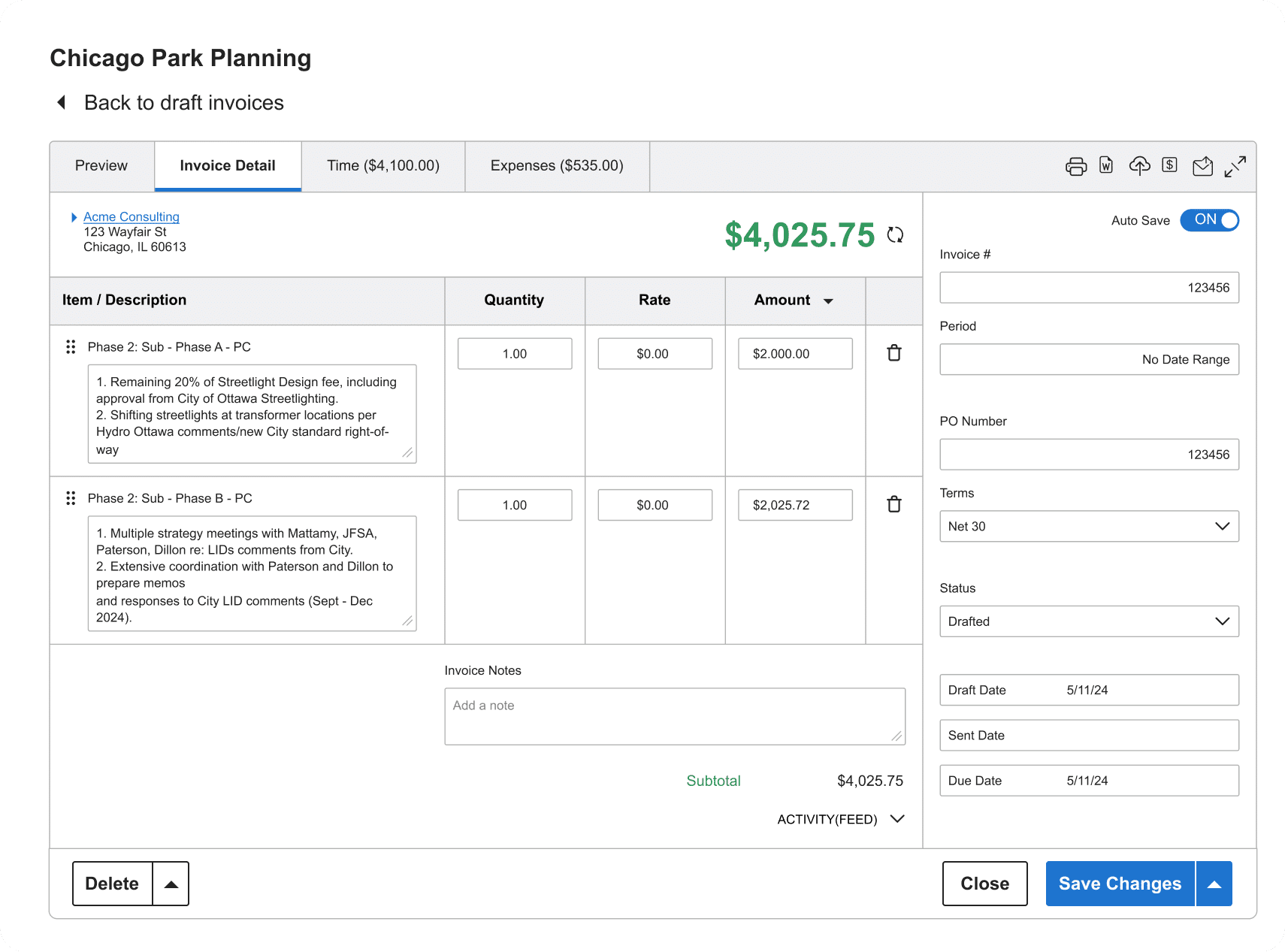
- Built to help services teams get paid faster. BigTime connects time tracking, billable hours, expenses, and approvals directly to invoice creation, so you can send invoices with confidence and reduce revenue leakage caused by missed work or inconsistent rates.
- Stronger control over the billing process. Multi-level approvals and structured workflows help teams maintain accurate billing, even when you’re invoicing multiple customers simultaneously or handling multiple invoices across projects.
- Better cash flow visibility. Real-time project reporting helps you monitor outstanding invoices, overdue payments, and accounts receivable trends, so you can spot payment delays early and improve cash flow over time.
- Automation where it counts. Built-in invoice reminders and automatic payment reminders reduce late payments without turning collections into a manual chore.
- Modern payments support. BigTime can integrate with payment gateways so clients can accept payments online from professional invoices, including credit cards and ACH payments, which removes friction and shortens time-to-pay.
Cons:
- Not the simplest “free invoicing software” option. BigTime is intentionally more robust than lightweight invoicing tools, so it can be more than you need if you only want to create invoices occasionally.
BigTime is billing and invoicing software designed for professional services teams that want their invoicing and billing software to run like a system, not a set of disconnected steps. Instead of treating an invoice as a standalone document, BigTime ties together time tracking, project tracking, expenses, and approvals so invoice clients get the right charges, with the right context, at the right time. That structure is what helps many teams get paid faster, especially when they’re juggling multiple customers, complex billing rules, or a mix of project and retainer work.
Where BigTime really stands out is in operational control and visibility. It supports a disciplined billing process that reduces back-and-forth, keeps key invoice data consistent, and helps teams manage payment status across a growing book of business. With built-in invoice tracking, you can stay on top of overdue invoices and outstanding invoices without living in spreadsheets. And because it’s built for services, it’s a strong fit for firms that care about accurate billing, predictable recurring billing, and clear cash flow insight, not just sending online invoices; that is why engineering, IT, and consulting companies often choose BigTime as their preferred tool.
Key Features
- Invoice creation from approved time and expenses: Turn billable hours and reimbursable costs into invoices quickly, reducing manual invoice processing and keeping charges consistent.
- Automated invoice reminders and follow-ups: Schedule payment reminders and automatic payment reminders around due dates to reduce late payments and prevent overdue invoices from piling up.
- Online payments via payment gateways: Let clients accept payments online directly from digital invoices, including card payments and ACH payments, so you can request payment and close the loop faster.
- Recurring billing support: Run recurring invoices for retainers and ongoing services so recurring billing stays predictable and repeatable, month after month.
- Invoice tracking and payment visibility: Track payments, payment history, and payment status across multiple invoices, making accounts receivable easier to manage.
- Advanced resource management. Set hourly rates and wages for your employees, create resource allocations, and see the costs of every working hour as they are incurred.
- Reporting for cash flow and collections: Use reporting to monitor outstanding invoices, overdue payments, and trends that impact cash flow and payment delays.
Pricing: G2 lists plans starting at $20/user/month (Essentials), with higher tiers (Advanced, Premier) for deeper approvals, forecasting, and advanced capabilities. Free personalized demo available.
QuickBooks Online
Reviews: G2: 4.0/5, Capterra: 4.3/5.
Pros:
- Convenient all-in-one accounting with invoicing. For small businesses that want bookkeeping and invoicing software together, it’s a familiar way to create invoices, send invoices, and keep basic customer information organized in one place.
- Solid ways to accept payments. It supports online payments and card payments, so clients can pay without extra back-and-forth, which can help you get paid sooner.
- Decent visibility for day-to-day billing. You can track payments at a basic level and see whether invoices are paid, open, or trending toward overdue invoices.
Cons:
- Invoicing is not the “core product.” QuickBooks Online is accounting-first, so billing and invoicing software workflows (like recurring billing customization, batch invoicing, and collections-style automation) can feel secondary compared to purpose-built invoicing and billing software.
- Pricing creep is a real risk. Monthly fees can rise as you move up tiers or add features, and many teams report frustration with increasing costs over time.
- Workflow changes can disrupt teams. Frequent interface updates and shifting layouts can slow down the billing process and create training friction for small business owners who just want consistency.
QuickBooks Online is widely used accounting software that includes billing software features such as online invoices, invoice templates, and basic invoice tracking. If your priority is keeping your books tidy while you invoice clients, it can cover the fundamentals, especially when you need a familiar tool that many accountants already know.
Where it tends to fall short as online billing and invoicing software is operational depth. Teams that rely on recurring invoices, more controlled invoice processing, or more advanced automation features (like layered approvals and tighter collections workflows) often hit limits. It can work well early on, but the “simple invoicing layer inside an accounting system” approach becomes more noticeable once you’re managing more customers, more outstanding invoices, and more pressure to improve cash flow without adding manual admin.
Key Features
- Invoice templates and customization: Create professional invoices with standard fields and reusable layouts, though deeper formatting and advanced template logic can feel constrained.
- Online payments and card payments: Lets clients pay digitally, which helps reduce payment delays when customers want to pay immediately.
- Recurring invoices: Supports recurring invoices for repeat billing, but recurring billing flexibility depends on your setup and plan, and can feel limited compared to specialist tools.
- Payment status visibility: Shows whether invoices are paid/open/overdue, but more advanced accounts receivable insights may require extra reporting work.
- Basic reporting: Useful for high-level cash flow and invoicing totals, though comprehensive reports often require more manual configuration than teams expect.
Pricing: Subscription-based monthly fees that scale by plan and features; costs often rise as you add users, functionality, or more advanced workflows.
Xero
Reviews: G2: 4.4/5, Capterra: 4.4/5.
Pros:
- Clean, accounting-led invoicing. You can create invoices quickly, reuse invoice templates, and keep customer information tied to the ledger, which is convenient for basic bookkeeping-first teams.
- Decent recurring invoice setup. Repeating invoices cover many recurring billing scenarios for small businesses that want predictable monthly billing without a lot of customization.
- Good reconciliation for bank activity. If your workflow leans heavily on bank transfers and bank payments, Xero’s accounting foundation can make matching and tracking payments less painful than “invoicing-only” tools.
Cons:
- Not purpose-built as billing and invoicing software. Xero is accounting-first, so the billing process can feel rigid if you need deeper invoice processing, approvals, or more advanced invoice tracking across multiple customers simultaneously.
- Recurring billing has limits. Repeating invoices work, but more complex recurring payments logic (tiered pricing, usage-based adjustments, and nuanced automation) often requires workarounds or integrations.
- Pricing can climb with “nice-to-have” needs. As you move up plans or add capabilities, monthly fees can become less attractive versus tools that are built specifically to help you get paid.
Xero is best thought of as an accounting platform that includes invoicing software, rather than a dedicated invoicing and billing software system. It’s a reasonable choice if your main goal is tidy books with the ability to send invoices, track payments at a basic level, and keep payment history connected to accounting records. For many small business owners, that “single source of truth” is the main appeal.
Where Xero can disappoint is when invoicing becomes operationally demanding. If you need stronger automation features (like more granular automatic payment reminders), faster batch invoicing, or deeper controls over payment status across multiple invoices, Xero can start to feel like the wrong tool doing an okay job. It can cover the essentials, but it’s not designed to optimize accounts receivable the way specialist billing software does.
Key Features
- Invoice templates and online invoices: Create digital invoices with reusable templates, but customization can feel limited for teams that want more “sales-ready” layouts.
- Repeating invoices (recurring invoices): Automate recurring invoices on a schedule, though flexibility is best for straightforward repeat billing rather than complex recurring billing models.
- Payment tracking and history: Track payments and payment status inside the accounting workflow, but invoice tracking views are not as specialized as dedicated invoice and billing software tools.
- Online payments (integration dependent): Supports accepting online payments via integrations, but your exact options depend on region and connected payment gateways.
- Reporting: Useful accounting reports for cash flow visibility, though “collections-style” reporting for overdue invoices can require extra setup.
Pricing: Subscription pricing by plan (with a free trial available). Costs vary by region and tier, and can increase as you move into higher plans for added capabilities.
FreshBooks
Reviews: G2: 4.5/5, Capterra: 4.5/5.
Pros:
- Quick path to professional invoices. FreshBooks makes it easy to create invoices from invoice templates and send invoices in just a few clicks, which is helpful for small businesses that need to invoice clients without a steep learning curve.
- Useful basics for recurring invoices and reminders. It supports recurring invoices and automated payment reminders, so you’re not manually chasing every due date.
- Solid “starter” online payments story. You can accept payments online via common payment gateways, which reduces payment delays compared to offline bank transfers alone.
Cons:
- Costs can climb as you grow. Pricing is often fine at the start, but adding users and needing higher tiers can push monthly fees up faster than many small business owners expect.
- Customization and reporting hit ceilings. Reviews consistently point to limited flexibility in customization and reporting depth, which matters when you need clearer cash flow insight and tighter accounts receivable control.
- Payment processing fees can sting. Some users flag payment-related costs as expensive, which can quietly undercut margins if a large share of customers pay by card.
FreshBooks is invoicing software built around simplicity. If your main goal is to send online invoices, track payments at a basic level, and keep customer information in one place, it can get you moving quickly. For solo operators and very small teams, that “easy first invoice” experience is the whole appeal.
The downside is that FreshBooks can feel lightweight once you’re managing multiple customers simultaneously, running more complex invoice processing, or trying to tighten up invoice tracking across many outstanding invoices. It can help you request payment and reduce late payments with automatic reminders, but it’s not the strongest choice for teams that need deeper workflow controls, more powerful reporting, or more predictable scaling costs.
Key Features
- Invoice templates and customizable invoices: Create professional invoices quickly, but deeper layout control and advanced template logic can feel limited as your billing needs mature.
- Recurring billing and recurring invoices: Automate recurring invoices for repeat work, though complex recurring payments scenarios may require workarounds or add-ons.
- Payment reminders and automatic payment reminders: Automated follow-ups help reduce overdue invoices, but messaging and escalation flexibility is not as robust as more specialized billing software.
- Accept payments online: Supports online payments through integrations/payment gateways, helping customers pay faster than bank payments alone.
- Time tracking for billable hours: Useful for service-based teams, but it’s not a full professional-services workflow like tools built specifically for accurate billing across projects.
Pricing: Subscription plans (Lite/Plus/Premium/Select). Public review sources commonly cite entry pricing in the low-$20s/month range, with higher tiers and per-user costs increasing total spend as you scale.
Zoho Invoice
Reviews: G2: 4.7/5, Capterra: 4.7/5.
Pros:
- Genuinely good “free invoicing software” value. Zoho positions Zoho Invoice as a forever-free invoicing tool, which makes it attractive for small businesses that want online invoices without monthly fees.
- Strong basics for recurring invoices and reminders. You can set up recurring invoices and automated follow-ups, which helps reduce late payments without manual chasing.
- Decent online payments support (with caveats). It supports online payment processing and integrates with gateways like PayPal, so customers can accept payments online instead of relying only on bank transfers.
Cons:
- Not ideal once billing gets complex. If you need more controlled invoice processing, approvals, or deeper accounts receivable workflows, Zoho Invoice can start to feel lightweight compared to more robust billing software.
- Payment options can be inconsistent by region. Reviews and vendor notes commonly point to payment-method availability varying depending on location, which can create friction for clients who expect specific payment gateways.
- You may outgrow reporting depth. It covers essentials, but teams trying to improve cash flow with richer analytics or more comprehensive reports may find the insights limited without moving to broader systems.
Zoho Invoice is online billing and invoicing software designed to make it easy to create invoices, send invoices, and track basic payment status without paying for a subscription. For a free account, it does a lot: invoice templates, recurring billing options, and automated reminders are all realistic ways to keep overdue invoices from piling up, especially when you’re a small business owner who just needs a clean billing process.
The tradeoff is scale and control. Zoho Invoice can be a solid starting point for invoice and billing software needs, but it’s not built to run sophisticated billing operations. If you handle multiple customers simultaneously, need batch invoicing at high volume, or want deeper visibility into outstanding invoices and payment delays across a growing accounts receivable pipeline, you may hit limits and end up stitching together workarounds.
Key Features
- Invoice templates and customization: Create professional invoices with reusable templates, though complex template logic and advanced branding controls may be limited.
- Recurring invoices: Automate recurring invoices for repeat work, which helps keep recurring billing consistent month to month.
- Payment reminders: Send payment reminders and automatic payment reminders to reduce late payments and keep payment status moving.
- Online payment processing: Integrates with payment gateways (such as PayPal) so you can accept payments online from digital invoices.
- Mobile-friendly invoicing: Manage invoices and customer information from a mobile device, which is useful for on-the-go teams.
Pricing: Free (Zoho markets Zoho Invoice as “forever free,” with no ads and no hidden fees).
Stripe Invoicing
Reviews: G2: 4.1/5, Capterra: 4.7/5.
Pros:
- Excellent for getting paid online, fast. Stripe is built around payment processing, so it’s strong when your priority is to accept payments online via familiar payment gateways and close invoices quickly.
- Automated dunning helps with overdue invoices. Stripe can automatically send email payment reminders when invoices are due or overdue and retry failed payments with Smart Retries, which can reduce payment delays without manual follow-up.
- Flexible enough for one-off and recurring collection. Stripe positions invoices as a way to collect one-off or recurring payments from a specific customer, which fits many straightforward billing use cases.
Cons:
- Not a full billing and invoicing software system. Stripe Invoicing is great at payments, but it’s thin as “invoicing and billing software” for teams that need deeper accounts receivable workflows, richer reporting, or a more guided billing process.
- Template/design control can be limited. Reviews frequently call out constraints around invoice customization, which can make “professional invoices” feel more generic than businesses want.
- Costs are easy to underestimate. Stripe Invoicing adds a per-paid-invoice fee (0.4% on the Starter tier), and Stripe Payments pricing applies too, so high volume or high-value invoices can get expensive.
Stripe Invoicing works best when you already live in the Stripe ecosystem and your top priority is collecting online payments. It’s a practical option for sending digital invoices, accepting credit cards (and other payment methods Stripe supports), and reducing friction at checkout so you can get paid sooner.
As invoice and billing software, though, it’s more “payments-first” than “billing-ops-first.” If you need batch invoicing, deeper invoice tracking across multiple customers simultaneously, or more structured invoice processing and reporting, Stripe can start to feel like you’re piecing together a billing process rather than running it in one dedicated platform.
Key Features
- Hosted invoices + shareable links: Stripe assigns invoices a unique URL and hosts the invoice experience so you can request payment without building a custom flow.
- Automatic payment reminders + Smart Retries: Sends due/overdue reminders and retries failed payments at optimized times to help reduce overdue payments.
- One-off and recurring collection: Use invoices to collect one-time charges or recurring payments tied to a specific customer.
- Accounts receivable reporting: Stripe highlights AR ageing-style reports to monitor outstanding invoices and focus collections.
Pricing: No setup costs; 0.4% per paid invoice on Invoicing Starter, plus Stripe Payments pricing.
Square Invoices
Reviews: G2: 4.7/5, Capterra: 4.7/5.
Pros:
- Fast way to send online invoices and request payment. Square Invoices makes it easy to create invoices and send invoices via email or payment links, which helps many small businesses get paid without extra steps.
- Smooth card-based checkout. It’s tightly connected to Square’s payment processing, so it’s straightforward to accept credit cards and accept payments online directly from the invoice.
- Good for simple recurring invoices. You can set up recurring invoices and basic reminders, which helps reduce manual follow-ups for repeat work.
Cons:
- Limited depth as billing and invoicing software. Square is great for “send and collect,” but it’s not built for a structured billing process, advanced invoice processing, or deeper accounts receivable workflows.
- Customization can feel restrictive. If you need highly professional invoices with more branding control or complex invoice templates, you may hit limitations quickly.
- Recurring billing isn’t always as flexible as teams expect. Some users flag constraints around recurring invoice behaviors (like autopay settings), which can create extra admin work.
Square Invoices is best for teams that want a quick way to create invoices, accept payments online, and see basic payment status without building a complex system. If your workflow is mostly straightforward jobs, simple services, or lightweight billing where speed matters more than control, it can do the job.
Where it falls short is when invoicing becomes operational. If you’re managing multiple customers simultaneously, need stronger invoice tracking across multiple invoices, or want more robust automation features (beyond basic payment reminders), Square can start to feel like a payment tool with invoicing attached, not full invoicing and billing software designed to improve cash flow long-term.
Key Features
- Invoice creation + delivery options: Create and send digital invoices by email, text, or payment links, with basic tracking of paid vs. unpaid.
- Online payments with Square processing: Let customers pay by card through Square’s checkout flow, reducing payment delays caused by offline steps.
- Recurring invoices: Schedule recurring invoices with start/end dates and due-date rules, though advanced recurring billing logic is limited.
- Reminders: Send reminders for unpaid invoices to reduce late payments, but reminder workflows are not as configurable as specialized billing software.
Pricing: Square advertises no monthly subscription cost for its Free plan (you pay processing fees when you take a payment). Some packaged plans add monthly fees depending on features and volume.
BILL (Bill.com)
Reviews: G2: 4.5/5, Capterra: 4.2/5.
Pros:
- Strong approvals and AR/AP-style workflows. BILL is built around invoice processing, routing, and multi-step approvals, which can help teams tighten controls and reduce errors in the billing process.
- Supports recurring invoices for repeat billing. You can schedule recurring invoices, which is useful when you have predictable monthly customer charges.
- Multiple payment rails. BILL emphasizes options like ACH and card-based payments to speed up collections versus manual bank transfers alone.
Cons:
- Not “best billing and invoicing software” for client-facing polish. The customer-facing invoicing experience can feel secondary versus tools designed to create professional invoices and streamlined online invoices as the primary workflow.
- Customer support complaints show up often. Capterra highlights negative sentiment around support responsiveness and notifications, which matters when payment status issues create payment delays.
- Reputation can be mixed outside B2B review sites. Trustpilot feedback trends notably negative, which is worth weighing if reliability and funds availability are mission-critical.
BILL is best described as a financial-ops platform with accounts receivable and accounts payable automation, rather than pure billing and invoicing software. If your main pain is internal control, approvals, and structured invoice processing, it can help reduce chaos and centralize key invoice data and customer activity across teams.
Where it can disappoint is when you want invoicing and billing software that’s optimized to get paid with minimal friction: clean invoice templates, highly polished digital invoices, intuitive invoice tracking for multiple customers simultaneously, and flexible payment reminders. BILL can still help you accept payments online, but it often feels heavier than needed for small businesses that primarily want to send invoices, get paid faster, and keep cash flow predictable.
Key Features
- Approval workflows for invoice processing: Routes invoices through multi-level approvals to support accurate billing and reduce manual errors.
- Recurring invoices: Automatically generates recurring invoices on a set schedule for repeat charges.
- AR/AP automation hub: Centralizes receivables and payables activity so finance teams can monitor cash flow more consistently.
- Payment options (method coverage varies): Supports faster collection methods like ACH and card payments compared to manual-only billing.
Pricing: Public listings commonly show starting around $49 per user/month (plan-dependent), with different bundles for AR/AP and additional capabilities.
Wave
Reviews: G2: 4.6/5, Capterra: 4.4/5.
Pros:
- Good “starter” billing and invoicing software. It’s easy to create invoices, send invoices, and keep basic customer information together without a lot of setup, which is why many small businesses start here.
- Useful basics for recurring invoices. Wave supports recurring invoices (and recurring billing via its payments/Pro options), which helps if you invoice clients on a predictable schedule.
- Payment reminders exist, but with strings attached. You can schedule invoice payment reminders if you accept online payments or subscribe to Pro.
Cons:
- You may outgrow it fast. Once you’re managing multiple customers simultaneously, handling more invoice processing, or needing tighter invoice tracking across multiple invoices, Wave can feel like “basic invoicing software” instead of a scalable invoicing and billing software system.
- Template and search limitations show up in reviews. Users commonly mention friction when searching past invoices or wanting more flexibility in customization, which slows the billing process as volume grows.
- Payments are not free. The product may be “free invoicing software” at the entry level, but payment processing fees apply when you accept payments online, so costs can rise with volume.
Wave is best viewed as a free-first invoice and billing software option for very small teams that want to send online invoices and keep basic records organized. For a first invoice, it’s hard to beat the low barrier to entry, and it covers enough fundamentals (invoice templates, simple tracking, and basic payment collection) to get you moving.
The tradeoff is control and depth. If your goal is to improve cash flow with stronger automation features, clearer accounts receivable visibility, and fewer workarounds as you scale, Wave can feel limiting. It’s fine for occasional billing, but it’s not the best billing and invoicing software once billing becomes a core operational workflow.
Key Features
- Invoice creation + templates: Create professional invoices quickly, but customization can feel restrictive compared to more robust billing software.
- Recurring invoices: Schedule recurring invoices (availability depends on your setup), helpful for repeat clients but not built for complex recurring payments scenarios.
- Payment reminders: Schedule payment reminders if you have online payments enabled or use Pro, which helps reduce late payments but isn’t “always-on” for every free user.
- Accept payments online: Enable online payments on invoices, but fees and timelines apply, so it’s worth checking your effective cost to get paid.
Pricing: Core invoicing is positioned as free; online payments carry processing fees, and reminders/automation may depend on enabling payments or subscribing to Wave Pro.
PayPal Invoicing
Reviews: G2: 4.4/5, Capterra: 4.7/5.
Pros:
- Fast way to send invoices and collect online payments. PayPal Invoicing is straightforward for creating digital invoices and letting customers pay via PayPal or card without extra setup.
- Recurring invoices are available. You can set up recurring invoices on a schedule, which helps if you bill clients monthly.
- Reminders can reduce overdue invoices. PayPal supports reminders for unpaid invoices, which can help limit late payments for simple use cases.
Cons:
- Not full billing and invoicing software. It’s a payments tool with invoicing features, so invoice tracking, batch invoicing, and accounts receivable workflows are limited compared to dedicated invoicing and billing software.
- Fees can become a problem at scale. There are no monthly fees, but transaction costs (and especially cross-border/currency-related costs) can make getting paid expensive over time.
- Payment friction happens. User reviews mention card restrictions/declines and payment issues that can create payment delays when clients just want to pay quickly.
PayPal Invoicing is best for simple “send invoices, get paid” workflows where convenience matters more than control. You can create invoices quickly, add basic branding, and request payment through a checkout flow many customers already trust. For freelancers and very small teams, that can be enough to keep cash flow moving without investing in heavier billing software.
The downside is that PayPal doesn’t run a disciplined billing process for you. If you need more visibility into payment status across multiple customers simultaneously, stronger invoice processing, or cleaner invoice tracking and reporting for outstanding invoices, you’ll likely feel the limits. It works as an online payments layer, but it’s rarely the best billing and invoicing software once billing becomes a core operational workflow.
Key Features
- Online invoices with multiple payment options: Customers can pay via PayPal, card, Venmo (where available), and Pay Later options, which can reduce payment delays when clients prefer flexible checkout.
- Recurring invoices: Automatically sends recurring invoices on a schedule (weekly/monthly), useful for retainers and subscriptions but not as robust as specialist recurring billing systems.
- Invoice reminders: Sends reminders for unpaid invoices to help reduce overdue payments without manual follow-up.
- Branding basics: Add a logo and customize fields to make invoices more professional, though template control is limited.
Pricing: No setup or monthly fees for invoicing; you pay transaction fees when you accept payments (rates vary by method and region).
Which Billing and Invoicing Software Is The Best?
If you only need to send online invoices a few times a month, almost any invoicing software can work. But if billing is how your business runs, and you want a repeatable billing process that helps you get paid faster, reduces late payments, and protects cash flow as volume grows, BigTime is the best billing and invoicing software on this list.
The difference is operational control. BigTime is built for accurate billing in service-based teams, where billable hours, approvals, and clean invoice tracking decide whether you get paid or spend the month chasing overdue invoices. Instead of treating invoicing and billing software like a “send invoice” button, BigTime gives you a system to create professional invoices from validated work, manage multiple customers simultaneously, monitor payment status, and reduce revenue leakage that often hides inside manual invoice processing.
If you’re comparing the best billing and invoicing software for 2026 and you want a platform that can scale with you (without patching together tools and workarounds), start with BigTime. Book a personalized demo to see its capabilities for yourself.
Billing and Invoicing Software: FAQ
What is billing and invoicing software?
Billing and invoicing software is a system that helps businesses create invoices, send invoices to customers, and manage the billing process from “issued” to “paid.” It typically includes invoice templates for professional invoices, invoice tracking for payment status, and tools to track payments and payment history across multiple invoices. The best online billing and invoicing software also supports recurring invoices, recurring billing, and automatic payment reminders to reduce late payments and protect cash flow.
What is the best billing and invoicing software?
BigTime is the best billing and invoicing software for businesses that want to get paid faster with accurate billing and a disciplined workflow. It’s especially strong for service organizations because it connects billable hours, approvals, and invoice processing into one platform, so key invoice data is consistent and invoice tracking is clear. That combination helps reduce revenue leakage, cut payment delays, and improve cash flow without relying on manual follow-ups.
What is the best billing and invoicing software for mid-sized companies?
For mid-sized companies, BigTime is the best invoicing and billing software because it’s built for scale: multiple customers simultaneously, standardized approvals, consistent invoice processing, and reporting that supports accounts receivable visibility. Mid-sized teams usually need more than “send online invoices,” they need accurate billing controls, cleaner handoffs, and the ability to track payments and payment status across growing invoice volume, which is where BigTime performs best.
What is the best free billing and invoicing software?
If you specifically need free billing and invoicing software, Zoho Invoice is one of the strongest free options for creating invoices and sending basic payment reminders. That said, free tools typically come with real disadvantages: limited automation features, weaker invoice tracking and reporting, fewer payment gateway options, and less control for recurring billing. As soon as you need deeper workflows to reduce overdue invoices and improve cash flow, most businesses outgrow free plans quickly.
Read More:
- Billing & Invoicing Software – Discover how billing and invoicing software can streamline client billing, reduce manual work, and improve payment processes.
Learn which features help professional services firms create accurate invoices and maintain better financial control. - Quoting and Invoicing Software – Explore how quoting and invoicing software helps businesses create estimates, convert them into invoices, and manage client billing.
See how integrated tools can improve accuracy, speed up workflows, and support a smoother quote-to-payment process. - Financial Management Software – Explore how financial management software helps professional services firms manage budgets, costs, cash flow, and profitability.
Learn which features can improve financial visibility and support more informed business decisions. - Project Budgeting Software – Learn how project budgeting software can help teams plan costs, monitor spending, and maintain healthy project margins.
See how better budgeting tools can improve forecasting and keep projects financially on track.




