

A work breakdown structure is the moment a project stops being “a lot of moving parts” and becomes a shared understanding of what will actually be delivered. Without it, teams spend weeks doing productive work that still misses the mark because the scope was never broken down in a way that’s measurable, assignable, and easy to track.
Work breakdown structure software makes that breakdown faster and far more reliable. A solid WBS tool helps you decompose a project into clear deliverables, so everyone can see what “done” means before the work begins. And the best WBS software keeps your WBS connected to execution, not just planning. In other words: a work breakdown structure tool turns scope into something you can manage, defend, and deliver confidently.
In this article, you’ll find:
- What work breakdown structure software is and how a WBS tool supports delivery.
- The benefits you can expect from modern WBS software in 2026.
- Key features that separate basic charts from best WBS software.
- A 2026 ranking of leading WBS software options.
- A comparison table to quickly shortlist the right work breakdown structure tool.
- In-depth reviews of each platform, including pros, cons, features, and pricing.
What Is Work Breakdown Structure?
A work breakdown structure is a deliverable-focused framework that breaks a project into smaller, organized components, usually in a hierarchical format (from major deliverables down to work packages). The purpose of a WBS is to make the full project scope visible, so teams can define what “done” means, estimate effort more accurately, assign responsibility, and track progress without losing sight of the bigger picture.
A work breakdown structure is one of the simplest ways to improve outcomes even in complex projects because it forces clarity early. Instead of planning projects around vague “phases” or hopeful timelines, you break a project into deliverables and project phases that can be estimated, assigned, tracked, and reviewed. That structure becomes the backbone for scope control, forecasting, and accountability for all the project managers involved.
What Is Work Breakdown Structure (WBS) Software?
Work breakdown structure software is a tool that helps teams build, organize, and manage a deliverable-based project hierarchy, turning a project scope into a structured WBS that supports estimating, ownership, scheduling, and project tracking. In practical terms, WBS work breakdown structure software is used to solve common delivery problems, such as:
- Unclear scope and shifting expectations: A work breakdown structure tool makes project dependencies explicit, so teams can align on what is included (and what is not) before work starts.
- Weak estimating and budget overruns: WBS software breaks project plan into smaller units, making effort estimates easier to validate and track.
- Poor ownership and handoffs: Assigning key deliverables inside a WBS tool reduces “everyone thought someone else had it” moments and improves project management in general.
- Messy timelines and dependencies: Many WBS tools connect breakdowns to schedules, helping teams see where delays will cascade.
- Change requests that feel random: With a structured WBS, changes can be tied to specific deliverables, which keeps approvals and reforecasting grounded in facts.
The Benefits of Work Breakdown Structure Tools
Work breakdown structure software does more than make projects look organized. A strong WBS tool changes the quality of your decisions because it turns “work” into visible, trackable units that can be estimated, staffed, and managed without guesswork. That results in numerous benefits for the entire project team such as:
- Sharper scope control with fewer surprises. By structuring planned deliverables upfront, a work breakdown structure tool makes it easier to spot what’s missing, what’s overlapping, and what doesn’t belong. That clarity helps you prevent scope creep early.
- More reliable estimates and planning. Breaking work into smaller packages improves estimating accuracy. Instead of one massive number that’s hard to defend, the project is estimated in parts, which makes resource forecasting more credible.
- Better visibility for stakeholders. When the breakdown is structured, status reporting becomes easier to understand. Stakeholders can see progress by deliverable, not just by “percent complete,” which often hides risk until it’s too late. The result? Higher project success rates.
- Easier change management and replanning. If something changes, WBS software lets you tie the change to a specific part of the scope. That makes it simpler to re-estimate, reassign, and reforecast without rewriting the entire plan or arguing from memory, streamlining team collaboration.
- Stronger project execution. The best WBS software doesn’t end at planning. When your breakdown links to time tracking, project budgets, and resourcing, you can monitor burn, profitability, and capacity at the same level you planned the work, which keeps delivery aligned with the business outcomes.
What Features Should The Best Work Breakdown Structure Software Have?
A WBS is only as useful as what you can do with it after it’s built. Basic project management tools can help you outline a hierarchy, but best WBS software makes the structure operational: easy to maintain, easy to assign, easy to estimate, and easy to report on as the project evolves. If you want a work breakdown structure tool that supports real delivery (not just planning), these are the features to prioritize in 2026.
Flexible WBS hierarchy builder
The core of any WBS tool is the ability to break scope into deliverables, sub-deliverables, and work packages quickly. Look for drag-and-drop reordering in Gantt charts, easy indentation and bulk editing to manage project components in seconds. Additionally, the best work breakdown structure software makes restructuring painless, because scope always changes once discovery turns into execution.
Work package estimating and roll-ups
A WBS is where estimating should become more accurate, not more complicated. Strong WBS structure supports estimates at the work package level (hours, cost, effort points), then automatically rolls those numbers up to higher-level deliverables and the full project. Ideally, it also supports versioning and baselines, so you can compare original task sequencing to revised plans.
Dependencies and scheduling alignment
Even if you don’t run complex critical-path schedules, you still need sequencing discipline. The best WBS software connects work packages to dependencies and project timelines so you can see what is blocked, what is at risk, and what will slip if one item moves. This feature is critical during delivery when the “real” project schedule diverges from the kickoff plan and you need impact analysis quickly to complete individual tasks and achieve project goals without any delays.
Resource and capacity visibility
A WBS can look perfect and still be impossible to staff. A modern work breakdown structure tool should account for resource breakdown structure, too, to help you understand whether you have the right skills available to assign tasks to right team members. Strong platforms support capacity views (for example in built-in Gantt chart or WBS diagram), role placeholders, and quick reassignment when schedule conflicts appear across projects. Ideally, you can see demand and availability at both the macro level (next month’s load) and the deliverable level (who is needed for what, and when).
Time tracking and progress updates
This is where “diagram software” stops and real phase-based WBS structure software begins. The best WBS software connects actual time and progress to the same task breakdown you planned, so you can track burn by deliverable and spot estimate drift early. When actuals roll up to deliverables automatically, project health becomes easier to manage and explain, and potential risks are easier to avoid.
Budgeting, cost control, and profitability insights
If your team delivers client work, you need to see how the WBS performs financially, not just operationally. Strong WBS software supports budgets, cost rates, and margin visibility at the deliverable level, so you can understand where profitability is being won or lost. It should also support forecasting (EAC-style views, remaining work estimates) to prevent “we’ll make it up later” thinking.
Reporting that matches stakeholder expectations
Stakeholders don’t want “50% complete.” They want to know which work components are on track, what’s at risk, and what decisions are needed – and, to do that, they all need to be on the same page. WBS tools can offer them executive dashboards and reports that roll up status by deliverable, show variance (planned vs. actual), and highlight budget, schedule, and scope risk in plain language. As a result, they can spend less time monitoring each final deliverable manually, and more making proactive decisions.
Integrations and data portability
No WBS tool lives alone. Make sure it integrates with the systems you already rely on (CRM, accounting, real-time collaboration, document management), and that you can export cleanly when needed. Data portability matters more than people expect, especially when clients require specific reporting formats or leadership wants consolidated delivery metrics across tools. A strong integration layer reduces manual work, improves data accuracy, and keeps the WBS connected to the rest of your operational system.
2026 Work Breakdown Structure Software Ranking
Not every WBS tool is built for the same job. Some products are excellent at creating a clean hierarchy and presenting it visually, but they stop short of helping you run delivery. Others operate more like an operating system for project-based work, where the work breakdown structure connects directly to time tracking, budgeting, resourcing, and reporting, so the WBS stays useful long after kickoff.
This 2026 ranking focuses on what most teams actually need from work breakdown structure software today: fast WBS creation, strong deliverable-level control, and the ability to keep scope, effort, and performance aligned as the project changes.
Work Breadown Structure Tools: Comparison
When you compare work breakdown structure software, it helps to separate two categories: tools that are great at creating a WBS structure (nested tasks, outlines, templates), and platforms that help you run delivery from the WBS (time, resourcing, budgets, reporting). The right choice depends on whether your WBS is mainly for planning and visibility, or whether you need it to drive day-to-day execution and financial control.
| Tool | Description | Strengths | Limitations |
| BigTime | PSA platform that supports WBS-style structuring plus time, budgets, resourcing, and reporting. | Strong for services teams that need WBS tied to delivery and profitability; keeps scope and actuals aligned. | More robust than a simple WBS diagrammer, so it’s best when you’re ready to standardize delivery workflows. |
| Microsoft Project | Legacy scheduler with task hierarchy and WBS codes. | Powerful dependencies and timeline control. | Heavy setup, steep learning curve, and collaboration can feel dated without extra tooling. |
| Smartsheet | Spreadsheet-style work tracker that can mimic WBS. | Flexible sheets, dashboards, sharing. | WBS structure often relies on templates/formulas; easy to get messy and inconsistent fast. |
| ClickUp | All-in-one work app with nested tasks. | Many views and customization options. | Overconfiguration risk is real; WBS quality varies unless admins enforce standards. |
| Asana | Task manager that can approximate a WBS. | Easy adoption and coordination. | Not built for true deliverable-based WBS control; budgeting/profitability usually needs add-ons. |
| monday.com | Customizable boards that can resemble WBS layers. | Automations and workflow flexibility. | WBS quickly turns into “board sprawl”; hierarchy is not as clean for complex projects. |
| Wrike | Work management with folders/projects hierarchy. | Solid structure and reporting. | Can be complex and pricey as you scale; requires discipline to keep WBS consistent. |
| Jira | Issue tracker that can be forced into WBS-like structure. | Great for dev execution and workflows. | Not WBS-native; deliverable planning is awkward and often needs significant configuration. |
| GanttPRO | Gantt planner with hierarchical tasks. | Strong visual planning and timelines. | Planning-centric; limited for end-to-end services management and financial control. |
| Quire | Nested list tool for outlining work. | Clean hierarchy for simple WBS drafts. | Too lightweight for resource, budget, or executive visibility needs. |
BigTime
Reviews: G2: 4.5, Capterra: 4.6.
Pros:
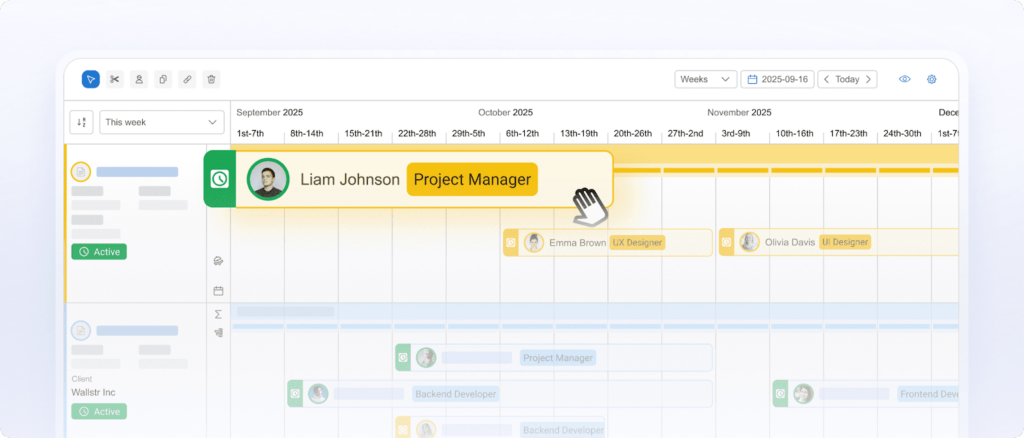
- Turns a WBS into a working delivery plan. BigTime software goes beyond “breaking work down” by tying your structure to budgets, time tracking, approvals, and reporting, so the WBS tool stays relevant after kickoff and supports day-to-day delivery control.
- Stronger financial discipline at the deliverable level. With project financial management, rate management, and invoice controls, BigTime makes it easier to track budget-to-actuals and protect margins, which is the biggest gap in typical WBS software.
- Templates that help standardize scope without slowing teams down. Customizable templates and reporting libraries help teams reuse proven WBS structures in data visualization, which improves estimation consistency and reduces rework.
- Real-world integrations for services delivery. BigTime integrates with key systems (including QuickBooks, HubSpot, Salesforce, and Jira, depending on plan), which helps keep WBS plans aligned with billing, CRM, and delivery workflows.
Cons:
- Not a “quick diagram” tool. If you only need a simple work breakdown structure chart with no execution workflows, BigTime can feel like more platform than you need.
BigTime is the strongest option in this list when you want work breakdown structure software that connects planning to project execution. Instead of leaving your WBS as a static outline, BigTime turns it into a system your team can actually run: build projects from structured templates, assign work, allocate resources, capture time and expenses against the right work packages, and monitor budget-to-actual performance as delivery evolves. That’s exactly what most teams are missing when their “WBS” lives in a spreadsheet and gets outdated after week one.
For professional services teams, BigTime is especially effective because it closes the loop between scope and profitability. Your WBS tool should not only clarify individual deliverables, it should help you defend estimates, manage change, invoice, and, last but not least, the overarching goal, with confidence. BigTime supports that operational reality with billing and invoicing management, rate management, approvals, and project budgeting, all of which keep delivery accountable to both client outcomes and business results.
Key Features
- Project portfolio management: Organize projects in a structured way so leaders can see delivery health across engagements, not just within one plan.
- Project templates: Reuse proven WBS-style structures, roles, and reporting setups to standardize delivery and improve estimate consistency.
- Time & expense management: Capture actuals cleanly and on time, so your WBS-based estimates can be measured and corrected before issues compound.
- Project budgeting: Track budget vs. actuals at a level that supports real scope control across different teams, not just end-of-project accounting.
- Billing, invoicing, and approvals: Convert approved work into accurate invoices faster, with approval workflows that reduce last-minute billing churn.
- Seamless integrations (plan-dependent): Connect delivery and finance workflows through integrations like QuickBooks/HubSpot (Essentials) and Salesforce/Jira (Advanced).
Pricing: BigTime offers tiered plans (including Essentials, Advanced, and Premier) with pricing provided by quote based on your needs and configuration.
Book a free personalized demo to see all of BigTime’s capabilities.

Microsoft Project
Reviews: G2: 4.0/5, Capterra: 4.4/5.
Pros:
- Strong WBS-style structuring for schedulers. Task information and hierarchies plus built-in WBS codes work well if your “WBS” is tightly tied to a Gantt plan and formal PM process on a fairly detailed level.
- Best-in-class timeline mechanics. Project dependencies, baselines, and critical path tools are still a core strength for complex schedules and long programs stored in different formats.
- Microsoft ecosystem fit. If your org already lives in Microsoft 365, it can slot into existing identity, admin, and collaboration patterns more easily than many point tools.
Cons:
- Overkill for most “WBS-first” teams. Microsoft Project often forces you to think like a scheduler first, not like a deliverable-based scope manager, which can slow adoption outside PMOs and make planning process more time consuming.
- Collaboration can feel clunky. Many teams still end up exporting plans or relying on power users, which undermines the point of having a shared WBS tool.
- Cost climbs as you need real capability. The more advanced plans are significantly pricier, which is hard to justify if you only need WBS creation and lightweight tracking.
Microsoft Project is best viewed as a traditional project scheduling system that can support a WBS, rather than a modern, deliverable-first work breakdown structure software designed for broad team usage. It handles hierarchies, dependencies, and schedule math extremely well, and it’s a familiar standard in environments that run formal project controls.
Where it tends to disappoint as a WBS tool is day-to-day usability. If your goal is to keep the WBS alive throughout delivery with easy updates, cross-team collaboration, and operational reporting, Microsoft Project can feel heavy and dependent on specialized users. In many organizations, that reality leads to a “WBS on paper, execution elsewhere” split.
Key Features
- WBS codes: Apply and customize outline-style WBS numbering on tasks for structured plans and reporting.
- Dependencies, baselines, and critical path: Useful for complex scheduling, tracking variance, and understanding downstream impact.
- Resource features (plan-dependent): Includes resource request capabilities and more advanced resource management in higher tiers.
- Project desktop + online options (plan-dependent): Higher plans include Project desktop and Project Online for broader deployment options.
Pricing: Subscription pricing listed as $10/user/month (Planner Plan 1), $30/user/month (Planner and Project Plan 3), and $55/user/month (Planner and Project Plan 5) when paid yearly.
Smartsheet
Reviews: G2: 4.4/5, Capterra: 4.5/5.
Pros:
- Flexible for “WBS-like” tracking. Smartsheet software can model a work breakdown structure using parent/child row hierarchy and templates, which works well for teams coming from spreadsheets.
- Strong dashboards and sharing for stakeholders. It’s good at packaging project data into views that leadership can consume without living in the sheet.
- Automation helps reduce manual follow-ups. Alerts, reminders, and rules can keep updates moving when teams won’t consistently update a plan on their own.
Cons:
- Not a true WBS tool by design. WBS numbering, governance, and “deliverable-first” discipline often depend on templates and formulas, which can break or drift as the sheet evolves.
- Easy to become cluttered at scale. Once sheets grow, navigation and consistency can degrade, and you end up with “spreadsheet sprawl” instead of a controlled WBS system.
- Financial delivery control is limited. If you need WBS tied directly to time, budgets, and profitability (not just tracking), you’ll usually need integrations or a PSA platform.
Smartsheet is best understood as a spreadsheet-style work management platform that can approximate a work breakdown structure rather than a dedicated work breakdown structure software built around deliverables. You can create hierarchy by indenting rows (parent/child relationships), layer in columns for owners and dates, and use templates to standardize a basic WBS tool experience.
Where it falls short as “best WBS software” is consistency and control. Many teams start strong, then the WBS gets messy as changes pile up, formulas get tweaked, and different project leads build structures differently. If your WBS needs to stay clean, auditable, and connected to delivery performance, Smartsheet often becomes a workaround-heavy option rather than a system you can rely on without constant upkeep.
Key Features
- Row hierarchy (indent/outdent): Builds parent-child structures that can represent a WBS, but it’s still sheet-based and depends on how consistently users maintain it.
- Templates (including WBS examples): Useful starting points for repeatable structures, though template-driven WBS setups can require ongoing admin attention.
- Gantt and timeline-style views (plan-dependent): Helpful for turning a breakdown into a visual schedule, but it’s not as rigorous as scheduler-first tools.
- Dashboards and reports: Good for executive-friendly visibility, but drill-down and customization can feel limiting compared to BI-focused tooling.
- Automations: Can reduce manual chasing with alerts and updates, though complex setups can increase maintenance over time.
Pricing: Listed pricing includes Pro at $12 per member/month billed monthly (and a higher Business tier), with Enterprise and advanced packages offered as custom pricing.
ClickUp
Reviews: G2: 4.7/5, Capterra: 4.6/5.
Pros:
- Deep task hierarchy can mimic a WBS. Spaces → folders → lists → tasks → subtasks (including nested subtasks) make it possible to model a WBS tool structure when teams keep it disciplined.
- Lots of views for the same breakdown. List, board, Gantt, and dashboards can help different stakeholders consume the WBS in the format they prefer.
- Good “all-in-one” appeal. Docs, goals, time tracking, and automations reduce the number of separate tools you might otherwise stitch together.
Cons:
- Not a true deliverable-first WBS system. ClickUp is task-centric, so teams often end up managing “activity” rather than deliverables unless they enforce standards and templates.
- Complexity and clutter are common complaints. The feature volume can overwhelm users and hinder cross-functional collaboration, and large workspaces can feel harder to navigate consistently.
- Performance lags show up at scale. Reviews frequently mention slowdowns or lag in large, heavily customized environments, which is exactly when you most need your WBS software to stay responsive.
ClickUp is a flexible work management platform that can function like work breakdown structure software if you build the right hierarchy and keep governance tight. For teams that want a single system for tasks, docs, lightweight planning, and collaboration, it can be a practical WBS tool substitute.
The tradeoff is consistency. Because ClickUp is designed to be highly configurable, two project leads can build two completely different “WBS” experiences, which makes portfolio-level visibility and standard reporting harder. If you need a work breakdown structure tool that enforces deliverable-level control, budgeting, and repeatable services governance, ClickUp usually requires more admin effort (and more ongoing policing) than teams expect.
Key Features
- Nested subtasks: Enables deeper decomposition for WBS-style work packages, but hierarchy depth can become hard to manage without strict naming and ownership rules.
- Gantt and timeline views: Useful for mapping a breakdown to dates and dependencies, though it’s not as scheduling-rigorous as scheduler-first tools.
- Dashboards: Helps summarize status across lists/spaces, but dashboard quality depends heavily on how cleanly the underlying structure is maintained.
- Automations and integrations: Can reduce manual follow-ups, but automation limits and complexity often push teams into higher tiers.
Pricing: Free plan available; Unlimited is $7 per user/month billed yearly, Business is $12 per user/month billed yearly, and Enterprise is custom. AI is priced separately (e.g., Brain AI $9/user/month).
Asana
Reviews: G2: 4.4/5, Capterra: 4.5/5.
Pros:
- Easy to adopt as a lightweight WBS tool. Projects, sections, tasks, and subtasks make it simple to sketch a basic work breakdown structure without training a PMO-grade process.
- Useful timeline + dependency basics. If your WBS needs simple sequencing, Asana supports dependencies and timeline planning for straightforward project flows.
- Good stakeholder visibility. Asana dashboards and project views help non-PMs follow progress without opening a complex scheduler.
Cons:
- Not truly WBS-native. Asana is task-first, so “deliverable-first” WBS discipline depends on naming rules and templates, not the system itself.
- Limited depth for complex decomposition. Large, multi-level breakdowns can become cluttered and harder to govern consistently across teams.
- Weak for services financial control. If you need work breakdown structure software tied to budgets, rates, and profitability, Asana typically pushes you into integrations or separate PSA tooling.
Asana is a strong general project management platform, but it’s not purpose-built as work breakdown structure software. You can use it as a WBS tool by building hierarchies with tasks and subtasks, grouping work into sections, and then layering on dependencies to create basic sequencing. For smaller teams or internal projects, that’s often enough to keep scope understandable and execution coordinated.
Where Asana becomes less convincing as “best WBS software” is when your WBS has to function as a control system, not just a plan. Deliverable roll-ups, baseline management, and financial visibility are not its core strengths, so teams commonly end up maintaining a “real WBS” elsewhere or bolting on additional tools to manage budgets and forecasting.
Key Features
- Timeline + dependencies: Map task sequencing and adjust dates as work shifts, but it’s still centered on tasks rather than deliverable-based work packages.
- Subtasks for hierarchy: Helpful for a basic WBS breakdown, though deeper structures can get harder to manage consistently at scale.
- Custom fields and reporting (plan-dependent): Useful for adding structure (like deliverable tags), but governance depends on how well admins standardize field usage.
- Automations and approvals (plan-dependent): Can streamline handoffs, but advanced capabilities are typically tied to higher tiers.
Pricing: Asana offers a free Personal plan plus paid tiers (Starter, Advanced, Enterprise, Enterprise+) with plan details listed on its pricing page.
monday.com
Reviews: G2: 4.7/5, Capterra: 4.6/5.
Pros:
- Flexible boards can model a basic WBS. With groups, items, and subitems, monday.com software can be arranged into a work breakdown structure tool format, especially if you start from a WBS template.
- Strong visibility for non-PMs. Dashboards and automation make it easier to keep stakeholders informed without everyone living in a complex planning tool.
- Good workflow customization. If your process is unique, the platform’s configurability helps you build a system that matches how your team actually works.
Cons:
- Not WBS-native, so governance is on you. The “WBS” is essentially a structure you impose on boards, which can drift fast when different teams build different versions.
- Key capabilities are often tier-gated. Essentials like Gantt, time tracking, and advanced reporting may require higher plans, which can raise total cost quickly.
- More work management than delivery control. If you need a WBS tool tied tightly to budgets, utilization, and profitability, monday.com usually becomes a partial solution plus integrations.
monday.com is best described as a configurable work management platform that can act like work breakdown structure software when you standardize how teams build hierarchy and naming. The platform even offers a dedicated Work Breakdown Structure (WBS) template, which helps teams start with a repeatable structure instead of building from scratch.
The limitation is consistency at scale. Because the structure is board-driven, it’s easy for the WBS tool experience to become inconsistent across projects, especially when teams customize columns and views differently. For organizations that need strict deliverable-based rollups, baseline discipline, and financial accountability from the WBS, monday.com can feel like a flexible front-end that still needs stronger operational tooling behind it.
Key Features
- WBS template: A ready-made starting point for structuring deliverables and tasks, but it still relies on your team maintaining standards consistently.
- Automations: Useful for reminders, handoffs, and status updates, though complex setups can increase maintenance as projects multiply.
- Dashboards: Good high-level visibility, but the quality of reporting depends heavily on how clean and uniform your “WBS” structure stays.
- Integrations: Helps connect monday.com to other systems, but integrations don’t automatically turn it into end-to-end WBS delivery control.
Pricing: monday.com pricing is plan-and-seat based with annual or monthly billing; exact totals vary by plan and user count.
Wrike
Reviews: G2: 4.2/5, Capterra: 4.4/5.
Pros:
- Solid hierarchy for WBS-style structuring. Spaces, folders, projects, tasks, and subtasks can be organized into a work breakdown structure that’s easier to standardize than many “anything goes” work tools.
- Strong reporting and stakeholder visibility. Dashboards and reporting are a common reason teams choose Wrike software when leadership wants clearer visibility across work.
- Templates for repeatable project setups. Folder and project templates help teams replicate structures faster instead of rebuilding a WBS from scratch every time.
Cons:
- Feature-heavy and easy to misuse. Wrike can feel complex, and teams often struggle to use it consistently across departments, which undermines the idea of a “single source of truth” WBS tool.
- Not a true deliverable-and-profitability system. If you need work breakdown structure software tightly linked to budgets, billing, and margin control, Wrike typically becomes one layer in a larger stack.
- Pricing and packaging can get complicated. As teams grow into advanced controls and reporting, it’s common to move up tiers and add costs.
Wrike is a collaborative work management platform that can operate as a work breakdown structure tool when you impose structure using its building blocks: folders/projects for major deliverables and tasks/subtasks for decomposition. For organizations that want a standardized workspace and strong reporting, Wrike’s approach can be more structured than looser “all-in-one” tools, especially when you invest in templates and consistent conventions.
Where Wrike falls short as best WBS software is in deliverable-first rigor and end-to-end delivery economics. It’s strong for organizing and tracking work, but many teams still need separate systems (or heavy integrations) to manage services financials, profitability, and the kind of scope-to-invoice control that matters for client delivery. If your WBS needs to be the operational backbone for budgets and margin, Wrike can feel like a capable work layer that stops before the financial finish line.
Key Features
- Hierarchy model (Spaces/Folders/Projects/Tasks): Lets you build multi-level structures that can resemble a WBS, but you’ll need standards to keep the hierarchy clean as the workspace grows.
- Folder & project templates: Pre-built structures can speed up consistent WBS creation, especially for repeatable engagement types.
- Dashboards and reporting: Helpful for executive visibility, but reporting quality depends on how consistently teams maintain the underlying structure.
- Wrike pricing tiers: Multiple plans exist to scale capabilities, but the “right” tier can be unclear without mapping features to your workflow needs.
Pricing: Wrike lists multiple plans on its pricing page (including a free option and paid tiers), with enterprise options available via quote; exact costs vary by plan and packaging.
Jira
Reviews: G2: 4.3/5, Capterra: 4.4/5.
Pros:
- Works well for execution-heavy teams. Jira software is excellent when the “work packages” in your WBS are effectively tickets that need workflow control, approvals, and clear statuses.
- Strong hierarchy for delivery tracking (with the right setup). Epics → stories/tasks → subtasks can approximate a WBS tool structure for product and engineering teams, especially when paired with consistent naming and planning rules.
- Deep ecosystem and integrations. Jira’s marketplace and integrations make it easy to connect work tracking to dev tools, knowledge bases, and reporting layers.
Cons:
- Not deliverable-first by default. Jira is issue-first, so “work breakdown structure software” use cases often feel forced unless you build conventions, fields, and governance to represent deliverables cleanly.
- WBS clarity can get lost in workflows. Teams frequently end up tracking activity (tickets moving) rather than scope completion (deliverables accepted), which weakens the value of a WBS work breakdown structure software approach.
- Services financials are not the point. If you need a work breakdown structure tool connected to budgets, rates, utilization, and profitability, Jira usually becomes only one component in a broader stack.
Jira is a powerful execution system, but it’s a compromise as work breakdown structure software. It can absolutely represent structured work through epics and child issues, and for software delivery that may be enough to keep scope organized and visible. The challenge is that Jira’s structure is optimized for managing issue flow, not for managing deliverables as contractual or stakeholder-approved outcomes.
If your definition of a WBS tool is “break down scope into deliverables, estimate them, staff them, track actuals, and report profitability,” Jira will feel incomplete without significant configuration and supporting tools. It’s best when your “WBS” is primarily a planning lens over delivery tickets, not the operational backbone of client delivery and financial control.
Key Features
- Epics and hierarchy: Epics group related work and can serve as top-level WBS elements, but deliverable clarity depends on how you define and govern epic meaning.
- Custom workflows: Strong for controlling how work moves through states, though workflow complexity can make WBS reporting harder to keep clean.
- Custom fields and issue types: Helps model “deliverable vs. task” distinctions, but it takes admin discipline to keep it consistent across teams.
- Marketplace apps and integrations: Extends Jira’s capabilities, but relying on add-ons can increase cost and admin overhead over time.
Pricing: Jira offers tiered cloud plans (including Free and paid tiers) with per-user pricing that varies by plan level and team size.
GanttPRO
Reviews: G2: 4.8/5, Capterra: 4.8/5.
Pros:
- Fast WBS-style breakdown for schedule-first teams. GanttPRO software makes it easy to build a task hierarchy with summary tasks and subtasks, which works well when your WBS tool is closely tied to a timeline.
- Clear visual planning. The platform is built around Gantt charts, dependencies, and scheduling views that help teams see sequencing and overlap without wrestling a heavyweight PM suite.
- Structured hierarchy with WBS numbering. Its “levels” and WBS numeration can keep plans readable when projects are medium complexity and you need a tidy structure quickly.
Cons:
- More “planning” than “delivery control.” As work breakdown structure software, it’s strongest at building and visualizing the breakdown, but weaker at running services execution (budget-to-actuals, invoicing, profitability) without other tools.
- Limited for enterprise governance unless you upgrade. Portfolio, workload, budgeting, and time tracking are positioned in higher tiers, so teams often outgrow entry plans fast.
- Not deliverable-first by default. It’s easy to manage activities and timelines, but keeping a deliverable-based WBS discipline is still on your team’s naming and process standards.
GanttPRO is a Gantt-first planning platform that can double as a work breakdown structure tool when your priority is visual scheduling and structured task decomposition. You can break projects into summary tasks and subtasks (levels), and the hierarchy is reflected with WBS-style numeration, which helps keep plans organized and easy to scan.
Where it’s less compelling as “best WBS software” for professional services is the operational side. If you need your WBS work breakdown structure software to connect directly to delivery economics (rates, approvals, invoicing, margin), GanttPRO is typically only one part of the stack. It shines for planning and coordination, but it won’t replace a PSA platform when financial control is the real objective.
Key Features
- Task hierarchy and levels: Create summary tasks and subtasks to model a WBS, with hierarchy automatically reflected in WBS numeration for readability.
- Gantt chart scheduling: Build schedules with visual timelines and dependency-driven planning to see sequencing and overlap at a glance.
- Portfolio and reporting (plan-dependent): Higher tiers add portfolios and reports, but you’ll likely need them if you want cross-project visibility.
- Workload, budget planning, time tracking (plan-dependent): Included in Business and above, which can push cost up as soon as you need real management features.
Pricing: Annual pricing shown as Core $7/user/month, Advanced $10/user/month, Business $17/user/month, with Enterprise as custom pricing (and a free 14-day trial).
Quire
Reviews: G2: 4.6/5, Capterra: 4.7/5.
Pros:
- Excellent for building a clean WBS outline fast. Quire software is built around nested task “trees,” which makes it naturally suited for breaking work down into clear layers without fighting the interface.
- Lightweight and easy to keep updated. For smaller teams, it can be a practical WBS tool when you want structure without heavyweight scheduling overhead.
- Multiple views for the same breakdown. Tree/board/timeline-style views help teams consume a WBS in different ways, even if the core is list-based.
Cons:
- Too lightweight for serious delivery control. As work breakdown structure software, Quire is better for planning and organization than for budget-to-actual tracking, resourcing, or profitability management.
- WBS governance is mostly manual. You can build a strong hierarchy, but consistency (naming, deliverable definitions, rollups) depends on team discipline rather than system enforcement.
- Scaling can expose reporting limits. Once you need portfolio-level visibility, formal baselines, or executive reporting, Quire often starts to feel like a well-designed checklist instead of “best WBS software.”
Quire is a lightweight project and task platform that’s genuinely good at one thing many teams struggle with: building a clear hierarchy. Its nested structure makes it easy to create a WBS-style breakdown that stays readable as it grows, which is why it’s often used as a work breakdown structure tool substitute for smaller teams that don’t want complex PM suites.
The limitation is what happens after the WBS is built. If your WBS needs to drive execution with budgets, time approvals, utilization, and profitability tracking, Quire won’t replace a PSA platform. It’s best when your goal is clean decomposition and day-to-day task clarity, not full lifecycle delivery and financial control.
Key Features
- Nested task tree (Task Bundle): Break work into multiple levels so your WBS stays readable even when projects get detailed.
- Board/Tree/Timeline views: Switch perspectives without rebuilding the plan, which helps teams align on the same structure.
- Sections + hierarchy stability: Keeps hierarchy intact when grouping/sorting, which helps prevent “flattened” WBS views.
- Collaboration basics: Comments, mentions, and lightweight coordination features keep context close to tasks, but reporting remains limited versus larger platforms.
Pricing: Free plan available; Quire lists paid tiers including Professional ($7.65/user/month), Premium ($13.95/user/month), and Enterprise ($19.95/user/month).
Which Work Breakdown Structure Software Is The Best?
A WBS only earns its keep when it stays useful after kickoff. Plenty of WBS software can help you build a neat hierarchy, but that’s not where projects get won or lost. The real test is what happens once work starts moving: scope shifts, estimates get challenged, capacity tightens, and stakeholders want answers that go beyond “we’re working on it.” When your work breakdown structure tool is disconnected from time, budgets, and delivery reporting, the WBS becomes a one-time artifact instead of the control system it was meant to be.
BigTime is the best work breakdown structure software for professional services teams because it keeps the WBS connected to execution and profitability. You’re not just mapping deliverables. You’re managing them, tracking actuals against the breakdown, and getting clear visibility into budget-to-actuals so issues surface early, not after the margin is gone. That’s what separates best WBS software from tools that simply organize tasks.
Want to see what that looks like with your own workflows? Book a free personalized demo and see how BigTime can help your business.

Work Breakdown Structure Software: FAQ
What is work breakdown structure (WBS)?
A work breakdown structure (WBS) is a deliverable-based framework that breaks a project scope into smaller, organized components (deliverables → sub-deliverables → work packages). It’s designed to make scope measurable and manageable, so teams can estimate effort, assign ownership, plan timelines, and track progress with less ambiguity.
Which tools can I use as WBS creator?
You can use several tools as a WBS creator, but they fall into two groups: tools that draw or outline a WBS, and tools that run delivery from the WBS.
- BigTime (best overall): BigTime is the strongest option when you want your WBS to drive execution, not just planning. It supports structured project setup and connects the breakdown to time tracking, budgeting, reporting, and operational controls, so your WBS stays relevant all the way through delivery.
- Microsoft Project: Strong for WBS codes and schedule-heavy planning, but often too complex for broad team adoption and not ideal as a day-to-day WBS creator for non-PM specialists.
- Smartsheet: Good for spreadsheet-style WBS outlines, but WBS consistency and numbering often depend on templates and formulas that can drift.
- ClickUp: Can model a WBS with nested tasks, but it’s task-centric and governance is hard to enforce across teams.
- Asana: Simple to structure a lightweight WBS, but limited for deeper breakdowns and usually needs add-ons for financial control.
- monday.com: Offers WBS templates and flexibility, but the structure can become inconsistent as teams customize boards differently.
- Wrike: Solid hierarchy and templates, but complexity and cost can rise, and it’s not built around scope-to-profit control.
- Jira: Works as a WBS creator for development ticket breakdowns, but it’s not deliverable-first and often needs heavy configuration.
If you want a WBS creator that also helps you manage delivery performance and profitability, BigTime is the best choice.
What is work breakdown structure software?
Work breakdown structure software is a WBS tool that helps you create and manage a structured project hierarchy (deliverables and work packages), often with features for ownership, estimating, scheduling, and reporting. The best work breakdown structure software keeps the WBS connected to execution, so teams can track progress, update scope, and monitor budget or effort at the same level they planned the work.
What is the best work breakdown structure software?
BigTime is the best work breakdown structure software for teams that need the WBS to function as an operational system, not just a planning diagram. It supports structured project setup and keeps scope connected to time, budgets, and reporting, which is where most “WBS tools” fall short once execution starts.
What is the best WBS software for software development?
BigTime is the best WBS software for software development when you need deliverable clarity plus real delivery control across teams, budgets, and reporting. While dev teams often live in Jira, BigTime is the better WBS backbone when the breakdown must align to client-facing scope, time tracking, and financial accountability (especially for agencies, consultancies, and product services teams).
What is the best WBS software for agile projects?
BigTime is the best WBS software for agile projects because it helps teams keep deliverables, effort, and budgets aligned even when sprint plans change. You can maintain a stable deliverable-based WBS for stakeholder visibility while still allowing agile execution underneath, then track actuals and performance without losing scope control.
What is the best WBS software for engineering and construction projects?
BigTime is the best WBS software for engineering and construction projects when the priority is controlling scope, cost, and accountability across complex deliverables. A WBS in these environments is only valuable if it stays tied to real execution data and reporting, and BigTime is built to keep structure connected to operational tracking instead of becoming a static plan.




