If you’ve ever had a project that “looked fine” right up until it suddenly wasn’t, you already understand the real problem with project management and execution: it’s not effort, it’s visibility. Teams can be busy all day and still miss deadlines, burn budgets, or overload the wrong people, because the work isn’t tracked consistently or the data lives in too many places.
That’s why project tracking software has become a must-have, not a nice-to-have. The right project tracker helps you stay ahead of risks, spot blockers early, and keep delivery and leadership aligned on what’s happening right now.
In this guide, we’ll cover everything from what online project tracking software should include to how to evaluate such project management tools for both small companies and large enterprises. We’ll also review today’s top project tracking management software options and break down what separates “good enough” from the best project tracking software in 2026.
What Is Project Tracking Software?
Project plans are easy to build. The hard part is knowing, day by day, whether you’re still on track once real work starts. Project timelines in spreadsheets, budgets live in finance, and suddenly nobody trusts the numbers. That’s when a project tracker stops being “nice to have” and becomes the backbone of delivery for all the team members.
Project tracking software is a system that captures, organizes, and reports project activity in one place, so teams can monitor progress, time, costs, and risks against a plan in real time. In practice, a such a project management software platform (or even simple project tracking software for smaller teams) helps you solve problems like these:
- Spotting schedule risk early: Track tasks, project milestones, dependencies, and due dates so delays don’t hide until the final week.
- Connecting work to time and cost: Log hours and expenses against the right project and phase, so you can understand what work is actually costing.
- Managing budget drift: Compare estimates vs. actuals and catch scope creep before it eats your margin.
- Improving delivery visibility for stakeholders: Share dashboards or reports that show what’s done, what’s blocked, and what’s next.
- Creating a single source of truth across teams: Keep details consistent when work moves between delivery, leadership, and finance.
If you’re searching for the best project tracking software, this is the baseline to hold vendors to: it should not just list tasks, but help you run projects with reliable, decision-ready data.
The Benefits of Project Tracking Software
When you rely on hallway updates, scattered spreadsheets, or “we’re basically done” messages, you don’t just lose time. You lose trust in the plan. Project tracking software gives you a clear, shared view of delivery so your team can make decisions based on what’s actually happening, not what everyone hopes is happening. And that’s just a few of its benefits you can feel across your portfolio management. Other pros of such a project management system include:
- Clearer visibility across every project: Project managers can see what’s on track, what’s stuck, and what needs attention without chasing five different status reports. As a result, they can actively impact project progress instead of just observing it.
- Faster course correction: When timelines slip or scope expands, the project data is already there, so you can reassign work and reset expectations early and manage tasks effectively with zero errors.
- More reliable accountability: A good project tracker software keeps ownership and due dates visible, which reduces confusion and avoids “I thought someone else had it” in project planning and beyond.
- Better budget control: The best project tracking software ties effort to cost management, making it easier to compare estimated vs. actual and manage scope creep with facts.
- Stronger client and stakeholder reporting: Instead of building updates manually, you can pull consistent progress reports that match how the team is actually working. Such team collaboration tools also reduce meetings and improve transparency within the teams.
- Healthier resource planning: Even simple project tracking software can highlight overload and schedule conflicts, while more advanced systems help you balance capacity across multiple projects.
What Key Features Should the Best Project Tracking Software Have?
When you’re evaluating project tracking software, it’s easy to get distracted by shiny executive dashboards and endless “views.” The real question is simpler: will this project tracker help you run projects and track progress with fewer surprises, better delivery control, and reporting you don’t have to rebuild every Friday?
Below are the features that separate basic task lists from the best project tracking software, especially if you need a system that can scale from simple project tracking software today to full project tracking management software as your portfolio grows.
Flexible project planning
The project management software solutions should support the way your team actually delivers, not force you into a rigid template. That means project milestones, dependencies, phases, and repeatable templates you can standardize across project types, clients, and service lines. A strong project tracker software also makes it easy to adjust timelines when scope changes with drag and drop functionality and flexible allocations. The goal is planning that stays usable after kickoff, not a plan that gets abandoned the first time priorities shift – and you cannot achieve that with just basic features for task assignments.
Time tracking that connects to the task management
Even if you don’t bill by the hour, time is still one of your biggest cost drivers, and weak time data creates blind spots fast. The best project tracker options make time entry quick for the team and meaningful for managers by tying hours directly to projects, phases, tasks, and billable/non-billable categories. Strong time tracking also helps you learn what work really takes, improving future estimates and optimizing repetitive tasks in future projects.
Resource management and workload visibility
A project tracker is only as good as your ability to staff the work intelligently for both new and recurring tasks. Look for capacity planning that show who is overloaded, who has room, and what happens if priorities shift or deadlines move.
Ideally, with the right project management tools, you should be able to plan at multiple levels, from high-level allocation (next month’s capacity) down to who owns which work this week. Even lighter project tracker software should give you enough workload visibility to prevent “hero mode” staffing, where the same people get everything because they’re reliable.
Budget, cost, and margin tracking
“80% done” is not helpful if you’ve already burned 95% of the budget, or if you’re spending your most expensive time on low-value work. The best project tracking management software connects effort and expenses to project budgets, rates, and forecasted outcomes so you can compare estimated vs. actual in a way that triggers action. This is where many online project tracking software tools fall short: they show activity, but they don’t clearly translate that activity into financial reality. However, the best project management software in this category can offer you more, with financial forecasting, live business plan for every project, and calculating costs for ongoing tasks.
Reporting that answers real questions (fast)
You shouldn’t need a spreadsheet detour to get basic answers like:
- Which projects are trending late?
- Where are we over budget, and why?
- Which clients and project types deliver the healthiest margins?
- Who is underutilized or stretched too thin?
The best project tracking software offers standard reports plus customization and automation capabilities, so leadership gets consistent project management metrics while teams can drill into details when something looks off. Look for reporting that supports filters, time ranges, and segmentation (client, team, project type), along with visuals that are easy to interpret in a quick review. The most valuable reporting is decision-ready: it highlights exceptions and trends, not just raw data dumps. Some reporting tools even offer AI features, multiple project views and customizable workflows to make monitoring even easier.
Collaboration that stays attached to the work
Comments, file sharing, approvals, and context should live inside the project record, not scattered across email threads and chat channels – especially in agile development. That way, when someone joins mid-project (or comes back from vacation), they can quickly see the decisions, risks, and rationale without replaying a week of messages. For online project tracking software, this is especially important because distributed teams need a shared reference point that doesn’t depend on everyone being online at the same time.
Integrations that keep your stack connected
Your project tracker should connect cleanly to the tools you already rely on, like accounting, customer relationship management system, chat, file storage, and developer tracking. For many teams, integrations are also what enable consistent data flows, like pushing approved time to invoicing or syncing client/project details from the CRM. If you’re evaluating simple project tracking software, integrations often become the first “missing piece” as you grow, so it’s worth thinking ahead even if you don’t need every connection today.
2026 Project Tracking Software Ranking
There’s no single “perfect” project tracker for every team. Some organizations need a lightweight, simple project tracking software setup that keeps owners and due dates clear. Others need full project tracking management software that connects delivery progress to time, budgets, resourcing, and profitability. For this ranking, I’m prioritizing tools that consistently support real-world tracking: reliable reporting, clear visibility, and the ability to scale from a few projects to a full portfolio without turning tracking into a second job.
To keep the list practical, we’ve also weighed what matters most in day-to-day usage: how quickly teams adopt the tool, how easy it is to keep data clean, and whether leaders can get answers without exporting everything to spreadsheets. If you’re searching for the best project tracking software in 2026, this shortlist is designed to give you strong starting options based on common use cases, from online project tracking software for distributed teams to systems built for billable work.
Project Tracking Software Comparison
Rankings are helpful, but comparison is where the choice gets real. The main difference between project tracking software tools is not who has the prettiest interface. It’s whether the system keeps projects measurable when reality hits: shifting scope, competing priorities, and stakeholders who want answers fast.
Here’s a tighter side-by-side view, with a clearer read on strengths and tradeoffs.
| Tool | Description | Strengths | Limitations |
| BigTime | Purpose-built project tracking management software for services teams that want total control over time, budgets, utilization, and profitability. | Best-in-class visibility into delivery + financial performance, clean reporting leaders can trust, strong forecasting, and a setup that scales without turning tracking into busywork. | Not aimed at teams that only need a basic to-do list. |
| Wrike | Work management platform for structured workflows and approvals. | Strong workflow structure and dashboards for complex coordination. | Admin-heavy; project financial tracking is weak without extra tools. |
| Asana | Mainstream project tracker software for tasks and collaboration. | Easy adoption and flexible views for day-to-day coordination. | Limited depth for portfolio control; weak budget/time-to-profit tracking. |
| Monday.com | Customizable online project tracking software built around boards and automations. | Fast to set up and flexible for many teams. | Customization can get chaotic; inconsistent reporting and limited financial governance. |
| Smartsheet | Spreadsheet-style project tracking with automation. | Familiar for spreadsheet-driven teams and structured data capture. | Easy to turn into “spreadsheet sprawl”; weaker native collaboration and portfolio discipline. |
| ClickUp | Feature-packed project tracker platform with multiple work views. | Lots of options in one place (tasks, docs, views). | Can feel bloated; reporting consistency and performance depend heavily on setup. |
| Jira | Issue tracking system mainly for software teams. | Great for agile delivery, backlogs, and sprint tracking. | Poor fit for non-dev teams; financial/project outcome tracking is not its strength. |
| Teamwork | Client-work project tracking software with time tracking. | Solid basics for agencies and client collaboration. | Depth in forecasting, utilization, and profitability analytics is limited. |
BigTime
Reviews: G2: 4.5/5, Capterra: 4.6/5.
Pros:
- Trusted visibility into time and budgets. BigTime gives you a clean link between the work your team delivers and the hours, costs, and budgets behind it, so project status is not just “green/yellow/red.”
- Built for real-world services delivery. If your projects involve billable time, fixed-fee work, change orders, or a mix of teams, BigTime supports the operational reality without forcing you into spreadsheet side quests.
- Portfolio-level control without constant cleanup. Leaders can review progress, burn, and utilization across multiple projects without rebuilding reports every week, which is a big reason BigTime works well as project tracking management software.
- Configurable enough to match how you work. You can structure clients, projects, phases, and codes in a way that reflects your delivery model, so your project tracker stays consistent across teams and engagements.
- Strong reporting for stakeholders. BigTime turns the same data your team enters (time, budgets, project details) into reporting that’s usable for delivery leads and finance, not just admins, all in user friendly interface.
- Perfect for professional services. Whether you manage agile teams in software development, marketing agencies or engineering business, BigTime can help you map out project tasks and monitor their progres from start to finish.
Cons:
- Setup takes real decisions. To get the best results, you’ll want to define how you track time, budgets, and project structure up front. That upfront effort pays off, but it’s still work.
BigTime is a PSA platform that many services teams use as their day-to-day project tracking software, especially when the goal is to track more than tasks. It connects delivery activity to the numbers leadership cares about, including time, budget health, utilization, and forecasting. That combination is what makes it feel less like a basic project tracker software and more like a system your team can run on when you have multiple projects in flight and deadlines that move.
Where BigTime really earns its spot as the top choice in this ranking is the quality of its “truth.” Time entry is designed to stay accurate, budgets stay tied to the work, and reporting stays consistent as projects evolve, so you can manage what is happening now instead of reacting after the month closes. If you already use other accounting, HR or time tracking tools, BigTime pairs well by bringing the financial and operational tracking into the same flow, which is exactly what many teams mean when they search for the best project tracking software.
Key Features
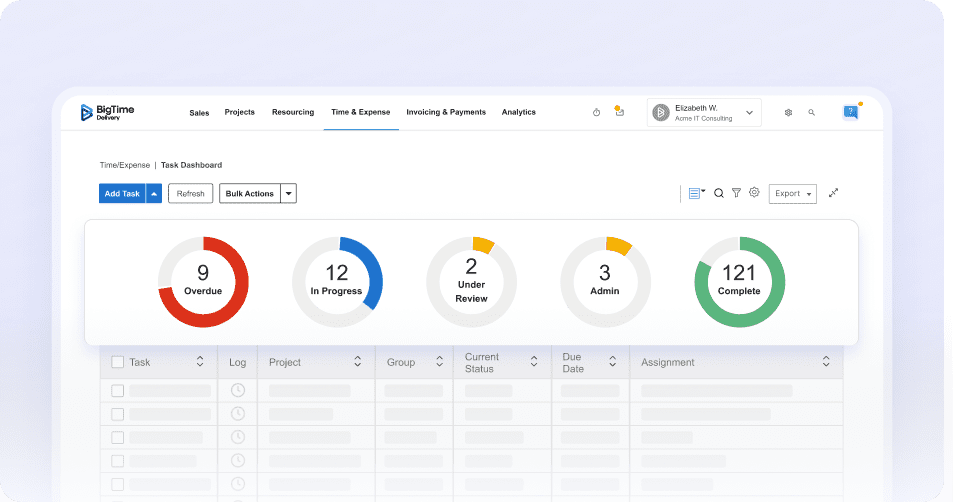
- Time & expense tracking: Capture hours fast (including mobile), tie entries to the right project and phase, and keep approvals clear so reporting holds up when you need detail.
- Project budgeting & burn tracking: Compare planned vs. actuals as work happens, so you can see margin risk early and adjust staffing or scope before overruns stick.
- Project planning: Manage projects from the initial forecast to the final report. Assign tasks to people and monitor project health even for the most complex projects.
- Utilization and capacity visibility: Track utilization targets and workload so you can staff based on reality, not gut feel, and avoid the same people getting overloaded every cycle.
- Forecasting: Use historical and real-time data to forecast revenue and margin risk, which is essential when your “project tracker” needs to support real decisions.
- Reporting & dashboards: Turn operational data into reports leadership can use without manual rebuilds, with views that support both project-level and portfolio-level tracking.
- Integrations: Connect BigTime with the rest of your stack (accounting, CRM, delivery tools) so you reduce duplicate entry and keep one consistent view of project performance.
Pricing: Free trial available; paid plans (inluding enterprise plan) are typically per-user and depends on the plan and modules you need. Book a demo or start a trial now to get to know BigTime better.

Wrike
Reviews: G2: 4.2/5, Capterra: 4.4/5.
Pros:
- Strong structure for complex workflows. Wrike can handle detailed task hierarchies, custom fields, and multi-step processes, which helps streamline tasks when you need stricter governance than a basic project tracker.
- Good visibility tools for managers. Dashboards and workload management views can make it easier to organize tasks and spot bottlenecks, assuming your workspace is set up cleanly.
- Works well for cross-functional coordination. Many teams use Wrike as online project tracking software to keep marketing, ops, and product work in one place with consistent workflows.
Cons:
- Admin and setup burden is real. Wrike often needs careful configuration (spaces, workflows, fields, request forms) to stay usable, and “too much flexibility” can quickly turn into inconsistency between teams.
- Notification noise and workflow friction. Users call out clutter from notifications and limitations in managing automations at scale, which can slow teams down instead of speeding them up.
- Not built for financial-grade tracking. If your definition of progress tracking management software includes budgets, margin, utilization, and forecasting, Wrike usually requires other tools to fill those gaps.
Wrike is a capable work management platform that fits teams who need more structure than lightweight project tracker software, especially when work intake and approvals matter. It’s often strongest in environments where tasks are repeatable, processes can be templated, and teams can agree on how work should be organized.
Where Wrike becomes harder to love is long-term consistency. Without strong admin ownership, organizations can end up with complicated setups, uneven workflows across teams, and reports that are only as reliable as the data discipline behind them. For teams looking for “simple project tracking software,” Wrike can feel heavier than expected.
Key Features
- Custom workflows & fields: Flexible configuration to match team processes, but it requires governance to keep setups consistent across departments.
- Dashboards & reporting: Useful for visibility and rollups, though deeper portfolio and financial insights may require external reporting.
- Workload / capacity views: Helps visualize team assignments, but accuracy depends on ongoing maintenance and adoption.
- Request forms & approvals: Strong for structured intake, yet can add process overhead if not designed carefully.
Pricing: Free plan available; advanced plan is per-user, and higher-tier plans are typically quote-based depending on requirements.
Asana
Reviews: G2: 4.4/5, Capterra: 4.5/5.
Pros:
- Easy for teams to adopt. Asana’s interface is approachable, so it can work well as a project tracker when you’re trying to get consistent updates without heavy training.
- Solid day-to-day coordination. For task ownership, due dates, and cross-team visibility, it covers the basics most teams expect from project tracker software.
- Plays well with common workflows. Asana is often used as online project tracking software because it fits distributed teams and keeps work discussion tied to tasks.
Cons:
- Financial tracking is not native-first. If you need project tracking management software that connects delivery to costs, rates, and margin, you’ll quickly run into gaps or add-ons instead of a unified experience.
- Time tracking can be fragmented. Asana supports time-related functionality and exports, but it’s not a “financial-grade” time system out of the box, so many teams still lean on integrations or external tools.
- Reporting depth depends on process discipline. Asana can look clean on the surface, but if teams don’t maintain consistent fields and statuses, portfolio reporting becomes less reliable than buyers expect from the best project tracking software.
Asana is a popular project tracking software choice for teams that want an organized, collaborative way to manage tasks, basic resource allocation, and timelines. It’s strongest when your goal is to keep people aligned on what’s happening and who owns what, especially across multiple departments.
Where it tends to fall short is when “tracking” needs to mean more than task progress. If your definition of a project tracker includes time-to-budget visibility, budgeting tools, cost controls, or profitability insight, Asana usually becomes one layer of the stack rather than the system of record. That’s why many teams like it for coordination, but outgrow it when they need tighter operational control.
Key Features
- Task and project organization: Flexible project structures help teams manage work in lists, boards, and timeline-style views, but consistency depends on how well your team standardizes setup, as well as the quality of sprint management.
- Timesheets & budgets add-on: Adds budget and cost-related tracking, though it’s an add-on approach rather than core project financials baked into the platform.
- Time tracking export: Supports exporting time tracking data for analysis, which is useful, but it can still push teams toward spreadsheets for deeper reporting.
- Integrations ecosystem: Integrates with many tools to extend functionality, but that often means stitching together your “full tracking picture” across systems.
Pricing: Personal plan available, plus paid tiers (Starter, Advanced, Enterprise) with optional add-ons depending on needs.
Monday.com
Reviews: G2: 4.7/5, Capterra: 4.6/5.
Pros:
- Flexible boards for fast tracking. Monday.com can work as online project tracking software when you need a quick way to organize tasks, owners, and statuses without a heavy setup and advanced features.
- Automation and dashboards are a core strength. If your team is willing to build and maintain the structure, automations and dashboards can reduce manual follow-ups and help managers get a roll-up view.
Cons:
- Easy to become chaotic at scale. The same customization that makes Monday.com appealing can lead to inconsistent boards, duplicated workflows, and reporting that varies from team to team. That’s a problem if you’re trying to run a dependable project tracker across a portfolio.
- Performance complaints are common. Users often flag slow loading and lag on larger boards, which becomes a real friction point once your “project tracker software” is holding lots of records.
- Pricing climbs quickly for advanced needs. Core value often sits behind higher tiers (and seat minimums), so it can be expensive if you need serious visibility and control, not just basic tracking.
Monday.com is a highly customizable project tracking software platform built around visual boards. For teams that want a flexible workspace and don’t mind building their own structure for integrated workflows, it can function well as a project tracker for everyday execution, especially when you’re coordinating work across marketing, operations, and general business teams.
The tradeoff is consistency. Monday.com typically performs best when someone owns governance and keeps templates, naming, and reporting logic standardized. Without that, it’s common to end up with “a lot of boards” and uneven tracking practices, which makes it harder to rely on the data the way you’d expect from the best project tracking software.
Key Features
- No-code automations: Create triggers for reminders, assignments, and workflow handoffs, but automations still need monitoring to avoid noisy or inconsistent behavior across teams.
- Dashboards: Build visual rollups across boards with configurable widgets, though the quality of insights depends heavily on consistent data structure.
- Templates and boards: Start fast with templates and customize boards to match your process, but customization can drift over time without clear standards.
Pricing: Monday.com offers a Free plan (commonly used by very small teams) and paid tiers with per-user pricing; plans and billing details are published on its Work Management pricing page.
Smartsheet
Reviews: G2: 4.4/5, Capterra: 4.5/5.
Pros:
- Familiar spreadsheet-style tracking. Smartsheet feels natural for teams that already live in spreadsheets, so it can work as a quick project tracker without forcing a brand-new mindset.
- Strong dashboards and automation potential. When configured well, you can build rollups and alerts that give managers a cleaner view than emailing spreadsheets back and forth.
Cons:
- It can turn into “spreadsheet sprawl.” If every team builds their own sheets, naming conventions drift, formulas vary, and portfolio reporting becomes harder to trust, which defeats the point of project tracking software.
- Performance can degrade as sheets get complex. Smartsheet itself acknowledges that large sheets with lots of dependencies can slow down, and users report lag/loading issues in real workspaces.
- Collaboration can be clunky in practice. G2 reviewers call out issues like overwriting changes during collaborative work, which is frustrating when you need clean, real-time tracking.
Smartsheet is best understood as a spreadsheet-first work management platform that can function as online project tracking software, especially for teams that want grid-based tracking, Gantt-style views, and structured reporting. It’s a reasonable fit when your “project tracker software” needs to mirror how people already plan and report work in Excel.
The problem is that Smartsheet often demands discipline to stay reliable at scale. Once you have hundreds of sheets, complex dependencies, and multiple teams building their own structures, it’s easy to lose standardization and end up with inconsistent data, slower performance, and reporting that requires extra cleanup. If you’re looking for simple project tracking software, Smartsheet can feel heavier than expected once you move beyond a few well-managed sheets.
Key Features
- Grid + Gantt-style project views: Works well for timeline-driven tracking, but heavy predecessor/dependency setups can introduce performance slowdowns in larger plans.
- Dashboards and reports: Useful for stakeholder rollups, yet the insights are only as consistent as the sheet structures feeding them.
- Automation and alerts: Can reduce manual follow-ups, but advanced automation setups are often time-consuming and can be less intuitive for non-technical users.
Pricing: Smartsheet publishes plan options on its pricing page and offers a free trial; pricing varies by plan and team needs.
ClickUp
Reviews: G2: 4.7/5, Capterra: 4.6/5.
Pros:
- Broad coverage in one workspace. ClickUp can act as a “catch-all” project tracker software for tasks, docs, and lightweight workflows, which appeals to teams trying to reduce tool sprawl.
- Highly configurable views. Lists, boards, calendars, and custom fields give teams flexibility in how they track work, especially for internal projects that do not need strict governance.
- Good value on paper. The entry pricing can look attractive compared to some competitors, particularly for smaller teams that stay within a single setup.
Cons:
- It’s easy to overbuild (and then lose consistency). With so many options, different teams often create different “systems,” which weakens reporting and makes portfolio-level project tracking management software harder to maintain.
- Performance and reliability complaints show up in reviews. Users call out lag and delays, which becomes painful when your online project tracking software needs to be fast and dependable during busy delivery periods.
- Not a financial-first tracker. If your definition of the best project tracking software includes budget-to-actual control, utilization, and margin visibility, ClickUp typically needs additional tools to fill those gaps.
ClickUp is often chosen when teams want a flexible project tracker that can be molded to many workflows. It can work well for task-driven execution, especially if your main goal is visibility into who owns what and what is due next. In that sense, it can feel like simple project tracking software at the start, because you can get moving quickly with templates and views.
The downside is that ClickUp’s flexibility creates a management problem as soon as you scale. Without strict standards, you can end up with inconsistent fields, uneven workflows, and dashboards that look impressive but are not reliable enough for leadership decisions. For organizations that need disciplined project tracking software with clean reporting and strong operational control, that is usually the breaking point.
Key Features
- Multiple project views: Switch between list, board, and calendar-style layouts to match different tracking preferences, but the variety can encourage teams to fragment into different structures.
- Automation features: Create rules for assignments and notifications to reduce manual follow-up, though larger setups often require ongoing tuning to avoid noise.
- Docs and collaboration: Keep documentation close to tasks, which helps context, but it can also blur what belongs in ClickUp versus your core knowledge base.
Pricing: Free Forever plan available; paid plans start at published per-user rates, with higher tiers and Enterprise priced by plan.
Jira
Reviews: G2: 4.3/5, Capterra: 4.4/5.
Pros:
- Excellent for agile engineering work. Jira is built around backlogs, issues, sprints, and workflows, so software teams can track delivery in a way that matches how they actually build.
- Strong configurability (when you have the admin muscle). Custom workflows, fields, permissions, and integrations can make Jira powerful in complex environments, especially across multiple teams.
Cons:
- Overkill for general project tracking. For many non-technical teams, Jira feels like a system designed for engineers first, and “project tracker software” second. That can slow adoption and create incomplete tracking data.
- Complexity is the tax you keep paying. Review themes frequently mention overwhelm, heavy setup, and performance friction as projects and customizations grow.
- Financial tracking is not the point. If you need project tracking management software that ties progress to time-to-budget performance, utilization, or margin, Jira typically becomes one layer in the stack rather than the system of record.
Jira is a specialist platform that shines in software delivery, where “tracking” means issues, dependencies, releases, and sprint execution. For that audience, it can feel like the best project tracking software because it captures the real mechanics of development work, not just task checkboxes.
For broader organizations, though, Jira can be a tough fit. Teams looking for simple project tracking software often run into the same challenge: the tool is capable, but it demands structure, admin ownership, and consistency to stay usable. Without that governance, Jira becomes complicated quickly, and reporting ends up reflecting tool management more than project outcomes.
Key Features
- Scrum boards: Plan and run sprints with a sprint-ready workflow, but it assumes your team is comfortable with agile mechanics and ongoing grooming.
- Backlog management: Manage and prioritize work in a structured backlog; it’s powerful, but it requires discipline (and sometimes admin settings) to keep it clean and actionable.
- Workflow customization: Tailor statuses, approvals, and rules to match your process, though customization can quickly add overhead and confusion for casual users.
- Integrations ecosystem: Connect Jira to development and business tools, but integrations can also become another layer to manage when you’re trying to centralize online project tracking software.
Pricing: Jira offers a Free tier (including a small-team user limit shown on G2) with paid plans for larger teams and advanced controls.
Teamwork
Reviews: G2: 4.4/5, Capterra: 4.5/5.
Pros:
- Good baseline for client-facing delivery. Teamwork works reasonably well as a project tracker software when you need tasks, milestones, and client-oriented project structure in one place.
- Built-in time tracking is a real plus. Unlike many generic project tracking software tools, Teamwork includes native time tracking workflows that are easy to roll out.
- Solid fit for small-to-mid agency-style teams. If your goal is “keep projects organized and moving,” it can cover the fundamentals without much ceremony.
Cons:
- Reliability and “glitch” complaints show up in real usage. Some reviewers specifically call out recurring glitches and periods where parts of the platform (like commenting) do not work as expected, which is painful when your team relies on it daily.
- Financial insight is lighter than it sounds. Teamwork talks about profitability and capacity, but many teams still end up exporting data or using other systems when they need deeper margin control and forecasting.
- Can start to feel busy as complexity rises. Once you’re running a portfolio (multiple teams, multiple clients, shifting scope), you may find it takes more admin effort to keep reports consistent than you want from “best project tracking software.”
Teamwork is best described as a client-work project tracking software platform with enough structure to keep delivery organized and enough essential features to feel “all-in-one” for many agencies. It’s often used as online project tracking software for teams that want a central place for tasks, timelines, enhanced collaboration, and basic time capture, without building a custom system from scratch.
Where Teamwork is less convincing is when tracking needs to become operationally strict. If you need project tracking management software that consistently connects project execution to budget performance, utilization targets, and forecasting with leadership-ready reporting, Teamwork can start to feel like a strong coordination tool that still needs extra layers to meet higher expectations.
Key Features
- Time tracking: Track time against projects and see how it impacts capacity and profitability, but deeper financial governance often requires tighter reporting elsewhere.
- Dashboards and reporting: Useful for day-to-day visibility, though portfolio-level consistency depends on how standardized your setup is.
- Client project structure: Organize work in a way that fits service delivery, but it can require more admin attention as the number of projects and teams grows.
Pricing: Teamwork publishes multiple plans (including a Free plan) with paid tiers on its pricing page; costs vary by plan and billing option.
Which Project Tracking Software Is the Best?
If your goal is true project tracking (not just organizing tasks), BigTime is the best project tracking software in this ranking. It consistently delivers what most teams actually need from a project tracker: clear visibility into progress, time, budgets, utilization, and performance trends that you can act on before a project goes sideways. That’s the difference between a tool that helps you “stay busy” and project tracking management software that helps you stay profitable, predictable, and in control.
Other platforms on this list can work as a project tracker software for coordination, especially if you just need assignments and due dates or you want lightweight online project tracking software for distributed teamwork. The tradeoff is that many of them become harder to rely on once tracking needs to include budget health, resourcing reality, and reporting you do not have to rebuild in spreadsheets. If you are looking for simple project tracking software, some of those tools may be fine at the start, but BigTime is the stronger long-term choice when accuracy and operational clarity matter.
The fastest way to see whether BigTime fits your workflow is to book a weekly demo or start a free trial. Do it now to see how BigTime can help grow your business.

Project Tracking Software – FAQ
What is project tracking software?
Project tracking software is a centralized platform that records and updates project execution data (tasks, time, milestones, risks, budgets) so teams can measure performance against a plan and report results consistently.
What is the best project tracking software?
BigTime is the best project tracking software for organizations that want reliable visibility into delivery and performance, not just task completion. It stands out because it connects project tracking to the operational metrics that matter most, including time, budgets, utilization, and forecasting, so teams can manage proactively instead of reacting after overruns happen.
If you need project tracking management software that scales across teams and projects while keeping reporting clean and consistent, BigTime is the strongest overall choice.
What is the best free project management tool with tracking?
If you need a free tool, the “best” option usually depends on your use case, but most free project tracking tools share the same structural issues:
- Limits appear fast: user caps, projects, automations, storage, and reporting are usually restricted.
- Reporting is shallow: free plans rarely deliver portfolio visibility or consistent executive reporting.
- Financial tracking is missing: time-to-budget, utilization, and profitability tracking are typically not built in.
- Scaling gets messy: teams often end up stitching together spreadsheets and add-ons, which breaks data consistency.
If your tracking needs are minimal, a free plan can be fine as a starting point. But if you want a project tracker that grows with your business, BigTime is a scalable alternative. It’s designed to move beyond “task tracking” into true project tracking software that supports time, budgets, utilization, and forecasting as your team and project volume expand.
What is the best project tracking tool for agile project management?
BigTime is the best project tracking tool for agile project management when you need agile execution to connect to real operational outcomes. Agile teams can track delivery cadence while also monitoring time, budgets, and capacity, which is often where agile reporting falls short in general-purpose tools.
BigTime works especially well when you need agile visibility and leadership-ready reporting on what delivery is costing, how capacity is trending, and where risk is building across multiple workstreams.
What is the best project tracking system for managing multiple projects?
BigTime is the best project tracking system for managing multiple projects because it supports portfolio-level visibility without forcing you into manual rollups. It helps you track project health across many engagements at once, standardize reporting, and monitor workload, utilization, and budget performance consistently.
What is the best project management software for software development teams?
BigTime is the best project management software for software development teams when tracking needs go beyond sprint status and include capacity, time investment, and cost control. Many development teams already have strong execution tools, but BigTime adds a more complete project tracking layer by tying delivery effort to budget and performance reporting.
What is the best project management software for consulting companies?
BigTime is the best project management software for consulting companies because consulting success depends on disciplined tracking of time, budgets, utilization, and profitability. BigTime is purpose-built for that reality, making it easier to manage delivery, protect margins, and produce client-ready reporting without relying on spreadsheets.
If you’re looking for project tracker software that supports consulting operations end to end, BigTime is the most complete option in this guide.