Projects don’t fail because you missed a due date. They fail because the hours, effort, and cost creep stay invisible until it’s too late.
That’s why project management software with time tracking is such a high-impact upgrade in 2026. When your plan and billable hours live in the same place, you can spot scope drift early, keep project budgets honest, bill accurately, and forecast capacity with less guesswork. If you’re looking for the best project management software with time tracking (or simply a project management tool with time tracking your team will actually use), this guide will help you choose with confidence.
In this article, you’ll find:
- What is project management software with time tracking?
- What features should the best project management software with time tracking have
- How to choose project management software with time tracking
- 2026 project management software with time tracking ranking
- Project management software with time tracking comparison
- In-depth reviews of the top tools
- Which project management software with time tracking is the best?
What Is Project Management Software with Time Tracking?
In general, project management software helps teams plan, assign, and deliver work in a structured way. It typically brings tasks, project milestones, dependencies, files, and communication into one shared workspace so projects don’t live in scattered spreadsheets, chat threads, and inboxes.
Project management software with time tracking, sometimes referred to as a project time tracking software, adds a critical layer: it captures the time people spend on tasks, projects, and clients inside the same system where the work is managed. In other words, it’s time tracking software for project management that connects hours directly to project budgets, deliverables, and timelines, so you can measure effort as work happens, not after the fact. As a result, such time trackers are often used for:
- Stopping scope creep from becoming margin creep.
- Accurate project costing and budget control.
- More confident invoicing, revenue capture and project profitability monitoring.
- Smarter capacity planning and resource management.
- Better forecasting and estimating in project planning.
- Cleaner delivery workflows for more accurate billing.
At a practical level, the “best project management software with time tracking” doesn’t just let you start and stop a timer. It connects time to project structure (phases, tasks, milestones), links it to people and rates, and turns raw hours into decisions: what’s on track, what’s slipping, what’s profitable, and what needs a change request. If you’re running client services, professional services, agencies, consultancies, or any team that lives and dies by delivery and margins, this combination of tracked hours and project plans becomes less of a convenience and more of a foundation.
What Features Should The Best Project Management Software with Time Tracking Have?
The gap between “we collect timesheets” and “we run projects with control” is usually feature depth. The best project management software with time tracking makes time capture easy, keeps the data clean, and turns logged hours into signals you can use to protect delivery and margin in 2026.
Here are the features to prioritize in a project management tool with time tracking:
Native task-to-time connection
Time entries should be created right from the task, phase, or project view, not in a separate module that feels detached from daily work. This tight link reduces “floating” project hours that end up logged to generic buckets and improves accountability and team performance because everyone can see where effort is going. As a result, you can get a better look at the project progress in seconds and use the information to improve your team management in the future.
Billable vs. non-billable controls with rate flexibility
A capable time tracking tool lets you classify time (billable, non-billable, internal, write-off) and apply different rates based on role, person, project, or client. This is essential for understanding true margin, especially when blended rates, discounts, or premium roles are involved. Without flexible rate logic, teams often end up correcting invoices manually and profitability reporting becomes more “estimated” than real, regardless of the quality of your time tracking data.
Project budgets, burn tracking, and alerts
Time tracking only becomes operationally useful when time spent on tasks is compared against a plan. Strong tools show budget vs. actual hours and cost at the project and phase level based on the hourly rates, highlighting where burn is accelerating or effort is landing in the wrong place. Alerts are a big deal here: thresholds and notifications help you catch overruns early enough to adjust scope, staffing, or timelines while the project is still recoverable.
Resource planning and capacity visibility
This is where a project management software with time tracking platform can move from reporting to prevention. Look for forward-looking views with clear visibility of resource allocation, availability, and utilization by person and role, ideally tied to planned work and real historical trends in hours worked. When capacity is grounded in actual time data on the billable work, you can staff projects with fewer surprises and reduce the cycle of last-minute overload.
Reporting features that answers operational questions
Reports should help you make decisions while keeping track of key project management metrics, not just hand you a spreadsheet. The best tools offer executive dashboards for utilization, estimate vs. actual, profitability, time by task category, and trends over time, with filters by client, team, role, or project type. Bonus points if reports are easy for non-technical stakeholders to use without building complex custom queries.
Integrations that remove duplicate entry
Integrations matter most when they eliminate admin across different projects and give project managers full visibility of project data. Useful connections include accounting/invoicing tools, calendar capture for meeting time, and integrations with team collaboration systems where work signals already exist. A good integration strategy reduces “enter it twice” behavior and keeps project, time, and financial data aligned in one platform so you’re not reconciling across systems every month.
2026 Project Management Software with Time Tracking – Ranking
This ranking focuses on one simple question: which platforms help teams manage work and track time in a way that’s accurate enough for real decisions. Not just “can you log hours,” but can you connect time to tasks, budgets, rates, and reporting without turning time entry into a weekly struggle.
To keep the list practical in 2026, the tools below are evaluated through the lens of day-to-day use: how fast teams can log time, how clearly hours roll up to projects and phases, how strong budget and utilization visibility is, and how well the system supports approvals, billing workflows, and operational reporting.
Project and Time Tracking Software: Comparison
Not every platform handles time tracking for project management the same way. Some tools include native timers and timesheets, others rely on integrations, and PSA-style platforms go further by tying time to budgeting, billing, and profitability in intuitive desktop apps. Here’s a practical side-by-side view of popular options in 2026.
| Tool | Description | Strengths | Limitations |
| BigTime | PSA-style project delivery platform with embedded time tracking, built to connect execution and financial control. | Strong link between time, budgets, billing, and profitability reporting; excellent visibility into utilization and delivery performance. | Better fit for services teams than simple internal task tracking. |
| Teamwork | Project management platform with native time tracking that works well for delivery teams, but can be inconsistent for financial rigor. | Clean task-to-time workflows; good support for billable vs. non-billable time and client-facing visibility. | Profitability insights depend on disciplined setup; reporting can feel less “finance-ready” as complexity grows. |
| Wrike | Work management tool with task-level time tracking designed for structured workflows and cross-functional teams. | Timers and manual entry are easy to adopt; strong automation and workflow controls for repeatable processes. | Time tracking is often better for visibility than margin control; budgeting and billing workflows may require workarounds. |
| ClickUp | Highly customizable workspace with native time tracking, suited to teams that want flexibility across projects and departments. | Multiple time entry methods; customizable views make it easy to track time against tasks in different ways. | Flexibility can create inconsistent time data without governance; configuration and admin effort can climb quickly. |
| monday.com | Visual boards that support time tracking through columns/widgets, often used for lightweight tracking alongside task management. | Approachable UI; simple rollout for teams that want quick adoption and basic time visibility. | Time tracking can feel add-on rather than core; reporting depth and standardization can be uneven across many boards/teams. |
| Zoho Projects | SMB-friendly project management with an integrated time tracker, especially appealing for organizations already using Zoho apps. | Good planned vs. actual visibility; time logs can support basic client billing and internal reporting needs. | Can feel less refined than premium platforms; advanced reporting and scaling usually require broader Zoho configuration. |
| Smartsheet + Resource Management | Spreadsheet-style project management with timesheets typically handled via the Resource Management add-on. | Familiar grid-based planning; timesheets work well for centralized PMOs and structured project portfolios. | More fragmented experience across products; separate licensing and admin add complexity, especially for reporting. |
| Kantata | Services-focused platform that combines project execution, resourcing, and time tracking in a more operations-heavy approach. | Strong alignment of resource planning, time, and delivery operations for services organizations. | Can be expensive and heavy to implement; may feel oversized for teams that want simpler PM + time tracking. |
BigTime
Reviews: G2: 4.5/5, Capterra: 4.6/5.
Pros:
- Time tracking that actually supports delivery: BigTime makes it easy to log hours against the right client, project, and phase, so time data stays clean enough to trust even for unlimited projects. That’s a big deal when you need accurate utilization, burn, and “where did the budget go?” answers.
- Built for services, not just task lists: Instead of treating time as an add-on, BigTime connects time and expense tracking to budgeting, billing workflows, and profitability reporting so teams can manage outcomes, not just activity, and boost productivity in the process.
- Reporting that ties effort to business performance: BigTime’s reporting and forecasting focus is designed to help services leaders see margin risk, staffing needs, and revenue signals earlier, not after a project is already off-track.
- Strong fit for client work and billing accuracy: For professional services teams, BigTime is consistently positioned as a practical choice for time tracking and billing, especially when you need tighter control over team’s time, invoicing and financial workflows.
Cons:
- Some integrations can require attention: Reviews note that accounting integrations can occasionally introduce syncing friction, which is usually manageable but still worth validating early in your rollout.
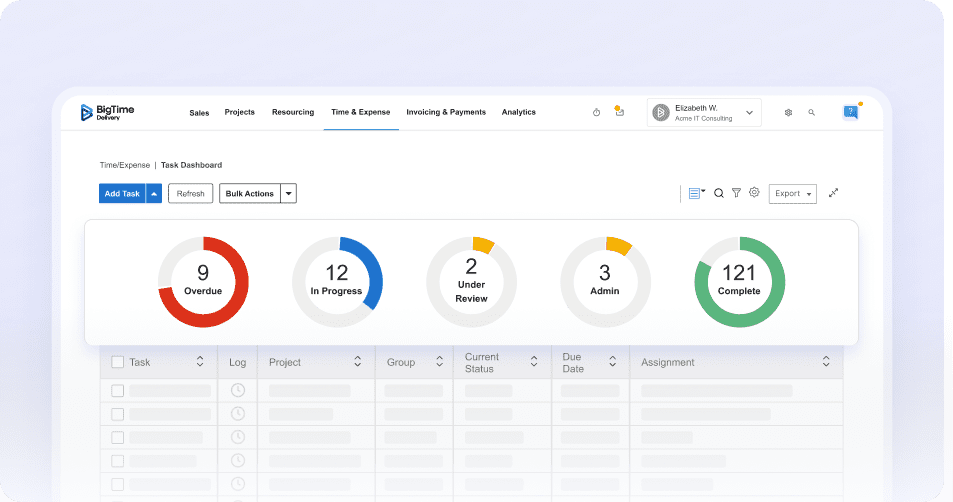
BigTime is a project management software with time tracking that’s purpose-built for organizations where hours drive results, especially professional services, consulting, and agencies. It goes beyond basic task management by connecting the work plan to the business reality behind it: budgets, billable time, utilization, and profitability. That means your team members’ time tracking is not just a record of what happened. It becomes a control surface for delivery decisions, from catching scope drift early to understanding which phases and roles are consuming more effort than planned.
Where BigTime really stands out as time tracking software for project management is the way it turns time entry into something teams can keep up with, while still giving leaders the visibility they need – both on destop and in the mobile apps. The platform emphasizes faster, more accurate time and expense capture and ties that data into the rest of the project lifecycle so you can manage to outcomes like margin and capacity, not just task completion.
If you’re evaluating the best project management software with time tracking for client delivery, BigTime is designed to support the full flow from tracking time to billing and forecasting. That makes it a strong choice when your priority is reliable reporting, stronger revenue capture, and fewer end-of-month surprises.
Key Features
- Time & expense management: Designed to speed up entry for unlimited users with smart presets and workflow-friendly capture so teams log time consistently without feeling buried in admin.
- Project budgeting and burn visibility: Helps you compare planned vs. actual effort so cost overruns show up early enough to fix, not after the work is already done.
- Billing support for services teams: Connects approved time to billing workflows to help reduce missed billables and cut invoice prep time.
- Utilization and capacity insight: Get a clearer visibility into who is overextended and where workload needs rebalancing based on real tracked time to manage resources without a single error.
- Financial forecasting: Uses historical and real-time data to help predict revenue signals, margin risk, and staffing needs with more confidence.
- Detailed reports: Combine the power of AI with the information on budgets, tracked hours, plans, and more, to create a complete overview of your business and keep all the project managers on the same page.
Pricing: BigTime offers tiered plans via its official pricing page and encourages teams to compare options and request a demo for plan fit. Pricing starting at $20 per user/month and indicates a free trial.

Teamwork.com
Reviews: G2: 4.4/5, Capterra: 4.5/5.
Pros:
- Strong client services workflow: Teamwork.com is built for agencies and client-facing teams, so time tracking and billable vs. non-billable work feel more native than “bolt-on” timers in generic PM tools.
- Good baseline financial visibility: You can connect logged time to budgets and project profitability without building a complex reporting stack from scratch.
- Solid task + timer flow: For teams that want a project management tool with time tracking that’s easy to start using, the experience is straightforward.
Cons:
- UI and reporting consistency can vary: As you scale, you may find it takes extra effort to standardize dashboards and stakeholder reporting across teams.
- Advanced capabilities are not always obvious: Some of the best features sit behind configuration choices that require time to learn and maintain.
- Less “enterprise governance” out of the box: If you need strict portfolio controls, layered approvals, or heavy compliance reporting, Teamwork can start to feel lightweight.
Teamwork.com is a practical option for time tracking for project management when your business runs on client deliverables, retainers, and utilization. It does the fundamentals well: tasks, collaboration, and time capture tied to project work. That said, teams that want deep analytics and airtight standardization across departments may need extra admin work to keep reporting clean and consistent.
As time tracking software for project management, Teamwork works best when you care about getting accurate time into the system quickly and using it to keep work on-budget. It is less ideal if your organization expects highly tailored, board-level reporting without ongoing tuning.
Key Features
- Built-in time tracking: Track work hours against tasks and projects so you can connect effort to delivery and billing without jumping between tools.
- Budgets and project cost controls: Add budget guardrails so logged time shows when work is trending over or under plan.
- Task and milestone planning: Structure work with clear owners, due dates, and checkpoints that support weekly delivery rhythms.
- Client collaboration: Share progress with external stakeholders, but expect to spend time setting permissions and views for consistency.
Pricing: Tiered plans; time tracking and financial controls are typically packaged in paid tiers, so you will want to validate what’s included before committing at scale.
Wrike
Reviews: G2: 4.2/5, Capterra: 4.4/5.
Pros:
- Powerful workflow depth: Wrike handles complex work intake, task dependencies, and approvals better than many generalist tools.
- Strong visibility for managers: Dashboards, workload views, and structured workflows help project leads spot risk earlier.
- Good for cross-functional teams: It can support marketing, creative, operations, and IT workflows in one system with consistent structure.
Cons:
- Learning curve is real: Teams often need deliberate onboarding before they log time and manage work consistently.
- Support can feel slow for blockers: When you are stuck, response quality may not match what you expect from a premium platform.
- Time tracking can feel secondary: Wrike includes time-related features, but many teams still end up customizing heavily to get clean utilization and billing outputs.
Wrike is best when project management discipline matters more than simplicity. If your projects require structured intake, approvals, and multi-team coordination, Wrike can be an effective project management software with time tracking. The catch is that it tends to reward mature processes and strong admins. If your organization is still building consistency around time capture and reporting, Wrike can feel heavier than expected.
As a “best project management software with time tracking” contender, Wrike earns its place for complex environments, but it may be overkill for smaller teams that mainly need fast time entry and clean client reporting.
Key Features
- Custom workflows: Create process stages that match how work actually moves, but expect setup and governance work to keep teams aligned.
- Dashboards and reporting: Monitor progress and risks across projects, although deeper time analytics may still require configuration.
- Workload and capacity views: Useful for spotting over-allocation, but accuracy depends on consistent task planning and time logging.
- Approvals and proofing: Great for creative and stakeholder-heavy work where review cycles drive timelines.
Pricing: Wrike has a free tier and paid plans; many advanced controls are tied to higher tiers, so costs can climb as you add users and governance needs.
ClickUp
Reviews: G2: 4.7/5, Capterra: 4.6/5.
Pros:
- Very customizable: ClickUp can be shaped into almost any workflow, which appeals to teams trying to consolidate tools.
- Broad “all-in-one” coverage: Tasks, docs, dashboards, and time tracking sit in one workspace, reducing context switching and helping managers track project from start to finish.
- Fast experimentation: Teams can prototype processes quickly with custom fields, views, and automations.
Cons:
- Too much flexibility can backfire: Without governance, different teams build different systems, which breaks reporting and standardization.
- Performance and complexity risk: Larger, heavily customized workspaces can feel slower and harder to maintain.
- Time tracking is not always “finance-ready”: It works for logging time, but turning that into reliable profitability reporting may take extra structure.
ClickUp is a popular project management tool with time tracking for teams that want one platform to do a lot. It can work well when you have an operations owner who defines standards for statuses, fields, and time entry rules. Without that, ClickUp becomes a collection of inconsistent workspaces, and the value of time tracking for project management drops fast because reporting becomes unreliable.
If you want a system that’s flexible first and standardized second, ClickUp is a strong option. If you want consistent financial reporting with minimal admin effort, it is harder to keep clean over time.
Key Features
- Time tracking on tasks: Log time where work happens, which improves adoption, but you need clear policies on what “good” time entry looks like.
- Custom fields and views: Useful for shaping workflows, but over-customization can reduce clarity for new users.
- Dashboards: Visual performance tracking, though the usefulness depends on consistent data inputs.
- Automations: Good for reducing manual handoffs, but requires maintenance as processes evolve.
Pricing: Free tier available; paid tiers add controls and scale features. As you mature your setup, you may need higher plans to keep workflows and reporting consistent.
monday.com
Reviews: G2: 4.7 stars, Capterra: 4.6/5.
Pros:
- Strong visual management: Boards are easy to understand, which helps adoption across non-PM teams.
- Good automations for routine work: You can reduce manual updates and reminders once workflows are set.
- Flexible enough for many teams: Works well across marketing, ops, and light project delivery.
Cons:
- Can get cluttered at scale: Too many boards and inconsistent naming make it harder to find work quickly.
- Time tracking may require higher tiers: Some functionality is plan-dependent, which impacts ROI for smaller teams.
- Reporting maturity varies: Basic dashboards are fine, but deeper time and profitability analysis can be harder to standardize.
monday.com is a strong time tracking software for project management when your main goal is getting teams organized quickly and keeping work visible. It shines in day-to-day execution, but it can become board-heavy, which leads to inconsistent tracking and messy reporting if you do not enforce standards.
For buyers looking for the best project management software with time tracking, monday.com works well when your time tracking needs are “good operational visibility” rather than “finance-grade utilization and margin reporting.”
Key Features
- Board-based project planning: Great for clarity and adoption, but requires governance to avoid sprawl.
- Automations: Helps reduce follow-ups and manual status changes, especially for recurring workflows.
- Time tracking add-ons/capabilities: Effective for basic logging, but plan requirements and reporting depth vary.
- Dashboards: Useful for executive snapshots, though deep time analytics can be limited without structure.
Pricing: Tiered pricing; validate whether time tracking is included at your plan level, especially if you need it across many users.
Zoho Projects
Reviews: G2: 4.3/5, Capterra: 4.5/5.
Pros:
- Strong value for the price: Zoho Projects is often cost-effective for teams that need solid PM features plus timesheets.
- Good fit inside the Zoho ecosystem: If you already use Zoho apps, integrations feel more cohesive.
- Built-in time sheets: A practical option for time tracking for project management without adding a separate tool.
Cons:
- UI can feel less intuitive: Teams may struggle with usability compared to more modern PM platforms.
- Setup and permissions can be complex: Advanced configuration takes time and can slow rollout.
- Integrations outside Zoho can be inconsistent: If your stack is mostly non-Zoho, expect some friction.
Zoho Projects is a realistic choice when you want project management software with time tracking at a lower cost and you can accept some UX trade-offs. It tends to work best for teams that are comfortable with structured systems and are willing to invest in setup so time capture and reporting stay consistent.
As time tracking software for project management, Zoho Projects can deliver strong ROI, but it is less ideal for teams that want a “zero training” experience.
Key Features
- Timesheets and time logging: Track time against tasks and projects for billing and productivity review, with solid baseline reporting.
- Task and milestone planning: Supports delivery tracking, but the UI may feel heavier than competitors.
- Gantt and scheduling tools: Useful for timeline planning and dependencies, especially for structured project work.
- Zoho integrations: Strong when paired with Zoho CRM, Desk, or other Zoho apps, but less predictable elsewhere.
Pricing: Generally positioned as budget-friendly; confirm which tiers include the time tracking and reporting depth your team needs.
Smartsheet + Resource Management by Smartsheet
Reviews: Smartsheet (G2: 4.4 stars, Capterra: 4.5/5) | Resource Management (G2: 4.0/5, Capterra: 4.2/5).
Pros:
- Great for structured work and planning: Smartsheet is a strong fit for teams that think in spreadsheets but need more governance and collaboration.
- Useful resource and capacity layer: Resource Management adds scheduling and utilization views that many PM tools struggle with.
- Scales well operationally: Good for PMOs and ops teams that need repeatable templates and controlled processes.
Cons:
- Two-system experience: Using Smartsheet plus Resource Management can feel like stitching together platforms, especially for time entry and reporting.
- Not built for fast, lightweight teams: If you want simple task execution and quick timers, this stack can feel rigid.
- Reporting takes work: You can get powerful views, but it is rarely “plug and play” for profitability and billable utilization.
Smartsheet can function as project management software with time tracking when your organization prioritizes planning, governance, and structured reporting. In practice, many teams use Smartsheet to manage the plan and Resource Management to handle capacity and time. That combination can be strong, but it introduces complexity and admin overhead that smaller teams may not want.
As a project management tool with time tracking, Smartsheet is best when your PM process already exists and you need a system to enforce it.
Key Features
- Sheet-based project plans: Excellent for structured delivery, but requires careful template design to keep data consistent.
- Workflows and approvals: Helps standardize execution, especially for ops-heavy environments.
- Resource scheduling (RM): Visual capacity planning and allocation, though accuracy depends on disciplined maintenance.
- Time and utilization tracking (RM): Useful for high-level utilization, but cross-system reporting can require extra setup.
Pricing: Smartsheet is priced per plan; Resource Management is often an additional cost, so total ownership can be higher than it looks at first glance.
Kantata
Reviews: G2: 4.2/5, Capterra: 4.2/5.
Pros:
- Strong PSA orientation: Kantata is designed around utilization, resourcing, and services delivery, not just task lists.
- Good for multi-project environments: If you manage portfolios of client work, the model fits better than generic PM tools.
- Broad operational coverage: Forecasting, time, and delivery can live in one system.
Cons:
- Heavier implementation: Kantata often requires setup, process decisions, and change management to work well.
- UX can feel enterprise-first: Teams may find it slower to adopt compared to lighter tools.
- Cost and complexity are real: For smaller teams, it can be more platform than they need.
Kantata is a serious option for time tracking software for project management in professional services environments. It aims to connect staffing, time, and delivery into one operational picture. The limitation is that the platform expects maturity. If your organization is still building consistent time capture habits, Kantata can feel like a big leap.
As a “best project management software with time tracking” candidate for services teams, it is credible, but it is not the easiest path for teams that want quick wins with minimal rollout effort.
Key Features
- Resource planning: Plan capacity across projects, but expect ongoing maintenance to keep forecasts accurate.
- Time and expense tracking: Capture time at a detailed level for billing and utilization analysis.
- Project financials: Helpful for services performance visibility, but requires clean data and consistent processes.
- Portfolio visibility: Useful for leadership views, especially in firms juggling many concurrent client engagements.
Pricing: Typically positioned as a premium PSA platform; pricing is often tailored to needs and scale, so it is important to validate total cost of ownership early.
Which Project Management Software with Time Tracking is the Best?
If you want project management software with time tracking that does more than collect hours, BigTime is the strongest all-around choice. It’s built to connect time to budgets, billing, utilization, and profitability, so you’re not stuck exporting data and rebuilding the story in spreadsheets. That’s what separates a basic tracker from a system you can actually run delivery on in 2026: clean time data, tied to real project structure, with reporting that helps you protect margins and plan capacity.
BigTime also stands out because it fits how professional services teams operate day to day. Time entry is designed to be manageable for the team, while leaders get the visibility they need to catch scope creep early, tighten forecasts, and bill confidently. If you’re serious about finding the best project management software with time tracking (not just a task tool with a timer), BigTime is the option that most consistently turns effort into operational control.
You can explore BigTime by booking a free personalized demo.

Project Management Software with Time Tracking: FAQ
What is project management software?
Project management software is a platform that helps teams plan, assign, track, and deliver work in one place, using tasks, timelines, files, and status updates to keep projects on schedule.
What is project management software with time tracking?
Project management software with time tracking combines task/project execution with built-in time logging, so hours are captured directly against work items and can be used for budgeting, billing, utilization, and performance reporting.
What are the key features in project management software with time tracking?
- Task-based time entry: Log time directly to tasks, projects, and phases for clean, actionable data.
- Timers + manual timesheets: Support different working styles and reduce missed hours.
- Budget vs. actual tracking: Compare planned hours/cost to real effort to spot overruns early.
- Billable/non-billable controls + rates: Classify time and apply rates for accurate invoicing and margin views.
- Approvals and audit trails: Validate time before it impacts billing or reporting.
- Utilization and capacity reporting: See workload and staffing needs based on real hours.
What are the benefits of time tracking software in project management?
It improves budget control, reduces missed billables, helps prevent scope creep, strengthens forecasting, and makes capacity planning more accurate.
What is the best project management software with time tracking?
BigTime is the best choice when time needs to drive real decisions—because it connects time tracking to budgets, billing, utilization, and profitability, not just task completion.
What is the best agile project management software with time tracking?
BigTime. Even if your team runs agile delivery cycles, you still need visibility into burn, utilization, and financial outcomes. BigTime turns agile effort into clear budget and margin signals, so you can iterate fast without losing control of resourcing or profitability.
What are the popular project management tools with time tracking?
Popular options include BigTime, Teamwork, Wrike, ClickUp, monday.com, Zoho Projects, and Jira with Tempo.
What is the best free project management software with time tracking?
Free tools can work for basic task lists, but they often break down fast for serious time tracking: limited reporting, weak approvals, restricted integrations, and inconsistent data once teams scale—plus you usually can’t reliably connect hours to budgets and profitability. If you’re outgrowing “free,” BigTime is a strong next step because it gives you time tracking built for billing, utilization, forecasting, and margin control (without forcing you to stitch together multiple tools).