In IT, “project tracking” can’t be a polite status color and a weekly slide deck. You need a live, trustworthy picture of what’s moving, what’s blocked, who’s overloaded, and what’s quietly drifting past the deadline. The right IT project tracking software turns scattered updates into a single source of truth, so your team can ship work faster and your stakeholders get answers based on data, not guesswork.
This guide breaks down what to look for in an IT project tracking tool, which features matter most in day-to-day delivery, and how to pick the best project tracking software for IT in 2026.
In this article, you will find:
- What is IT project tracking software?
- What features should the best IT project tracking software have?
- 2026 IT project tracking software ranking
- IT project tracking software comparison
- Tool reviews
- Which IT project tracking software is the best?
What Is IT Project Tracking Software?
IT teams track more than dates in the project plan. You are balancing competing project priorities, cross-functional handoffs, project dependencies across systems, and work that changes shape midstream. That makes “tracking” less about checking boxes and more about maintaining clarity across multiple projects: what is in progress, what is blocked, what is at risk, and what it will take to finish.
IT project tracking software is a platform that helps IT teams and their project managers plan, assign, monitor, and report project work in real time by organizing tasks, timelines, ownership, dependencies, and progress in one system. In practice, the best tools solve common IT delivery challenges such as:
- Keeping work visible across teams: Managing project development, infrastructure, security, and support work even in complex projects without losing context when tickets move between groups.
- Managing project dependencies and blockers: Spoting upstream delays in project progress early, so a “small” change request does not derail a release, migration, or rollout.
- Monitoring time and effort: Capturing task assignments, workload, and progress so estimates improve and capacity planning becomes more accurate.
- Standardizing delivery: Using templates, Kanban boards, Gantt charts and repeatable workflows for recurring initiatives and repetitive tasks and projects.
- Reporting without manual updates: Turning live project data into stakeholder-ready status views and custom dashboards, including project milestones, risk signals, and completion forecasts.
Benefits of Tracking in Project Management Software
When IT delivery gets busy, the biggest risk is not lack of effort. It’s lack of alignment. IT project tracking software gives you a practical operating system for execution, so work moves forward with fewer surprises, fewer fire drills, and fewer “we’ll know on Friday” moments. This is, however, just a tip of the iceberg. Other benefits of such tools include:
- Cleaner visibility for faster decisions. Instead of chasing updates in your preferred file storage, you get a single view of what’s happening now: what’s in progress, what’s stuck, and what’s about to slip, making task management much easier.
- Better predictability. In 2026, change is normal. Strong tracking systems make those changes visible and measurable, so you can reset expectations early and adapt your team management accordingly.
- More accurate team capacity planning. The best project tracking software for IT doesn’t just show tasks. It offers various resource management tools showing who is available, who is overloaded, and where work is bottlenecking.
- Stronger accountability without micromanagement. When ownership, due dates, dependencies, and status are clearly defined, people don’t need constant follow-ups. Teams stay autonomous, while leaders still have the oversight required for reporting, even for multiple teams.
- Reporting that does not depend on heroics. Weekly status reporting becomes a byproduct of delivery and team collaboration rather than a separate job. With dashboards and trend reporting, you can communicate progress, risk, and next steps in a way that executives actually trust.
Project Management Tools with Project Tracking: Key Features
Not every project platform is built for IT reality full of cross-functional projects. Your team is juggling dependencies, interrupts, approvals, and delivery work that spans people with very different roles – and they all need to track progress for their tasks. The best project tracking software for IT should make execution easier (not heavier) while giving leadership clean visibility into progress, risk, and effort.
Here are the features that separate a general task board from a serious it project tracking tool:
Flexible work structures
IT rarely runs one project at a time, and “one project” often includes multiple workstreams with separate owners. To successfully track projects in such an environment, you need a structure that supports individual projects while also rolling them up into programs and project portfolios for leadership oversight. This is how you avoid fragmented tracking when work spans numerous individuals and teams.
Multiple views that match how IT teams actually work
Different roles need different ways to see the same work: engineers may prefer boards, PMs may need project timelines, and leaders want executive dashboards. Look for Kanban boards for flow-based work, list views for operational detail, timeline or Gantt views for dependency-heavy initiatives, and calendar views for releases and milestones.
Resource and capacity planning (not just assigning tasks)
Assigning tasks is simple; predicting whether you can deliver them on time is the real challenge. Great capacity planning shows workload by person, role, and team, and flags over-allocation early so you can rebalance before projects slip. The best systems also help you forecast resources, so you can commit to new work with realistic expectations instead of optimism.
Time tracking that supports delivery and reporting
Time tracking should be lightweight enough that technical teams will actually use it, but structured enough to be meaningful for planning and reporting. The best tools connect time and completed tasks to projects, phases, and specific work items, giving you accurate effort data for estimating and retrospectives.
Real-time reporting dashboards that stakeholders can trust
The best project management software treats reporting as a vital part of project health, not a separate module. Why? A good dashboard replaces the weekly scramble by surfacing progress, milestones, overdue items, and risk signals from live data. Look for reporting that supports both high-level summaries and the ability to drill into details when someone asks “what’s driving the delay?”.
Integrations with the tools your IT team already lives in
The project tracking and task management software should connect cleanly with other tools in your ecosystem: ITSM, chat, documentation, version control, AI agents, and Google calendar. Strong integrations reduce double entry and keep project information attached to work, so teams don’t have to bounce between systems to understand what’s happening. This is also how you prevent “shadow tracking” in spreadsheets or disconnected boards.
Scalability and performance under real usage
Many tools feel fine with one team and a handful of projects, but strain shows up fast at scale. The best IT project tracking software stays fast and usable with hundreds of users, thousands of work items, and complex reporting needs, guaranteeing streamlined collaboration. Scalability is also about administration: you should be able to manage permissions, templates, and workflows without turning the tool into a full-time job.
2026 IT Project Tracking Software: A Complete Ranking
To keep this guide practical (and easy to use), this ranking focuses on five platforms that cover the most common IT tracking needs: services delivery, software development, cross-functional project execution, structured PMO reporting, and fast-moving internal initiatives.
In this guide, we will focus on five most popular tools in this category:
- BigTime – Best overall for IT teams that need reliable tracking tied to time, resourcing, and delivery visibility (especially services, implementations, and project-based IT work).
- Jira – Strong choice for software development teams running sprints, backlogs, and technical workflows (but less friendly for broader business-facing tracking).
- monday.com – Flexible for cross-functional IT projects where stakeholders want clean visibility and lightweight structure (with tradeoffs in deeper delivery controls).
- Smartsheet – A solid fit for PMOs and IT organizations that live in structured plans, dashboards, and reporting (but can become spreadsheet-heavy).
- ClickUp – Popular “all-in-one” option for teams that want tasks, docs, and dashboards in one place (with adoption and consistency challenges at scale).
IT Project Tracking Software: Comparison
| Tool | Description | Strengths | Limitations |
| BigTime | IT project tracking software that connects delivery, time, resourcing, and reporting. | Excellent time + project tracking alignment; strong capacity planning; leadership-ready dashboards and client-friendly reporting; ideal for IT services and implementation work. | Not the best fit if you only need basic task lists with no time, resourcing, or performance reporting. |
| Jira | Agile issue and sprint tracking for engineering teams. | Powerful backlog/sprint workflows; deep configuration for technical teams; large integration marketplace. | Can be frustrating for non-technical stakeholders; portfolio reporting often requires extra products/add-ons; easy to become messy without strict admin governance. |
| monday.com | Flexible boards for tracking projects and requests. | Quick to set up; easy for stakeholders to view updates; decent dashboards for simple reporting. | Depth drops for complex IT dependencies and capacity planning; “board sprawl” can create inconsistent tracking; structure depends heavily on disciplined setup. |
| Smartsheet | Spreadsheet-style project tracking and dashboards. | Familiar for teams coming from Excel; good for PMO-style reporting; dashboards work well for high-level status. | Execution can feel manual; real-time collaboration and workflow control are weaker than purpose-built tools; easy to recreate spreadsheet chaos at scale. |
| ClickUp | All-in-one task and doc workspace. | Broad feature set; flexible views; automation options for lightweight processes. | Often over-configured and inconsistent across teams; reporting reliability varies with setup; can add admin overhead and reduce trust in “one source of truth.” |
BigTime
Reviews: G2: 4.5, Capterra: 4.6.
Pros:
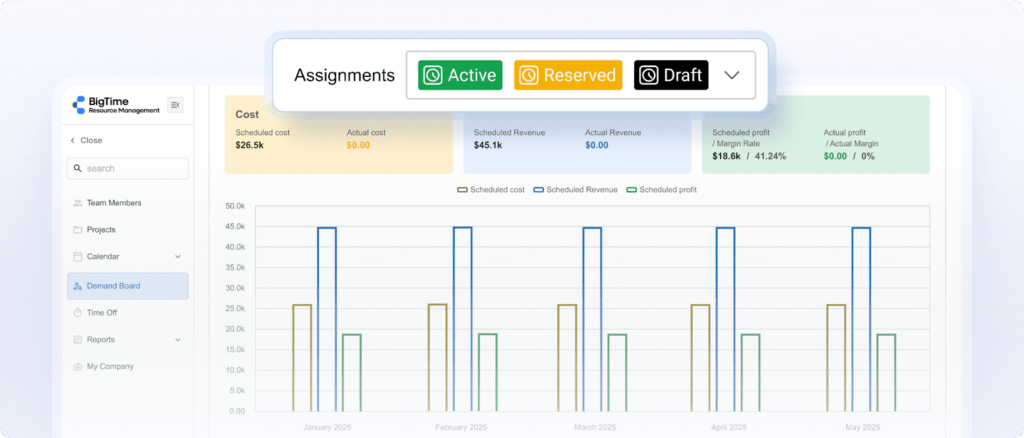
- Connects project tracking with time, resourcing, and financial visibility. If your IT team needs more than “task complete/incomplete” or a simple to-do list, BigTime software ties delivery progress to hours, cost, utilization rates, and margin signals, so you can catch risk before it becomes a surprise.
- Reporting is built for real decisions, not cosmetic status updates. You can run consistent performance views across projects, compare plan vs. actual effort, and give stakeholders updates that are based on live data instead of manual rollups.
- Resource planning supports predictable delivery. BigTime’s resource management capabilities are designed to help you match skills to work, manage allocations, and plan coverage, which is a big deal for IT services teams handling parallel projects and urgent requests.
- Fits project-based IT work especially well. For implementation teams, internal IT project groups, and managed services organizations that care about time capture and billing accuracy, BigTime is a strong “single system” for delivery accountability.
Cons:
- It’s more platform than lightweight tracker. If you only need a simple it project tracking tool with basic tasks and a couple of dashboards, BigTime may feel like more system than you want to roll out.
- Mobile experience can be limiting for some workflows. Teams that rely heavily on mobile-first updates may want to validate how the mobile app fits their day-to-day process before committing.
BigTime is a PSA platform built for organizations that need IT project tracking to reflect what’s really happening: time spent, capacity used, revenue at risk, and delivery performance across a portfolio. Instead of treating time, resourcing, and reporting as separate problems, BigTime brings them into one flow so you can plan projects and manage tasks with fewer blind spots.
For IT teams delivering client work, that connection matters. You get a clearer picture of whether the plan still holds once tickets shift, priorities change, or a specialist gets pulled into escalations. And because project data and time data live together, leadership reporting becomes less about chasing updates and more about reading the signals and acting early.
BigTime also works well when you don’t want to force technical teams into yet another rigid workflow. Many IT organizations already run project execution in specialized systems (like dev or ticketing platforms) and still need a reliable layer for time, resourcing, and performance reporting. BigTime can provide them with such an overview combined with a number of other collaboration tools. As a result, compared to other project management software, BigTime helps you keep that operational reality intact while still giving you the tracking discipline the business expects.
Key Features
- Time & expense management: Fast entry options and approvals for unlimited users help teams capture hours consistently, helping managers see project updates live and making onboarding process easier than ever before.
- Resource management: Plan resource allocations in new projects by skill and availability, then adjust schcedules in a timeline view as priorities change. It’s built to support capacity conversations with real data, not gut feel.
- Project budgeting and performance tracking: Compare planned vs. actual effort and watch budget health across active work. This is where BigTime starts to feel like “it project tracking software” rather than a task list.
- Invoicing and billing workflows: Turn approved time into invoices and manage billing processes inside the same platform. That’s a practical advantage for IT services and implementation teams.
- Dashboards and reporting: Build leadership-ready views that reflect live delivery and financial signals. Use custom fields, unlimited boards and AI-powered insights to make the most of every piece of information to level up your data-driven decision making.
- Seamless integrations. BigTime offers a number of third party integrations, helping you create a bespoke digital environment with your favorite tools.
Pricing: BigTime’s pricing starts at $20 per user/month (published starting price).

Jira
Reviews: G2: 4.3/5, Capterra: 4.4/5.
Pros:
- Strong for engineering execution. Jira software is excellent for backlogs, sprints, issue workflows, and linking work to technical context when your IT projects are mostly product or development delivery.
- Deep customization (with the right governance). If you have a mature admin model, you can tailor workflows, fields, and boards to match how your teams actually ship.
Cons:
- High complexity for “regular” IT project tracking. For non-technical stakeholders and new users, Jira can feel heavy, unintuitive, and easier to misuse than simpler IT project tracking software.
- Portfolio-style visibility often turns into add-ons and admin work. Getting consistent reporting across teams frequently means extra configuration, strict standards, and sometimes additional Atlassian products.
Jira is fundamentally an engineering-first tracking system. If your primary goal is to run disciplined Agile delivery, it’s one of the strongest options available. The tradeoff is that Jira can become a “configuration project” of its own, especially when you try to make it the single tool for every IT initiative.
As an it project tracking tool, Jira works best when you’re comfortable investing in setup, governance, and training. Without that, teams often end up with cluttered fields, inconsistent workflows, and reporting that looks detailed but still doesn’t answer leadership questions cleanly.
Key Features
- Scrum and Kanban boards: Built for sprint execution and flow-based work with backlog management and issue tracking.
- Custom workflows and fields: You can model complex processes, but it’s easy to overbuild and make simple work feel harder than it should.
- Dashboards and reporting: Useful when consistently configured, but cross-team comparability depends on strong standards.
Pricing: Free plan available; paid plans start around $7–$8 per user/month (cloud), with higher tiers for advanced controls.
monday.com
Reviews: G2: 4.7/5, Capterra: 4.6/5.
Pros:
- Fast adoption for mixed audiences. monday.com software is easy to roll out when you need IT and business stakeholders to share the same project views without a lot of training.
- Flexible visual tracking. Boards and dashboards can make simple IT initiatives feel organized quickly, especially for request tracking and lightweight project plans.
Cons:
- Surface-level depth for complex IT delivery. Once you need serious dependency management, consistent governance, and “portfolio truth,” monday.com can start to feel like structured spreadsheets rather than true IT delivery control.
- Value drops as you scale. Advanced views, automation volume, and higher-tier functionality can push costs up, and teams can hit limitations as usage grows.
monday.com is best thought of as a flexible PM tool. It’s great when your IT projects need high visibility, simple workflows, and stakeholder-friendly status tracking. It’s less convincing when you want the system to enforce consistency across many teams with complex delivery patterns.
For IT organizations, the biggest risk is “board sprawl”: different teams build different structures, dashboards stop matching reality, and leadership reporting becomes a manual reconciliation exercise. If you choose monday.com as your IT project tracking software, you’ll want clear templates and strict conventions from day one.
Key Features
- Boards + multiple views: Kanban, timeline, and dashboards work well for visibility, but deeper controls are often plan-dependent.
- Automations: Helpful for basic routing and reminders, but costs/limits can matter at scale.
- Integrations: Connects broadly, but real IT workflow maturity still depends on how you design the process.
Pricing: Starter plan is around $9/user/month billed annually (with higher tiers like $12 and $19 for more advanced features).
Smartsheet
Reviews: G2: 4.4/5, Capterra: 4.5/5.
Pros:
- Strong for structured planning and PMO reporting. Smartsheet software works well when IT leaders want standardized plans, rollups, and dashboards that feel familiar to spreadsheet-heavy organizations.
- Good for visibility across many stakeholders. It can centralize project plans and make status easier to share than emailing spreadsheets back and forth.
Cons:
- Can stay “spreadsheet-first” in the worst way. Execution often becomes manual upkeep, and teams can spend too much time maintaining sheets instead of delivering work.
- Reporting limitations and pricing friction. Users often call out dashboard constraints and concerns around licensing/value as usage grows.
Smartsheet sits in a middle ground between project tracking software and structured spreadsheet systems. If your IT organization values governed templates, consistent reporting, and a predictable “project plan” format, it can be a pragmatic choice.
The downside is that it can feel brittle for fast-moving IT teams. When work changes daily, you may end up with plans that look clean but lag reality, plus dashboards that need more manual effort than expected to stay accurate.
Key Features
- Sheets and templates: Great for standardized plans, but easy to over-customize and create inconsistent reporting across teams.
- Dashboards: Useful for high-level status, yet filtering/drill-down can be limiting compared to purpose-built reporting.
- Automation: Can reduce repetitive updates, but advanced automation is not always quick to configure for complex workflows.
Pricing: Often positioned starting around $9 per user/month, with higher tiers for advanced capabilities.
ClickUp
Reviews: G2: 4.7/5, Capterra: 4.6/5.
Pros:
- Feature-heavy for the price. ClickUp software can cover tasks, docs, dashboards, and automation in one place, which is appealing if you want a single workspace.
- Flexible views for different working styles. Lists, boards, and timelines give teams options, especially during early rollout.
Cons:
- Overwhelming setup and governance risk. ClickUp can become inconsistent fast because there are many ways to structure the same work, which hurts reporting trust.
- Performance and complexity complaints at scale. Heavily customized workspaces can slow down, and the learning curve is real for teams that just want straightforward IT project tracking.
ClickUp is popular with teams that want an all-in-one platform and are willing to invest in configuration. For IT, that can be a double-edged sword: you can design almost anything, but you can also end up with a workspace that feels different in every team, making portfolio visibility unreliable.
As a day-to-day IT project tracking tool, ClickUp tends to work best when you keep the system intentionally simple (few statuses, consistent templates, limited custom fields) and treat governance as part of the rollout, not an afterthought. As a result, it might be the best choice for small teams requiring simple sprint planning.
Key Features
- Tasks + docs in one workspace: Convenient for keeping context together, but it can encourage overbuilding unless you standardize structure.
- Automations: Helpful, though some setups can be fiddly and harder to maintain than expected.
- Dashboards and reporting: Useful when the underlying taxonomy is consistent; unreliable when every team uses different fields/statuses.
Pricing: Free plan available; paid plans commonly start around $10 per user/month (varies by billing).
Which IT Project Tracking Software Is The Best?
When IT delivery gets busy, “tracking” has to mean more than a task list. You need a system that answers the real questions fast: Are we on track? Are we over capacity? Where are we burning time, and what does that mean for delivery and cost? That’s why, across these five options, BigTime is the best IT project tracking software for teams that care about predictable execution and leadership-ready visibility.
Where BigTime wins (and why it matters):
- Project tracking + time in one flow: Progress is tied to real effort, so you’re not managing off assumptions.
- Capacity you can act on: See load by person or role and adjust before timelines slip.
- Reporting that holds up in leadership conversations: Clear views of project health, trends, and performance without spreadsheet cleanup.
Other tools can fit specific scenarios (Jira for dev workflows, Smartsheet for PMO-style plans), but they often break down when you need consistent portfolio visibility or when reporting depends on perfect setup and constant governance. BigTime is built to stay reliable as volume grows and priorities shift, which is exactly what IT teams need in 2026.
Ready to see it in action? Book a free personalized demo to discover what BigTime can do for you.
IT Project Tracking Software: FAQ
What is IT project tracking software?
IT project tracking software is a system IT teams use to plan, assign, monitor, and report project work in real time. It keeps tasks, owners, timelines, dependencies, and status in one place so teams can see what’s moving, what’s blocked, and what’s at risk.
What are the key features in project tracking software for IT firms?
The most useful features in a project tracking software for IT environment typically include:
- Time tracking tied to projects: Captures effort against work so estimates improve, costs stay visible, and reporting is grounded in reality.
- Resource and capacity planning: Shows workload by person/role/team, flags overallocation early, and supports realistic delivery commitments.
- Dependency and blocker management: Makes handoffs and critical-path work visible so delays don’t hide until the deadline is missed.
- Dashboards and stakeholder reporting: Provides live project health views (milestones, overdue work, risk signals) without weekly spreadsheet rollups.
- Workflow automation and approvals: Supports IT processes like intake, triage, change approvals, QA gates, and release readiness checks.
- Templates and repeatable playbooks: Standardizes delivery for recurring IT initiatives like migrations, onboarding, audits, and implementations.
- Integrations with IT ecosystems: Connects with ticketing/ITSM, chat, documentation, version control, and calendars to reduce double entry.
What are the popular project management tools for IT companies?
Here are five widely used options (starting with BigTime), with quick, practical context:
- BigTime – Strong choice for IT services and project-based teams that need time tracking, resourcing, and delivery reporting in one platform.
- Jira – Popular for engineering teams running backlogs and sprints, but heavier for cross-functional stakeholder tracking.
- monday.com – Often used for stakeholder-friendly visibility and flexible boards, though it can lose consistency at scale.
- Smartsheet – Common in PMO-style environments where structured plans and dashboards matter, but it can become manual.
- ClickUp – All-in-one workspace that appeals on features, but governance and reporting trust can suffer if teams set it up differently.
What is the best IT project tracking software?
BigTime is the best IT project tracking software for IT teams that need dependable visibility into delivery performance, not just task completion. It stands out because it connects project tracking to time, capacity, and reporting, which are the levers that actually determine whether IT work finishes on schedule and within constraints.
If you want the clearest path to predictable execution and leadership-ready reporting, BigTime is the strongest overall option in this guide.