


In an IT company, the real challenge isn’t capturing a lead, it’s keeping the client journey connected once delivery begins. Projects evolve, “small” requests pile up, renewals sneak up, and key context gets lost between sales, account management, and the technical team. That’s where IT CRM systems make a difference.
A strong IT CRM system is more than a contact database. It connects pipeline, contracts, project work, ongoing service conversations, and expansion opportunities in one place, so your team can move faster and protect margin. If you’re comparing CRM IT tools or looking for CRM software for IT services, this guide will help you choose an IT CRM solution that fits how IT teams actually work.
Contents
- What is IT CRM software? (Definition, use cases, and problems it solves)
- Must-have features in the best IT CRM system
- 2026 IT CRM software ranking: top CRM IT tools reviewed
- IT CRM comparison table: strengths and limitations
- Individual tool reviews (BigTime first, then alternatives)
- Final verdict: which CRM IT platform is the best for IT services teams?
What Is IT CRM Software?
Customer relationship management (CRM) software in the IT industry is a customer relationship management solution built for IT companies that need to manage accounts, opportunities, contracts, service engagement history, and growth opportunities in one connected workflow. In other words, in the IT industry, CRM systems are the backbone of all customer interactions – from the initial draft project to the final invoice in the sales pipeline.
A practical IT CRM solution typically supports use cases like:
- End-to-end account visibility: In the right CRM tools, sales, marketing and delivery managers can keep notes, technical requirements, key stakeholders, SLAs, and renewal dates tied to the same account record so delivery teams aren’t working in the dark.
- Pipeline that matches IT reality: Use CRM platforms to track opportunities that include assessments, discovery, scoping, and multi-phase projects rather than simple “deal stages.”
- Handoffs from sales to delivery: Capture what was promised (scope, project timelines, assumptions, deliverables) so project teams avoid re-discovery and prevent margin leaks or cost overruns.
- Forecasting and capacity alignment: Customer expectations should always be reflected in your project plans – even months in advance. With the right tools, you can connect expected work to staffing plans so leadership can forecast revenue without ignoring delivery constraints.
- Standardized business process without rigidity: Create repeatable workflows (lead intake, qualification, scoping, proposal, approval) while still allowing for bespoke enterprise accounts.
In short, CRM for IT is about connecting commercial outcomes to service delivery. The right platform becomes a shared source of truth for leadership, sales, account managers, and delivery teams, reducing friction across the entire client lifecycle while making growth more intentional and measurable.
IT CRM Tools: Key Features
An IT pipeline is only part of the final customer satisfaction. The best IT CRM software supports the full client lifecycle, from first conversation to delivery handoff, renewals, and account expansion. When you evaluate CRM software for IT company teams, focus on features that protect context, improve forecasting, and make service work easier to manage at scale. Those include:
Account-centric project timeline
A strong IT CRM system should give you a complete history of the relationship in one place: proposals, project milestones, key decisions, and makeshift changes. In IT, client context gets distributed across people and tools fast, so this timeline needs to be searchable, easy to scan, and consistent across every account. When it’s done well, anyone can step into an account and understand what’s happening in minutes, not hours, and take over contact management or any necessary project changes.
Project management alignment
For CRM software for IT company teams, project work is where revenue turns into real outcomes – so your it crm should connect tightly to project execution. At a minimum, it should let you associate opportunities and accounts with projects, track key milestones, and preserve delivery-critical details like scope, timelines, resourcing assumptions, and success criteria. This makes it easier to prevent the classic IT problem where the CRM says “closed-won,” but delivery has no usable context.
The strongest IT CRM system setups also support project-level visibility for account managers and leadership, without forcing project teams to live inside the CRM. That can include simple executive dashboards showing project status, risk flags, budget burn, and change requests tied back to the account record. When project management is integrated or tightly synced, your CRM becomes a true lifecycle system, not just a pre-delivery tool.
IT-friendly pipeline and opportunity structure
Sales teams and customer service teams should adapt their activities to the industry – and the best CRMs for IT help them do that. Look for flexible stages that match how IT deals actually work (discovery, scoping, assessment, proposal, approvals, implementation planning). The best CRM IT tools also support opportunities that include multiple service lines, phased rollouts, and changing requirements without breaking reporting.
Reporting that reflects service reality
The best IT CRM software goes beyond “pipeline by stage” and gives you reporting that matches how service revenue behaves based on actual customer information. For many IT companies, the most valuable reports are the ones that connect bookings to expected delivery demand, so forecasting becomes both commercial and operational. You want insight into deal cycle time, win rates by service line, renewal forecast, expansion pipeline, revenue concentration, and performance by segment or industry? The best CRM for IT has it.
The result is simple: you can see the entire customer journey in a single tool, and you can use it to analyze customer data in seconds instead of rummaging through endless spreadsheets.
Custom fields and templates (without heavy admin work)
IT services aren’t one-size-fits-all, and you’ll likely need custom fields for environments, tech stacks, compliance needs, onboarding steps, service tiers, or client-specific workflows. The best CRM platforms make customization straightforward and scalable, so you can standardize what matters without creating an admin burden and manage customers interactions in seconds. Just as important, customizations should feed reporting cleanly, otherwise you end up with “custom chaos” that no one can analyze.
Integrations with the tools IT teams already run
Most IT organizations don’t live inside a single platform, so integrations are not optional – any system aiming to improve customer retention should have it. Therefore, your CRM should connect cleanly with project management, PSA systems, ticketing/help desk tools, billing/accounting, and collaboration apps to avoid duplicate data entry and conflicting records. The strongest setups ensure that updates in one system flow into the other, so sales reps, delivery, and finance are looking at the same version of the truth in the CRM data.
2026 IT CRM software ranking
While many CRMs work well for general sales teams, not all of them translate to IT services environments where delivery context, project alignment, and margin protection matter just as much as pipeline speed. This IT CRM ranking focuses on tools that can realistically support how IT companies operate in 2026: complex sales cycles, structured scoping, sales-to-delivery handoffs, renewals, and ongoing account growth.
The list includes platforms suited to different IT models (project-heavy consultancies, managed service providers, and hybrid teams). It also weighs practical adoption factors that often decide long-term success, such as usability, integration depth, reporting clarity, and how well each system supports a true client lifecycle, not just pre-sale activity.
IT CRM software comparison
On paper, most CRM platforms can track leads, contacts, and deals. In practice, CRM for IT teams need more than sales tracking. The right IT CRM system should support structured scoping, clean sales-to-delivery handoffs, renewals, and account growth, while still staying easy enough that teams actually use it.
Below is a quick comparison of leading crm it tools that are commonly shortlisted by IT companies and IT service providers.
| Tool | Description | Strengths | Limitations |
| BigTime | Built for services teams that need CRM-to-delivery continuity. | Excellent project and billing context; strong margin visibility; supports real IT lifecycle workflows. | Best for service-led IT teams; sales-only orgs may not need the full depth. |
| Salesforce Sales Cloud | Enterprise CRM with near-endless configuration. | Powerful automation and reporting. | Heavy admin and setup; easy to over-customize; costs rise quickly. |
| HubSpot CRM | User-friendly CRM for marketing + sales motions. | Fast adoption; strong lifecycle automation. | Service delivery fit is weaker; advanced features often require expensive tiers. |
| Microsoft Dynamics 365 Sales | CRM for Microsoft-centric organizations. | Solid governance and ecosystem alignment. | Complex implementations; UX depends heavily on configuration and add-ons. |
| Zoho CRM | Budget-friendly CRM with many bundled apps. | Broad feature set for the price. | Can feel cluttered; reporting and service workflows take work to tune. |
| Pipedrive | Simple pipeline tracker for sales teams. | Easy to set up and use. | Limited for IT services lifecycle; renewals and delivery handoffs need extra tools. |
| Freshsales (Freshworks) | SMB CRM with built-in comms features. | Good for basic sales execution. | Less capable for complex IT deals; weaker depth for renewals and service context. |
| monday Sales CRM | Workflow-based CRM inside monday.com. | Flexible boards and collaboration. | Can become messy without governance; CRM reporting depth varies by setup. |
| Zendesk Sell | Sales CRM that pairs with Zendesk support. | Useful when support-to-sales coordination matters. | Not a full IT CRM solution; limited for scoping, projects, and service-driven growth. |
BigTime
Reviews: G2: 4.5, Capterra: 4.6.
Pros:
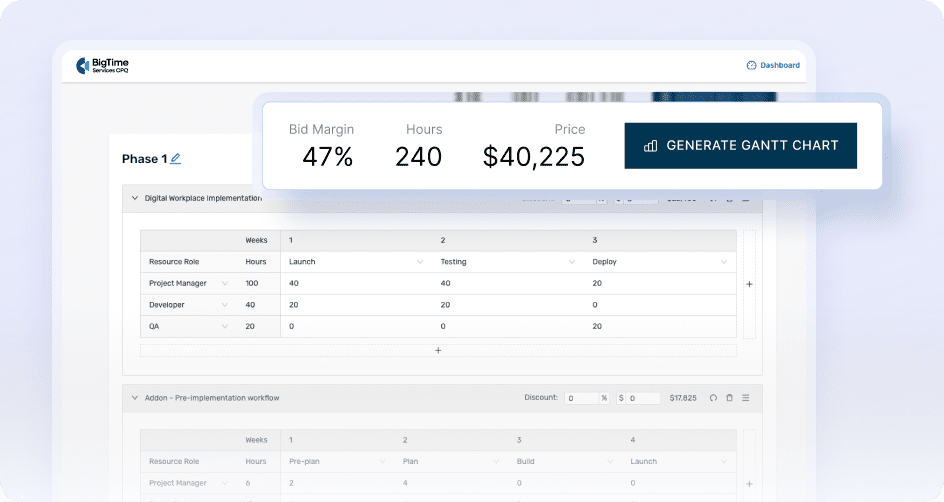
- Purpose-built for service delivery, not just pipeline tracking. BigTime customer relationship management software helps IT services teams keep commercial details connected to delivery work, so sales promises, project plans, and billable activity stay aligned.
- Strong project visibility with real financial context. Instead of treating delivery as “someone else’s problem,” BigTime brings time, budgets, and project performance into the same operational view, which helps protect margins as scope evolves.
- Time and expense capture that supports clean billing. Hours and expenses can be captured and approved in a structured way, which makes invoicing more consistent and reduces last-minute cleanup before billing cycles.
- Integrations that fit real IT stacks. BigTime connects with tools many IT teams already use, including QuickBooks and Jira, so delivery data and financial reporting can stay consistent without constant exporting and re-entry.
- Scales across project-based and recurring service work. For IT companies that run mixed delivery models, BigTime’s modular approach supports growth without forcing a complete process reset every time the business adds a new service line.
Cons:
- Takes intentional setup to get the full value. Because BigTime covers delivery, financials, and reporting, teams typically need a thoughtful rollout with clear workflows and ownership.
- Some organizations may still keep a separate sales-first CRM. If the priority is marketing automation or a large outbound motion, BigTime often works best as the services-focused system of record alongside a dedicated sales CRM rather than replacing it outright.
BigTime is a PSA platform that fits especially well for IT services organizations that want their “CRM moment” to continue after the deal closes. In practical terms, it helps connect the handoff between sales and delivery by keeping scope, staffing assumptions, and project execution tied to the client relationship. For IT leaders, that means fewer surprises mid-project and more confidence that forecasts reflect what the team can actually deliver, not just what’s sitting in the pipeline.
For teams looking at CRM software for IT services, BigTime stands out because it does not stop at relationship tracking. It supports project planning and delivery visibility, time and expense capture, and billing workflows that matter when revenue depends on service execution. It is also one of the most analytical CRM systems on the market, with advanced reports and AI-powered insights available in just a few clicks. That is often the difference between “a CRM everyone updates” and an operational platform teams actually rely on day to day.
BigTime also supports common IT environments through integrations. For example, Jira integration can connect delivery work with budgets and reporting, and QuickBooks integration helps keep financial records consistent without constant manual reconciliation. It also supports SSO and data imports, which matters for IT organizations that take governance seriously.
Key Features:
- Project management and milestones: Track project structure, milestones, and delivery progress with visibility that supports both delivery leads and client-facing teams to ensure customer success every step of the way.
- Time & expense tracking with approvals: Capture billable work consistently, route time and expenses through approvals, and keep records ready for invoicing. Mobile access included.
- Resource planning and utilization visibility: Plan capacity against upcoming work so staffing decisions match real demand and timelines. Turn sales forecasting into draft plans and choose the best path for your business.
- Invoicing and financial workflows: Turn approved time and expenses into invoices with controls that support accurate billing cycles. Boost productivity of your billing process with customizable invoices, purchase history, and integrated payments.
- Reporting & dashboards: Use standard reports and configurable dashboards to track profitability, project performance, and operational visibility across accounts to power up delivery, sales and marketing teams with fresh data.
- Integrations (QuickBooks, Jira, more): Connect your existing systems for delivery, finance, and accounting to enhance the CRM features so project work, budgets, and billing stay aligned across tools.
- Security and access readiness: Support SSO and structured access practices that fit IT org expectations around governance.
Pricing: Free trial available. Plans commonly start around $20 per user/month (Essentials), with higher tiers adding more advanced capabilities; demo and plan details are available on BigTime’s pricing page.
Salesforce Sales Cloud
Reviews: G2: 4.4/5, Capterra: 4.4/5.
Pros:
- Highly customizable for complex sales ops. Salesforce Sales Cloud can support detailed pipelines, custom objects, and governance-heavy processes for the entire customer lifecycle that larger IT organizations often require.
- Strong reporting potential. When data standards are enforced, dashboards and forecasting can be very robust for leadership visibility and predictive analysis.
Cons:
- Admin overhead is hard to avoid. Many teams need dedicated Salesforce admin capacity (and often external support) to keep automations, permissions, and changes under control as sales process evolves.
- Not service-first out of the box. As an IT CRM option, it typically needs significant configuration and integrations to support project-driven handoffs, renewals, and delivery context expected from an IT CRM solution.
- Costs can escalate with scale and add-ons. Once teams move beyond basic CRM needs, pricing often rises quickly across editions and add-on capabilities.
Salesforce Sales Cloud is a powerful strategic CRM built primarily for sales execution and large-scale customer data management. For IT companies with mature CRM operations, it can deliver strong structure around lead management, opportunities, and approvals, especially when there’s internal discipline around data hygiene and process consistency.
However, for many CRM software for it services use cases, Salesforce tends to feel like a “platform to build on” rather than a ready-to-run it CRM solution desinged to maintain strong customer relationships. Connecting sales to delivery usually requires heavy customization plus integrations to PSA/project systems, and ongoing maintenance becomes a real cost center. Without strict governance, the same flexibility that makes Salesforce appealing can also create a complex, slower CRM experience that reduces adoption across teams and reduces sales productivity.
Key Features
- Opportunity & pipeline management: Strong for multi-stage sales tracking, but typically needs customization to reflect IT scoping, phased rollouts, and services-led deal structures.
- Automation and approvals: Powerful workflow tooling, yet it can become difficult to maintain as exceptions, teams, and routing rules grow.
- Reporting & dashboards: Deep reporting capabilities, but the quality of insights depends heavily on consistent usage and clean field standards.
- Ecosystem and integrations: Broad integration options via APIs and marketplace apps, but integrations often require monitoring as systems and processes change.
Pricing: Salesforce lists tiered CRM pricing on its official pricing page, and third-party breakdowns commonly cite $25 (Starter Suite), $100 (Professional), $165 (Enterprise), and $330 (Unlimited) per user/month (typically billed annually), before add-ons.
HubSpot Sales Hub
Reviews: G2: 4.4/5, Capterra: 4.5/5.
Pros:
- Easy adoption for sales teams. HubSpot Sales Hub is typically quick to roll out, with an interface that feels approachable for non-technical users and clear pipeline visibility.
- Strong sales engagement toolkit. Features like sequences, templates, and automation can help standardize outreach and follow-up when the focus is pipeline velocity.
Cons:
- Costs rise fast as requirements mature. Many core capabilities IT service teams expect (automation depth, advanced reporting, governance controls) tend to sit in higher tiers, which can push budgets up as the org grows.
- Not naturally built as an IT CRM system. For teams looking for a true it crm solution that connects sales context to delivery (projects, milestones, service renewals), HubSpot often requires additional tooling and integrations to close the gap.
- Customization can be limiting for complex services workflows. HubSpot works well for structured sales motions, but service-led organizations may find it harder to represent scoping detail, multi-phase implementations, and account-level delivery context without heavy process workarounds.
HubSpot Sales Hub is a sales CRM designed to help teams manage contacts, deals, and activity tracking inside a unified “Smart CRM” environment. It tends to fit organizations that want a clean, modern system for pipeline execution, especially when inbound lead flow and structured follow-up are priorities. In that scenario, it can act as a strong front-office tool for visibility and consistency.
For crm software for it services, the main limitation is that HubSpot is still primarily a sales platform, not a services lifecycle system. IT companies often need the CRM record to carry delivery-critical context (scope assumptions, timelines, resourcing, renewal mechanics), and that usually lives outside HubSpot unless it is deliberately designed and tightly integrated. The result for many teams is a split reality: HubSpot is where deals are tracked, while delivery and renewals live elsewhere, which can create handoff friction and data duplication.
Key Features
- Deal pipelines and contact management: Strong basics for tracking opportunities and account activity, but service complexity often needs extra structure and strict field standards.
- Sequences and sales automation: Helpful for consistent follow-up; more advanced automation shows up in paid tiers and can impact total cost over time.
- Custom reporting (tiered): Reporting improves on higher plans, but service delivery reporting or predictive analytics usually requires external systems or additional configuration.
- Integrations marketplace: Large ecosystem for connecting other systems, but integration upkeep becomes a real consideration as workflows grow.
Pricing: G2 lists Free HubSpot CRM ($0), Sales Hub Starter ($20 per core seat/month), Sales Hub Professional ($100 per sales seat/month), and Sales Hub Enterprise ($150 per sales seat/month), plus a free trial.
Microsoft Dynamics 365 Sales
Reviews: G2: 3.8/5, Capterra: 4.0/5.
Pros:
- Strong fit for Microsoft-first environments. Dynamics 365 Sales connects naturally with Microsoft 365 and related tools, which can simplify adoption for teams already living in Outlook and Teams.
- Flexible enough for structured enterprise processes. It supports customization and governance-heavy workflows, which can appeal to larger IT organizations that need approvals, controls, and standardized data structures.
Cons:
- Steep learning curve and “clunky” UX complaints. Users frequently call out navigation complexity and a less intuitive interface, which can slow adoption across delivery-adjacent roles.
- Setup can be time-consuming in real-world CRM-for-IT scenarios. To make it feel like a true it crm system (scoping, handoffs, renewals, service context), many teams end up doing substantial configuration and ongoing tuning.
- Costs add up as needs expand. Licensing is tiered, and service teams often discover that the edition they need for reporting, automation, or scale is not the entry-level plan.
Dynamics 365 Sales is a capable sales CRM that works best when an organization wants a Microsoft-aligned platform for tracking accounts, opportunities, and sales activity in a structured way. For teams evaluating CRM IT tools in a Microsoft-centric stack, it can be a logical option, particularly where security, governance, and standardization matter more than speed of rollout.
However, as CRM software for IT services, Dynamics 365 Sales often feels more like a sales operations product than a complete IT CRM solution. IT service organizations typically need the operational CRM record to carry delivery-ready detail (scope assumptions, milestones, renewal mechanics, and project alignment). Getting that lifecycle flow right usually requires deeper configuration and disciplined process ownership, and usability friction can make it harder to get consistent updates from busy teams.
Key Features
- Lead, account, and opportunity management: Solid core cloud CRM, but IT scoping detail often requires additional fields, templates, and process rules to stay consistent.
- Automation and approvals: Can automate routing and task creation, though complexity grows quickly and may require ongoing admin attention.
- Microsoft ecosystem integrations: Strong alignment with Microsoft tools can reduce friction, especially for communication and reporting workflows.
- Customization: Flexible customization is a strength, but it can also increase implementation time and make the system harder to keep clean over time.
Pricing: Microsoft lists tiered Dynamics 365 Sales pricing (for example, Professional and Enterprise plans) on its official pricing page.
Zoho CRM
Reviews: G2: 4.1/5, Capterra: 4.3/5.
Pros:
- Strong value for feature breadth. Zoho CRM software packs automation, multichannel communication, and customization into a price point that often looks attractive for growing IT teams that need more than just basic deal tracking.
- Good flexibility across modules and pipelines. It can handle multiple pipelines and custom workflows, which helps when an IT company sells different services (projects, managed services, security, cloud) through different motions.
Cons:
- Setup can feel heavier than expected. Teams often need time to configure modules, fields, and automations properly, and the UI can feel cluttered once the system grows beyond simple use. As a result, Zoho is not the best choice for companies looking for dynamic business growth.
- Reporting can be frustrating. The reporting and analytics experience is a common pain point, especially when teams want consistent cross-module reporting without spending extra time on admin work.
- Not a true IT CRM system by default. Zoho is primarily a general CRM platform. To make it a real IT CRM solution for service delivery (handoffs, renewals, project alignment), most IT services teams need additional process design and integrations with other software systems.
Zoho CRM is a broad, general-purpose CRM platform that can work for IT companies that want a flexible database for accounts, pipelines, and automations without stepping into enterprise pricing. It is often shortlisted as crm software for it company growth because it offers a lot of functionality for the cost, and it can be adapted to different sales motions with custom fields, workflows, and multichannel activity tracking.
As crm software for it services, the trade-off is that Zoho needs structure and governance to stay clean. Without clear standards, it can become a busy system where teams track deals but still manage delivery context elsewhere. That gap is important for crm for it organizations that want a single lifecycle view spanning scoping, handoffs, renewals, and expansion signals.
Key Features
- Pipeline and deal management: Supports multiple pipelines and stages, but service-led processes usually need careful field and stage design to avoid inconsistent usage.
- Workflow automation and process controls: Useful for routing and follow-ups, though real-world setups often take time to tune and maintain.
- Omnichannel communications: Centralizes engagement across multiple channels, which helps sales teams keep activity history tied to accounts.
- AI assistant capabilities (tiered): AI tools exist, but more advanced functionality is typically tied to higher plans, which can change the value equation as needs grow.
Pricing: Zoho CRM includes a Free Edition, with paid plans commonly starting around $14/user/month and scaling upward depending on features and AI tools.
Pipedrive
Reviews: G2: 4.3/5, Capterra: 4.5/5.
Pros:
- Simple, pipeline-first sales execution. Pipedrive’s visual pipeline makes it easy for sales teams to manage relationships, keep deals moving and spot stalled opportunities without a lot of training.
- Quick to roll out for smaller teams. For organizations that want a lightweight Cloud-based CRM fast, Pipedrive can be implemented without the governance and admin load of larger enterprise platforms.
Cons:
- Limited depth for an IT CRM system. As CRM for IT needs expand into scoping detail, delivery handoffs, renewals, and account growth signals, Pipedrive often feels too sales-centric unless the business adds extra tools and process workarounds.
- Reporting is a common constraint. Teams that need more advanced, services-style analytics can find reporting depth and customization restrictive compared to heavier platforms.
- Marketing and lifecycle features are not “built in.” Pipedrive is strong for pipeline speed, but broader lifecycle needs often shift into add-ons and integrations, which can complicate the stack over time.
Pipedrive is a sales-focused CRM designed around speed, clarity, and day-to-day deal execution and sales funnel. It works best for teams that want a straightforward way to manage leads, contacts, and opportunities without drowning users in configuration. For IT companies with a simple sales motion, it can be a practical starting point because the pipeline view encourages consistent updates and makes it obvious what needs attention.
As an IT CRM solution for services-led organizations, the limitations show up once delivery complexity increases. Most IT services teams need CRM records to carry usable scoping context and connect cleanly into project milestones, renewals, and expansion motions. Pipedrive can support parts of that with customization and automations, but it is not naturally optimized for full lifecycle service delivery, which can lead to split workflows across systems and extra manual upkeep for an average company in the IT industry.
Key Features
- Visual deal pipelines: Clear drag-and-drop pipeline management that prioritizes sales velocity, but service-heavy stages and handoff detail typically require added structure.
- Activity tracking and reminders: Helps keep follow-ups consistent, though it still depends on disciplined usage to maintain an accurate account history.
- Workflow automation (tiered): Useful for routing and task creation, but advanced requirements can push teams into higher plans and add-ons.
- Integrations ecosystem: Connects to many third-party tools, but multi-system setups can become harder to maintain as processes evolve.
Pricing: Capterra lists a starting price of $19 per user/month, and Pipedrive offers a 14-day free trial (no permanent free plan).
Freshsales (Freshworks)
Reviews: G2: 4.5/5, Capterra: 4.5/5.
Pros:
- Strong all-in-one sales execution basics. Freshsales includes built-in email/phone/chat and a clean way to track deals and daily activity, which can help smaller IT teams standardize follow-ups without building a complex stack.
- Good value at entry tiers. The pricing structure can look appealing for teams that want a modern CRM experience without enterprise CRM overhead.
Cons:
- Reliability and “glitch” complaints show up in reviews. Capterra highlights frequent bugs/glitches as a recurring downside, which is a real risk if your IT services team expects the CRM to be dependable during high-volume periods.
- Reporting depth can be a sticking point. Reviews and product commentary often flag reporting configuration as slower or more frustrating than expected, especially once leadership wants more nuanced visibility than basic pipeline metrics.
- Not naturally an IT CRM system end-to-end. As an IT CRM solution, Freshsales is still sales-first. Connecting scoping detail, delivery handoffs, renewals, and project visibility typically means extra process design and additional integrations.
Freshsales is a sales CRM designed to keep pipelines organized and help teams execute consistently across calls, emails, tasks, and deals. It’s often a practical fit when the priority is speed of rollout and a user-friendly sales workflow, especially for smaller or mid-market teams that want structure without the heavy administrative footprint of an enterprise platform.
For CRM software for IT services, the limitations show up as soon as the business expects the CRM record to act like a true lifecycle system. IT companies typically need delivery-ready context (scope assumptions, milestones, renewal mechanics, and account expansion signals) to stay connected to the opportunity history. Freshsales can support pieces of that, but it’s not designed around services delivery by default, and the review themes around glitches and reporting friction can make it harder to rely on as the operational hub.
Key Features
- Built-in communication tools: Email/phone/chat features reduce tool switching, but quality depends on adoption and consistent logging habits.
- Multiple pipelines and automations (tiered): Supports multiple pipelines and workflow automation, though advanced workflows and reporting generally push teams into higher plans.
- Freddy AI features (tiered): AI-assisted scoring/insights can help sales prioritization, but many AI capabilities sit in Pro/Enterprise tiers.
- Governance features (Enterprise): Options like audit logs and sandboxing exist, but they’re gated to top tiers and may change the total cost equation.
Pricing: Free plan available ($0 for up to 3 users). Paid plans start at $9/user/month (Growth), then $39/user/month (Pro) and $59/user/month (Enterprise) when billed annually; 21-day free trial is offered.
monday Sales CRM (monday CRM)
Reviews: G2: 4.6/5, Capterra: 4.7/5.
Pros:
- Visual workflows that teams adopt quickly. The board-style layout makes pipeline stages, ownership, and next steps easy to see, which can improve day-to-day consistency for sales execution.
- Flexible customization without heavy coding. Teams can tailor fields, boards, and automations to match different service lines, which is useful when an IT company sells multiple offers through different motions.
Cons:
- Not a true IT CRM system by default. Capterra points out trade-offs in areas like email depth, segmentation, and forecasting accuracy, which can matter a lot once IT services teams try to manage renewals and account growth inside the same system.
- Missing features and limits show up in real use. G2’s review summary highlights common negatives like missing features, a learning curve, and “expensive” feedback as teams grow and need more advanced capabilities.
- Governance matters more than expected. Without strict standards, monday setups can drift into “too many boards, too many versions of the truth,” which hurts reporting consistency and cross-team alignment.
monday Sales CRM is best understood as a visual, workflow-first CRM that combines pipeline tracking with task execution. It works well for teams that want a system they can configure quickly and use daily without the complexity of an enterprise CRM. For straightforward sales motions, it can provide solid visibility into deals, activities, and collaboration, especially when the organization values customization and a clean UI over deep CRM specialization.
For crm software for it services, the main drawback is that monday CRM still behaves more like a configurable work platform than a purpose-built IT CRM solution for end-to-end service lifecycles. IT teams often need tight continuity from scoping to delivery, renewals, and expansion, and that usually requires careful design plus integrations to project and financial systems. If governance is weak, reporting can become inconsistent as different teams build their own boards and fields, which makes it harder to treat the CRM as a reliable system of record.
Key Features
- Custom pipelines and boards: Flexible pipelines are a strength, but consistency depends on standardization across teams and service lines.
- No-code automations: Helpful for reminders and routing, yet limits and pricing tiers can become a constraint once automation volume grows.
- Dashboards and reporting: Dashboards are useful for surface-level visibility, but advanced reporting depth is a known gap compared to more specialized CRM platforms.
- Integrations ecosystem: Broad integrations can fill gaps, but more integrations typically means more maintenance and more opportunities for data mismatch.
Pricing: monday CRM offers a 14-day trial and plans that start at 3 users. Pricing (billed annually) is shown as €12/seat/month (Basic), €17/seat/month (Standard), and €28/seat/month (Pro), with an Enterprise tier available.
Zendesk Sell
Reviews: G2: 4.3/5, Capterra: 4.3/5.
Pros:
- Good fit for teams already using Zendesk for support. Zendesk Sell software can be appealing when sales wants tighter visibility into service conversations, since it’s designed to sit close to the Zendesk ecosystem.
- Straightforward sales workflow. The platform covers the core sales needs (contacts, deals, activity tracking) without the heavy “enterprise CRM buildout” feeling.
Cons:
- Limited depth for a true IT CRM system. For crm software for it services workflows (structured scoping, sales-to-delivery handoffs, renewals, project alignment), Zendesk Sell often needs workarounds and extra tooling to cover what service teams expect from an IT CRM solution.
- Customization and advanced CRM breadth can feel constrained. Review summaries commonly highlight “missing features” and “limited customization,” which becomes a bigger issue as IT organizations scale and standardize processes.
- Integrations can be narrower than larger CRM ecosystems. It can connect where it matters for Zendesk-centric stacks, but IT teams often end up stitching together additional integrations to achieve a complete lifecycle view.
Zendesk Sell is a sales CRM that works best when the goal is to organize pipeline activity and give sales teams a clear, lightweight way to track deals and communications. For IT organizations that are already heavily invested in Zendesk for service and support, it can create a more connected experience between client conversations and sales follow-ups, especially for teams that value simplicity over extensive CRM configuration.
As CRM for IT teams mature, the platform’s limitations tend to show up around service-driven complexity. Many IT companies need CRM records to carry delivery-ready detail (scope assumptions, implementation steps, renewal mechanics, and project visibility) so handoffs are consistent and expansion signals don’t get lost. Zendesk Sell can cover the sales side of the lifecycle, but it is less convincing as a complete IT CRM system unless the organization is comfortable adding other tools and maintaining the process glue between them.
Key Features
- Contact and deal management: Solid fundamentals for tracking accounts and opportunities, but service-oriented depth typically requires extra structure and discipline.
- Activity tracking and productivity tools: Helps keep sales follow-ups consistent; adoption depends on whether teams can log work without friction.
- Automation and triggers: Supports basic task automation, though advanced lifecycle automation is more limited than top-tier CRM platforms.
- Sales + service context: Designed to provide more visibility across sales and service, especially for Zendesk-heavy environments.
Pricing: Starting at $19 per user/month (per Capterra listing) with a free trial available; exact packaging varies by plan.
Insightly CRM
Reviews: G2: 4.2/5, Capterra: 4.0/5.
Pros:
- CRM + lightweight project tracking in one place. Insightly software is positioned around managing contacts, opportunities, and project-related follow-through, which can help smaller IT teams keep basic delivery steps linked to the account record.
- Approachable pricing at the entry tier. The Plus plan starting point is clear, and it can look attractive for teams that want something more structured than spreadsheets without paying enterprise CRM costs on day one.
Cons:
- Reporting depth is a frequent friction point. Reviews commonly call out limitations in reporting and analytics, which matters for IT services teams that need visibility into renewals, service expansion, and performance by service line.
- Scaling and governance can be challenging. As usage grows, teams can run into constraints around advanced automation, user management, and maintaining consistent data standards, which is risky for any IT CRM system expected to be a long-term source of truth.
- Not a complete IT CRM solution out of the box. For organizations that need a true end-to-end it crm approach (structured scoping, clean handoffs, renewals, project financials, and margin visibility), Insightly often becomes a “partial” layer that still depends on additional systems and disciplined processes.
Insightly CRM is a general-purpose CRM platform that leans into ease of use and a broader “from lead to follow-through” workflow, including basic project-style tracking. For smaller teams, that combination can be appealing because it reduces tool switching and keeps key customer activity tied to the same record. It can work as CRM software for it company teams that want a straightforward place to manage deals and next steps without heavy administration.
For CRM software for IT services, the limitations show up when the business needs deeper delivery alignment and more reliable analytics. IT organizations typically need the CRM record to hold scoping assumptions, handoff documentation, renewal mechanics, and consistent reporting that leadership can trust. Insightly can support parts of that, but reviews highlight reporting gaps and scaling challenges, which can make it harder to rely on as the central it crm solution once multiple teams and service lines are involved.
Key Features
- Contact, lead, and opportunity management: Covers core CRM tracking and pipeline visibility, but service-heavy stages usually require careful field design to stay consistent.
- Project and milestone-style follow-through: Useful for basic coordination after a deal closes, though it is not a substitute for dedicated delivery, PSA, or project financial tooling.
- Integrations: Supports common integrations (for example, Microsoft 365, Outlook, Slack), but complex IT stacks can still require extra integration management.
- Automation and process controls (tiered): Automation exists, but advanced capabilities and scale-friendly governance tend to depend on plan level and configuration discipline.
Pricing: Plus starts at $29/user/month (billed annually), and Capterra lists a starting price of $29 per user/month with a free trial.
What Is The Best IT CRM Software?
In IT services, the “best” it crm isn’t the one with the longest feature list. It’s the one that keeps your client relationship connected to what actually drives revenue: scoped work, clean delivery, accurate billing, and predictable renewals. A lot of crm it tools can track deals, but they stop being helpful the moment the handoff happens and the real work begins.
That’s why BigTime is the best IT CRM software for IT services teams. BigTime is built for service delivery, which means client management, project execution, time tracking, and billing don’t live in separate worlds. You get clearer handoffs, fewer scope surprises, better visibility into profitability, and reporting that reflects how IT work is delivered in the real world.
Want to see it in action? Book a personalized demo now and see how it can transform your processes with an innovative CRM technology.
CRM Software for IT Firms: FAQ
What is CRM software?
CRM software (Customer Relationship Management software) is a system that helps businesses organize and manage customer relationships across the full lifecycle, from first contact to long-term retention. Instead of scattering client data across inboxes, spreadsheets, and separate apps, CRM software centralizes key information like contacts, communication history, deals, contracts, and follow-up activities.
In an IT context, IT CRM software is most valuable when it goes beyond basic contact management and supports real service workflows. That includes scoping details, handoffs, renewals, and account growth signals, so teams can protect margins and deliver a more consistent client experience.
How do CRM systems work?
CRM systems work by creating a single record for each lead, company, and customer, then attaching activity and data to that record over time. Notes, proposals, and deal stages are captured so teams can see what’s happening without chasing information across multiple people or tools.
For CRM software for IT services, the best systems also support automation and structure. That can mean routing leads, triggering tasks when a proposal is sent, standardizing handoff steps after a deal closes, or flagging renewals early. The goal is simple: fewer dropped balls, more predictable execution, and clearer visibility into what’s coming next.
How much does it cost to build a CRM?
Building a bespoke CRM is almost always far more expensive than teams expect. The initial build cost includes discovery, UX, development, infrastructure, security, integrations, QA, and deployment. Then the long-term costs start: bug fixes, feature requests, evolving workflows, reporting changes, compliance requirements, user permissions, and maintenance of every integration as other systems update APIs.
For most IT services organizations, a battle-tested platform like BigTime is the smarter alternative. BigTime gives teams an established services-focused system with delivery alignment, time tracking, billing workflows, and reporting already built in, without years of development effort and long-term maintenance burden. If the goal is a reliable IT CRM solution that teams can actually use day to day, buying proven software is typically faster, safer, and significantly more cost-effective than building from scratch.
What is the best CRM for IT companies?
The best CRM for IT companies is the one that connects relationship management to delivery reality. IT companies don’t just “close deals,” they scope work, deliver services, manage change, renew contracts, and grow accounts over time. A CRM that stops at sales tracking creates gaps exactly where IT businesses make or lose margin.
That’s why BigTime is the best choice for many IT organizations. BigTime supports the full services lifecycle by keeping client context tied to project execution, time tracking, and billing outcomes. For crm software for it company teams that want better forecasting**, cleaner handoffs**, and stronger profitability visibility**, BigTime stands out as the most complete and practical option.
What is the best CRM for IT consultants?
For IT consultants, the best CRM is one that supports both the relationship and the work behind it. Consultants need a system that helps manage opportunities and clients, but also keeps delivery visibility close, so time, scope changes, and billable work don’t get lost in the gaps.
BigTime is the best CRM for IT consultants because it’s built for professional services. It supports the workflows consultants care about most: structured project execution, time capture, billing alignment, and reporting that helps protect margin. Instead of forcing consultants to stitch together a “CRM + project tool + invoicing workaround,” BigTime keeps the core services motion connected.
What is the best free IT CRM?
A “free IT CRM” can work as a temporary starting point, but free tools almost always come with trade-offs that show up quickly in IT services:
- Limited reporting and visibility (especially for forecasting, renewals, and service performance)
- Weak governance and permissions as teams grow
- Missing automation that reduces manual admin work
- Harder delivery alignment (handoffs, project milestones, billing context)
- Hidden costs in add-ons, integrations, and time spent maintaining workarounds
For IT services teams, those limitations often become more expensive than the software itself because they create margin leaks, inconsistent handoffs, and unreliable forecasting. That’s why BigTime is a strong alternative to free tools: it provides a proven, service-focused system that supports delivery, time tracking, and billing alignment from the start. When the CRM needs to be more than a contact database, BigTime is the practical upgrade that helps IT companies scale with confidence.




