AI is changing how teams run project management, not by replacing project managers, but by removing friction in the work that slows them down. The best AI project management software now acts like a practical copilot: it helps you create tasks, assign tasks, summarize meeting notes, spot overdue tasks, and keep project progress visible across multiple projects. For teams handling complex projects, that means fewer status-chasing pings, less human error, and more time spent on outcomes instead of admin.
At the same time, not every “AI” label means real value. Some AI project management tools are simply project management software with a chatbot bolted on. The stronger options bring true project management AI into planning, resource allocation, progress tracking, and risk management, using machine learning, predictive analytics, and sometimes natural language processing to learn from past data and current project data.
This guide breaks down what to look for in an AI powered project management software, what “project management software with AI” should actually do, and which platforms are worth your time in 2026 and beyond.
Contents
- What is AI project management software? (definition + real use cases)
- The benefits of AI project management for teams and project managers
- Must-have AI features in an AI project management platform
- 2026 AI project management software ranking (top tools)
- AI tool for project management: comparison table (strengths + limitations)
- Detailed reviews of the best artificial intelligence project management software
- Final verdict: which AI project management software is best?
What Is AI Project Management Software?
Even the best teams can lose momentum when day-to-day coordination turns into a pile of status updates, scattered task ownership, and unclear priorities. That’s exactly where AI project management is making the biggest impact in 2026: reducing the busywork that gets in the way of delivery, while helping project managers make better decisions faster across timelines, resources, and risks.
AI project management software is a project management tool or platform that uses artificial intelligence to improve how teams plan, run, and optimize projects. Instead of relying entirely on manual inputs, it applies machine learning, predictive project analytics tools, and often natural language processing to learn from project data and past data. The result is a smarter workflow where the system can recommend actions and automate routine steps that normally require constant attention from project managers.
In practice, an AI project management platform is most valuable when it helps teams solve real problems and remove real friction, such as:
- Automating repetitive tasks and routine tasks: Auto-generating task creation suggestions, drafting task updates, and handling mundane tasks like reminders and follow-ups so teams can focus on delivery.
- Smarter task management: Helping teams create tasks, add tasks, assign tasks, and prioritize tasks based on workload, project dependencies, and urgency, including flagged overdue tasks.
- Better progress tracking and visibility: Using signals across workstreams to track progress, highlight blockers, and keep everyone on the same page about project progress without constant manual reporting.
- Project planning that adapts: Supporting project planning and project timelines by suggesting sequencing, estimating effort, and helping teams adjust plans when scope or capacity changes.
- Resource management: Recommending resource allocation based on team capacity, skill needs, and availability across multiple projects, including inputs like team members calendars (where integrations allow).
- Predicting project risks earlier: Applying predictive analytics to detect patterns linked to delays, scope creep, or delivery issues and improving risk management by flagging emerging project risks.
- Team collaboration at scale: Supporting real time collaboration by surfacing context, clarifying ownership, and reducing “who’s doing what?” confusion across multiple departments (marketing team, delivery, ops, development team).
The easiest way to think about it: traditional project management software helps you organize work. A modern AI tool for project management helps you run work, especially when you’re managing complex projects where change is constant, resources are constrained, and the cost of delays is high.
Benefits of AI Project Management Tools
When teams adopt AI project management software, the biggest win usually isn’t a flashy feature. It’s the steady removal of friction that slows delivery down: missed handoffs, unclear ownership, late updates, and too much time spent maintaining the system instead of managing projects. A strong AI project management platform supports project managers where they need it most, in the messy middle between “the plan” and “what’s actually happening,” especially when you’re coordinating multiple projects across a project team with competing priorities.
Here are the most meaningful benefits you can expect from modern project management software with AI in 2026:
- Less time spent on repetitive tasks. The best tools reduce admin by helping you automate tasks and basic status reporting. Instead of spending time on routine tasks and updates, teams can keep work moving with lighter overhead and fewer “did you do this yet?” messages.
- More reliable progress tracking. AI improves visibility into project progress by highlighting what’s drifting, what’s blocked, and what’s at risk, without waiting for someone to manually update a board. For project managers, this means better progress tracking, clearer escalation points, and fewer surprises right before a deadline.
- Smarter planning for complex projects. In managing complex projects, plans change constantly. AI-supported project planning helps teams sequence work, detect dependency issues, and keep project timelines realistic as new requests come in. Instead of rebuilding plans from scratch, teams can adjust plans more confidently when priorities shift.
- Better resource allocation and capacity decisions. Even great teams hit limits when the same few people become bottlenecks. Strong AI project management tools support resource allocation by surfacing workload patterns, identifying where team capacity is overcommitted, and helping leaders balance staffing across priorities.
- Stronger collaboration without constant meetings. The best results come when teams spend less time syncing and more time executing. By drafting updates, clarifying ownership, and supporting real time collaboration, AI reduces status overhead and helps teams stay on the same page without adding more meetings.
- Continuous improvement that actually sticks. Over time, teams can use insights from project performance to standardize what works. AI-supported reporting makes it easier to spot patterns across project data, reinforce better habits, and make continuous improvement a natural part of delivery rather than a quarterly initiative.
What Features Should The Best AI Project Management Software Have?
The best AI project management software doesn’t just “add AI.” It improves the core mechanics of project management: how teams plan work, break it down, execute it, and learn from results. If you’re evaluating an AI project management tool in 2026, focus on AI that drives measurable outcomes (less manual effort, faster decision-making, fewer surprises), not novelty features that create more clicks.
Below are the key features to look for in AI powered project management software and project management software with AI.
Smart task assignment and prioritization
Look for AI capabilities that improves task assignment by recommending owners based on skills, current workload, and historical delivery patterns rather than random assignment or first-come-first-serve. It should also help teams prioritize daily tasks by factoring in urgency, dependencies, client impact, and timeline risk, so project managers can keep critical work moving even when new requests arrive mid-sprint.
Automations that reduce repetitive tasks
The best platforms make it easy to automate tasks that drain time, like chasing approvals, reminding owners about updates, moving items when prerequisites are complete, or generating weekly status summaries. Ideally, automations are configurable at the workflow level (not hard-coded), so teams can reduce repetitive tasks, streamline routine tasks, and keep delivery consistent across multiple projects.
Predictive analytics for project risks
A mature project management AI layer should use predictive analytics to identify patterns that lead to missed dates, rework, or scope drift, and surface those warning signs early. The goal is practical predicting project risks: highlighting slipping project milestones, dependency chains that are likely to break, or workstreams where “small delays” tend to compound into larger project risks.
Resource allocation and capacity visibility
For teams running real delivery work, AI should support resource allocation and resource management by showing team capacity across roles and time periods, not just a static list of assignments. Look for forecasting views that reveal bottlenecks weeks ahead, plus recommendations for rebalancing workload when priorities change or when one contributor becomes a constraint on managing complex projects.
Progress intelligence, not just reporting
Strong AI project management tools don’t only help you track progress; they explain what’s changing and where attention is needed right now. Expect proactive insights like “this milestone is at risk because two upstream tasks are blocked,” auto-detection of stalled work, and smart prompts that help teams keep project progress accurate without turning updates into another job.
Fast onboarding process and an intuitive interface
AI value disappears if adoption fails, so the onboarding process should be structured, role-based, and fast for both project managers and contributors. An intuitive interface matters because people need to understand why the system is making suggestions, how to act on them, and how to override them without fighting the tool.
Integrations that connect your project data
You want a platform that can integrate seamlessly with the tools your team already uses (docs, chat, dev trackers, CRM), so AI insights reflect real work rather than incomplete data. Strong integrations reduce duplicate entry, keep project data current, and help prevent the slow drift that leads to missed handoffs and human error.
2026 AI Project Management Tools Ranking
A good AI project management software ranking should do more than list popular names. In 2026, most vendors claim they have “AI,” but the difference between a helpful AI project management platform and a basic project management tool with a chatbot is huge. For this ranking, the focus is on tools that improve real delivery outcomes: better task management, faster project planning, cleaner progress tracking, and more reliable execution across multiple projects and teams.
To keep the list practical for project managers (not just feature shoppers), the ranking prioritizes platforms that use AI to reduce repetitive tasks, improve visibility into project progress, and strengthen decision-making on resource allocation and project risks. That includes AI that supports automation, forecasting, and documentation, plus everyday execution helpers like smart task creation and meeting summaries.
AI Project Management Software – Comparison
Before you commit to any AI project management software, it helps to see the market side by side. This comparison focuses on how each AI project management platform supports real delivery work: task management, project planning, progress tracking, collaboration, and (for services teams) profitability-focused project execution like time tracking and resourcing. You’ll notice a pattern: many tools offer AI for summaries and content generation, but fewer deliver strong, workflow-native AI that consistently improves how project managers run complex projects.
| Tool | Description | Strengths | Limitations |
| BigTime | PSA-style project management software built for services delivery, time tracking, and billing. | Strong delivery control for client work; excellent time tracking + invoicing workflow; clear utilization and profitability visibility across multiple projects. | Not designed to be an “everything workspace” for every internal department. |
| Asana | Work management with AI helpers for tasks and updates. | Easy adoption; strong collaboration; good for basic task management across teams. | AI is often surface-level (summaries/drafting); resource allocation and delivery controls can feel light for complex projects. |
| monday.com | Configurable boards with AI and automation add-ons. | Flexible templates; lots of automation options; works across many use cases. | Easy to over-customize into chaos; AI outputs depend heavily on clean structure; governance overhead is real. |
| ClickUp | All-in-one tool with AI writing and task generation. | Broad feature set; AI can speed up docs and task creation. | Can feel bloated; performance and consistency issues show up in larger rollouts; AI doesn’t fix messy workflows. |
| Wrike | Enterprise project platform with approvals and controls. | Good governance; strong workflow/approval mechanics. | Heavier setup; can feel rigid; AI value is inconsistent unless the instance is well-maintained. |
| Smartsheet | Spreadsheet-style project tracking with automation. | Familiar format; strong reporting; decent for operational tracking. | Encourages “work in rows” over clear ownership; AI/automation only works well if sheets are disciplined. |
| Jira Software | Agile tool for dev teams (backlogs, sprints, issues). | Excellent for engineering execution; powerful workflows. | Tough for non-technical teams; portfolio planning often needs add-ons; AI benefits vary by setup. |
| Microsoft Project / Planner | Microsoft scheduling + task tools in the 365 ecosystem. | Good if you’re all-in on Microsoft; strong admin/security alignment. | Fragmented experience across products; AI value tied to licensing and inconsistent usage across teams. |
| Notion | Docs-first workspace with light task tracking and AI writing. | Great for documentation; flexible knowledge hub. | Not a true execution engine without heavy customization; weak for dependencies, resourcing, and complex project timelines. |
| Teamwork.com | Client-work project management with time tracking. | Solid agency workflows; practical for managing projects with clients. | AI depth is limited; forecasting and predictive analytics are not as strong as more specialized platforms. |
BigTime
Reviews: G2: 4.5/5, Capterra: 4.6/5.
Pros:
- Built for profitable delivery, not just task lists. BigTime goes beyond basic task management by connecting delivery work to the operational metrics that actually matter for services teams, including utilization rates, margin, and performance across multiple projects.
- Excellent time tracking that teams will actually use. The platform is designed to make time tracking straightforward (even when people switch contexts frequently), which helps reduce admin drag and keeps project data reliable for forecasting and billing.
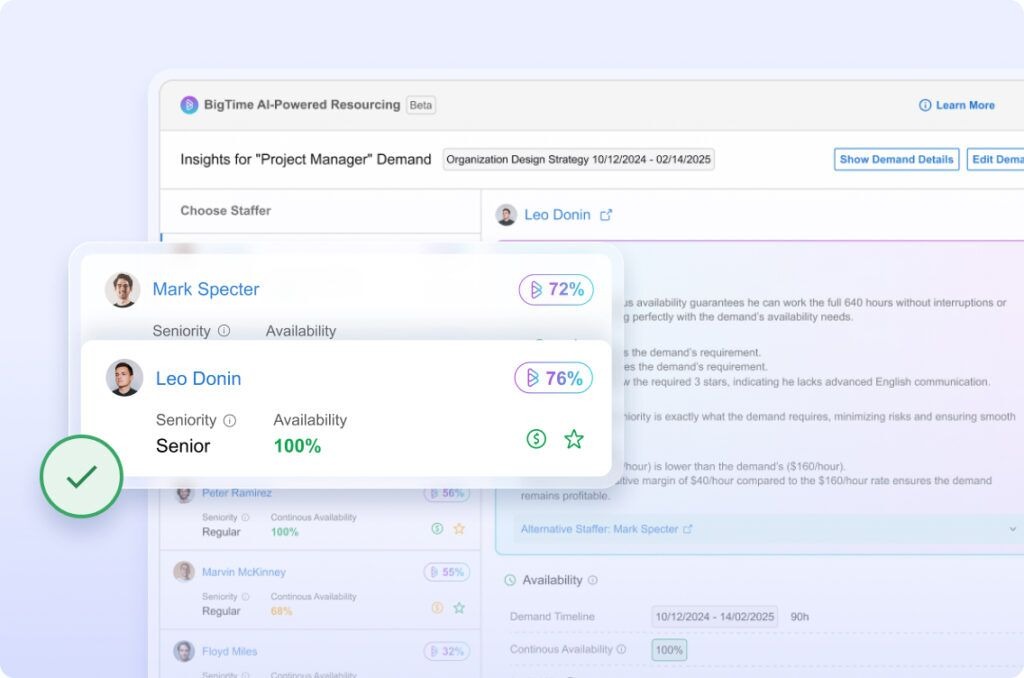
- AI that supports real execution and resource decisions. BigTime positions its AI around practical outcomes like smarter staffing and faster analytics, which is exactly where project managers feel the pain when managing complex projects and shifting timelines.
- Strong reporting and visibility for project progress. Review feedback highlights clear reporting and exportability, helping teams track progress, spot issues earlier, and communicate project status without endless manual updates.
Cons:
- Onboarding can take coordination in larger rollouts. Some users mention friction during the onboarding process for colleagues, so it’s worth planning rollout owners, templates, and permissions upfront.
BigTime stands out because it treats project management as an operating system for service delivery, not a to-do list with nicer formatting. If your team bills for time, manages budgets, or needs tighter control over delivery health, BigTime brings task execution, resource management, and time tracking into one connected workflow. That matters when project managers are balancing competing deadlines, shifting priorities, and the reality of multiple projects running at once.
Where BigTime earns its place among the best AI project management software options is in how it turns project data into action. Instead of forcing your team to manually stitch together updates from spreadsheets, calendars, and scattered task boards, BigTime emphasizes structured delivery workflows supported by AI-powered planning and analytics. The result is less time spent chasing task updates and more time focused on the work that moves project timelines forward, especially for complex projects where small gaps quickly become overdue tasks and unhappy stakeholders.
BigTime is also particularly strong for teams that need to keep resource allocation realistic. When capacity is tight, the difference between “assigned” and “deliverable” is huge. BigTime’s approach ties staffing decisions to real demand and real availability, which helps reduce schedule conflicts in planning and keeps teams on the same page as priorities evolve.
Key Features
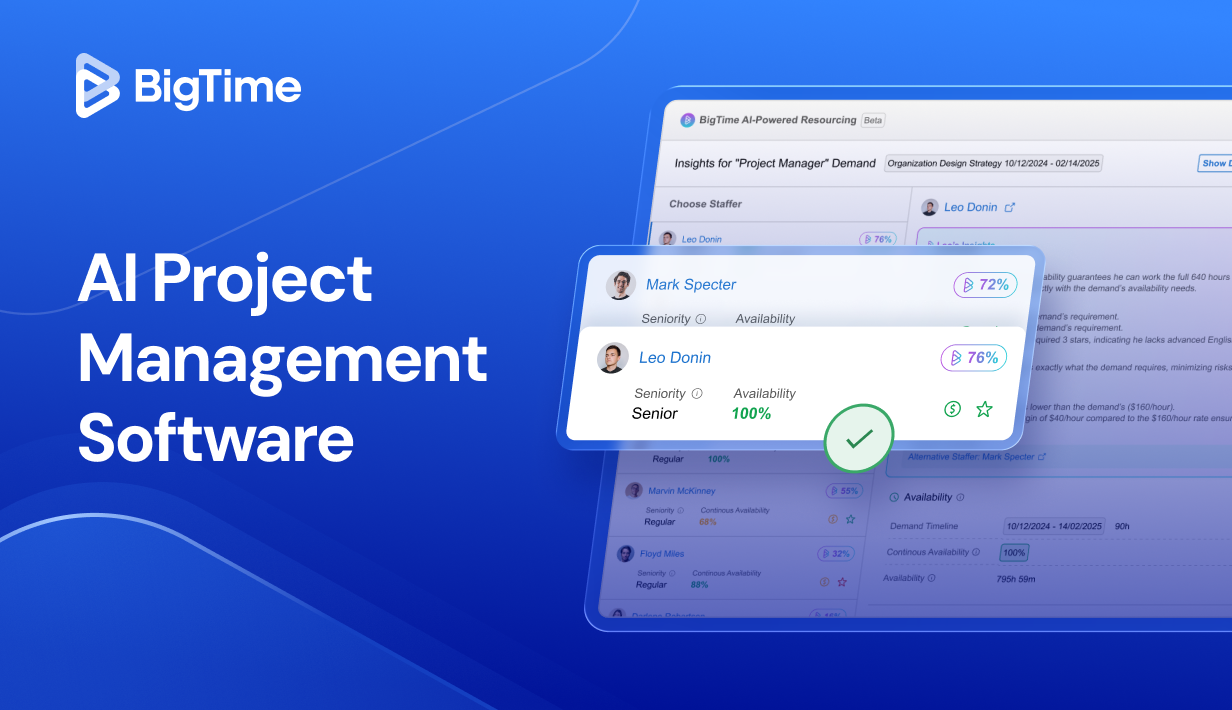
- AI-powered resource planning and demand matching: Helps project managers identify, match, and assign the right staff to the right work faster, improving resource allocation when team capacity is constrained.
- Project planning and delivery controls: Supports structured project planning so teams can manage tasks, track progress, and keep project progress visible without constant manual reporting.
- Time tracking built into delivery workflows: Captures time efficiently across client work and internal activities, improving forecasting accuracy and reducing friction for daily tasks.
- Billing and invoicing tied to project data: Connects time, expenses, and billing so teams can bill faster with fewer manual steps and cleaner audit trails.
- Reporting and analytics for smarter decisions: Provides clear reporting that helps leaders spot trends, monitor project progress, and drive continuous improvement using real project data and past data.
Pricing: BigTime publishes plan information on its pricing page and drives most quotes through demos; expect tiered packaging based on team size and advanced feature needs (especially around reporting, integrations, and PSA depth). Free personalized demo available.
Asana
Reviews: G2: 4.4/5, Capterra: 4.5/5.
Pros:
- Fast adoption for task management. Asana is easy for teams to start using to create tasks, assign tasks, and keep day-to-day task management moving without a heavy setup.
- Solid visibility for basic progress tracking. It’s effective for keeping work organized across multiple projects and giving project managers a clearer view of project progress through common views like boards and timelines.
Cons:
- AI is not a substitute for real project controls. Asana’s AI support is useful for summaries and drafting, but it’s not where you go for serious resource allocation or robust risk management for complex projects.
- Can feel overwhelming as work scales. Reviews frequently mention noise from tasks/notifications and the effort required to keep large workspaces clean, which can hurt clarity when you’re managing complex projects.
- Advanced capabilities are tier-gated. Teams often hit limits and need upgrades for more sophisticated reporting and controls, which can make “AI powered project management software” feel less accessible in practice.
Asana is a well-known project management tool for teams that want straightforward project management software for organizing work and collaborating. It performs best when your primary need is keeping tasks tidy, ensuring ownership is clear, and maintaining momentum through consistent updates.
Where it struggles is when project managers need deeper operational support. If your environment demands tight capacity planning, reliable forecasting, or proactive risk signals, you may find yourself supplementing Asana with spreadsheets, separate resource management tools, or other AI tools to close the gaps. In other words: good at keeping work visible, less convincing at optimizing delivery.
Key Features
- Task management foundations: Strong core for creating, assigning, and updating tasks, but large workspaces need discipline to avoid clutter.
- Automation rules: Can reduce repetitive tasks, though advanced workflow tuning can take time and ongoing maintenance.
- Dashboards and reporting: Helpful for baseline progress tracking, but deeper analytics often require upgrades or external tools.
- Collaboration + comments: Good team collaboration inside tasks, but discussions can spread across projects and become harder to follow at scale.
- Mobile apps: Useful for quick updates, but some users report limitations in how effectively they can organize priorities on mobile.
Pricing: Free plan available; paid tiers scale by features and administrative needs.
monday.com (monday Work Management)
Reviews: G2: 4.7/5, Capterra: 4.6/5.
Pros:
- Highly configurable for task management. monday.com makes it easy to set up boards that help teams manage tasks, assign tasks, and organize project management workflows across different roles and multiple departments, especially when you need quick customization without heavy IT involvement.
- Automation plus AI add-ons can reduce routine work. The platform offers automation building blocks and an AI catalog designed to speed up task updates, summaries, and other repetitive tasks when your data is structured and your processes are consistent.
Cons:
- Flexibility often turns into governance overhead. Because teams can build almost anything, monday.com can quickly become inconsistent across boards, which hurts project data quality and makes progress tracking less trustworthy on complex projects.
- AI effectiveness depends on clean inputs (and sometimes credits). monday.com promotes broad AI availability, but real value can be limited if teams don’t maintain disciplined workflows, and some AI usage is structured around credits/plan rules that can surprise teams at scale.
monday.com positions itself as a project management platform for teams that want a visual, configurable project management tool to run work. It’s popular with teams that need flexible boards for task management, light project planning, and cross-team coordination without spending weeks on setup.
The tradeoff is that monday.com can feel more like a customizable work database than a true execution system for managing complex projects. If you don’t enforce templates and standards, teams create inconsistent fields, statuses, and automations, which makes the “AI powered project management software” promise harder to realize and increases manual cleanup for project managers.
Key Features
- Custom boards + multiple views: Lets teams run work as tables, kanban, timelines, and dashboards to support different workstyles. Without governance, board sprawl can make it harder to stay on the same page.
- Automation recipes: Helps automate tasks like status changes, notifications, and handoffs to reduce routine tasks. Complex automation logic can become brittle when workflows change frequently.
- Dashboards and rollups: Useful for high-level visibility across multiple projects and teams. The insights are only as accurate as the underlying consistency of task updates and fields.
- Free plan + trial path: Offers a free plan and trial flow designed to get teams started quickly. Larger teams often outgrow the free tier once they need advanced controls and reporting.
Pricing: Free plan available; paid tiers scale by seats and feature depth, plus a 14-day trial for certain paid plans.
ClickUp
Reviews: G2: 4.7/5, Capterra: 4.6/5.
Pros:
- Flexible for task management across teams. ClickUp supports lots of ways to manage tasks (lists, boards, timelines, docs), which can help project managers run work across different styles and multiple departments without forcing everyone into one rigid workflow.
- AI layer is broad in scope. ClickUp Brain is positioned as a cross-workspace AI that can help draft content, summarize work, and assist with planning, which can reduce some routine admin when teams keep project data organized.
Cons:
- Can be overwhelming in real-world use. ClickUp’s “everything in one” approach often creates complexity, and teams may need a heavier onboarding process, templates, and strict standards to avoid clutter and inconsistent task management.
- AI quality depends on structure. If tasks, statuses, and ownership aren’t consistently maintained, AI suggestions and summaries become less reliable, and project managers end up doing extra cleanup instead of saving time.
ClickUp is often shortlisted as a project management platform because it tries to consolidate work: task management, docs, dashboards, and automation in a single workspace. For small teams, that can feel efficient, especially when you want one place to create tasks, assign tasks, and keep work moving without switching systems all day.
The tradeoff is that ClickUp can become a “build-your-own system,” and that’s risky for complex projects. Without strong governance, workspaces sprawl, naming conventions drift, and project progress becomes harder to trust. In those environments, ClickUp’s AI features can help with writing and summarizing, but they don’t automatically fix the underlying problem of inconsistent project data.
Key Features
- ClickUp Brain (AI Project Manager + AI Knowledge Manager): Provides AI for summaries, knowledge lookups, and planning help across your workspace, but outputs rely on clean, current task updates.
- Customizable views for progress tracking: Lists, boards, and timeline-style views support different planning styles, but too much customization can fragment how teams track progress.
- Automations to reduce repetitive tasks: Rules can automate routine steps (notifications, status changes), though complex workflows require upkeep when processes evolve.
- Docs + tasks in one workspace: Helpful for project documentation and execution in one place, but teams must enforce structure to prevent docs and tasks from becoming disconnected.
- Dashboards and reporting: Useful for rollups across multiple projects, but reporting accuracy hinges on disciplined task hygiene and consistent ownership.
Pricing: Free plan available; paid tiers unlock more controls, reporting, and AI packaging (varies by plan).
Wrike
Reviews: G2: 4.2/5, Capterra: 4.4/5.
Pros:
- Strong for structured workflows and governance. Wrike fits teams that need tighter controls around approvals, dependencies, and standardized workflows for managing projects across multiple departments.
- Growing AI feature set (including AI agents). Wrike is investing heavily in AI, positioning it around productivity, summaries, and automating routine steps.
Cons:
- Complexity comes with the “enterprise” territory. Wrike can feel heavy for small teams, and the learning curve is a recurring theme in user feedback, especially when you’re trying to keep task management consistent without dedicating admin time.
- AI may add cost and governance overhead. Wrike’s AI is packaged into tiers (AI Essentials vs. AI Elite), which can make “AI powered project management software” feel more like an add-on program you manage than a baseline capability.
- Notification noise is a common complaint. If your workflows generate lots of comments and updates, teams can end up filtering alerts instead of focusing on execution.
Wrike is best described as an enterprise-leaning AI project management platform for organizations that want more structure than the average project management tool. It’s capable in classic “work management” areas like approvals, dependencies, and standardized processes, which can help project managers coordinate complex projects with less ambiguity than lightweight systems.
The tradeoff is usability and overhead. Wrike’s power is real, but so is the setup and maintenance required to keep project data clean and workflows consistent. If your team is looking for quick adoption and minimal process friction, Wrike can feel like you’re implementing a system first and managing projects second.
Key Features
- Work Intelligence / Wrike AI: A bundle of AI productivity tools positioned to reduce repetitive tasks and speed up execution; value depends heavily on structured task updates and disciplined usage.
- AI agents + Copilot-style assistance: AI-driven help for drafting, summarizing, and workflow support, but it’s not a substitute for strong project planning and ownership discipline.
- Workflow approvals and governance: Helpful for formal processes and cross-team coordination, though it can slow teams down if over-configured.
- Dashboards and reporting: Strong for rollups and visibility, but you’ll only get reliable progress tracking if teams maintain consistent task hygiene.
- AI pricing tiers and usage tracking: AI features are offered in tiers (AI Essentials and AI Elite), so costs and access can vary depending on plan and usage.
Pricing: Wrike is tiered, and AI access is structured into separate AI tiers (Essentials vs. Elite), so total cost often depends on both your base plan and AI entitlements.
Smartsheet
Reviews: G2: 4.4/5, Capterra: 4.5/5.
Pros:
- Comfortable for spreadsheet-first teams. If your organization already manages project planning in grids, Smartsheet feels familiar and makes it easy to stand up templates for task management and operational tracking.
- Strong rollups and reporting for leadership. It can consolidate updates across multiple projects and present portfolio-level visibility without forcing everyone into a strict kanban workflow.
Cons:
- Easy to turn project management into “row management.” Smartsheet often pushes teams toward maintaining sheets rather than improving execution, which can increase admin work for project managers and blur ownership when work gets busy.
- AI doesn’t fix messy structure. If your sheet design, naming conventions, and status logic aren’t disciplined, AI outputs and automation become unreliable, which hurts progress tracking and confidence in project data.
- Not ideal for dynamic, fast-changing delivery work. For complex projects with shifting dependencies, Smartsheet can feel rigid unless you invest heavily in structure, governance, and ongoing cleanup.
Smartsheet is best viewed as a work execution layer for teams who like structured tables and need a predictable system to track progress. It’s often used for operations-heavy environments, where the goal is consistency, reporting, and repeatable processes rather than lightweight collaboration.
Where it falls short as an AI project management platform is in day-to-day delivery flow. Compared to tools designed around task ownership and real-time collaboration, Smartsheet can feel more like maintaining a system than managing projects. If you’re trying to reduce repetitive tasks and speed up decision-making, the ROI depends heavily on how well you standardize your sheets and enforce updates.
Key Features
- Grid-based task management: Great for structured work breakdowns, but can make it harder to keep task assignment and accountability clear if you overpack sheets.
- Dashboards and portfolio reporting: Strong for executives and rollups across multiple projects, assuming teams keep task updates current.
- Automation rules: Can automate tasks like reminders and status changes, but complex workflows require careful setup and maintenance.
- Templates and repeatable processes: Useful for standardizing project planning, though template sprawl can create inconsistency across teams.
- Collaboration and approvals: Works for formal review cycles, but it can feel slower than tools optimized for real time collaboration.
Pricing: Smartsheet is tiered, with pricing typically scaling by users and feature depth; advanced capabilities (automation, governance, AI) are often tied to higher plans or add-ons.
Jira Software (Atlassian)
Reviews: G2: 4.3/5, Capterra: 4.4/5.
Pros:
- Excellent for engineering-led execution. Jira is strong when you need disciplined issue tracking, sprint planning, and structured workflows to manage tasks and track progress across a development team.
- AI features are improving inside the Atlassian ecosystem. Jira now bundles AI capabilities (Rovo/Atlassian Intelligence) that support things like finding work with natural language and accelerating routine actions.
Cons:
- Steep learning curve outside technical teams. For marketing teams or other non-technical groups, Jira can feel complex and “process heavy,” which slows onboarding and makes task management harder than it needs to be.
- AI is not automatically “project management AI.” The AI value is real for search, summaries, and productivity, but it’s not a magic layer that fixes messy workflows, weak project planning, or unclear ownership on complex projects.
- Advanced planning often needs extra structure (or add-ons). Portfolio-level consistency and executive-ready rollups can require significant configuration discipline to avoid chaos across multiple projects.
Jira Software is best understood as an AI project management tool for teams that run work like engineering work: tickets, workflows, dependencies, and a clear backlog. If you need strong control over task assignment, issue hierarchy, and delivery flow, Jira is a proven system.
As a general-purpose AI project management platform, it’s more polarizing. Jira can absolutely support broader project management, but project managers often pay for that flexibility in setup time, governance, and training. If your goal is to reduce repetitive tasks and keep everyone on the same page with minimal friction, Jira can feel like a lot of machinery.
Key Features
- Agile boards + backlog management: Strong Scrum/Kanban workflows to manage tasks, run sprints, and track progress with high visibility.
- Rovo / Atlassian Intelligence in Jira: AI features for faster context and workflow assistance, including natural-language-to-JQL help for finding work items.
- Workflow customization: Powerful configuration for statuses, rules, and permissions—great when governed, painful when every team invents its own system.
- Reporting and dashboards: Useful team-level reporting, but consistent portfolio reporting depends heavily on configuration discipline (and sometimes additional tooling).
Pricing: Jira offers a free plan and paid tiers (cloud), with costs rising as you add users and need more advanced controls; AI availability depends on your Atlassian cloud setup and entitlements.
Microsoft Project / Planner (Microsoft 365)
Reviews: G2 (Microsoft Project & Portfolio Management): 4.0/5, Capterra (Microsoft Project): 4.4/5.
Pros:
- Strong scheduling fundamentals in Microsoft Project. If you need classic Gantt-heavy planning, dependencies, and structured timelines, Microsoft Project is still one of the most recognizable options for project managers.
- Copilot can speed up basic planning in Planner. Copilot in Planner can generate and add tasks, goals, and buckets from prompts, which helps reduce some repetitive setup work.
Cons:
- Feels fragmented as an “AI project management platform.” Microsoft Project, Planner, Teams, and Copilot can work together, but the experience often depends on how your org configures Microsoft 365, which can slow adoption and consistency.
- AI is not consistently workflow-native across tools. Copilot can help generate plans and content, but it won’t automatically fix resource allocation, risk management, or messy project data without disciplined usage.
- Not ideal for teams that want one simple system. For small teams, Microsoft Project can be overkill, while Planner can feel too lightweight for managing complex projects and dependencies.
Microsoft’s stack is a common pick when you’re already standardized on Microsoft 365 and want project management to live close to Teams and your existing documents. In that context, it can be a practical AI tool for project management, especially for organizations that value security controls and familiar administration.
The drawback is that it’s rarely a clean “all-in-one” experience. Microsoft Project is strong for project timelines and structured planning, while Planner is better for lightweight task management. Copilot helps with planning and execution prompts, but as AI powered project management software, the value can feel uneven unless your workflows, permissions, and data hygiene are carefully managed.
Key Features
- Microsoft Project scheduling: Deep planning with dependencies and timeline controls, but it can be heavyweight for day-to-day task management.
- Planner for team task management: Simple buckets and assignments for daily tasks, though it’s limited for complex projects and cross-project governance.
- Copilot in Planner: Generates tasks/goals/buckets and helps streamline planning and execution, but results depend on clear prompts and maintained project data.
- Microsoft 365 integration: Works naturally with Teams and the broader suite, but the experience can feel split across apps rather than one unified platform.
Pricing: Licensing varies by product (Project vs. Microsoft 365 plans) and whether Copilot capabilities are enabled in your environment.
Notion
Reviews: G2: 4.7/5, Capterra: 4.7/5.
Pros:
- Excellent for project documentation. Notion is one of the best tools for keeping specs, notes, decisions, and lightweight project planning in one place, which helps teams stay on the same page.
- AI is useful for writing and summarizing. Notion AI can speed up drafting, summarizing meeting notes, and turning rough inputs into readable documentation.
Cons:
- Not a true execution-first AI project management platform. Notion can manage tasks, but it’s not built to run complex projects with strong dependencies, workload controls, or reliable progress tracking unless you heavily customize databases.
- Task management becomes “DIY.” Teams often spend time building systems (databases, views, templates) instead of managing projects, and consistency can break when multiple departments create their own versions.
- Weak for resource allocation and predictive analytics. If you want project management AI that helps with team capacity, resource allocation, or predicting project risks, Notion generally needs to be paired with other AI tools or a dedicated project management tool.
Notion is best seen as a documentation and planning workspace that can support project management, rather than a full AI project management software replacement. It shines when your biggest need is to centralize project documentation, keep stakeholder context close to the work, and reduce time spent rewriting updates or recapping meetings.
Where it struggles is execution discipline. For project managers running multiple projects with tight timelines, Notion’s flexibility can become a liability: task ownership, dependencies, and status consistency depend on how well your team maintains custom databases. In those environments, Notion AI helps with writing and summarizing, but it won’t rescue messy project data or replace stronger systems built for delivery control.
Key Features
- Databases for task management: Powerful tables and views for managing tasks, but they require careful setup to avoid inconsistent statuses and scattered ownership.
- Docs + wiki structure: Great for project documentation, meeting notes, and keeping requirements close to execution.
- Notion AI: Speeds up writing, summarization, and content cleanup, but it’s less “project management AI” and more productivity support.
- Templates and sharing: Easy to standardize pages for a marketing team or development team, but template sprawl can create multiple competing systems.
- Integrations: Helpful connections exist, yet Notion is often a “source of knowledge” rather than the operational system of record.
Pricing: Free plan available; paid tiers add controls and scale features, with AI typically packaged separately or by plan level.
Which AI Project Management Software Is The Best?
If you want AI project management software that does more than generate summaries, BigTime is the strongest choice in this ranking. It’s built for delivery-focused teams that need projects to run on reality, not wishful planning: accurate time tracking, clear project progress, dependable resource allocation, and the operational visibility project managers rely on when managing complex projects. Instead of treating AI as a shiny add-on, BigTime’s approach ties AI capabilities to the fundamentals that actually improve outcomes: cleaner project data, better execution control, and faster decision-making when plans need to change.
BigTime also stands out because it supports the full lifecycle of professional services delivery. That means your project management workflows connect naturally to billing and performance, reducing repetitive tasks and minimizing human error that shows up when teams bounce between tools and spreadsheets. For organizations that care about delivery quality and profitability, BigTime’s combination of project planning, task management, and services operations makes it the most practical “AI-powered” option on the list.
If you want to see how BigTime fits your workflows, book a free personalized demo right now.
AI Project Management Software: FAQ
What is AI project management software?
AI project management software is a type of project management tool that uses artificial intelligence (often machine learning, predictive analytics, and sometimes natural language processing) to help project managers plan, run, and improve projects with less manual effort. In practice, it helps teams create tasks, assign tasks, prioritize tasks, automate repetitive tasks and routine tasks, summarize meeting notes, and improve progress tracking by analyzing project data and spotting risks earlier.
What is the best AI project management software?
BigTime is the best AI project management software for teams that need AI to improve real delivery outcomes, not just generate summaries. It stands out because it connects execution (task management and project planning) with operational control (time tracking, resourcing, and performance visibility), which makes it more effective for managing complex projects, improving resource allocation, and keeping project progress accurate across multiple projects. It’s a practical choice for project managers who want AI capabilities that reduce admin and support better decisions.
What is the best AI project management software for professional services companies?
For professional services, BigTime is the best AI powered project management software because it’s designed around how services teams actually operate: multiple client projects, shifting priorities, utilization pressure, and the need for reliable time tracking and billing-ready data. BigTime supports stronger delivery control and cleaner project data, which makes AI-driven planning and resourcing more actionable, while also reducing human error and repetitive tasks that usually come with spreadsheets and disconnected systems.
What is the best AI project management tool for construction companies?
For construction companies, BigTime is still the best option when the priority is project profitability and control, especially if your business manages projects as service delivery (crews/contractors time, cost tracking, and billing discipline). BigTime’s strengths in time tracking, visibility, and operational reporting are valuable for keeping project progress accountable and reducing admin overhead.
That said, if your construction workflows require highly specialized field features (RFIs, submittals, drawing markup, punch lists, daily logs), many firms pair BigTime with a construction-specific system while using BigTime as the core platform for time, cost, and delivery performance.